


What Is a Network Operations Center? an SMB Guide
A Network Operations Center, or NOC, is the 24x7x365 command center that watches your business network, servers, firewalls, and connected systems in real time so problems can be caught before they turn into downtime. In simple terms, it's the team and toolset responsible for keeping the technology your business relies on running, day and night, all year.
If your office internet slows down every few afternoons, your cloud apps lag without warning, or your staff only learn about an outage after customers start calling, you're already feeling the problem a NOC is built to solve. Most SMB owners don't need a textbook definition. They need to know who's watching the systems that keep payroll, phones, email, files, and customer service moving.
That's where a NOC fits. Think of it as the operational nerve center for your IT. It doesn't wait for employees to submit tickets after something breaks. It monitors, alerts, investigates, escalates, and fixes. Just as important, it's different from a cybersecurity team. Many businesses blur those roles, and that confusion creates real risk.
Table of Contents
- The Command Center for Your Business Network
- Core Functions of a Modern NOC
- NOC vs SOC A Critical Distinction for SMBs
- Building Your NOC In-House vs Outsourcing
- How to Choose a NOC Provider in Houston
- Your Next Steps Toward Network Reliability
The Command Center for Your Business Network
A good way to understand what a Network Operations Center is is to compare it to an air traffic control tower. Planes are always moving. Conditions change fast. Controllers monitor the whole picture so they can spot trouble early and keep traffic flowing safely.
Your business network works the same way. Internet circuits, switches, wireless access points, servers, cloud apps, Microsoft 365, remote connections, printers, phones, and security appliances all depend on each other. If one part stalls, users feel it somewhere else.
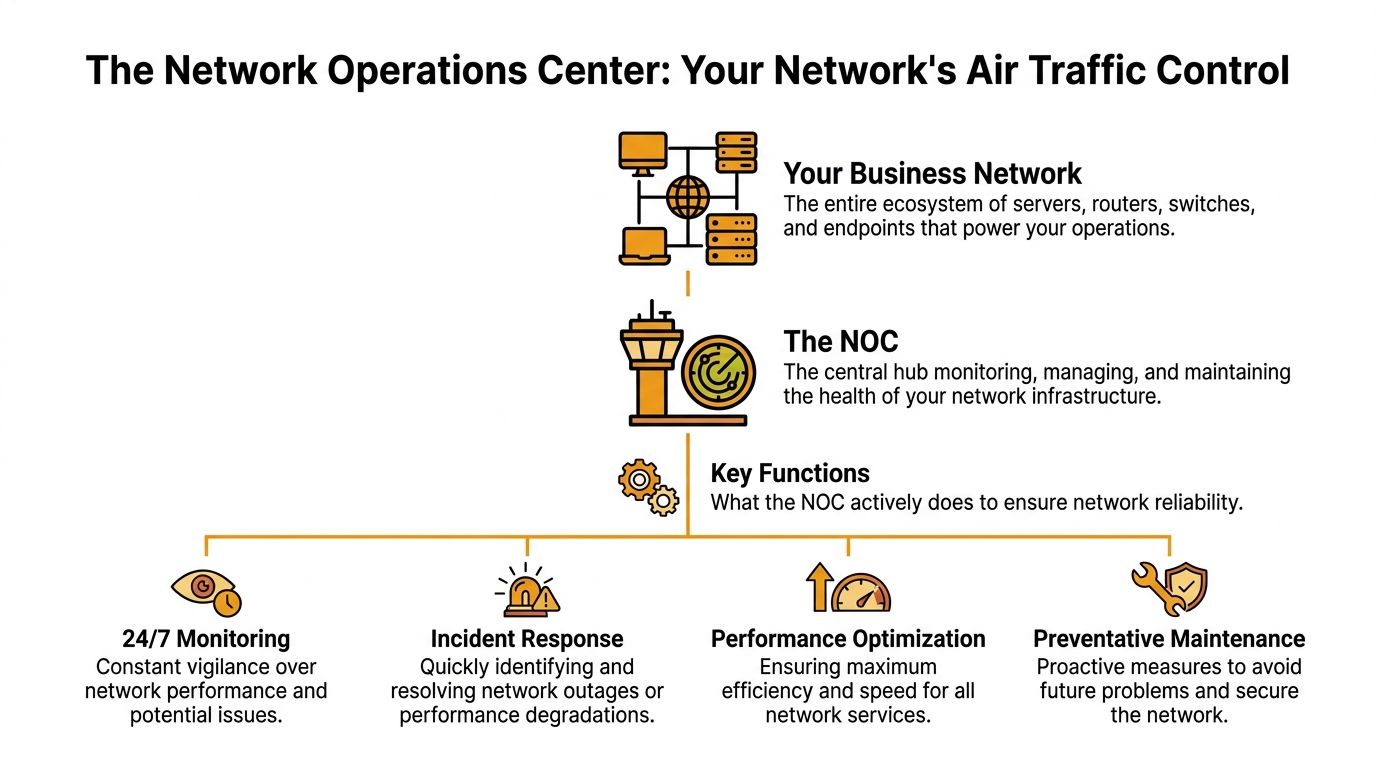
What the NOC actually watches
A NOC provides continuous, real-time oversight of network infrastructure on a 24x7x365 schedule and acts as a proactive “nerve center” that detects and resolves issues before they cause downtime, which is what separates it from a standard help desk, according to ThousandEyes' explanation of network operations.
In practice, that means a NOC watches far more than “the internet.” It typically covers:
- Network hardware like routers, switches, firewalls, and wireless systems
- Compute systems such as servers, virtual machines, and storage platforms
- Cloud services including infrastructure and business apps that employees rely on
- Edge and endpoint dependencies that affect remote work, branch offices, and connected devices
For telecom-heavy organizations, that kind of centralized visibility matters even more. Teams comparing monitoring approaches often find it useful to review resources such as OnRoute's software for telecom VPs, because telecom operations depend on exactly this mix of uptime oversight, alerting, and service coordination.
Why SMB owners should care
Maximum uptime is the simple goal. Not perfect technology. Not flashy dashboards. Uptime.
When employees can log in, reach files, use VoIP, connect to cloud apps, and serve customers without interruption, the business runs normally. When they can't, the damage spreads fast. Work slows down, orders stall, meetings fail, and trust drops.
Practical rule: If your team is the first to notice recurring IT trouble, you don't have a real NOC function. You have after-the-fact support.
A help desk answers user problems. A NOC hunts for operational issues before users feel them. That difference matters because most outages don't begin as dramatic failures. They start as warning signs: a circuit getting saturated, a firewall straining under load, a backup process failing unobserved, or a cloud service connection becoming unstable.
The business result
A solid NOC gives leadership one thing every growing company needs: predictability. Staff can work. Customers can reach you. Critical systems stay available. And when something does go wrong, there's already a process for detection, triage, escalation, and recovery.
For a non-technical owner, that's the clearest answer to “what is a network operations center?” It's the group responsible for keeping the lights on across your digital business.
Core Functions of a Modern NOC
A modern NOC isn't a room full of people staring at blinking screens. It's an operating model. The tools matter, but the workflow matters more. Good NOCs do three things consistently: they monitor, they respond, and they maintain.
Monitoring that catches drift before failure
The daily work starts with continuous monitoring. The NOC watches network devices, infrastructure services, and application dependencies for anything outside normal behavior. The responsibility set includes continuous monitoring, immediate alert response and escalation, performance optimization, capacity planning, and security incident detection, as described in TDF's overview of NOC responsibilities.
That sounds technical, but the business impact is simple. If a file server starts running hot, if a firewall port becomes unstable, or if a cloud app connection begins timing out, the NOC should see the pattern before your accounting team or front desk does.
A healthy monitoring setup usually looks for:
- Availability issues such as device disconnects, service failures, or unreachable systems
- Performance warnings like latency spikes, bandwidth strain, storage pressure, or overloaded virtual hosts
- Trend signals that show growth is outrunning capacity, even if users haven't complained yet
The strongest NOC teams don't just ask, “Is it down?” They ask, “What is starting to degrade?”
Incident response that follows a playbook
Once an alert fires, speed matters, but structure matters more. Random troubleshooting burns time. A mature NOC uses triage steps, checks business impact, confirms scope, and escalates with context when the issue needs a deeper engineer or a vendor.
A common sequence looks like this:
Alert validation
The technician confirms whether the alert reflects a real event, a transient blip, or a duplicate signal.Initial diagnosis
Logs, device status, system health, and recent changes are reviewed to isolate likely causes.Response or escalation
Straightforward issues may be fixed immediately. Complex issues get routed with clear notes, timestamps, and business impact.
For many Houston SMBs, this operational layer sits inside a broader managed service model. If you're comparing what should be covered beyond NOC monitoring, this list of managed IT services for Houston small businesses helps show where network operations fits among helpdesk, cloud support, backup, and security.
Maintenance that prevents repeat problems
Reactive support alone won't keep systems stable. NOCs also handle the work that users rarely see but always benefit from. That includes patching, firmware updates, change coordination, and verification that backups and core services are behaving properly after changes.
The practical test is straightforward:
| NOC activity | What it prevents |
|---|---|
| Overnight patching | Known software issues from lingering |
| Firmware updates | Device instability and compatibility trouble |
| Capacity planning | Slowdowns caused by growth outpacing infrastructure |
| Controlled change management | Avoidable outages from rushed modifications |
Many SMBs struggle internally. They can react to a visible outage, but they don't have enough process to prevent the next one. A NOC closes that gap.
NOC vs SOC A Critical Distinction for SMBs
Many business owners are often misled. They hear “we monitor your environment” and assume that includes both uptime management and cyberattack response. It often doesn't.
A NOC keeps systems available and performing well. A SOC, or Security Operations Center, focuses on detecting, investigating, and responding to security threats. Those functions can work together, but they are not the same thing.
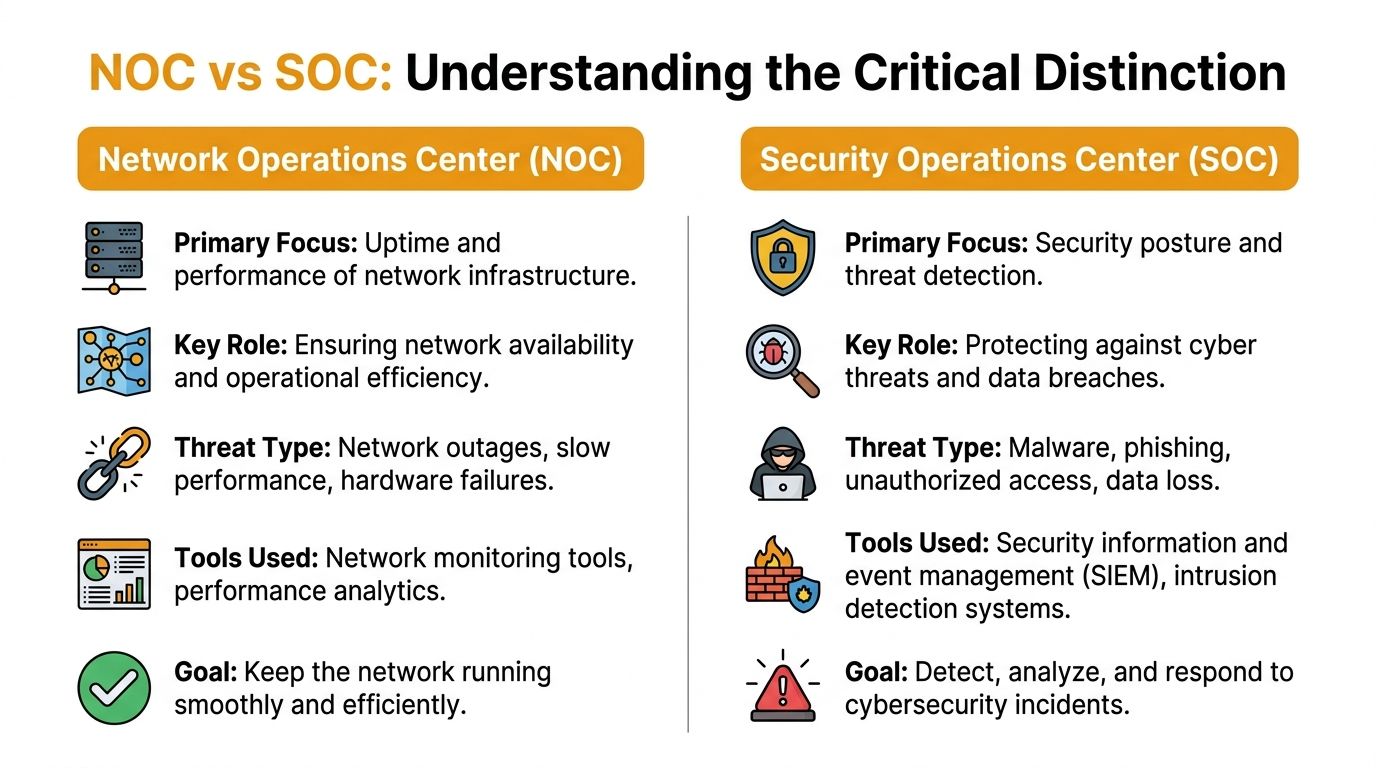
The easiest way to think about it
Use a hospital analogy. The NOC is the operations team making sure power, oxygen, elevators, phones, and internal systems stay online. The SOC is the security team watching for intruders, suspicious activity, and active threats.
If the building loses power, operations has a problem. If someone breaks into the medication room, security has a problem. If ransomware cripples systems, both teams may be involved, but they do different work.
According to IBM's overview of NOC concepts, 68% of SMB breaches in the US occurred because organizations incorrectly assumed their network monitoring provider included security incident response, leading to delayed containment by 4-6 hours.
That's the danger. A business buys monitoring, assumes it bought protection, and discovers the gap during an incident.
NOC vs SOC Core Responsibilities
| Attribute | Network Operations Center (NOC) | Security Operations Center (SOC) |
|---|---|---|
| Primary focus | Uptime and performance | Threat detection and response |
| Main concern | Outages, degradation, hardware or service failures | Malware, unauthorized access, phishing, breaches |
| Typical tools | Monitoring dashboards, device alerts, performance analytics | SIEM, threat analysis, security event workflows |
| Success measure | Systems stay available and usable | Threats are detected, investigated, and contained |
| Escalation trigger | Service quality or availability drops | Suspicious or malicious activity is identified |
A short explainer can help if your team needs a visual walkthrough before vendor conversations:
What SMBs should ask directly
Don't ask a provider, “Do you monitor us?” Ask narrower questions.
- Ask about security response by requesting a direct explanation of whether they investigate and contain cyber incidents or only flag them.
- Ask about handoffs so you know who owns the incident if suspicious traffic, compromised accounts, or ransomware appears.
- Ask for written scope because vague language causes expensive assumptions.
If a provider says they “watch your network,” that doesn't automatically mean they handle a breach.
If you're preparing for the security side of that conversation, a practical guide to data breach recovery is useful because it shows the work that begins after detection, which is far beyond standard uptime monitoring.
For SMBs, this distinction isn't academic. It affects who gets called, how fast an incident is contained, and whether your business loses hours to confusion when every minute counts.
Building Your NOC In-House vs Outsourcing
Once you understand the role, the next question is operational. Should you build a NOC yourself or buy the function from a provider?
For most SMBs, the answer comes down to three pressures: staffing, tooling, and coverage. It's one thing to say you want continuous monitoring. It's another to hire enough people, train them, equip them, and keep the process consistent around the clock.

What in-house really requires
An internal NOC gives you direct control. Your team knows your users, your quirks, your vendors, and your history. That's valuable.
But the hidden burden is big. Expert benchmarks for modern NOCs call for five critical controls: RBAC, network segmentation, IDPS, extensive SIEM logging, and routine security audits to meet standards like ISO 27001:2013, which sets a high bar for internal teams, as outlined in INOC's NOC security guidance.
That requirement list doesn't even include the basics of staffing shifts, documenting runbooks, maintaining dashboards, handling escalation paths, and covering vacations, turnover, and after-hours events.
Where outsourcing usually makes more sense
Outsourcing gives SMBs access to an existing operation instead of forcing them to assemble one from scratch. You're effectively buying a mature monitoring function, trained technicians, established workflows, and after-hours coverage.
That doesn't mean outsourcing is automatically better. It means it's often more realistic.
A quick trade-off view helps:
| Decision factor | In-house NOC | Outsourced NOC |
|---|---|---|
| Control | High | Moderate |
| Hiring burden | High | Low |
| 24/7 staffing challenge | High | Lower for the client |
| Tool investment | High | Usually bundled into service |
| Process maturity | Depends on your team | Depends on provider quality |
Decision test: If your business can't realistically staff nights, weekends, documentation, escalation, and tooling, you're not choosing between in-house and outsourced. You're choosing between outsourced and incomplete.
For Houston companies weighing that decision more broadly, this comparison of in-house vs professional managed IT support services in Houston is useful because NOC coverage is usually only one piece of the larger support model.
There are also hybrid approaches. Some businesses keep senior engineers and business-facing IT leadership in-house while outsourcing monitoring, alert triage, and overnight response. That model can work well when internal staff want to focus on projects, cloud migrations, vendor management, and user relationships instead of chasing every alert.
In practical terms, that's where a provider such as IT Cloud Global, LLC may fit for Houston businesses that need managed monitoring alongside helpdesk, cloud, infrastructure, and on-site support. The key is matching the service scope to your actual risk, not buying a label.
How to Choose a NOC Provider in Houston
A provider's website can make every NOC sound identical. They're not. Some are disciplined operations teams with clear procedures. Others are little more than alert forwarding with a nicer dashboard.
The difference shows up when a branch office loses connectivity, a remote access tool starts failing, or a cloud workload becomes unstable during business hours. A capable NOC maintains high performance and availability through automated incident response and specialized troubleshooting protocols that resolve issues like IP switching failures or remote access errors within minutes, directly affecting reliable cloud service delivery, as noted earlier from the INOC benchmark.
The questions worth asking
If you're evaluating Houston providers, use a checklist that forces specifics.
- Ask how they define response and resolution. A fast acknowledgment is not the same as meaningful action.
- Ask what they monitor. You want a clear list: network hardware, servers, firewalls, Wi-Fi, cloud workloads, Microsoft 365 dependencies, backup jobs, and remote access systems.
- Ask how they escalate. The provider should explain who handles after-hours events, vendor coordination, and on-site dispatch when needed.
What strong providers show you
You should expect visibility, not vague reassurance.
| What to review | Why it matters |
|---|---|
| SLA language | Shows whether obligations are measurable |
| Reporting samples | Reveals if you'll see trends, recurring issues, and accountability |
| Supported platforms | Confirms experience with tools your business already uses |
| Local support options | Matters when a physical device, circuit, or office issue needs hands-on work |
Houston businesses should also ask whether the provider can support mixed environments. Many SMBs now run some combination of Microsoft 365, Azure, AWS, line-of-business apps, local networking, and remote workers. If the provider only understands one slice of that stack, gaps appear fast.
A NOC partner should be able to explain your environment in business terms, not just tool names.
For a broader vetting framework, this checklist on how to choose a managed service provider helps separate polished sales language from actual operational capability.
Local context still matters
Cloud tools are remote. Network problems often aren't. Houston offices still deal with physical circuits, Wi-Fi dead zones, wiring issues, power events, and branch connectivity trouble. Even if your NOC is largely remote, it helps to work with a provider that can coordinate local hands when the issue isn't solvable from a dashboard.
That combination matters more than flashy promises. You want disciplined monitoring, fast response, clear communication, and a realistic path from alert to resolution.
Your Next Steps Toward Network Reliability
If you've been asking what a network operations center is, the practical next question is whether your business has that function today. Many companies don't. They have support. They have vendors. They have someone to call when things break. That's different.
Start with three actions.
List the systems that can't go down. Include internet access, phones, line-of-business apps, file access, cloud platforms, VPN or remote access, and wireless coverage. If one fails, note who notices first and what happens to the business.
Map your current response process. Who gets alerts now. Who investigates. Who escalates. Who owns after-hours issues. If those answers are fuzzy, your operational risk is higher than it looks.
Check your remote-work weak points. Many outages hit home offices and branch users first. For a practical look at connectivity resilience, this guide on preventing internet outages for remote workers is a useful companion when reviewing your continuity plan.
A good NOC strategy doesn't begin with buying the most complex tool. It begins with clarity. What must stay up, who watches it, and what happens when it starts to fail.
For most SMBs, the smartest move is to get an outside assessment before making changes. That helps you separate true monitoring gaps from one-off annoyances and decide whether you need better tooling, a managed NOC, stronger security coverage, or all three.
If your business needs a clearer view of network reliability, cloud dependencies, helpdesk gaps, or after-hours coverage, IT Cloud Global, LLC can help you assess your current setup and determine whether a managed NOC model fits your environment. A practical review should leave you with defined priorities, realistic response expectations, and a better understanding of where uptime responsibility starts and where security responsibility needs to be handled separately.
- Outsourced IT Support Houston: A Practical Guide for SMBs
- IT Security Assessment: A Practical Guide for Houston SMBs
- How to Prevent Data Breaches: A Practical Playbook for SMBs
- Remote Desktop IT Support Guide 2026
- Endpoint Protection vs Antivirus: A Houston Guide
- How to Choose a Texas Outsource IT Service
- Houston IT Support: A 2026 Guide for SMBs