


Houston IT Support Services: Expert Solutions 2026
Your office opens at 8:00. By 8:17, someone can't print. At 8:26, your accounting app drags to a crawl. By 9:00, a sales rep is tethering to a phone because WiFi is unstable, and now your day is running on IT problems instead of actual work.
That's the trap a lot of Houston business owners fall into. They don't have an IT strategy. They have an IT interruption pattern. They call someone when a laptop dies, when email breaks, or when a firewall throws an alert nobody understands. It feels cheaper in the moment. It usually isn't.
If you're evaluating Houston IT support services, the question isn't who can fix a problem after the damage is done. It's who can reduce downtime, tighten security, keep your team productive, and make your costs predictable enough to plan around.
Table of Contents
- Why Houston Businesses Need More Than Just IT Fixes
- Managed Services vs The Old Break-Fix Model
- Our Full Spectrum of Houston IT Support Services
- Proactive Cybersecurity and Compliance Posture
- The IT Cloud Global Advantage Local Experts and Fast Repairs
- How to Choose the Right IT Partner in Houston
- Common Questions About Houston IT Services
Why Houston Businesses Need More Than Just IT Fixes
A Houston business owner usually doesn't wake up thinking about patch management, endpoint isolation, or cloud permissions. You're thinking about payroll, customer service, inventory, deadlines, and whether your team can get through the day without another technical disruption.
That's exactly why reactive support fails. It treats technology as a side issue when it's part of every revenue-producing process in the building. If your phones, WiFi, Microsoft 365, printers, workstations, or line-of-business apps stumble, operations stumble with them.
Houston is big, competitive, and dense with companies that can't afford wasted time. The metro area serves over 150,000 businesses within a regional GDP of more than $530 billion, and more than 47% of Houston's small and mid-sized enterprises actively use managed IT services to maintain continuity and security in that environment, according to Cognitive Market Research's IT support services market report.
Practical rule: If your team loses time to recurring tech issues, you don't have an occasional IT problem. You have an operating model problem.
The shift that matters is simple. Stop buying isolated fixes. Start building reliable operations.
That means getting ahead of issues with monitoring, documented support processes, backup planning, security layers, and a partner who treats uptime like a business outcome, not a technical metric. A company that invests in proactive IT support for Houston businesses isn't just outsourcing troubleshooting. It's protecting work hours, customer experience, and management attention.
The business impact is operational, not abstract
When support is structured well, your employees stop improvising around broken tools. Your managers stop acting as accidental IT coordinators. Your front office stops wondering whether a small glitch is the start of a larger outage.
That's the primary value of Houston IT support services. Good support gives your business stability. Great support gives you room to grow without every technology change turning into risk.
Managed Services vs The Old Break-Fix Model
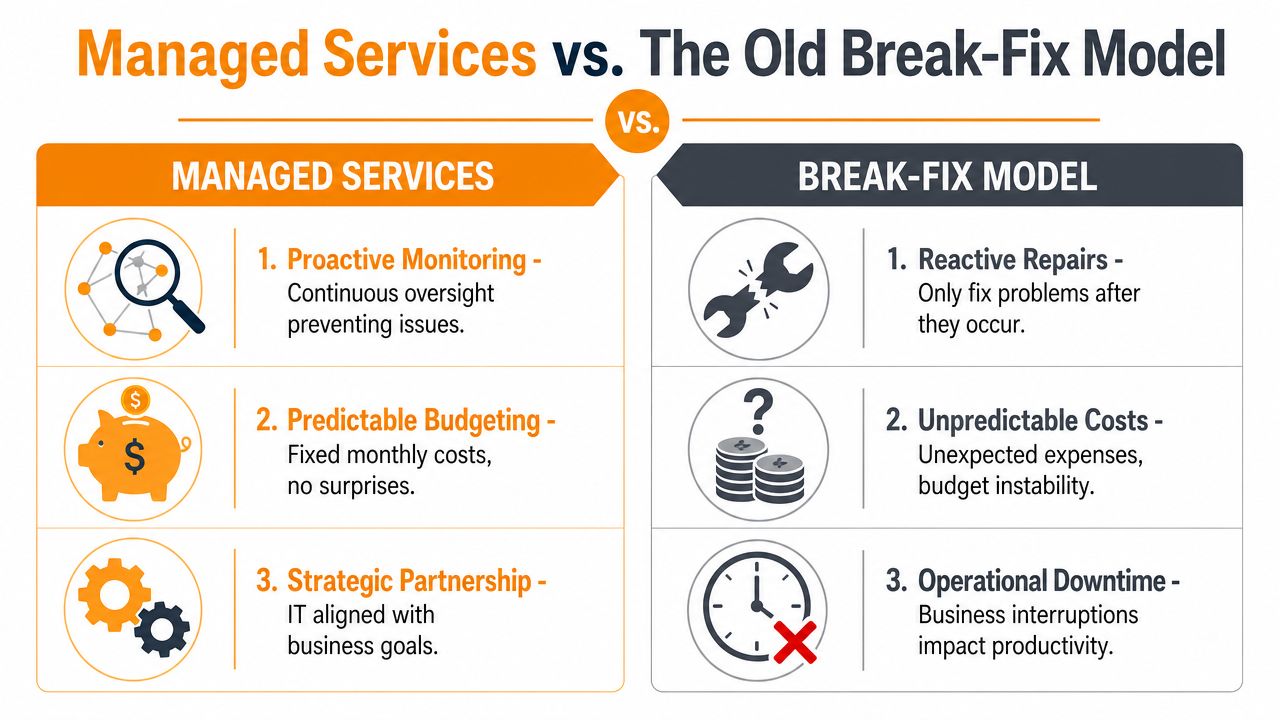
The easiest way to understand this is to think about your vehicle. You can ignore maintenance until the engine fails on the highway, or you can service it regularly and avoid most expensive surprises. One approach buys short-term convenience. The other buys reliability.
That's the difference between break-fix and managed services.
Why break-fix feels cheaper but costs more
Break-fix sounds reasonable because you only pay when something goes wrong. The problem is that by the time you're paying, you're already losing money somewhere else.
A server issue delays orders. A dead laptop sidelines an employee. A failed update knocks out line-of-business software. Then you pay rush rates for someone to figure it out while your staff waits.
Break-fix also creates a bad habit. Businesses postpone maintenance because nobody owns prevention. Updates wait. Reboots get ignored. Security settings drift. Backups go untested. Small problems stack up until they become a major interruption.
Here's the side-by-side view:
| Feature | Break-Fix Model | Managed Services Model |
|---|---|---|
| Cost structure | Unplanned and reactive | Predictable monthly spend |
| Support style | Problems addressed after failure | Issues identified and handled before disruption |
| Business impact | More interruptions and uncertainty | Better continuity and planning |
| Security posture | Often inconsistent | Ongoing oversight and maintenance |
| Strategic value | Transactional vendor relationship | Long-term operational partner |
What managed services actually change
Managed services put someone in charge of the environment before things fail. That includes monitoring, patching, helpdesk support, device oversight, cloud administration, backup review, and security management.
In Houston's managed IT market, proactive monitoring reduces unplanned downtime by 45–60%, and 78% of SMBs that adopt it achieve 99.5%+ system uptime within 12 months, based on benchmarks cited by Ultimate Tech Support's Houston IT support overview.
That's not a “nice to have.” That's fewer disrupted workdays, fewer emergency calls, and less management time spent firefighting.
Managed IT isn't about paying for more support. It's about needing fewer emergencies.
A solid provider should also help you understand the business logic behind the service. If you're comparing options, start with a plain-English breakdown of what managed IT services are and their benefits. If a provider can't explain how their model reduces operational drag, they're selling tools, not outcomes.
Our Full Spectrum of Houston IT Support Services
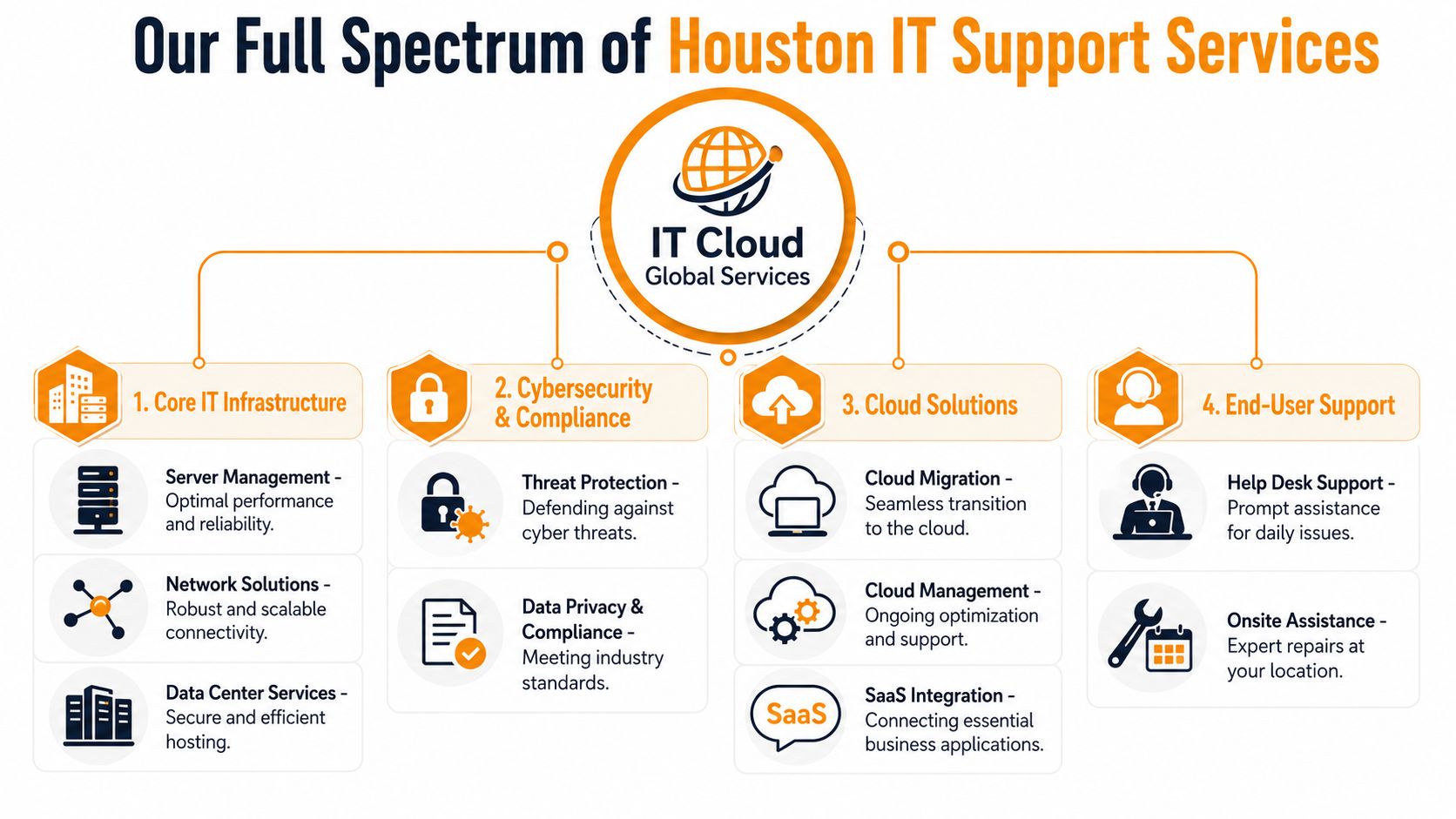
Most business owners don't need a long list of technical terms. They need to know what problem gets solved and what that means for the business. That's the right way to evaluate Houston IT support services.
Core business support
This is the foundation. If this layer is weak, everything else becomes harder.
- Managed IT support keeps systems monitored, maintained, and documented so problems don't build unseen in the background.
- Helpdesk support gives your staff a place to go when email sync breaks, printers stop responding, Microsoft 365 throws errors, or a workstation starts acting strangely.
- Remote and onsite assistance matters because not every issue can be solved the same way. Password resets and software fixes can happen remotely. Cabling faults, hardware swaps, and certain network issues often need hands on site.
A good support team doesn't just close tickets. It looks for patterns. If five users keep hitting the same issue, the core job is fixing the root cause.
Infrastructure and connectivity
A surprising number of support problems start with infrastructure that was patched together over time. One switch got replaced. WiFi expanded in a hurry. A firewall stayed in place long after the business outgrew it. Nobody documented anything clearly.
That's where infrastructure support earns its keep.
- Network services improve stability, coverage, segmentation, and performance across wired and wireless environments.
- VoIP and business communications give teams a flexible phone system that works across desks, mobile devices, and remote locations.
- Low-voltage cabling and physical connectivity matter more than people think. Bad cabling creates flaky networks, dead drops, and expensive troubleshooting.
- Hardware repair and depot service help when endpoints fail and business can't wait around for guesswork.
What to look for: Support should cover the full path from user device to internet connection to cloud application. If one provider manages only part of that chain, problems get bounced around instead of solved.
For Houston companies that want a practical overview, this guide to managed IT support services for Houston small businesses is a useful starting point.
Strategic technology growth
Support shouldn't end with “everything works today.” It should also help you move toward a cleaner, more scalable setup.
That includes:
- Cloud migration for businesses moving workloads into AWS, Microsoft Azure, Google Cloud, or Microsoft 365.
- Cloud management so permissions, licensing, storage, and user experience don't become a mess after migration.
- Backup and disaster recovery to make sure critical data and systems can be restored when hardware fails, files are deleted, or operations are disrupted.
- Virtualization and remote access using platforms such as VMware, Hyper-V, Citrix, and Remote Desktop Services to support flexible work and better infrastructure use.
IT Cloud Global, LLC provides this range of support, including helpdesk, cloud administration, network services, Microsoft 365 management, virtualization, and in-house repair depot work for Houston businesses.
The point isn't to buy every service. The point is to build the right stack for how your business runs.
Proactive Cybersecurity and Compliance Posture
Cybersecurity isn't a feature line on an IT proposal. It's part of business survival.

If you run a small or midsize company, you're not too small to be targeted. You're often easier to hit because attackers expect weaker controls, rushed decisions, and limited internal IT coverage. And when an incident lands, it doesn't stay in the server room. It disrupts invoicing, scheduling, customer communication, and employee productivity.
According to Uprite's review of Houston IT support providers, 60% of small businesses close within six months of a major cyberattack. That's the number business owners should pay attention to. Not how many security tools are listed on a quote. Not how flashy the dashboard looks. The operational question is whether your environment can absorb an incident without taking the company down with it.
Security has to protect operations, not just devices
A real security posture is layered.
You need endpoint protection on laptops and desktops. You need secure network controls. You need email filtering. You need patching. You need backup discipline. You need user access handled carefully. You also need someone watching for suspicious behavior and responding quickly when something looks wrong.
Tools such as SentinelOne-style endpoint protection can play an important role, but tools alone don't create resilience. Process does. So does follow-through.
If your cybersecurity plan starts after a ransom note appears, you don't have a plan. You have a recovery scramble.
For companies in regulated or high-risk environments, it also helps to understand how broader critical infrastructure cybersecurity standards shape practical controls around access, resilience, monitoring, and governance.
A quick primer on layered defense is worth watching before you sign any security agreement:
Compliance gets easier when security is organized
Businesses in healthcare, legal, finance, construction, logistics, and professional services often worry that compliance is a separate project. It usually isn't. It's the result of doing your core IT and security work in a disciplined way.
That means documented access controls, device oversight, secure backups, user offboarding, policy enforcement, and audit-friendly administration. When those pieces are scattered, compliance becomes stressful. When they're built into daily IT operations, audits and client questionnaires become much easier to handle.
The financial logic is straightforward. Proactive security costs money. Reactive breach response costs control.
The IT Cloud Global Advantage Local Experts and Fast Repairs
National providers love to promise coverage. Local businesses usually need accountability.
When your office has a dead workstation, a broken printer, poor WiFi in part of the building, or a networking issue that can't be solved through a remote session, you need a provider that understands the local environment and can act like a real partner, not a ticket queue.
Local support changes accountability
Texas has the second-largest IT services workforce in the United States, with more than 203,700 professionals employed across the sector, according to the Texas information technology industry report. That talent density matters for Houston companies because it supports deeper technical coverage across cloud, networking, endpoint support, virtualization, and security.
Local providers can turn that labor pool into practical business value. They can send technicians onsite, maintain closer relationships, and support specialized services that are harder to deliver from a distant call center.
You feel the difference when something goes wrong. A local team is more likely to understand your building layout, your ISP history, your cabling condition, your office workflow, and the actual business impact of a failed device in your front office or warehouse.
Depot repair is different from random break-fix calls
A lot of businesses underestimate the value of an in-house repair depot until they're stuck waiting on a one-off technician to diagnose a basic hardware issue. The traditional break-fix path often turns simple device failures into drawn-out interruptions. Nobody owns the workflow end to end.
A managed depot model is cleaner. Devices come into a controlled process. Diagnostics are documented. Parts and replacement paths are handled consistently. Quality checks happen before the unit goes back into service.
That matters a lot for businesses with multiple endpoints, shared workstations, or customer-facing equipment.
- Retail environments need functioning POS-adjacent systems, printers, and back-office workstations.
- Office teams need dependable laptops, desktops, and docking setups without repeated user disruption.
- Service businesses need quick turnaround because every downed device slows scheduling, dispatch, or invoicing.
Local expertise is valuable. Local repair capability is where that value becomes visible.
How to Choose the Right IT Partner in Houston
A lot of providers sound similar until you ask sharper questions. That's where the differences show up fast.
Some MSPs are built around prevention, documentation, and long-term support quality. Others are basically helpdesk resellers with a security bundle attached. If you're trusting someone with business continuity, don't buy on price alone.
Questions worth asking before you sign
Use this checklist in every sales conversation:
- How do you handle onboarding? Ask how they assess your current environment, document assets, identify immediate risks, and transition support without disrupting operations.
- What happens after hours? You need a clear process for nights, weekends, and urgent incidents. “We have support” is not a process.
- How do you approach cybersecurity? Listen for layered controls, endpoint protection, access management, patching, backup discipline, and user risk reduction. If they only talk about antivirus, keep looking.
- Do you support our actual stack? Ask about Microsoft 365, Azure, Google Workspace, line-of-business software, printers, WiFi, VoIP, cabling, cloud workloads, and remote users.
- Can you support hardware issues too? A lot of providers are comfortable in the cloud but weak on endpoints, printers, and onsite repair logistics.
What a strong SLA should include
A service level agreement, or SLA, is where promises become measurable commitments. If a provider is vague here, that's a warning sign.
A strong SLA should spell out:
| SLA area | What to verify |
|---|---|
| Response expectations | How quickly they acknowledge critical, high, and routine issues |
| Escalation path | Who handles complex incidents and when escalation occurs |
| Coverage window | Business hours, after-hours, weekends, and emergency support |
| Included services | What's covered under agreement versus billed separately |
| Reporting | Whether you receive regular visibility into tickets, risks, and recommendations |
The right partner should also explain these terms in plain English. If you need a translator to understand the contract, you're probably going to hate the support experience.
Common Questions About Houston IT Services
What does onboarding usually look like?
A solid onboarding process starts with discovery. The provider reviews your users, devices, network, software, cloud systems, security gaps, and support pain points. Then they standardize access, documentation, monitoring, and support procedures so the handoff doesn't create chaos.
Can service agreements stay flexible as we grow?
They should. Your business may add staff, open another location, adopt new cloud tools, or shift toward hybrid work. A useful agreement should adapt without forcing a complete restart every time your operations change.
Do providers handle industry-specific software?
They should be comfortable working around specialized applications, but don't assume it. Ask directly about your accounting platform, EMR, construction management software, legal tools, or CRM stack. General IT competence is important. Experience with your daily workflow matters more.
How are after-hours emergencies handled?
Ask for the actual escalation path, not a sales answer. You want to know who gets alerted, how incidents are prioritized, and what kinds of events qualify as urgent.
What about repair timelines for PCs, Macs, and printers?
This is one of the most overlooked questions in Houston IT support services. As noted by Ultimate Tech Support's managed services page, businesses in retail and service environments often struggle to get clear answers about the cost and timeline difference between break-fix repair and a managed in-house depot model for endpoints. That's a problem because hardware failures hit revenue fast when staff or customer-facing systems can't work.
If a provider can't explain their repair workflow clearly, assume delays later.
If you're ready to stop treating IT as a string of emergencies, talk to IT Cloud Global, LLC. The right conversation should focus on uptime, security, repair workflow, and how support will fit your day-to-day operation, not just a list of tools.
- Application Modernization for SMBs: Boost Efficiency &
- Excellent IT Group Houston Downtown: A 2026 Buyer’s Guide
- 7 Top Cybersecurity Companies in Houston for 2026
- Top 7 Managed IT Services Houston TX Reviews 2026
- Best IT Services Houston TX: Your 2026 Partner
- Top IT Services Houston TX: Your 2026 SMB Guide
- Houston Managed IT Services: A 2026 Guide for SMBs