


How to Choose a Managed Service Provider: A 2026 Guide
You're probably dealing with one of two situations right now. Either your current IT support is reactive, slow, and hard to pin down, or you've outgrown the person or small shop that “handles computers” but can't support the business you're trying to build.
That's the point where choosing the wrong managed service provider gets expensive. Not just in invoices, but in downtime, security gaps, messy cloud projects, and staff frustration. If you want to know how to choose a managed service provider, start by treating the decision like hiring a long-term operating partner, not a vendor you compare on monthly price alone.
A good MSP helps you stay ahead of problems. A poor one answers tickets, blames vendors, and disappears when the issue gets complicated. For Houston businesses, there's another layer. You also need a provider that can deal with local realities such as hurricane season, regional travel time for on-site support, and the practical challenges of keeping offices, retail locations, and remote teams connected.
Table of Contents
- First Map Your IT Needs and Business Goals
- Prioritize Expertise in Cybersecurity and Cloud Services
- Understanding MSP Support Models and Pricing
- How to Interview Vendors and Check References
- Scoring Proposals and Negotiating Your Service Level Agreement
- Local Factors for Choosing a Houston IT Provider
- Frequently Asked Questions About Choosing an MSP
First Map Your IT Needs and Business Goals
If your office feels like it's held together by ticket emails, password resets, and people asking who changed the Wi-Fi, stop before you start vendor calls. Most bad MSP decisions begin with a vague request like “we need better IT support.” That usually leads to polished proposals, mismatched services, and a contract that solves someone else's problems.

Start with the problems your staff complains about
Your first job is internal. List what's breaking, what's slow, and what keeps coming back.
Use plain language. You don't need a technical document at this stage. You need a realistic one. Start with these categories:
- Recurring user issues: login lockouts, slow computers, unstable Wi-Fi, printer failures, Microsoft 365 confusion, file access problems.
- Operational risks: no documented backups, old servers, unsupported workstations, shared passwords, no clear offboarding process.
- Business interruptions: internet outages, phone system problems, line-of-business app failures, remote access issues.
- Visibility gaps: you don't know what hardware you own, who has admin access, or which vendors support which systems.
Then take inventory. Write down your core platforms and dependencies. That includes Microsoft 365, Azure, AWS, Google Cloud, line-of-business software, firewalls, switches, Wi-Fi gear, laptops, desktops, mobile devices, printers, and any on-prem servers or virtual machines.
Practical rule: If you can't describe your current environment in a few pages, no provider can accurately scope it.
Turn business plans into technical requirements
Small businesses often miss the mark by asking for support based on current pain, not future movement.
If you're opening a new office, the MSP needs to handle network setup, structured cabling, wireless coverage, telecom coordination, and user onboarding. If you're hiring remote staff, you need a clean device process, secure access, Microsoft 365 administration, and endpoint protection. If you're in a regulated field, you need a provider that can support compliance work as part of normal operations, not as an afterthought.
Create a short requirements document with three parts:
- What you have now
- What isn't working
- What the business needs over the next few years
A simple version might look like this:
| Area | Current State | Problem | Needed Outcome |
|---|---|---|---|
| Microsoft 365 | Email and Teams in use | Admin work handled inconsistently | Reliable user management and support |
| Network | Office Wi-Fi and firewall | Coverage drops and no monitoring | Stable, managed network |
| Security | Basic tools only | No confidence in incident response | Strong endpoint and response process |
| Backups | Unclear ownership | Recovery process not documented | Tested backup and disaster recovery |
This document becomes your filter. If a provider can't map their service to your actual needs, they're not the right fit, no matter how polished the sales call sounds.
Prioritize Expertise in Cybersecurity and Cloud Services
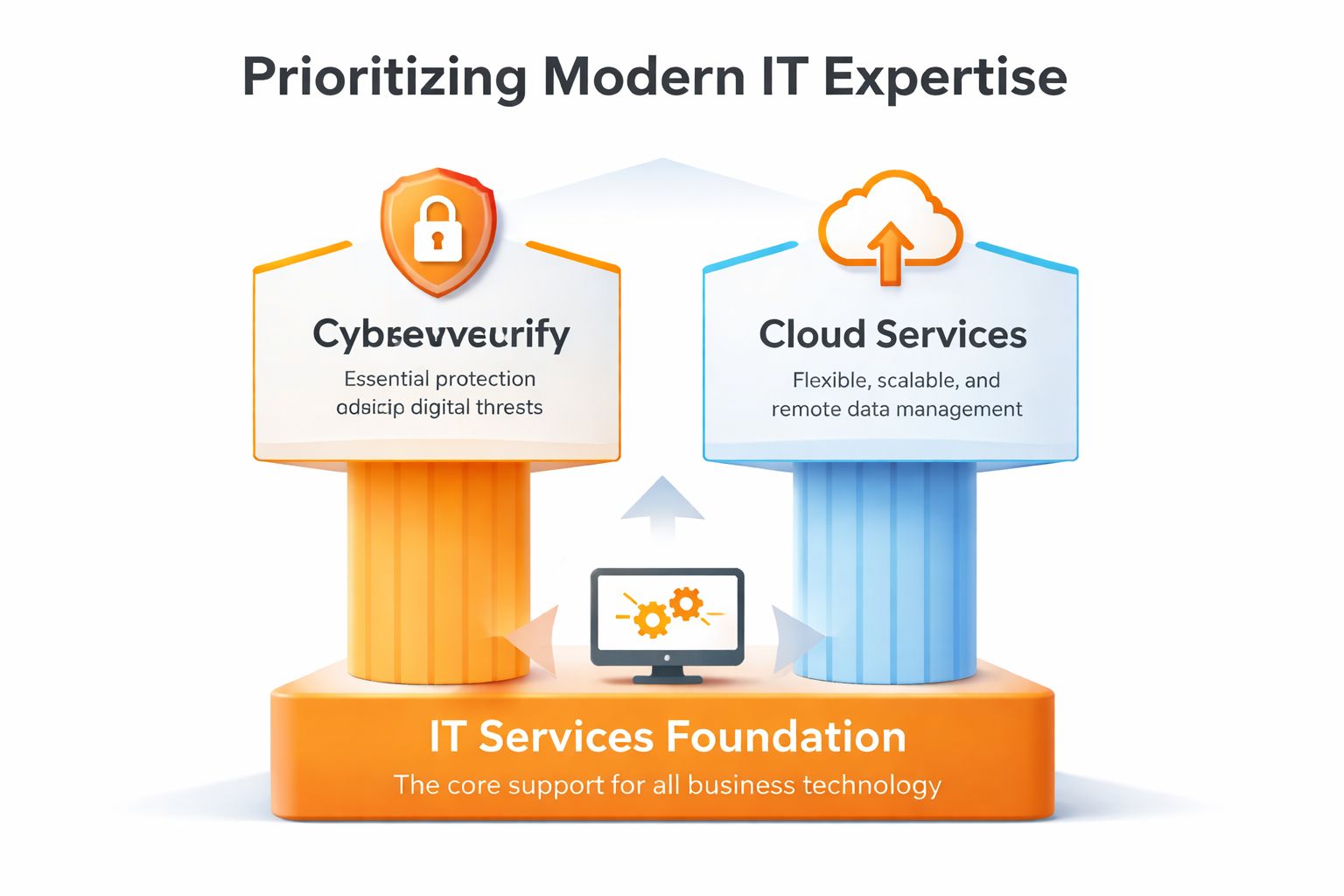
A modern MSP isn't just a helpdesk with remote access tools. If they're going to manage your environment, they're also handling your exposure. That's why security and cloud capability should be the first hard screen, not a nice extra.
Security should be your first filter
The market has already moved in that direction. A 2025 Barracuda and Vanson Bourne study on MSP selection found that 85% of mid-market enterprises now rely on MSPs for security needs, and 92% are willing to pay more for advanced capabilities such as 24/7 coverage and AI-driven threat detection.
That matters for smaller firms too. The lesson isn't “buy the biggest security stack.” It's “don't treat security as separate from support.” If your MSP manages endpoints, Microsoft 365, network access, backups, and user accounts, they're already inside the blast radius of any incident.
Ask direct questions:
- What endpoint protection do you deploy? Look for specific tools, not “enterprise-grade antivirus.”
- How do you monitor after hours? If they only respond when users call, that's reactive support.
- What happens during an incident? Ask who owns containment, communication, and recovery steps.
- Can you support compliance-driven environments? If you handle regulated data, this matters immediately.
Healthcare practices and any business touching sensitive records should pay close attention to the details of protecting health information in digital systems, because the line between ordinary IT support and security responsibility is thin once patient or client data enters the picture.
A layered defense model is a better sign than a single-tool pitch. For a practical way to think about that approach, review this guide on security in layers for business IT environments.
A provider that leads with password resets and printer support, but gets vague on detection, response, and recovery, is telling you where their real strengths stop.
Cloud fluency needs proof, not buzzwords
“Cloud support” is one of the most overused phrases in MSP sales. It can mean anything from resetting Microsoft 365 passwords to planning a full Azure migration.
You need specifics. Ask whether they actively manage:
- Microsoft 365 services such as Exchange, Intune, SharePoint, and Teams
- Azure or AWS infrastructure
- Google Cloud workloads
- Identity and access configuration
- Backup and recovery for cloud data
- Hybrid environments with both local servers and cloud apps
Then ask for examples of the kinds of projects they perform. Migrations, tenant cleanups, policy rollouts, conditional access planning, device enrollment, virtualization support, and user lifecycle management are all good signals. Vague claims like “we support all major platforms” aren't.
When evaluating how to choose a managed service provider in 2026, security depth and cloud competence aren't separate checkboxes. They're the core of the service.
Understanding MSP Support Models and Pricing
Pricing is where many businesses make a bad decision and don't realize it until six months later. The monthly number looks manageable, but the support model underneath it creates surprise invoices, finger-pointing, or service gaps.
What the common pricing models really mean
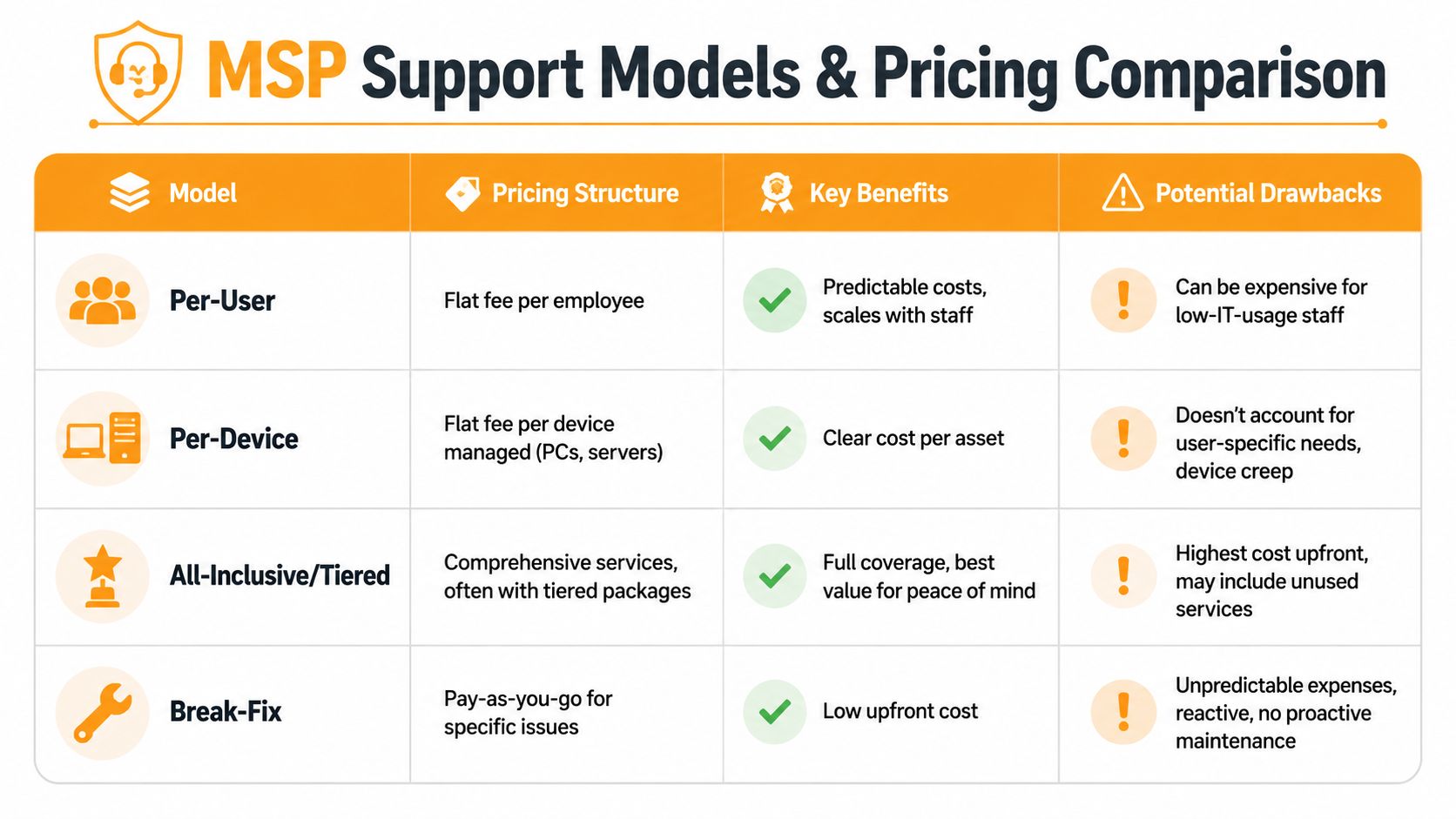
Most providers use one of four structures.
| Model | Best Fit | Main Upside | Main Risk |
|---|---|---|---|
| Per-user | Office teams with similar support needs | Predictable cost by headcount | You may pay too much for low-usage staff |
| Per-device | Environments with many shared or fixed assets | Easy to map by hardware count | Doesn't reflect user complexity well |
| All-inclusive or tiered | Businesses that want broad support under one roof | Strong predictability and simpler budgeting | You need to inspect what's excluded |
| Break-fix | Very small or temporary needs | Low entry cost | Reactive, inconsistent, and hard to budget |
The broad takeaway is simple. Predictable billing only helps if the scope is also predictable.
A foundational CompTIA benchmark on MSP cost outcomes reported that 96% of organizations reduced annual IT costs after engaging an MSP. Within that group, 50% achieved over 25% in savings, and 33% saw costs cut by more than half. That doesn't mean every MSP is cost-effective. It means the model can work when the provider is proactive and the scope is aligned.
How to compare value instead of just price
Two proposals with similar monthly rates can be very different. One includes monitoring, patching, Microsoft 365 admin, vendor coordination, backup oversight, and strategic planning. The other includes “remote support during business hours” and bills extra for almost everything difficult.
Read for exclusions. Common ones include:
- Projects: office moves, migrations, new site setup, major upgrades
- After-hours work: weekend changes, emergency work outside standard support windows
- On-site visits: included, limited, or billed separately
- Third-party coordination: calling your ISP, firewall vendor, software provider, or copier company
- Security tasks: incident response, policy changes, and hardening work
If you need a framework for comparing costs across service types, this breakdown of factors determining managed IT support service costs is useful because it forces you to look beyond the base fee.
Cheap support often costs more because you pay twice. Once on the invoice, and again when staff sit idle waiting for a fix.
A good MSP pricing conversation feels operational, not theatrical. They should explain what's covered, what isn't, where project work begins, and how they help you avoid recurring waste. If the proposal feels slippery before the contract is signed, it won't get clearer afterward.
How to Interview Vendors and Check References
By the time you reach vendor interviews, the shortlist should be small. At that stage, you're not just comparing services. You're judging how a team thinks under pressure, how clearly they communicate, and whether they operate with discipline.

A lot of MSPs sound strong in a pitch. Fewer sound strong when you ask them to explain escalation, ownership, handoffs, and what happens when their first fix doesn't work.
Questions that reveal how they actually work
Don't ask generic questions like “Do you offer great customer service?” Ask for process details.
Use questions like these:
- Walk me through a Priority 1 issue from alert to resolution. You want their actual chain of action, not marketing language.
- Who answers after-hours calls and who has authority to act? This tells you whether nights and weekends are real support or an answering service.
- What work is automated, and what still depends on technicians noticing a problem? This exposes whether they're proactive or just fast at reacting.
- How do you document environments and changes? Good providers keep clean records.
- What happens if our primary engineer is unavailable? You're checking depth, not personalities.
- Which tools do you standardize on for endpoint security, cloud admin, backups, and networking? Mature providers usually have a point of view here.
A benchmark cited by Vast IT Services on MSP selection pitfalls notes that proactive MSPs can cut IT incidents by 50%, while 45% of buyers choose the cheapest provider and often face double the downtime. That's why interview questions should focus on prevention, not friendliness.
How to run a useful reference check
Reference calls are where you verify the sales story. Keep them short, but make them specific.
Ask the reference:
- What kind of environment does this MSP support for you?
- How do they handle urgent issues when business is disrupted?
- What do they do well that another provider didn't?
- Where do you still have to push them?
- Did onboarding go smoothly, or was it chaotic?
- Have they helped you improve systems, not just maintain them?
Don't ask, “Are you happy?” Almost everyone says yes to avoid awkwardness. Ask for examples instead.
A short explainer may help as you prepare your interview process:
Listen for specificity. Strong references remember incidents, decisions, and outcomes. Weak references give polite generalities.
Also pay attention to the vendor's behavior during your own process. High-pressure follow-up, evasive technical answers, and constant discounting are all warning signs. The best providers don't rush you into a contract. They reduce uncertainty.
Scoring Proposals and Negotiating Your Service Level Agreement
Once proposals arrive, memory becomes unreliable. Every vendor sounds capable. Every deck looks polished. If you don't score them against the same criteria, the decision will drift toward presentation style, not fit.
Build a scorecard before the demos blur together
Use a weighted scorecard tied to your requirements document. Keep it simple enough that your team will use it.
Here's a practical template.
| Criteria | Weight | Provider A Score (1-5) | Provider B Score (1-5) | Notes |
|---|---|---|---|---|
| Security capability | High | Tools used, after-hours monitoring, incident process | ||
| Cloud and Microsoft 365 expertise | High | Azure, AWS, Google Cloud, Exchange, Intune, Teams | ||
| Support responsiveness | High | Helpdesk quality, escalation clarity, on-site ability | ||
| SLA clarity | High | Uptime, response, MTTR, exclusions, remedies | ||
| Industry fit | Medium | Healthcare, retail, professional services, multi-site | ||
| Pricing transparency | Medium | Scope, project billing, after-hours terms | ||
| Strategic guidance | Medium | Planning, roadmap, budgeting help | ||
| Contract flexibility | Medium | Term length, exit terms, onboarding and offboarding |
You don't need perfect math. You need a structure that prevents a slick sales process from outweighing weak operations.
Read the SLA like it matters, because it does
The SLA is where promises become obligations. If the language is soft, your recourse disappears when service gets inconsistent.
A benchmark discussed by BSWI on choosing a managed services provider says 40% of failed MSP engagements involve a vague SLA. The same benchmark points to stronger terms that define uptime at 99.99%, MTTR under 1 hour, and compliance expectations such as SOC 2 or HIPAA.
That gives you a practical checklist. Look for these items in writing:
- Response time by ticket severity: A fast acknowledgment matters, but it isn't the same as a fix.
- Resolution targets or MTTR: Ask how long they expect restoration to take for critical issues.
- Uptime commitments: If they host or directly manage critical systems, this should be explicit.
- Escalation path: Who gets involved when the first line can't resolve it?
- Service credits or remedies: If they miss the target, what happens?
- Security and compliance obligations: Especially important in regulated environments.
- Offboarding terms: How do credentials, documentation, backups, and configs transfer if the relationship ends?
A quick response that doesn't restore service is customer service theater, not operational performance.
Also review the contract itself with the same care. If you want a clean way to think through structure and clauses, this template resource on Papersign for IT service contracts is a useful reference before legal review.
Negotiate the exit before you need it. Ask how data, documentation, admin access, and system ownership are handled at termination. Good providers won't resist that question. They know mature clients ask it.
Local Factors for Choosing a Houston IT Provider
A provider can look excellent on paper and still be the wrong fit for Houston. Geography, weather, traffic, and industry mix all affect service quality here.
Disaster recovery in Houston is not theoretical
Business continuity planning matters everywhere, but Gulf Coast businesses need to press harder on backup location, recovery workflow, and communications during regional disruption. If a storm affects power, internet, roads, or office access, your provider should already have an answer for where your backups live, how users reconnect, and who coordinates the recovery sequence.
Local security pressure matters too. Contigo Technology's discussion of MSP vetting cites local CompTIA data showing 62% of Houston SMBs report significant fears about ransomware attacks. That should push security questions higher in your local evaluation, especially if an MSP offers only basic tools and generic reassurance.
Local presence changes response quality
On-site support in Houston isn't just “available” or “not available.” It's logistical. Ask where their engineers are based, how they dispatch, which ZIP codes they regularly serve, and what happens when your issue can't be solved remotely.
This is especially important for businesses with:
- Physical offices and retail sites: cabling, Wi-Fi, phones, printers, and network gear still require hands-on work.
- Compliance-heavy workflows: healthcare, legal, and financial teams often need tighter coordination.
- Multi-location operations: timing and consistency matter when sites are spread out.
For a broader view of regional infrastructure planning, examples of Southern Tier network solutions can be useful as a reference point for how location-specific network needs affect support decisions.
If you're comparing firms in the area, this guide on choosing an IT support provider in Houston is worth reading because it frames local support as an operating issue, not just a convenience.
Frequently Asked Questions About Choosing an MSP
How long should an MSP contract be
Long enough for a proper onboarding and stable service rhythm, but not so rigid that you're trapped if the fit is wrong. The concern isn't the number of months. It's whether the agreement has clear review points, defined offboarding terms, and reasonable flexibility if your business changes.
What's the biggest red flag during evaluation
Vague answers. If a provider can't explain their support process, security stack, escalation path, documentation habits, or contract boundaries in plain English, assume service will be harder to understand after signature, not easier.
Should I choose a local MSP or a remote-first one
Choose the one that fits your environment. If you have offices, devices, wiring, printers, access points, or site-specific issues, local presence matters. If your business is mostly cloud-based and distributed, remote excellence may matter more. Many businesses need both.
How do I switch MSPs without causing disruption
Start with ownership. Confirm who controls admin accounts, vendor portals, backups, domain-related services, firewall access, and documentation. Then build a transition checklist with dates, handoff contacts, and a clear cutover plan. The provider you hire should be able to guide that process calmly and in writing.
Do I need a provider with industry experience
If your industry has unusual software, strict compliance needs, or multiple locations, yes. Familiarity shortens onboarding and reduces preventable mistakes. Even when industry specialization isn't mandatory, it still helps.
Is the cheapest MSP ever the right choice
Sometimes a lower-cost provider is the right fit. Cheap isn't automatically bad. But low price with vague scope, weak security, and reactive support usually turns into a more expensive problem later.
If you want a Houston partner that handles managed IT, helpdesk support, cybersecurity, cloud platforms, networking, repairs, and business continuity with a practical, security-minded approach, take a look at IT Cloud Global, LLC. They work with businesses across the Greater Houston area and focus on the kind of clear communication, predictable support, and real-world technical depth that small and midsize companies need.
- 7 Best Managed IT Services Houston TX Reviews (2026)
- Top IT Services Houston TX: Your 2026 SMB Guide
- Houston Managed IT Services: A 2026 Guide for SMBs
- What Is a Helpdesk Ticketing System? an SMB Guide
- Your 2026 Disaster Recovery Testing Checklist
- Managed IT Services for Small Business Near Me: Houston
- The Importance of BCP: Business Survival in 2026