


Managed IT Services for Small Business Near Me: Houston
For managed IT services for small business near me in Houston, you're probably not browsing out of curiosity. You're dealing with recurring computer issues, a flaky network, rising security concerns, or a team that's wasting time waiting for someone to fix basic tech problems. In a small business, those problems don't stay in the IT lane. They hit sales, customer service, accounting, and owner bandwidth fast.
Houston businesses feel this pressure in a very practical way. A law office can't afford document access issues. A medical practice can't guess at compliance responsibilities. A retail or logistics company can't have internet, devices, or cloud apps failing in the middle of a workday. The question isn't whether you need technology support. It's whether your current setup is truly helping you run the business, or subtly making everything harder.
Table of Contents
- When Your Technology Works Against You
- What Are Managed IT Services for Small Business
- Key Benefits Why Proactive Beats Reactive
- 7 Signs Your Business Needs Managed IT Services
- Understanding Pricing Models and Real ROI
- How to Evaluate Local Houston IT Providers
- Your Next Step for Reliable IT in Houston
When Your Technology Works Against You
It usually starts on a normal day. Your staff logs in, the phones are moving, orders are being processed, and then one system stalls. Shared files won't open. Email starts lagging. Someone says the printer is down again. Then you realize the problem isn't one employee's laptop. It's the office.
For a small business owner, that kind of outage creates a chain reaction. Employees stop working. Customers wait. Managers improvise. Nobody knows whether the issue is the firewall, the server, Microsoft 365, Wi-Fi congestion, a failed backup job, or a security event. The longer it takes to sort out, the more expensive it gets.
That's the weakness of the old break-fix model. You wait until something breaks, then pay someone to react. That might feel cheaper month to month, but it usually creates the worst kind of spending: urgent, unplanned, and tied to the exact moment your team can least absorb it.
Houston small businesses often stay in that cycle longer than they should because the work still gets done, until it doesn't. A warehouse office tolerates slow machines. A clinic works around login problems. A professional services firm keeps postponing backup planning. Then a real incident hits and all the small compromises show up at once.
A managed approach changes the operating model. Instead of paying mainly for emergencies, you pay for prevention, maintenance, visibility, and response. That matters financially too. SMBs can reduce IT operational costs by up to 40% by switching from an in-house team or break-fix model to a managed service provider, driven by the move from unpredictable emergency spending to a predictable flat-fee model, according to Cortavo's Houston managed IT guide.
Practical rule: If your team only talks about IT when something is broken, you're already managing technology the expensive way.
What Are Managed IT Services for Small Business
Traditional support is like calling a handyman after a pipe bursts. Managed IT services are closer to having someone responsible for the whole building. They watch for risk, maintain core systems, document what matters, and deal with issues before they turn into downtime.
The shift from repair work to ongoing management
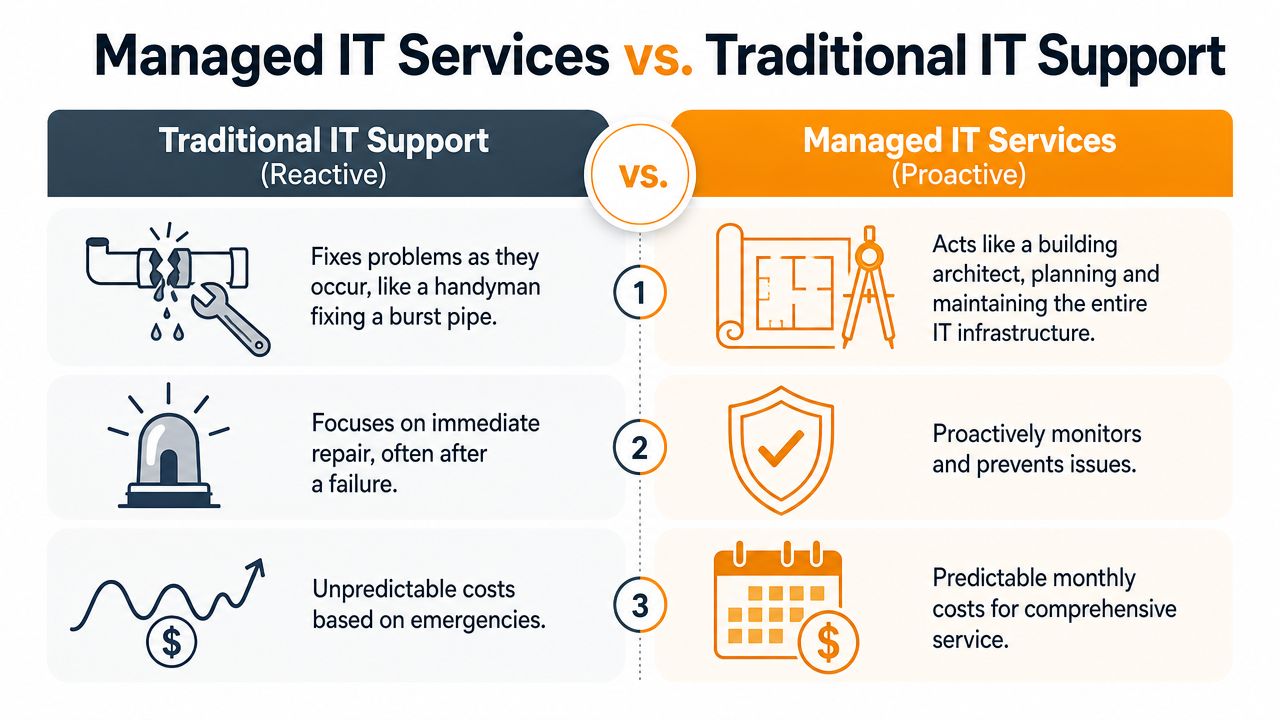
For a small business, that usually means one provider takes responsibility for the day-to-day health of your environment. Not just fixing laptops. Managing the systems your people rely on every day.
That can include workstations, servers, Microsoft 365, user accounts, network equipment, Wi-Fi, backups, endpoint security, patching, cloud systems, vendor coordination, and employee support. In some businesses, it's fully outsourced. In others, it's co-managed, where your internal person handles local knowledge and the outside provider handles tools, escalations, cybersecurity, and after-hours coverage.
The biggest difference is that the provider isn't waiting for pain to show up. They should be watching for failing hardware, patch gaps, suspicious activity, storage issues, backup failures, and recurring user patterns that point to a larger process problem.
What a small business usually gets
A solid managed IT arrangement usually includes several layers working together:
- Help desk support: Your employees need fast answers for account lockouts, device issues, email problems, and software errors.
- Monitoring and maintenance: Systems are watched continuously so problems get caught early.
- Cybersecurity controls: That can include endpoint protection, firewall management, patching, access controls, phishing defenses, and response planning.
- Backup and recovery: Backups matter, but tested recovery matters more.
- Cloud administration: Many Houston businesses need support across Microsoft 365, Azure, AWS, or Google Cloud.
- On-site and remote support: Some problems need hands-on work. Others should be resolved without waiting for a visit.
Security is one of the clearest reasons small firms move away from ad hoc support. The average cost of a data breach for a small business is approximately $2.2 million, and managed IT services are designed to reduce that risk through layered cybersecurity, proactive monitoring, and rapid incident response, as explained in IT Matters' overview of managed IT services for Houston businesses.
If your business also handles customer conversations through online communities, chat, or social channels, support operations can spill beyond internal IT. In that case, resources on optimizing support for community-driven companies can help you think more clearly about workflows, handoffs, and response ownership.
Managed IT works best when ownership is clear. Who supports users, who owns security, who tests backups, and who answers at 8 p.m. shouldn't be open questions.
Key Benefits Why Proactive Beats Reactive
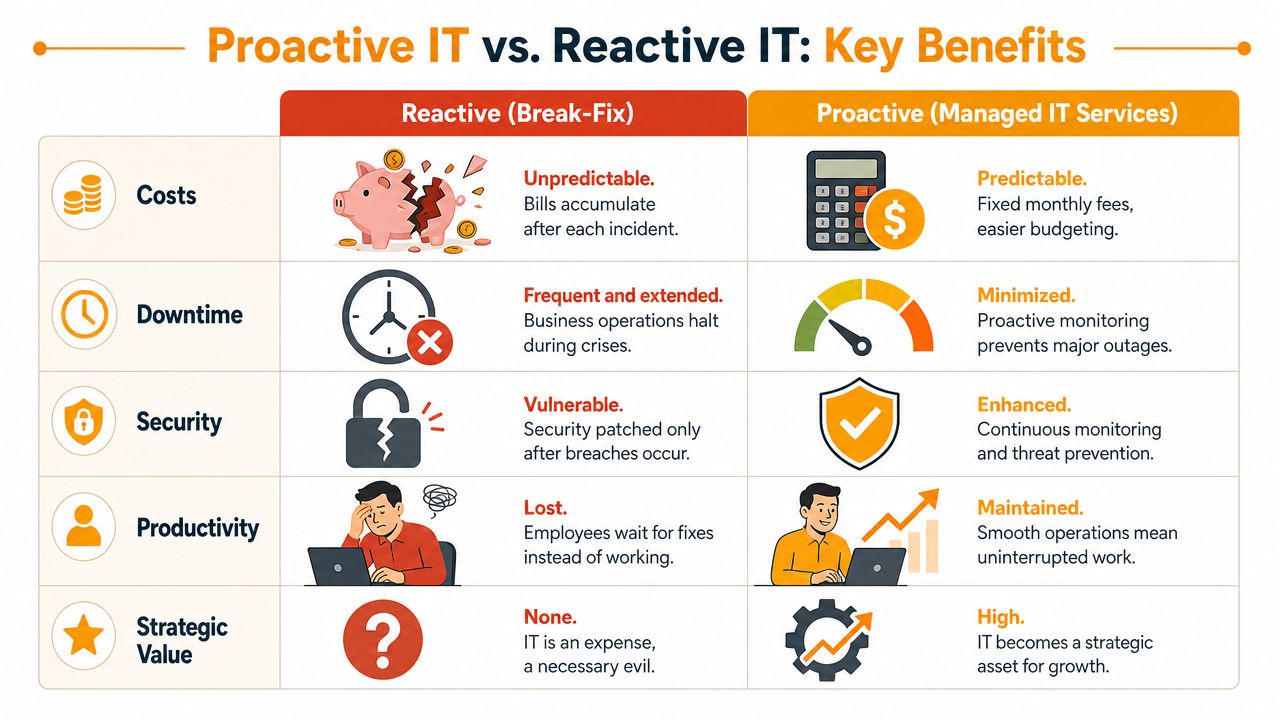
The practical argument for managed services is simple. Reactive IT gets paid when things fail. Proactive IT gets paid to keep failure from disrupting the business.
The business difference is incentives
When a provider only appears after an outage, every issue becomes a mini-project. Diagnosis takes longer because documentation is weak, no one has been watching trends, and the root cause may have been building for months. Your team sees the symptom. Nobody has been accountable for the environment.
A proactive model changes that. Monitoring, patching, routine review, and standardization reduce avoidable disruptions before users feel them. That isn't theory. A proactive managed IT model can reduce business downtime by 60% compared to traditional break-fix approaches, according to The Small Business Expo's managed IT analysis.
For owners, that translates into fewer interrupted workdays and fewer moments where everyone stands around waiting for one system to come back.
Side by side comparison
| Feature | Managed IT Services (Proactive) | Break-Fix Model (Reactive) |
|---|---|---|
| Cost structure | Predictable monthly agreement | Irregular invoices after incidents |
| Downtime approach | Prevents many issues before users notice | Responds after disruption begins |
| Security posture | Ongoing patching, monitoring, and layered controls | Often updated only after a problem |
| User support | Defined help desk process and escalation path | Support depends on availability |
| Planning | Supports budgeting, refresh cycles, cloud decisions | Little long-term strategy |
| Accountability | Shared responsibility with documented scope | Often limited to isolated fixes |
There's also a management benefit. A strong provider can help standardize devices, user onboarding, security settings, and support processes across the business. That reduces the weird exceptions that make small environments hard to support.
If you're also reviewing your external web presence, X8 Web Design's security tips are a useful complement to internal IT controls because website risk and internal business risk often overlap more than owners expect.
For a closer look at how this operating model works in practice, it's worth reviewing proactive IT support as a framework rather than treating support as a series of isolated repairs.
The real gain isn't that nothing ever breaks. It's that fewer issues become business-wide problems.
7 Signs Your Business Needs Managed IT Services
Not every small business needs the same level of support. But there are clear signs that your current setup is too fragile, too informal, or too dependent on luck.
Operational warning signs
Your team keeps reporting the same problems.
If Wi-Fi dead spots, printer failures, Outlook issues, shared drive access problems, or login resets keep resurfacing, the issue usually isn't user behavior. It's that no one has fixed the underlying system.Employees lose too much time waiting for help.
Support delays have a real productivity cost. Adopting fully managed IT services correlates with a 75% increase in operational efficiency, largely because 24/7 help desk support can resolve 90% of user-level issues in under 15 minutes, according to Dataprise's review of fully managed IT services.Backups exist, but nobody has confidence in recovery.
Many companies say they have backups when what they really have is a backup product they assume is working. Those are not the same thing.One employee has become the unofficial IT department.
If your operations manager, office administrator, or tech-savvy salesperson is the person everyone calls, you've created a hidden dependency that won't scale.
If support depends on one helpful employee, you don't have an IT strategy. You have a bottleneck.
Strategic warning signs
Your IT costs feel random.
One month is quiet. The next month brings a firewall issue, device replacement, Microsoft 365 cleanup, and a consultant invoice. That makes planning hard and usually delays useful upgrades.Security conversations happen only after a scare.
If you review passwords, MFA, device encryption, or user access only after someone clicks a suspicious email, your business is operating defensively instead of deliberately.You can't answer basic operational questions quickly.
Owners should be able to get a straight answer to questions like:- Who has admin access: Not approximately. Exactly.
- What happens if a laptop is lost: Is there remote wipe, account lockout, and recovery procedure?
- How fast can systems come back: Not in theory. In your actual environment.
Often, those looking for managed IT services for small business near me are already past the warning stage. The better move is to act before recurring friction becomes a full outage, a failed audit, or a security incident.
Understanding Pricing Models and Real ROI
The pricing question is where many small businesses get stuck. Not because managed services are impossible to understand, but because many proposals blur the actual scope.

Where pricing confusion starts
Most providers price in one of three ways:
- Per-user pricing: Often works well when each employee uses a similar set of systems and needs.
- Per-device pricing: Can fit environments with shared workstations, specialized equipment, or a mix of office and production devices.
- Flat-rate managed services: Usually appeals to owners who want predictable budgeting and broad coverage under one agreement.
The problem isn't the model itself. The problem is mismatch. A hybrid workforce, seasonal staffing, multiple locations, compliance requirements, cloud projects, or co-managed support can make a cheap-looking proposal expensive later.
That confusion is common. A 2025 Gartner study found that 42% of SMBs overpay for managed IT due to misaligned pricing structures, and only 15% of MSP marketing pages provide transparent cost breakdowns for hybrid workforces, according to Redington Group's analysis of managed IT pricing confusion.
A useful benchmark for local business owners is to compare proposals against the business outcomes you expect, not just the monthly fee. This deeper view of the hidden ROI of managed IT services in Houston helps frame that discussion in operational terms.
How to think about ROI without fooling yourself
ROI isn't just labor replacement. It includes avoided interruptions, reduced owner involvement in day-to-day tech issues, stronger security discipline, cleaner onboarding and offboarding, and less confusion about who handles what.
Ask these questions before you sign:
- What's included in the recurring fee: Help desk, patching, Microsoft 365 admin, endpoint security, backups, vendor coordination, after-hours support?
- What's billed separately: Projects, on-site work, cloud migrations, compliance consulting, hardware procurement?
- How does the model scale: What changes if you add remote staff, a second office, or a warehouse location?
Before comparing final proposals, it helps to watch a plain-language breakdown of how providers package services and where hidden costs can appear.
A low monthly number can still be the wrong deal if it excludes the support your business needs.
How to Evaluate Local Houston IT Providers
Once you start talking to local firms, most websites will sound similar. They all mention support, cybersecurity, cloud, and responsiveness. The difference shows up when you ask specific questions and push for specific answers.
Questions that expose weak providers fast
Start with scope and accountability.
- Who owns what: If you keep an internal admin or office manager involved, ask exactly where the provider's responsibility starts and stops.
- How are response times defined: Not "fast response." Ask what happens for a locked-out user, a failed internet circuit, a suspected security incident, and an after-hours outage.
- How do they handle compliance work: In healthcare, finance, legal, and other regulated environments, vague language creates real risk.
Compliance is where many small businesses get surprised. According to a 2025 HIPAA Compliance Survey, 37% of SMB healthcare providers experienced a compliance gap due to unclear MSP responsibilities, yet only 8% of MSP websites detail their compliance audit processes or liability coverage, as noted in Discover Cyber Solutions' review of managed IT questions SMBs should ask.
That same discipline applies outside IT. If you've ever reviewed outside vendors in other categories, the process behind strategic marketing agency selection is a good reminder that service partners should be evaluated on process clarity, reporting, and accountability, not just presentation.
What good answers sound like
A credible provider should be able to explain, in plain English, how they handle:
- User support workflows: Who answers, how tickets are prioritized, and when issues escalate.
- Security stack and tooling: What they use for endpoint protection, network security, backup, and identity management.
- Documentation and access control: Where passwords, admin roles, vendor contacts, and asset records live.
- Recovery planning: How they restore systems, not just how they back them up.
- Liability and shared responsibility: What they guarantee, what they don't, and what your business still needs to own.
One local option in this market is IT Cloud Global, which provides managed support, Microsoft 365 administration, cloud services, network security, backup and recovery, and on-site or remote assistance for Houston businesses. The more important point is the vetting method itself. Use a checklist, compare answers, and review how to choose a managed service provider with the same seriousness you'd use for a financial, legal, or operations partner.
A provider that can't explain their SLA, escalation path, and compliance boundaries clearly during sales won't become clearer after you sign.
Your Next Step for Reliable IT in Houston
At some point, every growing business has to decide whether technology will stay a patchwork of fixes or become part of a stable operating system for the company. This is the core decision behind the search for managed IT services for small business near me.
The right Houston provider should make three things easier right away. Day-to-day support should be more organized. Security responsibilities should be clearer. Costs should be easier to forecast. If a proposal doesn't improve those three areas, keep looking.
Local fit matters too. Houston businesses often need a mix of remote support and hands-on work across offices, retail spaces, clinics, warehouses, and hybrid teams. A provider has to understand both the technical environment and the practical reality of your operation.
A good next step is a direct evaluation of your current setup: devices, cloud apps, backups, user support flow, security controls, vendor sprawl, and the places where your staff loses time. That conversation should leave you with a clearer scope, clearer responsibilities, and a clearer budget. If it doesn't, it isn't the right partner.
If you're ready to replace recurring IT friction with a more dependable support model, talk with IT Cloud Global, LLC. A practical review of your current environment can help you identify support gaps, clarify cybersecurity responsibilities, and determine whether fully managed or co-managed service makes more sense for your Houston business.
- IT Security Assessment: A Practical Guide for Houston SMBs
- How to Prevent Data Breaches: A Practical Playbook for SMBs
- Remote Desktop IT Support Guide 2026
- Endpoint Protection vs Antivirus: A Houston Guide
- 7 Top Cybersecurity Companies in Houston for 2026
- Top 7 Cybersecurity Companies in Houston for 2026
- Houston IT Support: A 2026 Guide for SMBs