


Business Continuity Strategies: SMB Guide 2026
It's Monday morning in Houston. Your team is ready, customers are calling, invoices need to go out, and then the internet drops, Microsoft 365 won't load, or a hurricane warning forces people home early. Most owners think, “We have backups, so we're fine.” That's the wrong standard.
A backup can restore files. It doesn't tell your staff where to work, who approves emergency spending, how phones get rerouted, how payroll runs, or how orders keep moving if a key app is unavailable. That gap is where small and midsize businesses get hurt.
True business continuity strategies keep the company operating through disruption. They cover people, process, vendors, communications, and recovery technology. If your current plan starts and ends with “our data is in the cloud,” you don't have continuity. You have partial protection.
Table of Contents
- Why Every Business Needs a Continuity Strategy Now
- Laying the Foundation Risk Assessment and Key Metrics
- Choosing Your Technical Recovery Strategies
- Building Your Incident Response and Communication Plan
- Testing and Maintaining Your Continuity Plan
- Compliance Vendors and Partnering for Success
Why Every Business Needs a Continuity Strategy Now
Houston businesses don't deal with theoretical risk. They deal with storms, power interruptions, internet outages, ransomware, failed updates, and vendors that suddenly stop delivering. If your company depends on internet access, cloud apps, phones, payment systems, or a single location, then you already have continuity risk.
The financial impact stacks up fast. For smaller businesses, the average cost of downtime is $427 per minute, and globally only 61% of businesses have a documented business continuity plan, according to these business continuity statistics. That means a huge share of companies still operate without a formal playbook for staying functional when systems or facilities go down.
That's why I push owners to stop treating backup as the finish line. Backup matters. It's just one layer. Operational resilience means your team can still answer customers, access critical systems, process orders, communicate internally, and recover in a controlled way. If you want a useful outside perspective on how infrastructure design supports that goal, this overview of integrated infrastructure for resilience is worth your time.
Practical rule: If your recovery plan only answers “Where are the files?” and not “How does the business keep moving today?”, the plan is incomplete.
A continuity strategy also protects reputation. Customers are more forgiving when you communicate clearly and keep service moving, even in a limited mode. They're far less forgiving when nobody answers, deadlines slip, and your staff gives conflicting updates.
Start with a documented plan. If you need a baseline on what belongs in one, review the importance of a business continuity plan. Then build around the core question every owner should ask: what must keep operating, even when the normal way of working is gone?
Laying the Foundation Risk Assessment and Key Metrics
Most businesses start in the wrong place. They inventory servers, laptops, and subscriptions. That's useful, but it's not the foundation. The foundation is a Business Impact Analysis, or BIA. You identify what the business must do to stay operational, then map the people, systems, vendors, and workarounds required to keep that function alive.
For a Houston accounting firm, the critical function isn't “the file server.” It's being able to prepare returns, access client records, communicate securely with clients, and process billing. For a distributor, it's order intake, inventory visibility, shipping coordination, and payment processing. For a medical office, it's patient scheduling, documentation access, and communications.
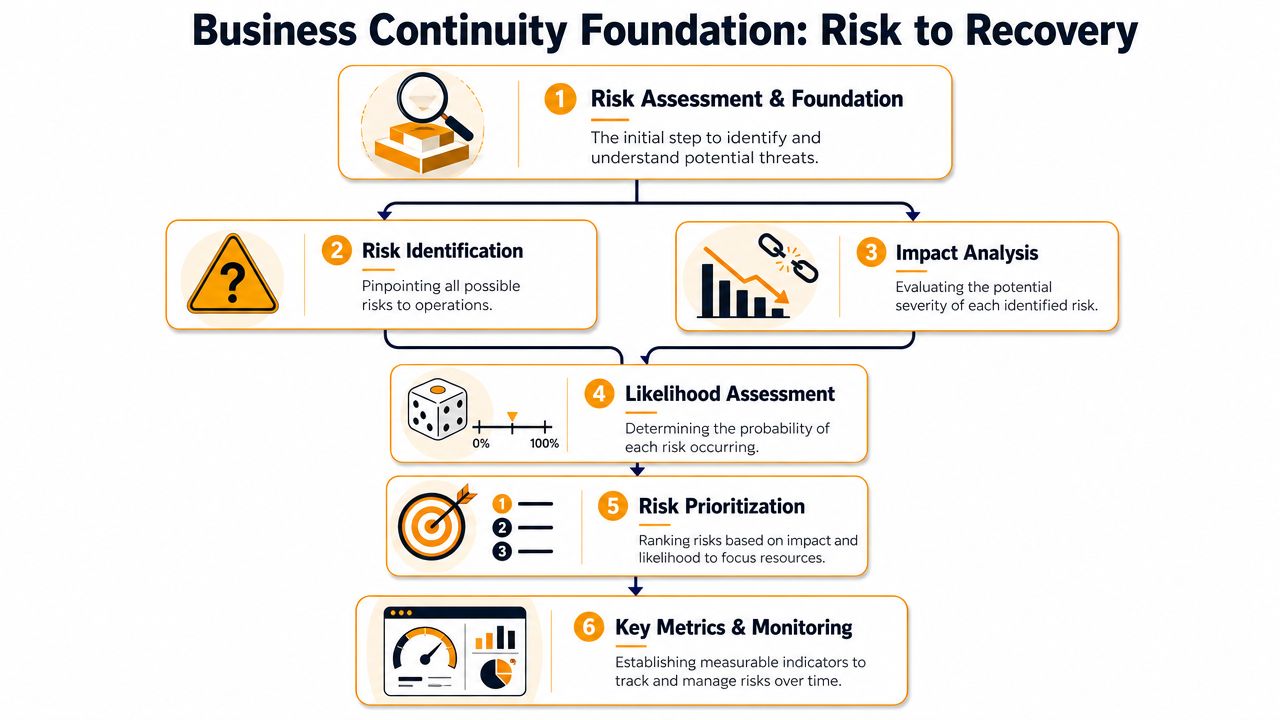
Start with business functions, not hardware
Run your BIA with plain questions:
- What must continue first: Which activities generate revenue, protect cash flow, satisfy customers, or meet legal obligations?
- Who performs the work: Name the actual employees, managers, and outside vendors involved.
- What do they need: List the apps, files, internet access, phones, printers, credentials, and approval paths required.
- What breaks the chain: Note single points of failure such as one office, one ISP, one copier, one vendor contact, or one person who knows the process.
- What's the workaround: Decide what can be done manually, remotely, or through an alternate location.
This exercise exposes the biggest mistake SMBs make. They protect data but not operations. According to Flexential's resilience overview, 94% of SMBs have backups, but only 34% have a tested business continuity plan that covers people, processes, and supply chains beyond IT restoration.
Backups protect information. Continuity protects the business.
That distinction matters because a restored server doesn't mean your staff can log in from home, your phones can ring, or your vendors can deliver.
Set RTO and RPO like an operator
Once you know what matters most, define two metrics for each critical function.
| Metric | What it means | Practical SMB example |
|---|---|---|
| RTO | Recovery Time Objective. How fast the function must be restored. | Payroll must be back by the same business day. The guest Wi-Fi can wait. |
| RPO | Recovery Point Objective. How much data loss the business can tolerate. | Losing a few minutes of point-of-sale transactions may be unacceptable. Losing a day of archived marketing drafts may be tolerable. |
Don't let these stay abstract. Put real business language behind them. “Our CRM can be down for half a day” is an RTO statement. “We can't afford to lose any signed contracts entered this morning” is an RPO statement.
Use those targets to drive investment. Fast RTOs usually require more automation, redundancy, and tested failover. Tight RPOs require more frequent replication or better recovery architecture. If you skip this step, you'll either overspend on the wrong systems or underprotect the ones that keep revenue moving.
A structured IT risk assessment for small businesses helps turn those judgments into a practical priority list. That's how you decide what needs premium resilience and what can recover later without hurting the company.
Choosing Your Technical Recovery Strategies
Technical recovery is where owners often get sold whatever a vendor likes to deliver. Don't buy recovery that doesn't match your business. The right design depends on your required recovery speed, your tolerance for data loss, your staffing, and how much complexity your team can realistically manage.
Start by separating the three common models: on-prem recovery, cloud recovery, and hybrid. None is automatically best. Each solves a different operational problem.
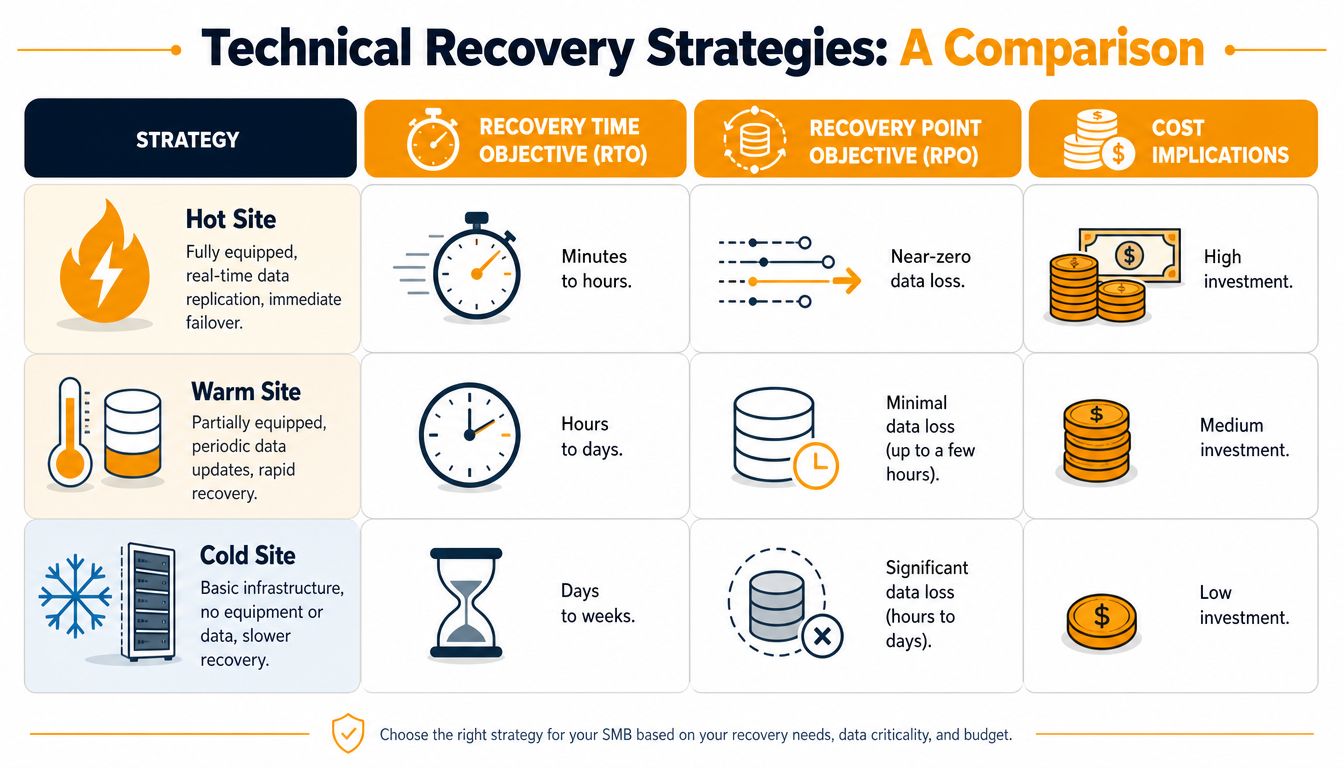
How on-prem recovery fits
On-prem recovery keeps infrastructure in your office, server room, or secondary facility. This can make sense when you run specialized line-of-business software tied to local equipment, large file workloads, or legacy applications that don't move cleanly into Azure, AWS, or Google Cloud.
On-prem works best when:
- You control a physical environment: Manufacturing, design, lab, or warehouse systems often rely on local devices and low-latency access.
- Your applications are stubborn: Some older accounting, ERP, or production systems weren't built for cloud-first recovery.
- You can support the hardware: Someone has to maintain power protection, storage, virtualization hosts, firmware, and backup infrastructure.
The downside is obvious. If the building has a power issue, flood risk, HVAC problem, or network outage, your recovery environment may suffer with it. Local recovery is only strong if the facility itself is resilient.
Where cloud recovery works best
Cloud recovery is usually the cleanest fit for companies that already work in Microsoft 365, cloud-hosted apps, VoIP, and remote collaboration tools such as Teams or SharePoint. For law firms, agencies, consulting groups, multi-location service businesses, and many professional offices, cloud-first recovery often reduces complexity.
Cloud recovery is strong when you need:
- Remote work flexibility: Staff can work from home, a temporary office, or another branch.
- Faster deployment of alternate environments: Virtual servers and cloud desktops can come online without waiting on replacement hardware.
- Less dependence on one building: A local office issue doesn't automatically shut down the whole operation.
But cloud recovery still needs planning. If identity management is weak, internet redundancy is absent, or key printers, scanners, and phone workflows still depend on the office, cloud won't save you by itself.
If your team can access the files but can't answer calls, print labels, approve payments, or authenticate into systems, recovery is incomplete.
Why hybrid is often the smart middle ground
For many Houston SMBs, hybrid is the most practical answer. You keep some workloads local for performance or equipment integration, while using cloud platforms for redundancy, remote access, and failover options. This gives you flexibility without forcing every system into one model.
Hybrid makes sense when a business has:
| Situation | Better fit |
|---|---|
| Office-dependent systems plus remote staff | Hybrid |
| Heavy local equipment or plant-floor applications | On-prem or Hybrid |
| Mostly SaaS apps and distributed teams | Cloud |
A manufacturer might keep production systems local but replicate core business apps to a cloud recovery environment. A retail business might run local network gear and payment hardware on-site while moving collaboration, email, and alternate communications into the cloud. A medical or dental office might keep certain imaging workflows local but maintain cloud-based communications and document access for continuity.
Don't stop at servers. Include every operational dependency:
- Internet connectivity: One provider is a risk. Add a secondary path where downtime hurts.
- VoIP and call routing: Ensure calls can move to mobile devices, alternate sites, or another queue.
- Wi-Fi and switching: Internal connectivity failures can stop work even when the internet is up.
- Authentication: If users can't log in, nothing else matters.
- Endpoint readiness: Laptops, VPN alternatives, remote access policies, and MFA all need to work under stress.
If you're comparing options for failover, replication, and recovery architecture, a practical disaster recovery plan for small business environments helps frame the decision. The goal isn't to buy the most advanced stack. The goal is to choose the recovery design your team can operate during a bad day.
Building Your Incident Response and Communication Plan
At 8:12 a.m., your office loses access to core systems. Staff can't sign in. Phones start ringing. A manager tells employees to use personal email. Another tells them to wait. Someone calls your IT vendor. Someone else calls the internet provider. That confusion costs time, money, and customer trust.
Business continuity breaks down here more than anywhere else. Backups may restore data later, but they do nothing for the first hour if nobody knows who can declare an incident, who approves emergency spending, or how employees should keep serving customers. Real resilience depends on decisions, accountability, and repeatable communication.
Define command before the crisis
Use a lean command structure and assign names, not job titles alone. If one person is out, name a backup.
A functional model includes:
- Incident lead: Declares the incident, activates the plan, and sets business priorities.
- Technical lead: Directs containment, recovery steps, vendor coordination, and system status reporting.
- Operations lead: Keeps work moving through manual processes, alternate tools, or temporary staffing changes.
- Finance approver: Authorizes emergency purchases, outside support, replacement equipment, or temporary workspace.
- Communications owner: Sends employee, customer, vendor, and leadership updates on a set schedule.
Keep authority clear. If a Houston business is dealing with a hurricane closure, the operations lead should not be waiting on three executives to approve a shift to remote work or a temporary service change. If it's ransomware, the technical lead should have clear authority to isolate devices fast, even when that interrupts normal work.
Write one-page action guides for each role. Include first-hour responsibilities, contact lists, escalation triggers, and decisions that role can make without asking permission. During a real incident, nobody reads a 40-page binder.
Build a Functional Communication Tree
Your communication tree needs to answer three things fast: who gets notified, who sends the message, and what channel they use if the first option fails.
One channel is not a plan. Email can be down. Your VoIP system can fail. Microsoft 365 can lock users out. Cell service can get congested during a storm. Build layered communication so one outage does not silence the company.
Use this structure:
- Primary internal channel: Emergency SMS platform, call tree, or approved mobile messaging app.
- Secondary internal channel: Personal mobile numbers, alternate email addresses, or department manager phone chains.
- Customer communication: Prewritten website alert, recorded phone message, direct outreach from account managers, or service status page.
- Vendor escalation: Internet provider, cloud provider, security vendor, payroll provider, building management, shipping partners, and legal or insurance contacts.
- Leadership reporting: Timed updates with current status, immediate business impact, next action, and pending decisions.
Keep messages short and directive. Tell people what happened, what they should do now, what they must avoid, and when the next update will arrive.
For example: “We are responding to a systems disruption. Do not log into the shared drive. Use mobile Teams only. Managers will receive the next update at 10:30 a.m.”
That message works because it reduces risk and gives people a clock. Long explanations create side conversations and bad decisions.
Store your contact list, account numbers, policy details, escalation paths, and message templates in an offline-accessible format. Print it. Save an encrypted copy outside your production environment. If your team can only reach the plan through the systems that are down, you do not have an operational plan.
Testing and Maintaining Your Continuity Plan
Your office loses power during a Houston storm at 8:10 a.m. Internet drops. VoIP phones fail. One manager knows the workaround, two key employees are out, and nobody has tested whether accounting, customer service, and operations can keep working from alternate locations. That is how a backup strategy fails a business. The files may survive, but the work stops.
Testing separates data recovery from operational resilience. If your team cannot process orders, answer customers, approve payments, and switch to manual workflows under pressure, your continuity plan is incomplete.
According to Pipedrive's business continuity planning analysis, 60–70% of business continuity plans fail during actual disruptions due to untested assumptions. The same analysis says organizations that conduct quarterly tests and annual full-scale simulations achieve 40% faster recovery times and 35% lower data loss rates. The point is simple. Repetition exposes bad assumptions before a hurricane, cyberattack, or system outage does it for you.
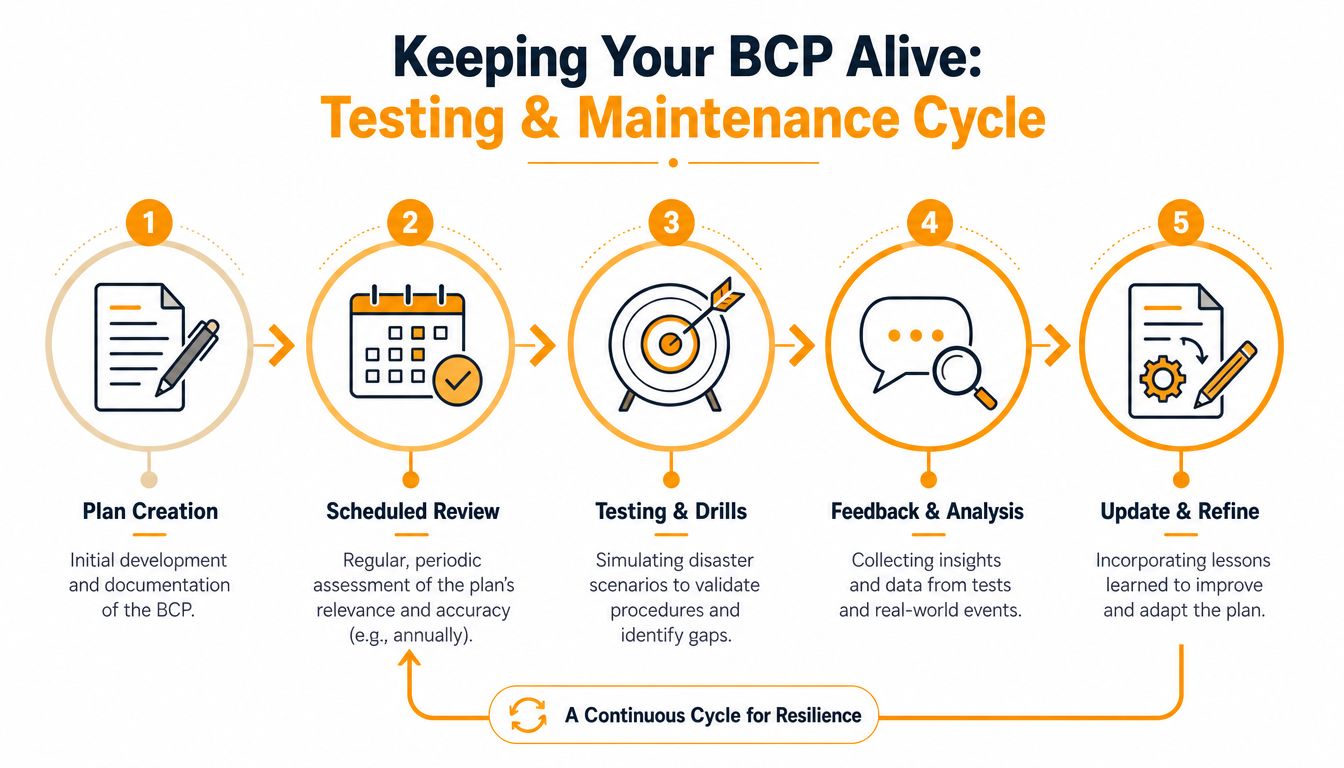
Use a testing rhythm your team will follow
Skip the once-a-year exercise that checks a box and teaches nobody anything. Set a schedule your managers can keep, then run it the same way every time.
Use this cadence:
- Quarterly tabletop exercises: Walk through one realistic scenario at a time. Hurricane closure. Ransomware event. ISP outage. Microsoft 365 disruption. Force each department to answer what happens in the first hour, by midday, and by the next business day.
- Twice-annual functional drills: Test one capability at a time, such as VPN capacity, call forwarding, payroll processing, restoring a key application, or shifting a department to a paper-based or alternate workflow.
- Full-scale simulations every 1 to 2 years: Run a broader exercise that tests people, process, vendor response, communications, and technical recovery together.
That cadence is practical for small and midsize businesses because it tests how the company operates, not just whether IT can restore a server.
Update the plan when the business changes
A continuity plan goes stale fast. New software, new vendors, staffing changes, and office moves all change your recovery path. If you do not revise the plan after those changes, your test results are already outdated.
Review and revise your plan when any of these happen:
- New critical software: A new ERP, EMR, POS, accounting platform, or document system changes dependencies and recovery order.
- Office move or expansion: Internet circuits, power, Wi-Fi coverage, and building access procedures change.
- Leadership or staffing changes: Approval chains, escalation contacts, and backup responsibilities shift.
- Vendor replacement: New VoIP, payroll, security, cloud, or shipping providers mean new support paths and new failure points.
- Policy changes: MFA requirements, device rules, remote work expectations, and client obligations affect recovery steps.
Use a simple after-action checklist after every test:
| Ask this | Why it matters |
|---|---|
| What failed or slowed down? | Exposes weak links and unrealistic assumptions |
| Who lacked clarity? | Reveals missing roles, contact gaps, or poor instructions |
| Which systems recovered in the right order? | Confirms business priorities are correct |
| Which manual workarounds were effective? | Shows what can keep revenue moving during outages |
| What needs to be rewritten now? | Turns lessons into action before memory fades |
Test the plan the way your company earns money. If your accounting team depends on a scanner, banking portal, printed checks, and one approver's phone, test that full chain. If your sales team needs CRM access and mobile coverage to keep customer commitments during a storm, test that too.
Keep the maintenance cycle tight. Run the drill. Record what broke. Rewrite the playbook. Assign owners and deadlines. Then test again.
Insurance belongs in this review as well. A continuity plan reduces downtime, but it does not cover every financial loss tied to property damage, business interruption, or vendor failure. If you are reviewing risk transfer alongside your continuity program, this guide to Southeast commercial insurance options is a useful reference for broader coverage decisions.
Compliance Vendors and Partnering for Success
Continuity planning gets sharper when compliance enters the picture. If you handle protected health information, payment data, legal records, financial records, or contractual uptime requirements, continuity isn't just a best practice. It becomes part of how you satisfy client obligations and withstand audits.
Compliance changes the stakes
HIPAA, PCI-related obligations, customer security questionnaires, and contractual recovery expectations all push you toward documented procedures, defined controls, and evidence of testing. The exact requirements vary by industry and agreement, but the business lesson is consistent. If a regulator, client, or insurer asks how you maintain operations during disruption, “we back up our files” won't be enough.
Insurance also belongs in this conversation. A continuity strategy reduces damage, but it doesn't replace financial protection. If you're reviewing risk transfer options alongside your technical plan, this guide to Southeast commercial insurance options is a useful reference point for business owners evaluating broader coverage decisions.
Formal programs produce better outcomes. According to Arcserve's summary of business continuity statistics, business continuity management programs improve disaster recovery rates by as much as 17 percent. That's a strong argument for moving beyond ad hoc IT fixes and into a managed, documented, and regularly reviewed process.
Choose partners that can execute under pressure
When you evaluate technology vendors or service partners, ask better questions. Don't ask only what features they sell. Ask how they support continuity under real conditions.
Use criteria like these:
- Response capability: Can they support an active incident, not just open a ticket?
- Documentation quality: Do they provide runbooks, escalation paths, and recovery procedures your team can effectively use?
- Testing support: Will they help run drills, restore systems, and validate changes?
- Breadth of coverage: Can they coordinate cloud, endpoint, network, identity, Microsoft 365, VoIP, and on-site dependencies?
- Local practicality: Do they understand what a Houston business faces with weather disruptions, local ISP issues, and multi-site operations?
A strong continuity partner should help you connect all the moving parts. Backup retention. Failover design. MFA and identity recovery. Network redundancy. VoIP rerouting. Device readiness. Vendor escalation. Compliance documentation. That work is too interdependent to manage as isolated projects.
Here's my opinion. Most SMBs should not try to coordinate continuity planning entirely on their own. Owners are busy. Internal admins are overloaded. Department leaders know operations but often don't know the technical recovery chain. That's why outside structure matters. The right managed services partner brings discipline, testing, documentation, and accountability that most small teams can't sustain internally.
If your current provider only talks about antivirus, backups, and helpdesk tickets, that's not enough. Business continuity strategies require operational thinking. They have to protect how the company functions, not just how the data is stored.
If you want a Houston-based team to help you build, test, and maintain a continuity plan that covers people, process, cloud systems, networks, communications, and recovery operations, talk to IT Cloud Global, LLC. They support SMBs that need practical resilience, not generic advice, with managed IT, disaster recovery, cybersecurity, cloud, Microsoft 365, networking, and responsive local support.
- How to Prevent Data Breaches: A Practical Playbook for SMBs
- Remote Desktop IT Support Guide 2026
- Vulnerability Scanning Services Explained for SMBs
- How to Choose a Texas Outsource IT Service
- Houston IT Support: A 2026 Guide for SMBs
- Computer Service Near Me: A Houston Buyer’s Guide
- 7 Best Managed IT Services Houston TX Reviews (2026)