


Network Cabling Services Houston: Top Providers & Guide
Your internet upgrade is done. The Wi-Fi is new. The phones moved to VoIP. Everyone expected the office to feel faster.
Instead, video calls freeze, shared folders drag, and the same desks keep opening IT tickets. On paper, the business has modern tools. In practice, the network still feels fragile. That usually points to one place most owners never see: the cabling behind the walls, above the ceiling, and inside the telecom room.
That's why smart buyers looking for network cabling services in Houston shouldn't stop at “Can you install Cat6?” The better question is, “How will you prove every drop performs the way it's supposed to after the install is complete?” Houston businesses often find that vendors skip that final proof step. A 2025 BICSI report found 73% of IT projects fail to include structured cabling certification reports, which leaves SMBs exposed to hidden problems that can turn into downtime within 12 months, as noted by Enter-sys on reliable network cabling services in Houston.
Table of Contents
- Is Your Houston Business Outgrowing Its Network
- The Building Blocks of a High-Performance Network
- Beyond Speed The Real ROI of Professional Cabling
- From Site Survey to Certification The Installation Process
- Navigating Costs Timelines and Houston Compliance
- How to Choose the Right Houston Cabling Provider
- Your Project Prep Checklist for a Smooth Installation
- Frequently Asked Questions About Network Cabling
Is Your Houston Business Outgrowing Its Network
Most businesses don't notice cabling until the network starts getting blamed for everything. Staff move desks and suddenly lose stable connectivity. A new cloud app goes live and file access feels inconsistent. The phone system works fine in one suite and poorly in another.
That pattern matters. If the same parts of the office always have trouble, the issue often isn't your internet circuit or your software license. It's the physical path your data has to travel.
Common signs the foundation is the problem
A strained network usually shows up in business symptoms first:
- Meetings break down: Video calls stutter, audio clips, or shared screens lag during client conversations.
- Moves create headaches: Adding a workstation, printer, access point, or camera turns into trial and error.
- Tickets repeat: The same users report dropped connections, slow transfers, or unreliable phones.
- Growth exposes weak spots: More devices go online, but the office infrastructure wasn't designed for the added load.
Bandwidth works a lot like lanes on a freeway. When too many vehicles merge into a road with bottlenecks, traffic doesn't fail all at once. It slows unevenly, then backs up at the same choke points. Poor cabling behaves the same way.
A business can buy faster internet and still keep the same internal traffic jam if the in-building cabling is disorganized, poorly terminated, or undocumented.
Why software fixes often miss the real cause
Owners often approve upgrades in the visible parts of IT first. New laptops. New firewall. Better Wi-Fi access points. Those can help, but they won't correct bad terminations, mislabeled runs, damaged cable, or undocumented pathways.
A structured cabling project solves a more basic problem. It gives your office a clean, organized, testable physical network that can support phones, wireless access points, workstations, cameras, and future expansion without guesswork.
That matters in Houston, where many businesses are growing inside mixed-use buildings, renovated offices, warehouses, clinics, and multi-suite spaces with very different cabling conditions hidden above the ceiling.
The Building Blocks of a High-Performance Network
A high-performance network starts with physical design that stays organized after the installers leave. Business owners usually notice the switch brand, internet speed, or Wi-Fi coverage first. The part that decides whether those investments hold up is the cabling underneath, especially how it is terminated, labeled, tested, and documented.
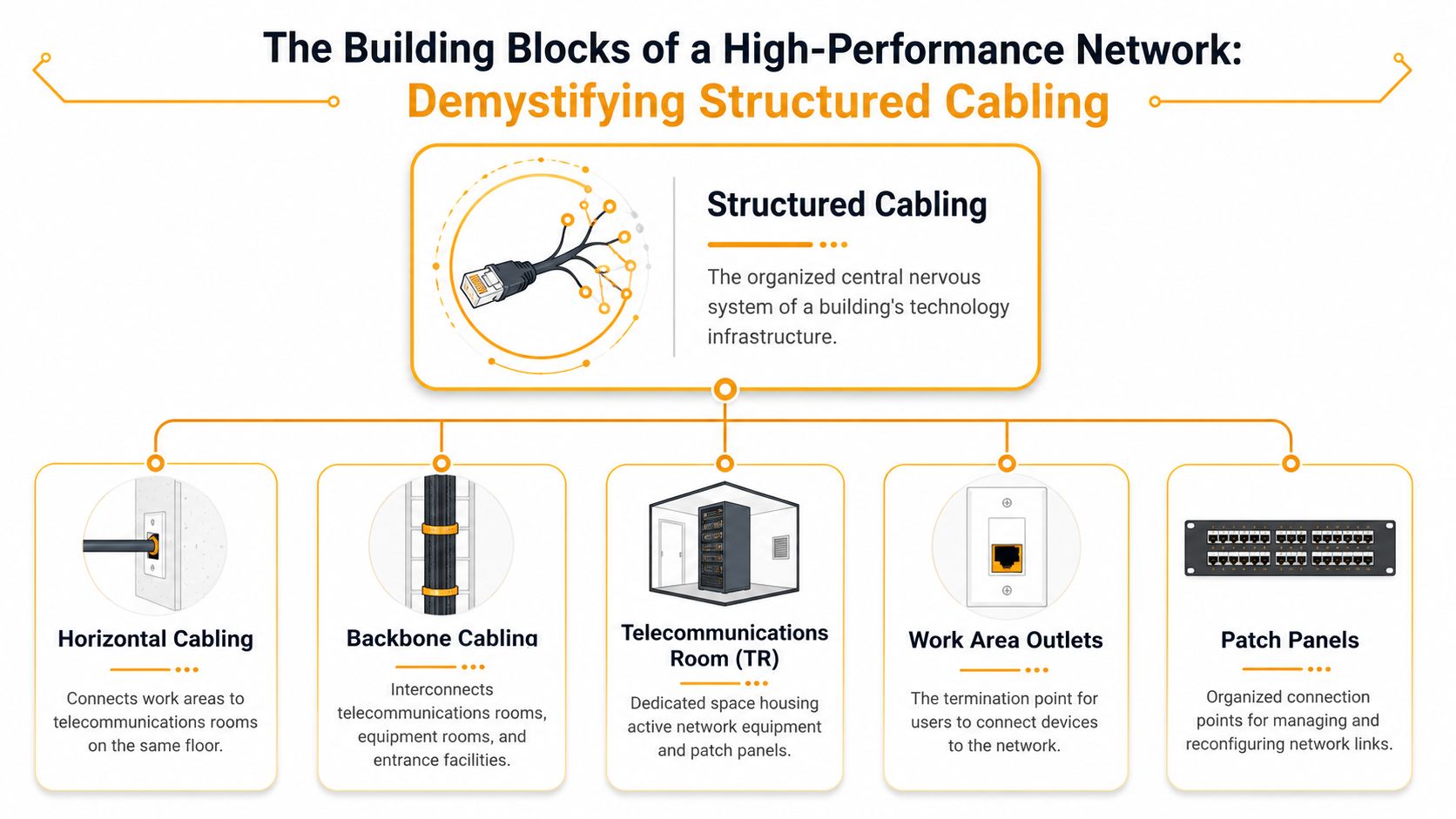
Structured cabling is the building's signal path. It connects users, devices, telecom rooms, and backbone routes in a layout your IT team can support without guesswork.
The core pieces are straightforward:
- Horizontal cabling: Cable runs from the telecom room to desks, offices, conference rooms, printers, and other endpoints on the same floor.
- Backbone cabling: The main links between telecom rooms, equipment rooms, and service entry points.
- Patch panels and terminations: Organized connection points that make tracing, testing, and future changes faster and safer.
- Work area outlets: The wall or floor ports where staff connect phones, computers, and other devices.
- Telecommunications rooms: The spaces that hold switches, patch panels, and supporting hardware.
What matters is how these parts work together in daily operations. A clean layout shortens troubleshooting time. Labeled patch panels reduce mistakes during moves or adds. Well-planned pathways leave room for another access point, camera, or department without opening ceilings again.
Media choice matters too. Copper and fiber solve different business problems, and good providers explain that trade-off in plain language.
| Cable type | Best fit | Strength |
|---|---|---|
| Cat6 copper | Workstations, phones, access points, standard office runs | Lower cost for endpoint connections, simple to patch, widely supported |
| Fiber optic | Uplinks, long runs, noisy environments, building-to-building links | More headroom, longer reach, no electrical interference |
Interference is easier to understand with a simple comparison. Copper works like a conversation in a busy restaurant. Good installation helps, but nearby electrical noise can still interfere. Fiber carries data as light, so that surrounding electrical noise does not affect the signal in the same way.
That difference shows up in real Houston projects. Warehouses, medical suites, manufacturing areas, and multi-tenant buildings often have equipment, power density, or run lengths that push copper toward its practical limits. Fiber is often the better fit for backbone links, while copper still makes sense at desks and other endpoint locations.
The part many providers rush past is validation. A cabling system is not finished because the lights come on. It should be certified, with test results tied to labeled runs so you can prove each link meets the standard you paid for. Without that documentation, future slowdowns and intermittent issues become harder to isolate, and warranty claims get murky.
If you're also planning surveillance along with data cabling, it helps to understand choosing between IP and analog CCTV, because camera systems affect cable pathways, switch capacity, and power planning.
For a broader view of how cabling fits into switching, wireless, and office layout, this guide on how to set up a business network is a useful reference.
Beyond Speed The Real ROI of Professional Cabling
A cabling project rarely gets approved because someone loves cable. It gets approved because leaders are tired of instability, wasted troubleshooting time, and upgrades that don't stick.
What poor cabling costs in real operations
Bad cabling creates soft costs that don't show up in a single invoice. Staff wait on file transfers. Calls get repeated. Conference room tech gets a reputation for being unreliable. IT teams burn hours tracing unlabeled runs or figuring out why one side of the office keeps dropping off the network.
Those costs pile up because physical issues are slow to diagnose. A flaky patch cord looks like an application issue. A poor termination can mimic a switch problem. An undocumented cable path turns every move, add, or change into detective work.
Practical rule: If troubleshooting always starts with “Let's see which port that goes to,” the cabling system is costing you money already.
Professional cabling cuts friction in places owners care about: uptime, user confidence, and predictability. It also gives maintenance teams something they can support without guessing. That's where a solid network maintenance service becomes more effective, because the physical layer underneath it is organized and documented.
Why good infrastructure buys flexibility
The best return often comes later. A clean cabling plant makes it easier to add desks, deploy phones, move departments, roll out access points, or expand surveillance without reworking everything above the ceiling.
It also supports the way modern offices operate:
- VoIP needs consistency: Voice traffic doesn't tolerate messy physical links well.
- Cloud apps need stable paths: Users experience cabling problems as “slow software.”
- Wi-Fi still depends on wires: Every access point needs a reliable backhaul.
- Smart building devices multiply quickly: Cameras, door systems, AV gear, and sensors all consume ports and pathway space.
Future-proofing doesn't mean buying the most expensive option everywhere. It means designing the right pathways, cable types, labeling scheme, and spare capacity so growth doesn't force a disruptive rebuild.
From Site Survey to Certification The Installation Process
A good cabling project feels boring in the best way. There are no surprises, no mysterious holes in the wall, and no handoff that leaves your team asking what was installed.
What happens before the first cable is pulled
The process starts with a site survey. Technicians walk the space, inspect ceilings and pathways, locate telecom rooms, and identify constraints such as concrete walls, shared risers, finished interiors, or active business areas that need special scheduling.
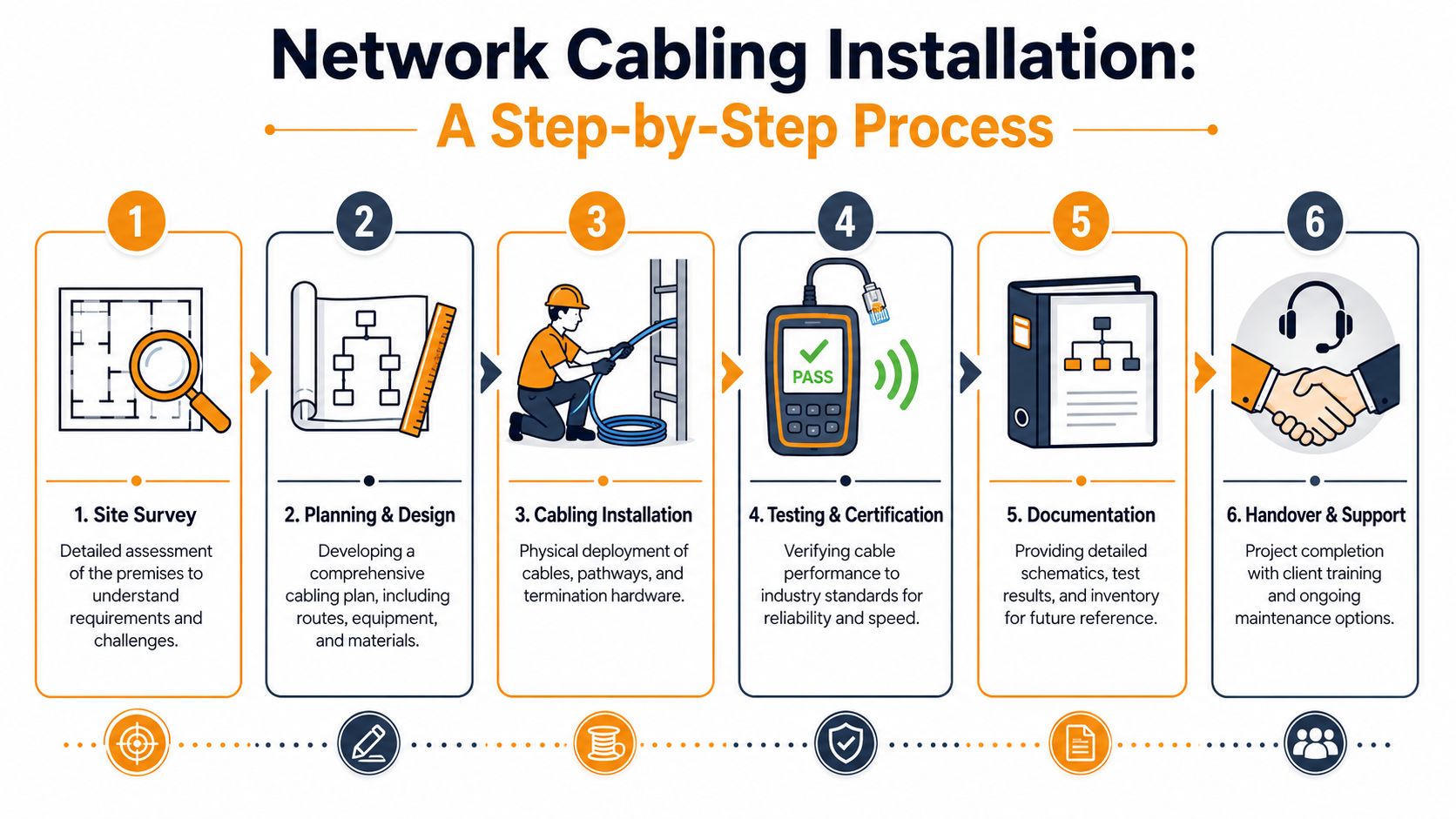
A proper design phase follows. That should define outlet locations, cable routes, rack layout, patch panel assignments, labeling conventions, and whether certain runs should be copper or fiber. If you want a second example of how contractors describe the work itself, review REDCHIP IT SOLUTIONS structured cabling and compare their scope language to other proposals you receive.
During installation, crews pull cable through approved pathways, maintain bend radius, avoid physical stress, terminate each end correctly, and install plates, panels, and rack hardware in an organized way. Clean cable dressing matters. It isn't cosmetic. It protects serviceability.
Here's a visual walkthrough of the overall lifecycle:
Why certification matters more than most proposals admit
This is the part many buyers miss. “Testing” and “certification” are not the same thing.
Basic testing may only confirm that a wire map is correct and the connection is live. Certification goes further. It verifies that the installed run meets the performance standard it was sold as, such as Cat6. That includes checking whether the cable can support the expected transmission characteristics under accepted industry criteria.
A serious handoff should include:
- Per-drop test results tied to cable labels.
- A labeling map that matches patch panels, outlets, and room locations.
- As-built documentation showing what changed from the original plan.
- Material records so future support teams know what was installed.
If a provider says “everything passed” but can't hand you organized results for each run, you're being asked to trust what should be proven.
Documentation is what turns an installation into an asset. Without it, the next office move or outage starts from zero.
Navigating Costs Timelines and Houston Compliance
Budget surprises usually show up after the quote is signed. The cable itself is rarely the problem. Labor, access, closeout requirements, and the condition of your building decide whether a project stays on budget and on schedule.

What actually drives price
A per-drop price helps with early budgeting, but it is only a rough planning number. One 60-drop office can be straightforward. Another 60-drop job in a renovated suite with hard ceilings, limited pathways, and an overcrowded telecom room can take far more labor and coordination.
Cost usually moves on five factors:
- Cable type and hardware: Copper and fiber solve different problems and come with different connectors, patch panels, and testing requirements.
- Pathway access: Open ceilings, conduit availability, risers, and wall construction change labor fast.
- Work environment: Occupied offices, healthcare spaces, and warehouses often require after-hours work, lift access, dust control, or tighter safety procedures.
- Closet readiness: If the rack, grounding, power, or cable management is unfinished, the install crew ends up doing correction work before new runs can be turned up.
- Closeout expectations: Labeling, certification, and as-built records add labor up front, but they cut support costs later.
Bandwidth works like lane capacity on a freeway. Buying faster cable is only part of the equation. If pathways are congested, terminations are sloppy, or the handoff includes no records, your network can still behave like rush hour traffic.
Schedule works the same way. Small projects can move quickly when access is open and decisions are made early. Larger jobs slow down at inspection points, coordination with property management, permit requirements, and final documentation. The physical pull is only one part of the calendar.
If you are comparing proposals from structured cabling contractors for Houston business environments, ask what is included in closeout. Two bids can look similar until one includes certification reports, labeling maps, and corrected as-builts, while the other stops at punch-down and tone test.
Houston compliance is part of the real project cost
Houston compliance affects maintainability, inspection readiness, and future troubleshooting. It is not clerical work.
For many commercial projects, the practical standard is Cat6 for horizontal copper and fiber for backbone links, based on distance, bandwidth, and growth plans. The bigger issue is whether the installer leaves behind a system your IT staff can support. That means consistent labeling, documented pathways, identified patch panel positions, and post-installation test records that match each drop.
Those requirements matter because troubleshooting without documentation turns every outage into detective work. I have seen businesses lose hours tracing one mislabeled run that should have been identified on day one. Interference and signal loss are hard enough to isolate. Missing records make a simple service call longer and more expensive.
Your proposal should spell out more than install labor and materials. It should state who handles permits if they are needed, what standards the labeling will follow, what level of testing will be delivered, and whether you will receive usable closeout documents at turnover.
Low bids often leave out the proof. If a provider cannot show how each cable will be labeled, tested, and documented, the savings are usually temporary.
How to Choose the Right Houston Cabling Provider
The Houston market has plenty of companies that can pull cable. Fewer can design a clean system, install it to standard, certify it properly, and leave you with documentation your next IT team can use.
Questions that separate pros from installers
Start with process, not price. Ask each provider what happens after the last jack is terminated.
A strong shortlist should answer these questions clearly:
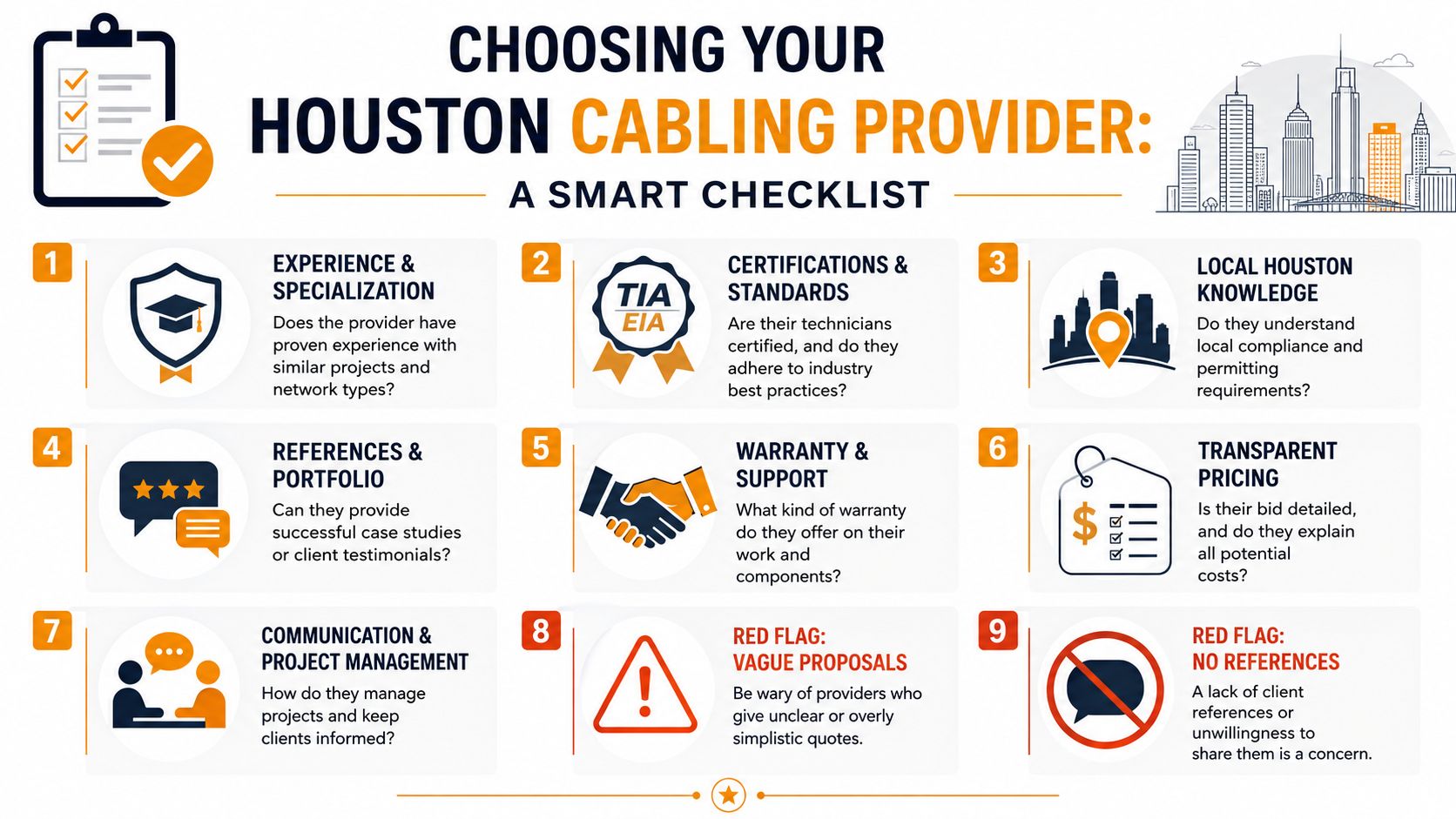
- Who oversees design quality? Ask whether they have a Registered Communications Distribution Designer involved in the project lifecycle.
- What testing do you provide? Ask for sample certification reports, not just a verbal promise.
- How do you label and document the install? The answer should include panel IDs, outlet IDs, floor plans, and as-built records.
- How do you handle adds and changes later? Good providers build systems that remain manageable after move-ins and department shifts.
- What building types do you know well? Office, retail, healthcare, warehouse, and mixed-use environments all have different field realities.
Projects with oversight from a Registered Communications Distribution Designer (RCDD) demonstrate 30% higher certification pass rates and significantly lower failure rates, according to the University of Houston cabling standards document. That matters because cable pathways, termination practices, and physical handling affect the outcome before the tester ever comes out.
What a strong proposal should include
A real proposal should read like a build plan, not a vague promise. If you want a benchmark for what a specialized provider category looks like, compare vendors against firms focused on structured cabling contractors.
Look for these signs of maturity:
| Good sign | Why it matters |
|---|---|
| Defined scope | You can see exactly what spaces, drops, pathways, and hardware are included |
| Testing deliverables listed | It confirms validation is part of the job, not an optional add-on |
| Documentation called out | It reduces future support confusion |
| Clear assumptions | You learn what access, patching, permits, or after-hours work may change price |
| Change process | It prevents surprise billing during the job |
Red flags are usually obvious once you know what to ask. Vague drop counts. No mention of certification. No sample labels. No explanation of how rooms, racks, or pathways will be documented.
Buy the provider who can explain failure prevention. Not the one who only talks about pulling cable fast.
Your Project Prep Checklist for a Smooth Installation
The smoothest cabling jobs happen when the business does a little preparation before the crew arrives. That doesn't mean doing technical work. It means removing preventable obstacles.
Before the crew arrives
Use this checklist to make the install cleaner and faster:
- Mark business priorities: Identify the offices, desks, conference rooms, cameras, wireless access points, printers, and specialty equipment that matter most.
- Name one decision-maker: The installers need a single point of contact who can approve outlet placement, room access, and small field adjustments.
- Open access paths: Make sure telecom rooms, storage areas, wall spaces, and ceiling access points are reachable.
- Flag scheduling constraints: Let the provider know when executive meetings, patient appointments, retail hours, or warehouse operations limit noisy work.
- Share future plans: If a department expansion or office reconfiguration is already likely, say so before the final drop map is locked.
A small amount of prep can prevent expensive rework. The crew can install what's needed now, while reserving sensible capacity and pathway options for what's coming next.
During the install window
Once work starts, your role is mostly coordination:
- Tell staff what to expect: People handle brief disruption better when they know where crews will be working.
- Confirm outlet locations early: It's easier to move a plan on paper than after a faceplate is mounted.
- Keep change requests organized: Route all adjustments through the same contact person.
- Review closeout items before signoff: Ask for labels, test results, and as-built records while the details are still fresh.
One practical habit helps a lot. Walk the finished rooms with the installer before final completion. You don't need to judge technical quality by sight. You just need to verify that what was requested is physically where it should be.
Frequently Asked Questions About Network Cabling
Can we keep some of our existing cabling
Sometimes, yes. It depends on cable condition, category, pathway quality, termination quality, and whether the existing runs still match your current needs. Reusing cabling can make sense when the installed plant is orderly, accessible, and appropriate for the devices you're supporting.
What doesn't work is assuming old cable is “probably fine” because link lights come on. If the goal is reliable phones, cloud applications, access points, and room systems, reused runs should still be evaluated carefully and validated before they become part of the new design.
Do we need plenum cable in a Houston office
That depends on the building environment and the pathways the cable will occupy. Plenum-rated cable is typically used where air-handling spaces require it, while non-plenum cable may be acceptable in other areas depending on code and building design.
Your provider shouldn't guess. They should inspect the site, review pathway conditions, and use the appropriate cable type for the space. This is one of those details that affects both compliance and safety, so it needs a field-based answer, not a generic one.
What if the building is older or architecturally sensitive
Older buildings require more planning and usually more patience. Crews may need to preserve finishes, avoid visible disruption, work around limited pathways, and coordinate carefully with building management.
In those spaces, good design matters as much as labor skill. Sometimes the best route isn't the shortest one. It's the path that protects the building, keeps the install neat, and still leaves the network maintainable after the project is done.
Should every new drop be certified
If you're paying for professional structured cabling, that's the standard you should expect. Certification is how you verify the installed run performs to the level it was sold as, and it gives your business a record to reference later if problems appear.
Without that proof, you're relying on assumptions. That may feel cheaper at handoff, but it usually gets more expensive when your team starts troubleshooting unexplained network issues months later.
What should I receive at project closeout
At minimum, you should expect clear labels, a record of what was installed, and organized test results that correspond to those labels. For larger projects, you should also expect updated floor plans or as-built documentation showing where the runs terminate and how they were assigned.
That closeout package is part of the deliverable. It isn't extra polish. It's what makes the network supportable after the installers leave.
If your business needs dependable cabling, Wi-Fi, cloud support, security, and day-to-day IT operations under one roof, IT Cloud Global, LLC provides Houston organizations with practical engineering, responsive support, and structured infrastructure work that's built to stay manageable long after installation day.
- IT Security Services Houston TX: Essential for Your SMB In
- Top IT Services Houston TX: Your 2026 SMB Guide
- Managed IT Services Houston TX: 2026 Guide for SMBs
- Cloud Computing Solutions for Small Business: Houston 2026
- Managed IT Services for Small Business Near Me: Houston
- Top Managed Services Provider Houston: Your 2026 Guide
- Integrated Communication Services for Houston SMBs in 2026