


Cloud Computing Solutions for Small Business: Houston 2026
If you're running a small business in Houston, there's a good chance your IT setup feels patched together. One server in the office. Microsoft 365 in the cloud. Shared files in too many places. Backups that someone assumes are working. Then a storm rolls in, the internet gets unstable, or a workstation dies, and suddenly "we've always done it this way" becomes expensive.
That's usually when business owners start looking seriously at cloud computing solutions for small business. Not because the term sounds modern, but because the old setup keeps creating avoidable risk. You need systems your team can access from anywhere, data that's protected even when the office isn't, and costs you can plan for without surprise hardware failures.
Table of Contents
- Why Your Houston Business Needs a Cloud Strategy Now
- Demystifying the Cloud SaaS PaaS and IaaS Explained
- The Real-World Benefits and Risks of Cloud Computing
- Navigating Cloud Security and Compliance Requirements
- Understanding Cloud Costs and Calculating Your ROI
- Your Cloud Migration and Vendor Selection Checklist
- The IT Cloud Global Advantage for Houston Businesses
- Frequently Asked Questions About Cloud Solutions
Why Your Houston Business Needs a Cloud Strategy Now
A lot of Houston companies don't start with a cloud strategy. They inherit one by accident. The accounting team uses QuickBooks online. Sales works in Microsoft 365. A line-of-business app still lives on an aging office server. Remote access depends on a VPN that works fine until it doesn't.
That hybrid-by-accident model creates friction. Your staff wastes time hunting for files, your support costs become unpredictable, and hurricane season exposes every weak point in a setup that still depends too heavily on one physical location. A cloud strategy fixes that by deciding what belongs where, who manages it, how it's secured, and how your business keeps operating when something goes wrong.
The market has already moved. 61% of small businesses now run over 40% of their core workloads in the cloud, according to DTP Group's cloud computing statistics roundup. The same source says SMBs are projected to allocate more than half of their technology budgets to cloud services in 2026, which tells you this isn't a side project anymore. It's becoming the default operating model.
Practical rule: If your business already depends on cloud apps, shared files, remote access, and off-site communication, you already have cloud risk. You just may not have cloud governance.
For many owners, the right next step isn't a full rip-and-replace. It's getting a clear inventory of what you use today, what's creating risk, and which systems should move first. If you're evaluating options, a good reference point is this overview of cloud IT services, which helps frame what managed cloud support should include beyond simple hosting.
A good strategy does three things. It reduces operational fragility, improves access for your team, and gives you a roadmap instead of another reactive IT purchase.
Demystifying the Cloud SaaS PaaS and IaaS Explained
Cloud terms lose people fast because vendors use them like everyone should already know what they mean. Most small business owners don't need textbook definitions. They need to know what they're buying, what they're responsible for, and how much control they'll have.
A simple analogy works better than technical jargon.
A simple way to think about each model
Think about pizza.
With SaaS, or Software as a Service, you order a fully made pizza. It arrives hot, boxed, and ready to eat. You don't manage ingredients, cooking, or cleanup. In business terms, that's Microsoft 365, QuickBooks Online, Salesforce, Dropbox, or Zoom. You log in and use the application.
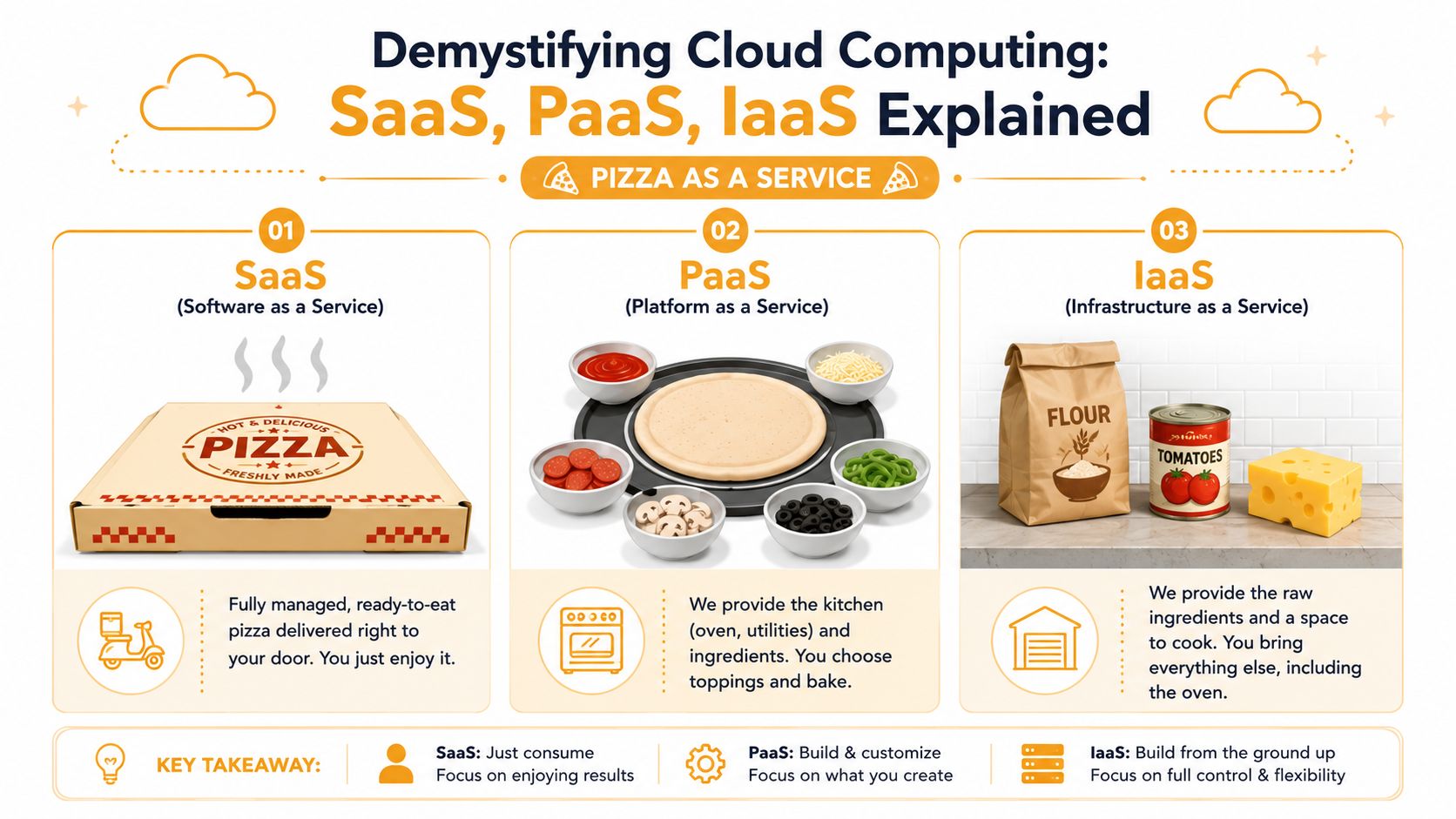
With PaaS, or Platform as a Service, someone gives you the kitchen, oven, and ingredients. You still decide how the pizza gets made. In business terms, this is useful when your company has a developer or software vendor building custom apps without wanting to manage underlying servers. Microsoft Azure App Service and Google App Engine fit this model.
With IaaS, or Infrastructure as a Service, you get raw infrastructure. Virtual servers, storage, networking. You still have to install, configure, secure, patch, and maintain the systems that run on top of it. Amazon EC2 and Azure Virtual Machines are common examples. This gives you flexibility, but it also gives you more responsibility.
A short explainer can help if you want to visualize the difference before making any platform decisions.
Which model fits a small business
Most small businesses should start with SaaS first, use IaaS selectively, and adopt PaaS only when a custom application justifies it.
Here's the practical version:
| Model | Best fit | What usually goes wrong |
|---|---|---|
| SaaS | Email, collaboration, CRM, accounting, document storage | Teams assume vendor security covers everything |
| PaaS | Custom apps maintained by a developer or software firm | Nobody defines who owns updates, logs, or access reviews |
| IaaS | Legacy app hosting, virtual servers, specialized workloads | Businesses lift and shift a bad server into the cloud and keep all the same problems |
That last mistake is common. Moving a messy server into Azure or AWS doesn't modernize it. It just changes where the problem lives.
The best cloud setup for a small business is usually boring. Standardized apps, clean permissions, documented backups, and only enough infrastructure to support what your business actually needs.
If you're weighing architecture options for regulated or multi-site operations, this guide on public, private, and hybrid cloud choices for Houston companies is worth reviewing before you commit to a provider.
The Real-World Benefits and Risks of Cloud Computing
Cloud adoption helps when it removes operational drag. It hurts when businesses treat it like a magic fix. Both are true, and both matter.
What works well in practice
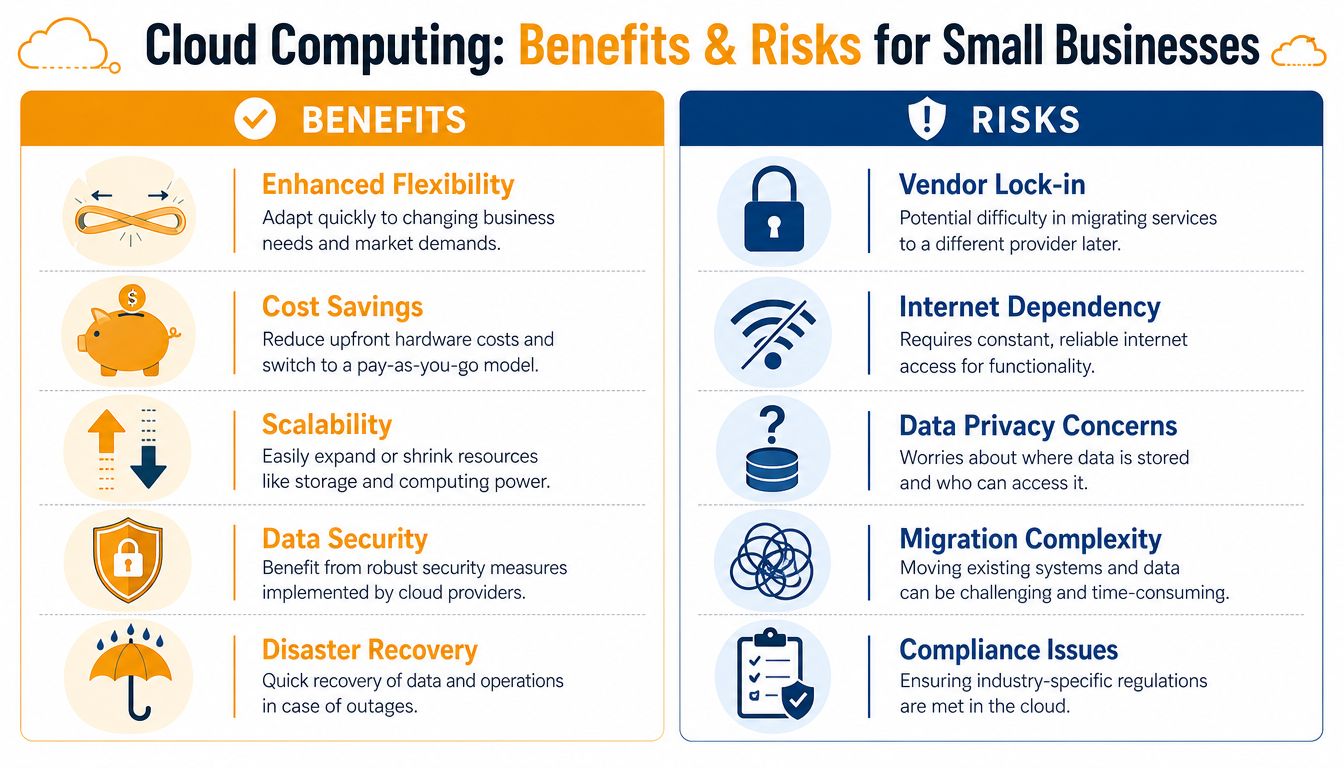
The strongest benefit is flexibility. Your team can work from the office, from home, or from the road without being tied to one server closet. That matters for Houston businesses dealing with weather disruptions, field staff, satellite offices, and owners who need visibility after hours.
Cloud systems also scale more cleanly than traditional hardware. If you hire, open another location, or add a new software platform, you can usually expand faster than you could with on-premise equipment. Disaster recovery improves too, especially when backups, file storage, email, and endpoint management are built into a single operating model instead of scattered tools.
Where small businesses get burned
The cloud creates new risks when nobody owns the details.
A company signs up for a few services, syncs files across devices, turns on remote access, and assumes that means they're protected. Then permissions sprawl. Subscription costs creep up. Former employees still have access to one forgotten system. A vendor change becomes painful because all your workflows depend on one ecosystem.
The common trouble spots look like this:
- Vendor lock-in: Your data, workflows, and user training get tied to one provider, which makes switching harder later.
- Internet dependency: If your connectivity is unstable, your operations can slow down fast.
- Migration confusion: Some applications move cleanly. Others need redesign, replacement, or a hybrid workaround.
- Weak governance: Cloud tools are easy to buy and easy to mismanage.
- Compliance gaps: A secure platform still needs secure configuration and documented controls.
Cloud is usually a better operating model than aging on-premise infrastructure. It's not automatically a better-managed model.
That's why good cloud computing solutions for small business always combine technology with policy. Access control, vendor oversight, backup validation, cost review, and security configuration matter just as much as the platform itself.
Navigating Cloud Security and Compliance Requirements
Security gets most of the attention. Compliance usually gets the surprise bill.
That's especially true for Houston businesses in healthcare, legal, financial services, professional services, and any company handling sensitive client information. A lot of cloud providers market secure infrastructure. That doesn't mean your environment is compliant the moment you subscribe.
Compliance is not included by default
The issue is responsibility. The provider secures parts of the stack. You still own your users, your data handling, your access rules, your retention practices, and the way systems are configured. That shared responsibility model is where many small businesses get stuck.
A 2026 Gartner report found that 68% of SMBs delayed cloud adoption due to unclear regulatory responsibilities between providers and customers, as cited by CompassMSP's discussion of cloud use for businesses. That same source notes the pressure regulated businesses face around HIPAA, SOC 2, and GDPR when they migrate.
If you store medical records, financial documents, legal files, HR records, or customer data with contractual handling requirements, the question isn't just “Is this platform secure?” Rather, the question is “Can we prove our controls, and are they designed correctly for our obligations?”
What regulated Houston businesses should do differently
The answer is rarely all-public-cloud or all-on-premise. In many cases, a hybrid cloud design makes more sense. Sensitive data can remain in a tightly controlled private environment while less sensitive workloads, collaboration tools, and business apps run in public cloud platforms.
That approach works when it's deliberate. It fails when businesses split systems across locations without a clear security model.
Use this checklist before you move regulated workloads:
- Map the data first: Know what information you hold, where it lives, and which systems touch it.
- Define control ownership: Document which safeguards the provider handles and which your team or MSP manages.
- Limit administrative access: Too many global admins create avoidable exposure.
- Review logging and retention: If you can't trace access or changes, you'll struggle during an audit or incident review.
- Treat compliance as architecture: It should shape platform design, not get bolted on after migration.
A practical starting point is reviewing your security baseline against a cloud-specific framework. This resource on cloud security and compliance lays out the kinds of safeguards businesses should confirm before moving sensitive systems.
A compliant cloud environment isn't something you buy off the shelf. It's something you design, document, and maintain.
Understanding Cloud Costs and Calculating Your ROI
You move email, files, and a line-of-business app to the cloud. The monthly bill looks reasonable for the first 60 days. Then extra storage shows up, backup retention grows, a few unused licenses stay active, and one regulated system needs tighter controls than the base plan includes. That is where small businesses in Houston often misread cloud economics. The problem is not the sticker price. The problem is measuring the full operating cost against the business value you realize.
Look beyond the monthly subscription
A fair cost comparison starts with everything your current setup requires to stay usable and compliant. For an on-premise environment, that includes server replacement, warranty coverage, backup software, endpoint protection, firewall subscriptions, internet redundancy, power, cooling, patching time, after-hours support, and the cost of downtime when something breaks.
Cloud changes how those costs show up. You trade large hardware purchases for recurring service fees, but you also gain new variables to manage. License sprawl, oversized virtual machines, storage that never gets cleaned up, duplicate SaaS tools, and premium security or compliance features can raise the bill fast if nobody owns cost control.
That matters even more for healthcare, legal, financial, and other regulated Houston businesses. A cheap migration that leaves out logging, retention, access reviews, or encryption controls is usually not cheap for long. You either add the missing controls later, or you pay for the gap during an audit, a security incident, or a rushed remediation project.
A practical ROI lens
I advise clients to calculate ROI in business terms first and technical terms second. Start with four questions:
What downtime costs your business per hour?
If staff cannot access email, files, scheduling, or your line-of-business app, the loss is immediate. For some businesses, one outage costs more than several months of cloud service.What internal labor are you freeing up?
If your team or outside IT provider spends fewer hours replacing failed hardware, troubleshooting remote access, or restoring lost files, that time has dollar value.What work gets done faster?
Better collaboration, standardized platforms, and reliable access from the office, home, or a job site can remove daily delays that never appear on an invoice but still hurt margins.What risk are you reducing?
For regulated businesses, this point carries real weight. Better backup design, stronger access controls, and cleaner audit trails can reduce the cost of incidents, legal exposure, and failed compliance reviews.
One more point gets missed in small business planning. ROI is not always about spending less. Sometimes it is about spending more predictably, reducing operational interruptions, and avoiding large surprise expenses.
If you want tighter control after migration, set spending rules early. Tag resources, review license counts monthly, assign ownership for storage growth, and require approval before anyone adds new workloads or premium services. These ideas on FinOps and cloud credit strategies are useful if you want a more disciplined way to control cloud spend without cutting the safeguards your business needs.
Your Cloud Migration and Vendor Selection Checklist
Most failed migrations don't fail because the cloud platform was wrong. They fail because the business skipped discovery, moved too much at once, or picked a vendor that talked well and documented poorly.
Migration checklist
Start with a phased plan, not a mass move.
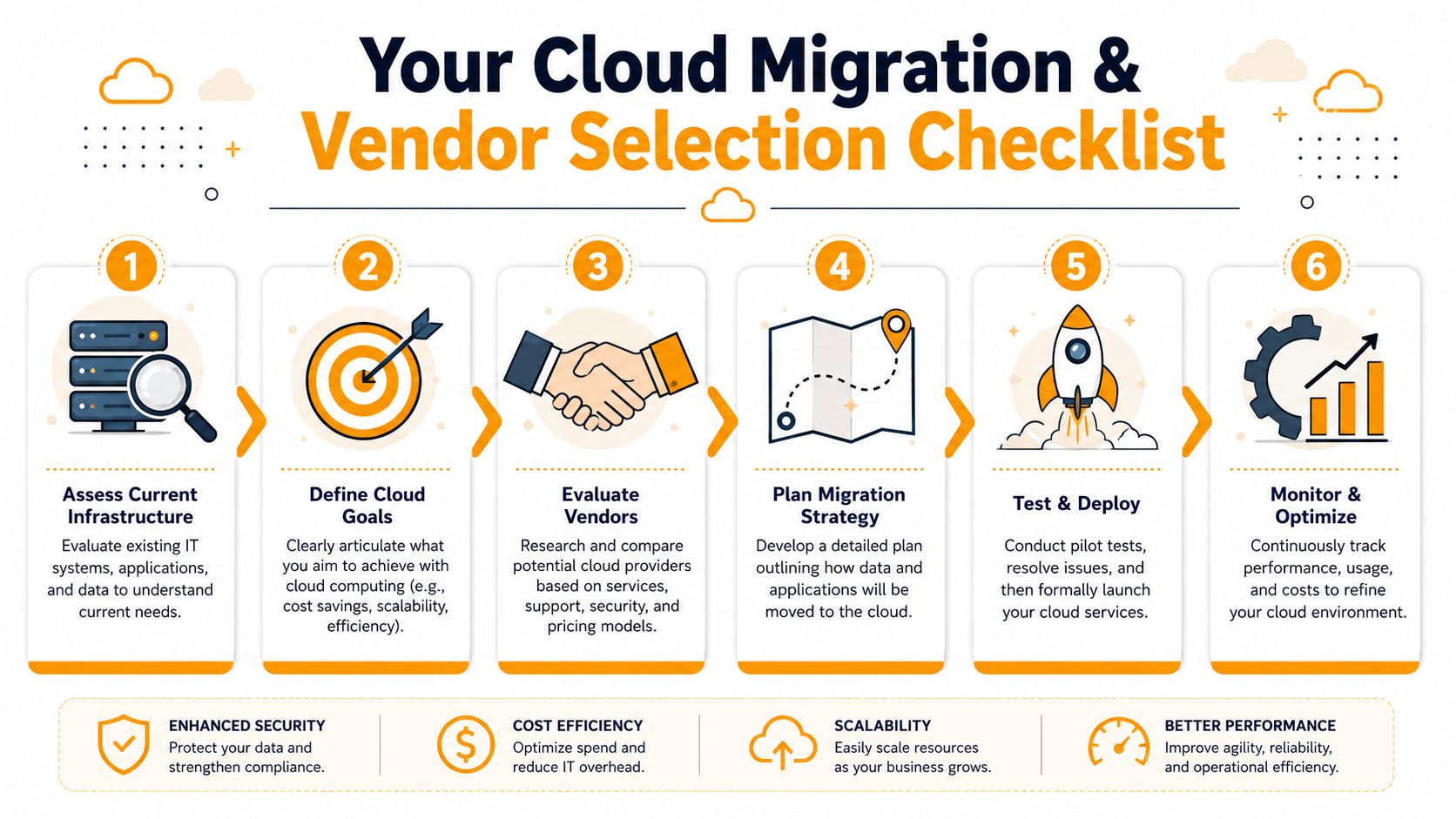
Assess what you have
List your applications, file locations, devices, user groups, backups, security tools, and business dependencies. Include the ugly parts. That ancient desktop running one critical app counts.Decide what should move and what should stay
Some systems belong in Microsoft 365 or Google Workspace immediately. Some fit Azure Virtual Desktop, AWS, or a hosted line-of-business environment. Some should remain local for now because the software is too old, too specialized, or tied to equipment in the office.Rank workloads by business impact
Email and file collaboration usually move differently than ERP software, CAD tools, or databases. Prioritize by risk and operational importance, not by what seems easiest for IT.Test before broad rollout
Pilot migrations with a small group. Confirm permissions, printing, line-of-business integrations, mobile access, and backup behavior before you expand.Train users on the new workflow
A clean migration can still fail if staff keeps saving files to old locations or bypassing approved tools.Document support ownership
Your team should know who handles user support, vendor escalations, security alerts, license management, and backup checks after go-live.
Good migrations are controlled, not fast. A slower rollout with fewer surprises usually costs less than a rushed one with rework.
How to choose the right vendor
You're not just buying cloud hosting. You're choosing who gets access to your business systems and who you'll call when something breaks.
Use these criteria:
- Technical depth: Ask which platforms they support directly. Azure, AWS, Google Cloud, Microsoft 365, VMware, Hyper-V, Citrix, and Intune all require different expertise.
- Compliance fluency: If you're regulated, they should speak clearly about access control, documentation, retention, audit trails, and shared responsibility.
- Migration discipline: Ask how they assess legacy applications, test cutovers, and handle rollback if something goes sideways.
- Support model: Find out whether helpdesk, monitoring, after-hours support, and on-site service are included or outsourced.
- Local business context: A Houston provider should understand weather resilience, multi-site networking, and the realities of supporting offices, warehouses, clinics, and retail environments in this market.
If your environment includes older software and you need a framework for evaluating whether to rehost, refactor, replace, or retire it, this guide to defensible software modernization decisions is useful during vendor interviews.
The IT Cloud Global Advantage for Houston Businesses
For Houston businesses, the value of a cloud partner isn't abstract. You need someone who can help with planning, migration, security, support, and the day-two issues that show up after launch.
That means being able to move workloads across AWS, Google Cloud, Microsoft Azure, and Microsoft 365, while also handling the practical pieces many firms separate into different vendors. Helpdesk support. Endpoint management. server administration. Wi-Fi and networking. Backup and disaster recovery. Microsoft 365 administration. Security tooling. Hybrid deployments. Repair support when a local device problem is part of the bigger workflow issue.
One local option is managed cloud computing services from IT Cloud Global, LLC. The company provides cloud planning, migrations, managed IT support, Microsoft 365 administration, virtualization support, network services, and security-aligned operations for Houston organizations that need one team to connect the moving parts.
That matters because small businesses don't benefit from fragmented accountability. If one vendor manages your licenses, another handles security, and a third touches your network, problems take longer to diagnose and ownership gets blurry. A coordinated support model is often the difference between a clean cloud environment and one that slowly drifts into complexity.
Frequently Asked Questions About Cloud Solutions
Can my legacy software run in the cloud
Sometimes yes, sometimes no, and sometimes not well.
Older Windows applications often run in a hosted virtual machine or remote desktop environment. But “it launches” isn't the same as “it performs well and integrates cleanly.” If the software depends on old hardware, local database behavior, specialty printers, or unsupported components, you may need a hybrid setup or a replacement plan.
What is a hybrid cloud and do I need one
A hybrid cloud means part of your environment stays private or on-premise while other workloads run in public cloud services.
This is often the right answer for regulated businesses, companies with legacy software, or offices that rely on local equipment but still want cloud collaboration and off-site resilience. You don't choose hybrid because it sounds advanced. You choose it when different workloads have different technical or compliance requirements.
Is my data secure in someone else's data center
It can be, but only if the environment is configured and managed correctly.
The data center itself may have strong physical and infrastructure security. Your risk usually comes from weak passwords, excessive admin access, poor device controls, bad retention settings, missing monitoring, and unclear backup ownership. In other words, the biggest issue is often not where the data sits. It's how your business controls access to it.
Should every small business move everything to the cloud
No. That's too simplistic.
Good cloud computing solutions for small business are selective. Email, collaboration, identity management, file sharing, backup, and many business apps are strong candidates. Specialized equipment, unsupported software, or systems with strict data handling requirements may need a staged or hybrid approach.
If your business is weighing a move to the cloud, or trying to clean up a cloud environment that grew without a plan, IT Cloud Global, LLC can help you assess your current setup, identify security and compliance gaps, and build a migration path that fits the way your business operates in Houston.
- Disaster Recovery vs Business Continuity for SMBs
- Houston IT Support: A 2026 Guide for SMBs
- IT Security Services Houston TX: Essential for Your SMB In
- Top IT Services Houston TX: Your 2026 SMB Guide
- Managed IT Services Houston TX: 2026 Guide for SMBs
- How Long Does Data Recovery Take? Realistic Timelines
- What Is a Helpdesk Ticketing System? an SMB Guide