


Application Modernization for SMBs: Boost Efficiency &
Your office software still opens, but it takes longer to load, breaks when staff need it most, and keeps pulling attention away from sales, service, and security. That's the trap many SMBs fall into. The system isn't completely down, so the pain gets treated like background noise, until a delay, a patch failure, or a surprise support bill makes it obvious that the old setup is eating time and money every week.
Application modernization is the practical answer, but only if you treat it like a business decision, not a tech upgrade for its own sake. The right move isn't always to replace everything. For a lot of SMBs, the smartest path is to modernize a few high-value applications, leave stable systems alone, and retire the ones that no longer earn their keep.
Table of Contents
- Why Your Old Software Is Costing You More Than You Think
- What Is Application Modernization Exactly
- The 5 Most Common Modernization Strategies
- How to Decide Which Applications to Modernize First
- A Phased Modernization Roadmap for SMBs
- Measuring the Business Impact of Modernization
- Your Modernization Checklist and Next Steps
Why Your Old Software Is Costing You More Than You Think
A local distributor keeps two systems alive because “they still work.” One runs inventory, the other handles customer orders. The staff knows the screens by memory, but every update takes longer than it should, reports don't line up cleanly, and simple fixes depend on one person who still remembers the older setup. That's not stability. That's hidden risk.
The cost shows up in places owners don't always track. Employees waste minutes on slow workflows, managers delay decisions because data lives in separate places, and support tickets pile up around systems that were never designed for today's pace. Security is part of that same story, because older applications often sit closer to the edge of support, with more manual patching and more room for gaps.
Practical rule: if a system keeps your team productive only because they've learned to work around it, that system is already taxing the business.
Red Hat's 2023 modernization research shows why this matters now. 95% of respondents said application modernization is essential to their organization's success, and 75% had already completed at least small-scale modernization projects, which tells you this is no longer a niche IT ambition, it's mainstream operating practice, according to Red Hat's modernization report.
If you're trying to reduce technical debt without disrupting daily operations, a useful companion read is mastering software health. It's a good reminder that the cheapest system to keep is sometimes the one you don't keep at all.
For SMBs, the issue isn't whether old software looks outdated. It's whether it keeps forcing the business to spend extra time, extra labor, and extra tolerance on problems that should've been solved years ago.
What Is Application Modernization Exactly
Think of application modernization like renovating a building you still want to use. You don't necessarily knock it down. You keep the parts that still have value, then update the structure, wiring, plumbing, and layout so the building works for how people live now.
That's the core idea in software too. The goal is to turn inflexible, hard-to-change systems into applications that are easier to update, easier to secure, and easier to scale. IBM describes this shift as moving from monolithic legacy applications to cloud applications built on microservices architecture so the software can improve scalability, maintainability, and cost efficiency in the process, according to IBM's overview of application modernization.
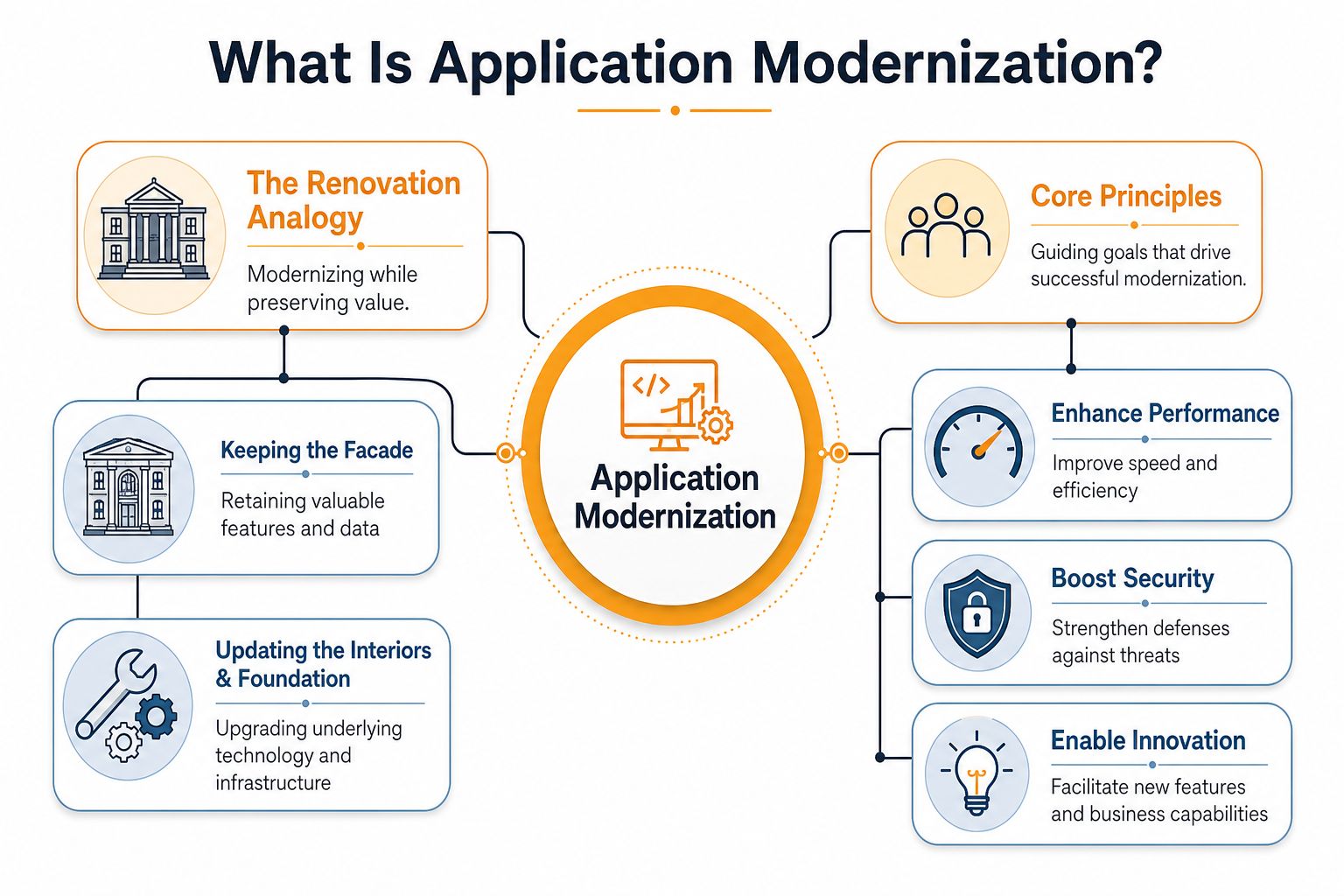
The shift from one big block to smaller services
A monolith is software where many functions are tied together tightly. That makes it harder to change one part without affecting others. A microservices approach breaks the system into smaller services that can be updated more independently, which is why it's often used when businesses want more flexibility.
Cloudflare's guidance on monolithic versus microservices and serverless patterns points to the business reasons behind that move. Teams usually pursue these patterns to improve scalability, maintainability, and cost efficiency by reducing operational overhead, according to Cloudflare's explanation of application modernization patterns.
The point isn't to make software “modern” in a cosmetic sense. The point is to reduce the friction that slows down business change.
For an SMB owner, that means modernization is less about buzzwords and more about removing bottlenecks. If your team can't update pricing logic, add a new customer workflow, or secure an old interface without fear of breaking something else, the software is holding the business hostage.
The 5 Most Common Modernization Strategies
The smartest modernization plans don't start with code. They start with the right level of change. Some apps need a light move. Some need surgery. Some should be left alone. If you want a broader overview of legacy system modernization strategies, the big takeaway is simple, one size never fits every application.
The main options in plain language
Rehost is the least disruptive path. It's like moving your furniture into a new building without redesigning the rooms. You keep the application mostly intact, but move it to a different environment, often the cloud.
Replatform is a small step up. The application still behaves the same, but you adjust parts of the platform underneath it. That can help reduce maintenance friction without forcing a rewrite.
Refactor means cleaning up the code and internal structure so the application is easier to support. This usually makes sense when the business wants better maintainability, but doesn't need a brand-new system.
Rearchitect or rebuild is the bigger play. Here, the business is changing the application's structure much more significantly, often to support cloud-native patterns, better integration, or more modular design.
Replace means dropping the old application in favor of a commercial product or SaaS platform. That's often the right answer when the old system is expensive to maintain and the market already offers a better fit.
A quick comparison
| Strategy | Description | Effort & Cost | Risk | Best For |
|---|---|---|---|---|
| Rehost | Move the app with minimal code changes | Lower | Lower | Fast infrastructure change |
| Replatform | Adjust the environment or platform underneath | Moderate | Moderate | Better operations without a full redesign |
| Refactor | Improve internal code structure | Moderate to higher | Moderate | Maintainability and cleaner future changes |
| Rearchitect or Rebuild | Redesign the app around a new architecture | Higher | Higher | Major business change or deep technical limits |
| Replace | Swap the app for a packaged solution | Varies | Moderate | Commodity functions with strong market alternatives |
For cloud moves, it also helps to understand the migration side of the work. This AWS cloud migration best practices guide is useful if your modernization plan includes infrastructure changes alongside application changes.
The key is restraint. Not every application deserves the same level of effort, and not every system should be dragged into a modernization program just because it exists. The right strategy depends on what the app does for the business, how fragile it is, and how much change it can absorb without causing downtime.
How to Decide Which Applications to Modernize First
SMBs often treat every application as equally urgent, but that approach wastes money fast. A payroll system that fails once a month is a different problem from an internal reporting tool that a single department uses a few times a week. Prioritization should start with business value and technical health, then add the practical question of how much disruption the company can absorb.
Microsoft's guidance is practical here. It recommends inventorying every application, mapping dependencies and integration points, and scoring each component on business value, technical health, and dependency risk before sequencing work into phases. It also suggests assigning T-shirt sizes to components so leaders can compare value against effort in a phased plan, according to Microsoft's application modernization planning guidance.
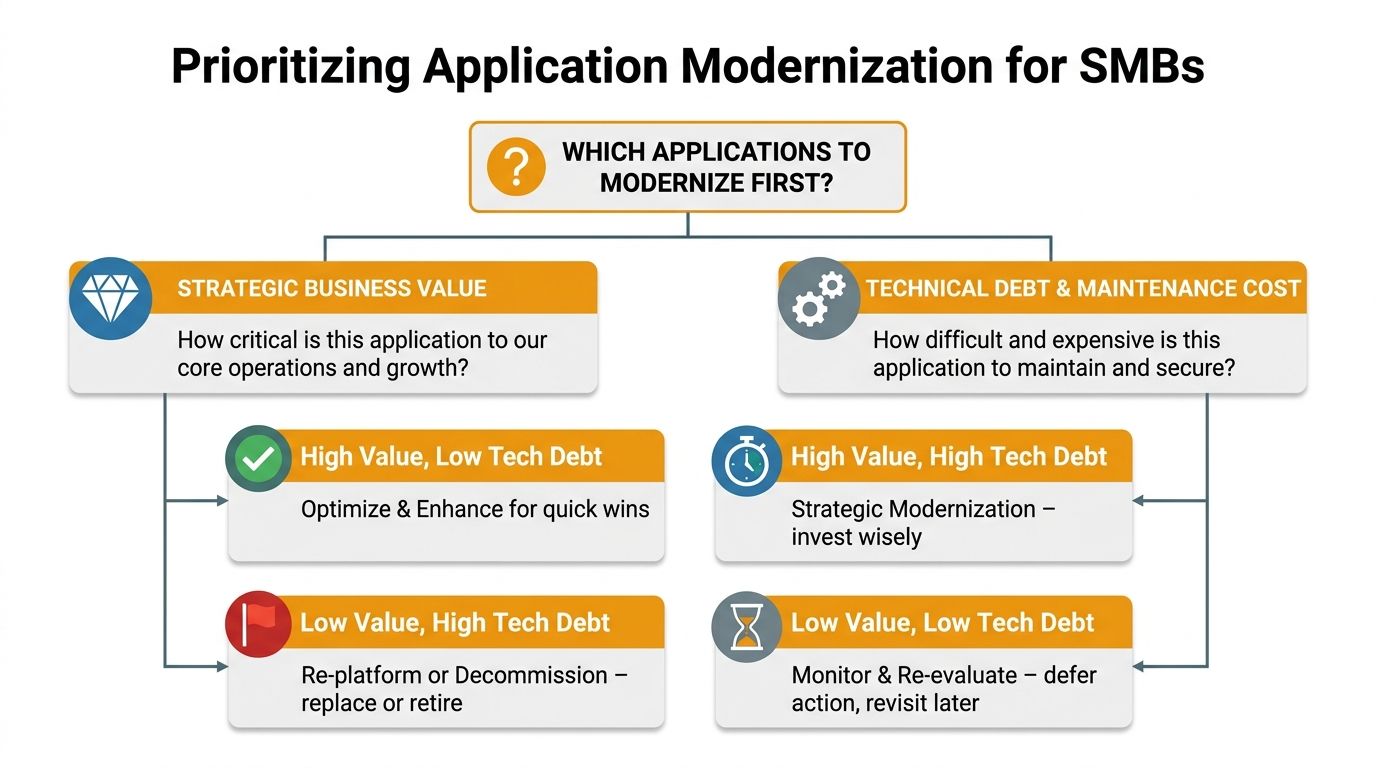
A simple 2×2 decision frame
Use two questions for every application. First, how important is it to revenue, service, compliance, or daily operations. Second, how painful is it to maintain, secure, or change. Those answers usually point to four outcomes.
- High value, low technical debt: modernize these first for quick wins.
- High value, high technical debt: modernize carefully, because these are strategic systems.
- Low value, high technical debt: consider retirement or replacement.
- Low value, low technical debt: keep them under review and move on.
Practical rule: if an application has low business value and high upkeep pain, modernization is often the wrong investment.
That last category matters more than many owners realize. Some systems should stay untouched for now, and some should be retired instead of repaired. Deloitte's guidance stresses that leaders should avoid trying to tackle everything at once and should separate operational workflows from product innovation, according to Deloitte's legacy system modernization perspective. For a broader planning view, this modernization planning overview is useful when you want to compare options before spending on code changes.
The video below is a useful visual complement if you're building a shortlist with your team.
The best SMB portfolio decisions are usually conservative. Keep stable systems that do not block growth. Retire the dead weight. Spend modernization money where it changes the business.
A Phased Modernization Roadmap for SMBs
A modernization project goes off track when it tries to fix everything at once. For SMBs, the better path is a roadmap that limits disruption, protects cash flow, and shows owners where the money is going. Start with one application, learn from the work, then expand only after the first change proves stable.
That approach works because modernization should be a series of controlled business decisions, not a single large bet. It also leaves room to use cloud platforms, containers, and CI/CD practices where they fit the workload, instead of forcing every application into the same model. For a practical planning view before you change code, this modernization of technology overview can help you compare the options.
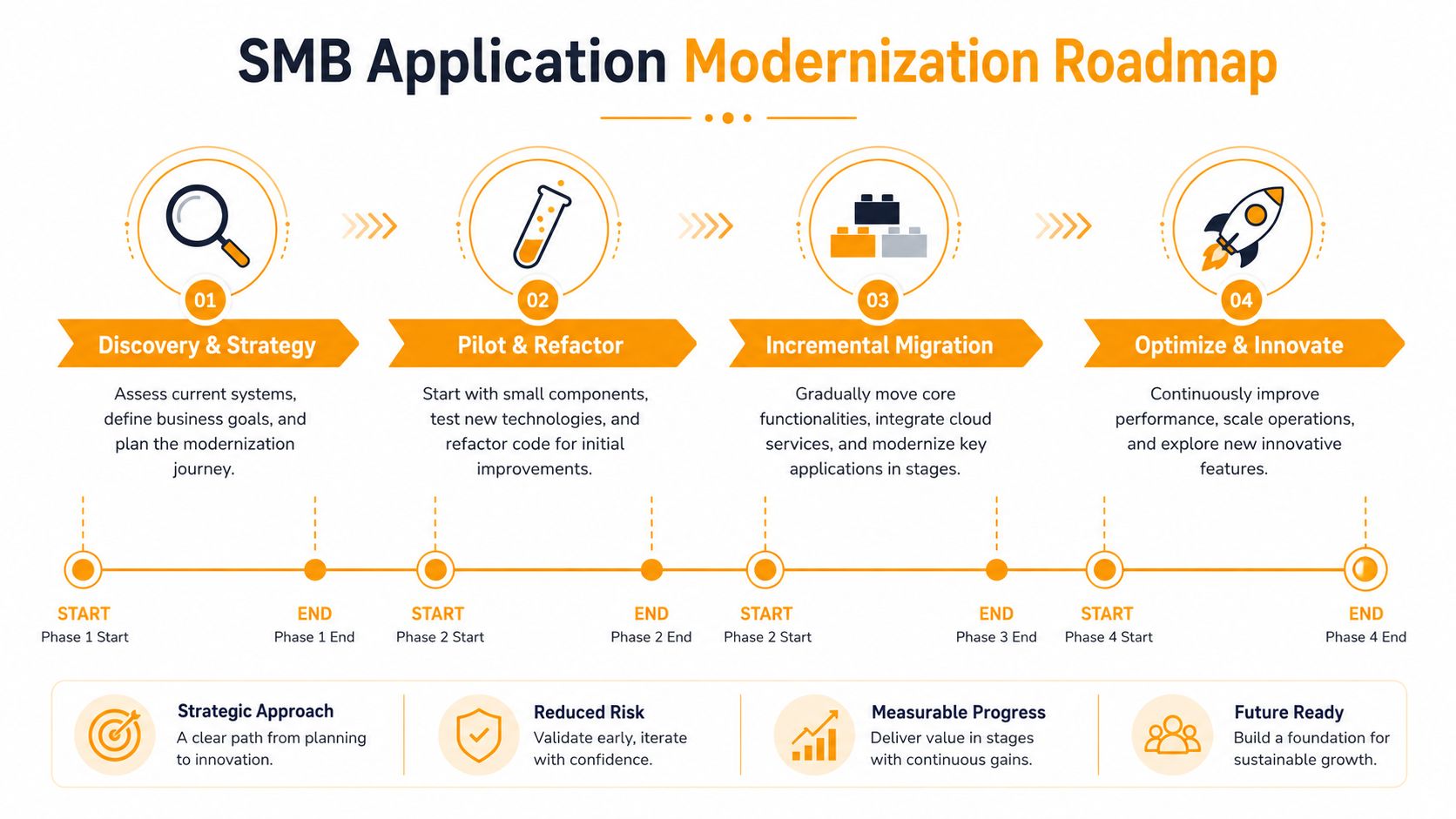
Phase 1 Discovery and strategy
Start with the inventory and decision frame from the prior section. Write down what each application does, who depends on it, what it costs to support, and what breaks when it goes down. Also note which systems are tied to revenue, which only support internal work, and which are candidates for retirement instead of repair. This first pass keeps you from spending modernization dollars on software that no longer deserves them.
Map where cloud fits, whether that means AWS, Azure, or Google Cloud. The point is not to move everything. The point is to separate systems that can improve from systems that should stay put for now.
Phase 2 Pilot and refactor
Choose one low-risk, high-value candidate. Use it to test the delivery process, clean up obvious technical pain, and prove the team can modernize without disrupting the business. A pilot gives you a controlled way to find gaps in access, testing, and rollback before larger systems are touched.
This is also the stage where owners should watch the trade-offs closely. A pilot may cost more upfront than a quick patch, but it should reduce support calls, lower risk, or make the next change easier. If it does none of those things, the approach needs to be adjusted before you move on.
Phase 3 Incremental migration
Move the next set of functions in pieces. Containers can help when you want repeatable deployment behavior, and CI/CD practices can shorten the time between code change and production release. Keep the scope tight so one failed step does not interrupt the whole operation.
This phase often exposes where the complexity sits. Some functions migrate cleanly. Others depend on old integrations, custom reports, or manual workarounds that have to be handled separately. SMBs do better when they migrate what creates value first and leave low-value, high-friction functions alone until there is a clear business reason to touch them.
Phase 4 Optimize and govern
Once the main business pain is reduced, keep measuring, standardizing, and tightening controls. That is where modernization becomes an operating habit instead of a one-time project. It also helps prevent the common SMB problem where the team modernizes one system and then lets the new environment drift into the same mess as the old one.
After migration, watch for waste in cloud spend, unused services, and overbuilt environments. Good governance keeps costs aligned with actual usage and helps the business avoid paying for capacity it does not need. If you are tuning the environment after go-live, optimization in cloud computing resource can help frame that work.
The strongest roadmap does not chase speed for its own sake. It protects the business while changing the parts that hold it back.
Measuring the Business Impact of Modernization
Modernization pays for itself only when it changes how the business runs. If the team cannot show what improved, the project becomes another IT cost with no clear business case. SMB owners need measures tied to customer experience, staff productivity, risk reduction, and daily operating expense.
The clearest results usually show up in operations. Faster response times mean staff and customers wait less. Fewer security issues mean less firefighting and less exposure to avoidable risk. Faster delivery means the business can release changes without long approval and testing delays. Those are business results, not just technical metrics.
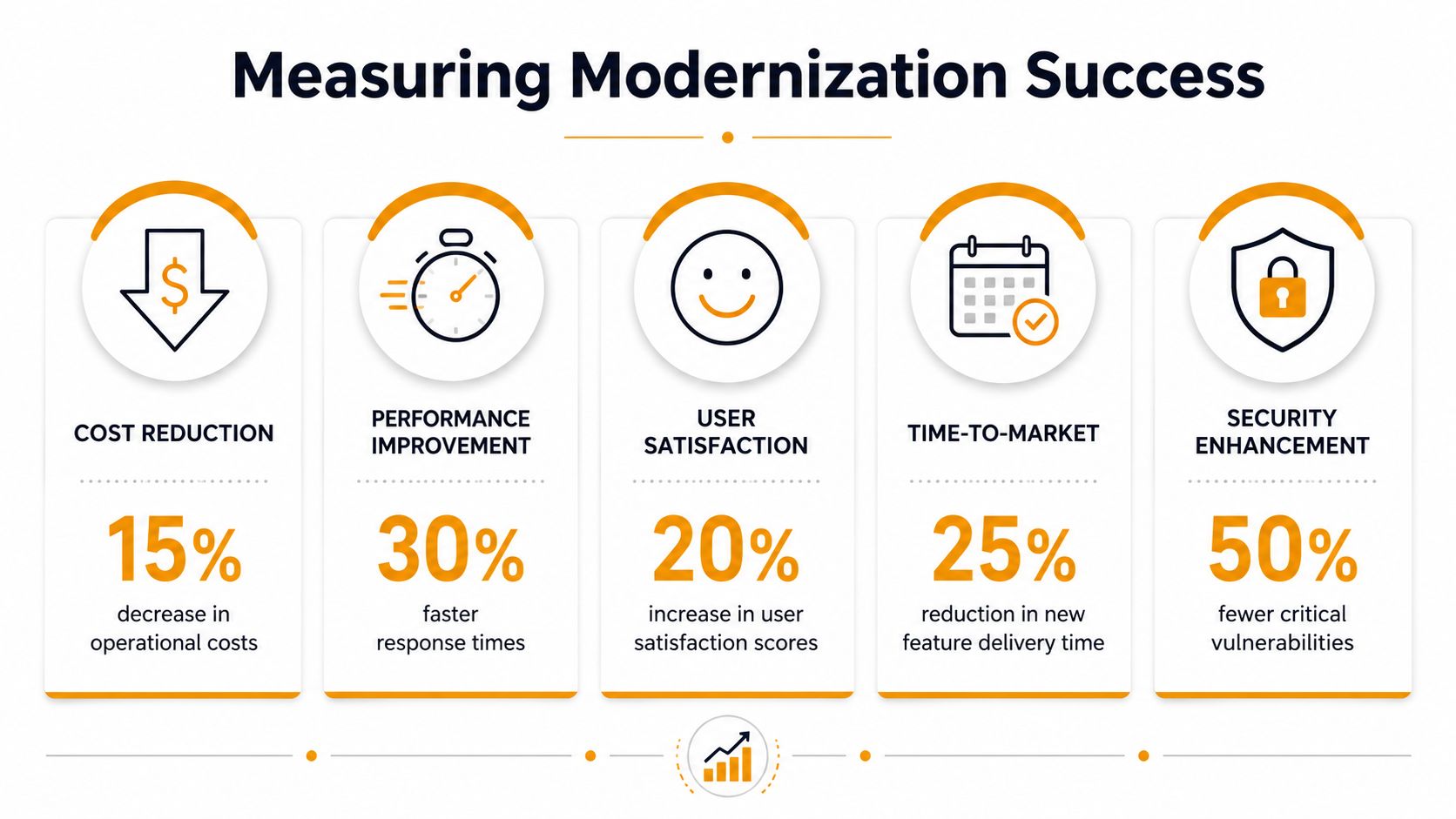
What to track
- Operational cost trend: monitor support effort, hosting expense, and vendor burden before and after the change.
- Response and reliability: track how often systems slow down or fail during normal business hours.
- Security posture: measure how quickly vulnerabilities are found and removed.
- Delivery speed: watch how long it takes to launch a new feature or workflow.
- User experience: ask employees where the new process helps and where it still gets in the way.
Grand View Research valued the global application modernization services market at USD 17.80 billion in 2023 and projected it to reach USD 52.46 billion by 2030, with a 16.7% CAGR from 2024 to 2030, according to Grand View Research's market report. That level of spending reflects how often companies see operational value in this work.
Modernization is only half the job if the new environment still runs inefficiently. For post-migration tuning, the cloud optimization guide is a useful reference for keeping cloud usage aligned with actual demand.
If you cannot measure the before and after, you will struggle to defend the budget for the next phase.
That is why the best SMB teams set baselines before they change anything. Once the old system is replaced or improved, the business can see whether the new setup reduced friction and made the organization easier to run.
Your Modernization Checklist and Next Steps
Use this checklist before you spend a dollar on migration work.
- Inventory every application: know what runs the business, who owns it, and what it touches.
- Score business value: focus first on systems tied to revenue, service, or compliance.
- Rate technical health: identify the applications that are hard to patch, hard to change, or expensive to support.
- Decide what to modernize, retain, or retire: don't force every app into the same path.
- Pick a pilot: start with one manageable system that can prove value quickly.
- Plan in phases: sequence the work so downtime and disruption stay controlled.
- Measure outcomes: track cost, reliability, security, and delivery speed after each step.
The right modernization partner should help you make those decisions, not just sell you a migration. For Houston-area SMBs, IT Cloud Global, LLC offers assessment, cloud migration across AWS, Azure, and Google Cloud, and ongoing management that keeps modernization tied to business outcomes, not just technical activity. If your current systems are slowing your team down, visit IT Cloud Global, LLC to start a practical modernization conversation and see what should change, what should stay, and what should be retired.
- On Premises to Cloud Migration: A Practical Guide 2026
- Cleveland IT Services: Your Partner Guide for 2026
- Excellent IT Group Houston Downtown: A 2026 Buyer’s Guide
- Houston IT Support: A 2026 Guide for SMBs
- Houston Managed IT Services: A 2026 Guide for SMBs
- Houston IT Support Services: Expert Solutions 2026
- Top Managed IT Services Houston for SMBs in 2026