


Optimization in Cloud Computing: A Guide for SMBs
Your cloud bill shows up, and it's higher again. Nobody approved a major new project. Nobody bought a new office. Yet your monthly infrastructure cost keeps drifting upward, and your team can't clearly explain why.
That's the trap. Cloud spending rarely blows up all at once. It leaks through idle virtual machines, oversized instances, forgotten backups, test systems left running over the weekend, and storage choices nobody revisits after the original setup. One industry analysis reported that companies waste almost 32% of cloud spend, and many organizations that act on optimization see 20% to 40% savings within 3 to 6 months according to Revefi's cloud cost optimization analysis.
For a small or midsize business, that changes the conversation. Optimization in cloud computing isn't a nice technical upgrade. It's cost control, operational discipline, and risk reduction. It helps you stop paying for resources you don't need, reduce surprise invoices, and keep critical systems performing well enough that your staff and customers don't feel the drag.
If you're already trying to tighten budgets across the business, cloud optimization belongs on the same list as vendor review, staffing efficiency, and process cleanup. If you need a broader cost-control mindset beyond infrastructure alone, this guide on managing IT costs for small businesses in Houston is a useful companion.
Table of Contents
- Introduction Why Your Cloud Bill Keeps Growing
- The Five Goals of Cloud Optimization
- Core Strategies to Optimize Your Cloud Environment
- Rightsize before you redesign
- Automate scaling and shutdowns
- Use commitment pricing where demand is predictable
- Clean up storage before it turns into silent waste
- Treat network costs as an architecture problem
- Simplify the platform where you can
- Be willing to move the wrong workload out of public cloud
- Essential Tools for Monitoring and Governance
- A Prioritized Optimization Checklist for SMBs
- How a Managed Partner Accelerates Optimization
- Conclusion Your Next Steps Toward a Smarter Cloud
Introduction Why Your Cloud Bill Keeps Growing
You approve a cloud invoice on Monday, glance at the total, and wonder why it jumped again. Nobody bought a new platform. Nobody launched a major product. The bill still climbed.
That usually means your cloud environment is drifting instead of being managed. A test server keeps running after hours. Backups pile up in expensive storage. An application that was sized for a busy month never got scaled back. Small line items stack up fast, and SMBs feel that waste harder than large enterprises because every unnecessary dollar comes straight out of hiring, margin, or cash flow.
The core problem is not the invoice itself. It is the lack of control behind it.
For small and midsize businesses, cloud optimization is not an enterprise theory exercise. It is a discipline for keeping monthly costs predictable, reducing surprise outages, and making sure your infrastructure still fits how your business operates. If no one reviews usage, ownership, and configuration on a schedule, waste becomes part of the baseline.
That creates business risk in three ways:
- Budget drift: Monthly spend rises without a clear link to revenue, customer growth, or staff output.
- Operational drag: Teams keep paying for old resources because nobody is sure what can be shut down safely.
- Decision paralysis: You delay upgrades or new projects because the current environment is too messy to price with confidence.
A growing bill is often a symptom of weak cloud habits, not high demand. That distinction matters. If demand is rising, you invest with confidence. If waste is rising, you fix process, governance, and architecture.
Start with a practical rule. If you cannot explain your biggest cloud cost drivers in plain English, you are not ready to scale that environment.
This guide is built for SMBs that need a clear order of operations, not abstract cloud advice. You need to know what to check first, what can wait, and when internal staff can handle it versus when bringing in a partner makes more financial sense. If you are already working on broader IT cost management strategies for small businesses in Houston, cloud optimization should sit near the top of that list because it affects both spend and uptime.
Treat optimization as a core business practice. Do that well and you get lower run costs, fewer billing surprises, and a cloud environment that supports growth instead of draining it.
The Five Goals of Cloud Optimization
You can cut your cloud bill and still end up with slower systems, more outages, and bigger support headaches. That is bad optimization.
For an SMB, cloud optimization has five clear goals: control cost, keep systems fast, reduce downtime, tighten security, and stay compliant without creating admin clutter. Treat those goals as one operating standard, not five separate projects. That is how you keep cloud spending tied to business value.
IBM describes cloud optimization as ongoing management, not a one-time migration task, in its overview of cloud optimization. That point matters because your environment keeps changing. New apps get added. Data piles up. Old workloads stay online long after the business stopped needing them. IBM also notes that moving infrequently accessed data into lower-cost storage tiers can cut storage costs sharply in the right use case.
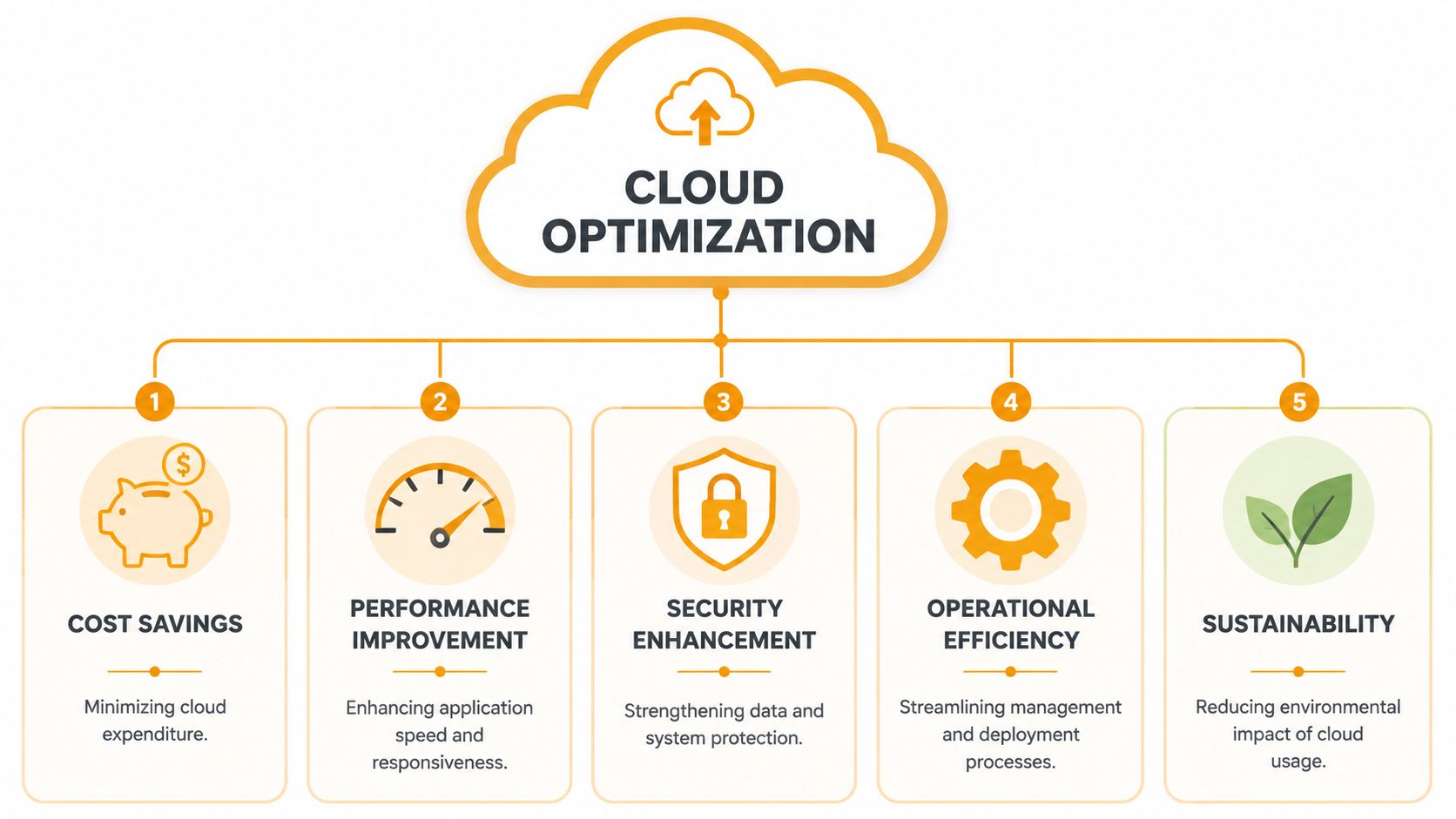
Cost control comes first
Start here because waste is the easiest problem to fix and the easiest one to measure. SMBs rarely need enterprise-sized cloud spending. They need clean visibility into what is running, who owns it, and whether it still supports the business.
Oversized servers, idle test environments, duplicate backups, and premium storage for stale data all drain cash. Fixing those issues gives you room to spend on what protects the business, such as backup reliability, stronger security controls, or outside support when your internal team is stretched.
Performance keeps people productive
Slow cloud systems waste money even when the bill looks reasonable. Staff wait on reports, apps lag during peak hours, and customers hit delays that push them toward a competitor.
Your goal is simple. Match resources to real demand so employees can work without friction and customers can complete transactions without delay. If you are building or supporting apps that depend on a scalable no-code backend, this matters even more because poor cloud tuning shows up fast in user experience.
Reliability reduces downtime costs
A system that fails during payroll, invoicing, order processing, or file access is not optimized. It is fragile.
Reliability means your cloud setup can handle routine spikes, failed updates, and hardware or service issues without taking the business offline. That usually comes down to boring but profitable disciplines: monitoring, failover planning, backup testing, and removing single points of failure. Small businesses often skip these steps until one outage costs more than a year of preventive work.
Security limits expensive mistakes
Security problems are often optimization problems in disguise. Overly broad permissions, forgotten assets, and messy data sprawl increase risk and make the environment harder to manage.
A cleaner cloud environment is easier to secure because ownership is clear and unnecessary systems are gone. That reduces the odds of breaches, accidental exposure, and rushed cleanup work that pulls your team away from revenue-producing tasks.
Compliance keeps growth from turning into chaos
Compliance is not only about regulated industries. It is also about keeping records straight, controlling access, and being able to explain where data lives and why.
That discipline matters as you add staff, vendors, software, and customer data. If your cloud environment is undocumented and loosely governed, every audit, insurance review, and client security questionnaire becomes slower and more expensive. SMBs feel this pain early because they have less margin for rework.
Here is the practical summary:
| Goal | What it means for your business |
|---|---|
| Cost savings | Lower waste and tighter control over monthly spend |
| Performance | Faster apps and less lost time for staff and customers |
| Reliability | Fewer outages and less disruption to core operations |
| Security | Better control over access, systems, and sensitive data |
| Compliance | Cleaner documentation, easier audits, and fewer process gaps |
The true win is balance. If you optimize only for price, you increase risk. If you optimize all five goals together, you get a cloud environment that costs less to run and causes fewer business interruptions. For SMBs, that is the standard to aim for, and it is also the point where bringing in a managed partner like IT Cloud Global often starts making financial sense.
Core Strategies to Optimize Your Cloud Environment
Your cloud bill does not drop because you ask your team to “be careful.” It drops when you change a small set of operating habits that keep waste from building up every month. For SMBs, that is the essential work. Build a tighter environment, reduce surprise costs, and cut the downtime that comes from poor configuration choices.
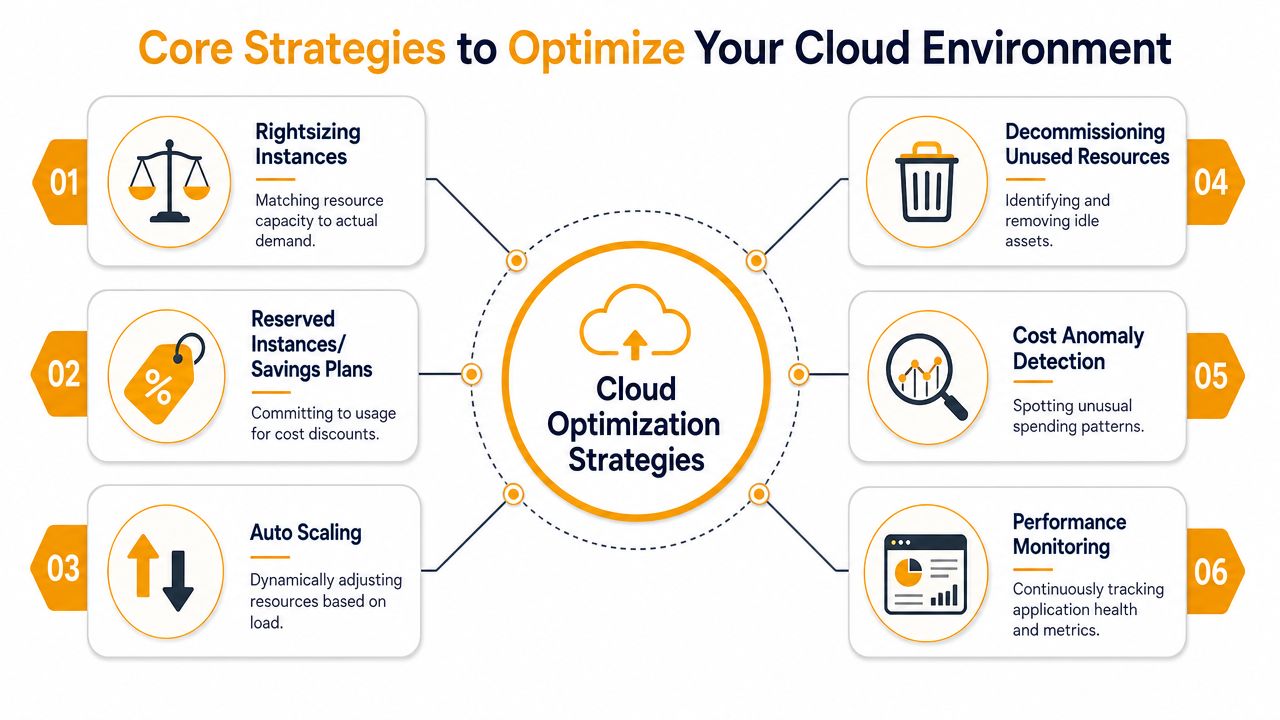
Rightsize before you redesign
Start with the quickest financial win. Match resources to demand.
Many SMBs carry oversized instances because they migrated old on-premises habits into the cloud. A server was sized for a peak event, nobody reviewed it later, and now you pay for unused CPU, memory, and storage every day. That is not caution. It is recurring waste.
Review workloads with steady underuse. Check usage by hour, day, and month. Focus on production systems first, where even one size reduction can create immediate savings without changing the application itself.
If you are not sure where to begin, an IT systems audit for cloud and infrastructure waste will usually expose the obvious overspend faster than ad hoc reviews.
Automate scaling and shutdowns
Manual start and stop routines fail. People forget. Schedules slip. Costs keep running.
Non-production environments are common offenders. Development, testing, staging, reporting, and training systems often stay online long after the workday ends. As noted in Flexera's cloud optimization guidance, shutting down non-production resources during off-hours can cut those workload costs sharply, and reserved pricing can reduce spend for steady workloads.
Use automation in two places:
- Auto-scaling for applications with changing demand
- Scheduled shutdowns for systems that do not need 24/7 uptime
- Start-up schedules so teams are not waiting for environments each morning
- Policy-based exceptions for workloads that must remain available
This is one of the clearest examples of optimization as a business practice, not a one-time cleanup.
Use commitment pricing where demand is predictable
Do not pay premium on-demand rates for systems that run the same way every month.
Core business applications, always-on databases, identity services, and stable internal platforms usually belong on reserved instances, savings plans, or equivalent commitment models. Keep flexible pricing for bursty workloads, short-term projects, and uncertain demand.
A simple rule works well for SMBs:
- Put steady-state workloads into a commitment review.
- Leave variable workloads on flexible pricing.
- Recheck usage before every renewal term.
Get this wrong and you either overpay for flexibility or lock into capacity you do not use. Get it right and you reduce baseline spend without touching performance.
Clean up storage before it turns into silent waste
Storage costs creep up because old data looks harmless. It is not harmless when it slows restores, complicates retention, and inflates monthly bills.
Review snapshots, backups, logs, duplicate files, and archived datasets. Then sort data by how often the business uses it:
- Hot data for active workloads
- Warm data for occasional access
- Cold data for archive or long-term retention
Move inactive data to lower-cost tiers. Set lifecycle policies. Remove data that no longer has an operational, legal, or reporting purpose. SMBs often find that storage waste has been growing for years because no owner was assigned.
Treat network costs as an architecture problem
A surprising number of cloud invoices are inflated by data movement, not compute.
Cross-region traffic, cloud-to-cloud transfers, backup replication, remote users pulling large files, and poor application placement all create charges that look mysterious until you map the traffic. Once you do, the problem is usually clear. Systems are talking across regions or platforms more often than the business needs.
Check where your applications run, where your users sit, where your backups land, and how often data leaves one service for another. If those paths are poorly planned, you are paying for architecture drift every month.
Simplify the platform where you can
Some SMB environments are expensive because they are overbuilt. A lightweight internal tool ends up sitting on full-time infrastructure with unnecessary management overhead, patching work, and monitoring noise.
Use containers or serverless services when the workload is intermittent and short-lived. Use simpler application patterns when custom infrastructure adds more cost than value. In some cases, a scalable no-code backend is a practical way to cut operational overhead for internal apps, customer portals, and basic workflow systems.
Do not chase trends. Choose the simplest setup that meets the business need, stays supportable, and does not create hidden labor costs for your team.
Be willing to move the wrong workload out of public cloud
Public cloud is not automatically the cheapest long-term home for every workload.
If a system has stable demand, high utilization, and little need for elasticity, you should compare the cloud cost against dedicated infrastructure, private cloud, or a different hosting model. Many SMBs delay this decision because they treat cloud as a strategy instead of a tool.
That mindset costs money. Optimization means choosing the right home for each workload, in priority order, based on spend, reliability, and business impact. That is also the point where bringing in a partner like IT Cloud Global often makes sense. You get a clearer view of what to fix first, what to leave alone, and what should move.
Essential Tools for Monitoring and Governance
You can't optimize what you can't see. Most SMBs don't overspend because they're reckless. They overspend because their cloud data is fragmented, unlabeled, or ignored until the invoice lands.

Native cloud tools give you first-line visibility
Start with the tools your cloud platform already provides. In AWS, Azure, and Google Cloud, native billing dashboards, cost analysis views, monitoring, and alerting can expose obvious issues fast.
These tools help you answer basic questions:
- What changed this month
- Which services cost the most
- Which accounts projects or subscriptions are drifting
- Where usage doesn't match business activity
For many SMBs, native tooling is enough to catch low-effort waste. It's also the cheapest place to build reporting habits.
Third-party platforms help when your environment gets messy
Once you're dealing with multiple cloud vendors, hybrid systems, or several business units, native tools alone start to break down. You may need a broader management layer, observability platform, or outside operational support to connect cost, performance, and operational data.
That's where cloud management platforms, infrastructure monitoring tools, and specialists can help. If you're also tightening operational controls across the business, an IT systems auditing process gives you a more useful baseline than cost data alone.
One area worth watching closely is network behavior. The FinOps Foundation highlights data transfer and egress optimization as an underserved topic, noting that CDNs, minimizing inter-region transfers, and private connectivity can materially reduce both spend and latency in its guide to optimizing cloud usage.
Tagging and governance turn raw data into decisions
A dashboard without governance is just a prettier bill.
Tagging matters because it tells you who owns a resource, which client or department it supports, what environment it belongs to, and whether it should still exist. Without tags, you can't assign costs confidently or hold anyone accountable for sprawl.
Use a simple tagging standard that answers these questions:
| Tag field | Why it matters |
|---|---|
| Owner | Someone must be accountable for the resource |
| Environment | Distinguishes production from dev, test, or staging |
| Department or client | Lets finance allocate spend properly |
| Application | Connects infrastructure to business services |
| Review date | Forces periodic cleanup decisions |
Good governance doesn't slow cloud usage. It prevents lazy provisioning from becoming permanent spend.
A Prioritized Optimization Checklist for SMBs
Most small businesses don't need a giant FinOps program. You need a shortlist, a schedule, and someone responsible for following through. That's it.
The bigger mistake is trying to optimize everything at once. Start with quick wins, move into recurring maintenance, then make architecture decisions after you've cleaned up the basics.
SMB Cloud Optimization Checklist
| Phase | Action Item | Goal |
|---|---|---|
| Phase 1 Quick Wins | Turn on budget alerts and cost anomaly notifications | Catch spend changes early |
| Phase 1 Quick Wins | Identify and remove unused disks, snapshots, old instances, and abandoned services | Eliminate obvious waste |
| Phase 1 Quick Wins | Schedule shutdowns for non-production environments | Stop paying for idle time |
| Phase 1 Quick Wins | Tag resources by owner, environment, and application | Make costs traceable |
| Phase 2 Continuous Improvement | Review top-cost workloads for rightsizing | Match spend to actual usage |
| Phase 2 Continuous Improvement | Apply storage lifecycle policies and archive inactive data | Lower storage costs and reduce clutter |
| Phase 2 Continuous Improvement | Separate steady workloads from bursty workloads | Choose pricing models more intelligently |
| Phase 2 Continuous Improvement | Review cross-region traffic, backups, and CDN usage | Reduce transfer waste and improve responsiveness |
| Phase 3 Strategic Review | Evaluate autoscaling, containers, or serverless where fixed capacity is wasteful | Improve efficiency and flexibility |
| Phase 3 Strategic Review | Reassess architecture for aging or overbuilt applications | Simplify support and reduce overhead |
| Phase 3 Strategic Review | Profile stable, high-utilization systems for possible repatriation or dedicated hosting | Find better long-term economics |
What to tackle first if you're short on time
If your team has one afternoon this month, do these four things in order:
- Find idle resources and delete or stop what nobody owns.
- Set alerts so the next surprise bill doesn't arrive unnoticed.
- Review your most expensive workloads instead of trying to inspect everything.
- Separate production from non-production in both tags and policies.
The last phase deserves honest attention. Some workloads cost less outside the public cloud. According to Flexential's perspective on cloud cost optimization, 20% to 30% of cloud workloads could cost significantly less in dedicated infrastructure after proper profiling. SMBs should care about that because “cloud-first” is not the same as “cloud-forever.”
If your internal team is small, assign one owner for the checklist and review it monthly. Optimization dies when everybody assumes somebody else is watching the bill.
How a Managed Partner Accelerates Optimization
Most SMBs know they should optimize. They just don't have the time to stay on top of usage trends, billing changes, monitoring noise, patching, backup validation, security reviews, and architecture cleanup all at once.
That's where outside help makes sense. Not because cloud optimization is mysterious, but because consistency is hard when your internal team is busy keeping the business running.

Why SMBs stall out on optimization
Here's what usually happens. A company migrates to the cloud, things work well enough, and optimization gets postponed until “later.” Later never comes because the same people handling support tickets, vendor issues, compliance requests, and endpoint problems are also expected to manage cloud spend.
The result is familiar:
- No consistent review cadence
- No clear owner for cloud cost controls
- No time for architecture cleanup
- No appetite for testing better pricing models or shutdown automation
Cloud optimization needs routine attention. If you only look during budget stress, you'll miss the operational fixes that would've prevented the stress in the first place.
What a partner should actually do for you
A good managed partner acts like an extension of your IT function, not just an emergency contact. That means handling monitoring, governance, optimization reviews, and strategic recommendations in a way your staff can effectively use.
Look for a partner that can help with:
- Visibility: Clean reporting on where your spend goes and what changed.
- Operational controls: Shutdown schedules, resource reviews, patching, backup checks, and policy enforcement.
- Architecture decisions: Guidance on when to rightsize, replatform, simplify, or move a workload elsewhere.
- Business alignment: Recommendations tied to uptime, budget, staffing load, and risk.
If you're comparing providers, this guide on how to choose a managed service provider is a solid place to start. For Houston-area businesses that need help with AWS, Azure, Google Cloud, Microsoft 365, monitoring, and broader managed IT operations, IT Cloud Global, LLC is one option that provides those services as part of ongoing support.
The right partner doesn't just lower a bill. They help you avoid paying for technical decisions that no longer match the business.
That's the key value. You're not outsourcing responsibility. You're buying back time, discipline, and decision quality.
Conclusion Your Next Steps Toward a Smarter Cloud
If your cloud costs feel unpredictable, don't assume that's normal. It usually means your environment has drifted away from your actual business needs.
Optimization in cloud computing works best when you treat it as an ongoing operating habit. Review usage. remove waste. adjust sizing. improve governance. question architecture. Repeat. That rhythm gives you better control over costs, fewer surprises, and a stronger technical foundation for growth.
You don't need to fix everything this week. Start with the checklist. Shut down what's idle. clean up storage. review your most expensive workloads. make sure someone owns the process. Those simple steps create momentum fast.
And be honest about capacity. If your team doesn't have the time or experience to manage cloud optimization consistently, bring in help. That's usually cheaper than letting waste, risk, and downtime build up unnoticed.
The goal isn't to make your cloud environment look advanced. The goal is to make it fit your business, support your staff, and stop draining budget unnecessarily.
If you want a practical review of your cloud environment, IT Cloud Global, LLC can help you assess usage, identify waste, tighten governance, and align your cloud setup with your business goals.
- Top 7 Managed IT Services Houston TX Reviews 2026
- Best IT Services Houston TX: Your 2026 Partner
- Managed IT Services Houston TX: 2026 Guide for SMBs
- Top Managed Services Provider Houston: Your 2026 Guide
- Best IT Managed Services Houston: 2026 Guide
- Managed IT Services Houston TX: Expert Solutions 2026
- Managed IT Services Houston TX: Your 2026 Guide