


Application Security Testing: A 2026 Guide for SMBs
A lot of Houston SMBs think application security testing starts after a scary alert, a failed audit, or a customer complaint. By then, the problem's already in production, and your team is stuck figuring out which login, portal, or API exposed data and for how long. The smarter move is to test the application before attackers find the weak spot, especially when that application handles customer records, payments, or anything tied to operations.
Table of Contents
- Why Application Security Testing Matters for Your Business
- The Three Pillars of Application Security Testing
- The Testing Gap Most Guides Ignore
- Integrating Testing into Development and Operations
- Choosing the Right Tools and Testing Cadence
- Compliance Requirements and Risk Considerations
- Your SMB Implementation Roadmap and Checklist
- How Managed IT Services Support Your Testing Program
Why Application Security Testing Matters for Your Business
A Houston distributor I'd expect to meet on any given week might have a customer portal for orders, a billing portal for invoices, and a hidden admin area for staff. None of those look dangerous on their own. The trouble starts when one weak validation rule, one stale permission, or one misconfigured session lets someone see data they shouldn't, and the business only learns about it after the fact.
Application security testing is the discipline of finding those weaknesses before attackers do. It's not just a scanner running against a website. It's a repeatable way to look at code, runtime behavior, authentication, authorization, and the messy workflows that real people use every day.
That matters because the market around this work has gone mainstream. One industry estimate places the global application security market at $13.64 billion with a projected 17.39% CAGR to $30.41 billion by 2030. The same dataset says organizations spent an average of $2.38 per employee on application security in 2023, and SaaS deployment models held over 68% of market share for security testing (Expert Insights). For SMB owners, that's the tell. This isn't a side project anymore, it's a budgeted control.
Practical rule: if an application stores customer data, moves money, or connects to a partner network, it needs testing that goes beyond a quick public-page scan.
OWASP's testing guide breaks the problem into areas like authentication, authorization, session management, input validation, and weak cryptography (OWASP Web Security Testing Guide). That's the mental model to use. A website isn't secure just because the homepage looks fine, and a login page doesn't tell you whether a user can abuse a workflow after signing in.
The business payoff is simple. Better testing reduces the chance of a breach, preserves customer trust, and makes partner security reviews easier to pass. For a Houston SMB, that usually means fewer emergency fixes, fewer awkward conversations with clients, and less time spent explaining why “we had a scanner” wasn't enough.
The Three Pillars of Application Security Testing
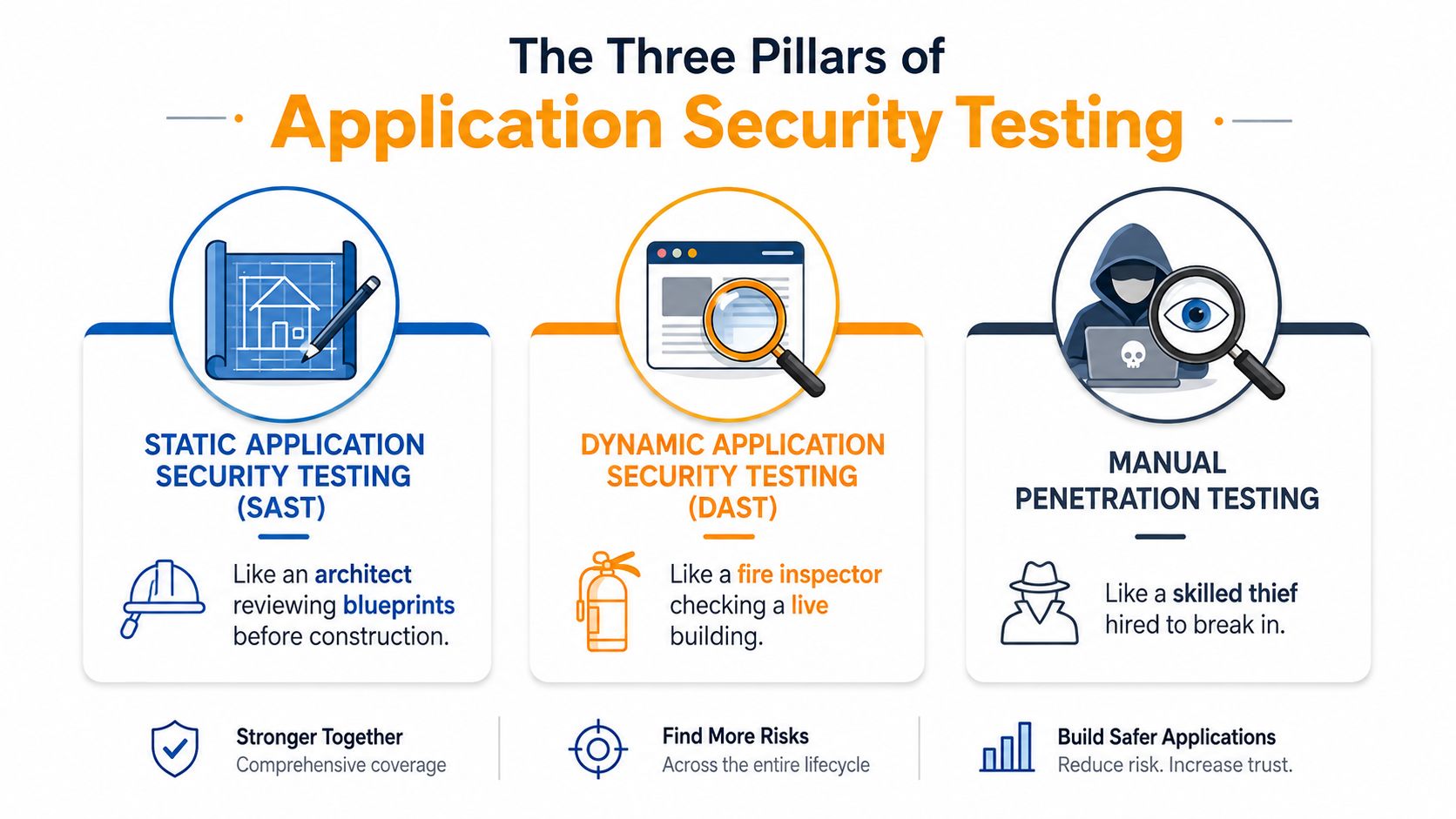
The simplest way to think about application security testing is to split it into three layers. SAST, DAST, and manual verification each catch different problems, and each misses things the others can see. If you only buy one kind of testing, you're accepting blind spots by design.
Static analysis catches code-level issues early
Static Application Security Testing looks at source code and dependencies before the app runs. It is similar to an architect reviewing blueprints before construction starts. It's strong for finding insecure coding patterns, risky dependencies, and obvious mistakes early enough that developers can still fix them without reworking a finished release (SentinelOne).
That early timing matters for SMBs because rework hurts. A developer fixing a problem in a pull request is a lot cheaper to deal with than a rushed hotfix after customers are already using the feature. Still, SAST can be noisy. It may flag code paths that look dangerous on paper but never become exploitable in production.
Dynamic testing checks what attackers can actually reach
DAST tests the running application from the outside. It's closer to a fire inspector checking a live building than a blueprint review. DAST is useful for runtime issues, configuration mistakes, and flaws that only appear once the app is deployed and responding to real requests (SentinelOne).
DAST's strength is realism. Its weakness is coverage. If your staging site doesn't exercise a workflow, DAST can't reliably prove that the workflow is safe. That's why teams that rely only on runtime scanning often feel busy while still missing the hard problems.
Manual testing catches logic abuse and role confusion
Manual penetration testing is the expert layer. A skilled tester doesn't just run a tool, they try to break assumptions, misuse roles, and chain small mistakes into something meaningful. That approach is critical when an app has admin functions, customer-specific permissions, or complex approval flows.
A layered approach works best. Start with SAST for code changes, add DAST for deployed apps, then reserve manual testing for the systems that carry real business risk. That's the sane SMB path because you don't need expensive human testing on every low-risk brochure page, but you do need it where money, identities, or privileged actions are involved.
Security in layers fits this model well, because one control rarely covers the whole attack path.
The Testing Gap Most Guides Ignore
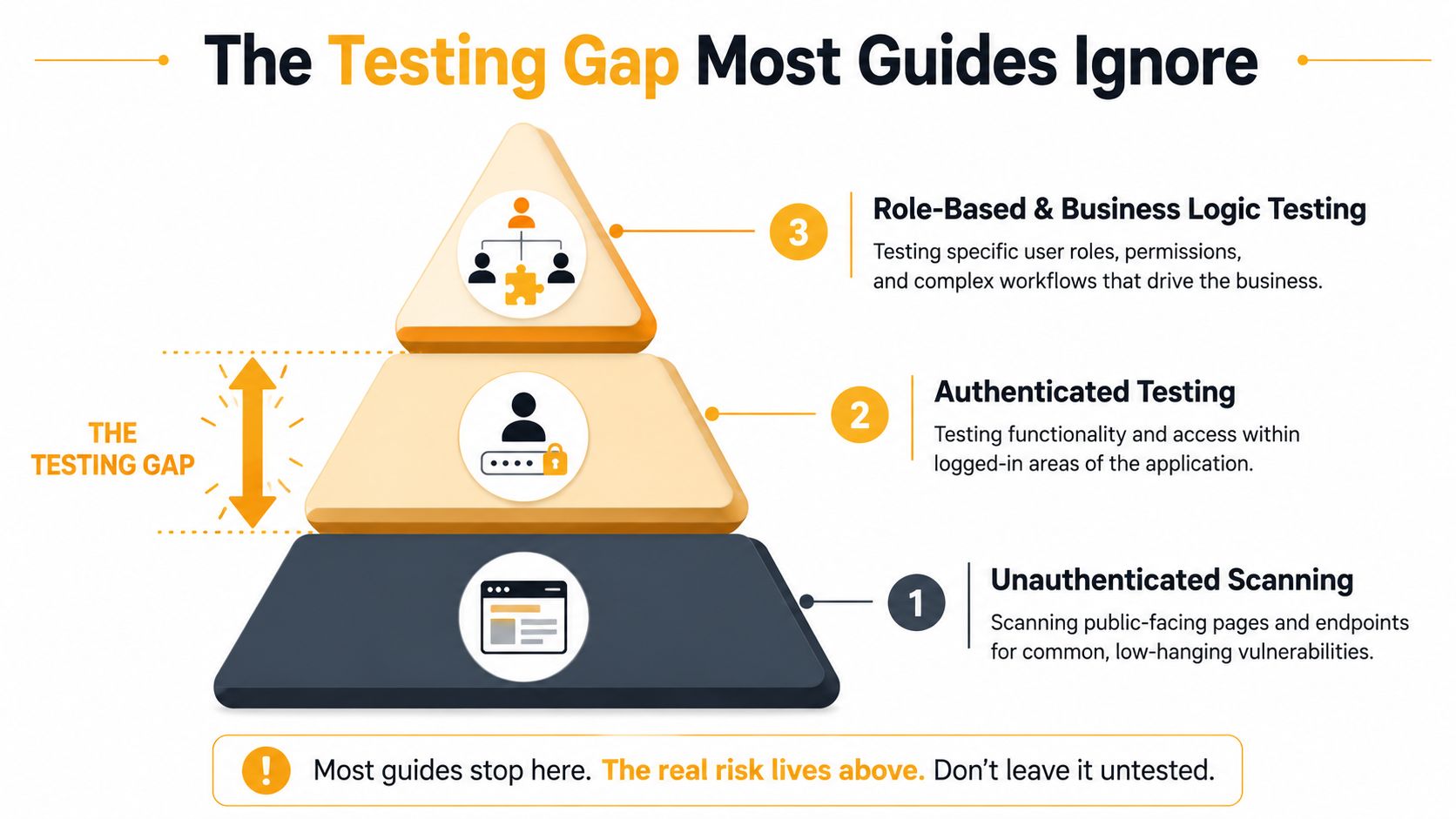
Most basic guides stop at public pages. They scan the login screen, a few forms, maybe an API endpoint, then call it a day. That's where a lot of small-business programs go wrong, because the significant exposure often starts after authentication, not before it.
Authenticated access is where the risk changes
TechTarget notes that organizations often skip authenticated application testing, even though they need to examine all user roles (TechTarget). That gap matters because the system's trust model changes the moment someone logs in. A regular customer, a manager, and an administrator should never have the same view or the same power, and testing has to prove that.
OWASP's testing guide backs that up by calling for testing as an administrative user and checking hidden parameters and administrative functions (OWASP Web Security Testing Guide). If the only thing you test is whether a page loads unauthenticated, you're ignoring the exact area where privilege escalation tends to show up.
Business logic needs human judgment, not just automation
Input validation and error handling matter, but so do the workflows behind them. An attacker might not need to break encryption or bypass the login screen if they can reuse a discount flow, change a record ID, or approve their own request. Those are business-logic flaws, and they're usually easier to spot with role-based testing than with a generic scanner.
OWASP's control domains give you a practical checklist: information gathering, configuration and deployment management, identity management, authentication, authorization, session management, input validation, error handling, and weak cryptography (OWASP Web Security Testing Guide). That list is useful because it reminds leaders that testing isn't one activity. It's a sequence of checks against different trust boundaries.
An SMB doesn't need to test every screen manually. It does need to test every sensitive workflow with the right role, the right session state, and the right assumptions broken on purpose.
If you're paying for surface-level scans, ask a direct question: did anyone test the application as a normal user, a power user, and an admin? If the answer is no, the program is incomplete.
Integrating Testing into Development and Operations
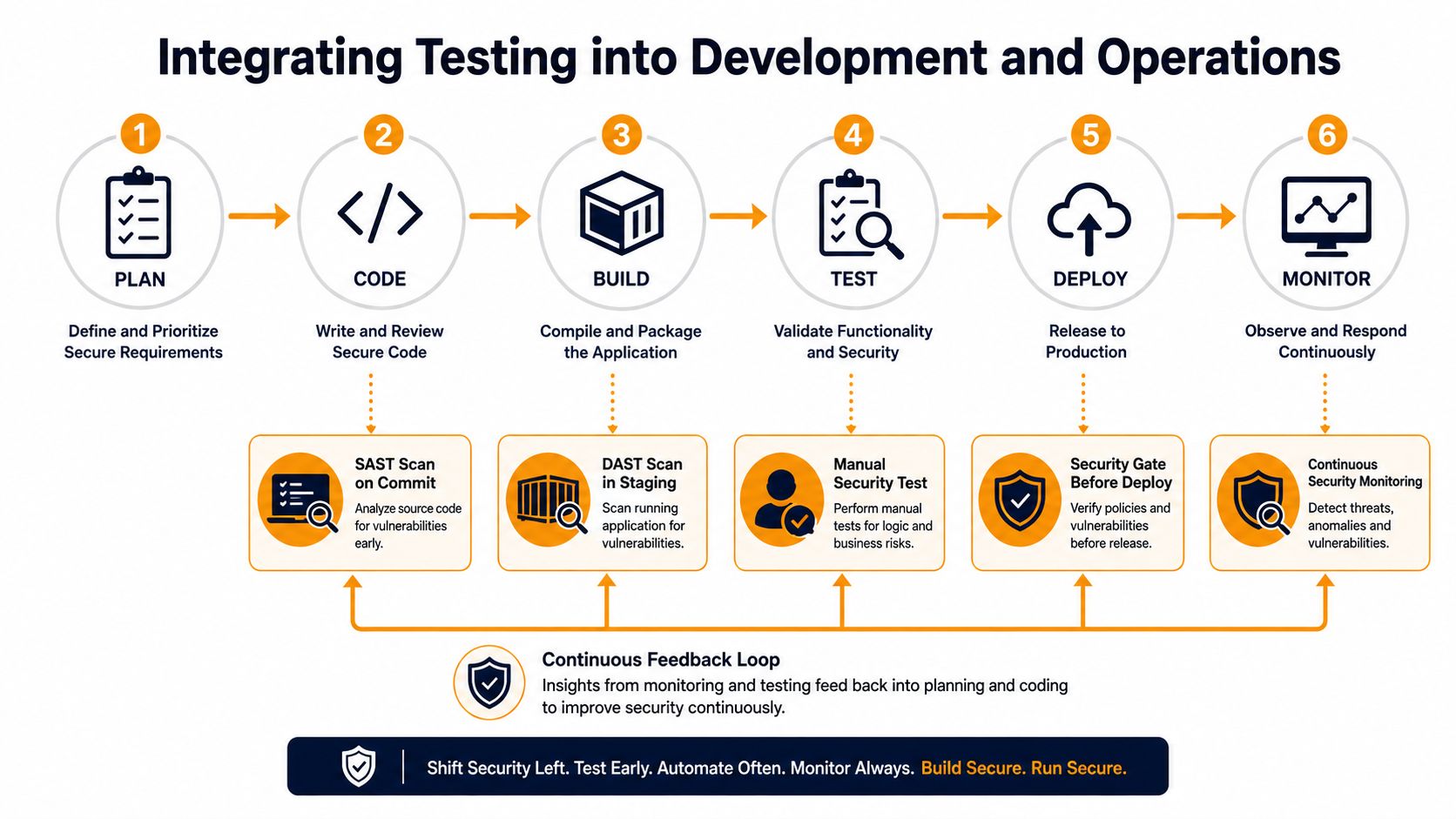
Testing works best when it sits inside the workflow instead of hanging off the side of it. Security checks that wait until the end of a release cycle usually create tension, because developers see them as a gate instead of a guardrail. The goal is to catch issues early, while changes are still cheap to fix.
Put SAST at the code stage and DAST in staging
Static checks belong close to the commit or pull request. That's where developers still have context, and it's where a warning can turn into a quick fix instead of a delayed ticket. DAST belongs later, once the application is runnable in staging or pre-production, because it needs a live system to validate behavior.
That split lines up with common DevSecOps practice and keeps teams from tripping over each other. It also reduces the “security is slowing us down” complaint, because the feedback arrives when the person who wrote the code can still act on it. For a smaller company, that matters more than tool sophistication.
Keep production focused on monitoring and containment
Production shouldn't be the first place you discover a weakness. It should be the place where you monitor for abuse, verify that controls still work, and watch for regressions. Runtime protection and logging are useful here, especially for applications already serving customers.
A simple way to frame it is this. Code stage for prevention, staging for validation, production for observation. That sequencing keeps each environment doing one job well instead of turning production into a laboratory.
The practical part is process, not theory. On any app with regular changes, build scan triggers into the same places work already happens, such as Git branches, build pipelines, or release gates. On slower waterfall-style projects, schedule scanning at design review, before staging sign-off, and again before go-live.
Working rule: if a scan result can't reach the developer who owns the code, it isn't integrated well enough.
Teams that need software development support can also use software development services to get the pipeline and release process aligned with security controls. For teams already managing multiple defenses, the distinction between application testing and endpoint controls is worth keeping clear, which is why it helps to compare application scanning with approaches like MDR vs EDR rather than treating everything as one security bucket.
Choosing the Right Tools and Testing Cadence
Tool choice should match the way your team builds software. A small company with one custom web app doesn't need the same stack as a firm shipping multiple APIs, vendor integrations, and customer portals. The trick is to buy for coverage and usability, not for a feature list that looks impressive in a demo.
Match the tool to the job
Code analysis tools are for finding issues in source code before release. Runtime scanners are for checking deployed apps. API testing tools matter when your service layer does most of the work. Dependency checks help catch vulnerable open-source packages before they ship.
The question isn't whether one category is “better.” It's whether your applications rely on that layer. If your business runs on a modern web stack, you usually need at least code analysis and runtime checks. If your team leans heavily on third-party libraries, dependency scanning becomes essential.
Use cadence to control budget and noise
| Cadence | Best For | Typical Cost Range | Key Trade-off |
|---|---|---|---|
| Annual penetration testing | Stable systems with limited change | Higher upfront service engagement | Good depth, but it can go stale quickly |
| Quarterly scans | SMBs with regular releases | Moderate, predictable operational cost | Better freshness, still leaves gaps between checks |
| Continuous testing | Fast-moving apps and higher-risk workflows | Ongoing tooling and process investment | Best visibility, but it needs discipline and triage |
Annual testing alone is too thin for changing systems. Continuous testing is valuable, but if your team can't remediate findings, you'll just build a backlog faster. Most SMBs land somewhere between quarterly and continuous, depending on how often they ship and how much customer data sits behind the app.
The right cadence is the one your team can sustain. A scanner that runs every day but nobody reviews is wasted effort. A manual test once a year on an app that changes every week is also wasted effort.
For leaders comparing services and platforms, the useful filters are integration ease, false-positive rate, reporting quality, and total cost of ownership. That's where a provider like IT Cloud Global, LLC can fit naturally, because it can support the operational side of implementation while a security team focuses on policy and remediation.
Compliance Requirements and Risk Considerations
Auditors rarely ask whether you “feel secure.” They ask what you test, how often you test it, and whether you can prove the process exists. That's why application security testing is as much about evidence as it is about defense.
Compliance needs testing records, not vague assurances
Frameworks like PCI DSS, HIPAA, and SOC 2 all push organizations toward stronger control over systems that store, move, or expose sensitive data. Testing helps prove that you're not relying on hope or one-time configuration work. It also gives you a repeatable record that's easier to show during reviews.
If you process payments, the relevant concern is obvious. If you handle health data, the stakes are different but just as real. If you provide services to other businesses, your buyers may ask for security evidence before they'll sign a contract or renew one.
Prioritize by exposure and business impact
Not every app deserves the same level of testing. A public customer portal deserves more attention than an internal brochure site. A workflow that lets staff update invoices or reset passwords deserves more scrutiny than a static marketing page.
The cleanest triage method is to rank applications by three questions. What data does it touch, who can reach it, and what happens if it fails? That lens helps you spend scarce testing dollars where the business pain would be highest.
Practical takeaway: put your deepest testing into the applications that are internet-facing, role-sensitive, or tied to revenue and regulated data.
Documentation matters here too. Keep test dates, tools used, findings, remediation owners, and closure status in one place. That record helps with audits, but it also helps executives understand that security work is ongoing, not a one-off project.
Your SMB Implementation Roadmap and Checklist
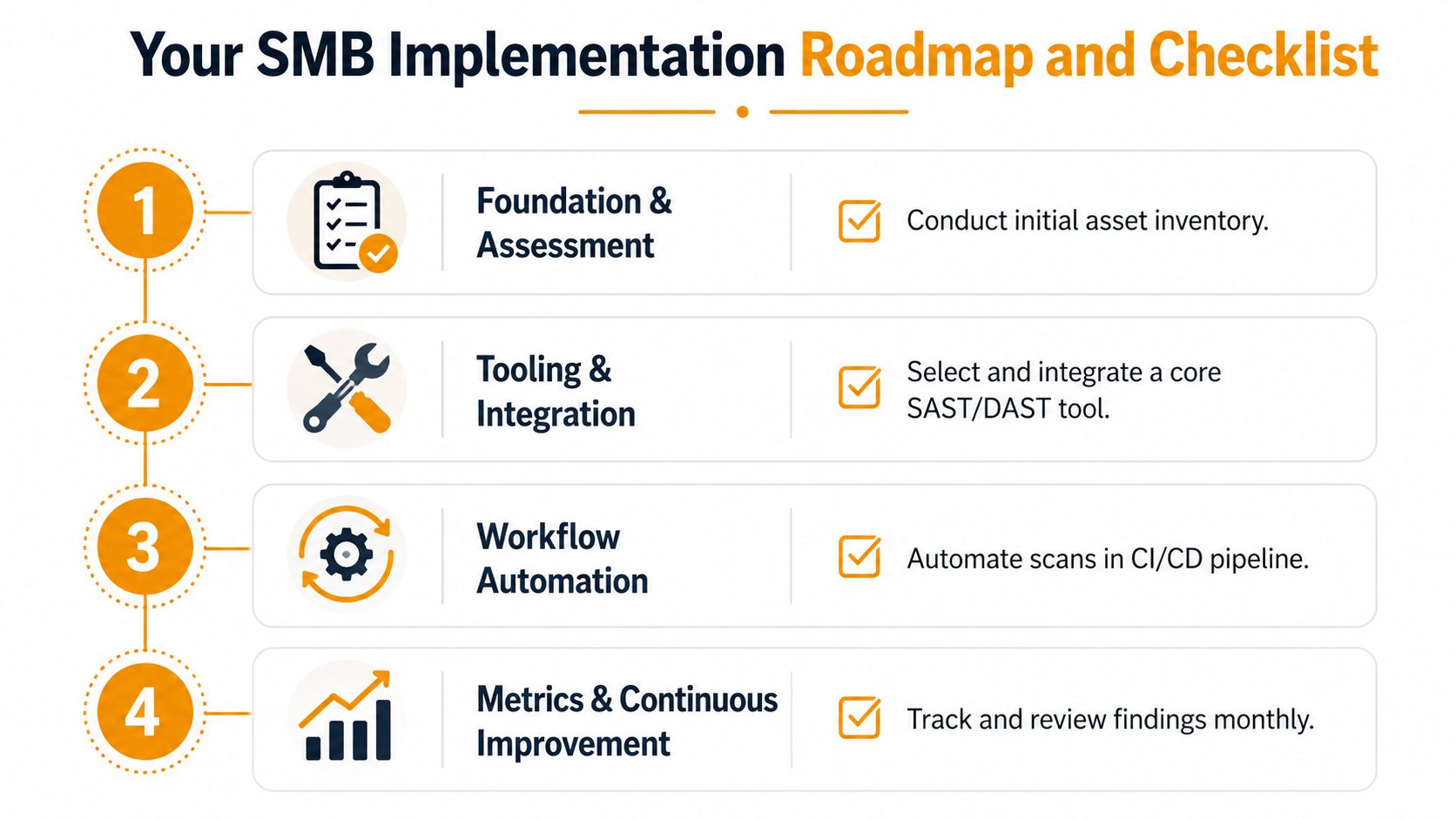
The fastest way for a small business to get traction is to start with one application, one workflow, and one owner. Don't try to boil the ocean. Build a repeatable process that proves value, then expand it to the rest of the environment.
Phase 1 Foundation and assessment
Start by listing every application that matters, including customer portals, internal tools, vendor-facing apps, and anything tied to payments or private data. Identify who owns each one, what data it touches, and how often it changes. That inventory tells you where the risk lives.
Phase 2 Tooling and integration
Pick a core toolset that can cover at least static and dynamic testing, then wire it into your source control or build workflow. If you're working with outside help, implementation support by Ekipa AI is the kind of resource that can help structure rollout and reduce the early setup friction. Keep the pilot small enough that people can finish it.
Phase 3 Workflow automation
Once the pilot works, automate scans in the CI/CD path and define who reviews what. Set a simple rule for severity, ownership, and escalation so findings don't get lost in email. If the team can't explain how a result becomes a ticket, the process isn't ready.
Phase 4 Metrics and continuous improvement
Review findings on a regular cadence and look for repeat offenders, slow fixes, and recurring control gaps. The point is not to collect alerts, it's to improve how the organization ships software safely. If a finding keeps showing up, treat it as a process issue, not just a bug.
A practical 90-day checklist looks like this:
- Inventory the applications: capture owners, user roles, and sensitive data paths.
- Select one pilot app: choose the system with meaningful risk and a cooperative owner.
- Define scan triggers: connect testing to commits, builds, or staging releases.
- Assign remediation ownership: make sure every finding has a named responder.
- Document closure: record what was fixed, when it was verified, and by whom.
That's enough to start without overwhelming a small team.
How Managed IT Services Support Your Testing Program
Most SMBs don't fail at application security testing because they don't care. They fail because nobody has the time to tune tools, triage findings, chase developers, and keep audit records current. Managed support closes that gap by taking over the parts that eat staff time.
A provider should be able to handle testing setup, schedule coordination, result review, and remediation tracking. It should also explain findings in business terms, not just technical jargon. That's especially useful for owners who need to see which application is at risk, what the exposure means, and what needs to happen next.
IT Cloud Global, LLC fits that model as a managed IT partner that can keep the surrounding infrastructure, endpoints, and cloud environment in shape while application testing gets folded into the broader security program. For Houston businesses, that can simplify who owns what, which is often the hardest part of getting started.
The best engagement is one where the provider doesn't just run scans, it helps the business build a habit. That means regular testing, clear remediation paths, and evidence that you can use in customer reviews or compliance work.
If your team's application testing still stops at surface scans, IT Cloud Global, LLC can help you close the gap with practical IT support, security services, and managed workflows that fit a small-business budget. Visit IT Cloud Global, LLC to talk through your current testing gaps and get a plan that matches how your business operates.