


Top Managed IT Services Houston for SMBs in 2026
Your office opens at 8. By 8:17, nobody can print, Microsoft 365 won't sync, and the one employee who “usually fixes this stuff” is already buried. You call an IT guy. He says he can remote in “soon.” Your staff waits. Customers wait. Orders slow down. The whole day bends around a problem that should've been prevented.
That's where a lot of Houston small businesses are right now. Not because they ignore technology, but because they're stuck in a reactive model. Something breaks, then somebody scrambles. It feels cheaper until it isn't. Its true cost shows up in missed work, frustrated employees, and owners spending their morning chasing a router reboot instead of running the business.
Houston makes this harder. You may have an office in town, a warehouse in Pearland, a satellite team in The Woodlands, and remote users scattered across the metro. That setup punishes sloppy IT support. You need systems that stay up, support that responds fast, and a provider that understands when remote tools are enough and when somebody needs to show up.
Table of Contents
- Is Your IT Keeping Up With Your Houston Business
- What Are Managed IT Services Really
- The Core Components of a Managed IT Services Plan
- Decoding Managed IT Services Pricing Models
- Your Cybersecurity and Compliance Partner
- Why a Houston-Based IT Partner Matters
- How to Choose the Right Managed IT Provider in Houston
Is Your IT Keeping Up With Your Houston Business
A Houston business owner usually doesn't call about IT because things are going great. They call when the point-of-sale system freezes during a rush, when files won't open before payroll closes, or when a phishing email gets clicked and everyone suddenly stops breathing for a second.
That's the trap of break-fix support. It only shows up after the damage starts. You don't have a plan. You have an interruption.
Houston isn't a small market where one office and a few laptops define the whole operation. The metro had a population of about 7.34 million in the 2020 Census, and the local economy spans energy, healthcare, aerospace, manufacturing, and logistics, which is one reason the city has a mature outsourced IT ecosystem and a long list of established providers in Cloudtango's Houston MSP directory. For a small business owner, that matters because local operations are often spread out, time-sensitive, and dependent on systems staying available all day.
The problem isn't just bad tech
Most of the time, the issue isn't a single broken server or weak Wi-Fi signal. It's the operating model behind your IT.
If your setup depends on:
- One internal power user who knows all the passwords
- A freelance technician who's available when he's available
- A pile of tools nobody actively monitors
- Backups you assume are working but haven't verified recently
then your business is carrying more risk than you think.
Practical rule: If IT only gets attention when users complain, you don't have an IT strategy. You have an alarm bell.
What better looks like
A stronger setup feels boring in the best way. Employees log in and work. Devices stay patched. Backups run. Security alerts get reviewed. Small issues get handled before they become visible business problems.
That's why managed IT services Houston businesses buy aren't really about gadgets or jargon. They're about reducing disruption, tightening security, and replacing random repair bills with a support model you can plan around.
What Are Managed IT Services Really
Managed IT services are a simple idea wrapped in technical language. Instead of paying someone only when something breaks, you pay a provider to actively manage, monitor, maintain, and secure your systems every month.
Think of your business like a commercial building.
A break-fix IT shop is the handyman you call after the pipe bursts, the lock jams, or the AC dies. You pay for chaos. Some problems get solved fast, some don't, and every issue arrives as a surprise expense.
A managed service provider is the property manager. They inspect the building, schedule maintenance, watch for warning signs, manage vendors, and keep security in place so tenants can work without constant disruption.
The difference between reactive and proactive
This is the core shift. In managed IT services, the value comes from proactive monitoring, not from heroic last-minute repairs. Houston providers built around this model continuously watch servers, endpoints, and networks for early warning signs, then remediate issues before users feel the downtime, as described by Centre Technologies' overview of Houston IT support.
That matters because most expensive IT failures don't start as dramatic failures. They start as small signals:
- Disk space filling up on a critical server
- Backup jobs failing unnoticed
- Workstations missing patches
- Firewall alerts nobody reviews
- Repeated login anomalies that point to account abuse
A managed provider catches those patterns earlier.
Good managed IT should feel less like emergency medicine and more like maintenance on equipment you can't afford to lose.
What you're actually buying
You're not just buying “support.” You're buying a way to run technology with fewer surprises.
That usually includes:
- Monitoring so issues get flagged early
- Maintenance so systems stay current
- Help desk coverage so users aren't stranded
- Security oversight so threats don't sit unchecked
- Planning so your tech stack matches your business
If you want a plain-English companion piece on the network side of this, the Splash Access guide to managed networks does a good job of explaining why businesses outsource day-to-day network oversight instead of waiting for outages.
Why small businesses benefit the most
Large enterprises can afford big internal IT departments. Most small and midsize businesses can't. They still need support for laptops, cloud apps, Wi-Fi, backups, cybersecurity, and vendor issues. They just don't need six full-time specialists on payroll to get there.
That's why the managed model works. It gives smaller companies access to structured IT operations without forcing them to build everything in-house. Instead of constantly reacting, they get a repeatable system for keeping work moving.
The Core Components of a Managed IT Services Plan
A real managed plan isn't just “call us if there's a problem.” It's a stack of operational controls that keep your business usable, secure, and recoverable.
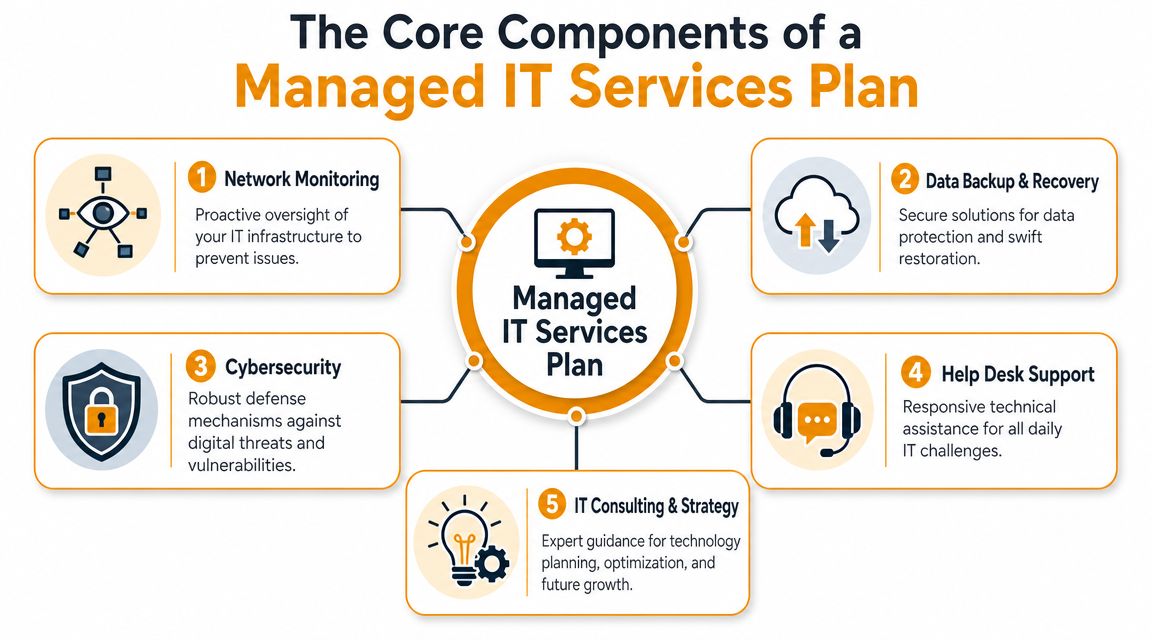
Help desk and user support
Your employees don't care whether the issue is local, cloud-based, or caused by a bad update. They care that they can't work.
A managed help desk handles the daily friction that slows teams down:
- Login problems that block access to email and files
- Printer and device issues that stop office workflows
- Microsoft 365 support when Teams, Outlook, or SharePoint misbehave
- New user setup and offboarding so access stays controlled
Good support isn't just about being friendly. It's about triage, escalation, documentation, and follow-through. If tickets disappear into a black hole, your provider is weak no matter how polished the sales pitch sounded.
Monitoring and routine maintenance
This is the engine room. Quiet work, but critical.
Managed providers watch core systems, apply updates, review system health, and tune performance before users start filing complaints. If you want a service checklist built specifically around local SMB needs, this Houston small business managed IT support guide is a useful reference.
The business value is straightforward:
- Less downtime
- Fewer recurring issues
- More predictable performance
- Less dependence on tribal knowledge
Cybersecurity controls that actually matter
Small businesses often buy security in the wrong order. They grab a firewall, add antivirus, and assume they're covered. They're not.
A mature managed services stack for SMBs typically includes endpoint threat protection, vulnerability assessment, and disaster recovery because those controls address common failure points like ransomware, misconfiguration, and failed restores, as noted in Zazz's Houston managed IT overview.
What I'd expect to see in a serious plan:
| Component | Why it matters to the business |
|---|---|
| Endpoint protection | Stops or isolates malicious activity on laptops and desktops |
| Vulnerability assessment | Finds weak spots before an attacker or outage does |
| Firewall and intrusion controls | Reduces exposure at the network edge |
| Email security | Cuts down on phishing and malicious attachments |
| Access controls | Limits damage when an account is compromised |
Backup, recovery, and continuity
Backups aren't useful because they exist. They're useful because they restore cleanly when something goes wrong.
A good provider should define how your data is backed up, where it lives, how recovery works, and who is responsible during an outage. If your phones and internet are tied tightly into operations, it also helps to understand how reliable data and telephony services fit into continuity planning. A business can't operate smoothly if the network survives but communications collapse.
A backup that hasn't been tested is a hope, not a recovery plan.
Vendor management and strategy
You don't need an IT vendor who just resets passwords. You need one who can coordinate the whole environment.
That means dealing with:
- Internet providers when circuits fail
- Software vendors when cloud apps break
- Hardware warranty support when devices fail
- Technology planning when you open a site, move offices, or standardize equipment
One local option in this space is IT Cloud Global, LLC, which provides managed support, network monitoring, backup and disaster recovery, cloud administration, and on-site or remote assistance for Houston-area businesses. That's the type of service mix you should compare against when evaluating providers, regardless of who you choose.
Decoding Managed IT Services Pricing Models
Pricing confuses a lot of owners because providers package similar services in different ways. The structure matters more than the label.
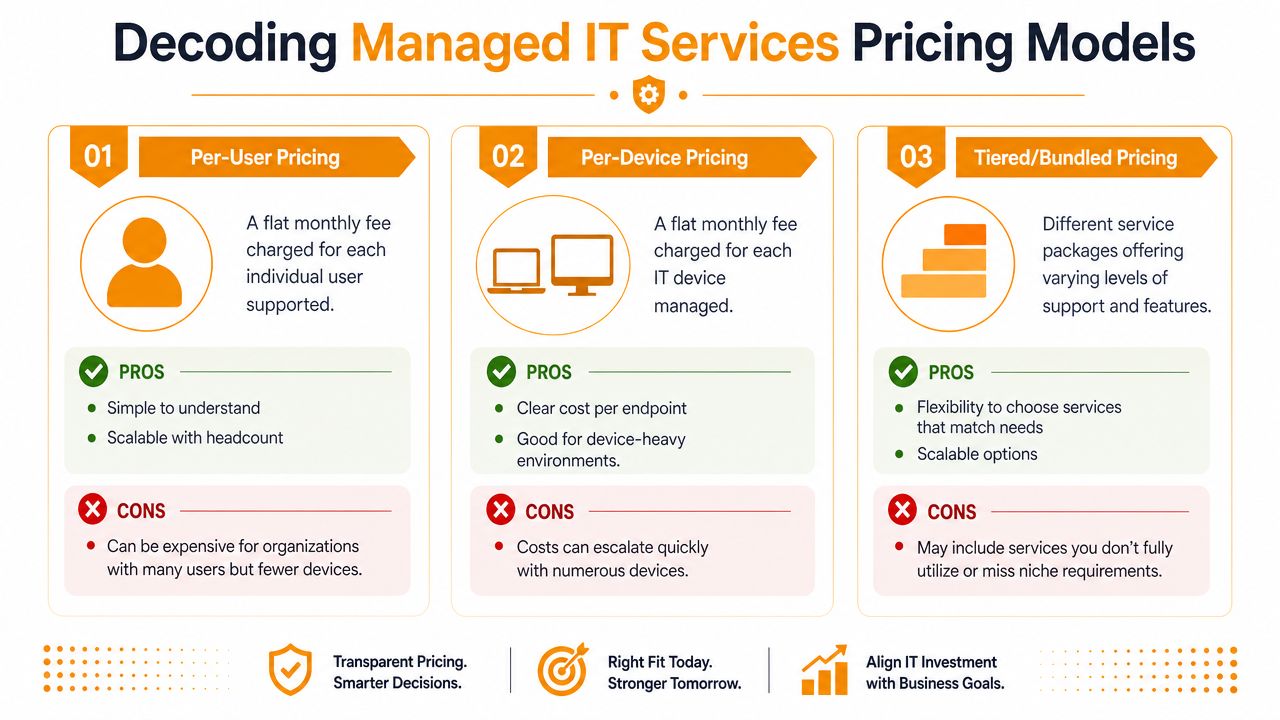
Per-user pricing
This model charges a monthly fee for each employee supported. It works well when your people use multiple devices and rely heavily on cloud apps, email, collaboration tools, and remote access.
It's usually the cleanest model for:
- Professional services firms
- Hybrid offices
- Teams with laptops, phones, and home setups
- Businesses growing headcount steadily
The upside is simplicity. If you add users, your support cost scales in a way that's easy to forecast. The downside is that light users can feel expensive if they barely touch technology.
Per-device pricing
This model charges by managed endpoint or system. Desktops, laptops, servers, firewalls, and other devices may each carry their own monthly fee.
It fits environments where equipment is more important than headcount:
- Warehouses
- Retail sites
- Shared workstation environments
- Operations with shift workers using the same machines
Per-device pricing is fine if your device inventory is stable and documented. It becomes messy when nobody agrees on what counts as a billable device.
Tiered or bundled pricing
This is the most common sales format. Providers package support into levels. Basic, standard, premium, or similar language.
The model can work well if the tiers are clear. It becomes a problem when the provider hides key services behind vague labels.
Here's the simplest way to evaluate it:
| Pricing model | Best fit | Main risk |
|---|---|---|
| Per-user | Cloud-first, employee-centric businesses | Paying for users with minimal needs |
| Per-device | Device-heavy operations | Costs drift if inventory expands fast |
| Tiered bundles | Businesses wanting packaged options | Comparing providers becomes harder |
This short video gives a useful overview before you review proposals:
What smart buyers ask about pricing
Don't obsess over the monthly number alone. Ask what's included, what triggers extra charges, and what work is considered project-based rather than covered support.
Look for answers to these:
- Onboarding scope included or billed separately
- After-hours support included or premium
- On-site visits limited or unlimited
- Security tools bundled or add-on
- Backup and recovery work included for both setup and real incidents
- Vendor coordination covered or billable
If a proposal looks cheap but leaves out security, backups, and after-hours response, it isn't cheap. It's incomplete.
The right pricing model is the one that matches how your business operates. Not the one that sounds simplest in a sales meeting.
Your Cybersecurity and Compliance Partner
If your managed IT provider treats cybersecurity like an optional add-on, keep looking.
Security isn't a side service anymore. It sits inside every part of your environment. User access, laptops, cloud apps, backups, email, Wi-Fi, file sharing, and vendor tools all create risk. If one of those is managed badly, your business pays for it in downtime, cleanup, legal headaches, or reputation damage.

Security has to be built into daily IT operations
A lot of owners still think in separate buckets. One vendor for support. Another for antivirus. Maybe a third consultant for compliance paperwork.
That split approach creates gaps. Good managed IT ties security directly into administration, patching, access control, device management, and response procedures. If your provider manages endpoints but doesn't review suspicious activity on them, that's not real protection.
A layered approach is the right approach. This security in layers guide is worth reading because it frames security the way operators should think about it. Not as one product, but as overlapping controls that reduce exposure when any single safeguard fails.
What your provider should be handling
You don't need a provider that throws buzzwords at you. You need one that can explain what they monitor, what they enforce, and what happens when an alert fires.
Ask whether they handle:
- Endpoint detection and protection
- Firewall management
- Email filtering and user protection
- Access policies and account reviews
- Backup integrity and recovery readiness
- Security awareness for employees
- Incident escalation and containment
If they can't explain those in plain English, they probably can't execute them well under pressure.
Compliance is operational, not theoretical
Healthcare, finance, legal, energy, and service businesses all face some form of customer, vendor, insurance, or regulatory pressure around data handling. That doesn't always mean a formal audit. It often means questionnaires, policy reviews, contract requirements, or proof that your controls aren't sloppy.
Your MSP should help you document systems, tighten access, standardize devices, and support the technical side of compliance. They don't need to be your attorney. They do need to keep your environment from undermining your obligations.
One area where this is becoming more important is AI and customer-facing automation. If your team is using chatbots or AI assistants, best practices for chatbot data privacy are worth reviewing before someone feeds sensitive business or customer data into the wrong tool.
Security maturity shows up in boring habits. Access reviews. patching discipline. documented backups. offboarding done on time.
That's the kind of discipline that keeps minor mistakes from becoming expensive incidents.
Why a Houston-Based IT Partner Matters
In Houston, generic MSP advice usually falls apart. Houston isn't one compact downtown cluster. It's a spread-out operating environment with traffic, industrial corridors, branch locations, field teams, and businesses that often work across multiple site types.
The local question isn't “Do I want remote support or on-site support?” That's too simplistic.
A key question is: Where do I need hands on-site, and where is remote management faster and more efficient?
Houston changes the support equation
Providers serving this market explicitly cover not just Houston proper but also Katy, Sugar Land, and The Woodlands, which is why buyers should ask for measurable service-level differences by location and by site type, as discussed in ECS Office Technologies' Houston managed IT page.
That matters because support needs change by location:
- Headquarters may need strategic planning, executive support, and conference room reliability
- Warehouses often need dependable connectivity, workstation uptime, and quick hardware swaps
- Retail or customer-facing sites need fast issue resolution because downtime hits revenue immediately
- Remote staff and branch offices often benefit more from strong remote tooling than from paying for constant local presence
When remote-first support is the right call
A lot of SMBs overvalue the phrase “local support” without asking what work requires a body in the room.
Remote-first support is often the better choice for:
- Password resets and account lockouts
- Microsoft 365 issues
- Routine endpoint troubleshooting
- Patch management and software deployment
- Monitoring and alert response
- Access changes and user administration
If your provider has good tools, good documentation, and disciplined escalation, these tasks get solved faster remotely than waiting for a truck roll.
When on-site support is worth paying for
There are still clear cases where local presence matters:
- Network cutovers or office moves
- Firewall, switch, or cabling issues
- Printer fleet or shared hardware failures
- New site buildouts
- Internet circuit handoffs
- Physical troubleshooting when remote access is gone
Here's my advice. Don't buy “always on-site” as a status symbol. Buy on-site response where the business impact justifies it.
The right Houston MSP doesn't sell one support model to every client. They match dispatch coverage to the way your locations actually operate.
Local knowledge matters beyond geography
A provider who understands Houston business conditions can usually ask better questions. Not because they have a magic zip code advantage, but because they've seen the same patterns before.
They know the difference between supporting:
- A clinic with patient-facing scheduling
- A logistics company with warehouse workflows
- An energy services office with field coordination
- A professional services firm living inside email, files, and meetings
That local context helps with planning, prioritization, and expectation setting. It also helps during ugly days, when a provider has to decide what gets fixed first and how to keep your people working while the root issue is still being handled.
How to Choose the Right Managed IT Provider in Houston
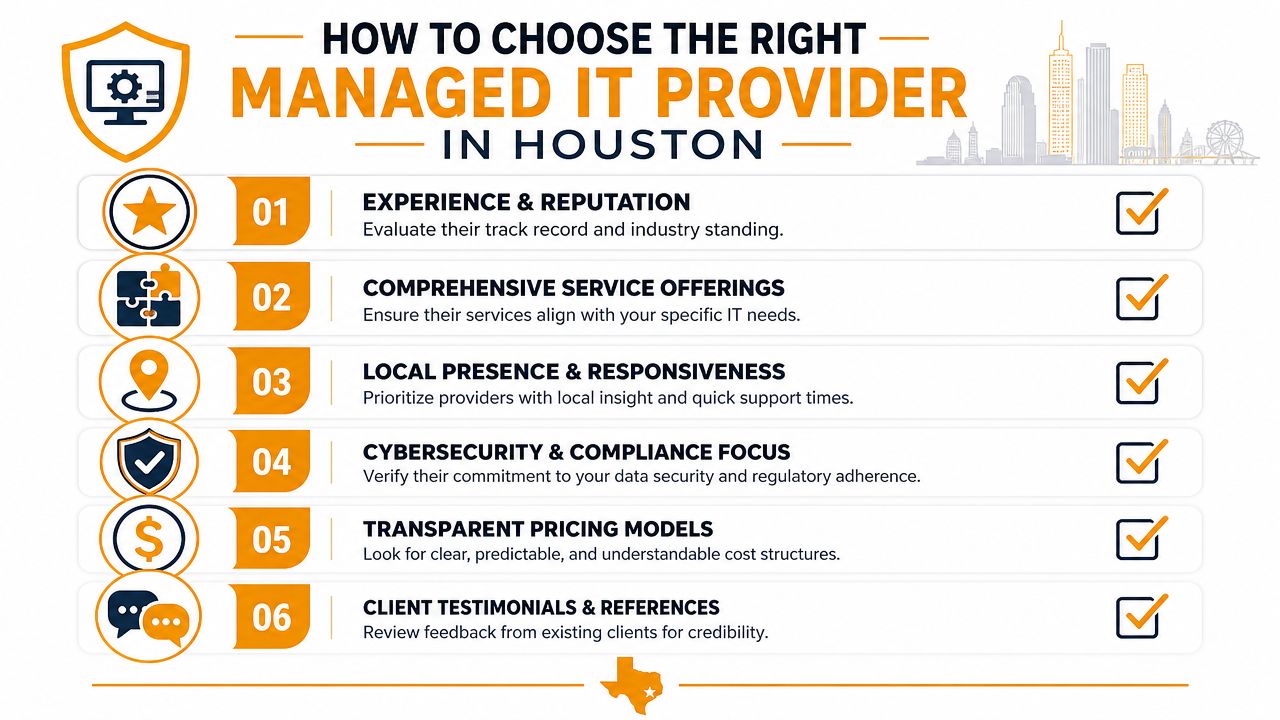
Most providers sound good in a sales call. Smooth slide deck. Friendly account manager. Big claims about response and security.
Ignore the polished intro. Interview them like you're hiring an operations partner, because that's what you're doing.
Ask questions that force specifics
Start with operational questions, not marketing ones. This guide on how to choose a managed service provider is a solid companion, but these are the questions I'd put on the table in the first meeting:
How do you monitor endpoints, servers, and networks day to day?
You want process, not buzzwords.What does your onboarding look like?
If they can't explain documentation, access transfer, and baseline review, expect a messy transition.What's included in standard support and what costs extra?
Force clarity on after-hours work, projects, security tools, and on-site visits.How do you handle backups and actual restores?
Not “we do backups.” Ask what happens when you need data back now.What are your escalation paths for security incidents?
Somebody should own detection, containment, communication, and recovery steps.
Look for evidence of operational maturity
You're trying to separate a real managed provider from a ticket-taker.
Strong signs:
- Documented processes instead of informal tribal knowledge
- Clear service boundaries so you know what's covered
- Security built into support rather than sold as an afterthought
- Location-aware support planning for offices, warehouses, and remote users
- Straight answers when you ask what they don't do
Weak signs:
- Vague promises about “white glove service”
- No clear answer on who handles incidents after hours
- One-size-fits-all bundles that ignore your footprint
- Heavy focus on tools with little discussion of process
- Deflection when you ask about failed backups, escalations, or dispatch timing
Judge how they think, not just what they sell
A provider's mindset matters. You want someone who asks:
- What systems are business-critical?
- Which locations need faster on-site response?
- What happens if internet access fails at your warehouse?
- How are user accounts removed when staff leave?
- Which vendors do we depend on to stay operational?
If they don't ask those questions, they're probably selling a generic package.
“We support Houston businesses” means very little. “Here's how we'd support your office, your warehouse, and your remote staff differently” means a lot.
Make the final call the practical way
Choose the provider that gives you the clearest operating model, not the fanciest pitch.
You want:
- Predictable support
- Security discipline
- A realistic on-site versus remote plan
- Transparent pricing
- A team that can explain your environment back to you clearly
That's how you choose managed IT services Houston businesses can rely on when systems fail, employees get locked out, or a location goes down at the worst possible time.
If you want a practical review of your current setup, IT Cloud Global, LLC can assess where your business is overpaying, under-protected, or relying too heavily on reactive support. The useful next step isn't a sales pitch. It's a direct conversation about your locations, your users, your risk points, and the right mix of remote management and on-site support for your Houston footprint.
- 7 Best Managed IT Services Houston TX Reviews (2026)
- Best IT Services Houston TX: Your 2026 Partner
- Managed IT Services Houston TX: 2026 Guide for SMBs
- IT Managed Services Houston TX: 2026 Guide
- Houston Managed IT Services: A 2026 Guide for SMBs
- Houston IT Support Services: Expert Solutions 2026
- What Is a Network Operations Center? an SMB Guide