


Software Development Services: A Practical Guide for 2026
Your team is probably already living this problem. One person updates a spreadsheet, another digs through email for the latest customer record, and a third keeps asking why the same order status shows up three different ways in three different tools. That is usually the point where off-the-shelf software stops helping and starts costing you time, trust, and money.
For a Houston business owner, that pain is not abstract. It shows up as missed handoffs, slow approvals, awkward workarounds, and staff who spend too much of the day correcting systems instead of serving customers. If that sounds familiar, you do not need a generic technology lecture. You need a clear view of what software development services do, what they cost, and how to buy them without getting trapped in the wrong engagement model.
Table of Contents
- When Off-the-Shelf Software Stops Being Enough
- What Software Development Services Actually Include
- The Development Lifecycle From Kickoff to Launch
- Fixed-Price, Time and Materials, or Dedicated Team
- What Software Development Services Actually Cost
- Security, Compliance, and Cloud Integration Considerations
- How to Choose the Right Software Development Partner
- Your Next Steps and Common Questions Answered
When Off-the-Shelf Software Stops Being Enough
A Houston service company I've seen in some form a dozen times has the same setup. The dispatcher uses one system, accounting lives in another, the field crew texts updates, and the owner keeps a spreadsheet open just to know what's happening. Everyone is working hard, but nobody trusts the full picture.
That's not a training problem. It's a signal that the business has outgrown generic software and needs something built around its own workflow. When your team spends more time moving data between tools than using the tools, custom development starts looking less like a luxury and more like cleanup.
Practical rule: If your staff keeps building workarounds in spreadsheets, email threads, and shared drives, the software is no longer serving the process. The process is serving the software.
The good news is that you don't need to buy a giant platform to fix it. Most small and midsize companies need a focused system that connects what they already use, removes duplicate entry, and gives managers one reliable view of the work. That is where the right software development services partner earns its keep.
If you're weighing whether to build, buy, or keep patching things together, start with the business pain, not the feature list. A useful local reference point is a firm that already handles custom software development in Houston, because local context matters when your team, customers, and vendors all expect practical answers fast.
The rest of this guide is built for that exact decision. You'll see what gets included, how the work moves from idea to launch, what the major pricing models really mean, and how to spot the providers that can deliver without turning your staff into unpaid project managers.
What Software Development Services Actually Include
Think of software development services like hiring a general contractor instead of buying a prefab shed. You're not just paying for the finished structure. You're paying for planning, coordination, design, build quality, and the fixes that keep it usable after opening day.
The phrase covers more than coding. It usually includes custom application development, where a team builds software around your workflow instead of forcing your team to adapt to someone else's product. It also includes web apps and mobile apps, which matter when staff, customers, or field teams need access from different devices.
The pieces that matter to an SMB
A solid provider usually handles API and system integration, which means your new software can talk to accounting, CRM, inventory, or other platforms already in place. It can also cover legacy modernization, which is the unglamorous job of replacing fragile old tools without breaking business operations.
UI/UX design is part of the package too, and it's not just about making screens look nice. It's about making the software easy enough that your team uses it correctly without constant retraining. Add quality assurance, and you get testing that catches mistakes before your customers do.
Business translation: Good software development is not just build work. It's the combination of design, integration, testing, and maintenance that keeps the software usable after the launch party.
The final piece is ongoing maintenance. That includes updates, bug fixes, support, and small changes after users start interacting with the live system. For an SMB, that ongoing work is where many projects either stay healthy or slowly rot.
This is different from generic IT support or managed services. IT support keeps your environment running. Managed services monitor, secure, and maintain the infrastructure. Development services create or reshape the software itself. If you only need help keeping devices, servers, and cloud tools stable, you may not need a development shop at all. If you need the business process encoded into software, you do.
The Development Lifecycle From Kickoff to Launch
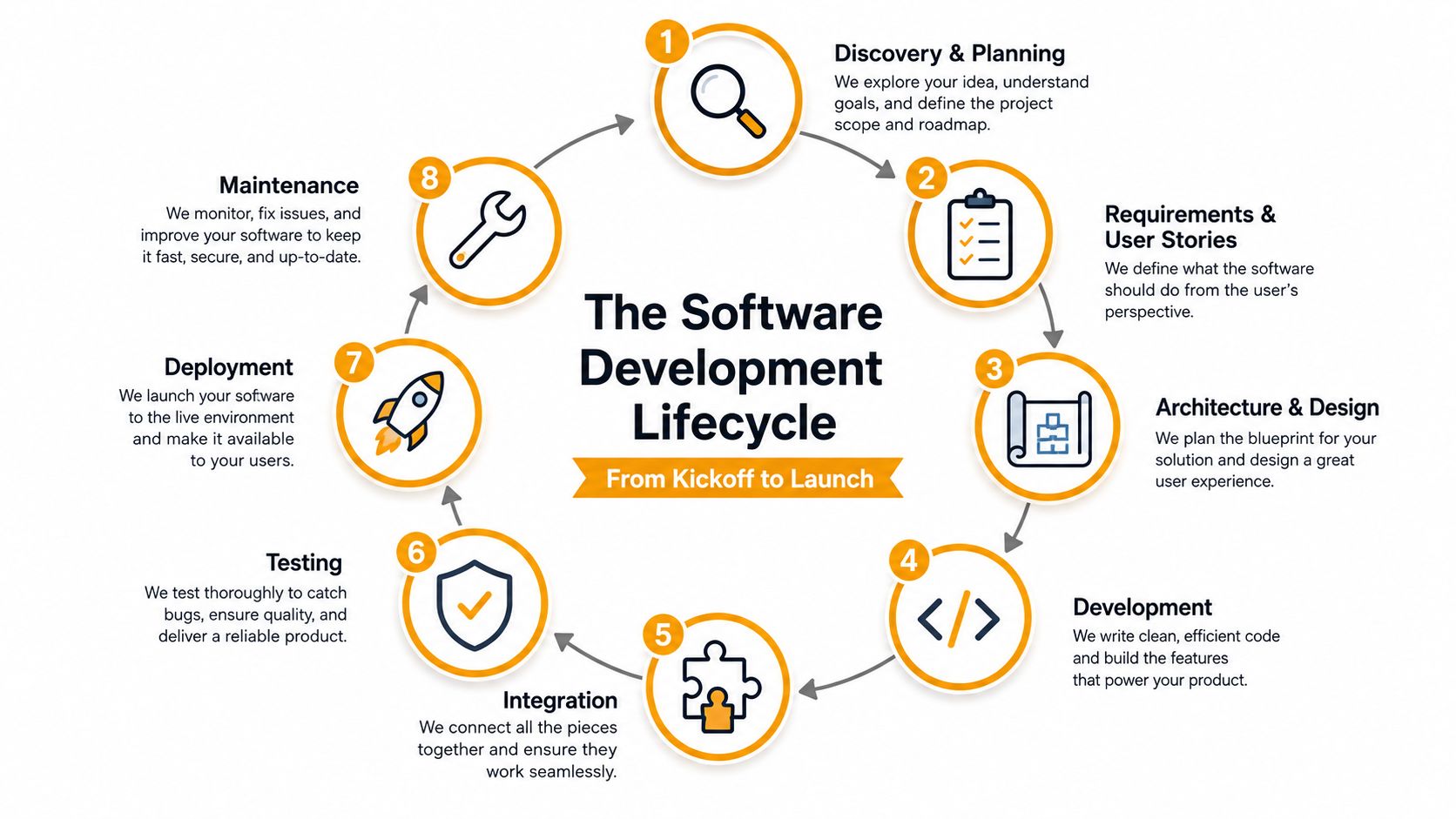
A credible provider should walk you through the work in stages, not just hand you a vague estimate and a date on a calendar. The lifecycle usually runs through discovery and planning, requirements and user stories, architecture and design, development, integration, testing, deployment, and maintenance. That sequence matters because each step gives you a different artifact to review before money gets burned.
What you should see at each stage
In discovery, you should get a blunt description of the problem and the business outcome. In requirements, you should see user stories, process maps, or a simple scope document that says who does what and why. In design, you should be shown wireframes, mockups, or a screen flow that proves the team understands the user experience.
Development should produce something visible, not just status updates. That might be a working demo, a staging build, or a partial module you can click through. Integration should show how the new software connects to your existing systems, and testing should produce a launch checklist or defect log that tells you what was fixed and what still needs attention.
A focused MVP often lands in an 8 to 16 week window, while a multi-system integration can run six months or more. Those are useful planning anchors, not promises, and they depend on how many systems you want connected and how clean your existing data is. For small businesses, the mistake is not starting too small. It's trying to solve everything in phase one.
The point of the lifecycle is control. Every stage should reduce uncertainty before the team moves forward. If a provider skips discovery, rushes architecture, or refuses to show test evidence, they're not being efficient. They're moving risk onto your business.
The discipline behind the lifecycle matters. A provider that treats delivery as a managed system, with lead time, cycle time, and deployment frequency in view, is far easier to work with than one that only talks about coding. If you want a deeper security angle on that discipline, the security in the SDLC guide is a useful companion read.
Fixed-Price, Time and Materials, or Dedicated Team
Most SMBs get burned not because the team can't build software, but because the payment model doesn't fit the job. The right model depends on how clear your scope is, how much discovery is still needed, and whether this is a one-off project or an ongoing capability.
| Engagement Model | Best Fit | Payment Structure | Who Carries Scope Risk |
|---|---|---|---|
| Fixed-Price | Clear deliverable, low uncertainty | One agreed project price | Provider carries more scope risk |
| Time and Materials | Discovery-heavy or evolving requirements | Pay for hours and actual work completed | Buyer carries more scope risk |
| Dedicated Team | Ongoing product work or embedded engineering | Regular team-based monthly cost | Shared, with the buyer often carrying business direction risk |
How to choose without overthinking it
Use fixed-price when you can describe the deliverable in one sentence and you know what done looks like. That works for a contained internal app, a simple portal, or a defined integration with limited variables. The upside is predictability. The downside is that every scope change becomes a negotiation.
Use time and materials when you're still figuring out the problem. That model fits discovery, prototyping, and projects where user feedback will shape the final product. You pay for flexibility, and you accept that the final cost won't be locked up front.
Use a dedicated team when software is becoming part of how your business competes. That model makes sense when you need continuous delivery, regular enhancement, and someone functioning like an extension of your own staff. It costs more operationally, but it usually beats trying to restart a new vendor relationship every few months.
If you're still deciding what the software should be, don't force fixed-price. If you already know the exact output, don't pay for open-ended exploration.
For Houston SMBs, the local trap is buying a model that feels safe on paper but is wrong in practice. If your business is still learning the process, fixed-price can create frustration. If the workflow is stable and the deliverable is clear, hourly discovery just wastes time. A software consulting partner should help you pick the model, not push the one that maximizes their comfort.
What Software Development Services Actually Cost
The honest answer is that price tracks complexity, not just screens. A simple internal tool and a multi-system platform are not the same purchase, even if both get called “an app” in a sales call. In a 2025 industry report, average-complexity mobile apps were estimated at roughly USD 30,000 to 150,000+, while large-scale systems using big data and AI were estimated at USD 800,000 to 4,000,000 (SCNSoft).
What drives the quote up or down
The biggest cost lever is scope creep. Every new report, role, permission set, and exception path adds labor, testing, and support burden. Architecture matters too, because a clean design reduces rework later while a rushed design just hides the cost until launch.
Integration depth is another major factor. One system talking to one cloud app is much easier than coordinating accounting, CRM, inventory, and document workflows at the same time. Regulatory requirements also change the shape of the work because security, auditability, and evidence gathering add steps that cheap quotes often ignore.
The location and structure of the team matter as well, but not in the simplistic way people think. A lower hourly rate can still produce a more expensive project if the team cuts corners, misses handoffs, or produces code that your staff can't maintain. Price is not the same thing as cost.
A smarter buying question is this. Over a 3 to 5 year horizon, will custom software cost less than stacking multiple SaaS subscriptions, integration tools, and manual workarounds? That decision gets more interesting when AI-augmented development lowers implementation cost, because the expense often shifts into maintenance, governance, and integration rather than the first build.
I'd rather see a Houston owner compare total ownership than chase a low bid. If the software touches core operations, a cheap first phase can become the most expensive choice you make.
Security, Compliance, and Cloud Integration Considerations
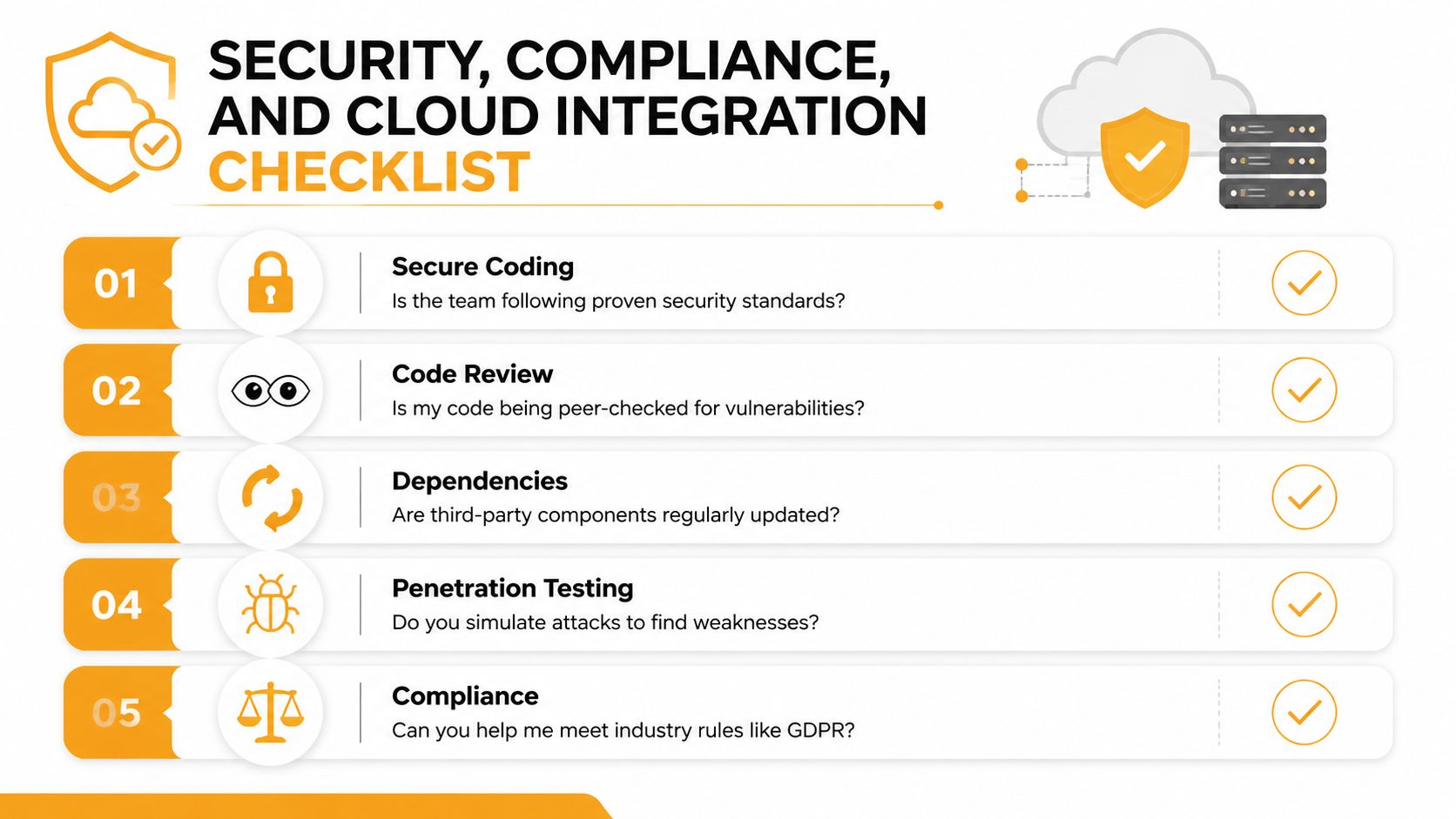
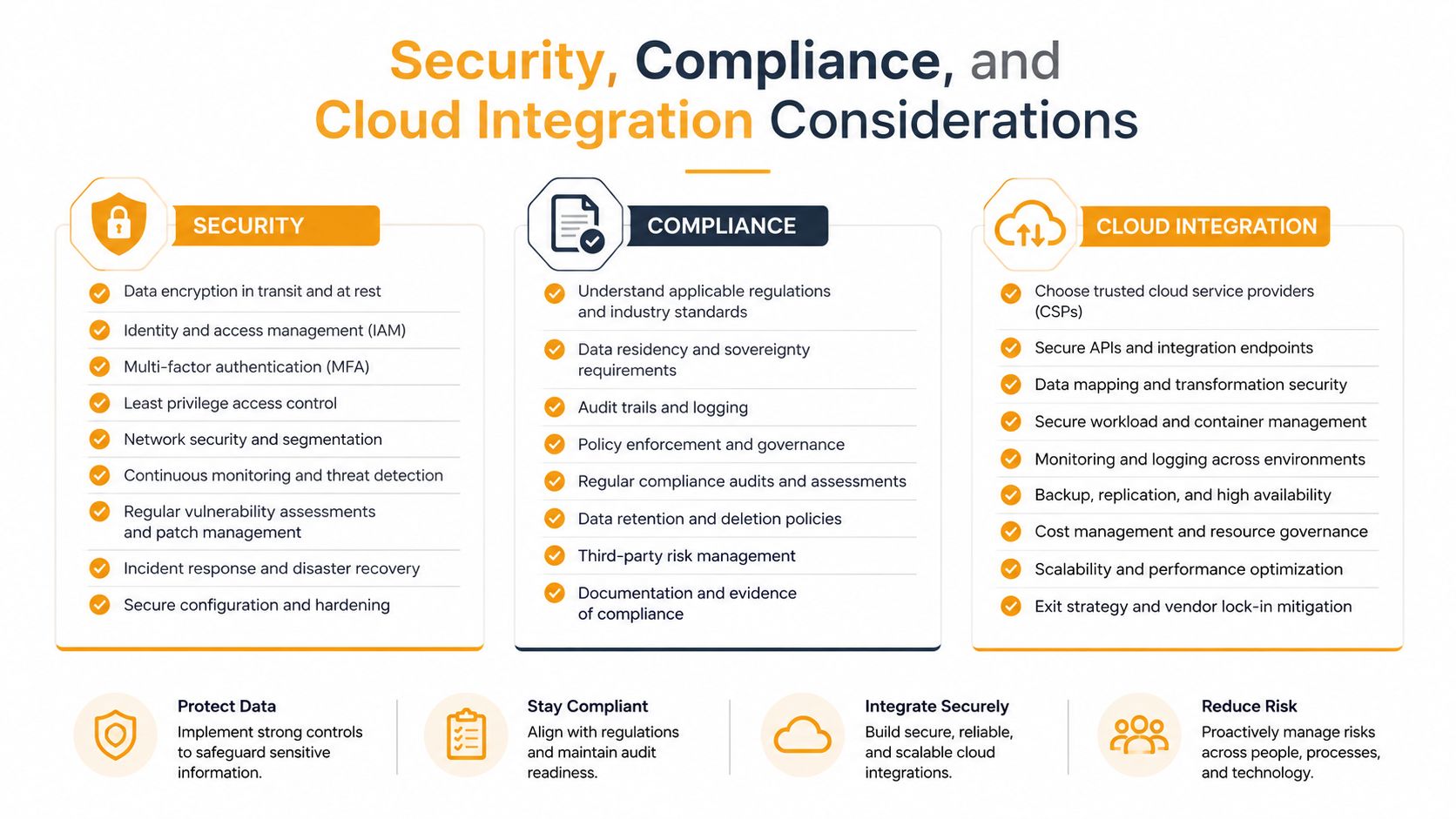
A Houston owner who waits until the end of the project to ask about security is already behind. Security needs to be built into the work from the first sprint, because fixing it later costs more and creates more risk. Ask whether the team uses secure coding, code review, dependency updates, penetration testing, identity and access controls, and encryption for data at rest and in transit.
Questions that expose weak providers fast
You do not need a technical background to pressure test a provider. Ask who reviews code before release, how vulnerabilities are tracked, and how third-party components are monitored. Ask what happens when a dependency is deprecated, whether test environments match production closely, and who gives the final sign-off before anything reaches live users.
Compliance changes by industry, but Houston SMBs still run into the same practical demands. Retail payment rules, healthcare-adjacent privacy concerns, and customer contracts all create evidence requirements that a serious provider should handle without drama. They should know how to document controls, limit access, and keep audit trails intact. If they treat compliance like paperwork that can be added later, they are not thinking like a partner.
Cloud integration belongs in the same planning session. Many SMB systems now run across AWS, Microsoft Azure, Microsoft 365, and Google Cloud, so new software has to fit the identity, storage, and collaboration tools already in place. A provider should be able to explain how it handles cloud-native and hybrid environments, and the answer should be specific enough to tell you they have done this before. For a closer look at the control side of that conversation, review this cloud security and compliance guidance.
That is also why cloud support and security support should sit close together. IT Cloud Global, LLC works across AWS, Google Cloud, Microsoft Azure, and Microsoft 365, along with cloud security and compliance support for businesses that need software to fit inside an existing operating environment. Whether you use them or another provider, the rule is the same. Security and integration must be designed together from the start. The security in the SDLC guide covers that discipline in more detail.
How to Choose the Right Software Development Partner
Pick the provider like you're hiring someone to own a business-critical process, because that's what you're doing. A serious partner shows you a documented discovery process, names the technical lead, gives you client references in your industry, and explains pricing without hiding behind jargon. If they can't do those four things, they're not ready for your project.
Red flags that should end the conversation
Walk away if the proposal is vague, the project owner is unclear, or the team dodges questions about code repositories and delivery cadence. A one-size-fits-all pitch is another bad sign. Real software work is shaped around your workflow, not recycled from the last five clients.
You should also care about communication. Ask how often you'll get updates, what gets reviewed in each checkpoint, and who has authority to make decisions when requirements change. If a provider needs you to chase them for status, they're already telling you how the project will feel after contract signature.
Vendor meeting rule: If you leave the meeting with more confusion than when you walked in, the provider hasn't earned your trust.
A good practical filter is to print a checklist and use it in the room. Does the team understand your industry? Can they speak to energy services, healthcare, logistics, or professional services without hand-waving? Do they know how a Houston operation runs, with hybrid staff, busy phones, and a constant need to keep work moving?
If you're evaluating mobile-heavy work, the AppLighter piece on onboarding a mobile development consultant is a useful reminder that the right consultant should fit the project stage, not just the technology stack. For broader project leadership, a project consulting partner should be able to translate business goals into a realistic delivery plan.
Your Next Steps and Common Questions Answered
Start with a 30-day reset. Write down the exact business problem, the people who touch it, the systems involved, and the pain created by the current setup. If your team can't describe the problem clearly, a vendor will happily describe it for you in a way that benefits their scope, not yours.
In the next 60 days, shortlist two or three providers and pay for discovery. Do not ask for free strategy theater. Ask each team to map the workflow, identify the risk, and define what a first phase would deliver. By day 90, sign a scoped pilot or first phase and agree on how success will be measured in business terms, not vanity metrics.
Four questions Houston SMBs ask before signing
How long does a typical project take? A focused MVP can move quickly, but anything that depends on multiple systems, messy data, or approvals from several departments will take longer. The more moving parts you have, the more valuable discovery becomes.
How do we protect intellectual property? Use clear contract language, control who has access, and confirm where code and documentation live. You should own the business outcome and know exactly how the handoff works if the relationship ends.
What happens after launch? Expect support, fixes, and changes. Launch is the start of the software's real life, not the finish line.
How do we know if we're getting good work? Look for working demos, predictable communication, honest risk reporting, and software your team can use. If every update is vague and every milestone slips without explanation, the project is drifting.
Pick the partner who treats your business outcome as the deliverable, not the line items in a statement of work.
If you want a straight answer on whether custom software fits your operation, talk to IT Cloud Global, LLC. They help Houston businesses connect software, cloud, security, and support work around real operational needs, which is what matters when you're trying to replace workarounds with something your team can run.