


Modernization of Technology for Houston SMBs
A lot of Houston business owners are living the same week on repeat. A desktop freezes while someone is invoicing a customer. Microsoft 365 logins fail on a Monday morning. The office Wi‑Fi drops during a client call. Backups exist, but nobody is fully sure whether they’d restore cleanly. Every small issue turns into an interruption, and every interruption steals time from sales, service, and operations.
That’s usually the point when owners start asking the wrong question. They ask, “What’s the cheapest fix?” The better question is, “Why does our technology keep getting in the way of work?”
That’s where modernization of technology becomes useful. Not as a buzzword. Not as a giant, risky overhaul. As a practical way to turn aging systems, scattered tools, and reactive support into something that helps the business run better.
For perspective, the pace of change isn’t slowing down. It took only 66 years from the first powered flight in 1903 to humans landing on the moon in 1969, and computing power has continued advancing under Moore’s Law for nearly six decades, according to the World Economic Forum’s timeline of tech transformation. If your business is still relying on systems and workflows designed for a much slower era, you’re not standing still. You’re falling behind.
Business owners who are trying to rethink operations often find it helpful to review broader strategies for digital business reinvention alongside a grounded IT plan. Then the work gets practical. An internal technology roadmap like this guide on creating an effective IT strategy for small businesses helps connect the vision to actual priorities, budgets, and execution.
Table of Contents
- Introduction Is Your Old Tech Holding Your Business Back
- The Business Case for Modernization ROI and Key Drivers
- The Six Key Domains of Technology Modernization
- Common Approaches and Strategic Tradeoffs
- A Practical Modernization Roadmap for Houston SMBs
- Managing the Human Side of Tech Modernization
- Your Houston Partner for Technology Modernization
Introduction Is Your Old Tech Holding Your Business Back
If your staff has workarounds for everything, your systems are probably overdue for change. The accounting team keeps a spreadsheet because the main system is slow. The front desk writes things down because the app times out. Someone in operations knows exactly which server needs a restart because it happens so often.
That’s not reliability. That’s institutionalized frustration.
What modernization really means
For a small or midsize business, modernization of technology usually means replacing fragile setups with tools and architectures that are easier to manage, easier to secure, and easier to grow with. That might be moving files into SharePoint, replacing an old line-of-business server, standardizing laptops with Intune, tightening endpoint protection, or redesigning a network that grew one patch at a time.
It doesn’t always mean “move everything to the cloud.” It means removing the parts of your environment that create drag.
Old tech rarely fails in one dramatic moment. It fails by creating constant friction that your team starts treating as normal.
Why waiting gets expensive
Aging systems cost money in ways owners don’t always see on a budget sheet. Staff lose time. Managers become part-time troubleshooters. Vendors can’t support older platforms forever. Security controls become inconsistent because newer tools don’t fit neatly on older infrastructure.
The bigger issue is opportunity cost. When a company spends all its energy keeping brittle systems alive, it can’t focus on automation, reporting, customer experience, or expansion. That’s why modernization isn’t just an IT issue. It’s an operations issue and a growth issue.
In practice, the best modernization projects start small. They identify where work gets stuck, what risks keep repeating, and which upgrades will remove the most friction first.
The Business Case for Modernization ROI and Key Drivers
Most owners don’t need a lecture on innovation. They need to know whether the investment will pay off.
A useful way to think about it is this. Running old technology is like driving an aging work truck that’s already been paid off but keeps burning fuel, chewing through tires, and landing in the shop. The monthly payment is gone, but the actual cost never stopped. It just moved into downtime, maintenance, and lost productivity.
What the return actually looks like
The financial case for modernization usually shows up in four places:
- Less downtime: Stable systems mean fewer interruptions to billing, scheduling, communication, and customer service.
- Lower support burden: Standardized devices, modern identity tools, and cleaner infrastructure reduce the number of random issues your team reports.
- Better security posture: Supported systems, stronger endpoint protection, and controlled access reduce avoidable risk.
- Faster change: When technology is easier to update, the business can launch new workflows, reports, and services without breaking something else.
One of the clearest hard business benefits comes from architecture. Adopting simplified and decoupled architectures can reduce technical debt by up to 40% while enabling 3x faster feature updates, according to Protiviti’s enterprise IT transformation analysis. That matters even for SMBs. If your systems are tightly tangled, every change becomes expensive, slow, and risky.
Where owners usually miscalculate
The mistake isn’t usually buying the wrong tool. It’s pricing modernization as a one-time expense while ignoring the ongoing cost of delay.
A company might hold onto an outdated server because replacing it feels expensive. But if that server causes recurring outages, limits remote work, blocks software updates, and forces manual processes, the business is still paying. It’s just paying in messier ways.
Practical rule: If a system is cheap to keep but expensive to work around, it’s already costing too much.
Another common mistake is focusing only on hardware. Real ROI often comes from reducing complexity. For example, consolidating identity management, standardizing endpoint policies, and cleaning up licenses can produce more day-to-day value than buying another powerful device.
If you want a grounded view of how recurring support, prevention, and planning affect the bottom line, this breakdown of the hidden ROI of managed IT services in Houston is worth reviewing.
The Six Key Domains of Technology Modernization
Modernization feels overwhelming when people treat it like one giant project. It gets manageable when you break it into domains.
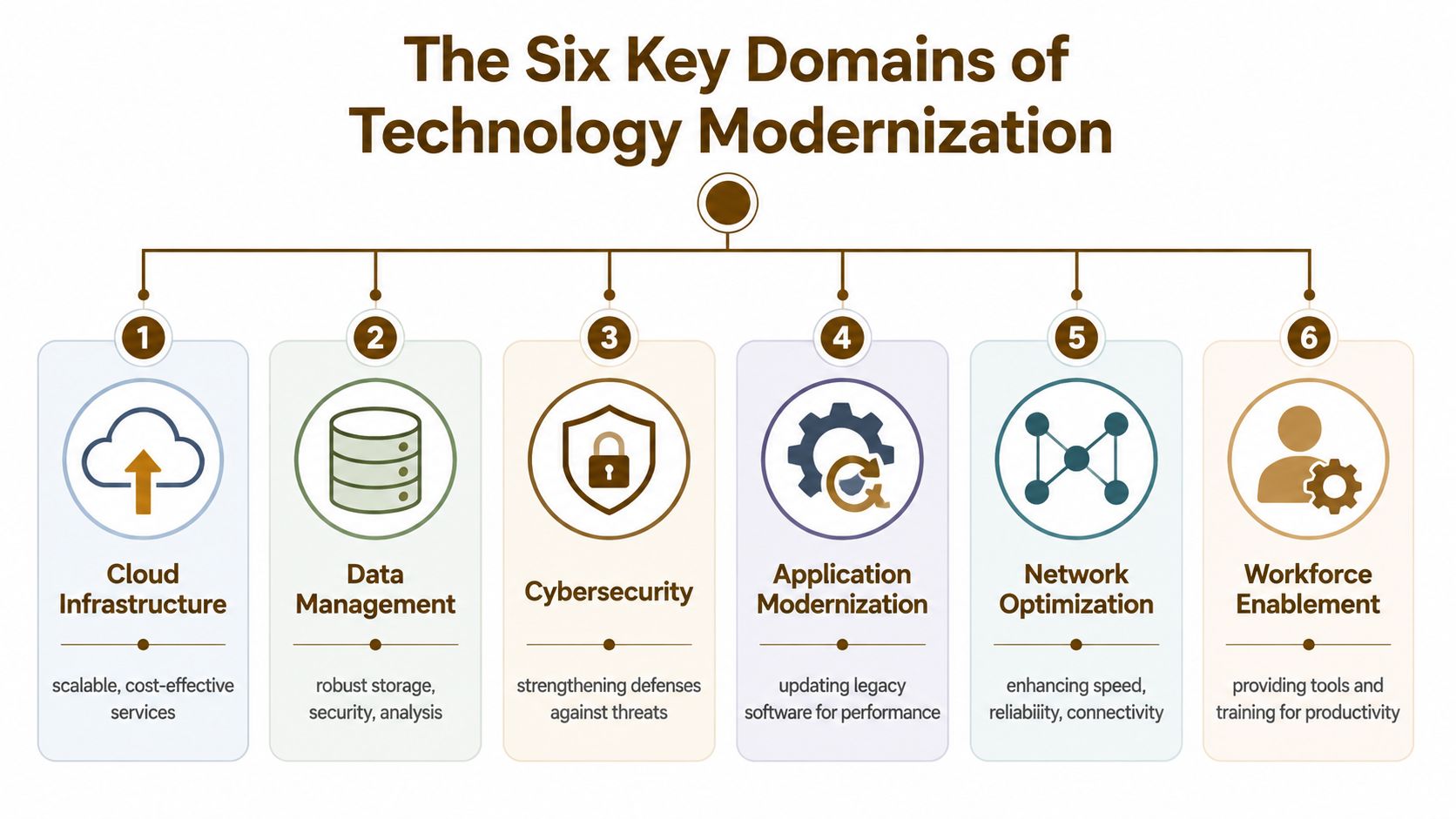
Cloud infrastructure
Many businesses begin their modernization efforts with cloud adoption. Not because cloud is trendy, but because old on-prem equipment eventually becomes a reliability and support problem. Cloud infrastructure includes Microsoft 365, Azure, AWS, Google Cloud, hosted applications, and virtual machines that no longer need to live on a noisy box in a closet.
What works is moving the right workloads. Email, collaboration, backups, and selected business apps are often strong candidates. What doesn’t work is blindly pushing every workload into the cloud without checking licensing, latency, user habits, and integration needs.
Security and compliance
Modern security is layered. Endpoint protection, identity management, patching, MFA, email filtering, device controls, and logging all have to work together.
For SMBs, this usually means replacing ad hoc security with policy-driven controls. If you’re reviewing your stack, a structured look at cloud security risk management helps frame the conversation around actual business risk instead of vendor buzzwords. It also helps to think in terms of security in layers, because no single tool fixes weak processes or inconsistent access controls.
Data and backups
A lot of businesses think they have data protection when they really have scattered copies of important files. Real modernization here means knowing where critical data lives, who can access it, how it’s backed up, and how quickly it can be restored.
This domain also includes reporting and analytics. Data modernization via AI/ML integration in cloud platforms can accelerate predictive analytics by processing 10x more data with 70% higher accuracy than legacy systems, leading to 25-30% gains in operational efficiency, according to RapidOps’ IT modernization guide. An SMB doesn’t need a giant AI program to benefit from this trend. Better data structure alone can improve dashboards, inventory visibility, and operational decision-making.
Better backups don’t just protect data. They protect payroll, customer relationships, and your ability to keep operating on a bad day.
Applications and workflows
This domain covers the software your staff touches every day. ERP tools, CRM platforms, accounting packages, inventory systems, quoting software, field service apps, and custom internal tools all live here.
Some applications need replacement. Some need cleanup and better integrations. In many environments, the primary fix is eliminating duplicate steps. If your team enters the same information into three systems, that’s not just inefficient. It’s a sign the workflow needs redesign.
Network and connectivity
Houston businesses rely on stable connectivity more than ever. VoIP phones, cloud apps, video meetings, remote support, cameras, guest Wi‑Fi, and mobile devices all compete for bandwidth and reliability.
Modernizing the network often means improving switching, access points, segmentation, monitoring, and cabling quality. The goal isn’t fancy hardware for its own sake. The goal is consistent performance and fewer mystery outages.
Workforce enablement
This one gets ignored too often. A modern environment still fails if your staff doesn’t know how to use it.
Workforce enablement includes laptop standards, mobile device management, secure remote access, Teams and SharePoint usage, onboarding checklists, and practical training. The right tools should reduce friction, not add it.
Common Approaches and Strategic Tradeoffs
Not every system should be rebuilt from scratch. Some should be moved quickly. Some need selective surgery. Some should be retired.
The easiest way to explain the options is with a home renovation analogy.
Four ways businesses modernize
Rehost is like moving your furniture into a newer house. You didn’t redesign the furniture. You just put it in a better place. In IT terms, that usually means lift-and-shift migration. The app or server moves to Azure, AWS, or another modern environment with minimal changes.
Refactor is remodeling the kitchen while keeping the house standing. The system still does the same basic job, but parts of the code, integrations, or infrastructure get cleaned up so it’s easier to maintain.
Rearchitect is taking the house down to the studs. You keep the location and maybe some key functions, but the structure changes significantly. This is the route for systems that still matter to the business but can’t keep supporting growth in their current form.
Replace is building a new house entirely. The old application gets retired and the business adopts a different platform, such as moving from a homegrown legacy tool to Microsoft 365, a modern ERP, or a SaaS line-of-business product.
The best approach is rarely the most ambitious one. It’s the one your business can adopt without breaking operations.
Some owners assume replacement is always best because it sounds cleaner. It isn’t. Replacement can force process changes, retraining, data migration headaches, and temporary productivity loss. At the same time, lift-and-shift can preserve old problems if the application itself is the issue.
If you want a broader technical perspective, this guide for CTOs on legacy modernization is a useful companion read.
Technology Modernization Approaches Compared
| Approach | Analogy | Cost | Time | Risk | Best For |
|---|---|---|---|---|---|
| Rehost | Moving furniture to a newer house | Lower relative cost | Faster | Lower technical change risk, but old design issues remain | Stable systems that mainly need a better hosting environment |
| Refactor | Remodeling the kitchen | Moderate | Moderate | Controlled if scoped well | Important apps that work but have maintenance pain |
| Rearchitect | Gutting the house to the studs | Higher | Longer | Higher project complexity | Core systems that limit scale, integrations, or reliability |
| Replace | Building a new house | Varies widely | Moderate to long | Business process disruption risk | Outdated software that no longer fits the business |
In small business environments, the winning pattern is often mixed. Rehost a few things. Replace one or two that are clearly holding everyone back. Refactor only where the business case is strong.
A Practical Modernization Roadmap for Houston SMBs
The right roadmap is simple enough to follow and disciplined enough to keep you out of panic spending.

Start with visibility
Before you change anything, get a real inventory. That means servers, laptops, firewalls, switches, access points, Microsoft 365 tenants, backup jobs, line-of-business apps, admin accounts, licenses, warranties, and outside vendors.
Then sort what you find into three groups:
- Critical and fragile: Systems that are essential to operations and already showing risk.
- Important but stable: Systems that matter but aren’t creating immediate pain.
- Replaceable noise: Old tools, duplicate apps, or unmanaged devices that add complexity.
Without that visibility, businesses overspend in the wrong places.
Build in phases not panic
Once you know what you have, define success in business terms. Faster onboarding. Fewer outages. Better remote access. Cleaner compliance posture. Simpler collaboration. More predictable support.
Then prioritize quick wins that staff will feel:
- Identity cleanup: Standardize user accounts, MFA, and administrative access.
- Endpoint baseline: Bring laptops and desktops under consistent patching, security, and policy controls.
- Backup verification: Confirm recoverability, not just the existence of backup jobs.
- Network stabilization: Fix recurring Wi‑Fi and connectivity bottlenecks that disrupt work daily.
- Application triage: Decide which old apps should be kept, moved, improved, or retired.
A phased budget matters. Modernization of technology works better as a sequence of controlled upgrades than a single leap. Businesses that try to do everything at once usually overload staff, create adoption problems, and lose sight of priorities.
This short video is a good reset if you want to think about modernization as a process instead of a shopping list.
Pick a partner who can translate tech into operations
A local partner should be able to explain tradeoffs in plain language. Not “zero trust architecture” first. Start with what changes for your payroll process, customer service workflow, remote employees, and recovery plan.
Ask practical questions:
- What breaks if this migration goes wrong?
- What can we pilot before a full rollout?
- How will staff be trained?
- What stays on-prem for now?
- What are the fallback steps if adoption is slow?
That level of planning is what keeps projects from turning into expensive surprises.
Managing the Human Side of Tech Modernization
The technical plan can be sound and still fail if the team doesn’t adopt it.
Employees usually don’t resist change because they love old software. They resist change because they’re worried the new setup will slow them down, make them look unprepared, or add steps to an already busy day. If management doesn’t address that early, people create workarounds and the old habits survive inside the new system.
People need clarity before they need training
Start with plain communication. Tell staff what’s changing, why it’s changing, and what problem it solves for them. “We’re standardizing devices” means very little. “You’ll stop losing access to files when you move between office and remote work” lands better.
Then train by role, not by platform. A warehouse lead, office manager, estimator, and accountant don’t need the same walkthrough. They need practical examples tied to the work they do every day.
Short, role-based training beats one long generic demo every time.
It also helps to involve a few respected employees early. When staff members test the new process, flag rough spots, and give feedback, the rollout improves and the internal trust level rises.
Finally, expect a transition period. Good modernization doesn’t mean zero disruption. It means controlled disruption with support, feedback loops, and fast adjustments when people get stuck.
Your Houston Partner for Technology Modernization
Houston SMBs don’t need abstract innovation language. They need systems that stay up, support their staff, protect their data, and fit the way the business operates.
That’s why the strongest modernization efforts start with assessment and prioritization, not a hard sell on one platform. Some businesses need a cloud migration. Some need network cleanup and better Wi‑Fi. Some need Microsoft 365 governance, backup discipline, endpoint protection, or virtualization support. Many need a mix of all of it, delivered in phases that won’t disrupt daily work.
A local partner matters because context matters. A professional services office, a retail location, a warehouse, and a multi-site business in Greater Houston won’t have the same constraints. One may care most about Teams, SharePoint, and identity controls. Another may need VoIP stability, cabling, access points, and secure remote access. Another may be running aging VMware or Hyper‑V workloads that need a realistic migration path.
The right support team should be able to do more than install tools. They should assess what you have, map business risk, stabilize the weak points, and help you decide when to rehost, when to replace, and when to leave something alone until the timing makes sense. They should also be able to support what comes after the project, because modernization isn’t a finish line. It’s an operating model.
That’s the practical value of working with a Houston-based managed services and consulting firm that can handle cloud, Microsoft 365, backups, endpoint security, networking, Wi‑Fi, VoIP, repair, and ongoing support under one roof. When the strategy and the day-to-day support are connected, businesses get fewer surprises and better follow-through.
If your business is tired of slow systems, recurring outages, security gaps, or patchwork IT decisions, IT Cloud Global, LLC can help you turn modernization into a practical plan. From assessments and cloud migrations to managed security, Microsoft 365 administration, backup and disaster recovery, networking, VoIP, and ongoing support, their Houston team helps small and midsize businesses modernize with less guesswork and more control.
- On Premises to Cloud Migration: A Practical Guide 2026
- Application Modernization for SMBs: Boost Efficiency &
- Software Development Services: A Practical Guide for 2026
- Cleveland IT Services: Your Partner Guide for 2026
- Houston IT Support: A 2026 Guide for SMBs
- 7 Best Managed IT Services Houston TX Reviews (2026)
- The Importance of BCP: Business Survival in 2026