


AWS Cloud Migration Best Practices: A Guide for SMBs
Your servers are aging. A line-of-business app depends on one person who “just knows” how it works. Hardware renewals keep showing up at the wrong time. Meanwhile, your team wants better remote access, faster deployment, and fewer interruptions when something breaks.
That’s usually when AWS moves from a vague idea to a live business decision.
For small and midsize businesses, cloud migration isn’t just about getting out of the server room. It’s about reducing operational drag without creating new chaos. The hard part is that many SMBs start with the wrong question. They ask how to move workloads, when the better question is why each workload should move, in what order, and under what conditions.
That shift matters because the market is moving fast. The cloud migration market is projected to grow from $232.51 billion in 2024 to $806.41 billion by 2029, and that same outlook notes that by 2025, over 50% of SMB technology budgets are projected to go to cloud services for efficiency and scalability, according to Caylent’s AWS migration assessment overview. That doesn’t mean every business should rush. It means waiting without a plan gets more expensive.
Table of Contents
- Why Smart AWS Migration Starts Before You Move a Single Server
- Choosing Your Migration Path Rehost Replatform or Refactor
- Building Your Migration Blueprint Discovery and Planning
- Securing Your AWS Environment Before Migration
- Executing the Migration Data Transfer and Cutover
- The Migration Safety Net Your Rollback and DR Plan
- After the Migration Optimizing AWS Costs and Performance
- Your Partner for a Predictable AWS Cloud Journey
Why Smart AWS Migration Starts Before You Move a Single Server
A good AWS migration starts long before anyone provisions an instance or copies a database. The planning phase decides whether the move improves the business or just changes where problems live.
SMBs feel this more sharply than large enterprises. You usually don’t have a dedicated cloud team, a deep bench of architects, or spare time for trial and error. If the migration plan is weak, your production systems, staff bandwidth, and customer experience all absorb the cost.
Define the business reason first
“Move to AWS” isn’t a strategy. It’s a destination. You need a reason that can guide decisions when trade-offs show up.
Common goals include:
- Reducing infrastructure risk: Replacing aging hardware and unsupported systems.
- Improving speed: Giving teams faster environments for deployments, testing, and expansion.
- Supporting flexibility: Making it easier for users, branches, and remote teams to access systems reliably.
- Creating cost control: Shifting from unpredictable capital expenses to managed operating costs.
Those goals should connect to specific workloads. If an application is stable, rarely changes, and already cheap to run, moving it may not be urgent. If another app creates outages, upgrade delays, or security concerns, that one belongs near the front of the line.
Practical rule: If you can’t explain why a workload is moving in one sentence, you’re not ready to migrate it.
Planning exposes the real blockers
The most expensive surprises in cloud projects are rarely technical in the narrow sense. They come from undocumented dependencies, unclear ownership, old licensing assumptions, and business processes nobody mapped.
That’s why pre-migration assessment matters. You’re not just counting servers. You’re finding out which systems talk to each other, who relies on them, what downtime is acceptable, and where compliance or security constraints will shape the design. Businesses that skip this stage usually discover hidden problems during cutover, when fixes are slow and costly.
A useful starting point is reviewing the key cloud migration challenges businesses need to overcome. It helps frame the migration as an operational and business decision, not just an infrastructure refresh.
Success should be measurable and boring
A successful migration is rarely dramatic. Users log in, applications respond normally, and the finance team doesn’t get surprised a month later.
That outcome comes from planning around clear targets such as lower operational friction, better recovery options, stronger security controls, and a manageable support model. The best aws cloud migration best practices look disciplined because discipline is what keeps the move from disrupting the business you’re trying to improve.
Choosing Your Migration Path Rehost Replatform or Refactor
The migration path you choose affects budget, delivery speed, risk, and the support burden your team carries after cutover. SMBs feel this more than large enterprises because there is usually less room for a failed experiment, fewer engineers to absorb rework, and tighter pressure to show a clear return.
The three paths that matter most are rehost, replatform, and refactor. The right answer is rarely the same for every workload.
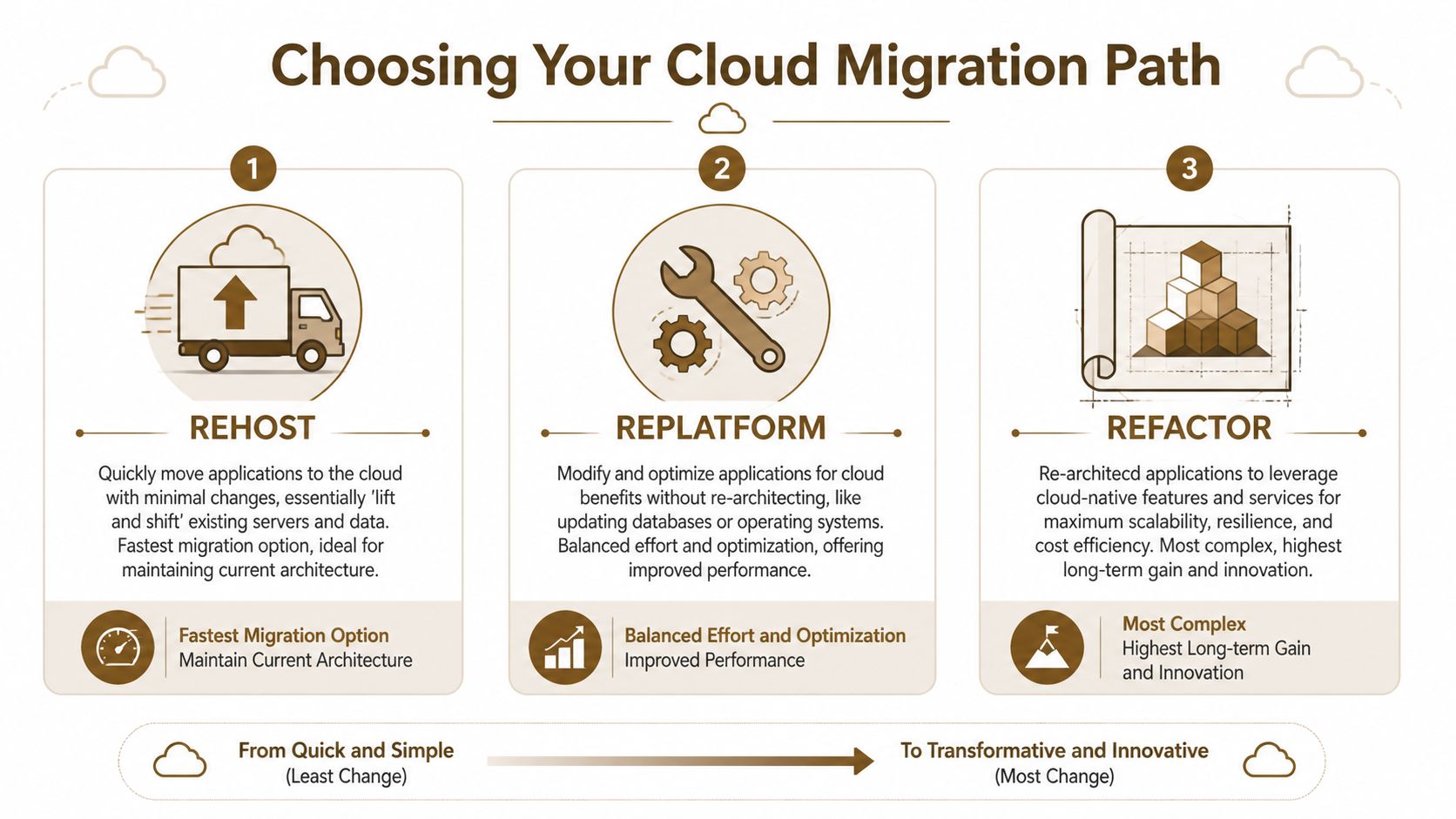
What each path actually means
Rehost moves an application to AWS with minimal change. It is usually the fastest way to leave aging hardware, a costly data center contract, or a fragile hosting setup. It also preserves many of the design problems you already have, so it should be chosen for speed and continuity, not because it improves the application by itself.
Replatform keeps the core application intact but improves parts of the environment around it. Common examples include moving a self-managed database to Amazon RDS, shifting file storage to Amazon EFS, or updating the operating system during the move. This path takes more planning, but it often gives SMBs a better balance of near-term safety and lower support effort after migration.
Refactor changes the application architecture so it fits AWS more effectively. That can include breaking a monolith into services, redesigning scaling patterns, or replacing custom infrastructure with managed services. The upside can be significant, but so are the delivery risk, testing demands, and internal coordination required. Before choosing this route, review your current estate with a cloud audit and optimization assessment before cloud build, deploy, and integration so you are not rebuilding an application that no longer deserves the investment.
Comparing AWS migration strategies
| Strategy | What It Is | Best For | Effort & Cost | Cloud-Native Benefit |
|---|---|---|---|---|
| Rehost | Move the workload with minimal changes | Urgent exits from aging infrastructure, stable legacy apps, limited budgets | Lowest initial effort, usually fastest path | Limited at first |
| Replatform | Move the app and improve selected components | Apps that need better manageability, supportability, or performance without a rewrite | Moderate effort and planning | Moderate |
| Refactor | Redesign the app for AWS-native patterns | Core apps tied to growth, scale, or customer experience | Highest effort and longer timeline | Highest |
What usually works for SMBs
A mixed approach is usually the safest choice.
An accounting system with stable usage and poor documentation may be a good rehost candidate. A customer portal with recurring performance complaints may justify replatforming. A product that directly drives revenue and needs faster release cycles may deserve refactoring, but only if the business can fund the work and support a longer delivery window.
AWS migration programs also reinforce the need to match the migration motion to the workload, especially when testing and cutover risk need tighter control. This breakdown of how AWS MAP impacts testing strategies is useful if your team needs to estimate validation effort before choosing a path.
What fails in practice is forcing every application into the same model. That usually creates one of two outcomes. Either the project drags because the team tried to modernize everything at once, or the company lands in AWS quickly and then spends the next year paying cloud bills for old design decisions.
Use a simple decision filter:
- Choose rehost when the priority is speed, contract exit, hardware retirement, or reducing immediate operational risk.
- Choose replatform when the workload matters enough to improve, but not enough to justify major redevelopment.
- Choose refactor when the application has direct business value, clear long-term ownership, and a case for higher engineering investment.
- Call for expert help when the application has unclear dependencies, licensing constraints, compliance exposure, or a cutover window the business cannot afford to miss.
Pick the path your team can afford to execute, test, support, and roll back if needed. That is the standard that keeps an AWS migration safe and financially sensible for an SMB.
Building Your Migration Blueprint Discovery and Planning
Most failed migrations don’t fail because AWS is hard. They fail because the business didn’t fully understand what it was moving.
Discovery fixes that. It turns guesswork into a migration blueprint your team can execute.

Start with what you actually run
The first job is building a clear inventory. That includes servers, applications, databases, file shares, authentication dependencies, scheduled jobs, third-party integrations, and the people who own each system. AWS tools such as AWS Application Discovery Service and AWS Migration Evaluator are useful here because they help identify assets and dependencies before you start moving them.
This is also the point where many SMBs realize their documentation is incomplete. That’s normal. What matters is correcting it before migration waves begin.
A strong discovery pass should answer:
- What exists: Every in-scope workload, its environment, and its owner.
- What connects: Which systems depend on which services, databases, or network paths.
- What matters most: Business criticality, acceptable downtime, and compliance considerations.
- What will break subtly: Batch jobs, integrations, shared services, and one-off scripts.
For teams that need to tighten this early stage, a review of cloud audit and optimization before build deploy and integration is often more valuable than jumping straight to migration tooling.
Use waves not one big move
A well-sequenced migration blueprint groups workloads into waves. You start with low-risk systems, learn from them, and then move more critical workloads with better patterns and fewer surprises.
That approach isn’t just cleaner. AWS notes that using a dependency-aware matrix and phased migration waves can lead to up to 40% faster execution, because teams reduce disruption and improve their process through low-risk pilot migrations first, according to AWS guidance on building a robust migration roadmap.
A practical wave model often looks like this:
- Pilot wave: Development systems, internal tools, or non-critical workloads.
- Stabilization wave: Shared services and moderately important applications with known dependencies.
- Core wave: Business-critical apps after the team has proven patterns for monitoring, cutover, validation, and rollback.
Testing should evolve with each wave. If you want a useful outside perspective, this breakdown of how AWS MAP impacts testing strategies is worth reviewing because it connects migration phases with QA and load-testing decisions that many SMBs under-plan.
An SMB migration checklist
Use a short checklist before approving any wave:
- Confirm ownership: Every workload needs a business owner and a technical owner.
- Map dependencies: Don’t migrate an application before identifying what it relies on.
- Pick the method: Rehost, replatform, or refactor should be decided workload by workload.
- Define validation: Know what “working” means after migration, not just “server is online.”
- Set rollback conditions: If specific checks fail, the team needs authority to reverse course.
The blueprint doesn’t need to be fancy. It needs to be accurate enough that nobody is improvising during cutover.
Securing Your AWS Environment Before Migration
A common SMB migration failure starts before any server is copied. Someone spins up AWS accounts quickly, gives the IT lead full admin rights, opens network access wider than necessary to avoid delays, and plans to tighten everything after cutover. Then the rushed setup becomes production. Costs rise, audit questions show up, and nobody is fully sure who can change what.
Security needs to be set before the first production workload lands in AWS. If controls are added later, teams usually make exceptions under deadline pressure. That is how permissions stay too broad, public exposure slips through, and logging gaps turn into expensive cleanup work.
That is why solid aws cloud migration best practices start with an AWS landing zone.

Build the landing zone first
A landing zone gives you the base structure for AWS before applications arrive. It defines account structure, identity controls, network boundaries, logging, and baseline governance. For SMBs, that prep work prevents a small team from managing every workload as a one-off exception.
Misconfiguration is one of the fastest ways to turn a migration into a security problem. A pre-configured environment with clear IAM, VPC, and monitoring rules reduces the amount of improvisation during migration, as noted in this AWS cloud migration checklist.
Security starts with decisions made before launch. Who can deploy, where workloads can run, and what gets logged by default should already be defined.
If the business has compliance requirements, customer data concerns, or outside contractors involved in the migration, this is usually the point where expert help pays for itself. Fixing the foundation after multiple workloads are live costs far more than setting guardrails early.
Identity network and encryption
Three areas deserve attention before anything moves.
Identity and access
Use AWS Identity and Access Management (IAM) to define access by role, not by convenience. During migration, SMBs often hand out broad admin access because the team is small and everyone needs to move quickly. That shortcut creates long-term risk, and it also makes troubleshooting harder because too many people can make production changes.
Separate privileges for human admins, automation pipelines, and applications. Turn on multi-factor authentication. Use temporary credentials where possible. If a managed service provider or consultant is helping with migration, give them scoped access and an end date, not permanent blanket permissions.
Network boundaries
Your Amazon VPC design should reflect how the business operates. Private workloads should sit in private subnets. Internet-facing systems should be limited to the components that need public access. Security groups should allow only the traffic each application requires.
This matters for more than security. A clean network design makes future troubleshooting, cost tracking, and disaster recovery much easier. For SMBs with limited internal cloud experience, poor VPC design is one of the areas where getting outside guidance early can prevent painful rework later.
Encryption
Sensitive business data should be encrypted at rest and in transit. In AWS, that often means AWS KMS or CloudHSM for stored data and TLS/SSL for data in motion. This is especially important for customer records, financial data, healthcare information, and any system that may face contract or regulatory review.
Encryption choices also have operational trade-offs. Customer-managed keys can give you tighter control, but they add key management overhead. AWS-managed options reduce admin effort, which is often the better fit for smaller teams unless compliance rules say otherwise.
After the foundation is in place, this walkthrough is a useful visual primer on AWS security basics:
Monitoring belongs in the foundation
Logging and monitoring should exist before cutover. Set up AWS CloudTrail for API activity, Amazon CloudWatch for operational monitoring, AWS Config for configuration visibility, Amazon GuardDuty for threat detection, and Amazon Inspector for vulnerability assessment.
For SMBs, the goal is not to turn AWS into a full-time security operations project. The goal is to make suspicious changes visible, catch drift early, and avoid the common post-migration problem where costs and risks grow unnoticed because nobody has clear alerts. Good monitoring also supports rollback decisions later, because the team can verify whether the new environment is behaving as expected.
If nobody on the team reviews alerts, tunes thresholds, or understands shared responsibility in AWS, bring in help before production cutover. Tools alone do not secure an environment. Clear ownership does.
Executing the Migration Data Transfer and Cutover
Migration execution is where planning meets reality. This is the stage most business owners picture first, but it should feel almost routine if the earlier work was done properly.
The main decisions are straightforward. How will you move the data, how will you move the servers or applications, and how will you switch users from the old environment to the new one without creating confusion?
Pick the right transfer method
For server migrations, AWS Application Migration Service is commonly used when you’re rehosting workloads with minimal changes. It replicates source servers and helps you launch them in AWS without requiring a full rebuild of the application stack.
For databases, AWS Database Migration Service is often the better fit. It’s designed to move database workloads while keeping source and target systems synchronized during the transition. That matters when downtime windows are tight and business systems can’t go offline for a long weekend.
AWS also emphasizes phased approaches for larger migration programs and highlights AWS Migration Hub for tracking migration waves and progress across teams. If your environment has many moving parts, that central view helps keep execution from becoming a spreadsheet problem.
Cutover is a business event not just a technical step
Cutover is the moment production traffic, users, or operational reliance shifts to AWS. There are two broad ways to handle it.
A flash cutover moves everything in one planned event. This can work for smaller, isolated systems with clear dependencies and a business that can tolerate a well-defined maintenance window.
A phased cutover moves services gradually. This is usually safer for SMBs with limited support staff because it reduces the blast radius if something doesn’t behave as expected. It also gives users and internal teams time to adapt.
Before any cutover, validate four things:
- Application behavior: Users can complete normal business tasks.
- Data consistency: Records, transactions, and files match expected results.
- Performance baseline: The application performs acceptably under expected load.
- Support readiness: Someone is assigned to triage issues quickly during and after the switch.
If your cutover plan only lists technical tasks, it’s incomplete. The business needs communication steps, decision owners, and a clear path for escalation.
What doesn’t work is treating cutover like a single overnight technical change with no coordination around finance, operations, customer support, or line-of-business owners. The switch to AWS may happen in infrastructure, but the impact is always operational.
The Migration Safety Net Your Rollback and DR Plan
Most migration plans assume success. That’s understandable, but it’s also where avoidable risk enters the project.
A rollback plan is not pessimism. It’s operational discipline. If the migration introduces unacceptable issues, your team needs a tested way to reverse course without debating the process in the middle of an outage.

A rollback plan needs triggers not good intentions
AWS migration experts note that detailed execution plans are common, but thorough rollback strategies are often overlooked. The same source summary adds that migrations without rollback planning can amplify project risks by 2x, contributing to budget overruns, according to AWS migration and modernization best-practice commentary.
That should get an SMB owner’s attention. When your internal IT team is lean, the absence of a rollback plan doesn’t just create technical risk. It creates decision paralysis.
A rollback trigger should be explicit. For example:
- Critical business functions fail after cutover.
- Data validation fails between source and target.
- Performance degradation prevents normal operations.
- Security controls or logging gaps appear in the production path.
If none of those triggers are defined in advance, teams tend to hesitate too long, hoping the issue will stabilize. That delay usually makes rollback harder, not easier.
What a real rollback plan includes
A proper rollback plan has moving parts. It isn’t just “switch it back.”
Start with re-entry design. If users or traffic move back to the source environment, what happens to the new data created in AWS during the failed cutover window? Without a data synchronization approach, rollback can trade downtime for integrity problems.
Then define decision authority. Someone needs the clear authority to call rollback. If five stakeholders need to debate it live, the process is already broken.
Finally, test it. A rollback plan that nobody has rehearsed is only a document.
A useful structure includes:
- Rollback triggers: Predefined technical and business conditions.
- Time limits: How long the team will attempt fix-forward before reversing.
- Data handling: Validation, reconciliation, backups, and transaction awareness.
- Communication: Who informs users, leaders, vendors, and customer-facing staff.
- Recovery overlap: How rollback aligns with your broader resilience planning.
For many SMBs, rollback planning naturally connects to disaster recovery. If you need to strengthen that side of the business, this guide to a disaster recovery plan for small business operations is a practical next step.
The best rollback plan feels boring in rehearsal. That’s exactly what you want when production is on the line.
After the Migration Optimizing AWS Costs and Performance
A migration isn’t done when workloads are running in AWS. It’s done when the environment is stable, visible, and financially under control.
That’s the point many SMBs miss. They rehost successfully, then operate the new environment with old habits. Resources stay oversized. Monitoring is shallow. Spending rises unnoticed until someone sees the invoice.
Why costs rise after a rushed move
According to the 2025 Flexera State of the Cloud report, SMBs often struggle with a 52% cost spike post-migration, while those that adopt FinOps practices and use tools like AWS Cost Optimization Hub can realize 25% to 35% savings, as summarized by N-iX in its review of AWS cloud migration practices.
That pattern is easy to understand. A rehosted workload often lands in AWS with the same sizing assumptions it had on-premises. But cloud costs reward active management, not static provisioning.
The day two operating rhythm
Good post-migration operations are repetitive on purpose. The team should review spend, right-size resources, confirm performance baselines, and look for drift in access, tagging, and configuration.
A practical operating rhythm includes:
- Set budget guardrails: Use AWS Budgets so overspend doesn’t wait for end-of-month discovery.
- Right-size compute: Review AWS Compute Optimizer recommendations to find instances that are overprovisioned for actual usage.
- Track by tag and owner: If workloads aren’t tagged clearly, cost accountability disappears fast.
- Monitor application health: Use Amazon CloudWatch to watch metrics, logs, and alarms tied to business-critical services.
- Match commitment to usage: For steady workloads, reserved purchasing options may improve cost predictability.
Some teams also benefit from tooling and process guides that help automate cloud savings across recurring clean-up and optimization tasks. The principle is simple. Don’t rely on manual vigilance for something the platform can help enforce.
A few post-migration habits matter more than they seem:
| Focus area | What to check regularly | Why it matters |
|---|---|---|
| Compute | Instance sizing and idle resources | Rehosted systems are often oversized |
| Storage | Old snapshots, unattached volumes, retention settings | Storage sprawl is easy to miss |
| Monitoring | Alarm coverage, log retention, response paths | Visibility weakens over time without upkeep |
| Access | IAM roles, stale users, excessive permissions | Convenience tends to expand permissions |
| Performance | Latency, errors, user-impacting slowdowns | Cloud success still depends on user experience |
At this juncture, many businesses discover that migration created the opportunity, but optimization creates the actual value.
Your Partner for a Predictable AWS Cloud Journey
A typical SMB cloud project starts with a simple goal. Reduce hardware headaches, improve uptime, and give the business room to grow. Then reality shows up. The IT lead is still handling support tickets, leadership wants a firm timeline, and no one has much margin for a failed cutover or a surprise AWS bill a month later.
That is why predictability matters more than speed.
AWS can give a small business more flexibility and better disaster recovery options, but only if the migration is handled as an operational change, not just a hosting change. The real work is choosing what should move now, what should wait, how to contain risk, and who is accountable when something does not go to plan.
For many SMBs, the limiting factor is not intent. It is capacity. Internal teams are already covering users, endpoints, vendors, security reviews, and day-to-day issues. Adding workload discovery, dependency mapping, cutover planning, rollback testing, and post-migration cost control on top of that can stretch a good team too thin.
A strong migration partner helps keep the project practical. They should bring a clear plan, experience with AWS architecture, and enough restraint to avoid solving problems the business does not have yet. They should also know when to recommend outside help. That usually means legacy applications with unclear dependencies, compliance-heavy environments, business-critical systems that cannot tolerate extended downtime, or migrations where one mistake could disrupt revenue.
The best aws cloud migration best practices show up in day-to-day decisions:
- tie each migration step to a business outcome
- choose the right approach for each workload, instead of forcing one method across the board
- schedule migration waves around dependencies and business risk
- secure the AWS environment before production traffic moves
- document and test rollback steps before cutover
- assign ownership for cost, performance, and access reviews after go-live
Those habits sound straightforward. In practice, they are where SMB migrations succeed or get expensive. I have seen businesses rush to move servers, only to spend the next quarter cleaning up avoidable issues like inflated compute costs, missed dependencies, and rollback plans that existed only in a meeting note.
A predictable AWS journey comes from experience, discipline, and clear decision-making under pressure. It comes from people who know where migrations usually fail, what can be simplified, and what should never be improvised on cutover weekend.
If you’re planning an AWS move and want experienced support without adding overhead to your internal team, IT Cloud Global, LLC can help you assess workloads, design a practical migration path, secure the environment, and keep post-migration costs under control. For Houston-area SMBs that need clear communication and dependable execution, the goal is simple. Move safely, operate confidently, and avoid expensive surprises.