


Managed IT Solutions: Grow Your Houston Business
You're trying to grow the business, keep customers happy, manage payroll, and somehow also be the person everyone calls when Wi-Fi drops, a laptop won't boot, Microsoft 365 starts acting up, or somebody clicks the wrong email. That's not a technology strategy. That's a daily interruption machine.
I see this a lot with Houston small and midsize businesses. The owner or operations lead becomes the unofficial IT manager by accident. One week it's a failed backup. The next it's a printer issue that turns into a network issue. Then a “simple” repair turns into a surprise bill and half the office loses time waiting on a fix.
The bigger problem isn't the one broken device. It's the pattern. Reactive IT keeps your team stuck in firefighting mode, and it gets worse as you add people, software, locations, and compliance pressure. If your business depends on reliable internet, secure access, cloud apps, and fast employee support, you need a system, not a string of one-off fixes.
Table of Contents
- When Your IT Becomes a Full-Time Problem
- What Are Managed IT Solutions Really
- The Core Services Your Business Gets
- Business Benefits and Real ROI
- Understanding Pricing Models and SLAs
- How to Choose the Right MSP in Houston
- Your Next Steps and the Future of IT Support
When Your IT Becomes a Full-Time Problem
A Houston business owner opens the office at 7:30. Before the first customer call, the file server is unreachable. By 9:00, two employees can't log into email. By lunch, someone in accounting reports a suspicious attachment they already opened. The owner had planned to review hiring, sales pipeline, and vendor pricing that day. Instead, the whole day gets eaten by technology problems.
That scenario isn't unusual. It's what happens when IT is handled only when something breaks. The business keeps moving, but the systems behind it get patched together. Passwords stay messy. Backups go unchecked. Updates get delayed because nobody wants downtime during work hours. Then one issue exposes five more.
Practical rule: If the same person handles operations, vendors, and “quick IT fixes,” your company has already outgrown break/fix support.
The pain usually shows up in a few predictable ways:
- Interrupted sales activity: Your team can't access shared files, CRM records, or cloud apps when they need them.
- Employee slowdowns: Small issues pile up. Login problems, printer failures, laptop lag, and software errors chip away at productive time.
- Security anxiety: You know phishing, ransomware, and account compromise are real risks, but you don't have continuous oversight.
- Budget surprises: A repair that looked minor turns into emergency labor, replacement hardware, and lost work time.
Houston businesses feel this especially hard when they're adding headcount, opening another location, or relying more on Microsoft 365, Azure, AWS, line-of-business apps, and remote access. Growth puts pressure on systems. Weak IT foundations crack first.
You don't solve that by hiring random specialists every time a problem pops up. You solve it by putting one accountable team in charge of keeping the environment stable, secure, and supportable. That's where managed IT solutions start to make sense. Not as a luxury. As an operating decision.
What Are Managed IT Solutions Really
Managed IT solutions are the business version of hiring a property manager for your digital infrastructure. Instead of waiting for the roof to leak, the locks to fail, and the HVAC to die, you pay a specialist to keep the whole property running, maintained, secured, and predictable.
That's the key shift. You stop buying isolated fixes and start buying ongoing management.
A better way to think about it
Managed IT services became a distinct industry in the early 2000s, when many consultancies adopted the managed services provider model to replace older break/fix support. In that model, the provider remotely manages a client's IT infrastructure and end-user systems on a proactive, subscription basis, with continuous oversight and service-level commitments instead of one-off repairs, which converts IT from an unpredictable emergency expense into a recurring operating cost, as described in this managed services overview.
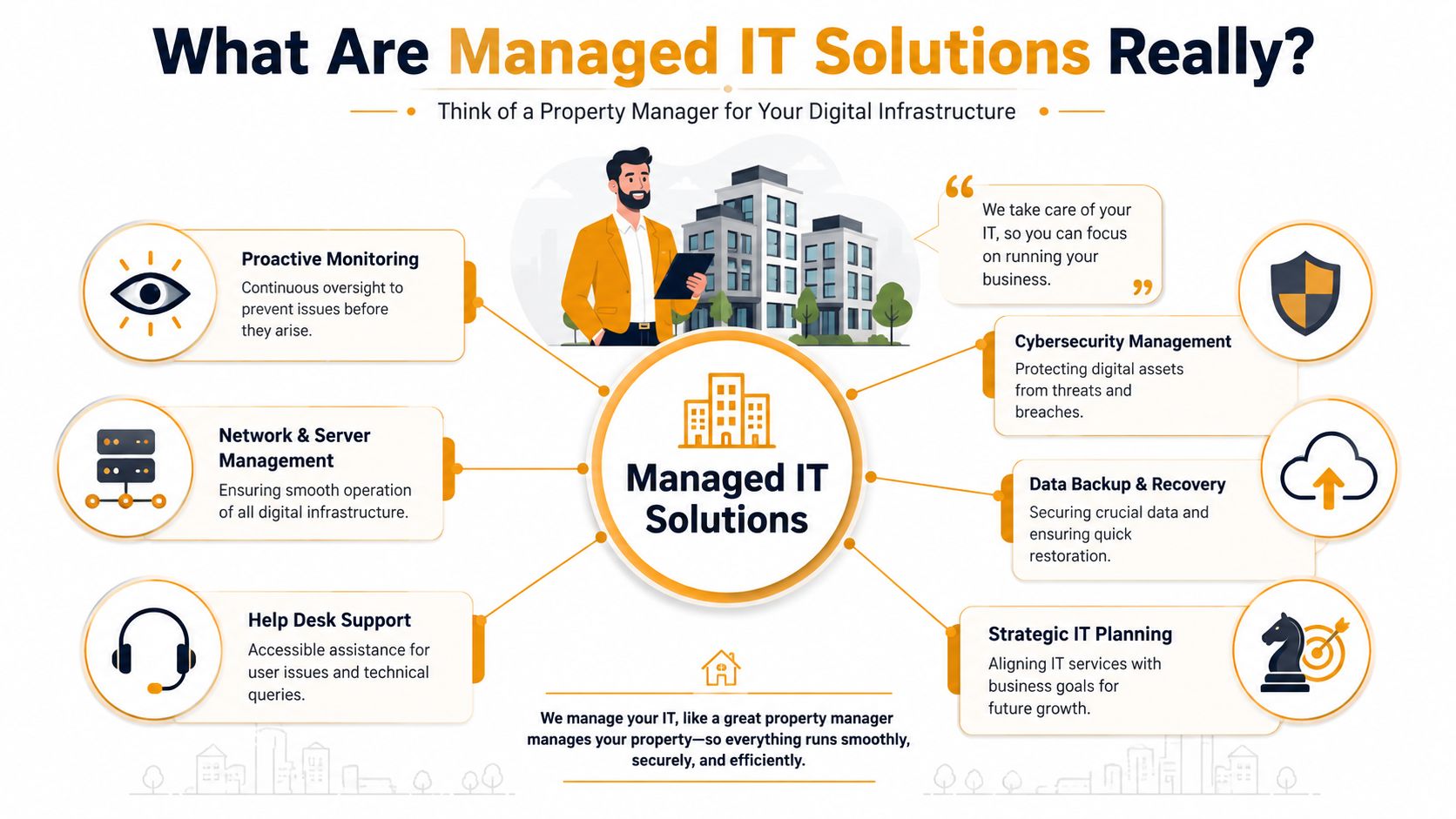
If you're a business owner, that means three practical changes:
- Problems get watched before users report them
- Support costs become easier to budget
- One provider owns day-to-day IT health
That's why managed IT solutions fit growing SMBs so well. Most smaller companies need enterprise-style support, but they don't need or can't justify building a full internal team for every function.
What you're actually buying
You're not just buying help desk tickets. You're buying operating discipline.
A solid managed IT relationship usually includes oversight of endpoints, user support, updates, infrastructure, security basics, backups, and planning. Good providers don't only answer the phone when something breaks. They maintain the environment so fewer things break in the first place.
Good managed IT should feel boring. If your provider only becomes visible during emergencies, they're probably not managing much.
That distinction matters. Plenty of firms sell “support” when they really mean reactive troubleshooting. Real managed IT solutions should cover maintenance, visibility, documentation, escalation paths, and accountability.
For Houston companies, I'd define it this way: managed IT solutions give you a standing operations team for technology, without having to build one department by department. That includes remote support, system care, and usually some strategic guidance on cloud, security, and business continuity.
If a provider can't explain what they monitor, what they patch, what they document, and how they respond, you're not looking at managed IT. You're looking at outsourced chaos with a monthly invoice.
The Core Services Your Business Gets
A mature managed IT model isn't just a repair service with a nicer label. It's continuous operational coverage across monitoring, patching, help desk, cloud migration, disaster recovery, identity and access management, and compliance support. That's the core distinction between reactive IT and a managed-services model built to be proactive, secure, and scalable, as outlined by Synergy Technical's managed IT services explanation.
What mature coverage looks like
Here's what your business should get.
- Monitoring that catches issues early: Servers, workstations, network gear, and key services should be watched continuously so the provider can spot failed backups, storage problems, unhealthy devices, or service interruptions before users pile into your office.
- Patch and update management: This isn't glamorous, but it's one of the first places weak IT shows up. Systems need structured updates for operating systems, applications, and security fixes.
- Help desk support for employees: When someone can't connect to VPN, access SharePoint, print, or use Microsoft Teams, they need quick support. Otherwise one employee problem becomes a department problem.
- Backup and disaster recovery: Backups are only useful if restore procedures are defined and tested. A provider should know what gets backed up, where it lives, and how recovery works if a server, account, or site goes down.
- Identity and access management: User accounts, permissions, multifactor access, onboarding, and offboarding must be controlled tightly. This matters a lot once your team grows beyond a handful of people.
- Cloud administration and support: If you run on Microsoft 365, Azure, Google Cloud, or AWS, someone needs to manage the tenant, licensing, access, policy settings, and service health.
For a more detailed local breakdown, this guide to managed IT support services for Houston small businesses is a useful reference.
What basic support misses
Basic support usually sounds fine in a sales call. Then you find out it doesn't include after-hours escalation, cloud tenant cleanup, user permission reviews, recovery planning, or compliance assistance.
That gap shows up in real business situations:
| Service area | Basic support approach | Mature managed IT approach |
|---|---|---|
| User issues | Wait for tickets | Monitor patterns and fix root causes |
| Security | Antivirus only | Access controls, patching, layered oversight |
| Backups | “It should be running” | Defined recovery process and ownership |
| Cloud | License sales | Ongoing administration and policy management |
| Compliance | Not addressed | Support for documentation and controls |
If your provider can fix a laptop but can't walk you through account permissions, backup recovery, and cloud administration, your coverage is incomplete.
Some providers also separate strategy from support. That can work, but only if someone is still responsible for the big-picture roadmap. Otherwise you get a decent help desk and a neglected environment.
One practical example. A company adds remote staff, starts using SharePoint and Teams heavily, and rolls out new laptops. Without proper identity controls, patching, and cloud oversight, that “simple growth” creates more login issues, data sprawl, and support noise. Managed IT should reduce that friction, not just react to it after complaints.
Business Benefits and Real ROI
Managed IT pays off when it removes friction from daily operations. That's the point. Not flashy dashboards. Not vendor jargon. Fewer interruptions, tighter control, and a business that can keep moving when technology gets tested.
A lot of owners make the mistake of comparing managed IT only to the hourly rate of a repair tech. That's the wrong comparison. The comparison is between planned support and the total cost of disruption.
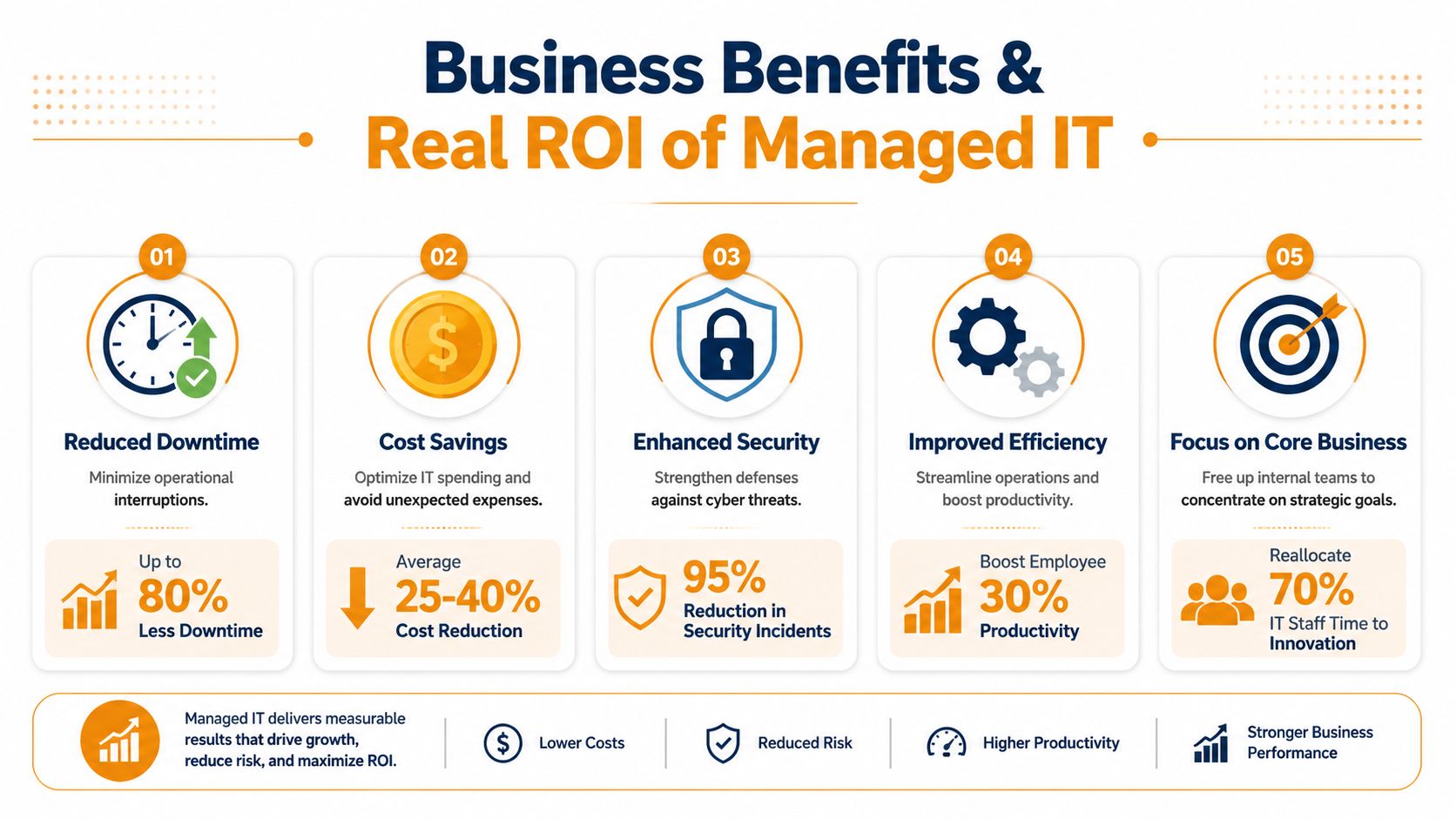
Here's a visual summary of the business case.
Where the return actually shows up
The first return is operational. Employees spend less time waiting on fixes, guessing at workarounds, or losing access to the tools they need.
The second return is financial. Managed services generally shift IT into a recurring operating cost instead of random emergency spending, which makes budgeting cleaner and decision-making easier. For SMBs, that predictability matters because surprise technology costs usually hit at the worst possible time.
A predictable monthly IT bill is easier to manage than a surprise outage during payroll, invoicing, or peak sales activity.
The third return is managerial focus. Owners and office managers stop acting as part-time dispatchers for every cable, laptop, login, and outage issue. That alone can be worth it if leadership is constantly getting dragged into low-level tech problems.
This video gives a straightforward overview of how managed support affects day-to-day business operations.
Why this matters during growth
Growth exposes weak systems fast. New hires need devices, accounts, permissions, shared storage, secure access, and support. If none of that is standardized, every hire becomes a mini-project and every mistake creates more cleanup later.
Managed IT also helps reduce business risk in less obvious ways:
- Faster employee onboarding: New users can get accounts, devices, and access with less confusion.
- Stronger customer confidence: Reliable systems support better response times, cleaner communication, and fewer service disruptions.
- Less internal strain: Your office staff doesn't have to become accidental IT coordinators.
- Better decision support: A competent provider can tell you when to replace aging hardware, tighten access, or clean up cloud sprawl.
I'll put it plainly. If your team loses momentum every time technology hiccups, managed IT isn't overhead. It's operational support for growth.
Understanding Pricing Models and SLAs
Most business owners don't need a lecture on billing theory. They need to know what they're paying for, what's included, and what happens when something breaks at 4:45 on a Friday.
That starts with pricing model clarity. Then it moves to the SLA, which is the contract language that tells you how support will work.

How pricing is usually structured
Most managed IT solutions fall into a few common billing approaches.
- Per-user pricing: Best for offices where each employee uses multiple devices and cloud apps. This is often the cleanest model for budgeting.
- Per-device pricing: Useful when environments are device-heavy but not every user needs the same support level.
- Tiered packages: These bundle services at different levels, but you need to read the exclusions carefully.
- Hybrid pricing: Some providers combine user-based support with separate charges for servers, projects, or after-hours work.
None of these models is automatically right. The right one depends on how your business operates. A law office, retail group, field service company, and multi-location clinic won't all fit the same structure.
For a practical overview of what affects service costs, review these factors determining managed IT support service costs.
What to demand in an SLA
Buyer guidance consistently puts measurable requirements first, especially response time, performance, pricing, cloud-platform support, and security protocols. It also recommends reviewing your current environment with the provider to identify storage, operations, and system gaps so service levels match your real workload demands, as explained in Visual Edge IT's guidance on finding managed IT solutions.
That means your SLA should answer specific questions:
| SLA item | What it means in plain English |
|---|---|
| Response time | How fast the provider acknowledges an issue |
| Resolution target | How quickly they aim to fix or stabilize it |
| Coverage hours | Whether support exists only in business hours or beyond |
| Escalation path | Who gets involved when the first line can't solve it |
| Included systems | Which devices, apps, cloud platforms, and sites are covered |
| Security scope | What protections and responsibilities are actually included |
Don't sign an SLA that sounds impressive but avoids specifics on response, escalation, and scope.
Ask direct questions. Does after-hours support cost extra. Is onsite work included. Are Microsoft 365 administration tasks covered. Who owns vendor coordination with internet, VoIP, printer, or software vendors. If those answers stay fuzzy during the sales process, they'll stay fuzzy after you sign.
How to Choose the Right MSP in Houston
It is 8:15 on a Monday. Your team cannot print shipping paperwork, Microsoft 365 logins are failing for two managers, and no one knows whether last night's backup completed. In that moment, you do not need a friendly sales rep. You need an MSP with a clear process, enough staff, and accountability.
That is how Houston business owners should evaluate providers. Judge them by how they handle pressure, not by how polished the proposal looks.
The Houston buyer checklist
Houston adds real-world requirements that many generic MSP checklists miss. Storm disruption, multi-site operations, field teams, compliance pressure, and growing cloud sprawl all change what good support looks like. If a provider cannot speak to those issues in plain English, keep looking.
Use this list to compare MSPs side by side:
- Local onsite support: Confirm they can send technicians to your Houston office, warehouse, or clinic when remote support is not enough.
- Fit for your stack: Make them name the platforms they support every day, whether that is Microsoft 365, Azure, AWS, SharePoint, Teams, Intune, line-of-business apps, or industry software.
- Security operations maturity: Ask how they handle endpoint protection, identity controls, patching, phishing response, and privileged access. They should answer clearly, without hiding behind buzzwords.
- AI ops and automation: Ask what they automate today. Good MSPs use automation to catch repeat issues, reduce alert noise, speed patching, and shorten response times.
- Compliance support: If you deal with HIPAA, CMMC, PCI, client security questionnaires, or cyber insurance requirements, ask what evidence, reporting, and policy support they provide.
- Backup and recovery ownership: Get a direct answer on who monitors backups, tests restores, and owns recovery during an outage.
- Documentation discipline: They should maintain current records for users, devices, vendors, licenses, network details, and recovery procedures.
- Business reviews and reporting: You want regular reporting on recurring issues, open risks, ticket patterns, and what they recommend fixing next.
- Houston continuity planning: They should have a plan for weather disruptions, power loss, internet outages, remote work fallback, and access to your sites during an emergency.
If you want a solid baseline, this guide on how to choose a managed service provider is a useful starting point.
| MSP Evaluation Checklist for Houston SMBs | Provider A | Provider B | Notes/Red Flags |
|---|---|---|---|
| Local onsite support available | |||
| Supports your cloud stack | |||
| Clear response and escalation terms | |||
| Backup and recovery ownership defined | |||
| Identity and access management included | |||
| Security protocols explained clearly | |||
| Compliance support available if needed | |||
| Houston storm continuity planning discussed | |||
| Reporting cadence provided | |||
| References in similar businesses |
Use a worksheet like this. Gut instinct is a poor buying process.
Questions that expose weak providers
Skip broad questions. They produce rehearsed answers.
Ask for process. Ask for names. Ask what happens first, second, and third when something breaks.
“Show me your process for onboarding, offboarding, backup recovery, after-hours escalation, Microsoft 365 administration, and security incident response.”
A capable MSP will walk you through the workflow, who owns each step, what tools they use, and where the handoff happens. A weak one will stay vague, switch to marketing language, or bury you in acronyms.
Here are the checks that matter most:
- Ask for real examples: Have them explain how they handled a user lockout, failed backup, internet outage, ransomware alert, or new-hire setup.
- Review staffing depth: One strong engineer is not enough. You need bench strength, escalation paths, and coverage when key people are out.
- Check account management discipline: Ask who reviews recurring problems, who owns vendor coordination, and how improvement items get tracked.
- Test strategic thinking: Ask what they would standardize in your environment in the first 90 days. Good providers will spot risk quickly.
- Look at hiring standards indirectly: If you want insight into why MSP staffing quality affects service quality, this example of nexus IT group placement shows why experienced systems engineers matter in provider environments.
My recommendation is simple. Do not buy on price alone. Buy the provider that can support your growth, clean up operational messes, handle compliance pressure, and keep your team productive when Houston throws a bad week at you.
Your Next Steps and the Future of IT Support
If your business is still running on reactive support, the next move doesn't need to be complicated. It needs to be disciplined.
A simple action plan
Start with an internal review. List the recurring issues your team deals with now. Include slow support, account confusion, device failures, cloud admin gaps, backup uncertainty, vendor finger-pointing, and security concerns. If a problem keeps resurfacing, write it down.
Then shortlist a few providers and evaluate them against the Houston checklist above.
- Step one: Identify where your business loses time because of IT friction.
- Step two: Compare two or three MSPs on fit, not just price.
- Step three: Ask each provider to assess your current environment and explain what they would standardize first.
That last point matters. You want a provider that can spot storage gaps, operational weaknesses, unsupported tools, and security risks before they become your next emergency.
What modern support is becoming
Managed IT is changing. Buyers increasingly want more than help desk coverage and basic monitoring. They want providers that can support AI-driven operations, reduce alert fatigue, improve response speed, and handle tighter compliance expectations for regulated workflows, as discussed in Sourcepass's managed IT services overview.
That means your next provider should be able to talk about automation, not just ticket closure. If you want a plain-English primer on that broader shift, this resource on essential DevOps automation concepts is worth reading because it helps frame why repeatable processes matter across IT operations.
The future of support is less reactive, more automated, and more tied to identity, compliance, and business continuity. That's good news for Houston SMBs, because it means managed IT solutions are becoming more aligned with real business needs, not just technical maintenance.
If your current setup keeps pulling you away from running the business, fix the model, not just the latest problem.
If you want a practical conversation about managed IT solutions for your Houston business, IT Cloud Global, LLC can assess your current environment, identify support and security gaps, and outline a managed services approach that fits your users, systems, cloud platforms, and operational requirements.
- 7 Top Cybersecurity Companies in Houston for 2026
- Top 7 Cybersecurity Companies in Houston for 2026
- Top 7 Managed IT Services Houston TX Reviews 2026
- 7 Best Managed IT Services Houston TX Reviews (2026)
- IT Managed Services Houston TX: 2026 Guide
- Business Continuity Strategies: SMB Guide 2026
- Managed IT Services for Small Business Near Me: Houston