


IT Consulting in Houston: A Guide to Choosing Your Partner
If you're looking at IT consulting in Houston, there's a good chance you're already dealing with the same pattern many small businesses face. Support tickets pile up. Wi-Fi drops at the worst time. Microsoft 365 feels half-configured. Someone on your team becomes the unofficial IT person, even though that isn't their job. Meanwhile, you're trying to figure out whether you need better support, stronger security, a cloud plan, or all three.
The hard part isn't finding companies that say they can help. Houston has plenty of firms that list managed services, cybersecurity, cloud support, and consulting. The challenge is figuring out which partner will reduce risk, stabilize operations, and make your costs more predictable once the contract starts.
That decision matters because technology problems rarely stay technical for long. They turn into payroll delays, missed client deadlines, compliance concerns, and frustrated employees. A good consulting partner helps you avoid that. A weak one gives you polished proposals and vague promises.
Table of Contents
- Why Smart IT Consulting in Houston Is a Necessity Not a Luxury
- Assess Your Current IT Before You Start Searching
- A Houston Business's Essential IT Services Checklist
- Decoding Pricing Models and Service Level Agreements
- Key Questions to Uncover a Provider's True Value
- Onboarding Your New Partner and Measuring Success
Why Smart IT Consulting in Houston Is a Necessity Not a Luxury
For most Houston businesses, IT consulting stops being optional when the same problems keep returning. A printer issue isn't just a printer issue if it keeps your billing team from sending invoices. A weak backup process isn't a technical nuisance if one ransomware incident can halt operations. At that point, you're not buying convenience. You're buying continuity.
The market is large enough that you can be selective. The Texas IT consulting industry employed 212,317 people and grew at an average annual rate of 1.4% from 2021 to 2026, according to IBISWorld's Texas IT consulting industry data. For Houston companies, that means you're shopping in a mature environment where firms often specialize in cloud, security, infrastructure, and complex business systems.
Start with an internal audit
Before you call anyone, write down three things:
- What you have. List laptops, servers, network gear, cloud apps, line-of-business software, phones, and who supports them today.
- What keeps breaking. Include recurring login issues, mailbox problems, slow machines, unreliable remote access, Wi-Fi complaints, and security concerns.
- What the business needs next. New office, hybrid workforce, compliance pressure, ERP upgrade, Microsoft 365 cleanup, cloud migration, or multi-site support.
That exercise changes the conversation. Instead of asking a provider, "What do you offer?" you can ask, "How would you fix these issues without disrupting my staff?"
Practical rule: If a provider starts by pitching tools before understanding your environment, they're selling a package, not solving your business problem.
If your current setup is mostly reactive, it helps to understand how proactive IT support works in practice. The difference is simple. Reactive support waits for failure. Proactive support watches for weak spots, patches systems, reviews alerts, and handles routine maintenance before your team feels the impact.
Assess Your Current IT Before You Start Searching
Many bad vendor relationships start with a vague request. A business owner says they need better IT support, but what they really need is tighter access control, cleaner Microsoft 365 administration, backup validation, and a more reliable helpdesk process. Those aren't the same purchase.
A proper assessment should translate technical friction into business impact. Slow systems mean slower order processing. Unmanaged devices create security exposure. Poor documentation means every issue takes longer to resolve because no one knows how the environment is connected.
A study cited by Mooncamp reports that 17% of IT projects fail so badly they can threaten a company's survival, based on Oxford and McKinsey research. The same discussion ties failure to unclear objectives, weak data quality, wrong analysis, and poor communication. See Mooncamp's digital transformation statistics summary.
Review your environment by operational pillar
A useful way to assess your current state is to group issues into four business-facing pillars.
- Security. Check endpoint protection, password policies, admin access, backup status, patching discipline, and how you handle offboarding. If you're in healthcare or energy-adjacent work, also note any client or regulatory requirements that affect data handling.
- Cloud. Review Microsoft 365, Azure, AWS, Google Cloud, file sharing, email routing, identity management, and remote access. Many businesses think they're "in the cloud" when they have a fragmented mix of old and new tools.
- Support. Document average response quality, not just whether someone eventually fixes the issue. Ask your team where they lose time, where tickets bounce around, and which recurring problems never seem fully resolved.
- Infrastructure. Include servers, switches, firewalls, Wi-Fi, cabling, conference room tech, printers, and any specialized business system that depends on your network.
Document pain in plain language
Don't write your notes like an engineer unless you are one. Write them like an owner or operations lead.
For example:
- Weak note: Users experience authentication problems.
- Better note: Staff lose access to email and shared files often enough that managers keep escalating it manually.
- Weak note: Wireless instability in warehouse.
- Better note: Barcode scanning and mobile access become unreliable in certain areas, which slows fulfillment.
That gives you something measurable to discuss with prospective consultants. It also protects you from generic proposals that don't address the actual workflow problems.
A structured review is worth doing before any vendor meetings. If you need a model, this guide to auditing IT systems for business risk and performance is a useful reference point for organizing what to check and what to document.
Look for root causes not just symptoms
A recurring issue often points to a bigger gap:
| Symptom | Likely underlying issue |
|---|---|
| Frequent password resets | Poor identity management or inconsistent onboarding |
| Slow remote access | Weak VPN design, aging infrastructure, or poor cloud app configuration |
| Constant printer problems | Network segmentation issues, aging hardware, or unmanaged drivers |
| Surprise software costs | No license governance or shadow IT purchases |
| Tickets reopen repeatedly | Weak documentation or shallow troubleshooting |
When you finish this exercise, you should have a short list of priorities, a list of affected systems, and a clear idea of what failure costs your operation in time, client experience, or internal disruption.
A Houston Business's Essential IT Services Checklist
A provider's service menu can look impressive and still leave major gaps. That's why I prefer a checklist built around business outcomes, not marketing labels. If you're evaluating IT consulting in Houston, focus on whether the provider can operate these four pillars well, not just whether the words appear on their website.
Early in the process, a visual summary helps nontechnical stakeholders align on what matters most.
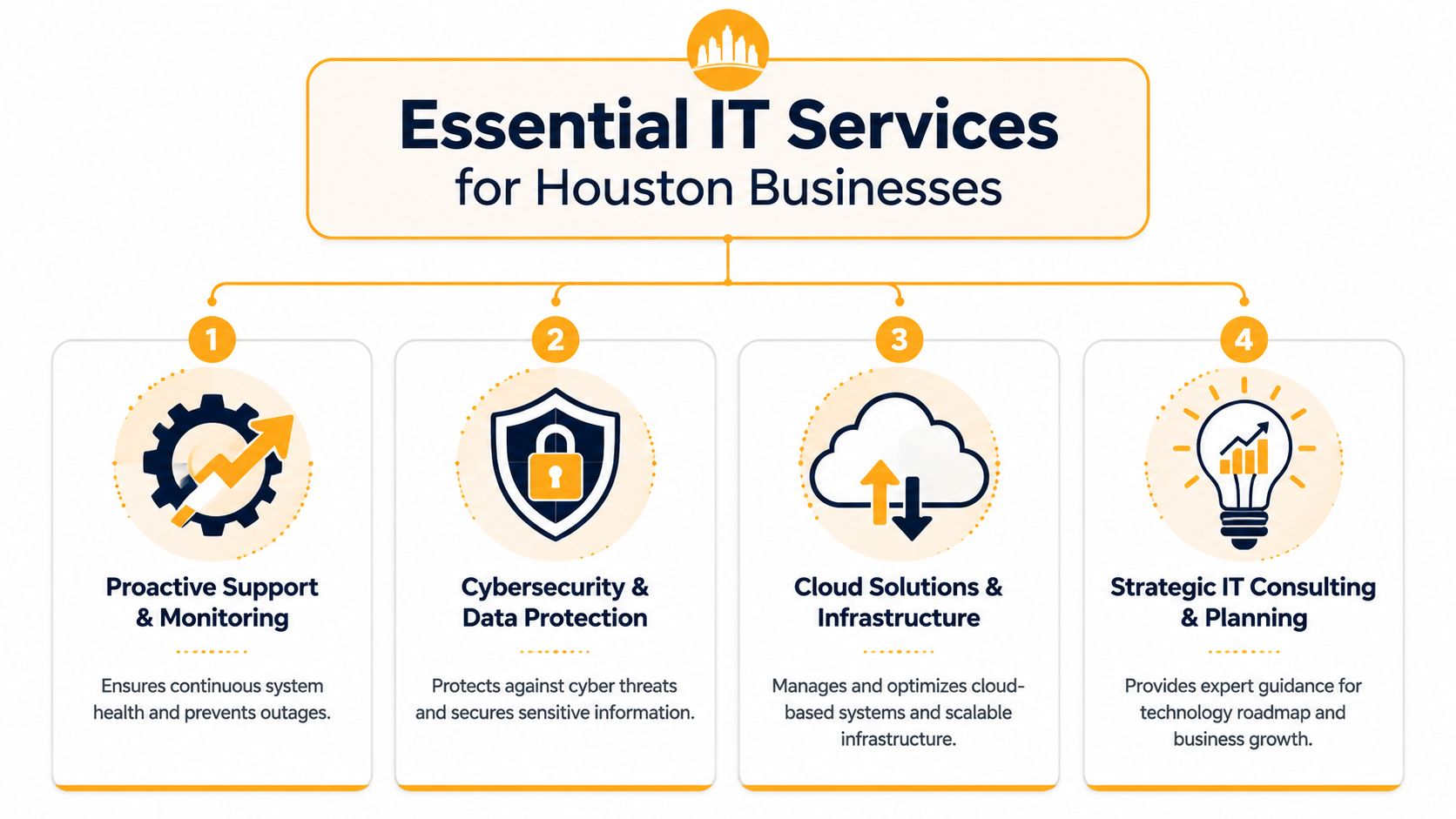
Proactive Support and Helpdesk
Good support is organized, documented, and consistent. Bad support depends on which technician picks up the ticket.
Look for a provider that can explain:
- How issues are prioritized. You want defined severity levels and escalation paths, not a vague promise to "respond quickly."
- How recurring problems are prevented. Reopened tickets usually mean the provider fixed the symptom and ignored the cause.
- How support is delivered. Ask what happens remotely, what requires onsite work, and how after-hours issues are handled.
A strong support desk should reduce noise for your staff. Employees shouldn't have to guess whether to email, call, or text someone to get help.
Cybersecurity and Compliance
Security work should be practical. The basics matter: endpoint protection, patching, backup verification, user access control, secure email handling, and documented response procedures.
If your provider mentions tools, ask how they use them. For example, endpoint protection platforms such as SentinelOne can play a role in layered defense, but the tool alone isn't the strategy. Someone still needs to review alerts, tune policies, manage exceptions, and coordinate response.
What works: clear offboarding steps, role-based access, tested backups, and monitored endpoints.
What fails: shared admin credentials, inconsistent patching, and backup assumptions no one verifies.
Cloud and Infrastructure Management
Houston businesses often need hybrid environments, not all-cloud purity. You might have Microsoft 365 for collaboration, Azure for some workloads, a line-of-business server still onsite, and specialized devices in the office or warehouse.
That means your provider should understand:
- Microsoft 365 administration including Exchange, Intune, SharePoint, Teams, and user lifecycle management
- Azure and hybrid planning for identity, access, workload placement, and policy control
- AWS or Google Cloud support if your applications or vendors rely on them
- Virtualization platforms such as VMware, Hyper-V, Citrix, or Remote Desktop Services when legacy workloads still matter
If your business is building or updating internal systems, it also helps to read Server Scheduler's development guide, especially if your IT decisions affect custom applications, integrations, or the long-term maintainability of software your team depends on.
Later in the evaluation, ask the provider to walk you through one migration or environment cleanup example from discovery through post-cutover support.
For a quick overview of how these service areas connect, this short video is useful context before you compare providers.
Network and Connectivity
This area gets ignored until the office starts feeling unreliable. Then every cloud app, phone call, meeting, and printer issue suddenly traces back to the network.
Check whether the provider can support:
- Business Wi-Fi design and troubleshooting for offices, retail floors, warehouses, and conference spaces
- Firewall and switching management with clear documentation
- Low-voltage cabling and physical infrastructure when bad cabling or patching is part of the problem
- VoIP and unified communications if phones and collaboration tools are tied to client-facing work
One practical example is IT Cloud Global, LLC, which offers managed support, cloud administration, repair services, networking, Microsoft 365 administration, virtualization support, and low-voltage cabling in Houston. That's not a recommendation by itself. It's a reminder that some providers can cover both strategic consulting and hands-on field work, while others are narrower.
Pricing models affect service quality
The same service category can feel completely different depending on the pricing model behind it. A cheap contract often creates incentives to do the minimum. A well-structured agreement usually supports proper maintenance, documentation, and planning.
Here are the common trade-offs:
- Flat-rate managed service can work well if your environment needs ongoing attention and you want predictable monthly spend.
- Per-user or per-device billing can be clean for growing teams, but make sure shared systems, conference rooms, and specialty devices are addressed.
- Break-fix billing looks flexible until small issues pile up and no one takes ownership of prevention.
Decoding Pricing Models and Service Level Agreements
Most business owners don't have trouble understanding the invoice. They have trouble understanding what behavior the invoice encourages. That's the key pricing question.
If a provider only gets paid when something breaks, don't expect them to invest much energy in prevention. If the contract is flat-rate but vague, you may end up fighting over what counts as covered work. Pricing isn't just finance. It's operations.
What each pricing model really buys you
Use this table as a starting point when comparing proposals.
| Model | Best For | Pros | Cons |
|---|---|---|---|
| All-you-can-eat flat rate | Businesses that want steady support, maintenance, and predictable monthly budgeting | Easier forecasting, stronger incentive for prevention, often better for ongoing support | Can hide exclusions if scope is poorly defined |
| Per-user or per-device | Teams with stable headcount or clear asset counts | Easy to understand, scales with growth, useful for standardized environments | Can get messy when shared devices, servers, or special systems aren't clearly included |
| Time and materials | Very small firms with infrequent issues or one-off project needs | No long-term commitment, pay only when work is done | Encourages reactive support, costs can spike, weak accountability for long-term health |
A Houston firm may quote senior consulting work separately from daily support. One Houston-focused market guide reports that senior consultant hourly rates typically range from $150 to $400, and it also points to firms with long-standing presence such as MRE Consulting, which was established in 1994. You can review that market context in Clutch's Houston IT services listings. The takeaway isn't that higher hourly rates are always better. It's that strategy, architecture, and migration planning are often priced differently from helpdesk coverage.
What to demand in an SLA
A service level agreement should tell you what happens when things go wrong. If it only tells you how to open a ticket, it isn't protecting you.
Look for these terms in plain English:
- Response time. How fast someone acknowledges the issue.
- Resolution target or workaround expectation. Acknowledgment isn't the same as restoration.
- Escalation path. Who gets involved if the first line team can't resolve it.
- Coverage boundaries. What's included, what's billable, and what counts as project work.
- After-hours handling. Define emergency support before you need it.
- Reporting cadence. You want regular reviews of ticket trends, asset changes, risks, and recommendations.
Watch for this: one-sided SLAs often promise quick response while avoiding any real accountability for follow-through.
Questions that expose weak contracts
Ask these directly during vendor interviews.
- Show me which tasks are included in the monthly fee and which are treated as projects.
- How do you classify priority levels, and who approves escalation?
- What happens if a recurring issue keeps reopening over multiple months?
- How do you handle vendor coordination with Microsoft, internet providers, software vendors, or hardware manufacturers?
- What documentation do we keep if we leave?
Those answers tell you more than a polished proposal ever will. If you want a practical checklist for evaluating contract structure and provider fit, this guide on how to choose a managed service provider is worth reviewing before you sign anything.
Key Questions to Uncover a Provider's True Value
A lot of providers can describe what they sell. Fewer can describe how they deliver it when your systems are messy, your staff is busy, and the cutover has to happen without disrupting operations.
That gap matters in Houston. Many firms advertise cloud support, but few explain the implementation details buyers need. As Netsurit's Houston IT consulting page points out, many pages mention cloud services without detailing how they reduce migration risk in Microsoft 365, Azure, and hybrid environments. That's where a provider's real value shows up.

Ask about process not promises
Don't stop at "Do you support Microsoft 365?" Ask what they do before, during, and after a change.
Use questions like these:
- Walk me through your onboarding process for a company our size. Listen for discovery, documentation, access review, monitoring setup, and user communication.
- How do you handle after-hours security incidents? You want a real workflow, not "someone is on call."
- How do you plan a Microsoft 365 or Azure migration to reduce downtime? A capable team should mention sequencing, identity changes, coexistence, rollback planning, and user impact.
- How do you document our environment? Good documentation protects you whether you stay or leave.
- Who owns coordination with other vendors? This matters more than people think.
Ask for the operating method, not the capability list. A provider that can describe the sequence of work is usually more dependable than one that only lists products.
If your company depends on local visibility for revenue, evaluate that same process discipline in adjacent areas too. For example, a business comparing partners for website, digital operations, and market reach may also want to understand optimizing for local search results, because weak handoffs between IT, web infrastructure, and local discovery can create avoidable friction.
What good onboarding should look like
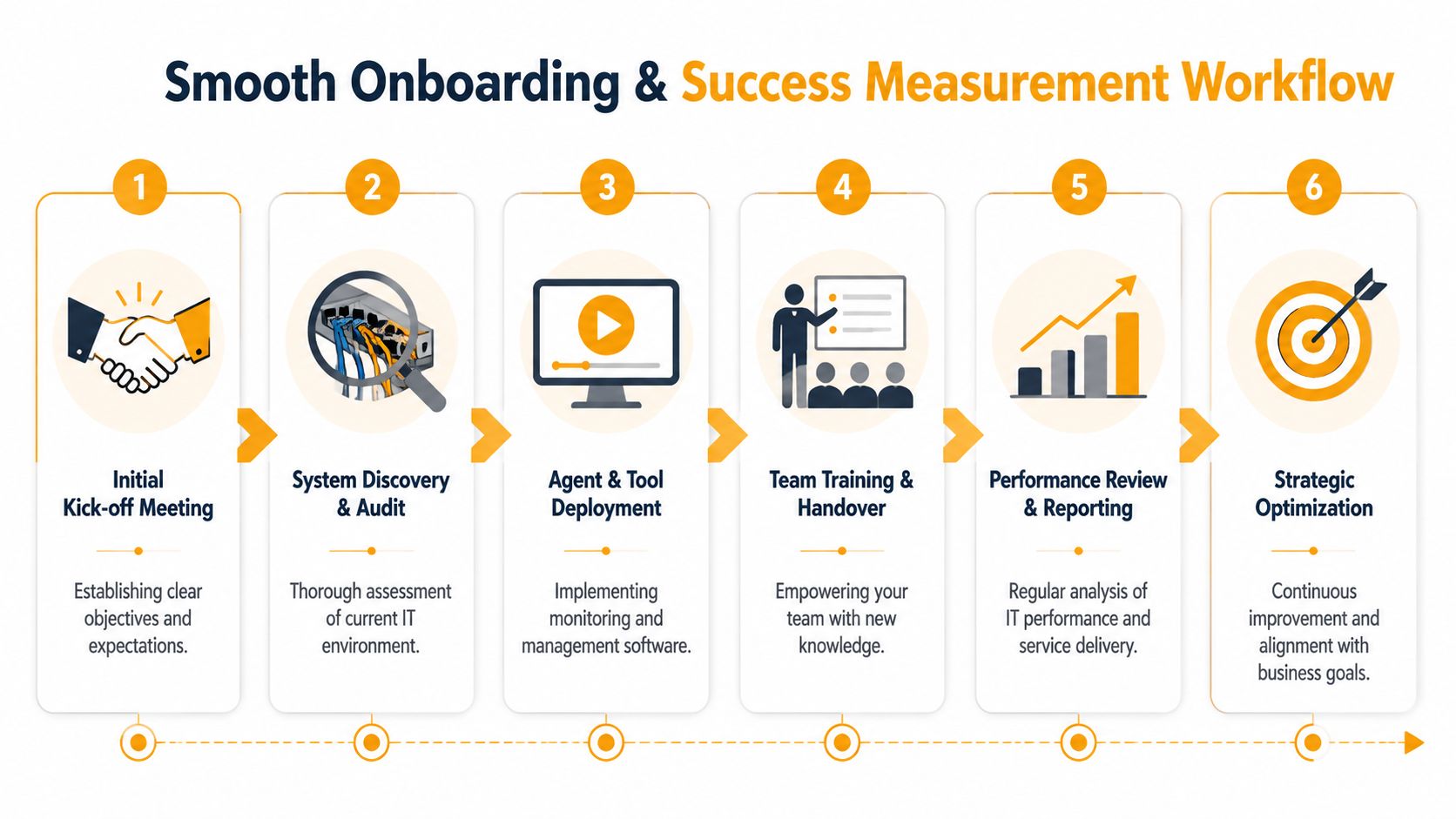
A strong provider usually follows a phased pattern. The exact order varies, but you should expect something close to this:
- Discovery and access review. They gather system details, admin access, vendor contacts, licenses, and business priorities.
- Monitoring and baseline setup. Devices, servers, backups, and key services are brought under visibility.
- Risk cleanup. Old accounts, weak policies, inconsistent endpoint settings, and backup gaps are addressed first.
- User communication. Your staff gets clear instructions on how to request help and what changes to expect.
- Roadmap review. The provider identifies near-term fixes and longer-term improvements.
If a vendor wants to start making major changes before finishing discovery, be careful. That usually creates surprises later.
Simple KPIs to track after go live
You don't need a complex dashboard. Track a short set of operational signals:
- Ticket quality. Are issues getting fully resolved the first time, or just closed quickly?
- Employee friction. Are people still complaining about the same systems?
- Recurring incident count. The right partner should reduce repeat problems over time.
- Project stability. Are upgrades and migrations arriving with fewer last-minute surprises?
- Leadership visibility. Do you receive useful summaries and risk recommendations without asking?
If those indicators improve, the relationship is probably working. If they don't, more meetings won't fix it unless the provider changes its process.
Onboarding Your New Partner and Measuring Success
Signing the contract isn't the finish line. It's the start of the part that determines whether the relationship creates order or confusion.
A smooth onboarding should lower uncertainty fast. Your team should know who to contact, what tools are being deployed, what changes are coming, and how priorities will be handled. If the first month feels opaque, the rest of the relationship usually follows the same pattern.
The workflow should be visible from day one.
The first phase should create clarity
A good onboarding sequence usually includes a kickoff meeting, system discovery, tool deployment, documentation alignment, and team communication. The provider should identify critical systems early, confirm who can approve changes, and establish how emergencies will be escalated.
What you don't want is silent onboarding. If agents are deployed, policies are changed, or accounts are reviewed without clear communication, users lose trust quickly.
A reliable handoff includes:
- Named decision owners for technology, finance, operations, and executive approval
- Documented access and vendor records so the provider isn't hunting for passwords or contacts during an outage
- Defined approval thresholds for project changes, licensing decisions, and emergency remediation
- Regular status updates in language leadership can understand
Good onboarding is visible. Your staff should know what's happening, why it's happening, and who to contact when something feels off.
Fast decisions keep projects healthy
Many IT projects stall because approvals drift. Scope changes sit in email. Nobody knows who can authorize budget, risk acceptance, or a schedule adjustment. That delay turns small blockers into expensive ones.
The Standish Group data cited by Runn reports that projects with low decision latency reached a 63% success rate, compared with 18% for slow decision-makers. You can review that in Runn's summary of IT project management statistics. In practice, the lesson is straightforward. Pick decision owners early, make skills visible, and use live project data instead of scattered spreadsheets.
For a small or midsize business, that usually means:
- One business owner or executive sponsor who can break ties
- One operational lead who knows daily workflow impact
- One IT-side lead from the provider who owns coordination
- One shared reporting rhythm so everyone sees the same priorities
Measure business outcomes not just ticket counts
Ticket volume can be useful, but it doesn't tell the whole story. A flood of tickets may mean users are finally reporting issues properly, or it may mean the environment is unstable. You need context.
Measure success with a mix of operational and business signals:
| What to measure | What it tells you |
|---|---|
| Recurring issue trends | Whether root causes are being fixed |
| User feedback from staff | Whether support feels clearer and faster |
| Stability of key systems | Whether email, file access, line-of-business apps, and connectivity are reliable |
| Change success | Whether updates, migrations, and rollouts are being executed cleanly |
| Leadership reporting quality | Whether decision-makers are getting useful risk and planning insight |
Review those measures on a regular cadence. Ask what improved, what stayed noisy, and what needs budget or policy support from your side. The strongest IT partnerships are collaborative. Your provider manages technology. You still have to make timely decisions, enforce internal accountability, and align IT with business priorities.
If you want a Houston-based partner that can support managed IT, cloud environments, Microsoft 365, cybersecurity, networking, repairs, and hands-on infrastructure work, IT Cloud Global, LLC is one option to evaluate. The right next step isn't a sales pitch. It's a practical conversation about your current environment, your operational risks, and whether their process fits how your business runs.
- How to Choose a Texas Outsource IT Service
- Houston IT Support: A 2026 Guide for SMBs
- Computer Service Near Me: A Houston Buyer’s Guide
- Top 7 Managed IT Services Houston TX Reviews 2026
- 7 Best Managed IT Services Houston TX Reviews (2026)
- Best IT Services Houston TX: Your 2026 Partner
- Managed IT Services Houston TX: 2026 Guide for SMBs