


IT Managed Services Houston TX: 2026 Guide
Your office is open, your team is working, and then one issue knocks everything sideways. Email stalls. Shared files won't open. The phones start ringing because staff can't do basic work. At that point, most Houston business owners aren't asking for a fancy technology roadmap. You just want someone competent to fix the problem fast and keep it from happening again.
That's usually the moment break-fix IT stops making sense. Paying someone only when things break sounds cheaper, until the same weak firewall, aging server, bad backup process, or neglected Microsoft 365 setup keeps creating downtime. You don't need random repairs. You need a system that keeps your business stable.
If you're searching for IT managed services in Houston, TX, the question isn't “Who can fix computers?” It's “Who can make IT predictable, secure, and aligned with how my business operates?”
Table of Contents
- Why Houston Businesses Are Moving Beyond Break-Fix IT
- What Exactly Are Managed IT Services
- The Core Services That Power Your Houston Business
- Managed Services vs Other IT Support Models
- How to Choose the Right IT Services Provider in Houston
- Managed IT Success Stories from Local Businesses
- Take Control of Your Business Technology Today
Why Houston Businesses Are Moving Beyond Break-Fix IT
It usually starts on a Tuesday morning. A staff member cannot open the accounting system, the copier will not scan to email, and your office manager is calling an IT company that can only show up after lunch. By the time someone starts troubleshooting, your team has already lost half a day and no one can tell you whether the backup from last night worked.
That is the core problem with break-fix IT. It responds to failure after the business has already paid for it through downtime, missed work, and rushed decisions. If your provider only gets involved when something breaks, you are buying labor during a crisis instead of reducing the chance of the crisis in the first place.
Houston businesses feel this harder than many markets because the IT load is not simple anymore. You are dealing with cloud apps, remote access, cybersecurity insurance requirements, vendor overlap, and employees working from multiple locations. A reactive support model leaves too many gaps between those moving parts.
The shift is happening well beyond Houston too. The global managed services market is valued at approximately $460.59 billion in 2026 and is projected to reach $705.22 billion by 2031, according to MarketsandMarkets' managed services market outlook. Businesses are not adopting managed services because it sounds modern. They are using it to get steadier costs, tighter security, and fewer outages.
Break-fix also creates a planning problem. If you have no internal IT staff, fully outsourced managed services often make more sense because one provider can own support, maintenance, security, and escalation. If you do have an internal IT person or small team, co-managed IT can be the better fit. Your staff keeps day-to-day control of the business systems they know best, while the provider fills the gaps in monitoring, security tooling, backup oversight, after-hours coverage, and project depth. That cost and coverage decision gets ignored in a lot of advice, but for Houston companies it usually matters more than the sales pitch.
You can absorb a random software glitch. You cannot run a growing business on recurring uncertainty.
A managed model puts someone on the hook for the work that prevents bigger failures. That includes patching, endpoint protection, backup verification, user support, and keeping an eye on system health before users start calling. If you want a local perspective on that shift, this look at why more Houston companies are outsourcing IT support in 2025 explains why owners are leaving ad hoc support behind.
What Exactly Are Managed IT Services
Managed IT services are the closest thing to an all-inclusive IT department on subscription.
Instead of calling someone every time a server crashes, a user gets locked out, or a phishing email slips through, you pay for ongoing coverage. That usually includes monitoring, support, security, backup oversight, cloud administration, and planning. The model is built around prevention.
Break-fix works like calling a plumber after the pipe bursts. Managed services work like paying a building engineer to inspect the pipes, monitor pressure, replace worn parts, and answer quickly when something still goes wrong. One approach bills you for chaos. The other is designed to reduce it.
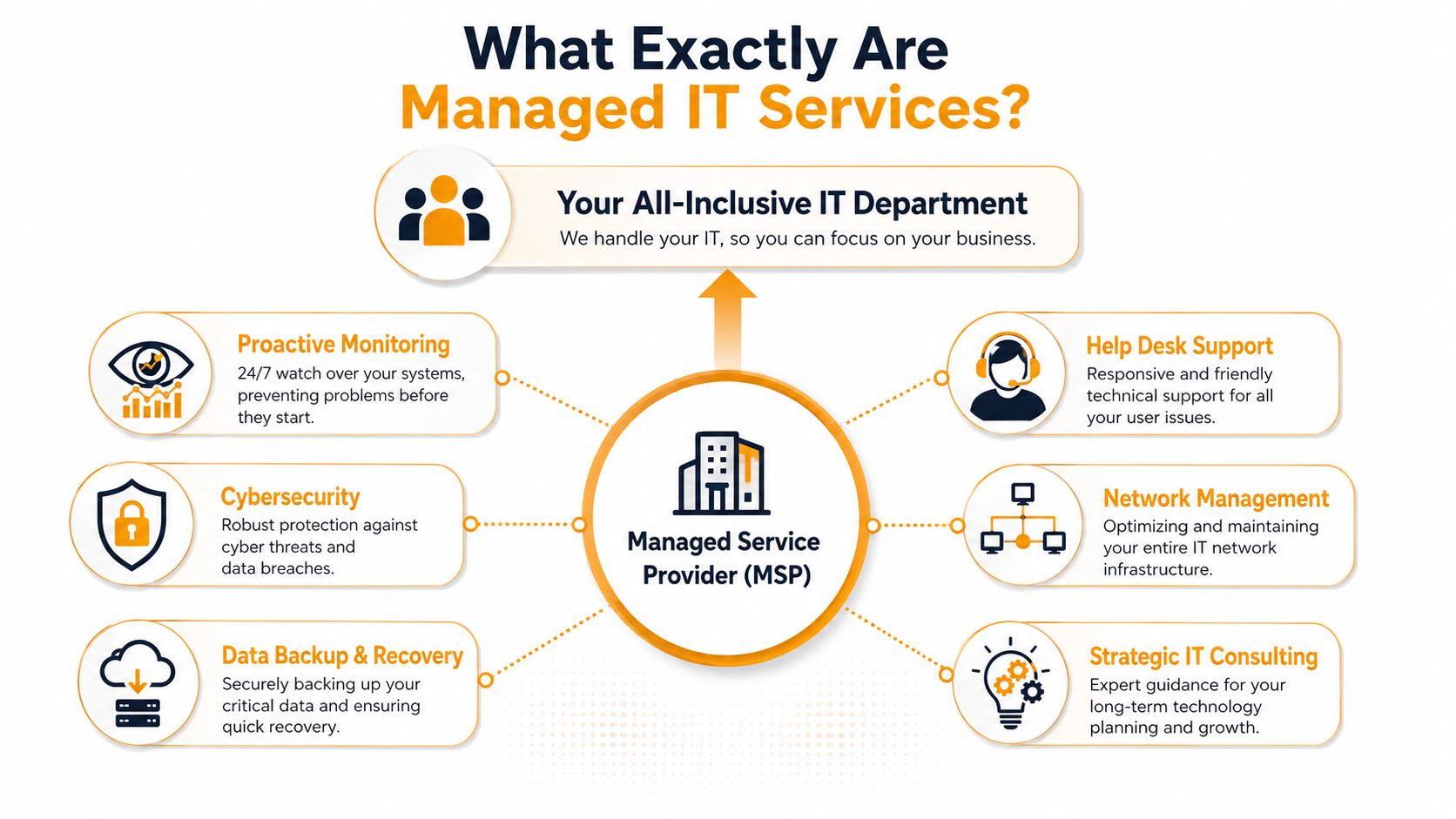
What changes under a managed model
With managed services, your provider doesn't just wait for tickets. They should be doing ongoing work in the background.
- Monitoring systems proactively: They watch servers, endpoints, network devices, cloud services, and backups so they can spot trouble early.
- Handling end-user support: Staff need help with passwords, email issues, Microsoft 365 problems, printer access, and device setup.
- Maintaining security controls: This includes tools like endpoint detection and response, email security, patching, and access management.
- Keeping recovery options usable: Backups only matter if they can be restored quickly and reliably.
- Planning ahead: Good providers help you decide when to replace hardware, clean up licensing, or move a workload to Azure, AWS, or Google Cloud.
Why business owners prefer this structure
The biggest advantage isn't technical. It's operational.
You know who owns the problem. You know what's included. You know your team has a place to call. And you're not stuck approving every small repair like it's a surprise expense. That's why many owners start viewing managed IT as part of operations, not just a repair line item.
Practical rule: If your current IT support only shows up after users complain, you don't have a strategy. You have a waiting game.
For a plain-English breakdown of the model and why companies use it, this guide to what managed IT services are and their benefits is worth reviewing.
The Core Services That Power Your Houston Business
At 8:15 on a Monday, your office does not care whether the problem sits with Microsoft 365, the firewall, a bad laptop, or a failed backup job. Your team cares that people cannot work, customers cannot get answers, and revenue slows down. Core managed services exist to prevent that chain reaction and shorten it when something still breaks.
For Houston businesses, the question isn't whether these services matter. It is whether you need a provider to own all of them or support your internal IT staff in a co-managed setup. That decision affects cost, response speed, and how much risk stays on your side of the table.
Help desk and user support
User support is where service quality becomes visible. Staff judge IT by how fast they get back into email, line-of-business apps, shared files, and phones.
A good help desk does more than close tickets. It tracks recurring issues, assigns clear ownership, escalates properly, and documents fixes so the same problem does not waste another hour next week. If your business already has an internal IT person, co-managed support can make sense here. Your employee handles local priorities and business-specific systems, while the MSP covers overflow, after-hours issues, and specialized troubleshooting.
That model often costs less than trying to hire another full-time technician just to cover gaps in availability.
Security and endpoint protection
Security work should sit inside daily operations, not in a separate binder nobody opens.
That means patching endpoints, enforcing access controls, reviewing suspicious sign-ins, filtering email, and responding to devices that start behaving like they are compromised. The business impact is plain. One missed patch or one fake invoice email can create downtime, wire fraud exposure, or a long recovery project your staff did not plan for.
For companies with internal IT, security is often the first place co-managed support pays off. Your in-house team may know your users and systems well, but still lack the tools or bench depth for continuous monitoring and response. A provider can fill that gap without taking over every other IT function.
Cloud management and Microsoft 365 administration
Many owners hear “cloud” and assume the vendor handles everything. They do not.
Microsoft 365 still needs active administration. So do Azure resources, AWS instances, Google Cloud workloads, mobile devices, SharePoint permissions, Teams policies, and identity settings. Sloppy configuration leads to locked-out users, overspending, data sprawl, and security holes that stay hidden until an audit or incident exposes them.
If you are comparing scopes of work, this checklist of essential managed IT support services for Houston small businesses is a practical place to start.
Here's a short explainer on what these services often look like in practice:
Backup, recovery, and network stability
Backups fail without warning. Restores fail loudly.
A provider should be able to tell you what gets backed up, how often recovery is tested, which systems come back first, and how long the business may be down during a real incident. If those answers are fuzzy, you do not have a recovery plan. You have backup software.
Network stability belongs in the same conversation. Weak WiFi design, aging switches, firewall errors, and poor telecom planning can slow a business just as surely as a server outage. For offices updating phone systems or connectivity, Reworx Recycling's telecom guide covers telecom decisions that often overlap with managed IT planning.
On-site support and hardware work
Remote tools solve a lot. They do not reseat a failed switch, repair damaged cabling, replace a dead SSD, or get a conference room back online five minutes before a client call.
Houston businesses with multiple offices, warehouse space, medical equipment, or older printing environments usually need some level of on-site capability. The trade-off is straightforward. Fully outsourced support gives you one vendor responsible for both remote and field work. Co-managed support can be more efficient if your internal team handles simple hands-on tasks and the MSP steps in for projects, escalations, and specialized repair work.
Some firms also need a provider that can support both managed services and physical device repair. One example is IT Cloud Global, LLC, which provides managed services alongside in-house repair depot work, network support, cloud administration across AWS, Google Cloud, and Microsoft Azure/O365, and Microsoft 365 management.
Managed Services vs Other IT Support Models
Most Houston businesses choose between three familiar models and one overlooked one. The familiar models are in-house IT, break-fix support, and fully managed services. The overlooked one is co-managed IT, where your internal team keeps control of some functions and an MSP fills the gaps.
The right answer depends on staffing, complexity, and how much risk your business can tolerate.
| Factor | In-House IT Team | Break-Fix Model | Managed IT Services |
|---|---|---|---|
| Cost structure | Payroll, benefits, training, tools, and hiring risk | Variable. Costs hit when problems appear | Recurring monthly operating cost |
| Response pattern | Depends on team size and availability | Reactive by design | Ongoing support with defined service expectations |
| Coverage | Can be strong, but limited by headcount and specialization | Narrow. Usually issue-by-issue | Broad coverage across support, security, and maintenance |
| Scalability | Hiring takes time | Difficult to scale cleanly | Easier to scale with business growth |
| Strategic focus | Varies by team maturity | Usually minimal | Often includes planning and advisory support |
| Risk of neglected maintenance | Moderate if team is stretched | High | Lower when preventive tasks are part of the agreement |
Where break-fix fails
Break-fix can still work for very small offices with low complexity, limited compliance exposure, and a high tolerance for occasional disruption. But once your business relies on cloud apps, remote users, endpoint security, shared file systems, and vendor integrations, the cracks show fast.
A break-fix technician may solve the symptom but miss the pattern. They can reset a switch, reboot a server, remove malware, or repair a workstation. They usually aren't paid to standardize devices, tighten permissions, review backup health, or build a roadmap for lifecycle replacement.
That's why many companies feel trapped in a loop. They keep paying for fixes without reducing the underlying friction.
When co-managed IT makes more sense
This is the part many providers skip, because “fully outsourced” is easier to sell.
If your company already has internal IT staff, fully outsourcing everything may not be the best move. Recent 2025 to 2026 data shows a 22% rise in co-managed IT adoption among Houston mid-market firms, and the same source notes that this model can reduce long-term costs by 15 to 20% for companies with 3+ internal IT staff, provided the SLA and handoff points are clearly defined, according to Integris' Houston location overview.
Co-managed works when each side owns specific responsibilities. It fails when both sides assume the other one is handling backups, patching, vendor tickets, or security alerts.
A few situations where co-managed often works better:
- Your internal team is strong but overloaded: Keep them focused on business systems, projects, and leadership requests. Let the MSP handle monitoring, help desk overflow, or endpoint security operations.
- You need specialized support: Internal teams may know your ERP or production software well but need outside help with VMware, hybrid Microsoft 365, firewall management, or cloud migration.
- You want after-hours coverage: Many SMB IT teams don't provide round-the-clock support. A co-managed setup can fill that gap without replacing staff.
- You need separation of duties: For compliance or internal control reasons, some organizations prefer shared ownership.
Fully managed is often the better fit when you have no internal IT, your current setup is inconsistent, or leadership wants one accountable partner. Co-managed is often stronger when you already have competent people in-house and want to extend them instead of replacing them.
How to Choose the Right IT Services Provider in Houston
A Houston company usually starts shopping for an MSP after something has already gone wrong. The server failed on a Monday morning. Microsoft 365 permissions are a mess after an employee departure. Ransomware protection looks fine on paper until nobody can confirm who is watching alerts after 6 p.m.
That is the wrong time to discover your provider only sells a help desk, not real operational ownership.
The right provider should fit the way your business runs. For some companies, that means fully outsourced IT with one firm owning support, security, vendor management, and planning. For others, especially businesses with one to three capable internal IT staff, co-managed support is the better buy. It gives your internal team room to focus on systems, users, and projects that are specific to your operation while the MSP covers monitoring, after-hours response, security tooling, and specialized escalation. If a provider cannot explain where co-managed ends and fully outsourced begins, keep looking.
Questions worth asking before you sign
Ask questions that force the provider to show how they work.
- Who owns what, in writing? If you have internal IT, ask for a co-managed responsibility matrix. It should spell out who handles patching, backups, Microsoft 365 admin, endpoint security, vendor tickets, user onboarding, and after-hours alerts.
- What are your response times for urgent, routine, and after-hours issues? Ask for SLA language, escalation paths, and what happens if they miss target times.
- What security controls are included by default? Get a clear list. Endpoint protection, email filtering, MFA enforcement, vulnerability patching, backup monitoring, and security alert review should not be vague add-ons.
- Who handles Microsoft 365, identity, and policy work? Many firms support password resets and mailbox issues but bill extra for tenant cleanup, conditional access, retention policies, and Entra ID administration.
- How do you support regulated or audit-driven businesses? If your business deals with HIPAA, client confidentiality, cardholder data, or industrial security requirements, ask how they document controls and support audits.
- What requires an on-site visit? Remote support is efficient, but some network, cabling, hardware, and user-side issues still need a local technician.
- Who manages outside vendors when things break? Your ISP, copier vendor, software provider, phone system vendor, and cloud platform do not coordinate with each other. Someone needs to own the ticket and push it to resolution.
For businesses reviewing physical safeguards alongside IT controls, this overview of integrated data center security is a useful reminder that resilience also depends on who can enter the facility, how access is logged, and whether the environment itself is protected.
Red flags that usually lead to bad outcomes
Weak providers usually reveal themselves during sales, not after onboarding.
Watch for broad promises with no service definitions. Watch for security sold as a separate bolt-on instead of part of daily operations. Watch for pricing that looks low until you ask about projects, after-hours support, onboarding, backup recovery, and Microsoft 365 administration.
A bad fit also shows up when the provider pushes one model for every client. A small law firm with no internal IT has different needs from a manufacturer with an in-house systems administrator. A provider worth hiring should be able to tell you, plainly, whether your business is better served by full outsourcing or co-managed support, and why.
One more warning sign matters in Houston. If the firm has no practical answer for storm recovery, multi-site connectivity, field users, or line-of-business applications that cannot go down during business hours, they may understand generic IT but not your operating reality.
Buyer check: Ask the provider to describe a client they would not be a good fit for. Honest firms answer that without hesitation.
What pricing should look like in Houston
Pricing should match scope, risk, and the amount of responsibility you are handing over.
In Houston, standard managed IT services commonly fall between $125 and $225 per user per month. In compliance-heavy environments such as healthcare or energy, pricing often rises to $150 to $300 per user per month because those engagements usually include more security controls, documentation, and policy work, based on Uprite's Houston pricing discussion.
Broader market guidance from IT GOAT's Houston managed IT services guide also shows that for companies with 10 to 50 employees, monthly spend for full-service support often lands between $3,000 and $5,000 when security, patching, and disaster recovery are included.
Use those ranges carefully. A fully outsourced agreement should cost more than a co-managed agreement where your internal team still owns part of the workload. The cheaper quote is not always the lower-cost option over a year. If your staff still spends hours chasing vendors, handling escalations, fixing backups, or covering after-hours issues, you are still paying for IT. You are just paying part of it off the invoice.
Managed IT Success Stories from Local Businesses
The benefits become clearer when you look at how different Houston businesses use managed services to solve different problems.

A law firm near the Galleria
A small law office had a common problem. Attorneys needed secure remote access, staff kept running into email and document sync issues, and leadership wasn't confident that client files were properly protected.
The managed services plan focused on endpoint security, Microsoft 365 administration, better permission control, and a cleaner support process for user issues. The immediate result wasn't flashy. It was stability. Lawyers could work from the office, home, or court without constant file-access friction, and the firm had a clearer handle on who could access what.
A manufacturer near the Ship Channel
This company didn't care about IT jargon. They cared about production disruptions.
Their pain points were network inconsistency, aging hardware, and support that always seemed to arrive after downtime had already spread to the floor. A managed setup gave them proactive monitoring, scheduled replacement planning, clearer escalation for network issues, and structured backup and recovery procedures. Instead of waiting for equipment failures to become emergencies, they started treating IT maintenance like any other operational discipline.
Reliable IT support matters most in businesses that can't simply pause and catch up tomorrow.
A healthcare clinic in the Medical Center
The clinic had pressure from multiple directions. They needed day-to-day user support, tighter control over patient data access, and documentation that made compliance reviews less painful.
A provider built around compliance expectations can make that manageable. The clinic's plan centered on access management, email and endpoint security, backup oversight, and policy enforcement across staff devices. The biggest improvement was confidence. Leadership no longer felt like they were guessing whether the environment was secure enough or organized well enough for oversight.
These examples are fictional, but the underlying issues are real and common across Houston. Legal teams need secure mobility. Manufacturers need operational continuity. Clinics need control, accountability, and dependable support. The right managed service plan looks different in each case because the business problem is different.
Take Control of Your Business Technology Today
Your IT setup doesn't need to be perfect. It does need to be controlled.
If your team is dealing with repeat outages, patchy support, security uncertainty, or costs that swing every time something breaks, the problem usually isn't one bad device or one bad month. It's the support model. Managed services give you structure. And if you already have capable internal IT staff, a co-managed model may give you better coverage without forcing a full handoff.
The best next step is simple. Review what you have today, identify what's covered, and decide where accountability belongs. That's how you turn IT from a recurring disruption into a business function that supports growth.
If you want a practical review of your current environment, IT Cloud Global, LLC offers consultations for Houston businesses that need help with managed IT, cloud administration, cybersecurity, help desk support, network stability, and recovery planning. A good consultation should show you where your risks are, what can be standardized, and whether fully managed or co-managed support fits your business better.
- 7 Best Managed IT Services Houston TX Reviews (2026)
- Best IT Services Houston TX: Your 2026 Partner
- Managed IT Services Houston TX: 2026 Guide for SMBs
- Houston Managed IT Services: A 2026 Guide for SMBs
- What Is a Network Operations Center? an SMB Guide
- Business Continuity Strategies: SMB Guide 2026
- Top Managed Services Provider Houston: Your 2026 Guide