


Managed IT Services in Houston: A Guide for SMBs
Monday starts with a password reset. By lunch, email is down for half the office. At 3 p.m., someone clicks a fake invoice, and now your team is asking whether files are safe, whether backups work, and whether customers can still reach you. Most Houston business owners don't need a lesson in technology at that moment. They need the business to keep moving.
That's where the conversation around managed IT services in Houston usually becomes real. Not when a vendor talks about tools, but when downtime starts costing hours, deals, and trust. If your current setup depends on calling someone only after something breaks, you're already paying for instability. You're just paying for it in disruption instead of a line item.
Table of Contents
- Beyond Break-Fix Your Introduction to Managed IT
- What Are Managed IT Services Really
- Core Managed IT Services Your Business Needs
- The Real-World Benefits for Houston SMBs
- Houston-Specific IT and Regulatory Considerations
- How to Choose the Right Houston IT Provider
- Your Next Step to Proactive and Secure IT
Beyond Break-Fix Your Introduction to Managed IT
A lot of small businesses still run IT like emergency plumbing. The printer dies, the Wi-Fi drops, the server runs out of space, and then somebody makes a call. That model feels cheaper right up until the day it isn't.
In Houston, that usually shows up in familiar ways. A growing office adds staff faster than laptops, permissions, and onboarding can be handled. A medical practice keeps working inside Microsoft 365 without a clear recovery plan. A law office stores sensitive files in several places because nobody had time to standardize anything. Nothing looks catastrophic until one failure exposes how many daily tasks depend on systems nobody is actively managing.
Managed services changed that model. Instead of paying a technician to react after a problem appears, you pay for continuous oversight, maintenance, security, and support. The larger trend is clear. The global managed services market is projected to grow from $396.2 billion in 2025 to $449.5 billion in 2026 and reach $834.7 billion by 2032, according to managed services market projections. Businesses aren't treating outsourced IT as a niche purchase anymore. They're treating it as an operating model.
What break-fix gets wrong
Break-fix support rewards delay. If no one is watching patch status, failed backups, storage growth, risky sign-ins, or aging hardware, you don't know about the issue until users feel it. By then, the damage is already operational.
A managed approach changes the question from "Who can fix this?" to "Why did this get close to failure in the first place?"
Practical rule: If your business only talks to IT when something is broken, you're managing incidents, not risk.
What business owners actually want
Most owners aren't shopping for technology. They're trying to remove friction.
They want employees to log in and work. They want new hires set up on day one. They want backups that restore, security controls that hold up under pressure, and a monthly operating rhythm that doesn't depend on luck. That's the point of proactive IT support for growing businesses. It turns IT from a recurring interruption into a controlled function.
What Are Managed IT Services Really
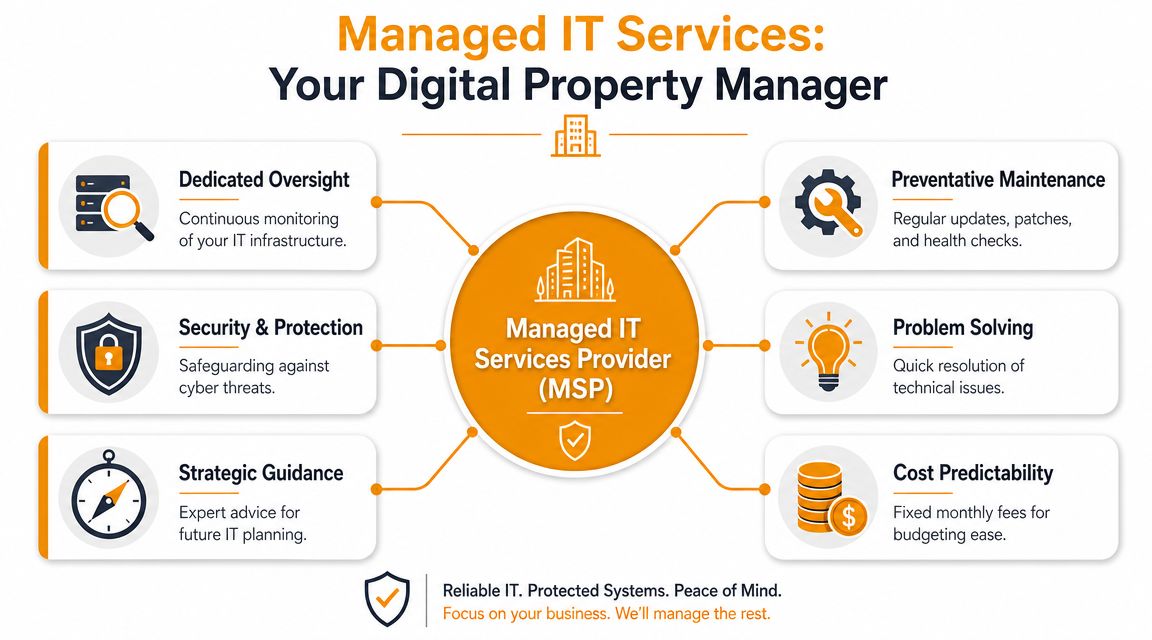
Think of a managed service provider like a property manager for your business technology. You don't hire them only when the roof caves in. You hire them to inspect, maintain, secure, document, and coordinate the whole environment so small issues don't turn into expensive disruptions.
That difference matters. A break-fix vendor gets paid when things fail. An MSP is supposed to reduce failure, reduce downtime, and keep systems within a known standard.
What the service model usually includes
For Houston SMBs, the managed model usually means a fixed monthly agreement covering the basics that should never be left to chance. Local providers commonly bundle workstation and server maintenance, patch management, cloud email, backup and recovery, and compliance support into a predictable monthly cost, as described by Houston managed IT service models. The practical benefit is simple. Your IT budget stops swinging wildly every time a device fails or a backlog catches up.
That predictability is one reason businesses move away from hourly support. Hourly billing often looks manageable in quiet months, then becomes painful when you're onboarding staff, replacing hardware, responding to security alerts, or dealing with an outage.
What an MSP should be doing behind the scenes
A good MSP doesn't just close tickets. It should be handling work your team rarely sees:
- Monitoring systems so failures are caught early
- Applying patches and updates on a schedule
- Standardizing user access so former employees don't linger in systems
- Reviewing backups so recovery isn't a guess
- Managing vendors when Microsoft 365, internet, VoIP, or line-of-business apps have issues
Managed IT should feel boring in the best way. Staff work, systems stay available, and technology stops hijacking the week.
If you're trying to understand where help desk ends and full-service management begins, this breakdown of what managed IT support services in Houston actually deliver is useful because it frames the service around outcomes, not buzzwords.
Core Managed IT Services Your Business Needs
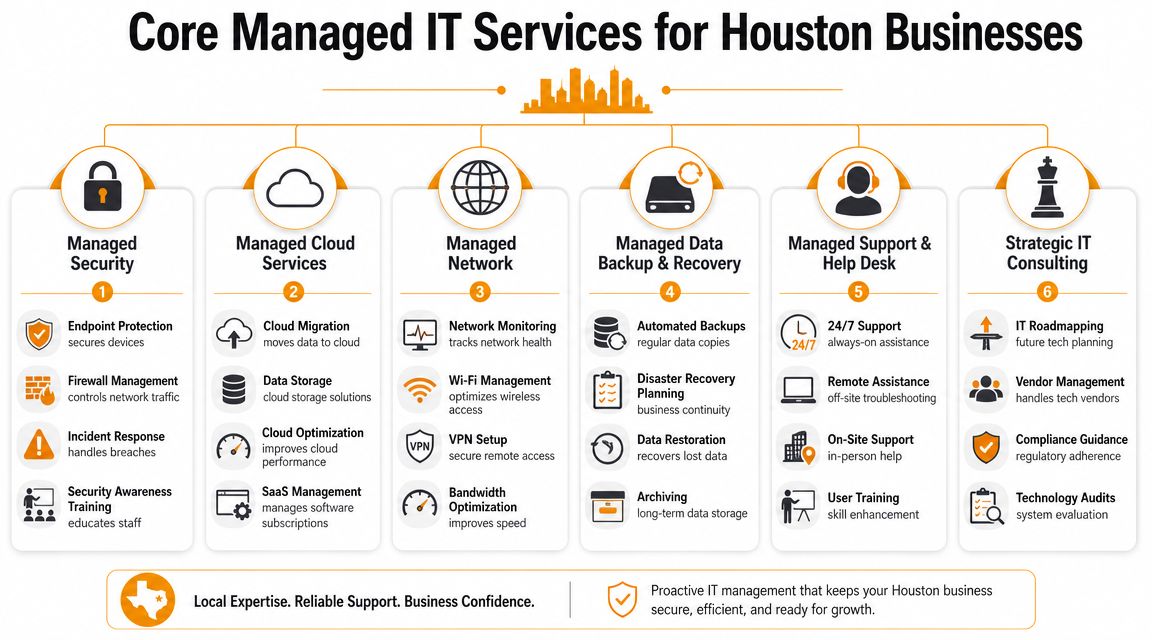
A managed IT plan isn't one thing. It's a stack of services that support daily work, reduce avoidable risk, and give you a way to recover when something still goes wrong. The exact mix varies by business, but these are the core pieces that matter most.
Help desk and user support
This is the part employees notice first. They can't sign in, Outlook won't sync, Teams audio is failing, a laptop won't connect to Wi-Fi, or a new hire needs access to six different systems before the day starts.
Good support is more than answering tickets. It means someone owns the intake process, triages issues by business impact, and resolves common problems fast enough that users don't invent workarounds. In a healthy environment, support also feeds back into root-cause work. If five users report the same problem, the answer isn't five closed tickets. The answer is fixing the underlying issue.
For many SMBs, responsive remote support plus scheduled on-site work is the right balance. It keeps routine problems from disrupting leadership time.
Cybersecurity and threat monitoring
Security has moved well beyond antivirus. Houston MSP offerings increasingly include 24/7 monitoring, managed security, zero-trust policy enforcement, and dark web monitoring, according to advanced managed IT service capabilities in Houston. That layered model matters because attackers rarely announce themselves with a dramatic event. They look for weak passwords, stale accounts, unpatched devices, and poorly governed cloud access.
A useful security program usually includes these elements:
- Endpoint protection: Laptops, desktops, and servers need active detection, not basic signature scanning.
- Identity controls: Multi-factor authentication, access reviews, and conditional access decisions matter because cloud accounts are often the front door.
- Email and web protection: Most trouble still starts with a user clicking something believable.
- Vulnerability management: If your provider can't explain how they identify and track weaknesses over time, the security story is incomplete. This guide to building a program for managing security weaknesses is a good plain-English reference.
Some MSPs also support platforms and products that go deeper into endpoint and cloud defense. For example, IT Cloud Global, LLC works with tools such as SentinelOne and supports cloud environments across AWS, Azure, Google Cloud, and Microsoft 365. That matters when your business runs across more than just office desktops.
Security maturity isn't about owning more tools. It's about knowing which controls are active, who reviews alerts, and whether suspicious activity gets investigated before it turns into an incident.
Cloud management and Microsoft 365 administration
A lot of Houston businesses are already "in the cloud" without managing it well. Files live in SharePoint and OneDrive. Email runs through Exchange Online. Teams becomes the communication hub. But nobody is consistently reviewing sharing settings, license assignments, mobile device policies, retention practices, or admin access.
That's where managed cloud administration earns its keep. It keeps Microsoft 365, Azure, AWS, or Google Cloud aligned with how the business operates. It also reduces the common problem of over-permissioned users, duplicated storage, and undocumented changes.
Cloud support should include routine admin work, governance, and planning. Migration is only the beginning. Optimization and control are the long-term job.
Network and Wi-Fi management
When staff complain that "the internet is slow," the problem might be Wi-Fi design, switch issues, firewall rules, bandwidth contention, aging hardware, or a bad ISP handoff. Without monitoring and documentation, people guess. Guessing wastes time.
Managed network services usually cover firewalls, switches, wireless access points, VPN access, and ongoing monitoring. In offices, warehouses, clinics, and retail spaces, stable connectivity is part of productivity. If your payment system, phones, cloud apps, and cameras all depend on the same network, poor network management becomes a business issue very quickly.
Backup and disaster recovery
Backups are one of the most misunderstood parts of IT. Many owners assume they exist because someone set them up at some point. The real question is whether they restore cleanly and whether the business knows what comes next after an outage, accidental deletion, ransomware event, or major service failure.
A workable backup and recovery program should include:
- Defined scope: What systems, files, SaaS data, and devices are protected.
- Recovery testing: Whether restores are performed and reviewed.
- Business priorities: Which systems must come back first so revenue work resumes.
- Clear ownership: Who makes decisions during a recovery event.
If a provider says your data is backed up but can't explain testing and restoration steps in plain language, keep asking questions.
Hardware repair and lifecycle support
Even in cloud-heavy environments, hardware still fails. Laptops age out. Printers jam at the worst moment. Storage degrades. Power events damage equipment. A managed relationship should include a clear process for repair, replacement, and refresh planning so device problems don't turn into emergency purchases.
This part is easy to overlook, but it's operationally important. Businesses lose time when employees work on failing machines because nobody wants to replace them "yet." A smart provider tracks age, warranty status, and replacement timing so hardware gets retired before it becomes the bottleneck.
The Real-World Benefits for Houston SMBs
Features sound nice. Outcomes are what matter. A managed IT relationship only pays off if your business runs more smoothly, takes fewer avoidable hits, and spends less leadership time dealing with preventable technology messes.
Fewer interruptions during the workday
The first win is simple. Staff stop losing chunks of the day to recurring technical issues.
That doesn't mean problems disappear. It means the environment is maintained well enough that common failures happen less often, and when they do happen, someone already knows the systems, users, and dependencies involved. The office keeps moving instead of waiting for a callback.
For small and midsize businesses, that's often more valuable than any flashy project. Quiet systems support productive people.
More predictable IT spending
Reactive IT usually creates reactive bills. One month is calm. The next month includes after-hours cleanup, emergency hardware replacement, backup repair, and labor nobody planned for.
A 2026 industry guide notes that SMBs can cut IT operational costs by up to 40% by switching to a managed service provider, tied to a proactive model of preventative maintenance and continuous service delivery, according to managed IT cost reduction guidance for Houston businesses. Even when savings aren't the only goal, budget stability helps owners plan with more confidence.
If your IT spend only becomes visible during a crisis, it's not under control.
Access to skills you probably should not build alone
Most SMBs don't need a full internal bench covering Microsoft 365 administration, security operations, backup strategy, vendor escalation, compliance support, and network troubleshooting. They need access to those skills when the business needs them.
That's one of the strongest practical advantages of managed IT. You get broader coverage than a single in-house generalist can usually provide. For companies with no internal IT, that fills an obvious gap. For companies with one internal lead, it removes the impossible expectation that one person should be expert in everything.
Managed services also give owners something less visible but just as valuable. Focus. When your controller isn't chasing an email issue and your operations manager isn't trying to figure out whether backups ran, they can do the work you hired them to do.
Houston-Specific IT and Regulatory Considerations
Houston isn't one kind of business market. It includes clinics, law firms, finance teams, engineering offices, energy companies, logistics operations, and multi-location service businesses. That mix changes what "good IT" looks like.
A generic support contract might keep devices running. It won't necessarily help your business hold up under compliance reviews, vendor security questionnaires, ransomware pressure, or a regional disruption that forces staff to work differently for days at a time.
Compliance is part of operations in Houston
For many Houston SMBs, provider selection should go beyond uptime. Businesses in healthcare, legal, and finance need to verify whether an MSP can support SOC 2, HIPAA, ransomware readiness, and disaster recovery testing across platforms like Microsoft 365 and AWS, as outlined in Houston managed IT compliance considerations. That's a buying issue, not just a technical one.
When owners skip this step, they often discover too late that "managed security" meant basic monitoring but not evidence collection, access governance, backup validation, or documented recovery testing. Those gaps show up during audits, client reviews, insurance questions, and incidents.
A better evaluation process asks practical questions:
- Access control: Who reviews privileged access and user lifecycle changes?
- Evidence and documentation: Can the provider support records needed for audits or investigations?
- Recovery readiness: Are Microsoft 365 and cloud workloads included in testing?
- Policy enforcement: Are security baselines defined and checked over time?
Resilience means more than antivirus
Houston businesses also need to think about resilience in operational terms. If the office is unavailable, if staff must work remotely, if a cloud service has a major issue, or if ransomware forces rapid isolation decisions, can the business still function?
That question pushes the MSP conversation beyond help desk response time. It brings in identity security, backup verification, cloud governance, user communication plans, and the provider's ability to coordinate across systems under pressure.
A resilient IT environment doesn't just prevent bad days. It shortens them.
Local context helps here. A provider serving Houston organizations should understand the mix of regulated workflows, distributed teams, and continuity concerns common in this market. That doesn't mean every company needs the same controls. It means the MSP should know how to tailor controls to the actual risks your business carries.
How to Choose the Right Houston IT Provider
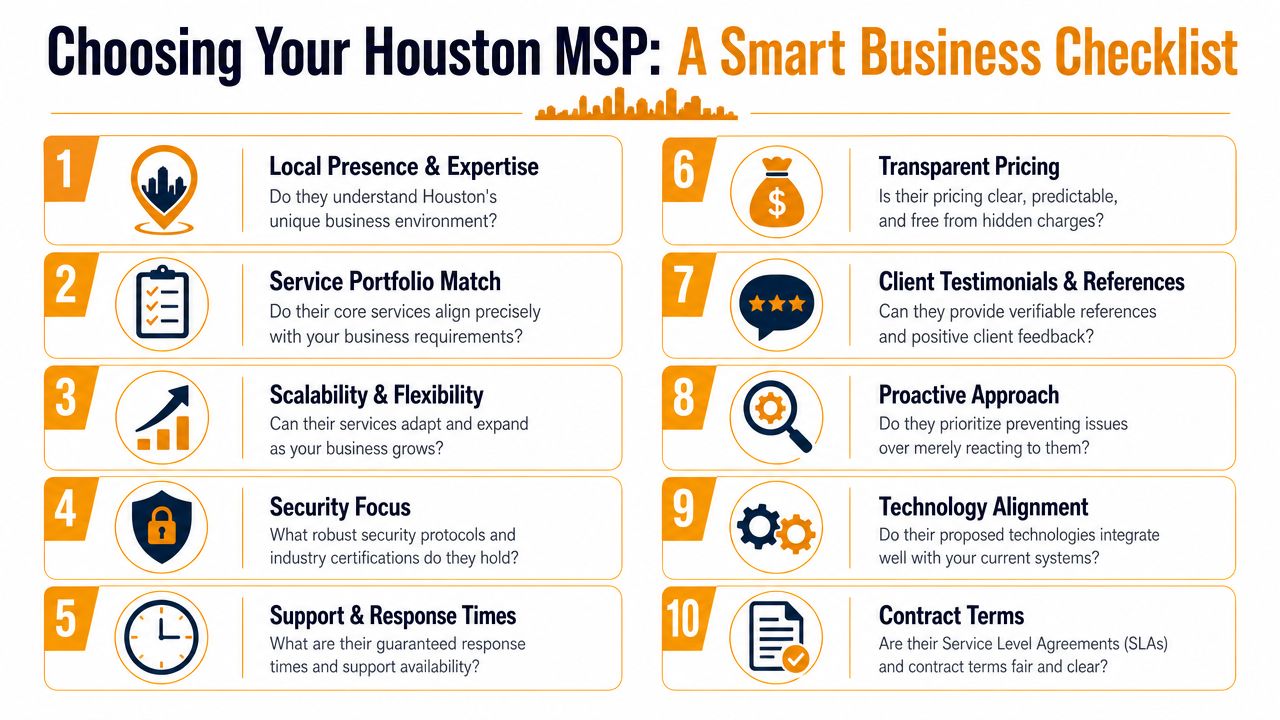
Most MSP sales conversations sound similar at first. Everyone promises support, security, and proactive service. The difference shows up in the questions they answer clearly, the exclusions they put in writing, and the way they handle responsibility when something serious happens.
What to ask before you sign
Start with fit, not price. A provider can be technically capable and still be wrong for your business if they don't support your systems, your industry requirements, or your operating hours.
Use a shortlist like this during discovery:
- Business alignment: Ask how they support companies your size, with your workflow and compliance needs.
- Security depth: Ask what they monitor, who reviews alerts, and how zero-trust or identity controls are enforced.
- Backup reality: Ask how recovery testing is done and how often results are reviewed with clients.
- Support process: Ask who answers tickets, what gets escalated, and how after-hours issues are handled.
- Documentation: Ask whether you receive asset records, admin documentation, and environment standards.
- Co-managed options: Ask whether they can work alongside an internal IT person instead of replacing them.
If you want a framework before vendor calls begin, this guide on how to choose a managed service provider is a practical place to start.
A service agreement deserves the same scrutiny as the technical scope. If you want to see what clear service commitments can look like, Purple's SLA example templates are helpful for understanding the difference between response promises and actual service accountability.
Here is a short explainer that helps non-technical buyers understand what to look for in an MSP conversation:
Comparing managed IT pricing models
Pricing structure affects both fairness and clarity. The cheapest-looking quote isn't always the most predictable one.
| Pricing Model | Best For | Pros | Cons |
|---|---|---|---|
| Per user | Offices where employees use multiple devices and cloud apps daily | Simple to budget, aligns with headcount, easier to forecast during hiring | Can feel expensive if some users need very little support |
| Per device | Environments with shared workstations, specialized equipment, or clear device counts | Useful when device inventory matters more than staff count | Can get messy when one employee uses several devices |
| Tiered plans | Businesses comparing service bundles side by side | Easier to see basic versus advanced coverage | Labels can hide exclusions if the scope isn't detailed |
| Co-managed agreement | Companies with an internal IT lead who needs outside depth | Preserves internal oversight while adding security, project, or escalation support | Requires clear division of roles to avoid finger-pointing |
When co-managed IT makes more sense
This is one of the most overlooked buying decisions in Houston. Fully managed IT makes sense when you want an outside provider to own day-to-day support, maintenance, and security. Co-managed IT is often a better fit when you already have an internal IT manager or generalist who understands the business but needs backup, specialized tools, or round-the-clock coverage.
A few examples where co-managed usually works well:
- A company with one internal IT person: That person handles user relationships and local decisions. The MSP adds security monitoring, escalations, documentation discipline, and project help.
- A fast-growing business: Internal staff can manage onboarding priorities while the MSP handles standardization, patching, and identity controls.
- A regulated firm: Leadership keeps oversight in-house while using the provider for technical depth, compliance support, and recovery testing.
The right choice comes down to control, staffing reality, and whether your current team can support the business without becoming a bottleneck.
Your Next Step to Proactive and Secure IT
Managed IT works best when it stops being viewed as emergency labor and starts being treated as operational infrastructure. For Houston SMBs, that means choosing a provider that can support day-to-day productivity, strengthen security controls, and help the business recover when conditions aren't normal.
The best time to fix IT isn't after another outage, another phishing scare, or another week lost to unreliable systems. It's while things are still functioning well enough to improve them without panic.

If you're evaluating managed IT services in Houston, look past ticket counts and marketing language. Ask who owns resilience, who supports compliance expectations, who validates recovery, and who helps your team work without constant technical drag. Those are the answers that matter when the pressure is on.
If you want a practical next step, contact IT Cloud Global, LLC for a no-obligation review of your current environment, support gaps, security posture, and recovery readiness. A short assessment can show whether fully managed or co-managed support makes more sense for your business.
- 7 Best Managed IT Services Houston TX Reviews (2026)
- Best IT Services Houston TX: Your 2026 Partner
- Managed IT Services Houston TX: 2026 Guide for SMBs
- IT Managed Services Houston TX: 2026 Guide
- Houston Managed IT Services: A 2026 Guide for SMBs
- What Is a Network Operations Center? an SMB Guide
- Business Continuity Strategies: SMB Guide 2026