


Best IT Services Houston TX: Your 2026 Partner
You're probably dealing with one of two situations right now. Either your team is growing and every new hire brings another laptop, another login, another Microsoft 365 question, and another security concern. Or you've hit that point where technology only gets attention when something breaks, which usually happens at the worst possible time.
That's the moment many Houston business owners realize they're not really “handling IT” anymore. They're reacting to it. A printer issue turns into a network issue. A lost password uncovers weak access controls. A slow server turns into half a day of lost work. What looked manageable six months ago starts stealing time from sales, operations, and customer service.
When evaluating IT services in Houston TX, the primary concern isn't just who can fix computers. It's who can reduce downtime, tighten security, and help you make smarter technology decisions without burying you in jargon.
Table of Contents
- Is Your Business Outgrowing Its IT
- A Houston Business Guide to IT Service Types
- The Real-World Benefits of Outsourced IT Support
- How to Choose the Right Houston IT Partner
- Understanding IT Service Pricing Models
- Navigating Security and Compliance in Texas
- Your Action Plan for Better IT Support
Is Your Business Outgrowing Its IT
A lot of small and midsize companies start with improvised IT. One reliable employee becomes the unofficial tech person. Your office manager calls the internet provider. Someone's cousin sets up the firewall. It works until the business gets more complicated.
Growth creates friction fast. More employees mean more devices, more shared files, more remote access, more software subscriptions, and more chances for something to fail. If the owner or operations lead is still approving every laptop purchase, chasing password resets, and deciding where backups live, the business has outgrown DIY support.
The warning signs are usually practical, not technical:
- Recurring downtime: The same WiFi, login, printing, or application issues keep coming back.
- No clear ownership: Nobody knows who handles backups, antivirus alerts, device setup, or vendor tickets.
- Security anxiety: You know cyber risk matters, but you're not sure whether your current setup is enough.
- Reactive spending: You pay when something breaks, but you can't predict the next problem or the next bill.
- Leadership distraction: Managers spend time doing support work instead of running the business.
Practical rule: If tech problems are regularly interrupting revenue work, IT is no longer an occasional task. It's an operating function.
That doesn't mean you need an enterprise-sized department. It means you need a system. For many Houston businesses, that starts with a professional provider that can take ownership of support, monitoring, security, and planning. If that shift sounds familiar, this breakdown of why Houston companies outgrow DIY IT faster and look for professional IT services lines up with what many local teams run into.
A Houston Business Guide to IT Service Types
Most business owners don't need more acronyms. They need a plain-English way to understand what each service does and what problem it solves.
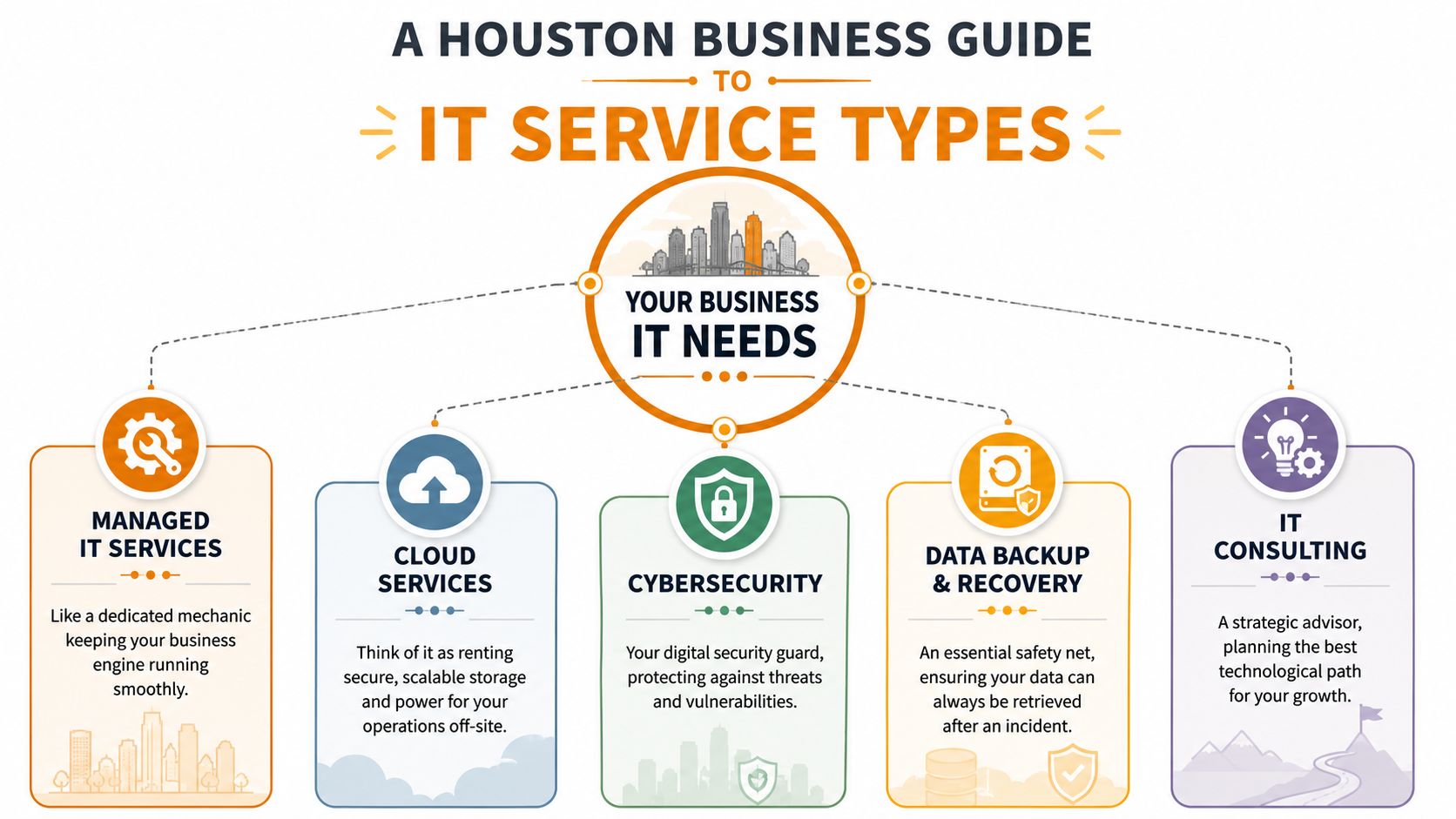
What managed support actually covers
Managed IT services are the closest thing to a full-time maintenance program for your business technology. If you want a useful outside definition, this overview of the managed IT services definition gives a solid baseline. In practice, it usually means a provider monitors systems, handles support requests, patches devices, manages core infrastructure, and works to prevent problems before users feel them.
Picture a building superintendent for your digital office. The goal isn't just to address the immediate blockage when something jams. The goal is to keep the building functioning.
Helpdesk support is narrower. It's the service people notice first because it deals with immediate user issues. Locked account, Outlook problem, Teams glitch, laptop won't connect to WiFi. Good helpdesk support reduces interruption. Weak helpdesk support creates ticket backlogs and frustrated employees.
On-site support matters when remote access can't solve the problem. Bad cabling, flaky conference room hardware, switch replacement, internet handoff issues, hardware installs, and office moves often need someone physically present.
The service categories most Houston SMBs need
Not every business needs every service at the same depth. Most need a mix.
| Service type | What it does | When you know you need it |
|---|---|---|
| Cybersecurity | Protects endpoints, email, networks, identities, and access | Staff click risky links, devices travel, or you handle sensitive data |
| Cloud services | Supports Microsoft 365, Azure, AWS, Google Cloud, file migration, and remote work | Your files, apps, and users need flexible access from multiple locations |
| Backup and recovery | Creates recoverable copies of data and systems | You can't afford to lose accounting, customer, or operational data |
| Network management | Keeps switches, firewalls, WiFi, and internet performance stable | Your office has dead zones, outages, or inconsistent speed |
| IT consulting | Aligns technology decisions with business goals | You're expanding, relocating, standardizing, or replacing old systems |
| Repair services | Handles broken PCs, laptops, Macs, printers, and data recovery needs | You have hardware failure that can't wait for replacement cycles |
A few trade-offs matter here.
If you only buy break/fix repair, you'll solve isolated failures but won't address the pattern behind them. If you only buy helpdesk, you may answer user questions without fixing the weak firewall, poor device standards, or missing backups causing those calls. If you only buy cyber tools without process and user support, you create alert noise without accountability.
Some providers are strong at cloud migrations but weak at day-to-day support. Others respond well to tickets but don't offer much strategic planning. Those are different businesses, and you should evaluate them differently.
For Houston companies with mixed needs, one option in the local market is IT Cloud Global, LLC, which provides managed support, helpdesk, on-site service, cloud administration, network work, repair depot services, and disaster recovery under one operating model. That kind of breadth can be useful if you'd rather avoid juggling separate vendors for support, security, and infrastructure.
The Real-World Benefits of Outsourced IT Support
Outsourced IT support works when it changes daily operations, not when it just adds another vendor invoice.
What changes operationally
The first benefit is less interruption. Employees stop burning time on small tech problems that block normal work. A good provider standardizes device setup, user onboarding, patching, and support workflows so issues get resolved faster and fewer problems repeat.
The second benefit is better risk control. That doesn't mean risk disappears. It means someone is actively watching the environment, maintaining protections, and treating security as an ongoing discipline instead of a one-time purchase.
Then there's budget predictability. Many businesses prefer moving away from surprise repair costs and inconsistent consultant invoices toward a recurring support model they can plan around. That makes technology easier to manage as an operating expense instead of a string of emergencies.
- For owners: You get time back. You're not triaging printer failures and account lockouts.
- For managers: New hires can be onboarded in a more repeatable way.
- For employees: Support becomes a process, not a scavenger hunt.
- For customers: They feel the result through fewer service disruptions and steadier communication.
Why local depth matters
Houston has the talent base to support serious business IT. Houston's IT and software workforce exceeds 110,000 individuals, representing 3.2% of the total metro area workforce, which gives local providers access to deep expertise in cloud, security, and network management, according to Decide Consulting's Houston tech workforce report.
That matters because outsourced support is only as good as the people and processes behind it. A provider with access to real engineering depth can usually handle the handoff from simple user support to more complex work like Microsoft 365 administration, virtualization issues, firewall policy reviews, or cloud migration planning without forcing you to shop for another firm every time things get more technical.
If you're weighing whether the switch makes sense, this overview of the top 7 benefits for businesses outsourcing IT services in Houston is a useful companion to the operational view above.
How to Choose the Right Houston IT Partner
Texas has a crowded market. With over 17,600 IT services firms in Texas, businesses have plenty of options, which is exactly why vetting matters, as noted in the Texas IT industry report. The right choice usually isn't the company with the slickest proposal. It's the one that fits your operating reality.
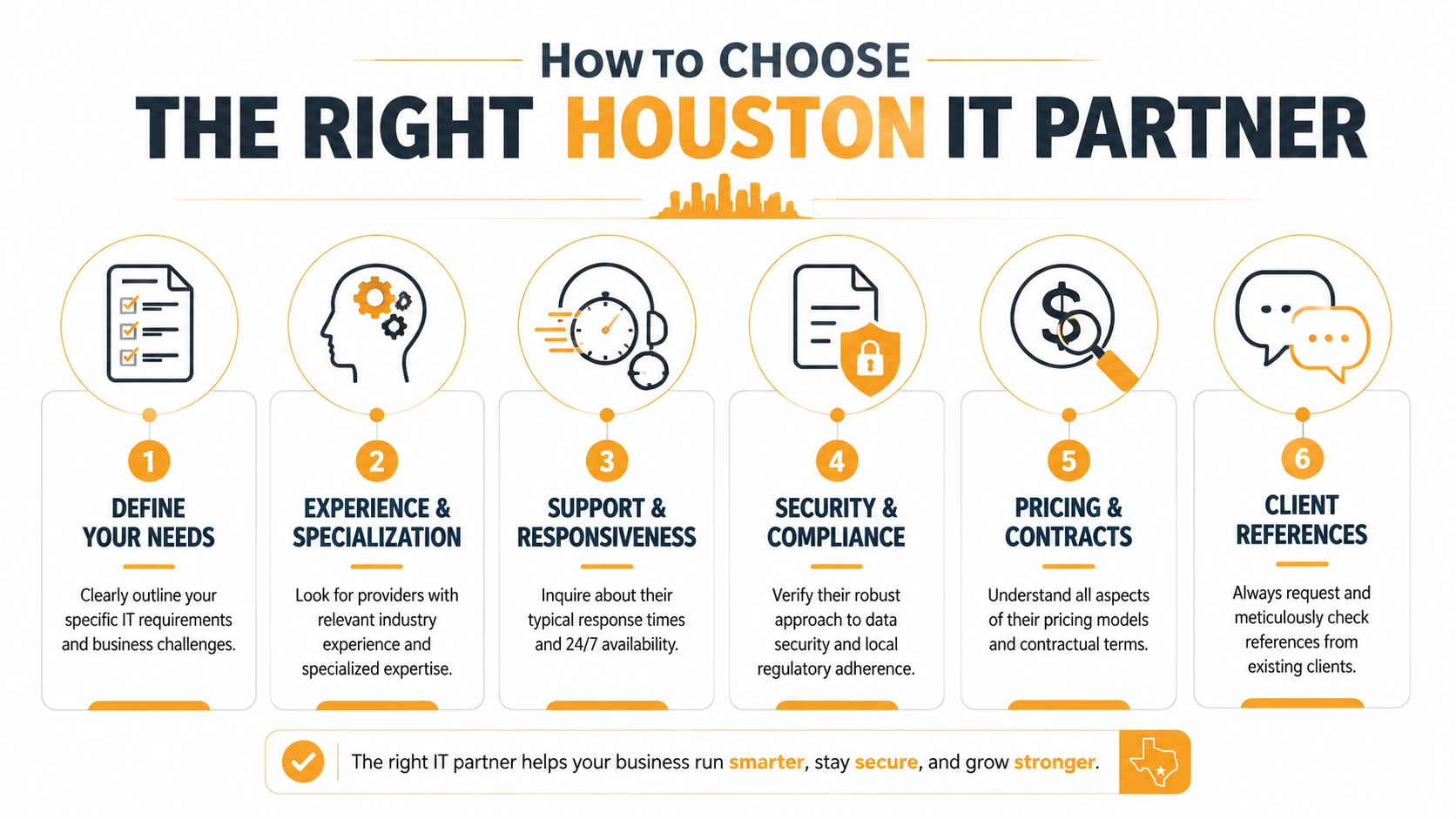
Questions worth asking before you sign
Start with questions that expose how they work.
- Response times: What's the expected response for routine tickets, urgent issues, and full outages?
- Escalation path: When a front-line technician can't solve the issue, what happens next?
- On-site capability: Do they send technicians for office issues, hardware installs, and networking work?
- Security ownership: What do they manage directly, and what stays on your side?
- Stack transparency: Which tools do they use for monitoring, endpoint protection, backup, and documentation?
- Planning cadence: Do they meet with clients regularly to review risk, lifecycle, and upcoming needs?
A provider that answers clearly is usually easier to work with later. A provider that hides behind vague language during the sales process usually stays vague after the contract starts.
If you want a broader market scan before narrowing to local firms, this list of top IT outsourcing providers in 2026 can help you compare service models and positioning styles.
Green flags and red flags
Here's the short version of what tends to work and what doesn't.
| Green flags | Red flags |
|---|---|
| They ask about your business processes, not just your device count | They jump straight to price without learning how you operate |
| They explain what is included and what costs extra | The contract blurs project work and monthly support |
| They discuss backup testing, access controls, and incident handling | Security is presented as “we install antivirus” |
| They offer both remote and on-site support paths | Everything depends on one person |
| They can support your cloud tools and physical office setup | They only handle tickets, not planning |
“You're not hiring a repair shop. You're choosing who gets operational access to your business.”
One more point. Don't confuse friendliness with fit. A good partner should be easy to work with, but they should also challenge weak practices. If they never push back on shared logins, outdated hardware, missing documentation, or loose access controls, they're keeping you comfortable instead of keeping you protected.
For a practical shortlist of evaluation points, this guide on how to choose a managed service provider is worth reviewing before vendor calls.
Understanding IT Service Pricing Models
Pricing gets confusing because two providers can quote very different numbers while describing what sounds like the same service. It usually isn't the same service.
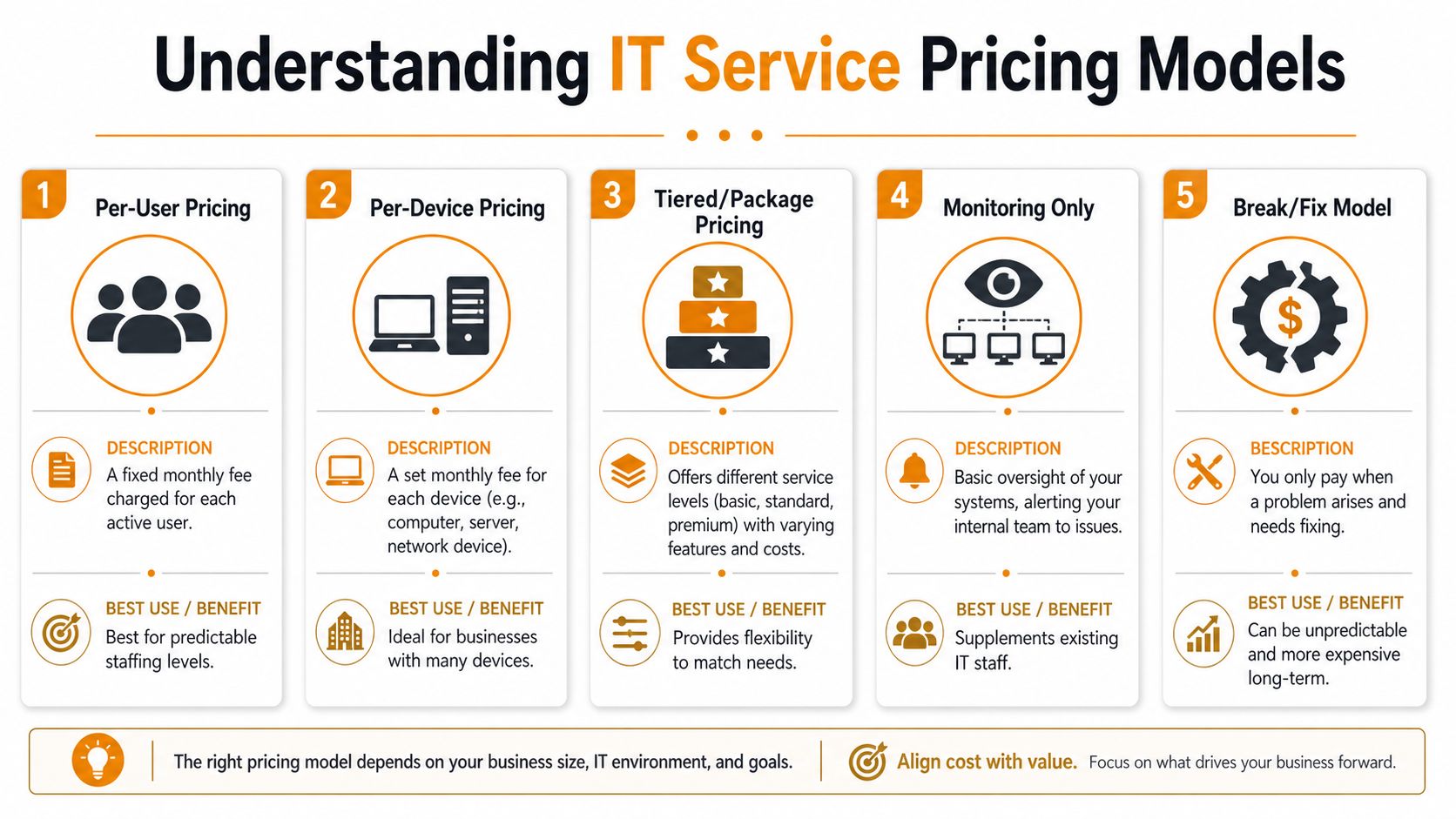
How the common models work
Per-user pricing charges a monthly rate for each active user. This model works well when each employee uses several services and devices, such as a laptop, email account, collaboration apps, and remote access.
Per-device pricing charges by the number of supported assets. That can fit environments with shared workstations, specialized devices, or a lot of infrastructure that doesn't map cleanly to headcount.
Tiered packages group services into basic, standard, and premium offerings. These can work well if you want to compare support levels quickly, but they also make it easy to overlook what's excluded.
Monitoring-only arrangements usually make sense when you already have internal IT staff and need outside visibility or backup support.
Break/fix support feels cheaper at first because you only pay when something fails. The problem is that it rewards delay. Routine maintenance, documentation, patch discipline, and risk reduction often get neglected because no one owns them.
What the higher tier usually includes
In Texas, per-user pricing typically ranges from $100 to $250+ per month, with higher-tier pricing commonly including broader security operations, compliance support such as HIPAA or NIST-related needs, and strategic advisory services beyond basic helpdesk coverage, according to this Texas managed IT market guide.
That range tells you something important. A low quote may still be perfectly valid, but you need to inspect scope carefully. Ask what happens with after-hours issues, new user setup, firewall changes, vendor coordination, backup oversight, Microsoft 365 administration, compliance support, and project labor. If the answer is “that's extra” for half the list, the cheaper proposal may not stay cheaper for long.
Buying advice: Compare quotes by responsibility, not just price. Who owns the outcome when users can't work, systems need recovery, or a security event starts unfolding?
Navigating Security and Compliance in Texas
Cybersecurity advice often stays too generic. Houston businesses need something more practical because compliance risk usually shows up in operations first. It appears in weak account controls, inconsistent device setup, undocumented access, missing incident plans, and confusion over who does what after a breach.

Why compliance is an IT issue, not just a legal issue
For Houston SMBs, the biggest problem is often the gap between basic IT support and actual incident readiness. A documented plan matters because people make bad decisions when stress is high and roles are unclear.
A significant compliance gap exists locally. 68% of Houston SMBs lack a documented incident response plan to meet Texas-specific data laws and newer federal cybersecurity disclosure requirements, according to the Houston SMB report. That's not an abstract issue. If a device is compromised, customer information is exposed, or email accounts are taken over, somebody has to determine what happened, contain it, preserve evidence, coordinate communications, and support reporting obligations.
Healthcare clinics, professional services firms, financial businesses, and any company storing sensitive records should pay close attention here. Generic “we have antivirus” language does not address legal exposure, reporting pressure, or documentation demands.
What a provider should help you document
A qualified IT partner should help you create structure around risk. That usually includes:
- Incident response roles: Who investigates, who approves communications, who talks to legal counsel, and who contacts affected vendors
- Access controls: Which users have admin rights, how departures are handled, and how account changes are approved
- System visibility: What is monitored, where alerts go, and how suspicious activity is escalated
- Recovery process: Which systems come back first, who validates restoration, and how backups are tested
- Compliance support boundaries: What the provider handles directly versus what your legal, HR, or compliance team must own
If you want a practical framework mindset, this guide on how to Mitigate risks for professionals is useful because it approaches risk as a repeatable planning problem, not just a technical checklist.
Security tools matter. Documented response matters more when the pressure hits.
Your Action Plan for Better IT Support
If your current setup feels messy, start with a short internal review before talking to providers. You don't need perfect answers. You need honest ones.
- List the recurring pain points: Slow systems, weak WiFi, login trouble, backup uncertainty, onboarding delays, vendor finger-pointing
- Identify the business impact: Which issues stop work, create customer friction, or expose sensitive data
- Map your environment: Users, devices, locations, cloud apps, internet dependencies, and any line-of-business systems
- Set a budget range: Not an exact figure. A realistic operating range you can sustain monthly
- Write down vendor questions: Response times, after-hours support, on-site help, security scope, backup responsibility, compliance experience, and contract limits
Then ask one hard question internally. Do you want a company that fixes tickets, or a company that helps run technology as part of the business? Those are different relationships.
The best buying decision usually comes from clarity, not urgency. Know your operational weak spots. Know what support outcomes you expect. Then evaluate providers based on ownership, communication, and fit.
If you want a practical conversation about your current environment, IT Cloud Global, LLC works with Houston businesses on managed support, helpdesk, cloud, security, networking, and repair needs. A no-pressure assessment can help you sort out what needs immediate attention, what can wait, and which support model fits your business.
- 7 Best Managed IT Services Houston TX Reviews (2026)
- Top IT Services Houston TX: Your 2026 SMB Guide
- Managed IT Services Houston TX: 2026 Guide for SMBs
- IT Managed Services Houston TX: 2026 Guide
- Houston IT Support Services: Expert Solutions 2026
- What Is a Network Operations Center? an SMB Guide
- Business Continuity Strategies: SMB Guide 2026