


What Is Network Access Control: Why Your Business Needs It
Network Access Control is a policy-enforcement layer that authenticates users and devices, checks endpoint health, and then grants, restricts, or quarantines access based on identity and compliance. The practical shift is that NAC has grown from a simple permit or deny gate into a control point for corporate networks, including user devices and IoT endpoints.
If your office has laptops, printers, guest Wi-Fi, VoIP phones, and a few smart devices all sharing the same network, you already know why that matters. One bad connection can become everyone's problem.
Table of Contents
- The Network Security Gap Most Businesses Don't See
- How Network Access Control Actually Works
- Choosing the Right NAC Deployment Model
- Real Benefits and Use Cases for Small and Midsize Businesses
- Implementation Steps and Common Pitfalls to Avoid
- Integrating NAC with Your Existing Security Stack
- When to Partner with a Managed Services Provider for NAC
The Network Security Gap Most Businesses Don't See
A contractor plugs a personal laptop into a conference room jack. The machine has outdated security controls, but your firewall never sees that part of the story because the device is already inside the building's network.
That's the gap. Firewalls, antivirus, and endpoint tools are useful, but they don't solve the moment when an unknown device first asks for access. Network Access Control closes that opening by checking the device before it gets full network reach, instead of waiting for a later alert after traffic has already moved around.
Why perimeter tools miss the real risk
Traditional defenses still matter, but they mostly assume the network edge is the place to stop trouble. In a small business, that assumption breaks down fast when staff bring personal phones, vendors connect temporary gear, or someone attaches an unmanaged printer to a switch port.
That's why NAC is best understood as a checkpoint at the point of admission, not a traffic filter after the fact. A device either proves it belongs, or it gets limited, quarantined, or blocked.
Practical rule: if a device can reach internal resources without proving its identity and posture, you don't have true access control yet.
For business owners comparing physical and digital security, a useful parallel is a commercial building with controlled entrances, monitored rooms, and separate access rules for different people. A good primer on that mindset is the commercial security systems guide, which frames access control as policy, not just hardware.
The most common mistake is assuming “on the network” means “safe enough to trust.” It doesn't. If a guest laptop, infected tablet, or rogue IoT device gets on the LAN, the network has already become the battleground.
That's the concern behind the internal risk patterns covered in network security vulnerabilities your business must know and prepare for. NAC doesn't replace every other control, but it gives you a chance to stop the wrong device before it can browse, scan, or spread.
How Network Access Control Actually Works
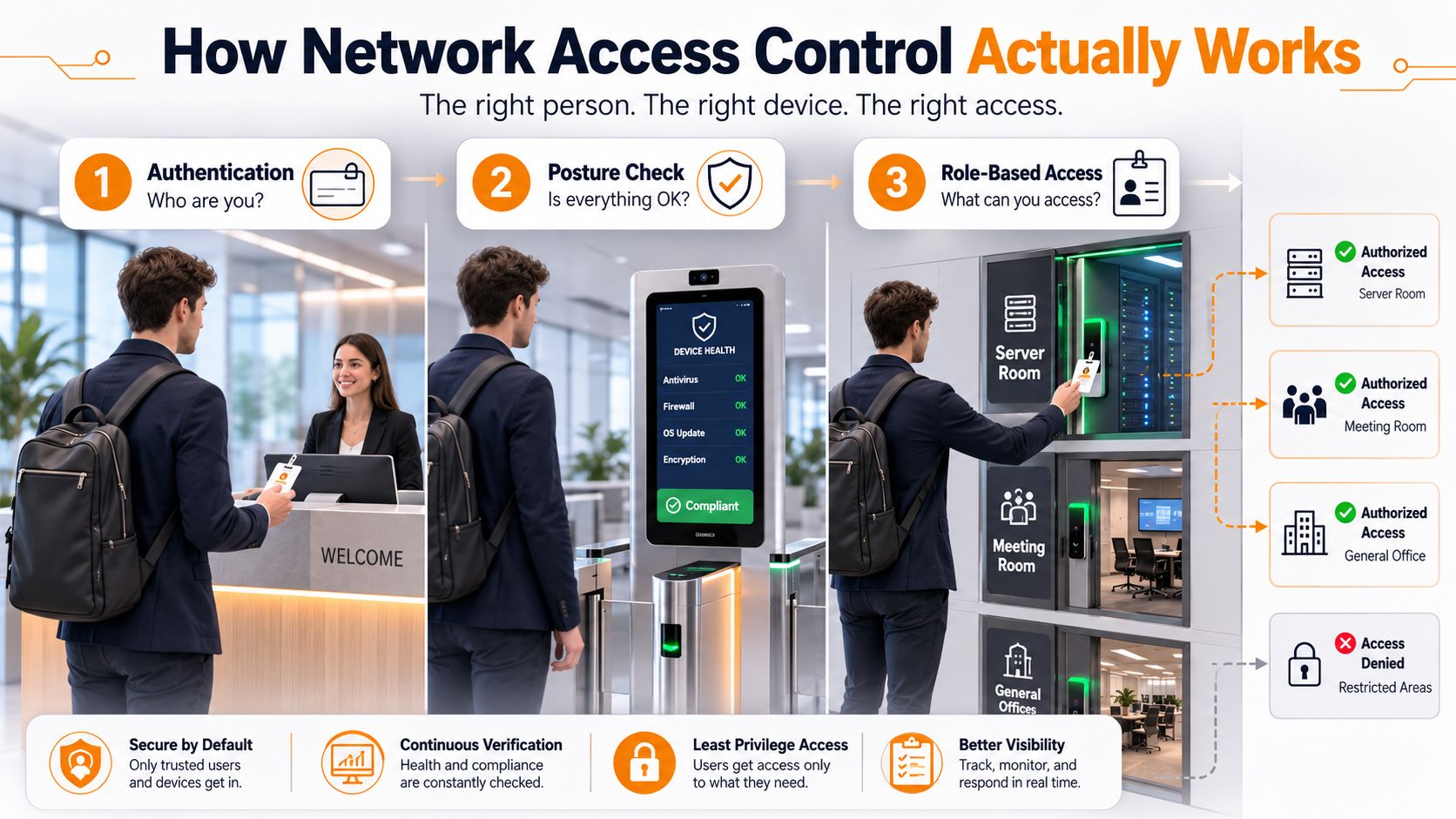
NAC operates through three sequential checkpoints, much like a building lobby system. First, the device or user proves who they are. Then the network checks whether the device looks healthy enough to connect. After that, access is limited to the rooms, resources, or services that match the assigned role.
The two phases that matter most
Pre-admission checks happen before a device receives meaningful access. NAC verifies the user or device, then checks health signals such as compliance state or approved identity, and only then decides whether the connection should continue. In a busy SMB network, that can mean the difference between a managed laptop joining the right VLAN and an unknown device ending up in a restricted zone.
Post-admission controls keep watching after the device gets in. If the endpoint drifts out of compliance or starts behaving in a way that does not fit its role, access can be restricted or the device can be moved into a limited segment. That matters when a printer, guest phone, or employee laptop all share the same switching fabric but should not have the same reach.
That is why NAC works as a policy engine, not a one-time login gate. It keeps making decisions as the network session changes, which is especially useful in mixed environments where unmanaged devices, IoT gear, and temporary connections are common.
A laptop does not need “full network access” just because it authenticated once. The right access is often narrower than people expect.
If you want a broader view of how this fits into the larger security picture, the article on strengthening your network defenses explains why access control needs to sit alongside other protections rather than replace them.
The moving parts behind the decision
A practical NAC setup usually includes a policy engine, a profiling layer that identifies what kind of device is connecting, and remediation workflows for non-compliant endpoints. The profiling layer matters a lot in SMB environments because not every device can run an agent, and not every device should be treated the same. A conference-room printer, a visitor's laptop, and a company-issued phone may all connect through the same switch, but each one needs a different level of trust.
The policy engine is where the business rules live. A finance laptop may get one set of permissions, a conference-room printer another, and a guest phone something far more limited. If a device fails the health check, remediation can push it into quarantine, full access can be denied, or a helpdesk workflow can be triggered. That gives the business a controlled response instead of a blanket yes or no.
That is the part many people miss. NAC is not only about saying no, it is about saying yes, but only here. A visitor might get internet access and nothing else. A company-managed laptop might get broader access. A VoIP phone might only reach voice services.
For a plain-language walkthrough of layered security approach, it helps to see NAC as one layer in a wider set of controls. It works best when identity checks, endpoint health, and network enforcement all support one another.
Choosing the Right NAC Deployment Model
The first design choice is how hands-on you want NAC to be. In SMBs, that usually means balancing visibility, control, and how much network gear you're willing to touch during rollout.
The practical options SMBs face
Agent-based NAC works well when you manage company laptops and can install software consistently. It gives you deeper device posture insight, but it's harder to use with printers, guest devices, and many IoT endpoints.
Agentless NAC is more realistic for mixed environments because it can classify devices without software on the endpoint. That makes it useful for phones, printers, cameras, and other hardware that can't install an agent, though you often give up some depth of compliance data.
Inline deployment puts enforcement directly in the traffic path, which can provide tighter control but may increase operational complexity. Out-of-band deployment is usually easier to fit into an existing network because it observes and directs policy without sitting directly in every packet path.
802.1X port-based authentication adds a strong identity layer at the switch or wireless edge. In practice, it's a powerful fit for managed devices, but it depends on infrastructure readiness and certificate planning.
The deployment reality is that enterprise NAC commonly depends on 802.1X, RADIUS, and policy-driven VLAN assignment, so switch, wireless-controller, and certificate readiness matter from day one. That infrastructure dependency is one reason many projects stall.
| NAC Deployment Models Compared | Best For | Device Coverage | Infrastructure Needs | Maintenance Level |
|---|---|---|---|---|
| Agent-based NAC | Managed laptops and desktops | Strong for corporate endpoints | Endpoint software and policy integration | Higher |
| Agentless NAC | Printers, phones, IoT, guests | Better for mixed environments | Network visibility and profiling support | Medium |
| Inline NAC | Tight enforcement needs | Broad, depending on design | More network path planning | Higher |
| Out-of-band NAC | SMBs seeking gradual rollout | Good across many device types | Integration with switches and wireless controllers | Medium |
| 802.1X access control | Wired and wireless admission control | Best for managed endpoints | Switch, wireless, and certificate readiness | Medium to higher |
A useful rule of thumb is simple. If your environment is mostly corporate laptops, agent-based control can work well. If your office is full of printers, smart sensors, and visitor devices, profiling and agentless handling become just as important as authentication.
Real Benefits and Use Cases for Small and Midsize Businesses
SMBs don't usually buy NAC because they want a shiny security architecture diagram. They buy it because the network has become messy, and the mess has business consequences.
Where NAC pays off in daily operations
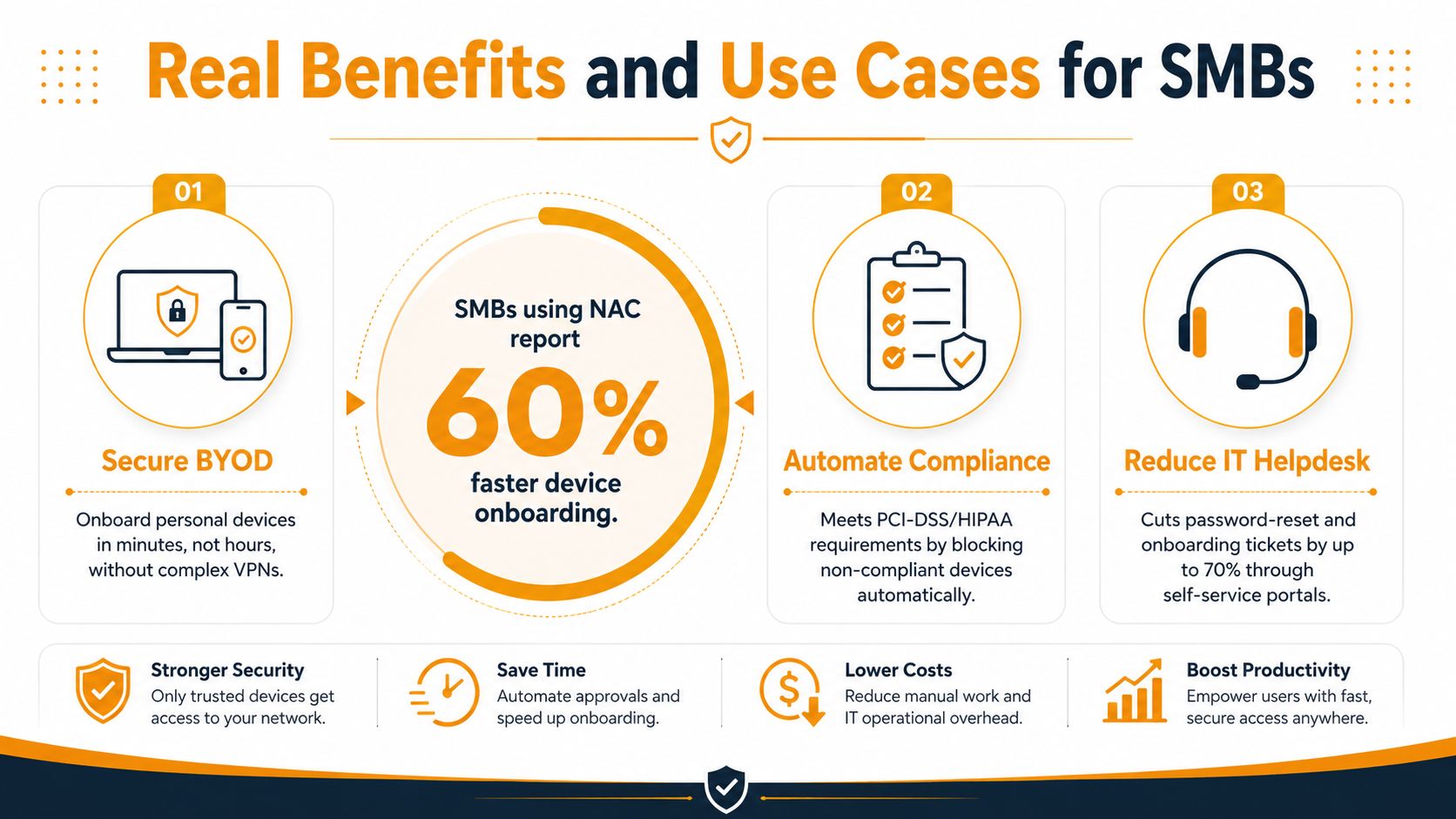
BYOD becomes manageable. Employees want to bring personal phones and laptops onto the network. NAC lets you allow that without giving every personal device the same trust level as a managed workstation.
Guest Wi-Fi stops being a security headache. Visitors can get internet-only access while remaining separated from internal systems, printers, and sensitive back-office services.
IoT and printers stop being invisible. A lot of SMB tools watch laptops well and forget about nontraditional devices. NAC helps profile those endpoints and apply separate rules instead of leaving them in the same flat network.
Compliance gets easier to evidence. If you have audit pressure in healthcare, finance, or another regulated environment, NAC creates a clearer record of who connected, what connected, and what access was allowed.
Lateral movement becomes harder. If a single device is compromised, NAC can keep that device inside a narrower zone instead of letting it roam across the whole network.
The category is also growing fast. Grand View Research estimated the global NAC market at USD 2.51 billion in 2022, USD 3.19 billion in 2023, and projected USD 17.14 billion by 2030, with a 27.2% CAGR from 2023 to 2030 (Grand View Research). The exact totals vary by analyst, but the direction is clear, NAC is moving from niche tooling into mainstream security planning.
For SMB leaders, the takeaway is simple. NAC helps you make one network serve many types of users without treating every device like it belongs to the same trust group. That's a practical win, not just a technical one.
Implementation Steps and Common Pitfalls to Avoid
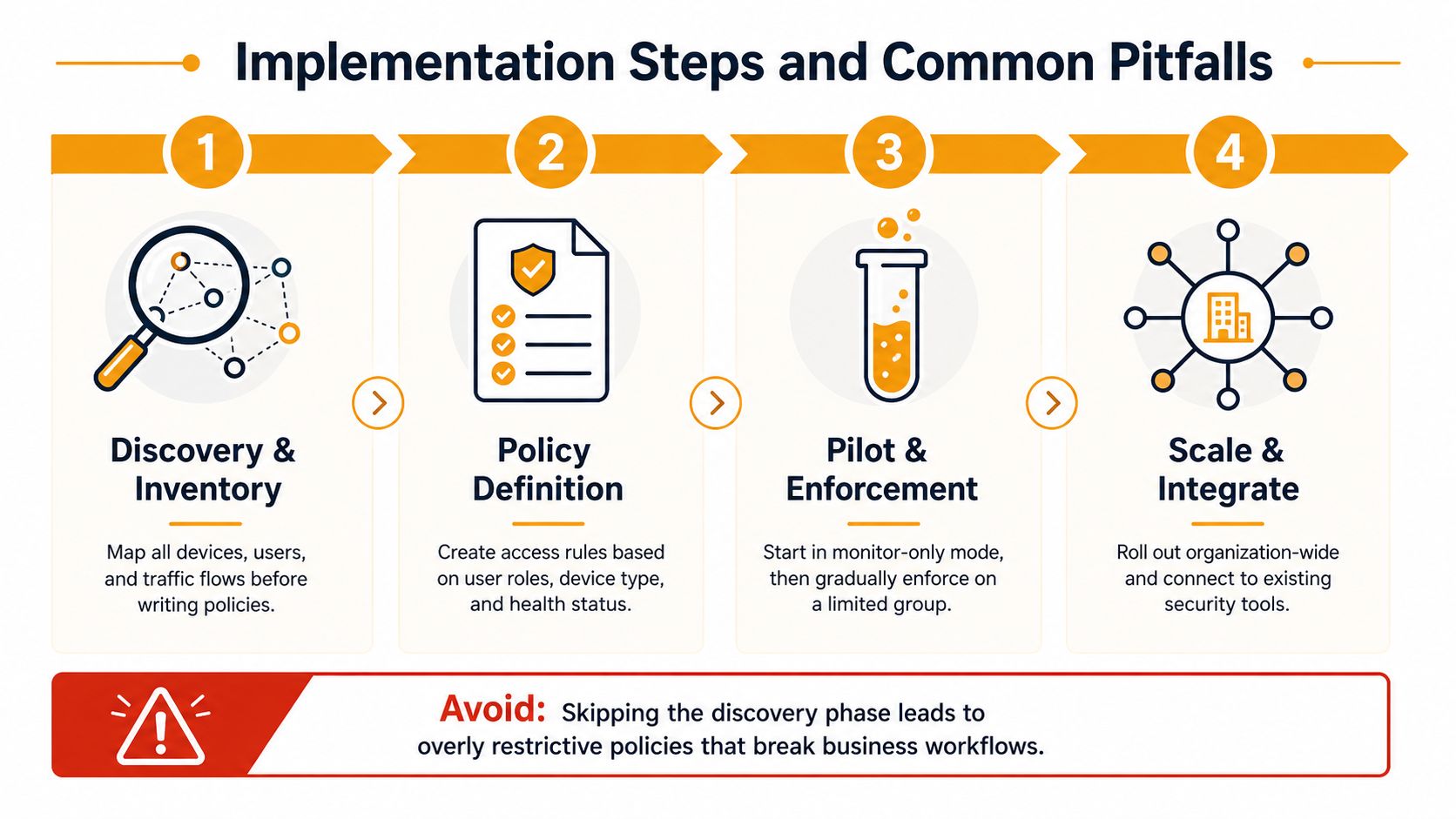
A NAC project works best when the team treats it like a rollout, not a switch flip. The order matters because policies are only as good as the inventory and infrastructure behind them.
A phased path that avoids self-inflicted outages
Discovery and inventory. Map users, endpoints, traffic flows, and the device types that exist on the network. That includes laptops, printers, VoIP phones, guest devices, and IoT, because mixed-device environments are the normal case in SMBs.
Policy definition. Decide what each role should reach, what each device class should be allowed to do, and what happens when posture checks fail. Keep the rules tied to business function, not just technical preference.
Pilot and enforcement. Start in monitor mode or on a small, low-risk segment. That gives you real-world data without locking out a department that suddenly can't print, call, or authenticate.
Scale and integrate. Roll out gradually and connect NAC to the rest of your security stack so compliance and identity data keep feeding the policy engine.
Common pitfall: teams try to enforce policies before they've profiled enough devices. That usually leads to broken workflows, angry users, and emergency exceptions.
A few mistakes show up again and again. Older switches and wireless controllers may need firmware work or replacement if they don't support the access-control features you want. Overly strict policies can block business-critical devices that don't fit tidy categories. And if NAC doesn't connect to directory services, you end up building manual work where automation should live.
The biggest issue is usually not the tool. It's the assumption that every endpoint can behave like a managed laptop. In mixed environments, that assumption falls apart quickly, especially when printers and IoT gear share the same switching fabric.
Integrating NAC with Your Existing Security Stack
A NAC rollout works best when it sits inside the tools your team already uses every day. On its own, it can decide who gets on the network. Connected to the rest of the stack, it starts shaping what happens after that first decision.
The integrations that make the most difference
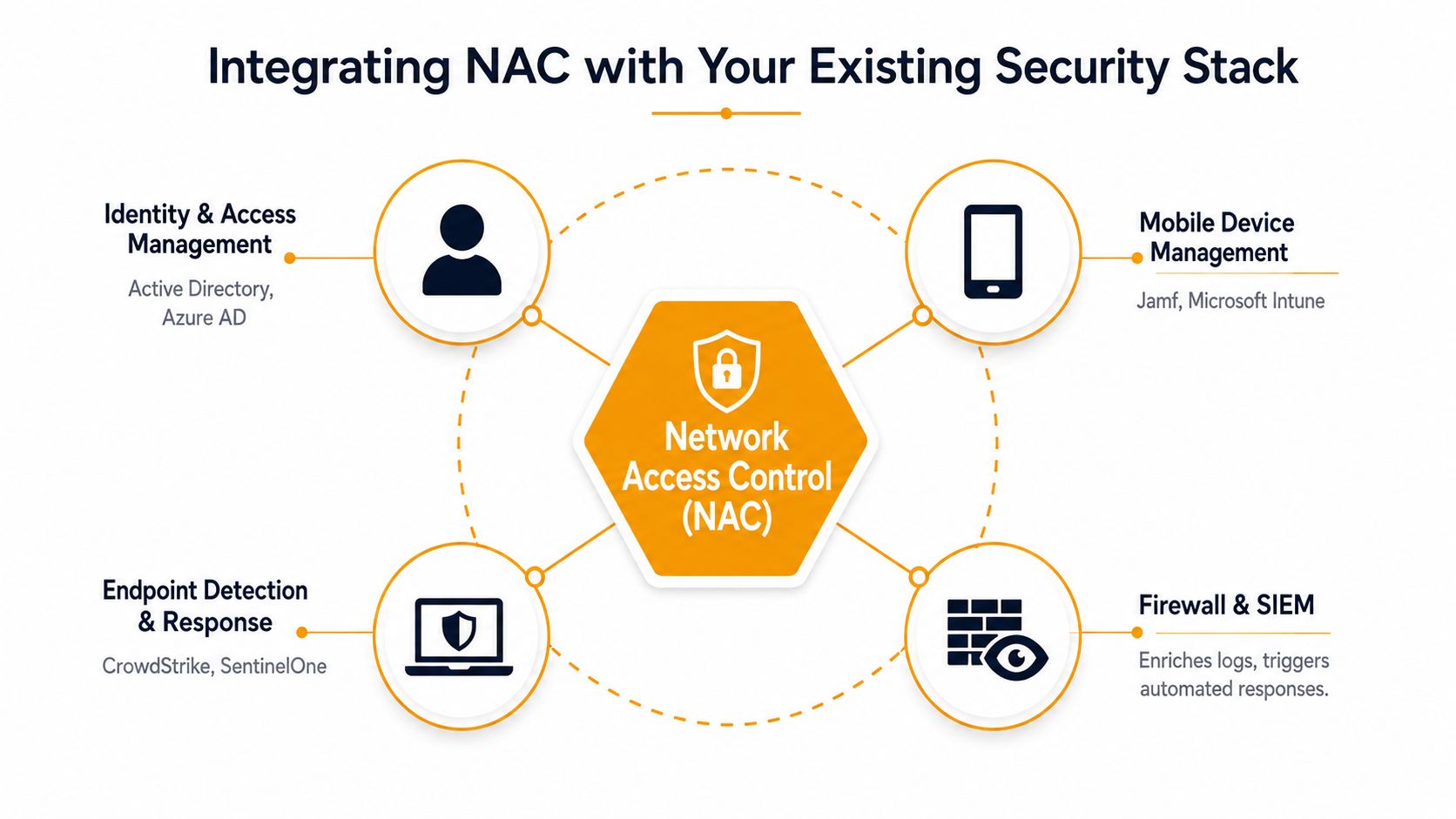
Identity and access management platforms such as Active Directory or Azure AD let NAC match users to roles, so access rules follow the person and not just the machine that happens to connect.
Mobile device management tools like Microsoft Intune can confirm device posture and corporate ownership, which helps NAC separate managed endpoints from personal devices and guest laptops.
Endpoint detection and response tools, including platforms such as SentinelOne, can send health signals into the access decision. A machine showing signs of trouble should not receive the same access as a healthy one.
SIEM platforms give you central logging. That matters when you need one place to see who connected, from where, and under which policy.
Vulnerability scanners add posture data that can turn a basic compliance check into a more useful access rule.
NAC is strongest when it works with directory services, SIEM, vulnerability scanners, and endpoint management. That turns access control into a process that keeps checking conditions instead of a one-time login step. In practice, that is the difference between a gate and a control layer.
For teams that already use a security in layers approach, NAC fits naturally as one layer feeding the others and taking signals back in return. It should share data with firewalls, identity tools, and monitoring systems so each control has better context than it would on its own.
For budget owners weighing internal effort against outside help, the same business logic behind revenue and efficiency with managed IT applies here. NAC can save time later, but only if someone sets it up to fit the rest of the environment instead of leaving it as a separate project.
In some SMBs, a managed provider can also be part of that stack. IT Cloud Global, LLC is one example of a service partner that can connect network work, endpoint support, and security tooling into one operating model, which matters when NAC has to work across printers, guest Wi-Fi, IoT devices, and unmanaged laptops without becoming a side project.
When to Partner with a Managed Services Provider for NAC
Some SMBs can handle a straightforward NAC rollout internally. Others need a partner because the network is too mixed, too distributed, or too tied to compliance to leave to trial and error.
When outside help makes more sense
If you have multiple sites, hybrid cloud connections, or lots of unmanaged endpoints, the project complexity rises fast. The same is true when your compliance posture needs clean audit trails and policy consistency across users, guests, and devices that don't all behave the same way.
An MSP can shorten that path by bringing policy templates, monitoring, and implementation experience with infrastructure dependencies that are easy to underestimate. That often beats learning the hard way with production traffic.
For leaders comparing internal effort with outside support, a useful business lens is the same one used in the revenue and efficiency with managed IT discussion, where time saved on maintenance and response can be redirected into core operations. NAC is one of those projects where the hidden cost is usually the operational slowdown, not the software itself.
If you're choosing a partner, the managed service provider checklist is a good filter for questions about monitoring, process maturity, and support scope. A qualified provider should be able to discuss rollout sequencing, identity integration, and how they'll handle devices that can't run agents.
The right call is usually the one that matches your staffing level and device mix. If your team is small and the network is messy, partnership often saves time and mistakes. If your environment is simple and your engineers already manage switch, wireless, and identity infrastructure confidently, in-house can still work.
If you want help mapping NAC to your specific network, not a generic diagram, talk with IT Cloud Global, LLC about a rollout that fits your users, devices, and support model. Visit IT Cloud Global, LLC to explore managed IT, network security, and implementation support that can help turn access control into something your business can effectively operate.
- Hybrid Cloud Management: A Practical Guide for SMBs
- Computer Service Near Me: A Houston Buyer’s Guide
- Your 2026 Disaster Recovery Testing Checklist
- What Is a Network Operations Center? an SMB Guide
- Microsoft 365 Backup Solutions Your Business Needs in 2026
- Managed IT Services for Small Business Near Me: Houston
- IT Risk Assessments: A Houston SMB’s Guide for 2026