


Computer Service Near Me: A Houston Buyer’s Guide
Your server just dropped off the network, the printer is blinking like it's offended, and your office manager is asking whether payroll is still happening. That's when most Houston businesses type computer service near me and click the first listing that looks busy. That's also how they end up with a vague estimate, a slow callback, and a technician who can't explain what broke.
Treat this like a buying decision, not a panic move. The right local provider should help you protect uptime, control risk, and understand what you're paying for. If you need a practical framework for qualifying vendors, compare local marketing system frameworks is a useful reminder that local buyers should compare operations, not just appearances.
Table of Contents
- When You Actually Need Local Computer Service
- How to Search for Computer Service Near Me the Right Way
- Services a Houston Computer Service Should Actually Cover
- Qualifications and Questions to Ask Before You Sign
- Comparing Response Time, Warranties, Data Recovery, and Security
- Pricing Expectations and What to Do in an Emergency
- Why Houston Businesses Choose IT Cloud Global
When You Actually Need Local Computer Service
A Houston accounting firm learns this the hard way every year. It's Monday at 7 a.m., the file server won't boot, QuickBooks won't open, and the team can't tell whether they have a dead drive, a bad update, or a network issue. At that point, you are not buying “computer help.” You are choosing the right vendor for the problem in front of you.
One broken machine is not the same as an IT problem
A one-off laptop failure calls for break-fix repair. A branch office with spotty Wi-Fi, recurring printer issues, or Outlook problems needs ongoing support. A growing company that's adding users, migrating email, or tightening security needs a managed IT partner that can handle planning, monitoring, and escalations instead of just reacting.
A common mistake in Houston is that owners describe a symptom and buy the first service that claims to fix it. That is how a company with a server issue ends up in a consumer repair queue, or a company with a recurring network problem hires a shop that only swaps parts. The service model has to match the business problem.
Practical rule: if you can't name whether this is repair, support, or a project, you are not ready to call yet.
Houston reality makes the choice more important
In Houston, distance and response time matter because the city is not one small service radius. An office in the Loop, a shop near the Galleria, and a warehouse in the Energy Corridor do not have the same tolerance for waiting around. If the provider cannot do both remote help and on-site visits, you are probably looking at a narrow shop, not a real business support option.
The broader demand is real, too. In the United States, 95% of households had at least one computer and 90% had a broadband internet subscription in 2021, according to the Census Bureau's Computer and Internet Use in the United States: 2021 (Census Bureau report). That level of dependence is why local repair and support still matter even as cloud tools spread.
Local service also has to be bought like a business decision, not a panic click. If you are trying to compare local marketing system frameworks, the same idea applies, qualify the provider, then decide whether they can handle your workload, your locations, and your response expectations.
Decide the service type before you call
If the issue is a dead workstation, you need repair. If employees are waiting on logins, printers, or remote access, you need support. If the problem touches backups, security, mail migration, or a server room, you need a provider that can handle a project or a managed agreement.
That distinction saves time and keeps you from buying the wrong fix. It also helps you describe the issue like a buyer, not a desperate user. If you already know you want a provider that can cover ongoing support, start with a managed IT services provider near me instead of a general repair shop.
How to Search for Computer Service Near Me the Right Way
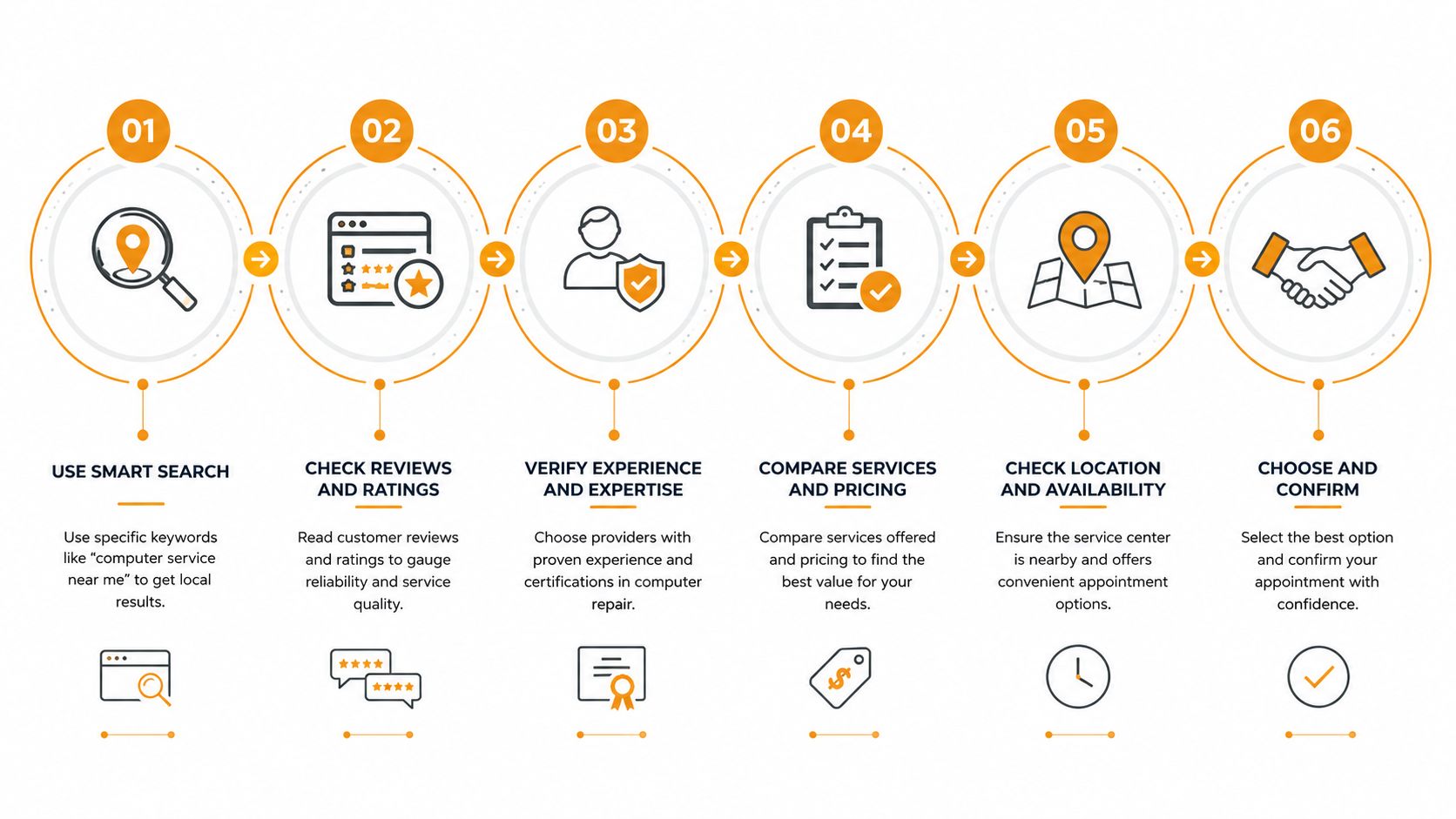
Stop searching like a consumer looking for the nearest storefront. Search like a buyer trying to identify whether the company serves Houston businesses. Your goal is a short list of real providers, not ten tabs full of lead-gen pages and call centers.
Use search terms that force a local answer
Start with three queries, and make them specific. Try computer repair Houston, managed IT support Houston, and on-site computer service Houston. Those terms surface businesses that describe their local coverage instead of national brands that route tickets through a queue.
Then open the Google Business Profile, not just the website. Look for service area, business hours, whether they mention on-site and remote support, and whether the description reads like a Houston operation or like a generic national template. A real local provider usually names the neighborhoods, suburbs, or commercial zones they work in.
Check the signals that tell you who's real
Read the reviews like a buyer. You want recent reviews that mention responsiveness, technician quality, communication, and whether the company solved the problem without confusion. If every review sounds vaguely enthusiastic and says nothing operational, that's not enough.
Use two directories or directories plus maps, then cross-check the websites. The internal comparison page on managed IT services providers near me is a good reminder that you should be comparing service scope, not just star ratings. Sponsored ads can be useful, but they're not proof of competence.
Buyer's shortcut: a provider that names the Loop, Galleria, Katy, Sugar Land, The Woodlands, or another real Houston area usually has a better chance of being local than a listing that only says “serving nationwide.”
Build a shortlist in ten minutes
Make your short list from two or three providers that check all three boxes. They should look local, show service scope clearly, and have reviews that mention actual work, not just friendliness. If they don't clearly say whether they do remote help, on-site visits, or both, move on.
Do not call every result you find. That wastes time and puts you back in the hands of whoever answers fastest. A tight shortlist gives you an advantage when you compare repair timing, guarantees, and security.
Services a Houston Computer Service Should Actually Cover
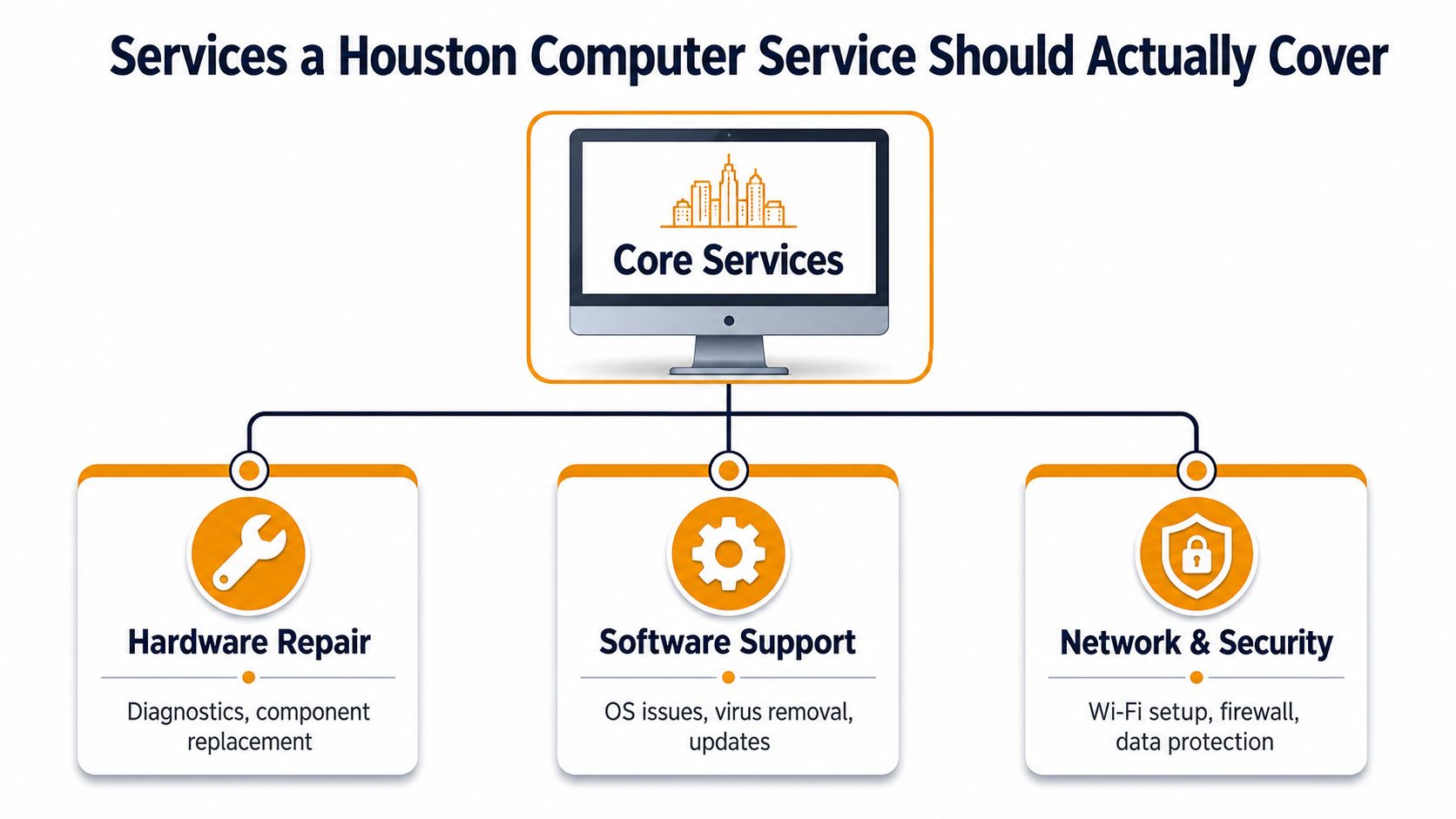
A serious Houston provider should handle far more than a cracked laptop screen or a frozen desktop. If the business only talks about “repairs,” you're looking at a narrow shop. If it can support endpoints, networks, cloud tools, and recovery work, you're looking at a real operational partner.
The helpdesk layer
Helpdesk and remote support should handle the everyday stuff, password issues, Outlook problems, printer failures, software errors, and user lockouts. This is the front line when employees can still work if someone remote gets them unstuck quickly. If your team waits half a day for simple fixes, the provider is too slow for business use.
On-site field service matters when the problem sits on a desk, in a closet, or behind a wall. That includes hardware swaps, cabling issues, network drops, and office equipment that can't be fixed through a screen. A provider that only offers one mode of support creates gaps the first time a problem is physical.
The infrastructure layer
Server and network administration is what keeps the office from limping along after every incident. That includes switches, firewalls, connectivity, user access, and the systems that make shared work function. If the provider can't manage the network, it can't really support the business.
Managed monitoring is what separates reactive repair from ongoing stability. It lets the provider watch for failures, not just respond after something goes down. That matters for offices that can't afford surprise downtime.
The project and recovery layer
A strong provider should also cover Microsoft 365, Azure, AWS, and Google Cloud work where needed, especially during migrations, account cleanups, or environment changes. It should also handle structured cabling, Wi-Fi design, VoIP, and an in-house repair depot for PCs, Macs, printers, virus removal, and data recovery.
For a Houston SMB, that full menu matters because needs overlap. A printer issue can expose a network problem. A slow laptop can turn out to be a backup issue. A “repair shop” that can't work across those layers is going to leave you juggling vendors.
If a company can't explain whether it handles devices, networks, cloud, and recovery under one roof, it's probably not built for business support.
Qualifications and Questions to Ask Before You Sign
This is the part most owners skip, and it's the part that saves the most money. A provider can sound confident on the phone and still be wrong for your environment. You want proof, not reassurance.
Ask for the operational proof
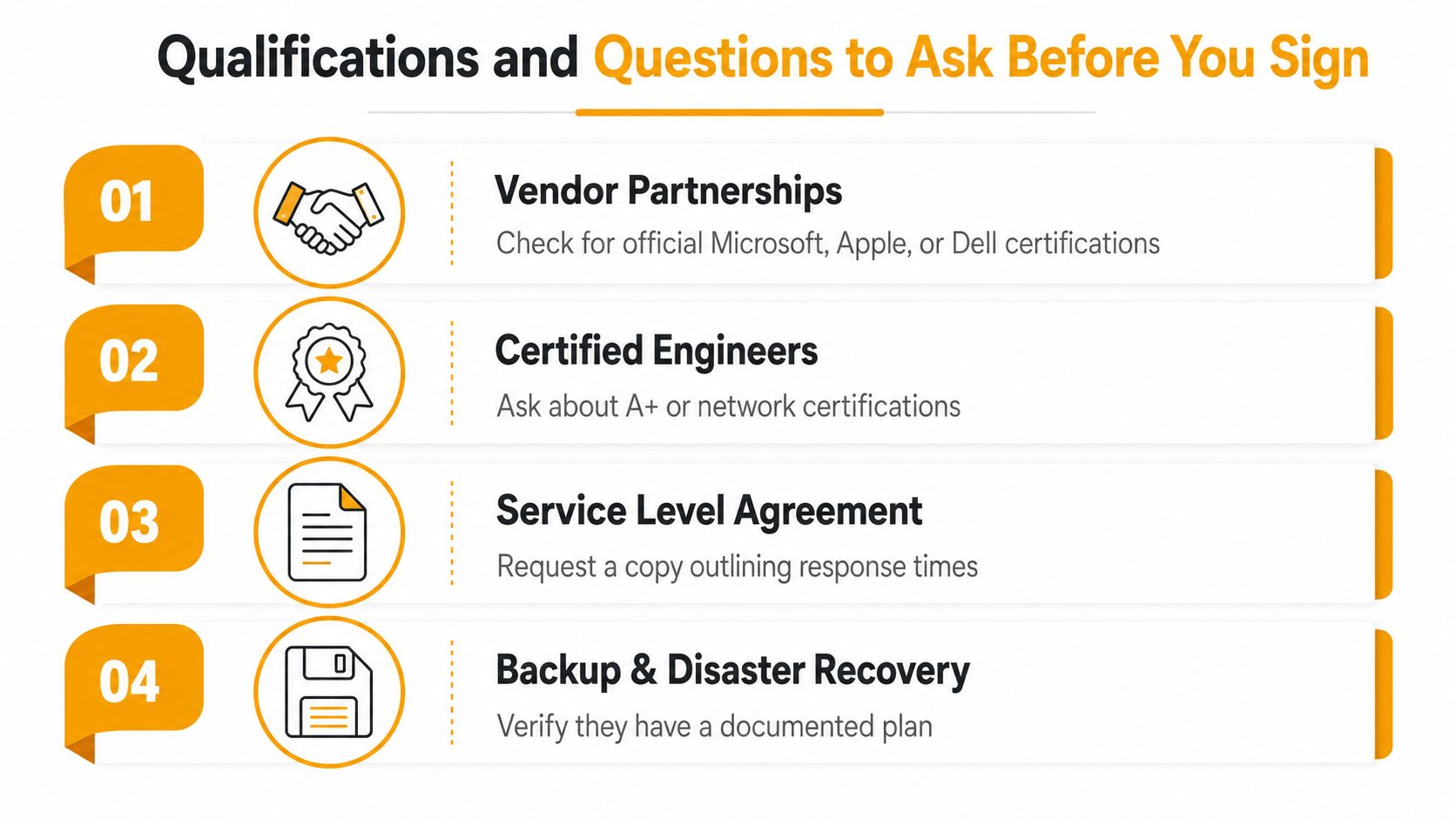
Start with documented service levels. Ask for a sample SLA and ask how they measure response time, escalation, and completion. Then ask who performs the work, because a ticket queue is not the same thing as access to a technician who can solve the issue.
Then ask about backup and disaster recovery testing. A provider that talks about backups but cannot explain how restores are tested is selling comfort, not resilience. In the buying guide from OneNet Global, a practical approach is to run a 30-day pilot and track ticket time-to-resolution, communication quality, and first-contact fix rate while also checking users, sites, compliance needs, reviews, sample SLAs, and an on-site walkthrough before full engagement (vendor evaluation guidance).
Ask the questions that expose weak providers
Use a short discovery checklist:
- Who is the lead engineer? Meet the person who will touch the account, not just sales.
- What are your backup-restore proof points? Ask for evidence that restores are tested, not assumed.
- What security controls do you use? Look for layered endpoint protection and clear administrative practices.
- How do you handle after-hours issues? If there's no escalation path, downtime gets expensive fast.
- Do I get the technician directly? If the answer is always “through support only,” expect delays.
The same diligence advice appears in the practical computer support guidance at questions to ask when looking to hire the right computer repair service. The point isn't to interrogate a good provider. The point is to weed out the weak ones before they touch your systems.
Look for the right service shape
A reputable local provider often combines on-site and remote troubleshooting, free initial diagnosis or quote, and a warranty or workmanship guarantee. That doesn't make it perfect, but it does show the company expects to stand behind its work. If there's no repair estimate, no direct technician access, and no clear scope, you're taking on risk you don't need.
Use the same checklist on every finalist. That makes the decision defensible when you compare the last two candidates and wonder which one will answer the phone in a crisis.
Comparing Response Time, Warranties, Data Recovery, and Security
Fast response matters, but speed by itself is a weak buying criterion. A provider that diagnoses quickly and then waits on parts is still useful. A provider that promises instant repair without understanding the failure mode is not.
Compare the models side by side
| Criterion | Break-Fix Shop | Solo Technician | Managed IT Partner |
|---|---|---|---|
| Response time | Can be fast for simple jobs, slower when the bench is full | Often responsive, but coverage is tied to one person | Usually stronger escalation and coverage options |
| Warranties | May offer a repair guarantee or warranty | Depends on the individual | Typically clearer service scope and follow-through |
| Data recovery | Sometimes handled in-house, sometimes outsourced | Often limited by tools and experience | Better chance of structured process and escalation |
| Security | Usually basic unless the shop is mature | Varies widely | More likely to include layered controls and policy discipline |
Understand same-day diagnosis versus same-day repair
This distinction matters more than most websites admit. Same-day diagnosis means someone can find the problem quickly. Same-day repair means parts are available, the failure is simple, and the job can be completed that day. Those are not the same promise.
The Houston buyer should ask what happens when the diagnosis is quick but the fix depends on parts or a deeper workflow. That's where many service pages blur the truth. Some shops are honest about same-day diagnosis, while depot-style repairs still take longer once the device is checked in. That difference is often the right trade-off for more complex jobs like board-level work, malware removal, liquid damage, or data recovery.
Match security and recovery to your risk
If the provider handles data recovery, ask whether it works in-house or pushes the job somewhere else. For a Houston business, especially one that depends on client files, payroll data, or medical or financial records, that answer matters. The internal data recovery page at data recovery in Houston is relevant because recovery capability should be part of the service conversation, not an afterthought.
Security should be treated the same way. Ask what endpoint protection they use, how they manage privileged access, and whether they can support both remote and on-site work with clear hours and escalation paths. A provider that can't answer those questions clearly is probably not prepared to protect business systems under pressure.
My rule: if the company sells speed but can't explain recovery risk, it's selling confidence, not competence.
Pricing Expectations and What to Do in an Emergency
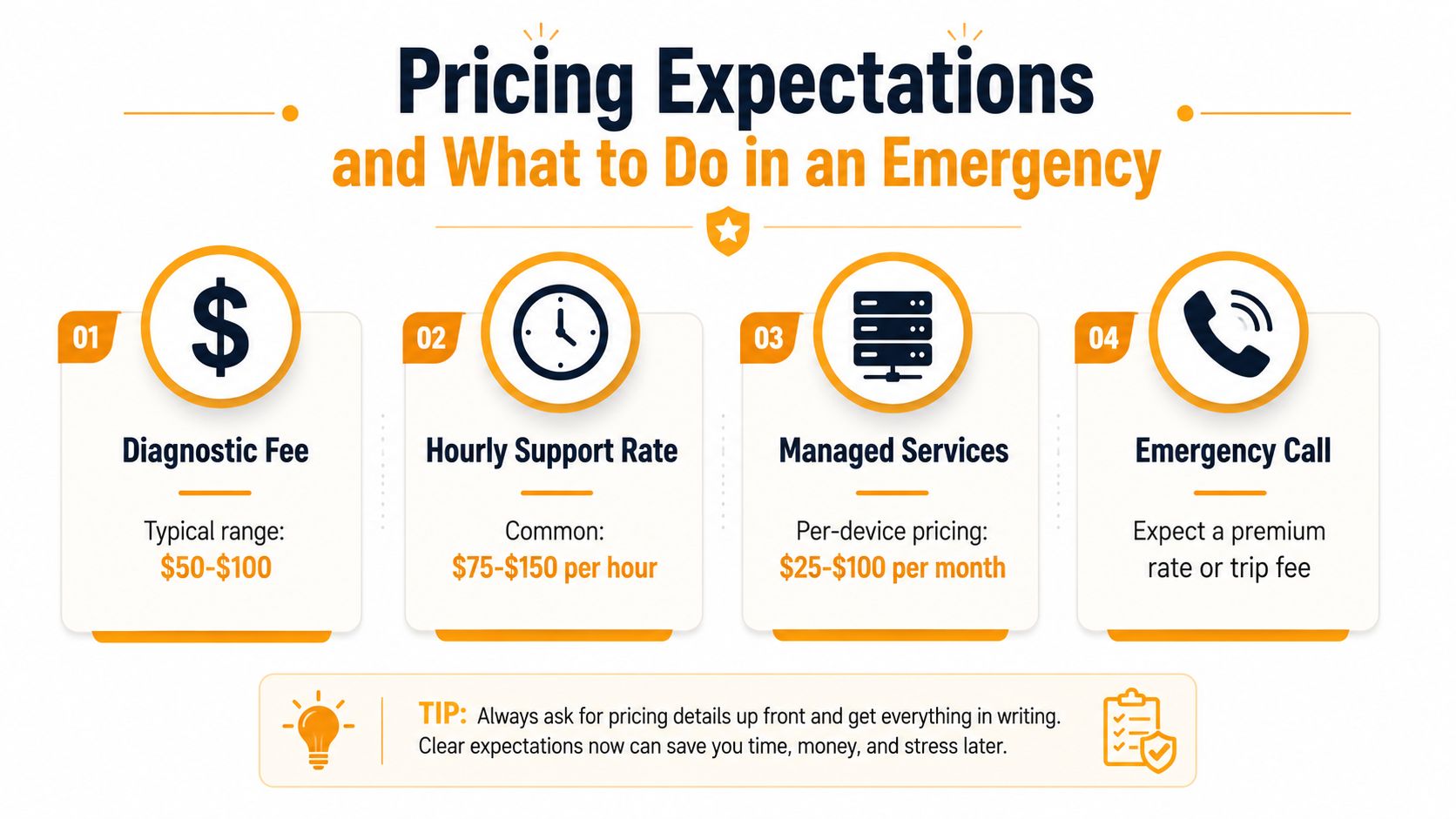
If you are shopping for computer service near me in Houston, price is a filter, not the decision. Too cheap usually means hidden fees, weak bench time, or a provider that disappears when the job gets harder. Too expensive with no clear scope means you are paying for overhead, not skill.
Anchor the quote before you agree
A serious quote should break out diagnostics, labor, emergency response, and project work. If the provider gives you a flat price, ask exactly what it includes and what triggers an overage. If that answer is vague, you do not have a quote, you have a guess.
Price pressure is real in repair work, especially as the market grows and more providers chase the same jobs. The pressure shows up in the global repair market, and that is exactly why buyers have to compare scope, not just the number at the bottom. Local pricing still has to make sense. Mature markets reward clarity, not mystery.
Use an emergency script the first 30 minutes
When a failure hits, do this:
- Stop the bleeding. Shut down the affected system if there is smoke, liquid, repeated rebooting, or obvious encryption activity.
- Document what changed. Note the last login, update, install, outage, or error message.
- Preserve access. Keep power, passwords, and account recovery details available for the technician.
- Do not keep experimenting. Repeated reboot attempts, random repair tools, and DIY recovery can make things worse.
- Call the right provider. If it is a business-wide issue, do not send it to a consumer shop that only swaps parts.
Know what not to do
Ransomware is where people make the biggest mistakes. Do not keep clicking, do not reconnect shares casually, and do not let three different employees “take a look.” For data loss, do not run recovery software on the failed device unless a pro tells you to. Every extra attempt can lower the odds of a clean recovery.
The goal in an emergency is simple, reduce damage before the provider arrives. That means preserving evidence, protecting other systems, and avoiding the false confidence that comes from busywork. The right provider should make that easier, not harder.
Why Houston Businesses Choose IT Cloud Global
Houston businesses don't need another vendor that only talks about fixing screens. They need a provider that can handle the diverse mix of work a small company runs into, repair, support, monitoring, cabling, cloud, VoIP, and recovery. That's the standard I'd use if I were buying for my own office.
IT Cloud Global, LLC fits that buying model because it covers in-house repair depot services for PCs, laptops, Macs, printers, virus removal, and data recovery, along with helpdesk, remote support, on-site service, server management, network security, structured cabling, Wi-Fi, Microsoft 365, Azure, AWS, and Google Cloud work. It also works with layered security and business communications tools through partners such as SentinelOne, Arista Networks, Atakama, and Ultatel, with dedicated engineers, 24/7 support, and free estimates.
That matters because the buying checklist from earlier sections is really about fit. If you need one company that can diagnose a device, support a network, and handle a project without sending you in circles, start there. If you only need a simple repair, still ask the same questions, because the wrong provider will still cost you time.
If you're comparing two or three Houston options, ask for a quote, request an on-site walkthrough, and insist on a 30-day pilot before you commit to a long relationship. That's the cleanest way to see whether the provider can support your environment under pressure.
If your Houston business needs computer service, IT Cloud Global, LLC can handle repair, support, networking, cloud, and recovery without forcing you to juggle separate vendors. Visit IT Cloud Global, LLC to request a free assessment and start with a quote, an on-site walkthrough, or a 30-day pilot.
- What Is Network Access Control: Why Your Business Needs It
- Hybrid Cloud Management: A Practical Guide for SMBs
- 7 Best Managed IT Services Houston TX Reviews (2026)
- Best IT Services Houston TX: Your 2026 Partner
- Managed IT Services Houston TX: 2026 Guide for SMBs
- IT Managed Services Houston TX: 2026 Guide
- Your 2026 Disaster Recovery Testing Checklist