


Hybrid Cloud Management: A Practical Guide for SMBs
If you're running a Houston business, you probably already know the problem. One app lives in AWS, email sits in Microsoft 365, the file server still hums in a back room, and a vendor refuses to move the phone system off the rack. The team keeps calling it “temporary,” but the core issue shows up every time someone asks why a dashboard is slow, why a bill jumped, or why nobody can tell which server still matters.
That's the hybrid reality. It's not a clean migration story, and it's not a failure. It's the operating model most SMBs end up with, because the business can't stop while IT modernizes. The right response is hybrid cloud management, which is an operations and governance discipline first, and a tooling decision second.
Table of Contents
- The Hybrid Reality Most SMBs Already Live In
- What Hybrid Cloud Management Actually Means
- Common Hybrid Architectures and Where They Fit
- The Five Operational Challenges That Break Hybrid Estates
- Monitoring, Automation, and Governance as One Discipline
- Tool Categories and How AWS, Azure, and GCP Fit In
- A 90-Day Hybrid Cloud Roadmap and SMB Checklist
The Hybrid Reality Most SMBs Already Live In
The trouble usually starts with something ordinary. A file share crawls because it still sits on aging on-prem hardware. A cloud invoice lands higher than expected because no one tied usage to a business owner. A helpdesk tech can see half the estate from one console, then has to switch into another screen to check identity or logs. Nothing is broken in a dramatic way, but the whole environment feels stitched together.
That is the steady state for a lot of SMBs, especially businesses in the 25-to-200-person range that grew by adding tools instead of redesigning the stack. Houston owners see it in day-to-day operations. The estate is mixed, and it stays mixed.
Practical rule: treat hybrid as the normal operating model, then build management around that fact instead of waiting for a perfect full-cloud endpoint.
The point is to accept that your server room, cloud apps, branch Wi-Fi, and SaaS tools are one business system whether they were purchased together or not. Once you accept that, the management question gets sharper. Who owns it, how is it governed, and what stops a small change in one environment from creating a mess in another?
That is where most SMBs get hurt. They buy a cloud product, but they do not install the operating discipline around it. The result is a hybrid estate with no shared rules, no shared visibility, and no reliable way to keep the pieces aligned.
What Hybrid Cloud Management Actually Means
Your hybrid estate runs like two connected buildings with one shared operations team. One side is on-prem, the other sits in public cloud, and both still need the same level of security, monitoring, change control, and incident response. The difference is in the environment, not in the responsibility.
The management layer sits above the platforms
Hybrid cloud management is the operating layer above the infrastructure. It is the mix of processes, tools, and policies that keeps public cloud, private cloud, and on-prem systems coordinated across one business. The hard part is not choosing a platform. The hard part is keeping identity, access, logging, backup, patching, and cost control aligned when different environments have different rules.
A lot of SMB leaders blur hybrid cloud and multi-cloud. Hybrid means you combine on-prem or private infrastructure with public cloud. Multi-cloud means you use more than one public cloud provider. In practice, many businesses run both at once, which is why hybrid cloud management has to handle mixed control planes without creating gaps in oversight. For a practical selection framework, how to choose between public, private, and hybrid cloud for Houston companies is a useful reference.
The job is consistency, not sameness
Different environments do not need to look identical. They do need shared rules for access, monitoring, maintenance, and incident handling. That is the core function of hybrid cloud management. If your on-prem systems and cloud workloads are governed by separate habits, separate tickets, and separate owners, the estate will drift.
The right operating model treats hybrid as one service set with multiple execution zones. Security policy should follow the workload. Logging should roll into one view. Backup and recovery should be planned across both sides, not added later as an afterthought.
For buyers who want a broader architectural comparison, understanding massive digital factories helps show how large-scale infrastructure thinking differs from a smaller mixed estate.
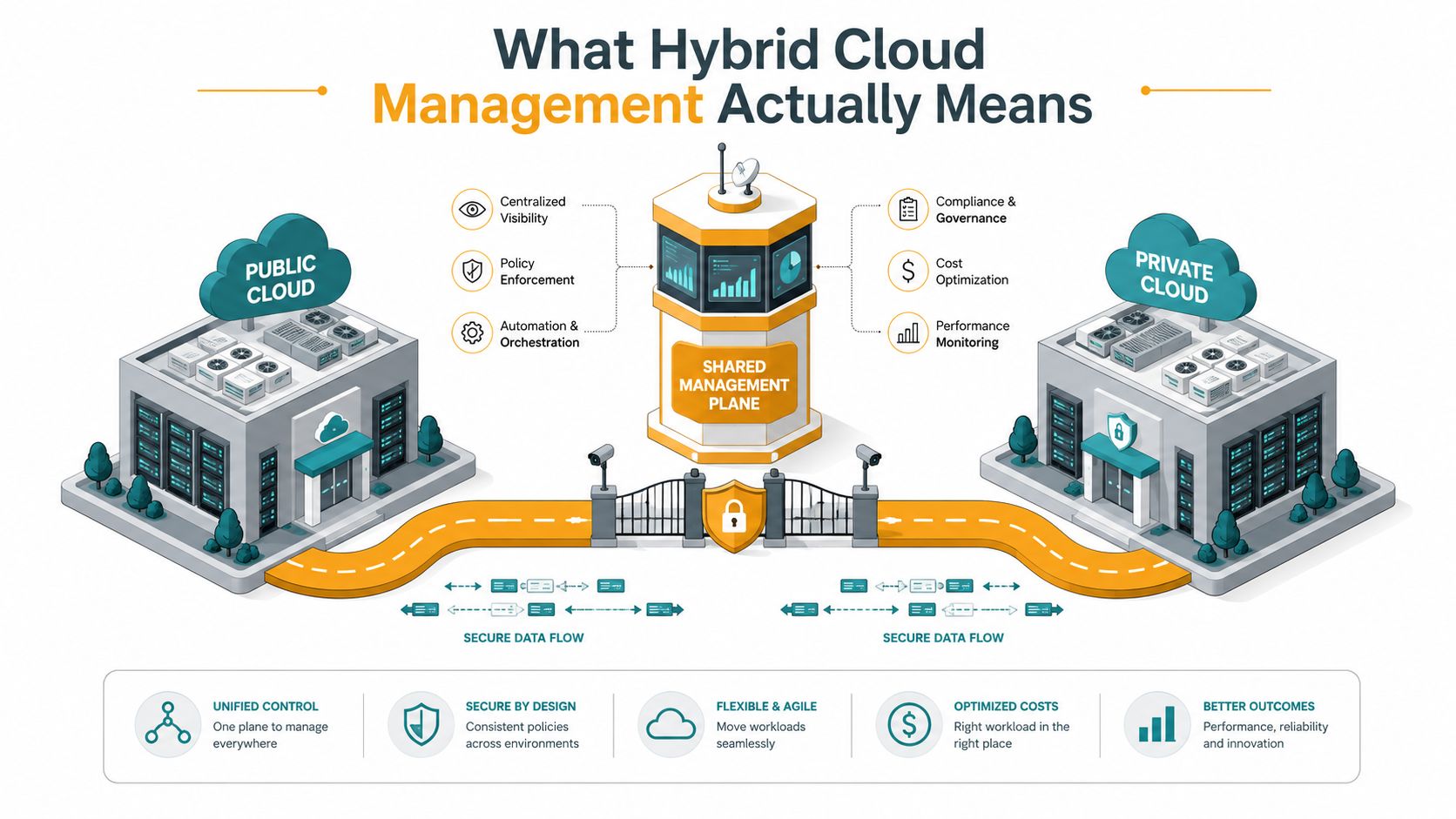
Bottom line: hybrid cloud management is an operations and governance problem first. Tools matter, but only after you define one operating model that can hold together environments that were never built to match.
Common Hybrid Architectures and Where They Fit
Not every hybrid setup looks the same, and SMBs need to stop pretending they do. Some businesses have a single on-prem core with a few cloud services on top. Others are already spread across multiple public clouds plus local systems. A few are dealing with branches, warehouses, or retail sites that behave like edge locations whether anyone planned for it or not.
Cloud plus on-prem fits the most common SMB reality
This is the classic pattern, and it's still the one most Houston companies recognize first. File services, legacy accounting apps, local print services, and systems that rely on nearby devices stay on-prem. Customer-facing apps, remote collaboration, backup, and bursty workloads move into cloud services. The architecture works when the business needs continuity, but it fails when teams try to manage each side with separate rules and separate ownership.
For buyers who want a broader architectural comparison, understanding massive digital factories is a useful companion read because it shows how large-scale infrastructure thinking differs from a smaller mixed estate.
Multi-cloud plus private cloud shows up in regulated or inherited environments
This pattern usually appears after acquisitions, compliance pressure, or platform sprawl. One business unit is on Azure, another uses AWS, and the private environment still carries sensitive or legacy workloads. The fit is real when different application families need different strengths. It's a bad fit when the company uses it as a license to avoid governance.
Edge-inclusive hybrid matters when the building itself generates data
Branches, factories, clinics, job sites, and retail stores often create a hybrid edge layer. Data needs to be filtered, cached, or processed locally before it ever makes sense to centralize it. That's a good model for IoT aggregation, point-of-sale systems, or local resiliency. It's a poor model for workloads that need strict data residency, because the more places data moves, the harder it is to control.
For Houston businesses trying to decide which pattern fits their current stack, this internal guide is worth using alongside your own architecture review, How to choose between public, private, and hybrid cloud for Houston companies. The key is simple, match the architecture to the business constraint, not the vendor pitch.
The Five Operational Challenges That Break Hybrid Estates
Hybrid estates don't usually fail because one cloud is “bad.” They fail because five operational problems pile up at the same time. The failure patterns are predictable, and so are the controls that stop them.
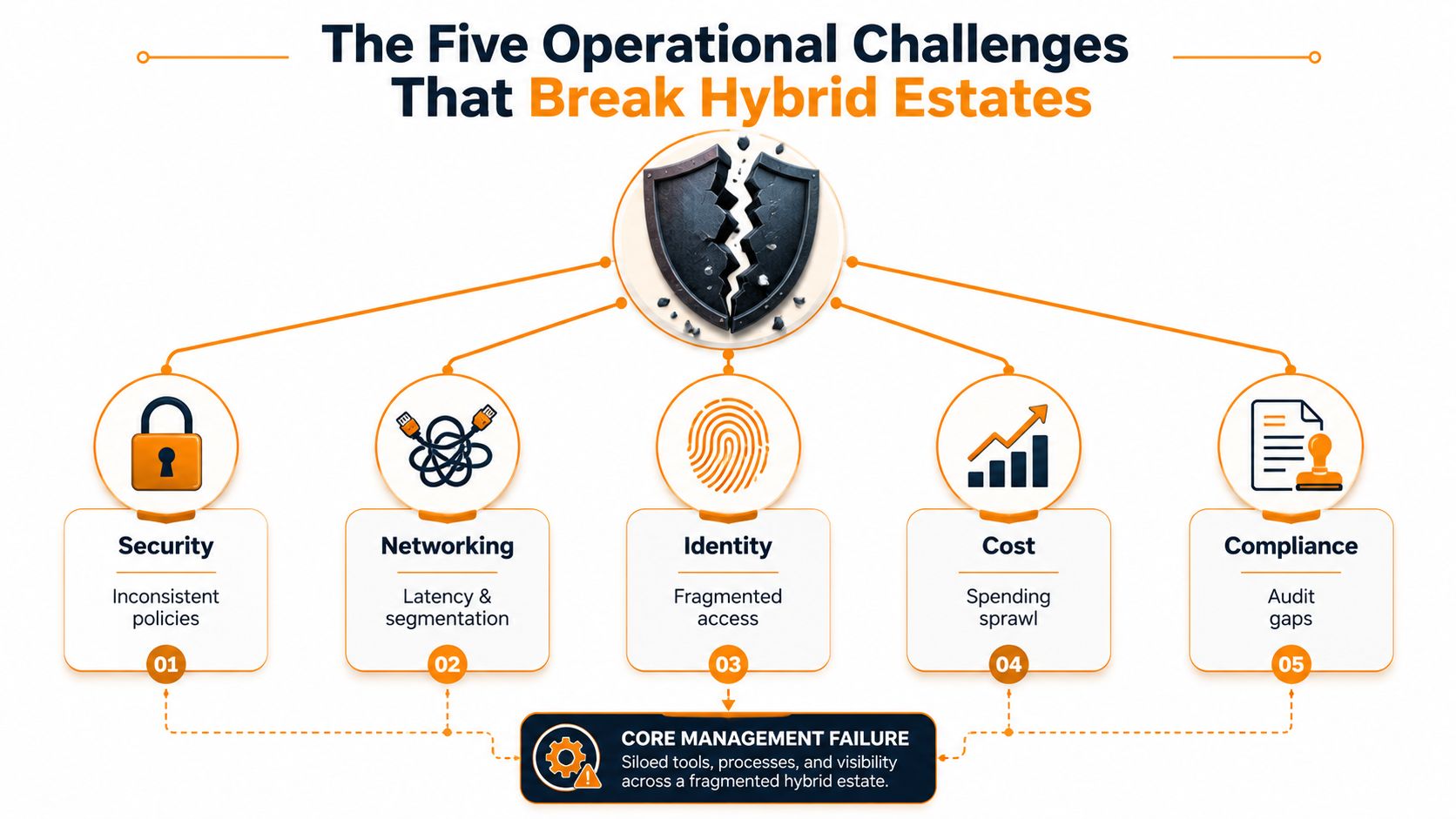
Security breaks first when policies differ by environment
The most common failure mode is inconsistent protection. A cloud account gets compromised, and because security boundaries don't line up cleanly across cloud and on-prem, the attacker has room to move. The cheapest control is blunt and effective, use one security baseline, enforce MFA everywhere an admin can touch, and make sure privileged actions are logged in the same place.
Networking breaks when the path between systems becomes the bottleneck
Hybrid work depends on the road between the buildings. If VPNs, firewalls, or routing rules are poorly designed, latency and segmentation issues show up as user complaints, failed integrations, or backup jobs that never finish cleanly. The practical control is to map traffic flows before you optimize anything else, then move critical integrations onto the simplest reliable path instead of adding more tunnels.
Identity breaks when admin access becomes scattered
Orphaned accounts and stale privileges are a bigger problem than most owners realize. If one team manages identities in one tool and another team does it differently elsewhere, nobody has a clean answer to who can change what. The control is straightforward, centralize identity, remove unused admin paths, and review privileged access on a schedule someone owns.
Cost breaks when nobody owns the bill
Surprise spend is usually a visibility problem disguised as a finance problem. If cloud resources, backup targets, data transfer, and local infrastructure are not tagged the same way, the bill becomes a mystery instead of a management tool. The cheapest fix is a tagging standard tied to business units, plus a monthly review that forces one person to explain outliers.
Compliance breaks when evidence is scattered
Audit gaps tend to show up in file shares, logs, and old systems nobody wants to touch. If the estate is mixed, compliance evidence is usually mixed too, which makes reviews slow and painful. The practical control is to standardize logging, keep records where they can be retrieved, and avoid letting one environment become the “we'll clean it up later” zone.
The budget flowing into this layer is not small. One industry report valued the global hybrid cloud management market at $26.4 billion in 2025 and forecast growth to $98.7 billion by 2034, a 19.2% CAGR MarketIntelo hybrid cloud management market. That spending is a signal. Companies are paying to reduce exactly these recurring operational failures.
The right takeaway is not that hybrid is too hard. It's that the same five problems keep coming back until someone installs controls that make them expensive to ignore.
Monitoring, Automation, and Governance as One Discipline
Most SMBs treat monitoring, automation, and governance like separate chores. That's the wrong mental model. In a hybrid estate, they work as one system. You monitor what matters, automate the repetitive parts, and govern the rules so the environment doesn't drift back into chaos.
Start with unified observability
If you can't see the estate in one place, you can't manage it. That doesn't mean every product has to disappear into one giant console. It means logs, metrics, and alerts need to be available in a way that lets your team trace a problem across cloud and on-prem without guessing where the evidence lives.
A good first move is to decide which events matter to the business, then centralize those signals. That includes authentication events, backup failures, network anomalies, and cost spikes. If your team still opens three dashboards to answer one question, the estate is being observed, but not managed.
Use Infrastructure as Code to stop drift
Automating hybrid-cloud operations with Infrastructure as Code matters because private infrastructure changed manually and public-cloud resources provisioned through APIs will drift away from a single baseline unless you force one version-controlled model across both environments Cloud4C on hybrid cloud benefits and challenges. That is not a theoretical risk. It's how incidents begin.
Practical rule: if a change is worth doing twice, it's worth putting in code.
For an SMB, that doesn't mean everything must be rebuilt at once. It means the most changed environment gets codified first. If cloud networking changes often, lock that down first. If the on-prem side is where drift keeps appearing, start there.
Turn policy into a control, not a document
Policy-as-code is where governance stops being a PDF nobody reads. Access rules, tagging standards, and security baselines should be enforceable, not just written down. When the policy is in code, the environment can reject bad settings before they become incidents.
A mature workflow looks like this. An alert fires, a runbook explains the response, and the repetitive step gets automated once the team trusts the pattern. That's the loop. Monitoring creates the signal, automation handles the repeatable work, and governance keeps the response consistent.
For a deeper look at the tuning side of that loop, cloud optimization guidance is helpful because it reinforces the same principle, you manage outcomes, not just resources.
Tool Categories and How AWS, Azure, and GCP Fit In
Don't shop for “the hybrid cloud tool.” That's the wrong purchase. Build a stack that addresses the control problems you face. The categories matter more than the brand names because each layer solves a different part of the estate.
The stack, not a single console
AWS, Azure, and Google Cloud each give you native consoles for their own environments. Those are necessary, but they're not enough. A third-party Cloud Management Platform can help unify control across estates, Infrastructure as Code tools like Terraform or Bicep keep deployments consistent, observability stacks bring logs and metrics together, and FinOps tools help you understand where spend is going.
A useful partner resource on the service-desk and management side is DataLunix Freshservice expertise, which is relevant if your team needs process, ticketing, and cloud management to connect cleanly instead of living in separate silos.
| Tool Category | Primary Operational Challenge Addressed | Example Layer |
|---|---|---|
| Cloud-native consoles | Platform-specific administration | AWS Console, Azure Portal, Google Cloud Console |
| Third-party Cloud Management Platforms | Unified control across environments | Cross-cloud management layer |
| Infrastructure as Code | Configuration drift and repeatability | Terraform, Bicep |
| Observability stacks | Visibility and incident correlation | Centralized logs and metrics |
| FinOps tools | Cost visibility and accountability | Billing and spend governance |
How the major cloud vendors fit together
AWS, Azure, and GCP are not interchangeable, and they're not supposed to be. Each one is part of the operating surface your team has to manage. In a hybrid estate, the question is not which one wins. The question is which jobs are handled natively, which need a shared layer above the vendor console, and which should be delegated to a managed partner.
For many Houston SMBs, that partner layer matters because the internal team is too small to run every discipline thoroughly. That's where a managed services provider can carry the operational load, while your leadership team keeps the governance decisions tied to business goals. Managed cloud computing is worth reviewing if you want to see how that division of labor works in practice.
The opinionated answer is simple. Pick tools by control gap, not by logo. The stack should reduce toil, tighten governance, and make one environment visible next to the other.
A 90-Day Hybrid Cloud Roadmap and SMB Checklist
Don't try to perfect the estate this quarter. Stabilize it. Then automate the repeatable parts. Then hand the recurring work to a process your team can keep alive without heroics.
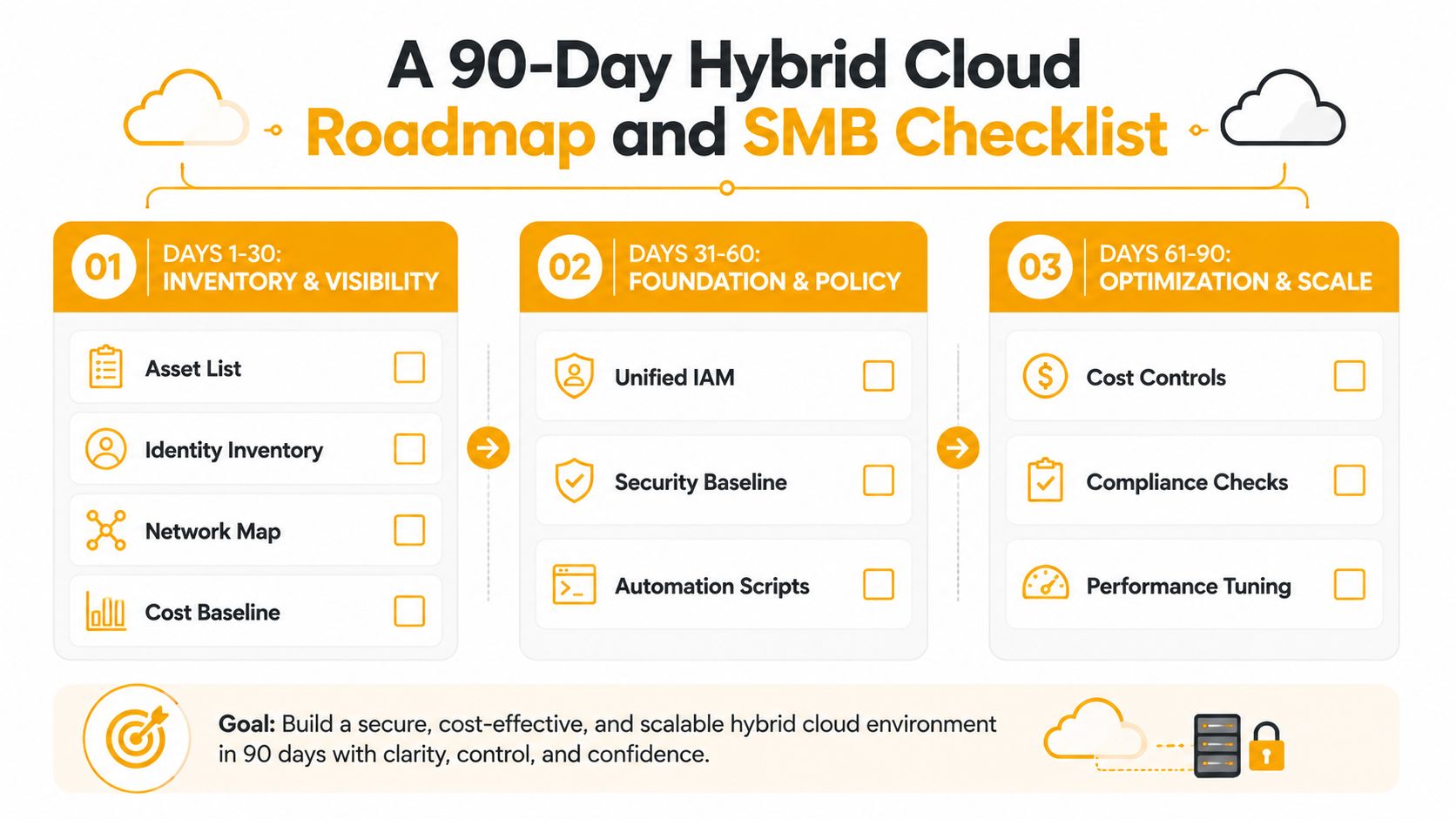
Days 1 to 30, inventory and visibility
Start with the facts. Build one asset list, one identity inventory, one network map, and one cost baseline. If you don't know what exists, you can't govern it. If your team can't answer who owns an admin account or which service is tied to which business function, that's the first gap to close.
Days 31 to 60, install the first controls
Put MFA on every admin path. Centralize logging so security and operations are looking at the same events. Apply Infrastructure as Code to the environment that changes most often, because that's where drift will hurt first. Add a tagging standard so spend and ownership stop disappearing into generic bills.
Days 61 to 90, automate and govern
Write runbooks for the alerts that keep recurring. Turn the top policy checks into policy-as-code rules. Hold a monthly cost review where someone has to explain new spend in plain English. That meeting should be short, direct, and unavoidable.
A simple SMB checklist helps keep this from becoming theater:
- Asset list complete: every server, major cloud service, and critical SaaS tool is named.
- Identity inventory current: admin accounts and privileged paths are documented.
- Network map visible: cloud-to-on-prem links are understood by the people who maintain them.
- Logging centralized: key events land in one place.
- MFA enforced: every administrative path requires it.
- Tagging standard live: resources can be tied back to an owner or business unit.
- Runbooks written: the top alerts have a response owner.
- Monthly review scheduled: cost and policy exceptions are reviewed, not ignored.
Many hybrid guides talk about a single control plane, but the core issue is harder. You have to standardize observability, identity, policy, and remediation across public cloud, private cloud, and edge systems that don't support identical tooling Mirantis hybrid cloud management. That's why the answer for most SMBs is not “build an enterprise architecture team.” It's “get the operating model right and let a managed partner execute the repetitive parts.”
If your estate is already split between cloud and on-prem, IT Cloud Global, LLC helps Houston businesses manage that mix with cloud services, migration, monitoring, security, and day-to-day support across the systems that have to keep working. If you want a practical plan for stabilizing hybrid cloud management without trying to staff an enterprise team in-house, visit IT Cloud Global, LLC and get a conversation started this week.
- What Is Network Access Control: Why Your Business Needs It
- Computer Service Near Me: A Houston Buyer’s Guide
- Your 2026 Disaster Recovery Testing Checklist
- What Is a Network Operations Center? an SMB Guide
- Microsoft 365 Backup Solutions Your Business Needs in 2026
- Managed IT Services for Small Business Near Me: Houston
- IT Risk Assessments: A Houston SMB’s Guide for 2026