


Best Managed IT Services Near Me: Your Houston 2026 Guide
Your office is busy, the phones are ringing, and then something small knocks the day sideways. Outlook won't sync. The Wi-Fi drops in one corner of the building. A line-of-business app slows to a crawl. Someone clicks a bad link. By lunch, your team is waiting on technology instead of using it.
That's usually when Houston business owners start searching for Managed IT services near me. Not because they want another vendor. Because they're tired of unpredictable outages, unpredictable invoices, and the constant feeling that one avoidable tech problem could interrupt payroll, sales, service, or customer trust.
The local part of that search matters, but not always in the way people think. Sometimes you need a technician in your office the same day. Sometimes you need a provider with excellent remote monitoring, strong escalation, and a clear service process more than you need an office five minutes away. The practical difference matters if you want support that works.
Table of Contents
- Why Houston Businesses Are Moving Beyond Break/Fix IT
- What Managed IT Services Actually Include
- Managed Services vs Traditional Break/Fix Support
- Understanding Pricing Models and Service Level Agreements
- Evaluating Modern Security and Cloud Offerings
- How to Choose the Right Houston Managed IT Provider
- Your Next Step for Reliable IT in Houston
Why Houston Businesses Are Moving Beyond Break/Fix IT
A lot of companies start with break/fix because it feels simple. Something breaks, you call someone, they bill you for time, and you move on. That works when your business is tiny, your systems are simple, and downtime is annoying rather than expensive.
Then the business grows.
Now you depend on Microsoft 365, cloud apps, Wi-Fi across the office, VPN access for remote staff, security tools, backup jobs, printers that still matter more than anyone wants to admit, and a network that can't go down in the middle of a workday. In that environment, break/fix starts acting like calling a roofer only after water is already dripping onto your desk.
Houston companies feel this quickly because many run lean. They don't want to build a large internal IT department just to cover helpdesk, patching, network support, security, and backup. They want a stable monthly operating model instead. That shift is happening at scale. The global managed services market is projected to grow from $344.4 billion in 2024 to $834.7 billion by 2032, expanding more than 3x over the decade, according to managed services market projections.
Businesses don't search for managed IT because technology is interesting. They search because instability gets expensive fast.
The practical appeal is straightforward:
- Fewer surprises: Ongoing monitoring catches trouble earlier.
- More predictable costs: Monthly support is easier to budget than recurring emergency calls.
- Better alignment: A provider doing ongoing management has a reason to keep systems healthy, not just repair them after failure.
- Room to grow: Your staff can focus on operations, customers, and revenue instead of chasing device issues.
If you want a broader look at why companies make that move, this overview of the benefits of managed IT services covers the business case well.
What Managed IT Services Actually Include
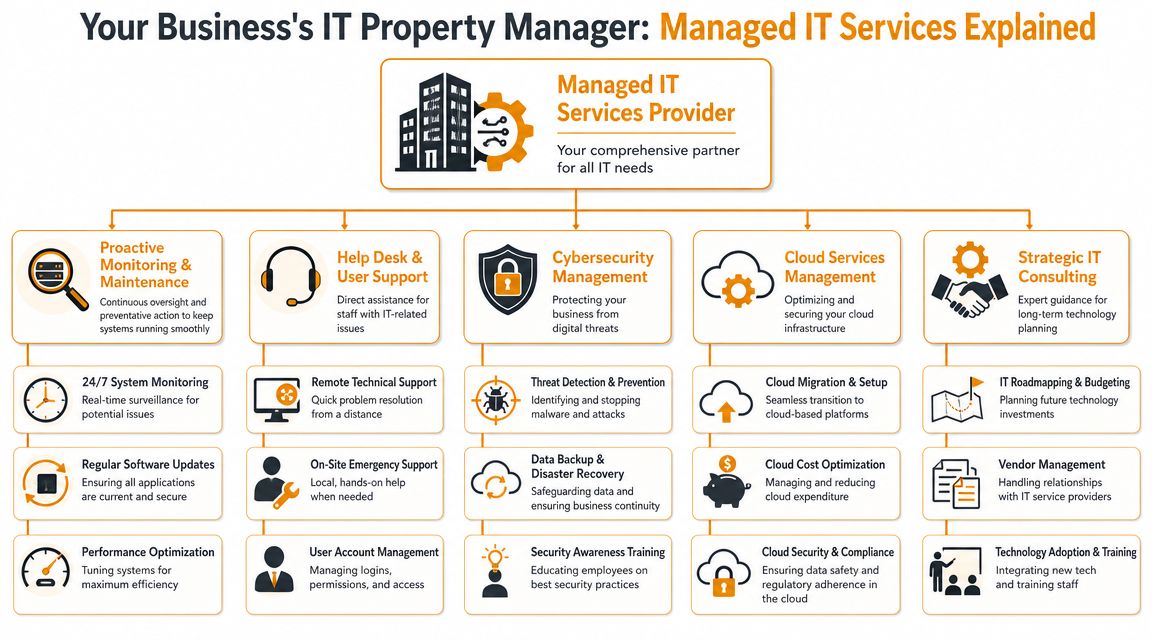
A managed service plan covers the day-to-day work that keeps your systems stable, secure, and usable. For a Houston business, that usually means more than a helpdesk and a phone number. It means someone is watching the environment, maintaining it on schedule, and stepping in before a small issue turns into a lost afternoon.
The property-management comparison still fits here. A good provider is managing the building systems of your IT environment, not waiting in the parking lot for something to break.
One point gets missed in a lot of "managed IT services near me" searches. Near me does not always mean a technician needs to be in your office every day. Many of the tasks that matter most, such as monitoring, patching, Microsoft 365 administration, backup checks, and account control, should be handled well remotely. Physical proximity matters more for hardware failures, office moves, cabling, firewall swaps, internet cutovers, and the moments when remote work stops being enough. The best fit for many Houston companies is a provider with strong remote operations and a clear local escalation path.
What should be inside a real managed service plan
Houston businesses should expect to see a few core functions, and each one serves a different operational purpose.
24/7 monitoring and alerting: Servers, endpoints, firewalls, backups, and cloud systems should be watched for signs of trouble. That includes failed backup jobs, storage problems, unusual login activity, certificate expiration, and connectivity issues. Early warning gives your team more options than an outage at 9:15 a.m.
Helpdesk support for users: Staff need fast support for login failures, email sync issues, Microsoft 365 errors, printer problems, new-device setup, and application access. If response is slow, payroll, sales, customer service, and operations all lose time.
Patch management and maintenance: Operating systems, line-of-business apps, firmware, and security tools need scheduled updates and follow-up checks. Patching without verification is not enough. Someone should confirm the update installed cleanly and did not break a critical workflow.
Endpoint and account administration: Laptops, desktops, phones, user permissions, onboarding, offboarding, and device policies need consistent handling. This work is routine, but it closes many of the gaps that lead to data exposure and former employees retaining access.
Network oversight: Switches, firewalls, Wi-Fi, VPN access, and internet failover need regular review and tuning. Slow internet is often not an internet problem. It may be bad wireless coverage, a failing switch, DNS trouble, or a firewall under strain.
Backup and recovery management: Backups need monitoring, retention policies, and test restores. A backup that has never been restored is a theory, not a recovery plan.
Strong providers also keep documentation current. That includes network maps, vendor contacts, admin access records, device standards, warranty status, and notes on critical systems. If your IT knowledge lives in one employee's head or in an old spreadsheet, your risk is higher than it looks.
A mature provider should also be able to explain which tasks are remote by default and which ones justify an onsite visit. That matters in Houston. If your office in The Woodlands, Katy, Sugar Land, or downtown needs a failed firewall replaced, "near me" has real meaning. If you need password resets, endpoint policy changes, phishing containment, or Microsoft 365 support, speed and process usually matter more than drive time.
One practical test helps here. Ask a provider what they check every week, every month, and every quarter. If the answer stays vague or centers only on ticket response, you are hearing about support availability, not real management.
For teams that want to understand the day-to-day skills behind good support operations, these resources for IT Support professionals are useful because they show the practical mix of troubleshooting, user support, and systems thinking the job requires.
Managed Services vs Traditional Break/Fix Support
Break/fix support and managed services can both solve technical problems. They just solve them from very different incentive structures.
The business model is different
With break/fix, you usually pay after something goes wrong. The provider is reacting to an event that already disrupted work. That makes sense for isolated projects, occasional hardware replacement, or very small environments with minimal complexity.
Managed services are built around ongoing prevention, routine administration, and structured response. The provider is supposed to reduce the number of emergencies, not just answer them. That's a very different relationship.
One practical example is phone systems. A company might think they only need someone to step in when phones fail, but voice systems now sit inside a larger environment of networking, security, internet reliability, and cloud platforms. If you're reviewing communications as part of your IT stack, this guide to phone systems for SMBs is useful because it shows how infrastructure choices connect to support requirements.
Managed Services vs. Break/Fix IT A Comparison
| Attribute | Managed IT Services | Break/Fix Support |
|---|---|---|
| Service approach | Ongoing monitoring, maintenance, and support | Reactive troubleshooting after failure |
| Billing style | Usually recurring and budgetable | Usually variable and event-driven |
| Provider incentive | Keep systems stable and reduce incidents | Respond when incidents happen |
| Downtime risk | Lower when monitoring and maintenance are done well | Often higher because issues are caught later |
| Security posture | Typically includes routine controls and oversight | Often fragmented unless separately purchased |
| Strategic input | Can include planning, lifecycle guidance, and vendor coordination | Usually limited to the problem at hand |
| Fit | Growing SMBs that depend on uptime | Small environments or one-time needs |
There's also a human factor. Break/fix support often depends on whoever picks up the phone and whatever context they can gather in the moment. Managed services should rely on documented systems, known configurations, escalation paths, and recurring review.
That doesn't mean break/fix is useless. It still has a place for one-off moves, repairs, cabling projects, or short-term overflow work. But if your staff loses time every month to recurring tech disruption, the break/fix model usually costs more operationally than it appears on the invoice.
Understanding Pricing Models and Service Level Agreements
A lot of business owners ask the wrong pricing question. They ask, “What's your monthly rate?” The better question is, “What do we get, what's excluded, and how fast do you respond when something important breaks?”
Common ways providers price support
Managed IT pricing usually falls into a few familiar models.
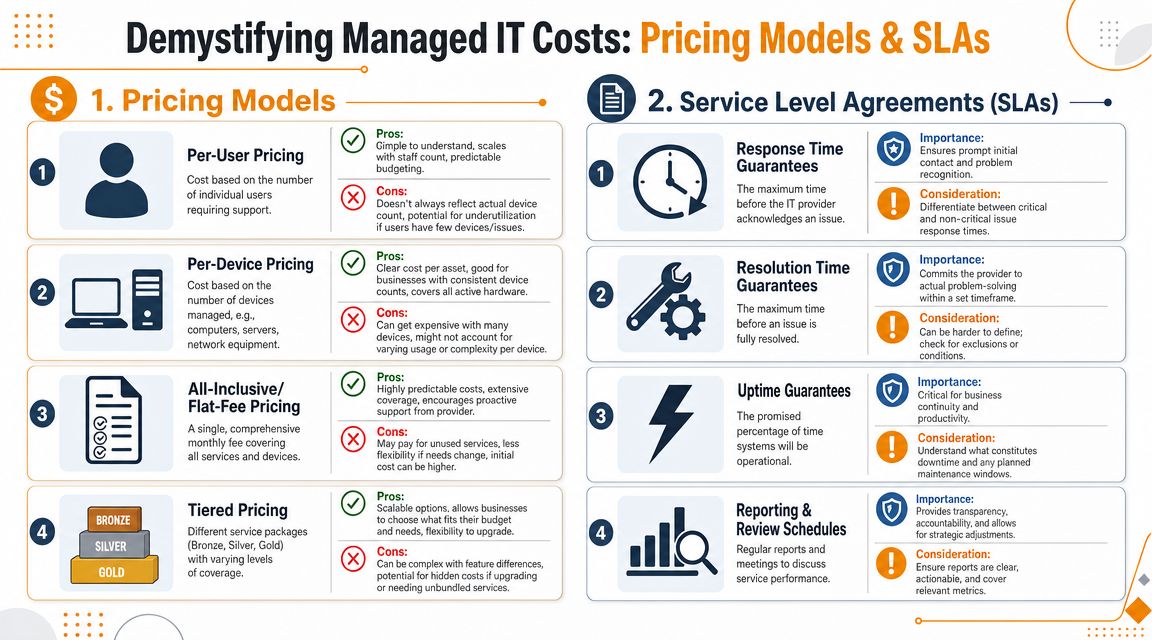
- Per-user pricing: Good for businesses that want simple budgeting tied to headcount.
- Per-device pricing: Useful when device count drives support effort more than user count.
- Flat-fee or all-inclusive plans: These can work well when you want broad coverage and minimal billing surprises.
- Tiered bundles: Common when providers separate basic support from stronger security, compliance, or cloud administration.
The key issue isn't just the model. It's what sits inside it. Buyers need to know whether ransomware readiness, backup testing, MFA support, compliance evidence, and incident response are included or sold as separate layers. That question matters more now because Gartner projected worldwide end-user spending on security and risk management to reach about $215 billion in 2024, a point noted in this discussion of managed IT support cost and security scope.
If you're comparing service proposals, this breakdown of factors determining managed IT support service costs is a practical checklist for understanding why one quote looks very different from another.
What a service level agreement should actually tell you
A cheap plan with a weak SLA can become the most expensive option in the room.
Ask for the SLA and read it like an operations document, not a sales insert. Focus on these points:
- Response time: How quickly does the provider acknowledge a ticket?
- Resolution targets: What happens after acknowledgment? Who owns the issue until it's solved?
- Priority levels: Is a company-wide outage treated differently from one user's printer problem?
- Onsite terms: When do they dispatch someone locally, and what triggers that visit?
- Review cadence: Do they provide reporting and regular service reviews?
If the provider can't explain what counts as critical, how tickets escalate, and when onsite support is triggered, the contract is still vague even if the pricing looks neat.
Here's what often goes wrong in practice:
- Low headline price, narrow scope: Basic helpdesk is included, but security tools, vendor coordination, and backup remediation are extra.
- Fast response, slow resolution: Someone replies quickly, but the issue sits because there's no escalation depth.
- Unlimited support with hidden boundaries: Routine requests are covered, but project work, after-hours changes, and cloud cleanup are billed separately.
- No operational reporting: You pay monthly but get little visibility into recurring issues, aging hardware, or risk trends.
Pricing matters. But clarity matters more. The best support agreements make it obvious what is covered, who is responsible, and how problems move from alert to resolution.
Evaluating Modern Security and Cloud Offerings
A Houston business usually learns the difference between decent IT support and mature IT operations after a bad week. A user clicks a phishing email on Monday. Microsoft 365 access starts failing for a sales manager on Tuesday. On Wednesday, someone asks whether backups were tested recently, and no one can answer clearly.
That is the standard modern providers need to meet. Security, cloud administration, and recovery planning have to work together. If they are sold as separate add-ons, gaps show up fast.
What good security support looks like now
Modern MSP security needs layers because attacks rarely stay in one lane. A compromised password turns into mailbox access. Mailbox access turns into wire fraud attempts, data exposure, or malware spread. The provider should be able to explain how those risks are contained, not just list tools on a proposal.
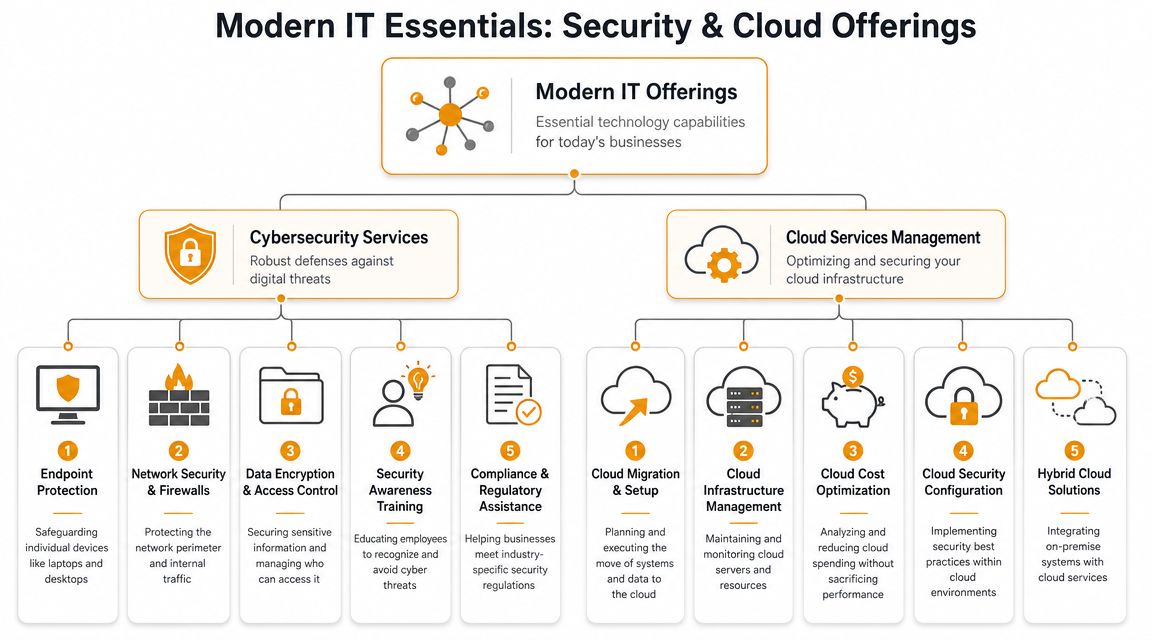
Look for clear capability in these areas:
- Endpoint protection and response: More than antivirus. You want tools and processes that catch suspicious behavior on laptops and desktops, isolate affected devices, and investigate what happened.
- Identity security: MFA, conditional access, admin account controls, stale account cleanup, and tighter privilege management.
- Firewall and network controls: Still important for offices with on-prem equipment, guest Wi-Fi, VPN access, cameras, phones, or warehouse devices.
- Encryption and policy enforcement: Data protection in transit, at rest, and through access rules that match how the business operates.
- Backup isolation and recovery testing: Backups need to survive credential compromise, and restores need to be tested on a schedule.
The practical benchmark is simple. A provider should state Recovery Point Objective (RPO) and Recovery Time Objective (RTO) targets, explain how often restores are tested, and show how backup systems are protected from the same breach that hits production systems. That is what separates a checkbox backup product from a resilience plan, as explained in this overview of business continuity expectations in managed IT.
Good backup answers are specific. Weak backup answers sound fine until someone needs a restore.
For Houston companies, "near me" matters differently in security than it does in desktop support. Security monitoring, identity protection, Microsoft 365 hardening, and cloud alert review are mostly remote disciplines. Physical proximity matters later, when a firewall fails, a site loses connectivity, or an incident requires local coordination with leadership, facilities, or another vendor. The better question is not "Are they close?" It is "Can they handle the issue remotely first, and do they have local escalation when hands-on work is needed?"
Cloud management is operations, not just migration
Cloud support gets oversold during the migration phase. The harder job starts after go-live, when access grows, apps multiply, storage sprawls, and no one is sure which settings changed six months ago.
For Houston businesses, that usually means ongoing support around Microsoft 365, Azure, AWS, Google Cloud, identity integration, device management, email security, SharePoint permissions, Teams administration, and cloud cost visibility. The provider should help answer practical questions such as:
- Who has access to what
- How devices are enrolled and secured
- How backup and retention work in cloud platforms
- What happens when an employee leaves
- How cloud changes are reviewed and documented
That operating discipline matters more than a polished migration pitch. Companies with local servers, line-of-business apps, warehouses, retail sites, or specialized equipment often end up in a mixed environment for years. The provider has to support that reality without forcing every problem into a cloud-only playbook.
One Houston option in this category is IT Cloud Global, LLC, which provides managed IT, cloud administration across AWS, Azure, Microsoft 365, and Google Cloud, plus security tooling through partners including SentinelOne. That mix is relevant for businesses that want one provider handling day-to-day support and broader infrastructure operations. If you are comparing providers, this checklist for choosing a managed service provider is a useful filter for security depth, operating process, and fit.
Vendor evaluation also gets harder when IT overlaps with communications, CX platforms, and business operations. The same discipline used in a guide to contact center vendor selection applies here. Look past features and ask how the provider handles implementation, ownership, escalation, reporting, and change control.
The test is operational. Can the provider secure identities, control cloud sprawl, protect business data, and restore systems on a bad day? If the answer depends on sales language instead of a documented process, keep looking.
How to Choose the Right Houston Managed IT Provider
“Near me” warrants a reality check. Physical proximity matters sometimes. It just doesn't matter for everything.
When near me really matters
You want a local Houston provider, or at least one with true Houston coverage, when the issue requires hands-on work.
That includes things like:
- Network hardware failure: Switches, firewalls, access points, and cabling problems often need physical access.
- Office moves or expansions: Rack setup, workstation deployment, Wi-Fi surveys, and low-voltage coordination are local tasks.
- New site launches: Retail, clinic, warehouse, and branch-office openings need onsite staging and validation.
- Executive or specialized hardware issues: Some problems can't be solved well over remote tools.
But for many daily issues, location is less important than operational maturity. Password resets, Microsoft 365 problems, endpoint alerts, patching, suspicious sign-ins, permissions issues, and many support tickets are handled remotely. That matters because the human element was involved in 68% of breaches, according to the Verizon 2025 DBIR reference cited in this discussion of local IT support and remote response trade-offs. Many of the highest-risk issues are identity, policy, and endpoint problems, not situations where a technician needs to drive over.
Here's a good rule. Don't ask only, “Are you near me?” Ask, “What do you solve remotely, what triggers onsite dispatch, and how is that written into the agreement?”
Before you shortlist vendors, it can help to review a structured guide to contact center vendor selection. It's not specific to MSPs, but the evaluation logic is strong: compare operating model, accountability, fit, and service depth, not just price or branding.
Questions that cut through the sales pitch
Ask these in meetings and insist on direct answers.
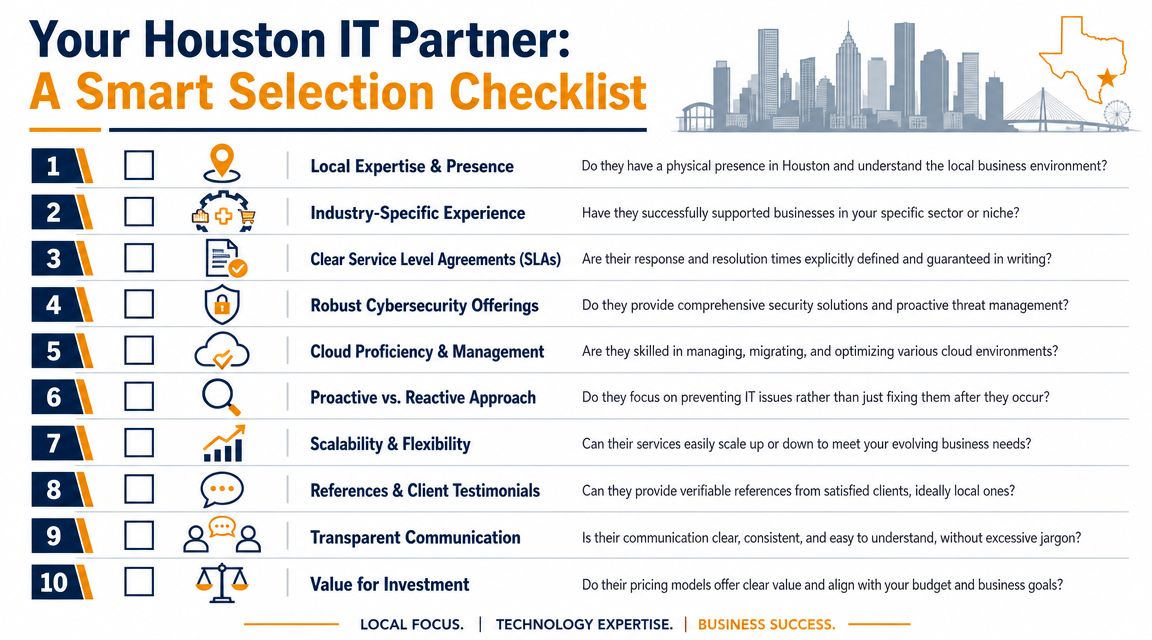
- How do you monitor our environment? Ask what they watch across endpoints, servers, cloud services, backups, and network equipment.
- What requires onsite support? Get examples. Server replacement, cabling, firewall swap, Wi-Fi issues, user onboarding, conference room systems, printer failures.
- How are tickets prioritized and escalated? You want a clear path from helpdesk to senior engineering.
- What is included in the standard plan? Press on backup testing, MFA support, security tooling, cloud administration, after-hours work, and vendor coordination.
- What does your onboarding process look like? Good onboarding includes documentation, asset discovery, access review, and baseline cleanup.
- How do you communicate during outages? Ask who updates your leadership team and how often.
- What reports do we receive? You want useful reporting, not just a pile of ticket counts.
- Can you support our growth? New users, second locations, cloud expansion, compliance pressure, and higher security requirements shouldn't force a provider change.
This video gives a useful high-level frame for evaluating providers before you sign anything:
A practical buying checklist also helps. This guide on how to choose a managed service provider is worth reviewing before proposals come in, because it forces the right questions around fit, support model, and accountability.
The best local provider isn't the one with the closest office. It's the one that can solve most issues fast remotely, show up when hands-on work is needed, and document both in writing.
Your Next Step for Reliable IT in Houston
If you're searching for managed IT services near me, the decision isn't just local versus non-local. It's reactive support versus operational discipline. You need a provider that can monitor, maintain, secure, and support your environment without turning every issue into a fire drill.
For a Houston business, the strongest fit usually looks like this:
- Clear remote support capability for daily issues
- Defined local escalation for hardware, network, and onsite work
- Security and cloud competence built into the operating model
- Straightforward communication with documented service expectations
- Predictable outcomes instead of recurring surprises
That's the standard to hold every provider against.
For businesses in Greater Houston that want one firm handling managed IT, helpdesk, onsite and remote support, backup and disaster recovery, Microsoft 365 and cloud administration, network operations, and security tooling through partners such as SentinelOne, IT Cloud Global is one local option to evaluate. The practical next step is simple: compare your current support model against the checklist above, identify where downtime or response gaps keep showing up, and get a consultation built around those real operational needs.
If you want a practical review of your current setup, IT Cloud Global, LLC can help you assess where remote support is enough, where Houston onsite coverage matters, and what a more predictable managed IT model should look like for your business.
- Remote Desktop IT Support Guide 2026
- How to Choose a Texas Outsource IT Service
- Houston IT Support: A 2026 Guide for SMBs
- Computer Service Near Me: A Houston Buyer’s Guide
- Top 7 Managed IT Services Houston TX Reviews 2026
- 7 Best Managed IT Services Houston TX Reviews (2026)
- Best IT Services Houston TX: Your 2026 Partner