


IT Security Services Houston TX: Essential for Your SMB In
You open the office on a Monday, and nothing works the way it should. Staff can't sign in. Shared files won't open. The accounting team says invoices are missing. Someone notices a strange ransom note on a workstation, and suddenly the whole day changes from “catch up on email” to “how do we keep the business running?”
That kind of morning is why many owners start searching for IT security services in Houston, TX. They're not looking for abstract cybersecurity talk. They want to know who can protect laptops, email, cloud apps, Wi-Fi, and backups without turning daily work into a hassle.
Houston small and midsize businesses have a specific problem set. Many run lean teams, depend heavily on Microsoft 365 or cloud apps, and serve industries with real compliance pressure like healthcare, manufacturing, legal, logistics, and contracting. Security has to fit that reality. It has to be practical, understandable, and tied to uptime.
This guide walks through how local security services work, what risks matter most, what tools providers use, how to compare vendors, and how to think about pricing. The goal is simple. Help you make a smart decision before a bad day forces one.
Table of Contents
- Introduction to IT Security Services in Houston
- Understanding the Scope of IT Security Services
- Business Risks and Compliance Drivers for Houston SMBs
- Core IT Security Services and Technologies Offered
- How to Choose the Right IT Security Services Provider
- Pricing Guidance and Common Engagement Models
- Local Case Examples and Success Stories
- Conclusion and Next Steps
Introduction to IT Security Services in Houston
A lot of Houston business owners wait to think seriously about security until something feels off. Maybe a fake invoice email slips through. Maybe a remote employee loses a laptop. Maybe Microsoft 365 logins start getting flagged from unusual locations. None of those events has to become a full breach, but each one is a warning.
Security services exist to reduce the chance that one weak point turns into full business downtime. In plain terms, they help guard the doors, watch the hallways, limit who can enter certain rooms, and keep a clean copy of your important records in case something still goes wrong. That's why security isn't just antivirus anymore.
For an SMB, this usually means combining several protections instead of buying one tool and hoping for the best. You might need endpoint protection on laptops, firewall oversight at the office, secure remote access for staff, Microsoft 365 hardening, backup monitoring, and a clear incident response process. Each part solves a different problem.
Practical rule: If your business relies on email, cloud files, remote logins, and connected devices, you already have a security environment. The real question is whether anyone is managing it intentionally.
Houston businesses also need local context. A provider that understands hybrid work, compliance expectations, on-site support needs, and business continuity planning can design something more realistic than a generic package. That matters when your front desk, warehouse, clinic, or retail location can't afford a long outage.
Understanding the Scope of IT Security Services
When owners hear “security services,” they often picture one thing, usually antivirus. In practice, IT security services in Houston, TX cover a broader operating system for your business. The provider isn't just installing software. They're helping you prevent attacks, detect suspicious behavior, contain damage, recover quickly, and document what happened.
What businesses usually mean by security services
A managed security provider may handle several categories at once:
- Endpoint protection: Security software for desktops, laptops, and mobile devices. It includes malware detection, isolation, and device health checks.
- Network security: Firewalls, secure Wi-Fi, traffic rules, and protections around office internet connections and branch links.
- Identity security: Login controls, multi-factor authentication, password policy enforcement, and access reviews.
- Cloud security: Protection for Microsoft 365, Azure, AWS, Google Cloud, SharePoint, Exchange, and other business platforms.
- Backup and disaster recovery: Secure copies of data and tested recovery steps for outages, deletion, ransomware, or hardware failure.
- Monitoring and response: Ongoing alert review and action when suspicious activity appears.
These layers work best when they support each other. If one tool misses a threat, another layer can still slow it down or stop it. If you want a plain-language overview of that approach, security in layers is a useful way to think about it.
Why Houston market depth matters
Texas holds the second-largest IT services workforce in the United States, with more than 203,700 professionals across over 17,600 firms, according to the Texas IT industry report. For Houston businesses, that matters because security support isn't limited to a tiny vendor pool. The market has enough depth for specialized help with monitoring, cloud security, compliance work, network engineering, and recovery planning.
That local density changes the buying experience. You're more likely to find a provider that understands your exact mix of office support, remote users, line-of-business apps, and industry requirements. It also makes it easier to find teams that can combine remote service with on-site work when a firewall fails, a switch needs replacement, or a location rollout needs hands-on help.
A good provider doesn't sell “cybersecurity” as one black box. They show which controls protect devices, which protect identities, which protect cloud data, and how they respond when one of those controls raises an alert.
The most common confusion I see is this. Owners think they must choose between convenience and safety. In reality, well-designed security should support work, not fight it. Staff should still be able to log in, share files, and work remotely. The difference is that access is controlled, activity is watched, and recovery is planned.
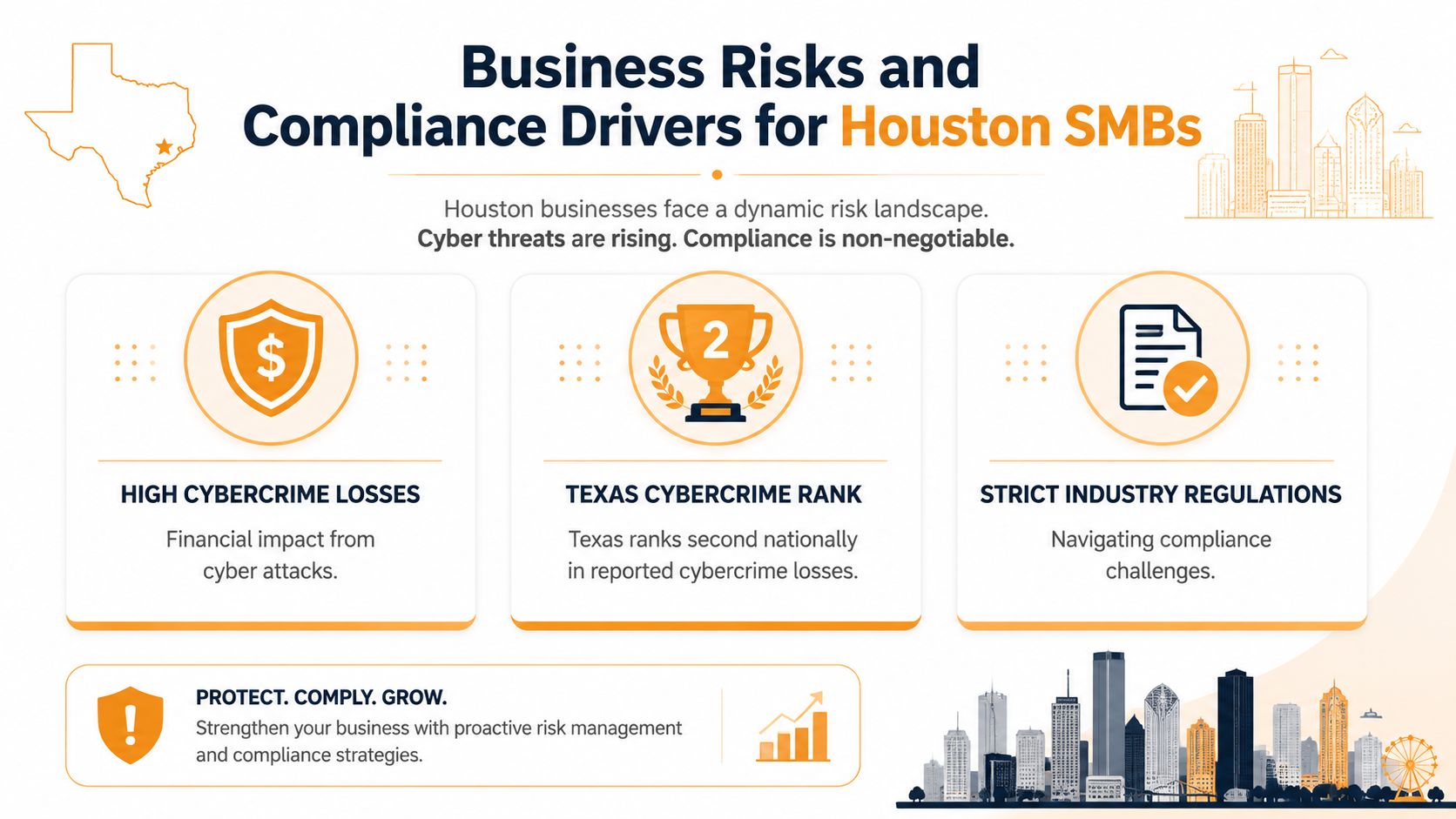
Business Risks and Compliance Drivers for Houston SMBs
A Houston company can have a normal Tuesday morning turn sideways fast. An office manager opens what looks like a vendor email. A bookkeeper approves a payment request. By lunch, the wrong bank account has the money, staff cannot trust their inboxes, and the owner is asking a harder question than “How did this happen?” The question is whether basic safeguards, approvals, and logs were in place before the mistake.
The local threat picture
Houston SMBs face the same attack patterns seen across Texas, but the local business mix changes how those risks show up. Energy contractors handle vendor payments and field access. Medical offices manage regulated patient information. Logistics and distribution firms depend on scheduling, dispatch, and uninterrupted communication. A single compromised account can interrupt all three.
Security problems usually start in ordinary business systems, not in some dramatic movie scene. Email is one common entry point. Remote logins are another. Shared cloud folders, saved passwords, and overly broad user permissions also create openings. The weak spot is often a routine process that grew without clear rules.
Here are the risk areas Houston owners should check first:
- Email fraud and business email compromise: Fake invoices, vendor impersonation, and payment change requests sent at the right moment.
- Remote access misuse: Weak passwords or missing multifactor authentication on Microsoft 365, VPNs, remote desktop tools, and other cloud apps.
- Ransomware spread: One infected device reaches file shares, synced folders, backups, or line-of-business systems.
- Sensitive data exposure: Customer records, financial files, employee documents, or patient information become visible to the wrong people.
- Downtime: Phones, scheduling, billing, dispatch, or production tools stop working, which turns a security issue into an operations issue.
One area that gets less attention than it should is internal handling of staff records. HR folders, payroll exports, benefit forms, and manager access rights often grow messy over time. If your team is tightening those practices, this guide to employee data security is a useful companion.
Why compliance changes the buying decision
For many Houston SMBs, security spending starts with a customer requirement, an insurance renewal, or a contract questionnaire. That changes the buying process. You are not only trying to block attacks. You are also proving that access is controlled, data is handled correctly, and recovery steps are documented.
The easiest way to understand compliance is to compare it to a building inspection. Locks on the doors matter, but so do the records showing who has keys, which doors stay locked, and what happens during an emergency. Security tools are the locks. Policies, logs, access reviews, and backup records are the inspection trail.
The exact pressure depends on your industry:
- Healthcare practices and related vendors need controls that support HIPAA privacy and security expectations.
- Defense contractors and subcontractors may face CMMC requirements during bidding or renewal discussions.
- Retailers and service businesses that process cards need to address PCI responsibilities.
- Professional services firms, manufacturers, and logistics companies are often asked to complete client security questionnaires before work begins.
This is why provider selection in Houston should include local fit, not just tool lists. Ask whether the provider has worked with your industry, your size of business, and the compliance requests your customers already send. Ask how they document user access, backup testing, security incidents, and policy changes. If a provider can stop malware but cannot help you answer an auditor, insurer, or major client, the service is incomplete.
Cloud systems deserve extra attention here because many compliance gaps start with simple configuration mistakes. Overshared SharePoint folders, inactive accounts that still work, missing retention settings, and weak admin controls create risk without any dramatic breach. If your business relies heavily on Microsoft 365 or cloud platforms, this guide to cloud security compliance explains where those gaps often appear.
Security reduces the chance of a bad event. Compliance helps you prove you are controlling the risk in a consistent way. Houston SMBs usually need both.
Core IT Security Services and Technologies Offered
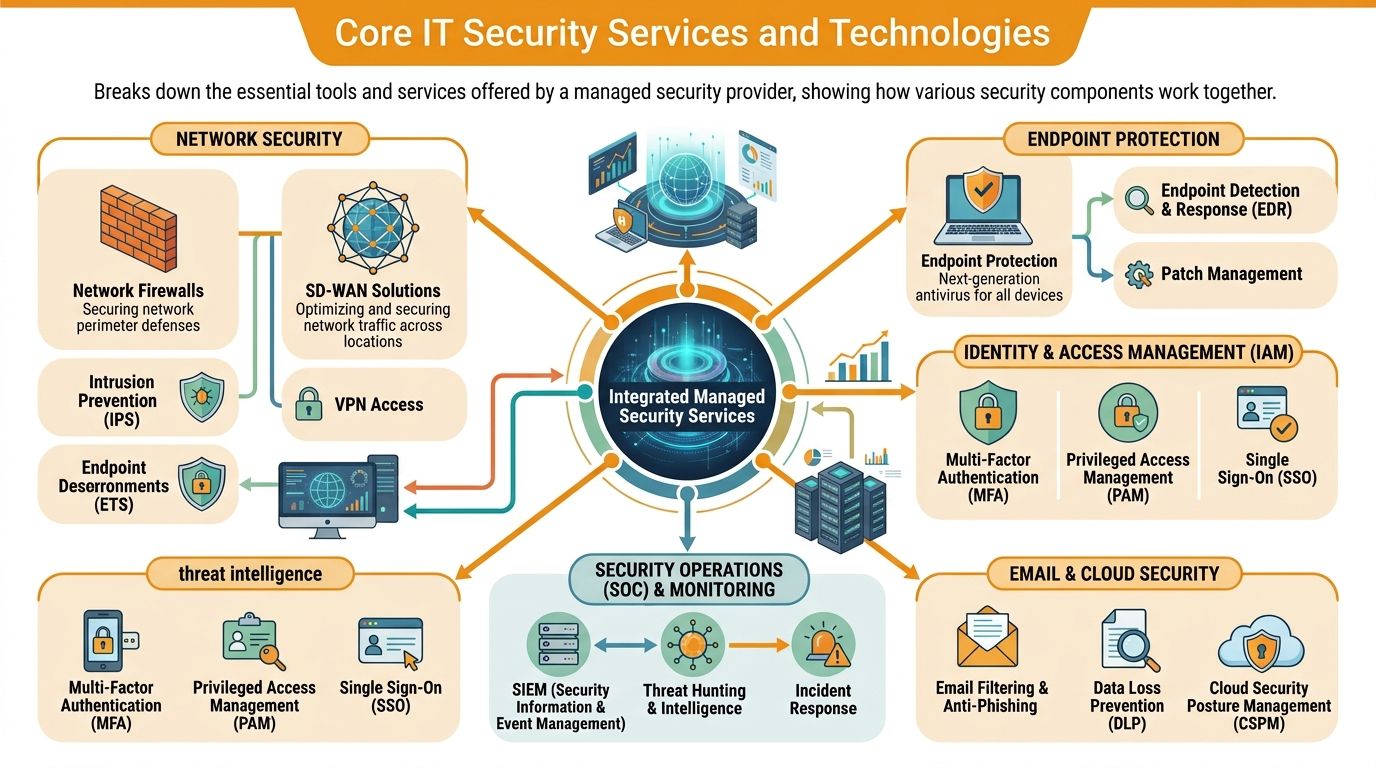
A Houston business can have a locked office, alarm system, and security cameras, then still lose money because one employee clicks a fake Microsoft 365 login page. That is why IT security services come in layers. Each layer covers a different path an attacker might use, and each one matters more in a city where SMBs often rely on remote access, cloud apps, and small internal IT teams.
The main layers that work together
Start with endpoint protection. Endpoints are the laptops, desktops, servers, and mobile devices your staff use every day. If your business were a warehouse, endpoints would be the doors workers use all day long. They need locks, cameras, and someone checking for unusual activity.
Modern endpoint tools do more than look for known malware files. They also watch for suspicious behavior, such as a program trying to encrypt large numbers of files, disable security settings, or contact a known malicious server. A good service can isolate that device quickly so the problem stays on one machine instead of spreading into accounting, file shares, or line-of-business applications.
Next is network security. Firewalls inspect traffic going in and out of your environment. Secure Wi-Fi settings reduce easy entry points. Network segmentation separates systems so a guest device, warehouse scanner, or conference room TV does not sit on the same lane as payroll or client records. For Houston companies with more than one office, remote staff, or cloud-heavy workflows, traffic rules also need to follow users across locations instead of relying on one office perimeter.
Backups serve a different job. They do not block an attack. They give you a way back after one.
That sounds simple, but backup quality varies a lot. Houston SMB owners should ask whether backups are encrypted, stored separately from production systems, tested for recovery, and mapped to the systems that matter most first. A backup that has never been restored in a test is like a spare tire you have never checked for air.
How cloud and identity protection fit in
For many Houston SMBs, the highest-risk system is no longer a server in a back room. It is identity. If an attacker gets control of a user account, that person may gain access to email, file storage, shared documents, CRM data, and admin settings without touching your office network at all.
That is why identity and access management deserves its own attention. Multi-factor authentication, conditional access policies, device checks, and role-based permissions help confirm that the right person is signing in from a trusted device and only reaching the systems they need. Tools such as Microsoft Entra ID and Intune often support this work in businesses built around Microsoft 365.
Cloud security also includes configuration review. Shared folders need the right permissions. Former employees need to lose access promptly. Admin accounts need tighter controls than standard users. Logging needs to be turned on so suspicious sign-ins and permission changes can be reviewed later. These are common gaps in SMB environments because they are easy to miss during fast growth, office moves, or software rollouts.
Some Houston providers combine endpoint tools, cloud monitoring, and human-led response into one managed service. If you are comparing service models, this explanation of MDR vs EDR for business security teams helps clarify the difference between software that detects activity on a device and a service that also investigates and responds.
What good response planning looks like
Security tools create alerts. Security services turn those alerts into action.
A mature provider usually includes several response functions working together:
- 24/7 monitoring: Someone reviews urgent alerts when they happen, including nights, weekends, and holidays.
- Incident triage: Alerts are sorted into harmless activity, suspicious behavior, or active threats.
- Containment actions: A provider can isolate a device, disable an account, block traffic, or restrict access while the issue is investigated.
- Recovery support: Clean systems are restored, passwords are reset, and affected permissions are reviewed.
- Readable reporting: Leadership receives a plain-English summary of what happened, what was affected, and what changed afterward.
For Houston SMBs, the strongest service mix usually covers four questions at once. Can it prevent common attacks? Can it detect suspicious activity quickly? Can it limit the blast radius if something gets through? Can it help the business recover without guessing?
The best security stack is one your team can monitor, understand, and test regularly. A simpler setup with clear ownership usually protects a growing SMB better than a complicated pile of tools nobody manages well.
How to Choose the Right IT Security Services Provider
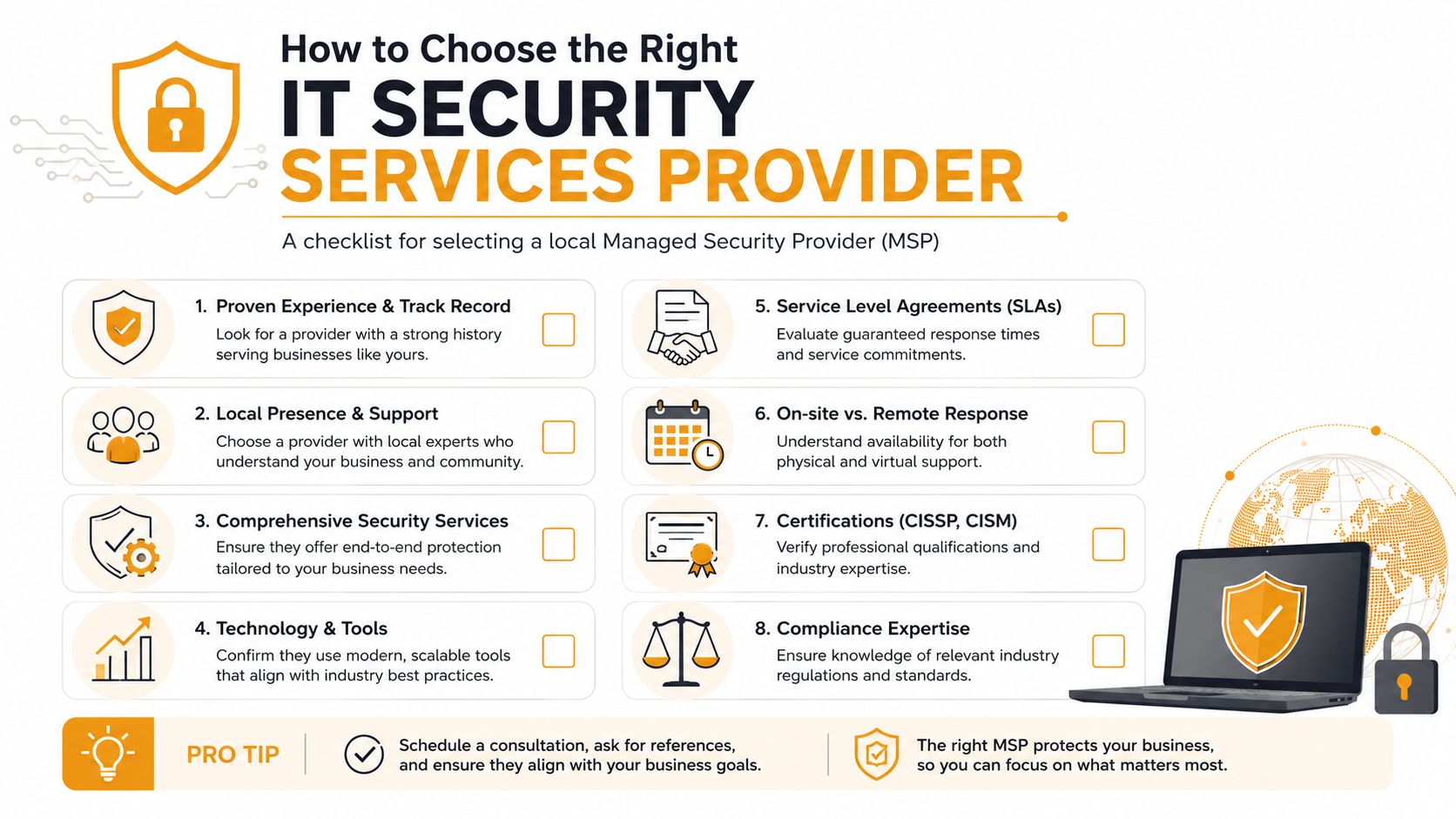
Most provider comparisons start with price because that's easy to line up on a spreadsheet. The problem is that security services aren't interchangeable. Two vendors can both say they “cover cybersecurity” while offering very different monitoring depth, reporting quality, cloud expertise, and response expectations.
Questions to ask in the first meeting
A useful first meeting sounds less like a sales pitch and more like an operational interview. Ask direct questions.
- How do you handle MFA and access control? In Houston's SMB sector, firms with incomplete multi-factor authentication and unpatched firmware face a 3.4x higher ransomware risk, while proactive MFA enforcement cuts incident response costs by 62%, according to the Houston Area Security Index summary.
- What happens when an alert appears after hours? You want to know whether someone investigates or whether alerts wait in a queue.
- What reports will we receive monthly? Good reports should show actions taken, open risks, device coverage, and account hygiene in language leadership can understand.
- How do you support compliance needs? A provider should be able to talk about logging, policy alignment, evidence gathering, and access reviews without getting vague.
- What is included, and what triggers extra fees? Clarity now prevents painful surprises during an incident.
You should also ask whether the provider can support your existing team. Many SMBs don't want full outsourcing. They want a co-managed relationship where an outside team handles monitoring, specialized security work, or after-hours response while internal staff stay involved.
Green flags and red flags
The easiest way to narrow a shortlist is to watch for patterns.
Green flags
- Clear scope: They explain exactly which devices, users, apps, and sites are covered.
- Plain-language communication: They can describe security issues without hiding behind jargon.
- Real process maturity: They talk about escalation paths, documentation, and review cycles.
- On-site realism: They're honest about when a problem can be handled remotely and when someone needs to come in.
- Role clarity: They define what they own, what your staff owns, and how handoffs happen.
Red flags
- One-size-fits-all bundles: If every business gets the same package, your environment probably isn't being assessed properly.
- Vague monitoring claims: “We watch everything” isn't an answer. Ask what they monitor and what response looks like.
- No mention of testing: Recovery plans and backups that aren't tested can fail when you need them.
- Poor explanation of identity security: If they treat MFA as optional or secondary, that's a problem.
- Messy reporting: If sample reports are confusing, future leadership communication will be too.
Ask one simple question near the end of every vendor meeting: “If one employee account is compromised at 9 p.m., what do you do first?” The quality of the answer tells you a lot.
Pricing Guidance and Common Engagement Models
A Houston business owner usually asks the pricing question at the same moment they realize security is not one tool. It is a stack of work. Someone has to watch alerts, tune protections, fix misconfigurations, respond after hours, document incidents, and help the business pass audits or customer reviews. That is why two quotes that look similar on page one can lead to very different results in practice.
The easiest way to compare proposals is to separate how the provider bills from what the provider does. Pricing is the payment method. Scope is the protection you are buying. If you mix those together, quote comparisons get muddy fast.
How security providers usually bill
A monthly managed security fee works like a service contract for ongoing care. You pay a steady amount for recurring work such as monitoring, patch management, account protection, alert review, reporting, and response coordination. For many Houston SMBs, this model fits best because budgeting is easier and support does not disappear after the first project ends.
A per-user model ties cost to headcount. That often suits professional firms, medical practices, and companies with many cloud accounts because identity security follows the employee. A per-device model ties cost to laptops, desktops, servers, and network equipment. That can fit warehouses, shared-workstation environments, and offices where device count matters more than employee count.
Then there is project pricing.
This is common for one-time work such as firewall replacement, Microsoft 365 cleanup, backup redesign, audit preparation, or incident recovery. It is useful when you have a clear start and finish, but it does not replace ongoing monitoring. A locked front door helps, but someone still needs to check the building every night.
Penetration testing usually sits in its own category because it is specialized assessment work rather than day-to-day operations. National guidance from the cybersecurity firm CrowdStrike describes penetration testing as a separately scoped service whose cost varies with environment size, testing depth, and complexity, which is why Houston quotes can differ so widely from one provider to the next (CrowdStrike's penetration testing overview).
Common MSP Pricing Models
| Engagement Model | Description | Typical Cost | Best For |
|---|---|---|---|
| Monthly retainer | Ongoing security coverage with monitoring, patching, alert review, and routine support | Varies by scope and hours covered | SMBs that want predictable operating costs |
| Per-user subscription | Security services priced by staff count | Varies by provider | Offices with stable employee-based growth |
| Per-device subscription | Pricing tied to laptops, desktops, servers, or network gear | Varies by provider | Mixed environments with many shared systems |
| Project-based engagement | One-time security improvement or remediation effort | Varies by scope | Cloud migrations, cleanups, audit prep |
| Penetration testing | Targeted assessment of weaknesses through simulated attack methods | Usually quoted separately | Businesses needing independent validation of controls |
Houston SMB owners should also ask one local question that generic guides often skip. What changes the price in this market? The answer is usually a mix of after-hours coverage, multi-site support across the metro area, compliance needs, and the age of the current environment. A firm handling oil and gas data, payment cards, or healthcare records will usually need more documentation and tighter controls than a small office with basic file sharing.
A lower quote can still become the more expensive choice. If a proposal leaves out incident response, backup oversight, Microsoft 365 hardening, staff security training, or compliance reporting, those costs often return later as add-ons. Compare quotes the way you would compare insurance policies. Do not stop at the premium. Read what is covered.
Local Case Examples and Success Stories
Real businesses rarely experience security problems as neat technical diagrams. They experience them as interrupted work, anxious staff, and rushed decisions. These two Houston-style examples show how the pieces come together without pretending every company has the same setup.
Retail office with ransomware exposure
A small retail company with multiple workstations and shared files had grown quickly. Staff used cloud apps, a local network, and remote logins, but security controls hadn't grown at the same pace. Several users shared broad access to common folders, and the company had no consistent way to review login security across devices.
The warning signs weren't dramatic. A suspicious email hit one employee's inbox. A remote login setup looked looser than it should have. A few systems were lagging behind on routine maintenance. None of that meant disaster by itself, but together it created the kind of opening ransomware groups look for.
The fix was layered, not magical. The business tightened account access, improved endpoint coverage, reviewed remote login exposure, and made backup recovery part of routine operations instead of an afterthought. Just as important, management got a clear escalation path for what staff should do if a device started behaving strangely.
What changed most was confidence. The owner no longer depended on luck and quick reactions from whoever happened to be available. The team had guardrails, better visibility, and a recovery plan that made sense to nontechnical staff.
Healthcare office preparing for audit pressure
A medical office had a different concern. Leadership wasn't reacting to a visible breach. They were worried about whether their systems, user access, and file-sharing practices would hold up under scrutiny. Their environment included Microsoft 365, remote work needs, and sensitive data moving among front-desk staff, clinical personnel, and administrators.
The weak point wasn't one broken tool. It was inconsistency. Some users had broader access than they needed. Shared resources were convenient but not always tightly controlled. Security decisions had accumulated over time instead of being designed deliberately.
The office responded by narrowing access, improving identity controls, reviewing device posture, and cleaning up how sensitive information moved through the environment. They also documented who could access what and under which circumstances. That sounds simple, but it's one of the hardest habits for growing teams to maintain.
Good security work often feels quiet. Staff log in, do their jobs, and don't notice the protections unless something unusual happens. That's usually a sign the system is working.
The broader lesson from both examples is that SMB security succeeds when controls match daily operations. If protections are too loose, risk grows. If they're too awkward, staff work around them. The provider's job is to find the middle ground where security becomes part of how the business runs.
Conclusion and Next Steps
Security buying gets easier once you stop treating it like a single product decision. Houston SMBs need a mix of protections that match how they operate. That means devices, accounts, cloud apps, backups, monitoring, and recovery all need attention.
The right security service should help you answer a few basic questions with confidence. Who has access to what? How are risky logins handled? What happens when a device looks compromised? Can you restore important data and keep working if something breaks? If those answers are fuzzy today, that's your starting point.
A practical next step is to review your current environment with fresh eyes. List your critical systems, remote access methods, cloud apps, user groups, and backup process. Then compare that list against the provider checklist in this guide. You'll quickly see whether your biggest gap is identity control, endpoint coverage, cloud configuration, documentation, or response readiness.
Houston businesses don't need more noise around cybersecurity. They need a plan they can operate. If you choose a provider that explains clearly, documents well, and builds protections around how your staff really work, security becomes much more manageable.
If you want a customized review of your current environment, IT Cloud Global, LLC can help you assess device security, cloud access, backup readiness, and response planning for a Houston SMB setup. A focused consultation can clarify where your biggest gaps are and which security services make sense first.
- Top IT Services Houston TX: Your 2026 SMB Guide
- Managed IT Services Houston TX: 2026 Guide for SMBs
- Cloud Computing Solutions for Small Business: Houston 2026
- Network Cabling Services Houston: Top Providers & Guide
- Managed IT Services for Small Business Near Me: Houston
- Cloud Security Managed Service: The Ultimate 2026 Guide
- Top Managed Services Provider Houston: Your 2026 Guide