


MDR vs EDR: Choosing Cybersecurity for Your Houston Business
You're probably in this spot right now. Your business has Microsoft 365, a few laptops in the field, a server or line-of-business app that can't go down, and an IT person or outsourced provider telling you it's time to tighten security. Then the acronyms start. EDR. MDR. XDR. SIEM. SOC.
That's where most Houston business owners get stuck. Not because they don't care about security, but because they're trying to make a practical decision with real consequences for uptime, payroll, client trust, and budget. Buying the wrong thing means one of two bad outcomes. You either overspend on a service you don't need, or you buy a tool your team can't realistically operate.
For most small and midsize businesses, the question isn't “Which cybersecurity product sounds more advanced?” It's “Who is going to watch this, investigate alerts, and act when something goes wrong at 2 a.m. on a Sunday?” That staffing question is what separates a smart security investment from shelfware.
Below is the direct answer. No jargon for the sake of jargon. Just a clear breakdown of MDR vs EDR, how they affect your operations, and which one usually makes more sense for a Houston SMB.
Table of Contents
- Your Business Needs Security But Which Kind
- EDR Is the Tool MDR Is the Service
- Side by Side MDR vs EDR Feature Comparison
- The Real Cost Staffing and Operational Differences
- A Practical Checklist for Making Your Decision
- The Right Security Blueprint for Houston SMBs
- Frequently Asked Questions About MDR and EDR
Your Business Needs Security But Which Kind
A typical owner calls after something small but unsettling. An employee clicked a phishing email. Microsoft 365 started flagging suspicious sign-ins. A laptop went missing. Nothing catastrophic happened, but it was close enough to raise a bigger question: are we actually protected, or are we just hoping antivirus is enough?
That's when the MDR vs EDR debate usually shows up.
Here's the problem. Most vendors explain this choice from their side of the table. They talk features, dashboards, telemetry, and response actions. You don't run your business from a dashboard. You run it by keeping people productive, systems available, and risk under control without building an in-house security department by accident.
A Houston SMB has different constraints than a large enterprise. Your office manager may wear three hats. Your IT generalist may be strong on support, Microsoft 365, printers, and vendor coordination, but not threat hunting. Your leadership team may need stronger protection without taking on another full-time operational burden.
If your security plan depends on someone noticing and interpreting alerts during a busy workday, it isn't much of a plan.
That's why this decision matters so much. EDR can be a strong security layer. MDR can be the better business outcome. They aren't the same purchase, and treating them like interchangeable products is where companies make expensive mistakes.
A useful way to frame it is simple: are you buying a security tool for your team to run, or are you buying a managed security function that helps carry the load? That difference affects response speed, after-hours coverage, internal workload, and how much confidence you'll have when something suspicious hits your environment.
Here's the short version before we go deeper.
| Area | EDR | MDR |
|---|---|---|
| What it is | Security tool | Managed security service |
| Main focus | Endpoint visibility and response controls | Monitoring, investigation, triage, and response |
| Who runs it | Your internal team or IT provider | External analysts plus detection tools |
| Coverage | Usually endpoint-focused | Typically broader across endpoint, network, cloud, identity, email, logs |
| Best fit | Businesses with security staff capacity | Businesses that need expert help and 24/7 coverage |
| Main trade-off | More control, more internal burden | Less operational burden, service dependency |
EDR Is the Tool MDR Is the Service
EDR stands for Endpoint Detection and Response. MDR stands for Managed Detection and Response. If you remember one thing from this article, remember this: EDR is the tool. MDR is the service wrapped around tools.
According to CrowdStrike's explanation of EDR vs MDR vs XDR, EDR installs software agents or sensors on endpoints to collect telemetry from laptops, servers, and other devices. MDR uses detection technology plus human analysts to monitor, investigate, triage, and guide response around the clock. That's the cleanest definition because it gets straight to the operational difference.
Think alarm system versus security team
EDR is like installing a high-end alarm system in your building. It can detect suspicious behavior on a laptop, server, or workstation. It may isolate a device, stop a malicious process, or surface forensic data that helps explain what happened.
But the alarm still has to go somewhere.
MDR is the security team watching the alarm system all day and all night. They review alerts, sort real threats from noise, investigate what's happening, and help contain the problem before it spreads. That service layer is what many small businesses need, because owning a powerful tool doesn't mean you have the staff to run it well.
Practical rule: If nobody is clearly responsible for reviewing alerts and taking action after hours, EDR alone is incomplete.
What EDR does well
EDR gives strong endpoint visibility. That matters because endpoints are where a lot of attacks begin or become visible first. A modern EDR platform can help your team see suspicious processes, unusual behavior, and device-level activity that basic antivirus won't explain clearly.
For businesses comparing tools, this guide on best endpoint protection for small business is useful because endpoint protection is still a core layer even if you ultimately choose MDR.
What MDR changes
MDR turns detection into operations. Instead of handing your team a pile of alerts, it provides people who monitor, investigate, and respond as an ongoing service. That's why business owners who are still understanding MDR security often realize the purchase isn't just about software. It's about whether they want to own the daily security workload or offload it.
The difference sounds small on paper. In practice, it's huge. One model gives you a console. The other gives you coverage.
Side by Side MDR vs EDR Feature Comparison
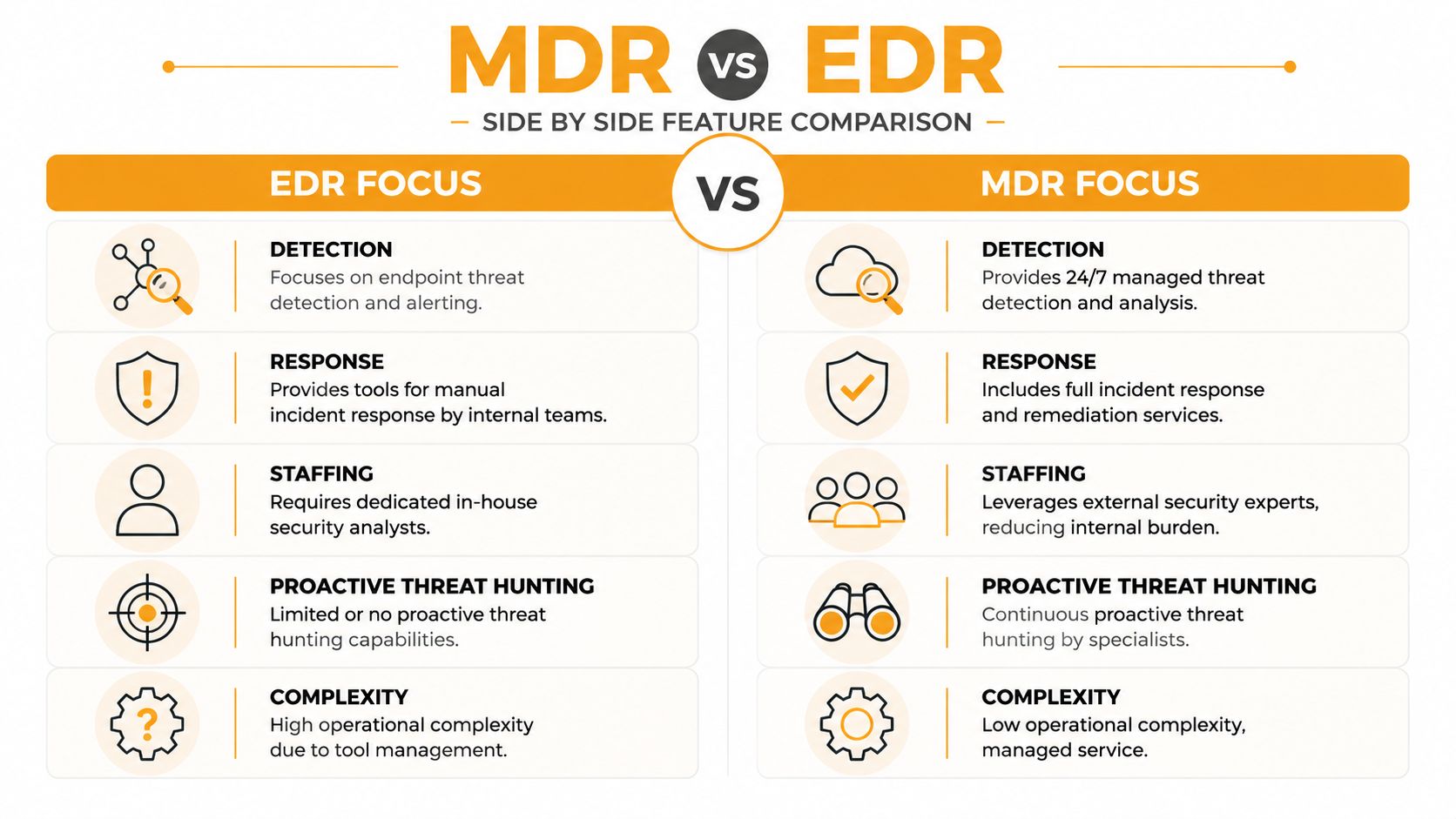
If you strip away marketing language, MDR vs EDR comes down to who handles the work after a threat signal appears. The comparison below makes that visible fast.
| Category | EDR focus | MDR focus |
|---|---|---|
| Detection | Detects suspicious endpoint activity | Monitors and analyzes detections continuously |
| Response | Provides response tools for your team | Delivers guided or managed response through analysts |
| Scope | Centered on endpoints | Commonly includes endpoint plus other data sources |
| Expertise | Depends on your internal staff | Includes external security expertise |
| Threat hunting | Limited unless your team performs it | Commonly includes continuous threat hunting |
| Operations | You own the alert queue | Provider helps own the outcome |
Threat detection
EDR is built to observe endpoint behavior. It's strong at surfacing suspicious activity on laptops, servers, and user devices. That's valuable, but detection by itself doesn't resolve an incident.
MDR takes those detections and adds continuous review. Instead of your internal team checking alerts when time allows, analysts monitor and investigate as part of the service.
The most important difference in detection isn't whether an alert exists. It's whether someone trustworthy is looking at it when it matters.
Incident response
EDR usually gives you response actions at the endpoint level. That might include isolation, process termination, or investigation tools. Those capabilities are useful, but they still require someone to decide what to do, when to do it, and how to coordinate the next steps.
MDR closes that gap. The service model includes triage and response guidance, and often direct operational help. For a small business without a dedicated security analyst, that's where its core value shows up.
Technology scope
Many SMBs underestimate the difference. Per SentinelOne's overview of EDR vs MDR vs XDR, EDR is typically constrained to endpoint telemetry and endpoint actions, while MDR commonly expands to multiple telemetry sources such as endpoint, network, cloud, Microsoft 365, identity, logs, and events. The same analysis notes that MDR often adds continuous threat hunting and 24/7 monitoring, which makes it a better fit when internal SOC capacity is limited.
That broader visibility matters because attacks don't stay neatly on one laptop. A compromised inbox can lead to account abuse. A stolen identity can lead to cloud access. An endpoint signal may only make sense when paired with Microsoft 365 or identity activity.
Human expertise
This category is blunt. EDR expects your team to know what they're looking at. MDR gives you specialists who do this as their job.
That doesn't mean EDR is weak. It means EDR is only as effective as the people operating it. A strong internal security team can get a lot from EDR. A lean SMB IT team usually has other priorities, and security alert analysis becomes one more urgent task in an already crowded day.
Proactive threat hunting
Many business owners don't think about threat hunting until after an incident. They should. It's the difference between waiting for obvious alarms and actively looking for suspicious patterns.
With standalone EDR, threat hunting only happens if your people have the time and skill to do it. With MDR, it's commonly included as part of the service. That changes your posture from reactive to more active, which is exactly what most SMBs are missing.
The Real Cost Staffing and Operational Differences
This is the section that should drive your decision.
A lot of businesses compare EDR and MDR as if they're comparing two software subscriptions. That's the wrong math. A better comparison is tool cost plus staffing burden versus service cost plus outsourced expertise.

What EDR really asks from your team
Buying EDR means you now own several ongoing responsibilities:
- Deployment and tuning: Agents have to be installed, configured, and adjusted to fit your environment.
- Alert review: Someone has to check what the tool is surfacing and separate noise from real threats.
- Investigation: Suspicious behavior needs context. Is it malware, a bad script, a user mistake, or a legitimate admin task?
- Response coordination: If a device should be isolated or a user account locked down, someone has to make that call and manage the fallout.
- After-hours coverage: Threats don't respect business hours. If your team clocks out, your response window stretches.
This is why a lot of SMBs buy a good endpoint tool and still feel exposed. The platform may be strong, but the process around it is thin.
What MDR changes operationally
MDR changes the labor model. Instead of handing your team a queue of alerts, it adds security analysts and around-the-clock monitoring as part of the service. That means fewer interruptions for your internal IT staff and less dependence on one overextended person being available at the right moment.
For a business owner, this usually translates into three practical benefits:
- Your IT team stays focused: They can spend more time on user support, projects, cloud administration, and uptime.
- Security gets continuous attention: Monitoring doesn't stop at 5 p.m.
- Decision-making gets faster: Analysts help determine what's urgent and what isn't.
A quick overview like the video below can help if you're comparing service models with your leadership team.
The hidden cost most owners miss
The biggest hidden cost of EDR isn't the software. It's operational inconsistency.
If your internal team is strong and available, EDR can work well. If that same team is buried in password resets, onboarding, vendor tickets, Wi-Fi issues, and Microsoft 365 administration, alert handling gets delayed or rushed. That's not a personnel failure. It's a capacity problem.
A security tool doesn't reduce risk by existing. It reduces risk when qualified people act on what it finds.
For many Houston SMBs, MDR ends up being the cleaner business choice because it packages the expertise, coverage, and day-to-day monitoring into one model. That doesn't make EDR obsolete. It means EDR alone often leaves a staffing gap that smaller organizations can't afford to ignore.
A Practical Checklist for Making Your Decision
Most businesses don't need more theory. They need a clean decision framework they can use in a leadership meeting.
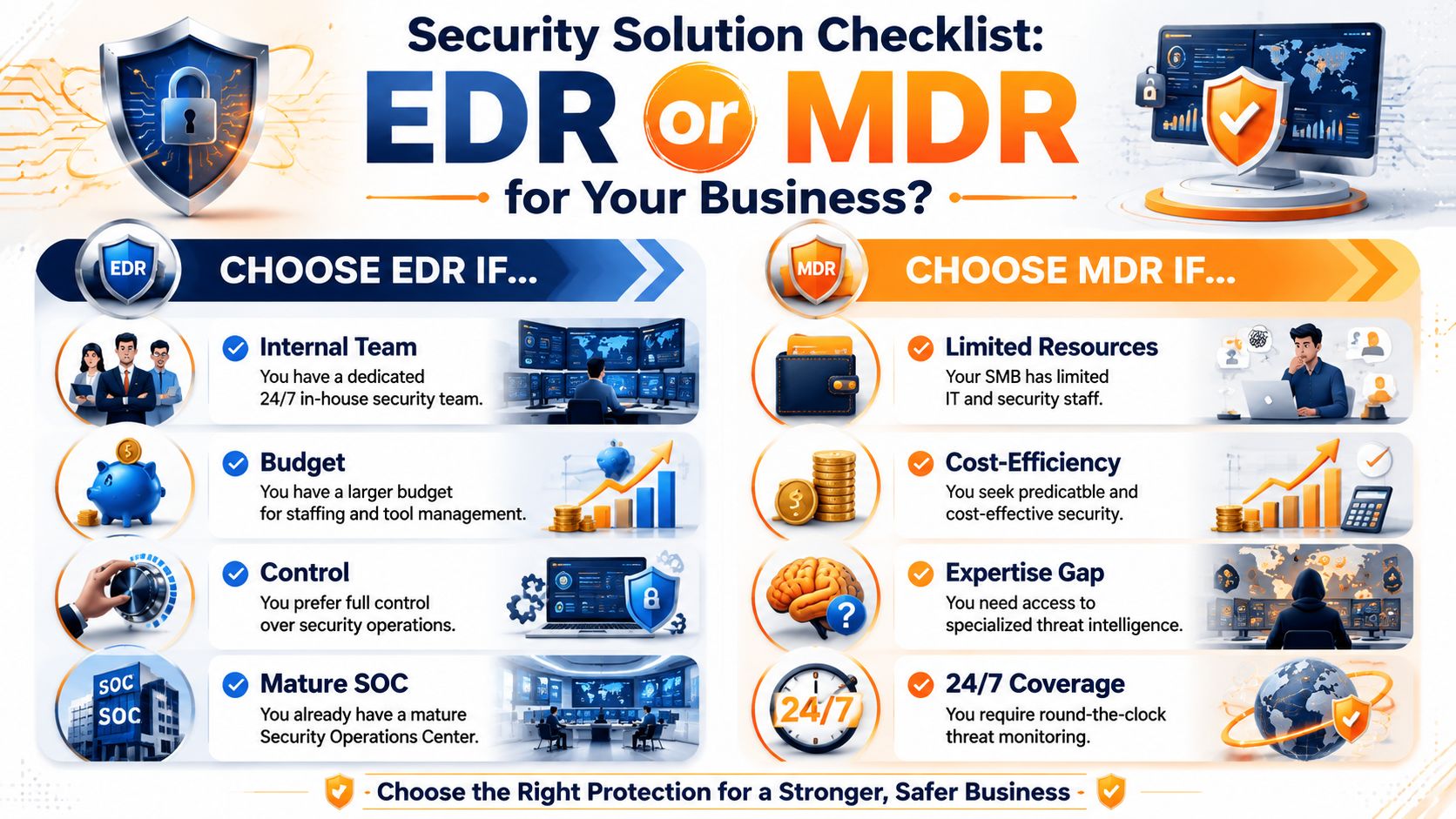
Choose EDR if these statements are true
EDR makes sense when your business already has the people and process to run it properly.
- You have real security coverage: Not just general IT support. You have staff who can review alerts, investigate activity, and respond without dropping everything else.
- You want direct control: Some companies prefer to own the tooling, the policies, and the response decisions internally.
- Your environment is simpler: If your biggest concern is endpoint behavior and you're not trying to stitch together broader monitoring across identity, cloud, and email, EDR can be enough.
- You're comfortable managing the queue: Alerts need human follow-up. If your team can do that consistently, EDR can be a good fit.
Choose MDR if these statements sound like your business
MDR is usually the better path when your company needs stronger security without building an internal SOC.
- Your IT team is lean: If one or two people are handling support, infrastructure, vendors, and user issues, they probably can't also deliver security monitoring around the clock.
- You need broader visibility: Many attacks involve Microsoft 365, cloud apps, identity systems, and email. If those matter to your business, managed coverage becomes more appealing.
- You want predictable operations: A managed service gives you a clearer operating model than relying on whoever happens to be available when alerts hit.
- You need help with modern cloud risk: If your environment relies heavily on Microsoft 365, this guide on Enterprise Microsoft 365 security is worth reviewing because identity and email security often influence whether MDR brings more value.
If your answer to “who investigates suspicious activity after hours?” is vague, choose MDR.
Questions to ask any vendor
Use these questions whether you're evaluating an EDR platform or an MDR provider.
- Who is responsible for triaging alerts?
- What data sources are included beyond endpoints?
- What happens after hours or on weekends?
- How is response handled if a device or account needs immediate action?
- What does my internal team still need to do day to day?
- How are Microsoft 365 and identity events handled?
- How do you document incidents for leadership, compliance, or insurance reviews?
For a broader security baseline before you choose a product or service, review these cybersecurity best practices for small businesses. That helps separate foundational gaps from detection-and-response needs.
The Right Security Blueprint for Houston SMBs
Here's the direct recommendation. For most Houston small and midsize businesses, MDR is the better fit.
Not because EDR is weak. It isn't. The issue is that EDR asks for operational maturity that most SMBs don't have. Someone still has to monitor, investigate, and respond. If your company doesn't already have a real security operations function, buying EDR alone often creates a false sense of confidence.
According to Kaseya's breakdown of MDR vs EDR, EDR emerged first as a technology category focused on endpoint telemetry, while MDR evolved later as a managed service layer that adds human analysts, 24/7 monitoring, and response operations. That same explanation makes an important point for SMBs: MDR didn't replace EDR so much as package it with expert operations and broader visibility. That's exactly why the MDR model tends to fit growing businesses better.
Why this recommendation fits Houston businesses
Houston companies often operate with lean teams and mixed environments. Office staff depend on Microsoft 365. Remote users move between home, field, and office. Leadership expects reliable uptime. Internal IT staff, if they exist, are usually responsible for much more than security.
That makes the staffing burden the deciding factor.
A well-run security program also needs layers. Endpoint protection matters, but so do identity controls, Microsoft 365 protections, network security, and response planning. If you want a practical way to think about that approach, this overview of security in layers is worth reading.

The blunt version
If your company has a mature in-house security capability, EDR can be enough.
If your company has a capable general IT team but no dedicated SOC, no overnight coverage, and no appetite for turning security operations into another internal department, MDR is the smarter move. It aligns better with how SMBs work. It protects the business without assuming resources you don't have.
That's the blueprint most Houston SMBs should follow.
Frequently Asked Questions About MDR and EDR
Does MDR replace my existing antivirus
Usually, no. MDR is a managed security service model, not just a basic antivirus replacement. In many cases, it works alongside endpoint protection and uses detection technology as part of the service. The better question is whether your current tools are being actively monitored and acted on.
Can I start with EDR and move to MDR later
Yes, that's a common path. Some businesses begin with endpoint-focused tooling and later add managed monitoring and response when they realize the internal workload is heavier than expected. The important part is being honest up front about whether your team can handle alert review and response consistently.
Is MDR only for large companies
No. In practice, MDR often makes the most sense for smaller organizations because they don't have a full in-house SOC. Large enterprises may build their own security operations. SMBs usually need outside expertise more, not less.
If I choose MDR, do I still need internal IT involvement
Yes. MDR reduces the security operations burden, but it doesn't eliminate internal responsibility. Your team still needs to coordinate on user impact, device access, policy changes, business context, and remediation steps. The difference is that they aren't carrying the detection and triage workload alone.
What's the biggest mistake businesses make in the MDR vs EDR decision
They buy based on features instead of operations. A business chooses EDR because the dashboard looks powerful, then discovers nobody has the time to manage it properly. The safer decision is the one your team can support every day.
If you're weighing MDR vs EDR and want a straightforward recommendation based on your staff, systems, and risk level, talk with IT Cloud Global, LLC. Their Houston team helps businesses build practical security plans that protect uptime, reduce operational strain, and fit the typical operations of SMBs.
- Managed IT Services Houston TX: Your 2026 Guide
- Managed IT Services in Houston: A Guide for SMBs
- Disaster Recovery Companies: An SMB Survival Guide
- How to Choose a Managed Service Provider: A 2026 Guide
- Best Endpoint Protection for Small Business: 2026 Guide
- Modernization of Technology for Houston SMBs
- Backup Data Offsite: An SMB’s Essential Guide