


Your 2026 Disaster Recovery Plan Checklist
When Disaster Strikes, Will Your Business Survive?
A server crashes at 9:12 a.m. Your line-of-business app won't open. Staff can't access customer files. Your phones still ring, but your team can't answer basic questions because the system behind everything is down. By lunch, you're losing sales, missing deadlines, and fielding annoyed emails from customers who assume you weren't prepared.
That same pressure hits when a flood takes out office equipment, a power issue corrupts a virtual host, or ransomware locks your shared drives. In each case, the technical problem becomes a business problem fast. Payroll stalls. Orders back up. Your reputation takes a hit. Your employees get stressed, then confused, then unproductive.
Most small and midsize businesses know they need a plan. Far fewer have one that functions under pressure. Only about half of companies have implemented a disaster recovery plan, and only one in four of those test it at least once a year, according to PhoenixNAP's disaster recovery statistics roundup. That gap matters because a plan that isn't tested often won't save you when systems fail.
This disaster recovery plan checklist gives you a practical order of operations. It's built for SMBs that need real resilience without enterprise-level waste. You'll see what to prioritize first, where cloud and on-prem systems change the answer, and where an MSP can save you time, money, and mistakes.
Table of Contents
- 1. Scope and Asset Inventory Know What You're Protecting
- 2. Define RTO and RPO Set Your Recovery Targets
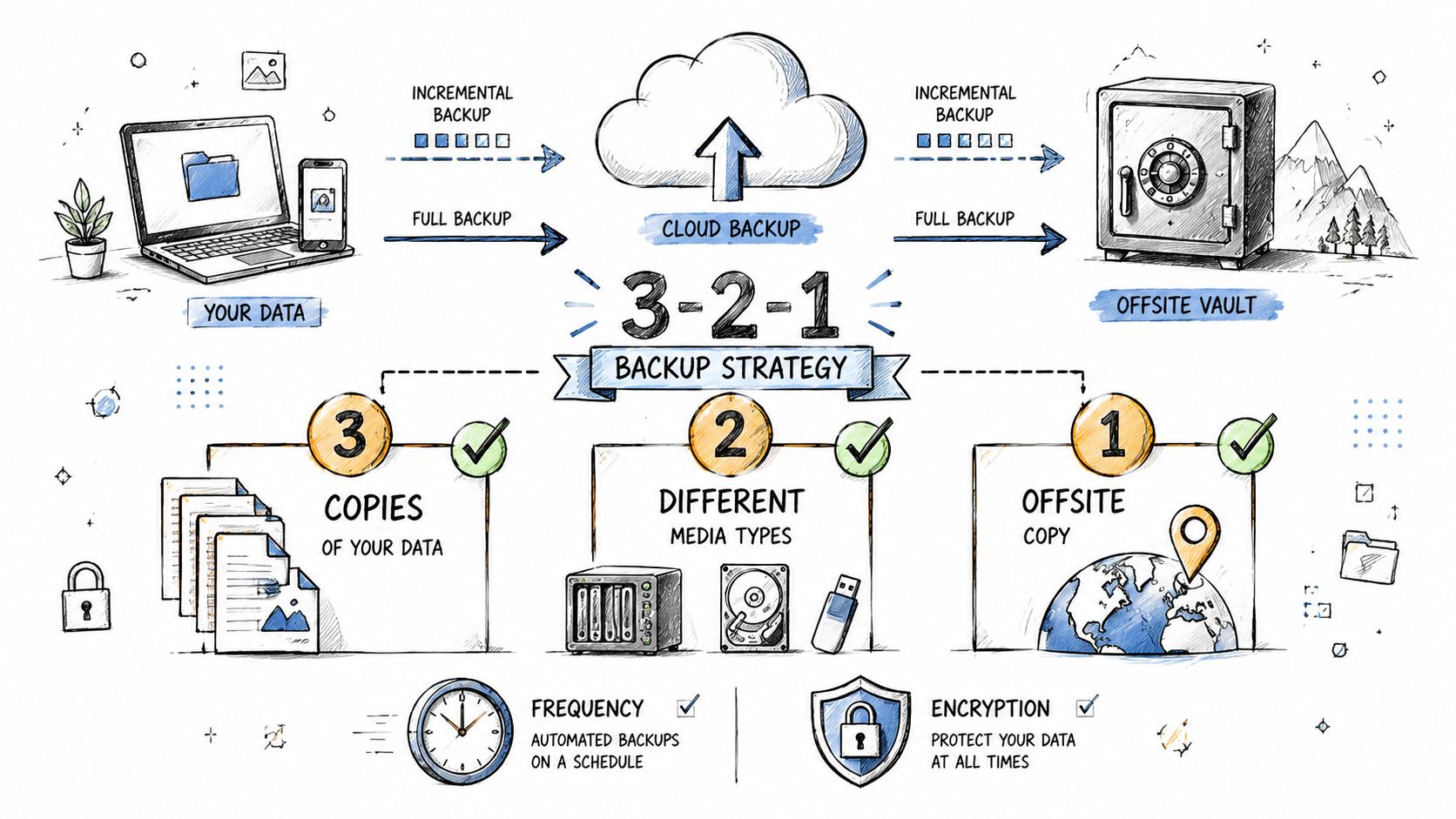
- 3. Verify Backups Your Last Line of Defense
- 4. Plan Failover Procedures Cloud and On-Prem
- 5. Build a Communication & Escalation Plan
- 6. Schedule Regular Testing
- 7. Ensure Compliance and Maintain Documentation
- 8. Maintain Key Vendor and Partner Contacts
- 9. Conduct a Post-Incident Review
- 9-Point Disaster Recovery Plan Comparison
- Turn Your Checklist into a Resilient Business
1. Scope and Asset Inventory Know What You're Protecting
If you don't know exactly what your business depends on, your recovery plan will be guesswork. That's how SMBs waste precious hours restoring the wrong server first while the system that runs sales, dispatch, scheduling, or billing stays offline.
Start with a full inventory. Include physical servers, laptops, firewalls, switches, Wi-Fi gear, virtual machines, Microsoft 365 data, Google Workspace data, line-of-business apps, cloud workloads in Azure or AWS, shared drives, backup appliances, and critical paper records that should be digitized. Department heads need to help with this because IT never sees every dependency from accounting, operations, HR, and customer service.
Build one reliable source of truth
Use a CMDB or at least a disciplined asset register in Microsoft SharePoint, Confluence, or a protected Excel workbook with strict ownership. Document what each asset does, who owns it, where it lives, what it connects to, and what breaks if it goes down.
For example, your CRM may rely on Microsoft Entra ID, a SQL database, a VPN tunnel, and a backup job that only one engineer understands. If that chain isn't documented, your team will restore pieces in the wrong order.
- List business function first: Tag each system by outcome, such as invoicing, scheduling, payments, inventory, email, or customer support.
- Map dependencies clearly: Note which servers, databases, SaaS tools, and network paths each application needs.
- Store a copy off-site: Keep the inventory in the cloud and in a secure offline location so you can still access it if your main network is down.
- Update after every change: New firewall, new VM, new Microsoft 365 tenant setting, new vendor integration. Add it immediately.
Practical rule: If a new system goes live and it isn't added to your inventory the same week, assume it won't be recovered correctly during an outage.
2. Define RTO and RPO Set Your Recovery Targets
Your server goes down at 9:15 a.m. Orders stop. Staff switch to pen and paper. Customers start calling. If your team still has to ask, “How fast do we need this back?” and “How much data can we afford to lose?”, you do not have a recovery target. You have a guess, and guesses get expensive fast.
Set Recovery Time Objective and Recovery Point Objective for each service that matters to revenue, operations, and customer trust. RTO is the maximum downtime you can absorb before the business starts taking real damage. RPO is the maximum data loss you can absorb before rework, lost orders, compliance trouble, or customer disputes become a problem. Those two numbers shape every practical decision after that, including backup frequency, failover design, cloud replication, and whether your current IT support can meet the target.
Tie recovery targets to business impact first
This decision belongs to the business owner and department leads, not just IT. A five-minute outage for point of sale, scheduling, or order entry can cost more than an eight-hour outage for HR files. If you treat both the same, you either overspend protecting low-priority systems or underprotect the systems that keep cash coming in.
Small and midsize businesses need to be disciplined here. You do not have enterprise budgets, duplicate data centers, or spare staff sitting idle. Set aggressive targets only where downtime has a clear cost. Give lower-priority systems longer recovery windows and use simpler, lower-cost protection for them.
A practical example makes the point. A dental office may need scheduling, phones, and patient communications restored first, while archived records can wait. A manufacturer may need ERP, barcode scanners, shipping, and internet connectivity back before internal file shares. A hybrid setup with Microsoft 365, a line-of-business app on a local server, and a cloud VoIP platform also needs separate targets for each piece. One number for “IT” is useless.
Use this checklist when setting targets:
- Assign an RTO and RPO by system: Email, ERP, CRM, file shares, VoIP, internet, identity services, virtual hosts, and key SaaS apps all need their own targets.
- Start with the cost of downtime: Ask what one hour without this system costs in missed sales, payroll disruption, production delays, or customer churn.
- Match RPO to real work patterns: If your team enters orders all day, a nightly backup is not enough. Review your offsite backup planning options and set backup or replication intervals that fit the business.
- Separate ideal from affordable: If you want near-zero downtime, expect to pay for replication, standby infrastructure, better monitoring, and more hands-on support.
- Document who approved each target: Owners and department heads need to sign off, because they are accepting the business risk.
If you work with an MSP, use them properly. Have them price three tiers for each critical system: basic recovery, faster recovery, and near-continuous recovery. That gives you a business decision instead of a vague technical debate. For many SMBs, that outside support is the only realistic way to cover both cloud and on-prem systems without adding full-time internal staff.
Vague recovery targets create two bad outcomes. You either overbuy protection for everything, or your team restores systems in the wrong order during an outage. Specific targets prevent both.
3. Verify Backups Your Last Line of Defense
A completed backup job doesn't mean you're safe. It only means software says it wrote something somewhere. That's not the same as proving you can restore a file, a mailbox, a VM, or an entire application stack under pressure.
Many SMBs get burned, paying for backup storage for years only to discover during a ransomware event that the restore chain is broken, the retention policy is wrong, or the backup never included Microsoft 365, Salesforce exports, or endpoint data.
Test restoration, not just backup success
Your disaster recovery plan checklist must include restore verification. Run file-level restores. Restore a virtual machine into an isolated environment. Confirm user permissions, application functionality, and database integrity after recovery. If you use Veeam, Datto, Acronis, Cove, or Azure Backup, use the product's test and reporting features, but don't stop there. Someone still needs to open the restored system and verify it works.
Offsite backup planning matters because a local-only backup can fail with the same event that took down your production systems. Flood, fire, theft, hardware failure, and ransomware don't care that your backup appliance was sitting in the next room.
A backup you've never restored is an assumption, not a safeguard.
Use a simple runbook for each restore type. One for single-file recovery. One for a mailbox. One for a full VM. One for a domain controller. One for your cloud tenant's critical data set.
- Cover every environment: Include on-prem servers, NAS devices, cloud workloads, endpoints, and SaaS data.
- Keep at least one isolated copy: Air-gapped or logically isolated backups help when malware spreads across the network.
- Document exact restore steps: Don't rely on memory or the one engineer who “usually handles backups.”
- Verify access rights after restore: Files restored without usable permissions can still stall operations.
This step is where an MSP often earns its keep. A good provider automates reporting, monitors failed jobs, validates restore points, and gives you tested procedures instead of hopeful assumptions.
4. Plan Failover Procedures Cloud and On-Prem
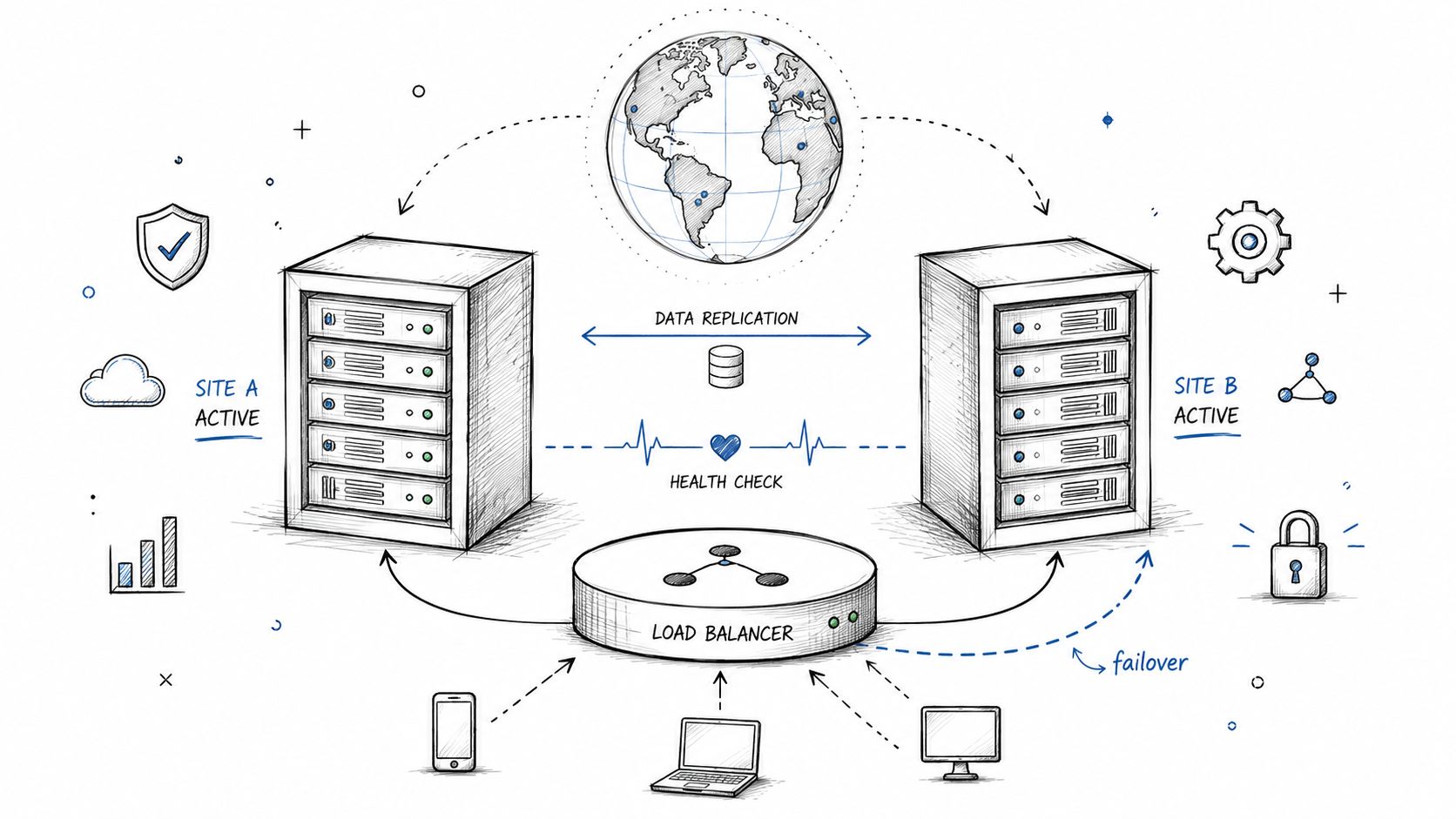
Backups help you recover. Failover helps you keep operating. If a host dies, a site loses power, or a cloud workload becomes unavailable, your team needs a written sequence for moving production to a secondary option.
That sequence must fit your environment. A small law firm with one office and Microsoft 365 has a different failover plan than a manufacturer running local file servers, line-of-business apps, warehouse workstations, and cloud-based email. Hybrid environments are now normal, so your disaster recovery plan checklist has to account for both on-prem and cloud handoffs.
Write the switch-over steps before you need them
Document who declares failover, what criteria trigger it, which systems move first, how DNS changes, how users reconnect, and how you verify the backup environment is stable. Don't leave DNS updates, VPN changes, Azure region deployment, or Hyper-V host recovery as “IT will handle it.”
For cloud workloads, use tools your team already understands. Azure Site Recovery, AWS Elastic Disaster Recovery, and infrastructure-as-code tools can reduce manual work if they're configured properly. For on-prem systems, document host-level recovery, spare hardware requirements, and the order for bringing up domain services, storage, and business apps.
- Separate high availability from disaster recovery: Automatic clustering is useful, but it doesn't replace a broader DR plan.
- Include user access steps: Staff need to know how to reach the recovered system, whether through a VPN, new URL, or remote desktop gateway.
- Plan failback too: Moving to the backup environment is only half the job. You also need a controlled return to normal operations.
- Use your MSP strategically: An MSP can manage DNS changes, cloud orchestration, vendor escalations, and after-hours cutovers when your internal team is thin.
The DRaaS market is projected to grow from USD 16,112.2 million in 2025 to USD 46,089.9 million by 2032, with a CAGR of 16.2%, according to MarketsandMarkets research on DRaaS. For SMBs, that projection reflects a practical shift toward managed off-site recovery instead of building every layer in-house.
5. Build a Communication & Escalation Plan
Technical recovery falls apart when communication is sloppy. If your staff doesn't know whether to stop work, switch to paper, disconnect devices, contact customers, or wait for instructions, you create confusion on top of downtime.
Your communication plan should cover four groups: employees, leadership, customers, and outside partners. Each group needs different information and a different tone. Staff need immediate direction. Executives need impact and decision points. Customers need status and expected next steps. Vendors need enough detail to support recovery.
Decide who speaks and when
Assign one incident lead. Assign a backup. Assign a customer-facing communicator. Assign the person who talks to your ISP, cloud vendors, cyber insurance contact, legal counsel, and MSP. If nobody owns those tasks, multiple people send conflicting messages or, worse, nobody sends anything.
A good SMB communication plan is simple and printed. Include mobile numbers, personal email addresses where appropriate, escalation order, prewritten outage messages, and decision triggers for when to notify customers.
- Create a phone tree: Don't rely only on email or Teams if your core systems may be unavailable.
- Store the plan in multiple places: Printed copies, secure cloud storage, and local offline copies all matter.
- Prepare message templates: One internal message, one customer message, one vendor escalation template.
- Update customers early: Silence makes clients assume the worst.
If you need a model for incident alerting and escalation workflows, reviewing a Resgrid vs Pagerduty comparison can help you think through alert routing and acknowledgment paths, even if you use a simpler SMB setup.
If your team has to ask, “Who's supposed to tell customers?” your communication plan already failed.
Don't ignore the human side. Some guidance emphasizes people before systems, and that's correct. Your employees can't execute recovery well if they don't know where to report, how to stay safe, or what to do next.
6. Schedule Regular Testing
Friday at 4:40 p.m., your main file server locks up, your team cannot open quotes or invoices, and the backup you assumed was fine has never been restored to a working system. That is how small businesses find out their disaster recovery plan was only paperwork.
Testing turns a written plan into something your business can effectively use under pressure. It exposes bad credentials, missing dependencies, outdated runbooks, and recovery times that look acceptable on paper but fail in real operations. For an SMB, that gap is expensive. Every extra hour of downtime means lost revenue, frustrated customers, payroll wasted on stalled staff, and a higher chance that a short outage turns into a week-long mess.
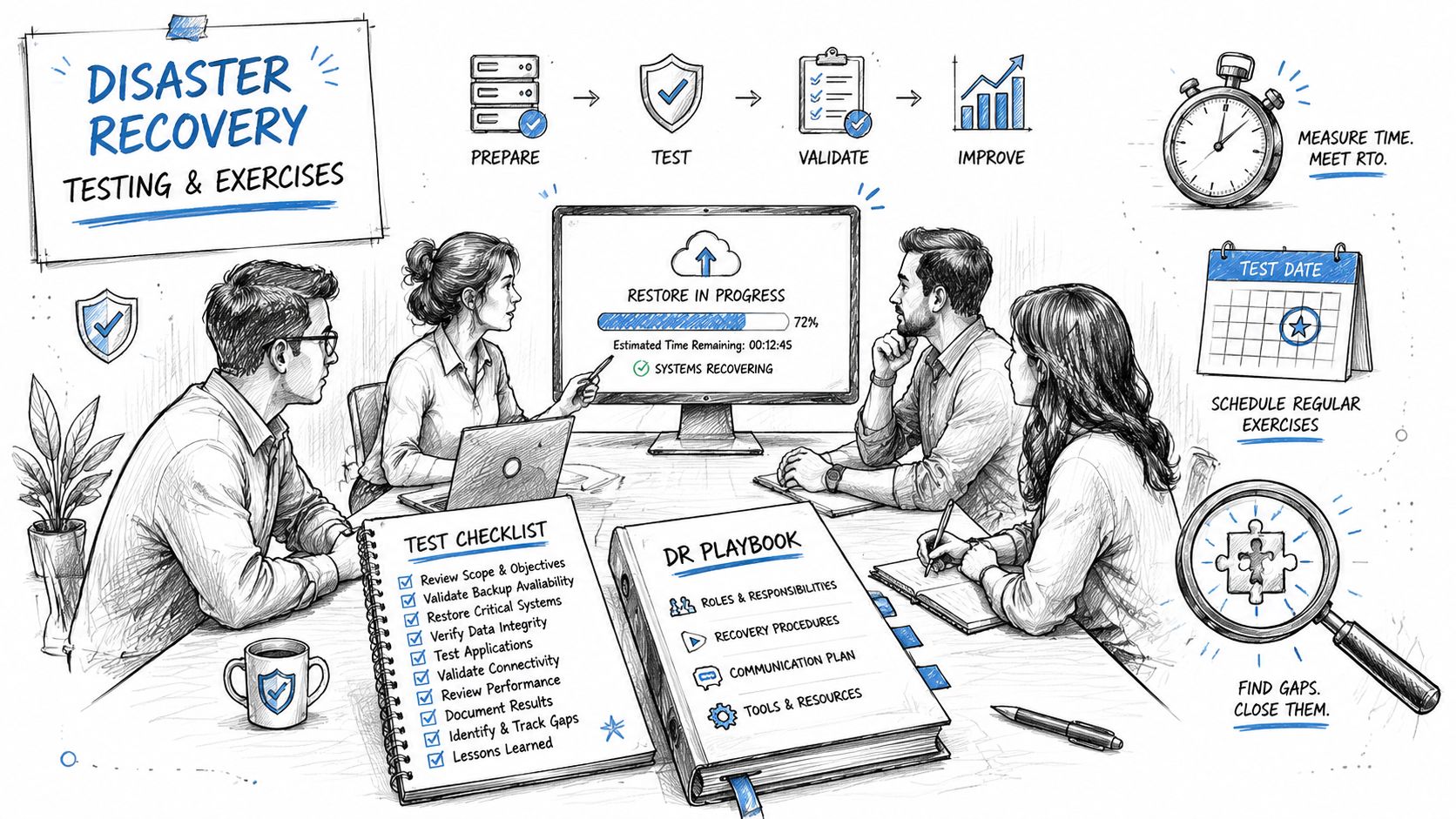
Start with exercises your team can afford to run consistently. A tabletop session is the right first step for many small and midsize businesses because it costs little, surfaces obvious gaps fast, and helps your internal team and MSP work from the same playbook. Use a realistic scenario tied to your actual risk. Ransomware on a file server, a failed hypervisor, a Microsoft 365 outage, or internet loss at the main office are all better than vague disaster scenarios.
Then test the technical recovery steps that keep the business running. Restore a VM. Recover a file share. Fail over a cloud workload. Confirm your line-of-business application works from the backup environment, not just that the server boots. If accounting cannot post invoices or customer service cannot access records, the recovery did not succeed.
- Measure actual recovery time: Compare what happened in the test to your RTO and RPO, not what the software dashboard says.
- Document every point of friction: Missing MFA access, stale DNS records, broken scripts, undocumented vendor dependencies, and role confusion all slow recovery.
- Fix the plan right after the test: Update runbooks, contacts, credentials storage, and recovery order while the failure is still fresh.
- Include business users: One person from finance, operations, or customer service can catch application issues your IT team will miss.
Keep the cadence realistic. Quarterly tabletop exercises and at least annual hands-on restore testing are a practical baseline for many SMBs. If your environment changes often, test more often. A cloud migration, new office, ERP change, cybersecurity insurance requirement, or switch to a new MSP should trigger another round of testing because your old assumptions are now risky.
If you do not have in-house time or technical depth, use your MSP. A good MSP should help script tests, validate restores, and prove that cloud and on-prem systems recover in the right order. That support gives small teams coverage they usually cannot build alone.
For more practical methods, this guide for security teams on DR testing offers useful examples you can adapt to an SMB environment.
You do not need enterprise orchestration software to test well. You need a repeatable schedule, clear pass or fail criteria, and the discipline to fix what breaks before a real incident forces the lesson.
7. Ensure Compliance and Maintain Documentation
A ransomware hit at 9:10 a.m. Your IT lead is out, your backup admin left six months ago, and the only network diagram anyone can find is from before your cloud migration. Recovery slows to a crawl. So does customer service, billing, and every promise you made to clients.
That is why documentation matters. It is not paperwork for its own sake. It is the difference between a controlled recovery and an expensive guessing exercise. For small and midsize businesses, bad documentation hurts more because you have fewer people, less redundancy, and less time to sort out missing details during an outage. If you operate in healthcare, finance, legal, or retail, poor records also create audit problems, breach reporting risk, and avoidable legal exposure.
Keep documents usable under stress
Write your runbooks for the person who did not build the system. If another qualified engineer, internal admin, or MSP technician cannot follow the steps without calling the original author, the document is incomplete. Include screenshots, IP ranges, DNS records, admin portals, MFA recovery steps, credential vault location, vendor account details, and the exact recovery order for cloud and on-prem systems.
Store documentation in more than one place. Keep a secured cloud copy, an offline or read-only copy, and a hard copy of the most important recovery procedures off-site. If your identity platform or file share is unavailable, your plan still needs to be reachable.
Review documentation at least annually and after any meaningful IT change. New firewall rules, a Microsoft 365 licensing change, a server migration, a remote office, or a new compliance requirement can make old instructions wrong fast.
- Version every document: Add the date, owner, approver, and a short change log.
- Match the actual environment: If you use Intune, SharePoint, VMware, Hyper-V, Azure, Amazon S3, SentinelOne, or a local NAS, name those exact tools and settings.
- Document compliance steps clearly: Include retention rules, access logging, approval requirements, breach reporting timelines, and how protected data must be handled during recovery.
- Assign ownership: Every runbook, diagram, and policy needs one person or provider responsible for updates.
- Tie documents to actual systems: Network maps, backup jobs, cloud tenants, endpoint tools, and line-of-business apps should all point back to the right recovery instructions.
Do not overbuild this. A 40-page enterprise playbook nobody reads is less useful than a clean, current set of runbooks your team can use. SMBs need documentation that is accurate, accessible, and specific enough to support a fast restore without adding overhead you cannot maintain.
This is also one of the best uses of an MSP. A disciplined provider can keep network diagrams, backup procedures, cloud admin records, and vendor access notes current while your staff stays focused on operations. If you have a lean internal team, that outside support closes a real gap and reduces the chance that recovery depends on one employee's memory.
8. Maintain Key Vendor and Partner Contacts
You can't recover alone if your internet circuit is down, your cloud tenant needs urgent support, your firewall license expired, or your backup appliance vendor needs to validate a restore issue. Recovery often slows down because the right contact information isn't available when it matters.
Build a dedicated vendor contact list and keep it separate from generic procurement files. Include your ISP, telecom provider, cloud platform support, backup vendor, firewall vendor, cyber insurance carrier, line-of-business software vendors, building management, electrician, copier vendor if it handles scanned records, and your MSP.
Treat support contacts as recovery assets
For each vendor, list account number, support phone number, escalation path, service contract level, renewal date, and the systems they affect. If your accounting app depends on a third-party hosting provider, note that dependency clearly. If your VoIP provider controls emergency routing or call forwarding, include after-hours support instructions.
This section matters more for SMBs because your internal bench is smaller. One capable MSP can coordinate the ISP, Microsoft 365 support, backup provider, and hardware vendor while your staff stays focused on customers and operations.
- Verify contacts regularly: People change roles, phone numbers change, portals change.
- Document contract expectations: Know what your SLA covers before an outage.
- Build relationships early: Don't wait until a crisis to figure out how to escalate a critical ticket.
- Keep personal names and generic queues: Named reps help, but shared support channels matter when specific people are unavailable.
Research cited in the provided background notes suggests many SMBs lack the budget for professional disaster recovery automation and still face aggressive cyber risk. That's exactly why your partner list matters. When you can't afford a large internal DR team, your outside providers become part of your response capability.
9. Conduct a Post-Incident Review
Your systems are back online, but your business is still exposed. If you restore service, close the ticket, and get back to work without reviewing what happened, you leave the same weaknesses in place for the next outage, ransomware event, or failed update.
Run the review within 24 to 72 hours, while the details are still clear and before people rewrite the story in hindsight. For a small or midsize business, this is one of the cheapest ways to improve recovery performance. You do not need an enterprise postmortem process. You need a disciplined one. Bring in IT, operations, leadership, and any vendor or MSP that had a direct role in the response.
Turn disruption into a stronger recovery plan
Start with the timeline and stick to facts. What triggered the first alert? Who confirmed the impact? Which system failed first? Where did approvals stall? Which recovery steps were missing, outdated, or too complex to follow under pressure? Did customer updates go out on time and with the right information? Did backups restore cleanly? Did a cloud platform, ISP, software vendor, or hardware issue slow recovery?
Then turn findings into assigned work, with one owner and one deadline for each fix. Update the runbook. Remove steps nobody can execute quickly. Add missing MFA recovery methods. Replace unsupported hardware. Correct the communication tree. If ransomware was part of the incident, fold the lessons into your ransomware recovery plan and response process.
Keep the review factual and disciplined. The goal is to remove the conditions that made errors likely, reduce recovery time, and prevent repeat disruption. For SMBs with limited staff, your MSP can add real value here by documenting root causes, tightening backup and failover procedures, and identifying which fixes deserve budget now versus later.
One good review can prevent months of repeat pain. That is the return.
9-Point Disaster Recovery Plan Comparison
| Item | 🔄 Implementation Complexity | Resource Requirements | 📊 Expected Outcomes | Ideal Use Cases | ⭐ Key Advantages / 💡 Tips |
|---|---|---|---|---|---|
| Scope and Asset Inventory: Know What You're Protecting | Moderate, discovery then ongoing updates | CMDB/scan tools, cross‑team time, storage for off‑site copy | Complete asset map; prioritized recovery targets | New DR plans, audits, migrations | ⭐ Better prioritization and faster recovery; 💡 Use CMDB, document dependencies, keep off‑site copy |
| Define RTO and RPO: Set Your Recovery Targets | Low–Moderate, stakeholder alignment required | BIA tools, finance input, business stakeholders | Clear recovery targets guiding design and costs | Budgeting backups, SLA setting, tiering apps | ⭐ Aligns IT with business impact; 💡 Calculate downtime costs, be realistic about targets |
| Verify Backups: Your Last Line of Defense | Moderate, automation plus regular restore testing | Backup software, storage, encryption, test windows, staff time | High confidence in recoverability; reduced restore failures | Ransomware risk, full‑stack recovery needs | ⭐ Ensures backups are usable; 💡 Test restores regularly, follow 3‑2‑1, consider immutable/air‑gapped copies |
| Plan Failover Procedures: Cloud and On‑Prem | High, hybrid configs and automation complexity | Redundant infra, IaC, load balancers, runbooks, networking expertise | Faster failover/failback; minimized downtime | Critical systems, multi‑region/cloud deployments | ⭐ Enables rapid recovery at scale; 💡 Test failovers, use IaC, plan DNS and health checks; distinguish HA vs DR |
| Build a Communication & Escalation Plan | Low, mostly documentation and drills | Contact lists, templates, notification tools, periodic tests | Clear responsibilities; consistent stakeholder messaging | Customer‑facing outages, executive reporting | ⭐ Reduces confusion and accelerates response; 💡 Create phone tree, store copies in multiple locations, prewrite templates |
| Schedule Regular Testing | Moderate, coordination and management buy‑in | Test environments, participant time, management approval | Validated plans, trained teams, discovered gaps | Mature DR programs, compliance requirements | ⭐ Validates readiness and uncovers flaws; 💡 Start with tabletop exercises and document lessons learned |
| Ensure Compliance and Maintain Documentation | Moderate, continuous reviews and version control | Documentation platform (Confluence/SharePoint), reviewers, legal input | Audit readiness; consistent, usable runbooks | Regulated industries (HIPAA, PCI), governance needs | ⭐ Reduces audit risk and recovery confusion; 💡 Keep version control, store copies in 3 places, update after tests |
| Maintain Key Vendor and Partner Contacts | Low, routine maintenance and verification | CRM or contact list, quarterly review process | Faster vendor engagement and SLA fulfilment | Incidents requiring third‑party support | ⭐ Speeds coordination with vendors; 💡 Include account numbers, escalation contacts, verify quarterly |
| Conduct a Post‑Incident Review | Low–Moderate, structured facilitation and follow‑up | Time for stakeholders, note‑taking tools, action tracking | Root cause identification and actionable improvements | After incidents and DR tests | ⭐ Turns incidents into improvements; 💡 Be blameless, run review within a week, assign owners and due dates |
Turn Your Checklist into a Resilient Business
A disaster recovery plan checklist only matters if it changes how your business operates before a crisis hits. That means inventorying what matters, setting real recovery targets, proving backups can restore, documenting failover steps, clarifying communication, testing often, keeping documents current, maintaining strong vendor contacts, and learning from every incident.
For small and midsize businesses, the challenge isn't understanding the idea of disaster recovery. It's balancing protection with budget, staff capacity, and the hybrid reality of on-prem systems plus cloud platforms like Microsoft 365, Azure, AWS, and line-of-business apps that grew over time. You don't need enterprise excess. You need clarity, order, and repeatable execution.
That practical mindset matters even more as cyber risk keeps rising and SMBs remain attractive targets. Some organizations still treat disaster recovery as a backup purchase. That's too narrow. Recovery is an operations issue, a customer trust issue, and a financial survival issue. If the people, systems, and decision paths aren't prepared together, your tools alone won't save you.
There's also a broader business lens here. Smart owners already think about resiliency across utilities, facilities, and operating costs, not just servers and software. If you're reviewing continuity planning more broadly, this guide to 2026 business solar credits is one example of how businesses evaluate infrastructure decisions through a resilience and cost-control lens.
Your best next step is simple. Pick one owner for the disaster recovery plan checklist. Give that person authority to gather department input, work with your MSP or IT lead, and close the biggest gaps first. Start with asset inventory, backup verification, and communication. Those three steps alone can reduce chaos fast.
If you're in Houston and your environment includes aging servers, Microsoft 365, remote users, compliance pressure, or patchwork backups from years of quick fixes, outside help can save you months of trial and error. A capable MSP brings tested processes, cloud expertise, vendor management, documentation discipline, and after-hours support that most SMBs can't build internally.
The businesses that recover well aren't lucky. They prepare in a way that matches how they operate.
If you need help turning this disaster recovery plan checklist into a working program, IT Cloud Global, LLC can assess your current risks, document your environment, verify backups, design practical failover procedures, and support your team with managed IT, cybersecurity, cloud, and recovery services built for Houston small and midsize businesses.
- Business Continuity Strategies: SMB Guide 2026
- Data Breach Response Plan: Essential SMB Guide 2026
- Disaster Recovery Companies: An SMB Survival Guide
- How to Recover from Ransomware Attack: 2026 Guide
- Disaster Recovery Plan for Small Business: Your 2026 Guide
- Security in Layers: Protect Your Business from Cyber Threats