


How to Recover from Ransomware Attack: 2026 Guide
Your staff can’t open shared files. A ransom note is sitting on the desktop. Printers are idle. Someone in accounting says the server folders have strange extensions. In that moment, the worst move is panic.
The second worst move is guessing.
A ransomware event is a business continuity crisis first, and a technical problem second. The reason is simple. Recovery time decides whether this becomes a bad day, a bad week, or a company-threatening disruption. CrowdStrike’s ransomware recovery guidance notes that ransomware dwell time can average 224 days before detection, but the primary variable for small businesses is what happens after discovery: lost revenue, stalled operations, employee downtime, and reputation damage.
If you’re a Houston-area SMB dealing with this right now, you need a playbook that helps you make decisions under pressure. That means containing the spread, preserving evidence, restoring from clean backups, keeping employees informed, and preparing the documentation your insurer, customers, or compliance contacts may ask for later. It also means tightening the process around people risk, because many incidents still start with a bad click, weak access control, or poor internal reporting. A practical companion resource on preventing internal threats is worth reviewing once the immediate fire is under control.
Table of Contents
- Your Business is Attacked What Happens Now
- Immediate Triage How to Contain the Ransomware Threat
- Assess the Scope and Engage Your Response Team
- The Recovery Path Restoring Systems from Clean Backups
- Managing Communications and Legal Notifications
- Post-Incident Hardening and Future Prevention
Your Business is Attacked What Happens Now
Start with one assumption. This is an active incident until proven otherwise. Even if only one laptop shows a ransom note, the attacker may already have access elsewhere.
Your first job isn’t to solve it. Your first job is to stop making it worse.
When owners get pulled into a ransomware crisis, they usually ask three questions right away. Are we down everywhere. Should we pay. Who do we call first. Those are normal questions, but if you answer them out of order, you burn time and create more damage. The right sequence is containment, scoping, preservation, then recovery.
Focus on business impact first
A small company doesn’t need a giant security team to handle the first steps. It needs discipline. Write down which business functions are blocked right now. Payroll. Phone system. Customer orders. Dispatch. Scheduling. Point of sale. Medical records. Anything that stops cash flow or creates safety or compliance exposure goes to the top.
Use this simple priority table:
| Business function | Current status | Manual workaround available | Restore priority |
|---|---|---|---|
| Payroll and finance | Blocked or partial | Yes or no | High |
| Customer operations | Blocked or partial | Yes or no | High |
| Email and collaboration | Blocked or partial | Yes or no | Medium to high |
| Archived files | Blocked or partial | Yes or no | Lower |
That list becomes the backbone of your recovery order later. Without it, teams often waste hours restoring less important systems while revenue-critical work stays frozen.
Practical rule: Don’t let the ransom note dictate your priorities. Let business operations dictate them.
What not to do in the first minutes
Some mistakes are common because they feel decisive. They aren’t.
- Don’t start clicking around infected systems. Every extra action can alter evidence or trigger more encryption.
- Don’t begin deleting files. You may destroy logs or signs of how the attacker got in.
- Don’t send a company-wide email from a possibly compromised system. Use phones, texting, or another trusted channel.
- Don’t assume backups are safe. They might be clean, but they must be verified before any restore.
For Houston businesses with small in-house IT teams, that discipline matters more than fancy tooling in the first hour. Calm decisions beat rushed ones.
Immediate Triage How to Contain the Ransomware Threat
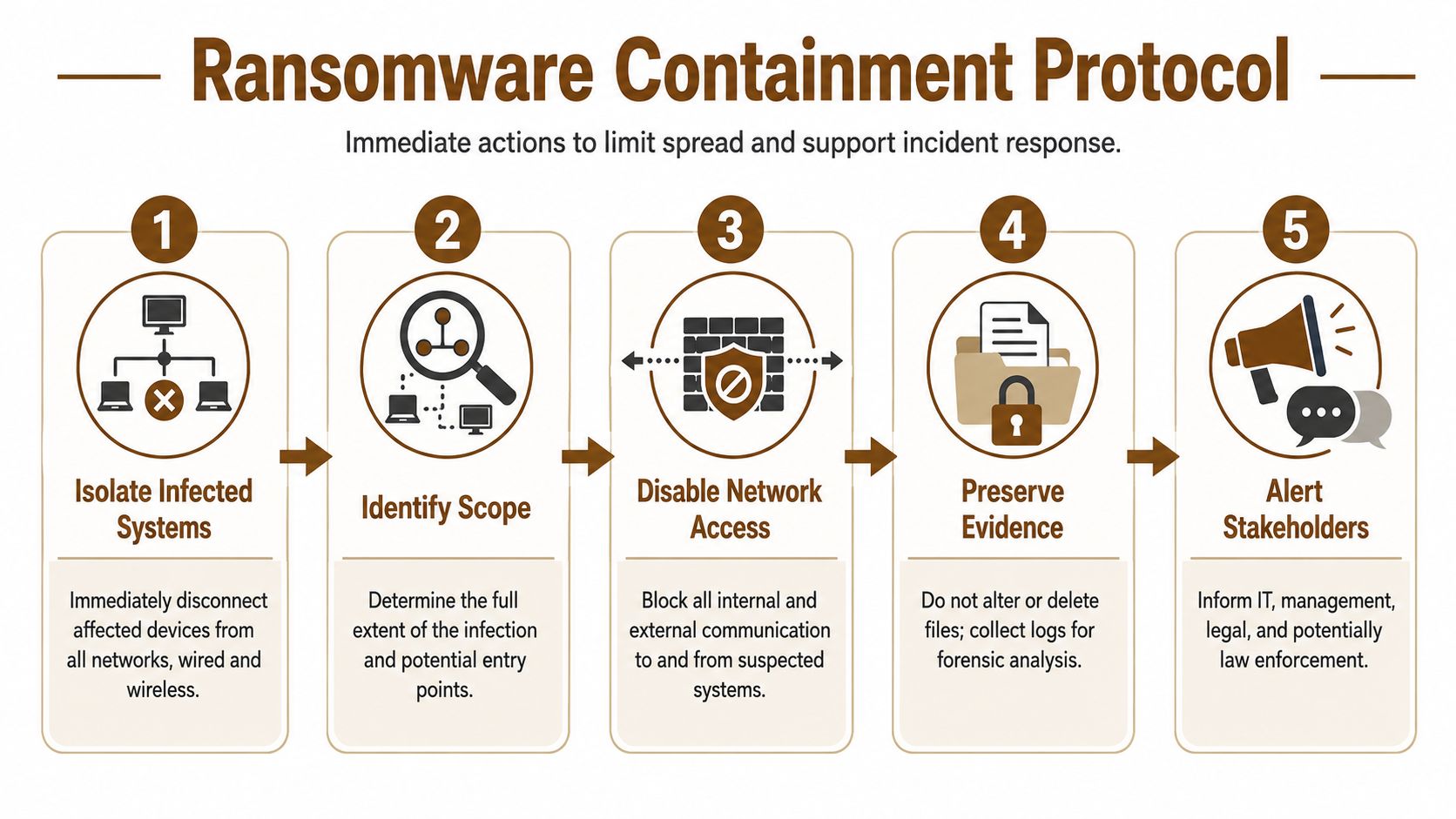
This part is urgent. Modern ransomware moves fast. Infrascale’s ransomware recovery guide says over 50% of attacks are deployed within 24 hours of initial access and 10% within 5 hours. That’s why containment is the first real win.
Your first-hour checklist
If a workstation, server, or shared drive looks encrypted, move through these actions in order.
Isolate the affected device
Disconnect the machine from wired and wireless networks. Pull the network cable. Turn off Wi-Fi and Bluetooth if possible. If it’s a virtual machine, disconnect its network access at the management layer.Do not shut it down unless your response lead tells you to
Preserving memory and system state can matter for forensics. A powered-on device may contain clues about the attack path, tools used, and active sessions.Block access to shared resources
Disable affected file shares and remote access paths if you can do so safely. The point is to stop lateral movement and stop users from touching encrypted content.Use a clean channel for coordination
Call key staff by phone. Use text messaging. Use a separate collaboration platform only if you trust it. Don’t rely on potentially compromised email to manage the incident.Freeze privileged changes
Don’t let multiple people start resetting settings randomly. One person should log decisions. One person should lead technical actions.
If you want a practical primer on early warning signs that often show up before a full-scale outage, this guide on how to detect malware before it shuts down operations is useful for building better response habits after the crisis.
Containment is not cleanup
Owners often want someone to “run antivirus and fix it.” That’s too early. If you clean before you scope, you may miss compromised accounts, hidden persistence, or secondary infected systems.
Treat containment like a fire door. You’re trying to stop spread, not rebuild the building yet.
Keep affected devices isolated but powered unless a responder directs otherwise. That preserves evidence and buys your team time.
What the front office should do while IT contains
At this stage, good companies separate panic from progress. The owner or operations lead should handle non-technical control tasks while technical staff contain systems.
- Pause risky business activity. Stop batch file transfers, stop remote access for nonessential users, and pause any mass document processing.
- Create an incident log. Record times, usernames, systems affected, screenshots of ransom notes, and actions taken.
- Assign a decision owner. One executive should approve customer messaging, insurance contact, and outside counsel engagement.
- Protect paper operations. If your office can work manually for a few hours, switch now. That reduces pressure to make bad restoration decisions.
A controlled slowdown is better than a full uncontrolled spread.
Assess the Scope and Engage Your Response Team
Once the spread is contained, the work changes. You’re no longer reacting minute to minute. You’re building a clear picture of the incident and pulling the right people into the room.

Build your war room list
For a Houston SMB, the core response group usually includes:
- Executive decision-maker who can approve downtime trade-offs and customer messaging
- Technical lead from internal IT or your managed service provider
- Cyber insurance contact because many policies require prompt notice and approved vendors
- Legal counsel for breach notification, privilege, and communications review
- Operations lead who knows which systems keep the company moving
If you operate in healthcare, financial services, or any compliance-heavy field, add your compliance lead early. They don’t need to run the technical work, but they should know what evidence is being preserved.
Document before you touch
A lot of businesses lose useful evidence because everyone starts troubleshooting at once. Slow down and document the scene.
Capture these items:
- Screenshots of ransom notes on every affected endpoint or server
- A list of encrypted shares and systems, including who reported them
- User reports about suspicious emails, pop-ups, remote access prompts, or login issues
- Recent administrative changes such as new accounts, privilege changes, or disabled security tools
- Timestamps for first detection, first isolation, and first observed encryption
This record helps in three ways. It supports forensics. It helps with insurance. It prevents “I thought someone else was tracking that” confusion.
Ask the right scoping questions
At this point, don’t obsess over naming the ransomware family. Focus on impact.
Use questions like these:
| Question | Why it matters |
|---|---|
| Are only endpoints affected, or are servers involved too | Server impact changes recovery order |
| Are backups reachable from the same credentials | Backup exposure changes your recovery path |
| Were any admin accounts used abnormally | Account compromise may still be active |
| Is email trustworthy right now | Comms may need to move off email |
| Do we suspect data theft, not just encryption | Legal and customer notifications may expand |
If you can’t say which systems are clean, assume they need validation before they rejoin production.
That mindset keeps a contained incident from becoming a repeat incident a few days later.
The Recovery Path Restoring Systems from Clean Backups
Recovery is where preparation shows. Most companies don’t fail because restore technology is impossible. They fail because they restore too quickly, from the wrong point, or into an environment that’s still compromised.
Varonis’ ransomware statistics summary reports that about 97% of organizations that had data encrypted in a ransomware attack were able to recover their data, and that the global average cost to recover, excluding ransom, fell 44% to $1.53 million in 2025. The practical takeaway is simple. Businesses with mature, tested backup and recovery playbooks are far more likely to survive without paying.
Start with backup validation, not restoration
This is the step owners most want to skip. Don’t.
Industry guidance on ransomware data recovery from SentinelOne’s ransomware recovery overview stresses the need to confirm backups are clean before restoration. That means scanning backup iterations with antivirus and anti-malware tools, identifying the most recent uninfected version, and testing restored systems before full deployment.
Here’s the practical sequence:
- Pick candidate restore points from before the first known encryption activity.
- Scan multiple backup versions so you’re not forced to trust a single point blindly.
- Restore into an isolated environment first where nobody can accidentally reconnect it to production.
- Test application behavior with real user workflows, not just “the server boots.”
- Promote to production only after validation.
For small businesses, especially those with a mix of Microsoft 365, local servers, cloud apps, and office workstations, that isolated restore step is what separates a clean recovery from a second outage. If you’re comparing backup platforms and recovery designs for future resilience, this overview of cloud-based backup and recovery solutions for small businesses is a solid next read after the incident.
Decide what gets restored first
Don’t restore in technical order. Restore in business order.
Decide what gets restored first
Use a tiered approach:
- Tier 1 systems support cash flow or safety. Think line-of-business apps, scheduling, phones, dispatch, EHR access, or payment processing.
- Tier 2 systems support productivity. File shares, collaboration tools, reporting platforms, and internal portals often land here.
- Tier 3 systems are useful but can wait. Archives, old project folders, and nonessential test systems fit this bucket.
A small legal office in Houston may put document management and email at the top. A manufacturer may put production scheduling first. A clinic may prioritize patient systems and phones. The order depends on operations, not on which server looks easiest to restore.
Here’s a fast decision table:
| System type | Restore first if | Delay if |
|---|---|---|
| Core business app | Work stops without it | Manual workaround exists |
| Shared file server | Teams need current docs to operate | Data can be pulled from another source briefly |
| User laptops | Key staff can’t work otherwise | Staff can use loaners or web apps |
| Old archives | Required for legal or billing need today | Not needed for immediate operations |
Before you restore at scale, review a walkthrough of the process:
Restore versus rebuild
Some systems should be restored. Others should be wiped and rebuilt from a known-good image.
Restore versus rebuild
Use restore when:
- The backup is verified clean
- The system is business-critical
- Rebuilding the app stack would take too long
- You can validate data integrity after recovery
Use rebuild when:
- The host shows signs of deep compromise
- Admin credentials may have been abused on that machine
- The system is easier to replace than to trust
- The old environment has poor documentation or unknown changes
A fast restore into a dirty environment isn’t recovery. It’s reinfection on a schedule.
That’s the heart of how to recover from ransomware attack events safely. Not quickly at any cost. Cleanly, in the right order, with proof.
Managing Communications and Legal Notifications
Technical recovery gets attention. Communication failures often create the longer tail of damage.
A Houston business owner usually has three audiences to manage during a ransomware event. Employees need direction. Customers need confidence. Insurers and counsel need accurate facts. If personal or regulated data may be involved, Texas breach notification requirements and sector-specific obligations may come into play, so get legal review early.
Employee message template
Send this through a trusted channel that you believe is safe.
Subject: Temporary system disruption and employee instructions
We are responding to a security incident affecting parts of our technology environment. Effective immediately, do not connect company devices to office networks unless instructed by IT. Do not open suspicious emails, attachments, or pop-ups. If you saw unusual file names, login prompts, or a ransom message, report the device name and time noticed to the incident lead. We will provide updates through phone and approved communication channels.
That message does three things. It reduces accidental spread. It centralizes reporting. It stops rumor-driven chaos.
Customer message template
Customers don’t need jargon. They need a steady update and honest expectations.
Subject: Service disruption notice
We are currently addressing a cybersecurity incident that is affecting parts of our operations. Our team has taken steps to contain the issue and is working to restore services safely. Some response times or system-based services may be delayed while we validate systems. If we determine that customer information was affected, we will notify impacted parties directly with specific guidance.
That language is direct without promising facts you don’t yet know.
If you need help shaping a public-facing statement after the first internal review, this cyber attack press release guide gives useful examples and structure.
Insurance and legal call notes
When you call your insurer or breach counsel, keep the first report factual. Don’t speculate.
Use notes like these:
- What we know: First signs of encryption appeared at [time]. Affected systems currently include [list]. Containment actions taken include isolation of affected devices and suspension of certain network access.
- What we don’t know yet: Initial access path, whether data was exfiltrated, and whether all affected accounts have been identified.
- What we are preserving: Screenshots, logs, affected system list, backup validation records, and communication records.
That style helps legal and insurance teams guide you without locking you into inaccurate early statements.
Post-Incident Hardening and Future Prevention
Recovery isn’t done when users can log back in. It’s done when you can show that the environment is clean, the root cause has been addressed, and the same path won’t work again.

What proof of eradication looks like
The hardest post-recovery question is often the simplest one. “How do we know it’s gone?”
The Cloud Security Alliance guidance on responding to and recovering from ransomware makes the standard clear. Post-recovery, SMBs face liability if a recovered system still harbors dormant malware. A clean bill of health needs a clear audit trail and forensic documentation supported by evidence from EDR/XDR tools, not assumptions.
For a small business, that evidence package should include:
- Endpoint telemetry showing no active malicious behaviors after restoration
- Credential actions such as password rotations for privileged and affected accounts
- Patch records showing exploited weaknesses were closed
- Backup validation notes proving what restore point was used and how it was checked
- Reconnection approvals showing who authorized systems to rejoin production
If your clients care about privacy and data handling after an incident, broader education on protecting digital privacy can help leadership think beyond pure uptime and toward trust recovery.
A practical hardening checklist
At this point, many businesses either learn the lesson or waste it.
- Rebuild trust in endpoints. Use EDR or XDR platforms to watch for unusual process behavior, privilege changes, and persistence attempts after restoration.
- Reset access properly. Rotate passwords, review admin groups, and remove stale accounts. Don’t just reset the password of the visibly affected user.
- Patch the path in. If the incident started with an exposed remote access workflow, a phishing click, or an unpatched system, document it and close it.
- Retest backups. Recovery confidence drops fast if you only test backups during a live incident.
- Write a real disaster recovery plan. If your current plan lives only in someone’s head, fix that now. This guide to building a disaster recovery plan for small business is a practical place to start.
The best post-incident report is one that an insurer, auditor, and customer can all read and reach the same conclusion: the company recovered carefully, documented the work, and reduced the chance of a repeat.
Houston SMBs don’t need enterprise bureaucracy to get this right. They need a documented process, tested backups, evidence-based validation, and leadership that treats ransomware as an operational risk, not just an IT inconvenience.
If your business needs hands-on help with ransomware recovery, backup validation, endpoint security, or a stronger continuity plan, IT Cloud Global, LLC supports Houston-area organizations with managed IT, incident response support, cloud systems, and disaster recovery services built for real-world small business operations.
- Managed IT Services Houston TX: Your 2026 Business Guide
- IT Support Near Medical Center: Expert Healthcare IT 2026
- Managed IT Services Provider Near Me: Houston SMB Guide
- Find Managed IT Services Providers Near Me: A Buyer’s Guide
- Best Network Support Houston: 2026 Buyer’s Guide
- Disaster Recovery Companies: An SMB Survival Guide
- Houston Network Consulting Firm: An SMB Buyer’s Guide