


IT Managed Services Near Me in Houston: 2026 Guide for SMBs
Your office internet drops during payroll. The shared drive won't open. A team member clicks a suspicious email, and now everyone is asking whether customer data is exposed. In that moment, searching for IT managed services near me feels urgent for one reason. You need someone who can stop the disruption fast.
But speed alone won't solve the bigger problem. Houston businesses rarely struggle because they lack a phone number for IT support. They struggle because their technology is reactive, undocumented, loosely secured, and dependent on one person who “usually knows how it works.”
That's why a smart managed services decision starts before you compare providers. You need to know what support you need, what should be included every month, what should trigger on-site work, and how a provider handles security when an issue moves beyond a simple helpdesk ticket.
Table of Contents
- Why 'Near Me' Is Just the Starting Point
- Defining Your Needs Before You Search
- What to Expect from a Houston Managed Services Provider
- How to Evaluate Potential IT Partners
- Comparing SLAs and Pricing Models
- Red Flags and Making Your Final Decision
- Your Next Step for Proactive IT in Houston
Why 'Near Me' Is Just the Starting Point
A local search usually starts with a practical need. You want a provider who can get to your office, handle cabling, replace failed hardware, or troubleshoot a network closet without waiting on a flight or subcontractor. That matters in Houston, especially if your business depends on office connectivity, printers, Wi-Fi coverage, phones, or shared systems that can't be fixed through a screen share.

But proximity is only the first filter. A nearby provider with weak processes, vague support boundaries, or poor security discipline can create more downtime than they prevent. The right question isn't just “Who's close?” It's “Who can run IT in a predictable way when your business is busy, stressed, and growing?”
The broader market explains why so many businesses are making this shift. The managed services market is projected to reach $834.7 billion by 2032, up from $278.9 billion in 2022, according to this managed services market analysis. That projection reflects a broad move toward outsourcing monitoring, support, and security to specialized providers that deliver steadier operations.
What local should actually mean
For an SMB, “local” should mean more than a map pin. It should mean:
- On-site capability when hardware is involved so a provider can handle failed workstations, switches, Wi-Fi access points, printers, and cabling issues.
- Regional business familiarity so they understand how your office works, who needs priority support, and where downtime hits revenue.
- A practical support model that doesn't require a truck roll for every password reset, software error, or patching task.
Practical rule: Search locally, but shortlist operationally. Geography helps. Process decides.
If you're still deciding whether outsourced support makes sense at all, this guide on the benefits of managed IT services is a useful companion. Its true value isn't convenience. It's replacing recurring IT chaos with defined support, maintenance, and accountability.
Defining Your Needs Before You Search
Most bad MSP conversations start the same way. A business owner asks for a quote, the provider asks how many users there are, and everyone pretends that number alone tells the story. It doesn't.
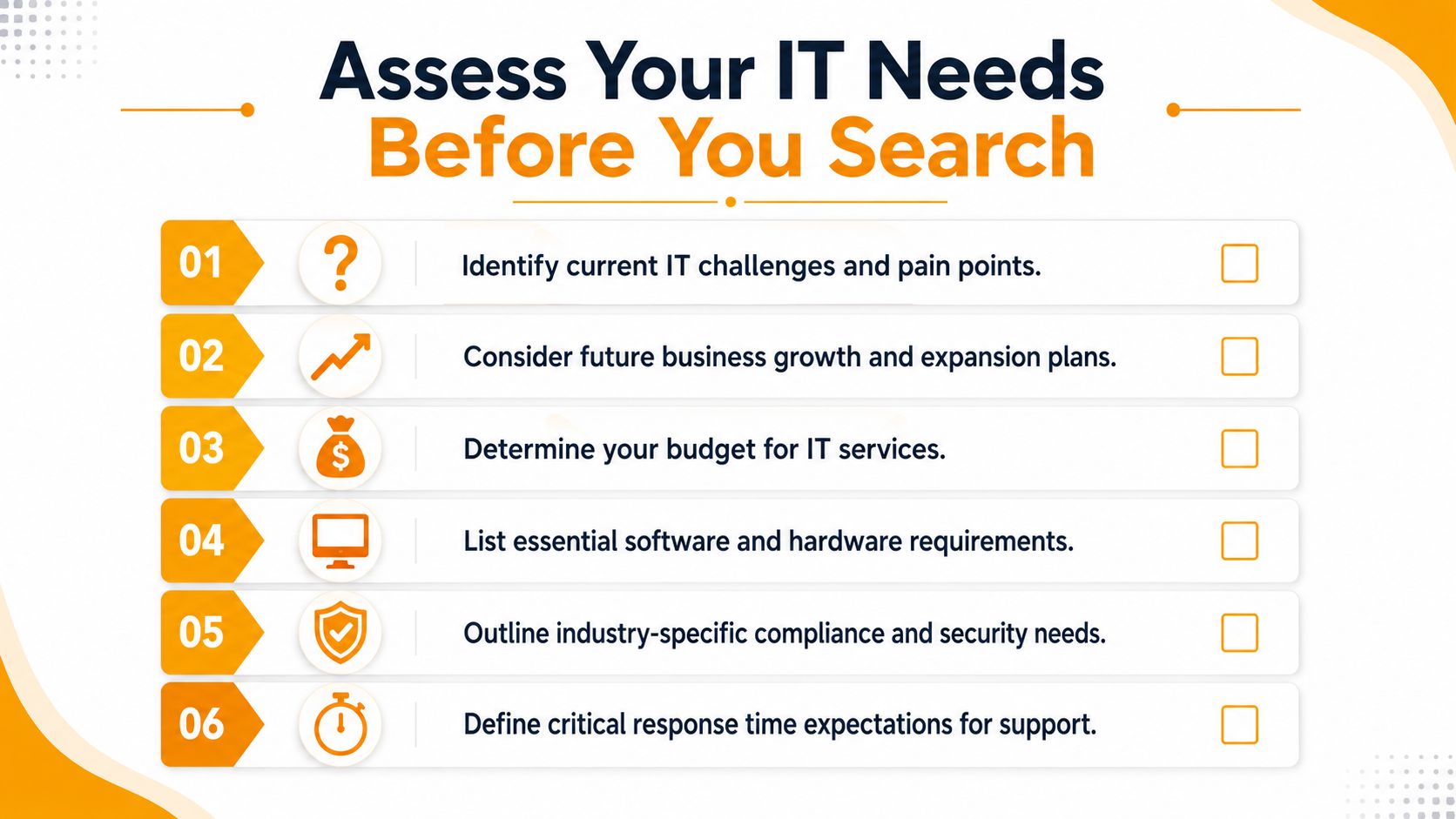
Before you search for IT managed services near me, create a short internal briefing document. It doesn't need to be formal. A two-page outline is enough if it gives providers a clear picture of what your business depends on and where your current setup breaks down.
Build your internal IT briefing
Start with the basics, but don't stop there.
- User and device count: List employees, shared devices, laptops, desktops, printers, and any phones or tablets used for business operations.
- Critical systems: Name the platforms that would stop work if they failed. That might include Microsoft 365, line-of-business software, point-of-sale tools, file storage, accounting systems, or cloud apps.
- Current pain points: Write down recurring issues. Slow Wi-Fi, login problems, backup uncertainty, printer instability, phishing concerns, and weak remote access all belong here.
- Business constraints: Note whether you operate from one site or several, whether you have after-hours needs, and whether you rely on warehouse, retail, medical, or field operations.
- Growth plans: Include office moves, hiring plans, cloud migration goals, or hardware refreshes you expect in the near term.
This changes the quality of every conversation that follows. A serious provider can scope support more accurately, identify obvious gaps faster, and avoid handing you a generic package that doesn't fit.
Include compliance and response expectations
Many Houston businesses also need to state requirements that don't show up in a basic seat count.
Ask yourself:
- Do you handle regulated or sensitive information? Healthcare, legal, finance, and professional services often need stricter access control, logging, and data handling.
- What can't wait until tomorrow? If your front desk, phones, payment systems, or shared applications go down, define what “urgent” means internally.
- Do you need strategic help or only ticket support? Some businesses need a helpdesk. Others need someone to plan Microsoft 365 administration, backup policy, vendor coordination, cloud changes, and security improvements.
If you can't describe your environment clearly, you'll get vague proposals back. That's not a sales problem. It's an input problem.
What to hand a provider on the first call
Give each MSP the same baseline information so you can compare responses fairly.
| Item | What to include |
|---|---|
| Business profile | Industry, office locations, team size, work style |
| Systems | Key software, cloud tools, internet dependency, phone setup |
| Infrastructure | Network gear, Wi-Fi issues, servers, backups, printers |
| Security concerns | Phishing, endpoint protection, access control, compliance needs |
| Support expectations | Business hours, after-hours concerns, on-site needs, decision-makers |
When you do this first, you stop shopping blind. You also make it easier to tell which providers listen carefully and which ones jump straight to a canned pitch.
What to Expect from a Houston Managed Services Provider
A good MSP should reduce interruptions, stabilize your environment, and make IT less dependent on memory and improvisation. If a provider mainly talks about “being available when you need us,” that's not enough. Availability matters, but managed services should be structured, repeatable, and preventive.
Core services that should be standard
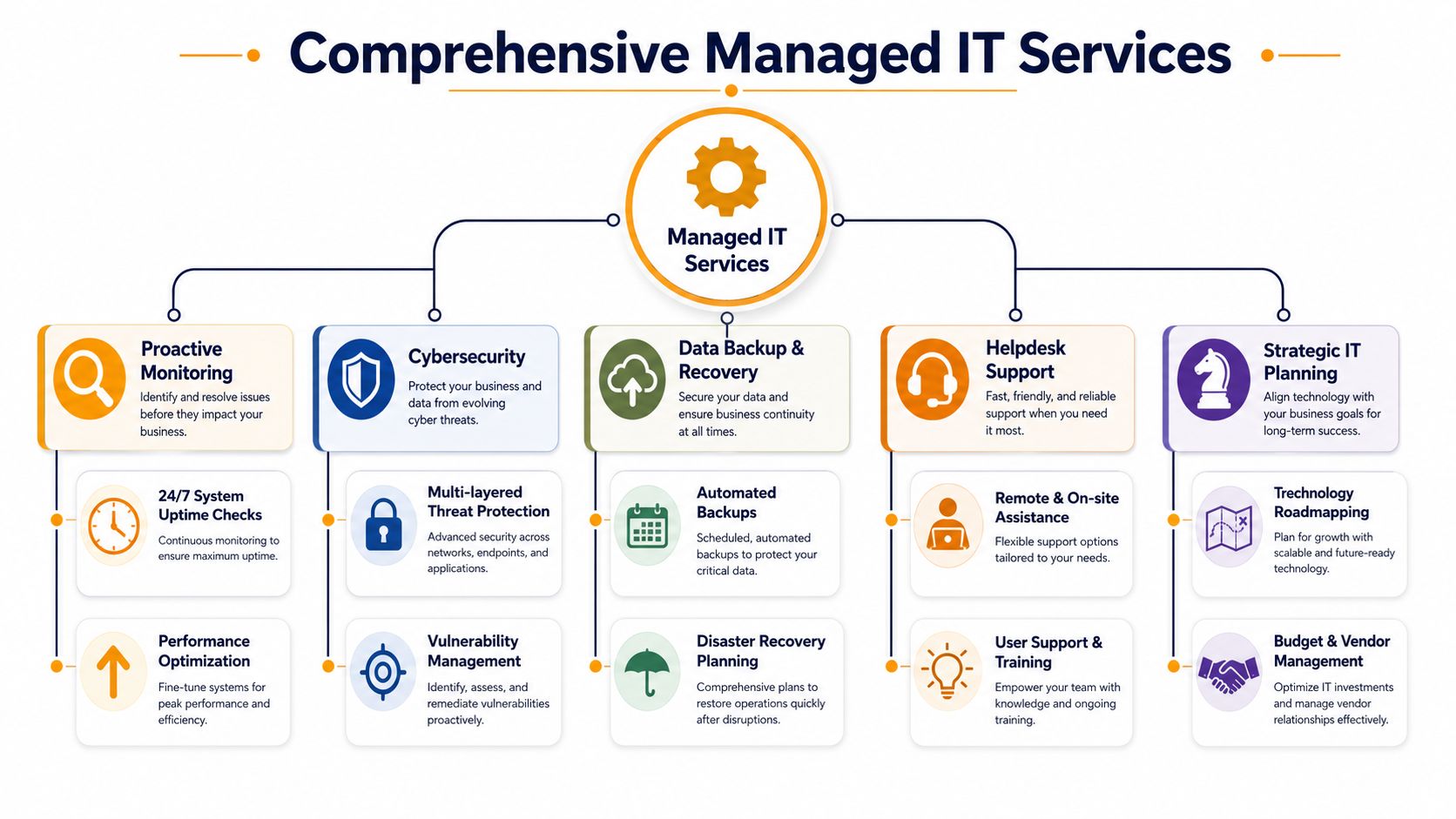
At minimum, you should expect a managed service plan to cover a practical operating baseline.
- Monitoring and maintenance: Devices, network components, and core systems should be watched for failures, performance issues, and missed updates.
- Helpdesk support: Users need a clear path for day-to-day issues such as login problems, software errors, printer access, email issues, and device trouble.
- Patch and endpoint management: Workstations and servers need controlled updates, not random manual fixes after something breaks.
- Backup and recovery oversight: You need to know what is being backed up, whether restores are tested, and who owns recovery procedures.
- Security administration: This includes endpoint protection, access controls, alert handling, and practical guidance when suspicious activity appears.
Those are table stakes. You may also need Microsoft 365 administration, cloud support, vendor coordination, Wi-Fi work, VoIP troubleshooting, virtualization support, or low-voltage cabling depending on your environment.
A Houston provider like IT Cloud Global's managed IT support in Houston offers that mix of remote support, on-site service, network work, cloud administration, and continuity planning. That kind of range matters when one business issue touches users, infrastructure, and security at the same time.
For teams comparing service desk workflows, ticket routing, and multi-client support operations, reviewing tools such as ServiceDesk Plus MSP licenses can also help you understand what a mature provider's internal support stack may look like.
Here's a quick visual for what a full managed service stack typically includes.
When remote support is enough and when onsite matters
Many businesses overvalue physical proximity, but value is in a hybrid operating model: mature remote tooling for daily support, patching, and cloud management, with onsite work reserved for issues that physically require it, as explained in this overview of hybrid managed IT delivery.
That distinction matters because the fastest fix often isn't an on-site visit.
Remote-first tasks usually include:
- User support issues like password resets, Outlook problems, software access, printing logic, and permission changes
- Routine administration such as patch deployment, endpoint checks, backup reviews, and Microsoft 365 changes
- Security response coordination including isolating an endpoint, reviewing alerts, or locking an account quickly
On-site work usually makes sense for:
- Hardware failures involving desktops, laptops, printers, switches, or firewall appliances
- Physical network issues such as cabling faults, bad access point placement, weak Wi-Fi coverage, or patch panel troubleshooting
- Office changes including moves, expansions, conference room setup, and equipment deployment
A provider that insists every issue needs an on-site visit is inefficient. A provider that avoids on-site work altogether is incomplete.
When you search for IT managed services near me, look for that balance. Mature remote capability keeps daily operations moving. Local field support handles the work that can't be solved from a dashboard.
How to Evaluate Potential IT Partners
Most MSP websites sound similar. They mention support, cybersecurity, backups, cloud services, and responsiveness. That doesn't help much when you're trying to decide who can run your environment without hidden gaps.
The better test is operational. Ask questions that force the provider to define boundaries, accountability, and workflow. SMB buyers are often advised to ask about baseline coverage, escalation depth, and documentation, yet most local content doesn't explain how to compare those details. The key issue is how an MSP separates baseline contract work from billable projects, as noted in this guide to managed IT selection questions.
Ask what the monthly fee actually covers
Start here, because misunderstandings become billing friction.
Ask each provider to walk through examples, not just categories:
- Included support examples: password resets, user onboarding, printer troubleshooting, endpoint monitoring, patching, Microsoft 365 admin changes, backup checks
- Likely billable work: office moves, major cloud migrations, firewall replacements, wiring projects, large-scale device deployments, recovery from a major incident
- Gray-area tasks: after-hours changes, vendor calls, new application rollouts, policy work, permissions cleanup, multi-step remediation after a security alert
If the answers are broad or slippery, keep pushing. “That depends” is sometimes true, but a mature MSP can still explain how they usually classify work.
Test escalation and documentation maturity
The next thing to probe is what happens when a basic ticket turns into a serious operational issue.
Ask questions like:
- Who owns escalation when frontline support can't solve the problem?
- How are critical incidents handled after hours?
- What documentation do you maintain about client systems?
- If one engineer leaves, how does the next engineer pick up without losing context?
- How do you record network layout, admin access, backup procedures, and vendor contacts?
These questions uncover whether the provider runs on process or personality. If everything depends on one senior technician remembering how your network is set up, you don't have a managed environment. You have a fragile one.
Documentation isn't paperwork for its own sake. It's what keeps your business from stalling when the usual fixer isn't available.
Compare how they communicate
You're not only hiring technical skills. You're hiring an operating rhythm.
Look at the sales process itself:
- Do they answer directly? Clear answers during evaluation usually predict clear communication during incidents.
- Do they ask smart follow-up questions? Good providers want context, not just seat counts.
- Do they explain trade-offs? If they never mention limitations, exclusions, or sequencing, they're probably selling, not advising.
- Do they provide a decision framework? A useful reference is this guide on how to choose a managed service provider, which outlines the practical factors buyers should compare before signing.
A polished proposal doesn't prove maturity. A provider's ability to explain what happens on an ordinary Monday and a bad Friday tells you much more.
Comparing SLAs and Pricing Models
Pricing and SLAs are where many business owners either overfocus on the monthly number or underread the service promise. Both mistakes are expensive. A lower fee can hide thin coverage, and a broad “24/7 support” claim can mean very little if the contract doesn't define response and resolution expectations.
How common pricing models differ
Different MSPs package support in different ways. None is automatically right or wrong. The better fit depends on how your company grows, how standardized your devices are, and how much budget predictability you want.
| Model | Best For | Predictability | Scalability |
|---|---|---|---|
| Per user | Offices where each employee uses multiple devices and core apps | Usually easier to budget as headcount changes | Strong if hiring tracks service demand |
| Per device | Environments with shared workstations, specialized equipment, or uneven device usage | Can be predictable if device counts stay stable | Less flexible when users add multiple tools |
| Tiered or all-in | Businesses that want broader bundled coverage and fewer billing surprises | Often simpler to forecast if scope is defined clearly | Good when the provider defines inclusions carefully |
The key isn't the label. It's the scope behind it.
For a plain-English example of how packaging affects buyer perception, even outside IT, it helps to look at structured pricing pages like Rosie's pricing plans. Clear packaging makes comparison easier. Vague packaging pushes all the risk back onto the buyer.
What to look for in an SLA
An SLA should tell you what happens after you report a problem. It shouldn't just reassure you that support exists.
Review these items closely:
- Response commitments: How quickly does the provider acknowledge critical, high, medium, and low-priority issues?
- Resolution targets: A fast response is useful, but what happens after acknowledgment matters more.
- Escalation path: The contract should show how serious issues move beyond frontline support.
- Coverage windows: Confirm business hours, after-hours handling, holiday coverage, and what counts as emergency support.
- Excluded work: Make sure the SLA and the service agreement line up on what's covered versus separately billed.
If the SLA is short on definitions, the provider keeps discretion and you keep uncertainty.
A good review method is simple. Take two common issues from your business, like “internet outage at the office” and “new employee setup with Microsoft 365 access,” then ask each provider to explain exactly how those requests would be handled under the proposed agreement. That exposes the difference between a polished promise and an operational commitment.
Red Flags and Making Your Final Decision
You don't need perfect answers from every provider. You do need honest ones. The wrong MSP usually reveals itself in small ways before the contract is signed.
Warning signs during the sales process
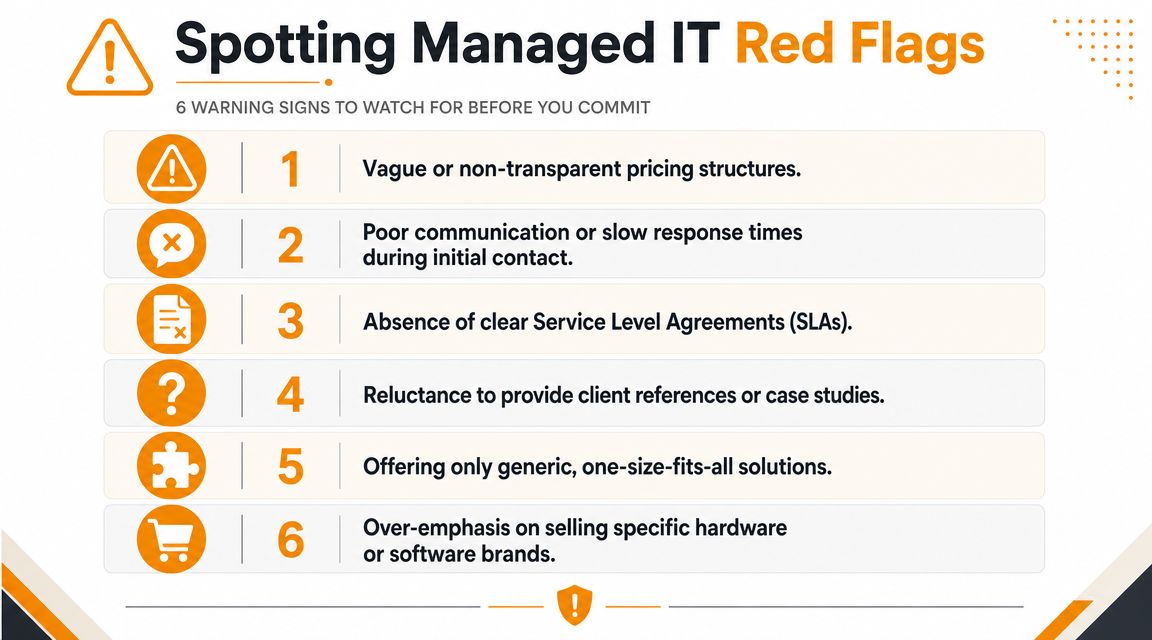
Watch for patterns like these:
- Vague pricing language: If they can't explain included support, billable project work, and after-hours handling in plain terms, expect disputes later.
- Weak discovery questions: A provider that jumps to a proposal without understanding your systems is likely reusing a template.
- Pressure to decide quickly: Good partners don't need urgency to hide thin process.
- Brand-first selling: If every conversation turns into hardware resale or a preferred software stack, your business needs may be secondary.
- Thin local credibility: If they won't offer relevant references, explain on-site coverage, or describe who does field work, pause.
One more red flag gets missed often. If the provider talks confidently about security but can't describe how alerts are reviewed, escalated, and documented, you're hearing marketing, not operations.
How to choose with confidence
Final selection should feel less like buying support hours and more like choosing a long-term operating partner.
Use this short checklist before signing:
- Review the proposal line by line and mark anything that sounds broad enough to be interpreted later.
- Check references with specific questions about communication, follow-through, and handling of messy issues.
- Ask who your account interacts with after onboarding. Salespeople don't solve tickets.
- Confirm the transition plan for documentation, credential handling, endpoint setup, backup review, and vendor coordination.
The right provider won't be the one with the flashiest pitch. It'll be the one that gives you the clearest picture of how support works when something breaks, someone clicks the wrong thing, or your business changes faster than expected.
Your Next Step for Proactive IT in Houston
Monday starts with a server issue, two employees cannot access shared files, and your accounting system is running slow. In that moment, "IT managed services near me" feels like a simple local search. The underlying decision is operational. You need a provider that can keep daily work running, respond cleanly under pressure, and support your business without turning every problem into extra billable work.
For Houston companies, proximity helps, but it does not tell you how support will function after the contract is signed. The better choice is a provider that can handle routine work remotely, show up on-site when the issue calls for hands-on help, and explain where managed service stops and project work begins. Security matters here too. A provider should be able to explain how they monitor alerts, investigate suspicious activity, document incidents, and coordinate recovery when something goes wrong.
That is the next step. Get specific about your environment, your support gaps, and the work that keeps getting deferred because no one owns it.
IT Cloud Global, LLC is one Houston option that offers managed IT support, cloud administration, cybersecurity services, backup and disaster recovery, network setup, cabling, VoIP, and in-house repair support for local businesses. A consultation should help you clarify what belongs in your monthly agreement, what should be scoped separately, and whether their service model fits the way your business operates.
A good first meeting should leave you with clearer scope, fewer assumptions, and a sharper view of risk. If it does not, keep looking.
- 7 Best Managed IT Services Houston TX Reviews (2026)
- Best IT Services Houston TX: Your 2026 Partner
- Managed IT Services Houston TX: 2026 Guide for SMBs
- IT Managed Services Houston TX: 2026 Guide
- Houston Managed IT Services: A 2026 Guide for SMBs
- What Is a Network Operations Center? an SMB Guide
- Business Continuity Strategies: SMB Guide 2026