


Find Managed IT Services Providers Near Me: A Buyer’s Guide
Your office internet is unstable, one employee can't access Microsoft 365, another clicked a suspicious link, and your line-of-business app slows down every Monday morning. You search for managed IT services providers near me because you need help fast. That search feels local, but the decision is strategic. The provider you choose will affect downtime, security exposure, employee frustration, and how predictable your IT costs feel month to month.
A lot of small businesses in Houston start this search when something already hurts. That's normal. What's risky is choosing the first company that answers the phone, promises "full support," and sends over a vague monthly quote. A good MSP relationship is built on scope, accountability, and fit. A bad one usually starts with assumptions.
Table of Contents
- Why Your 'Near Me' Search Needs a Strategy
- First, Map Your Own IT Needs and Goals
- Finding and Shortlisting Local MSP Candidates
- The Ultimate MSP Evaluation Checklist and Interview Questions
- Decoding Proposals Comparing SLAs, Pricing, and Security
- Making Your Choice and Next Steps with Templates
Why Your 'Near Me' Search Needs a Strategy
When a business owner types in managed IT services providers near me, they're often thinking about distance. Can someone come onsite? How fast can they get here? Do they know the Houston area? Those questions matter, but proximity alone doesn't solve recurring IT problems.
Managed services is now a mature market, not a small break/fix niche. The global managed services market was valued at USD 365.33 billion in 2024 and is projected to reach USD 511.03 billion by 2029, with a 6.9% CAGR, according to managed services market data cited by Clutch. That matters because local providers are no longer competing just on "we fix computers." They're competing on recurring support models, cloud operations, cybersecurity depth, and measurable service levels.
That shift changes how you should buy.
Local doesn't automatically mean accountable
A provider can be ten minutes away and still be a poor fit. I've seen businesses choose a nearby firm that answered tickets slowly, handled every issue as a one-off fire, and billed extra for things the client assumed were included. The office location looked convenient. The service model was not.
Practical rule: Search locally, evaluate operationally.
If your systems go down, you don't need a vendor who only reacts well under pressure. You need a team that reduces how often those failures happen in the first place. That's the difference between a repair shop mindset and an MSP mindset.
The real buying criteria are operational
The best local MSP for your business usually isn't the one with the flashiest homepage. It's the one that can clearly explain:
- How they monitor systems before users notice issues
- What response commitments mean for critical vs noncritical tickets
- What happens onsite when remote support isn't enough
- How they handle security operations beyond basic antivirus
- What is included in the monthly agreement and what triggers extra billing
A strategy protects you from panic buying. It also helps you avoid the common trap of outsourcing responsibility without outsourcing clarity. If you don't define expectations, you'll likely get broad promises and narrow delivery.
Houston businesses have one more practical concern. Traffic, multiple office locations, warehouses, clinics, retail sites, and hybrid teams create different support realities. A law office in Downtown Houston, a manufacturer near the Ship Channel, and a clinic in Sugar Land may all need "managed IT," but they won't need the same onsite cadence, compliance handling, or after-hours coverage.
The right search starts with your business model, not the search bar.
First, Map Your Own IT Needs and Goals
Most MSP buying problems start before you ever talk to a provider. The business says, "We need IT support," but that can mean anything from password resets to cloud governance, backup validation, Microsoft Intune management, vendor coordination, and disaster recovery planning. If you don't define the work, you can't evaluate the fit.
Separate urgent pain from ongoing responsibility
Start with the problems your staff already feels. Slow support. Wi-Fi dead spots. Unreliable VPN access. Poor patching. Backup anxiety. Printer chaos. Vendor finger-pointing between your software company, internet provider, and whoever last touched the firewall.
Then separate those from the responsibilities an MSP would own every month. Those are different lists.
Use this split:
- Immediate pain points like recurring outages, login issues, aging PCs, or spam overload
- Operational responsibilities like endpoint management, helpdesk, backup checks, security alerts, Microsoft 365 administration, and user onboarding/offboarding
- Strategic needs like cloud migration, compliance readiness, site expansion, or replacing aging servers
A business that skips this step usually ends up buying a support package for obvious annoyances but misses the higher-risk work in the background.
Build a simple internal requirements sheet
You don't need a giant spreadsheet. A one-page requirements sheet is enough if it's honest and specific.
Include these categories:
Users and locations
List your office count, remote users, shared devices, warehouse or retail endpoints, and any locations that need onsite support.Core systems
Note what runs your business. Microsoft 365, QuickBooks, line-of-business applications, VoIP phones, cloud file storage, on-prem servers, Wi-Fi, printers, cameras, or specialized software.Security and compliance
Document the basics first. MFA status, endpoint protection, backup expectations, admin account control, and whether you face formal compliance obligations.Support expectations
Decide what counts as urgent. A down server isn't the same as a new monitor request. You need internal agreement on that before reviewing SLA language.Budget and timing
Be realistic. Are you replacing a failed provider quickly, or planning a controlled transition over the next quarter?
If your business is adopting AI tools, expanding Microsoft 365 usage, or moving more workloads to cloud platforms, that belongs on the sheet now, not later.
That forward view matters. 75% of knowledge workers already use AI at work, and 80% of respondents cite managing cloud spend as a top challenge, based on research summarized by CloudTango. If your provider can only manage laptops and basic tickets, they'll struggle when your real issues shift to identity, data access, and cloud cost control.
A written IT roadmap helps here. If you need a practical planning model, this guide on creating an effective IT strategy for small businesses is a useful starting point.
What not to delegate blindly
Some businesses try to outsource decisions they should still own. Don't hand over these questions without internal input:
- Risk tolerance for downtime and data loss
- Approval authority for software purchases and configuration changes
- Access rules for executives, finance staff, and shared accounts
- Growth plans that will affect licensing, onboarding, or site support
- Preferred communication style for incidents, reporting, and escalations
An MSP should help shape those decisions. They shouldn't guess them for you.
Finding and Shortlisting Local MSP Candidates
You don't need a list of twenty providers. You need a shortlist you can compare seriously. For most small and midsize businesses, three to five candidates is enough.

Start broad, then get local and specific
Begin with search results, maps listings, and business directories. Then filter hard. You're looking for evidence of local operating reality, not polished slogans.
Good shortlist sources include:
- Google Business Profiles for signs of responsiveness, service area relevance, and review patterns
- Industry directories such as Clutch or similar MSP listings
- Local business groups including chambers of commerce, trade associations, and peer referrals
- Vendors you already trust such as your phone system provider, copier vendor, or software consultant
When a local business owner recommends an MSP, ask what kind of work that provider handles. Some firms are good at user support but weak in cloud governance. Others are excellent at infrastructure but disorganized with communication.
A practical framework for this early filter is in this article on how to choose a managed service provider.
What to look for on each provider's site
Most MSP sites sound similar. Managed services. Cybersecurity. Cloud. Support. Strategy. The useful differences show up in the details.
Look for signs like:
- Clear service descriptions instead of broad marketing language
- Onsite support language that explains when they dispatch and where
- Industry references if you have specialized workflows
- Real operational signals such as ticket handling, escalation structure, backup testing, or Microsoft 365 support specifics
- Named tools or platforms such as SentinelOne, Intune, Azure, VMware, or SharePoint administration
If a provider only talks about "technology solutions" and "peace of mind," you still don't know what they do every day.
A strong local MSP website should tell you how they work, not just what they call themselves.
Later in your search, it helps to hear another perspective on what buyers often miss. This video is a useful checkpoint before you start interviews.
Shortlist for fit, not volume
For Houston-area businesses, local fit often comes down to practical issues:
- Do they support your area consistently
- Can they handle onsite work for offices, clinics, shops, or warehouses
- Do they work well with hybrid users
- Can they coordinate with internet providers, software vendors, and phone systems
- Do they sound comfortable with your environment size and complexity
You can also include one provider that offers broader infrastructure and support coverage. For example, IT Cloud Global, LLC is a Houston-based option that provides managed IT, remote and onsite support, cloud administration, business continuity, and security services. That's relevant if your shortlist needs firms that can cover both day-to-day support and project work.
A shortlist isn't a popularity contest. It's a controlled set of candidates that appear capable, local enough for your needs, and mature enough to survive close questioning.
The Ultimate MSP Evaluation Checklist and Interview Questions
Sales calls are easy to ace. Operations are harder. The point of evaluation is to find out what happens after you sign.
What separates a proactive MSP from a reactive one
The most useful technical screening question is about the provider's proactive monitoring stack. Core layers such as 24/7 monitoring, endpoint protection, and backup/disaster recovery are associated with achieving up to 99.99% uptime in managed environments, but only when they're tied to measurable response targets, according to this managed IT services benchmark discussion.
That last part matters more than the number. Plenty of providers say they "monitor everything." Ask what that means in operational terms.
A real answer should cover asset inventory, alert thresholds, patching cadence, backup restore validation, endpoint visibility, escalation paths, and who reviews recurring incidents. A weak answer stays at the slogan level.
If security testing is part of your buying process, this outside guide on key criteria for pentest partner selection is useful because it shows how to assess technical depth, reporting quality, and scope clarity. Those same buying habits apply when you're evaluating an MSP's security posture.
MSP evaluation checklist
Use a scorecard so every candidate answers against the same criteria.
| Category | Criteria | Notes / Red Flags |
|---|---|---|
| Support model | Remote support, onsite availability, after-hours process, escalation path | Vague answers about emergencies, no clear dispatch rules |
| Monitoring | 24/7 monitoring, alerting, patch management, reporting | "We keep an eye on things" with no tooling or thresholds |
| Security | Endpoint protection, identity controls, email security, backup checks, incident handling | Calls antivirus a complete security stack |
| Cloud and Microsoft 365 | Tenant administration, user lifecycle management, Teams/SharePoint/Exchange support, license guidance | Only supports desktop issues, not cloud governance |
| Backup and recovery | Backup coverage, restore testing, recovery responsibilities, vendor coordination | Backs up data but doesn't test restores |
| Communication | Account management, review cadence, ticket visibility, documentation standards | No named point of contact, weak reporting |
| Pricing clarity | Included services, exclusions, after-hours billing, project work, onsite billing | One flat number with unclear scope |
| Business fit | Industry familiarity, compliance awareness, growth support, project capability | Strong at support, weak at planning |
Reality check: If a provider can't explain how they prevent recurring issues, you're still buying break/fix with a monthly invoice.
Interview questions that expose how they really work
Ask questions that force process answers, not branding answers.
Try these:
- A critical server is down. Walk me through who gets alerted first, who contacts us, and what happens in the first hour.
- An employee clicks a malicious link. What does your team check, isolate, and document?
- Our backup fails unnoticed for several days. How would you know, and who owns restore testing?
- We open a second location. What parts of onboarding, networking, Wi-Fi, vendor coordination, and security do you handle?
- We need better Microsoft 365 control. How do you manage identity, shared files, device policies, and offboarding?
- A ticket keeps recurring. How do you distinguish one-off support from root-cause work?
- What is billed outside the agreement. Give examples.
- Who does the work. Internal engineers, outsourced resources, or a mix?
- How often do you review our environment with us. What reports do you bring?
A good provider won't treat those as hostile questions. They'll welcome them.
One more practical resource: these questions to ask when looking for IT support can help you tighten your interview script before meetings.
Watch for how the provider talks about your business during the call. Strong firms ask about workflows, risk, decision-making, and user behavior. Weak firms jump straight to seat counts and monthly pricing.
Decoding Proposals Comparing SLAs, Pricing, and Security
By the proposal stage, most providers sound close enough to make the decision confusing. At this point, structure matters. Don't compare proposals by total monthly cost alone. Compare scope, assumptions, and accountability.
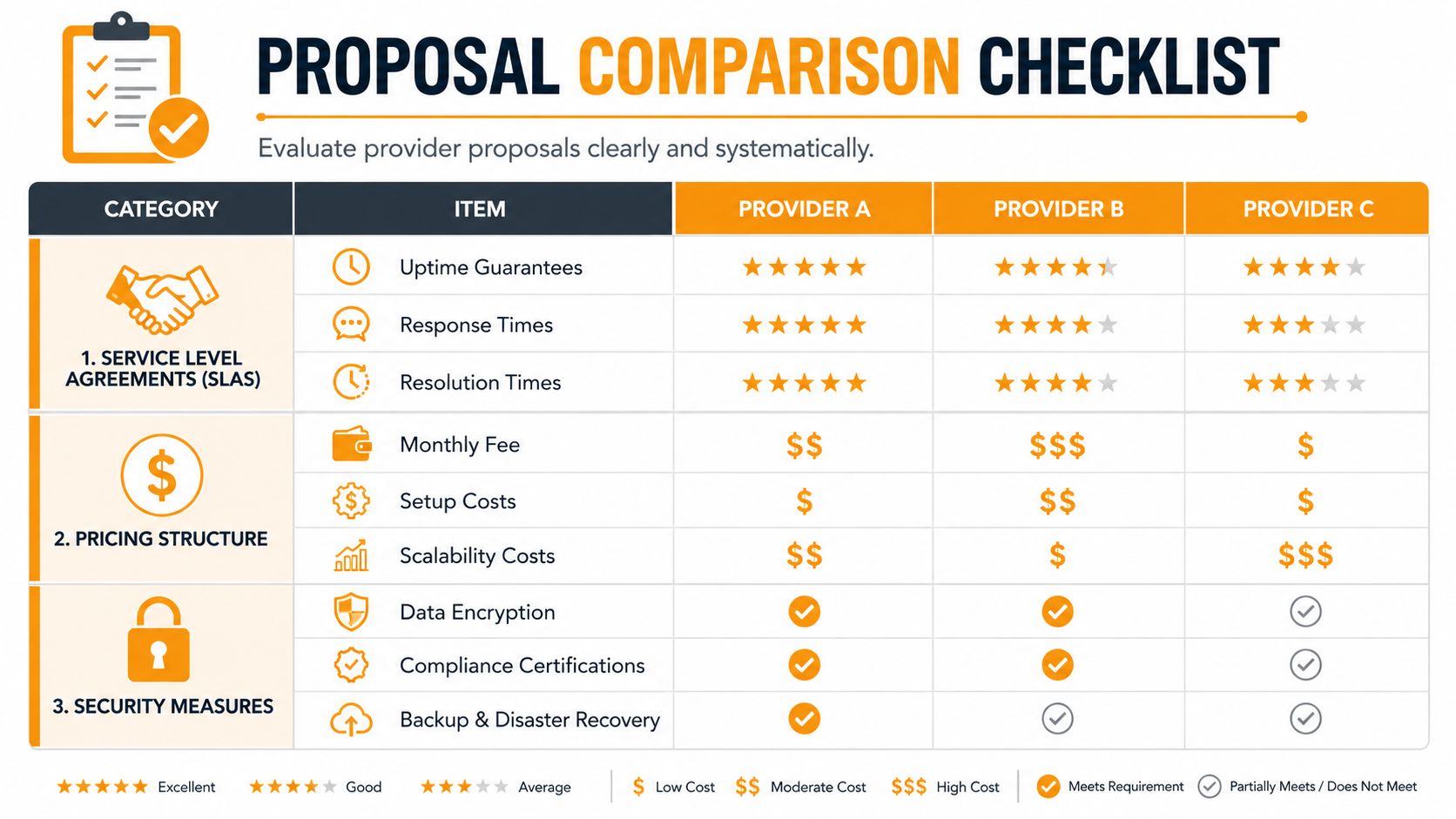
Compare the pricing model before the monthly fee
Managed services pricing often shows up as per-user, per-hour, or monthly flat-rate structures, which Dataprise identifies as dominant commercial models in managed services delivery in its managed services guide. The right model depends on the work being outsourced.
Here's the practical trade-off:
- Per-user pricing usually works well when support, Microsoft 365 administration, endpoint management, and recurring security work are tied to employees.
- Hourly pricing can make sense for one-time cleanup or project work, but it often creates cost volatility for ongoing operations.
- Flat-rate agreements are easier to budget when the scope is mature and well defined.
If a provider proposes hourly support for recurring operational work, be careful. That model can reward tickets rather than prevention.
Read the SLA like an operations document
A service level agreement shouldn't read like a sales brochure. It should tell you what happens when things go wrong.
Check these items:
- Priority definitions so "critical" has a written meaning
- Response times for each ticket class
- Resolution expectations or escalation rules
- Coverage windows for nights, weekends, and holidays
- Onsite terms including dispatch conditions and travel billing
- Excluded systems that aren't covered under the agreement
SMB buyers often struggle because MSP catalogs aren't standardized, and a common failure is not understanding what's included versus billed separately, especially for onsite support, after-hours emergencies, or compliance reporting, according to independent buyer guidance discussed here.
That lack of standardization is why proposal comparison has to be line by line.
Ask what managed security actually includes
"Managed security" is one of the most overloaded phrases in IT sales. It might mean basic antivirus and some alerts. It might mean layered endpoint detection, identity monitoring, email hardening, policy enforcement, incident triage, and backup integrity checks.
Ask them to define:
- Endpoint security tools
- Email filtering and account protection
- Identity controls and MFA support
- Log review or alert triage responsibilities
- User security training support
- Backup monitoring and restore ownership
- Compliance documentation support
If you want a good outside reference point for what mature protection looks like in practice, this overview of modern security operations is worth reading. It helps separate real operational security from checkbox language.
Security scope should be written like a runbook. If it's written like a slogan, expect gaps.
You also want to know whether proposal pricing includes setup, documentation cleanup, onboarding, licensing guidance, and post-project support after migrations or major changes. Many unpleasant surprises live there.
Making Your Choice and Next Steps with Templates
At this point, the decision usually comes down to one question. Which provider is most likely to reduce risk and friction for your business over time, not just impress you during the sales cycle?
Technical capability matters. So does cultural fit. If your leadership team likes direct communication, hates surprises, and needs someone who can work calmly with office managers, executives, and vendors, that should carry weight.
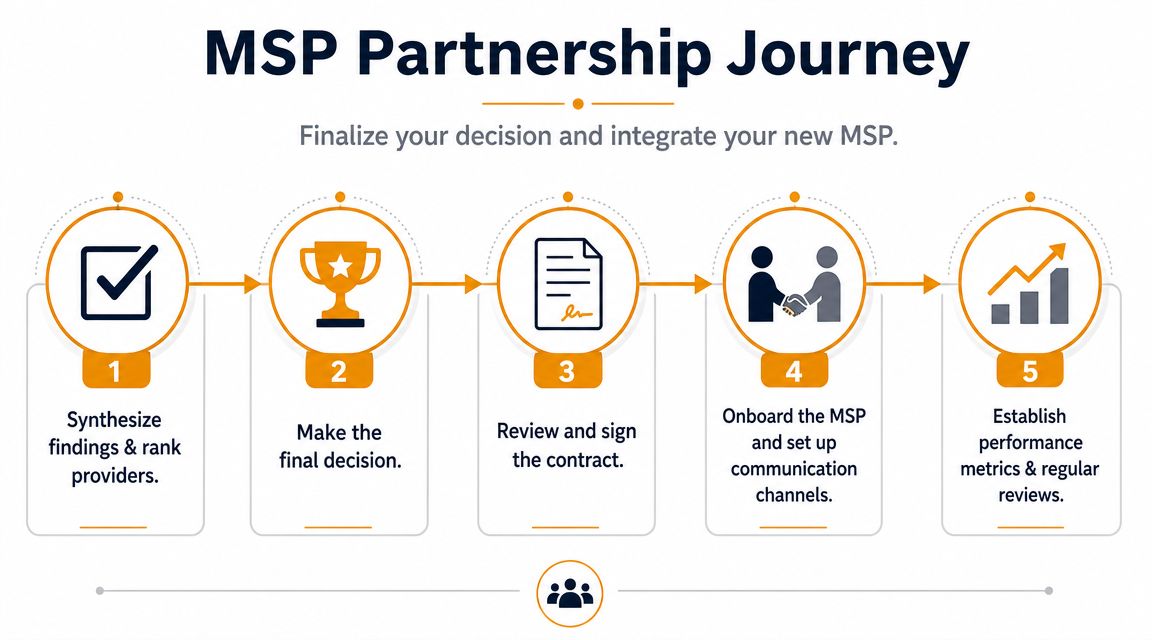
How to make the final decision
Use your scorecard, then step back and ask a few plain-language questions:
- Who understood our business fastest
- Who answered directly when we asked about scope, exclusions, and failures
- Who seems equipped to prevent issues, not just close tickets
- Who can support our Houston-area onsite realities when needed
- Who gave us confidence that documentation, communication, and security discipline are part of daily operations
If two providers are close, choose the one with clearer accountability. Businesses can work around a lot. They can't work around ambiguity for very long.
Pick the MSP you can hold to a standard in writing.
Simple RFP email template
Use this for your first serious outreach to shortlisted providers.
Subject: Request for managed IT services proposal
Hello [Provider Name],
We're evaluating managed IT services providers for our business in the Houston area and would like to request a proposal.
Our environment includes:
- [Number of users]
- [Number of locations]
- [Remote or hybrid users]
- [Core systems such as Microsoft 365, line-of-business apps, servers, VoIP, Wi-Fi]
We're looking for support in these areas:
- [Helpdesk and end-user support]
- [Onsite support expectations]
- [Cybersecurity and endpoint protection]
- [Backup and disaster recovery]
- [Cloud or Microsoft 365 administration]
- [Compliance or reporting needs]
Please include the following in your response:
- Your service model and what is included
- SLA details for critical and noncritical issues
- Onsite support availability and billing terms
- Security stack overview
- Backup and recovery responsibilities
- Pricing structure and any excluded services
- Onboarding process and expected timeline
- Client references or relevant industry experience
Thank you,
[Your Name]
[Company Name]
[Contact Information]
New MSP onboarding checklist
The handoff period is where good decisions can still go sideways. Make the first month structured.
Use this onboarding checklist:
- Assign internal owners for approvals, vendor contacts, and escalation decisions
- Confirm access transfer for Microsoft 365, internet providers, firewalls, backup systems, domain records, line-of-business apps, and admin portals
- Collect documentation including network diagrams, device inventory, warranty details, and prior vendor contracts
- Define communication rules for ticket submission, emergency escalation, approval thresholds, and executive notifications
- Schedule a baseline review of security controls, backup status, user access, aging hardware, and open risks
- Set reporting cadence for monthly service reviews and issue trending
- Clarify project boundaries so remediation work, cleanup tasks, and upgrades don't get lost inside support assumptions
A new MSP relationship should start with cleanup, visibility, and expectations. If onboarding feels improvised, daily support usually will too.
The strongest outcome from a managed IT services providers near me search isn't finding the nearest company. It's finding a partner whose service model fits your business, whose scope is clear, and whose team can support both your daily operations and your next stage of growth.
If you're comparing local providers in Houston and want a practical conversation about managed IT, cloud administration, cybersecurity, backup, or onsite support needs, IT Cloud Global, LLC is one Houston-based option to include in your shortlist.
- Best IT Services Houston TX: Your 2026 Partner
- Managed IT Services Houston TX: 2026 Guide for SMBs
- How Long Does Data Recovery Take? Realistic Timelines
- What Is a Helpdesk Ticketing System? an SMB Guide
- What Is Virtualization in Computing? Save & Boost Uptime
- Cloud Computing Solutions for Small Business: Houston 2026
- Network Maintenance Service: A Guide for Houston SMBs