


Managed IT Services Houston TX: Your 2026 Business Guide
You're probably not searching for managed IT services in Houston, TX because technology is going well.
It usually starts with something small. A server slows down on a Monday morning. Microsoft 365 login issues lock people out right before payroll. Wi‑Fi drops in the front office, then someone in accounting says their files won't open, and suddenly half the day is gone. By the time you call for help, the actual cost isn't the repair bill. It's the disruption to sales, operations, customer service, and your team's patience.
In Houston, that pressure is amplified by the pace and complexity of local business. Companies here often deal with field teams, multiple offices, compliance obligations, cloud apps, and clients who expect fast response times. If your IT only gets attention when something breaks, you're already behind.
Table of Contents
- Is Your IT Holding Your Houston Business Back
- Beyond Break-Fix What Are Managed IT Services
- The Essential Managed IT Services for Houston Businesses
- The Business Benefits and ROI of Managed IT
- Navigating Cybersecurity and Compliance in Houston
- How to Choose the Right Houston Managed IT Provider
- Frequently Asked Questions About Houston IT Services
- Get Proactive IT Support Your Houston Business Deserves
Is Your IT Holding Your Houston Business Back
A lot of Houston owners live in the same cycle. Something breaks. Your team scrambles. You call whoever handled the last issue. They fix one symptom, send an invoice, and disappear until the next fire starts. Nothing gets documented well. Nothing gets standardized. The same problems keep coming back.

That model might work for a very small office with almost no operational dependency on technology. It fails once your business relies on cloud apps, remote access, shared files, cybersecurity controls, and steady uptime. If your staff can't work without systems being available, reactive IT becomes expensive even when the repair invoice looks manageable.
Houston is a large, demanding business market. The Houston-The Woodlands-Sugar Land metro area had about 7.3 million residents in the 2020 Census, which makes it a major market for SMB support, outsourced helpdesk, and network services, especially across industries such as energy, healthcare, logistics, manufacturing, and professional services, as noted in Cortavo's Houston managed IT overview. In a market that dense, downtime doesn't just annoy employees. It slows your ability to compete.
What this usually looks like in the real world
- Slow systems become normal: Staff stop reporting issues because they assume nothing will change.
- Surprise invoices pile up: You don't know your real IT spend until the month is over.
- Security gaps stay hidden: Old laptops, weak permissions, and missed updates remain in place until there's an incident.
- No one owns the roadmap: Projects like cloud cleanup, Wi‑Fi upgrades, or backup testing stay on the “later” list.
You don't need more tickets. You need fewer recurring problems.
That's why many owners start looking at managed services after they notice the warning signs in day-to-day operations. If that sounds familiar, this guide on signs your small business needs IT support is a practical place to compare your situation.
Beyond Break-Fix What Are Managed IT Services
Break-fix support starts after something fails. Managed IT services are built to reduce how often failures happen in the first place, while giving your business a clear support process when issues do come up.
For Houston small and midsize businesses, that shift matters because IT problems rarely stay isolated. A failed switch can stop phones. A missed patch can create a security issue. A backup that was never tested becomes a real problem when someone in a medical practice, field office, or accounting team needs data restored fast. Managed services put one team in charge of watching those dependencies, maintaining standards, and responding under a defined service model.
In practice, that usually means a monthly agreement that covers ongoing monitoring, helpdesk support, maintenance, documentation, and security administration. The goal is not just to fix tickets faster. The goal is to prevent repeat issues, control risk, and give business owners a predictable way to budget for IT.
What changes under a managed service model
Under break-fix, the provider engages after users are already blocked. Under a managed model, the provider is responsible for routine upkeep and early detection across workstations, servers, Microsoft 365, networks, backups, and security tools.
That changes expectations on both sides. The business gets defined coverage, response targets, and a point of accountability. The provider is expected to document the environment, standardize systems, and recommend changes before outdated hardware, weak permissions, or neglected backup jobs turn into expensive downtime.
| Model | How it works | Common outcome |
|---|---|---|
| Break-fix | Support begins after a failure or outage | Variable invoices, reactive decisions, recurring issues |
| Managed IT | Ongoing support, monitoring, maintenance, and security under a subscription | More predictable costs, faster response, fewer avoidable disruptions |
Houston companies also have local pressures that make this model more practical than it may sound on paper. Energy firms, clinics, contractors, logistics companies, and professional offices often have a mix of remote users, cloud apps, aging line-of-business systems, and compliance obligations. That environment needs regular oversight, not occasional repair work.
What good managed IT is supposed to do
A good managed service relationship should produce three business outcomes:
- Keep employees working with responsive user support and fewer recurring interruptions.
- Keep systems reliable through patching, monitoring, lifecycle planning, and routine maintenance.
- Keep risk contained with security controls, tested backups, access management, and documented procedures.
Those outcomes are easy to say and harder to deliver. That is why provider evaluation matters. In my experience, Houston business owners get the best results when they ask who owns standards, how backup testing is handled, what happens after hours, and whether the provider has experience with regulated environments such as healthcare and energy. If those answers are vague, the service will usually be reactive, even if the contract says "managed."
If you want a clearer baseline before comparing providers, this guide on what managed IT services are and their benefits explains the service model in plain language.
The Essential Managed IT Services for Houston Businesses
Houston businesses usually don't need a long menu of disconnected tools. They need the right service stack, integrated well, with clear ownership. That's especially true when you have office staff, remote workers, cloud apps, phones, Wi‑Fi, line-of-business software, and compliance concerns all touching the same environment.
This visual gives a good high-level view of the core service categories.
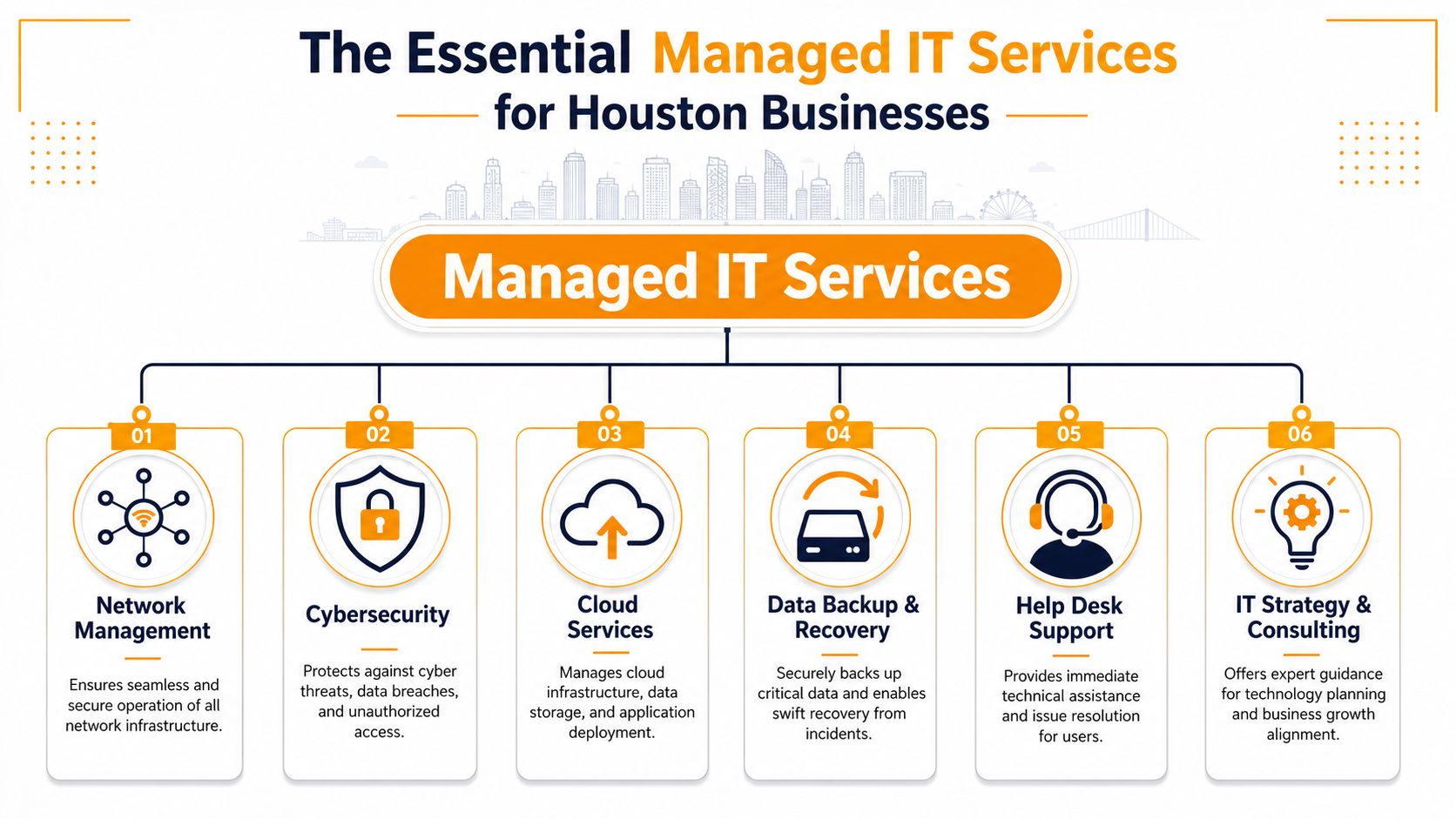
Helpdesk support that keeps work moving
Helpdesk is where most employees experience IT. If users wait too long for basic issues like password resets, printer failures, Outlook problems, or Teams access, productivity drops fast. Good helpdesk support should be easy to reach, consistent, and tied to documented processes.
For a Houston SMB, the value is not just answering tickets. It's shortening the time between “I can't work” and “I'm back up.”
A strong helpdesk function should include:
- User support across common platforms: Microsoft 365, Windows, macOS, mobile devices, printers, and collaboration apps.
- Remote troubleshooting: Fast resolution for common issues without waiting for a site visit.
- Escalation paths: Desktop issues shouldn't stall because nobody can hand them to a network or cloud specialist.
Endpoint security and device management
Every laptop, desktop, and mobile device is a potential entry point. That's why endpoint management and endpoint security belong together. It's not enough to install antivirus and hope for the best. Devices need updates, policy enforcement, visibility, and isolation when something looks wrong.
Modern tools are essential. Security platforms such as SentinelOne are often used to strengthen endpoint detection and response. Device policies can also be enforced through Microsoft Intune or similar management systems, especially for hybrid teams.
What works:
- Standardized device setup
- Central patching
- Endpoint detection and response
- Access controls tied to user roles
What doesn't:
- One-off laptop setup
- Local admin rights everywhere
- Infrequent patching
- No inventory of who has what device
Cloud migration and cloud administration
Many Houston businesses already use the cloud, but they aren't always managing it well. Files may be scattered across SharePoint, OneDrive, local desktops, and old servers. Permissions drift. Former employees keep access longer than they should. Nobody is sure which workloads belong in AWS, Azure, or Google Cloud.
Cloud work should solve business problems, not add confusion.
An experienced provider should help with:
- Migration planning: Moving email, file storage, servers, or apps without unnecessary disruption.
- Platform administration: Managing Microsoft 365, Exchange, SharePoint, Teams, Azure, or Google Cloud after the migration is complete.
- Access design: Setting the right permissions so people can work without exposing too much data.
One Houston option in this category is IT Cloud Global, which provides managed IT, helpdesk, cloud support across AWS, Microsoft Azure/O365, and Google Cloud, plus on-site and remote support for local businesses.
Before going deeper into the remaining service layers, it helps to see how these pieces fit together in practice.
Network support and performance management
When owners say “the internet is slow,” the actual issue could be Wi‑Fi design, switching problems, firewall configuration, ISP handoff trouble, device saturation, or poor segmentation. Network support matters because every cloud app, voice call, remote session, and file transfer depends on it.
For Houston offices, especially those with warehouses, medical suites, retail floors, or mixed-use facilities, remote-only support isn't enough. You need someone who can monitor remotely and still handle on-site network changes when needed.
Look for experience with:
- Managed firewalls
- Switches and routing
- Business Wi‑Fi
- VLAN planning
- Structured cabling and low-voltage work
- Vendor coordination with your ISP
Arista and similar enterprise networking platforms often come up in better-designed environments because reliability at the network layer affects everything above it.
Backup and disaster recovery
Backup is one of the most misunderstood parts of small business IT. Many companies think they're covered because files sync somewhere. Sync is not the same as tested recovery. If ransomware encrypts files, a user deletes the wrong folder, or a server fails, the question isn't whether a copy exists. The question is whether your business can restore what it needs, fast enough to keep operating.
A usable backup and disaster recovery plan should define:
- Which systems are critical
- Where backups are stored
- Who can restore them
- How recovery is tested
- What happens if the office, server, or cloud tenant is unavailable
Backups that have never been tested are just assumptions stored on hardware.
VoIP and collaboration systems
Phones still matter, especially for service businesses, clinics, dispatch operations, and customer-facing offices. A modern managed IT provider should understand VoIP as part of the business workflow, not as a separate utility someone else owns.
That includes call quality, handset setup, mobile apps, voicemail routing, and integration with your network. Platforms such as Ultatel can be part of a managed voice setup, particularly when companies need reliable calling for office and remote staff.
On-premise support when remote work is not enough
Some issues can't be solved over a remote session. A failed switch, bad cable run, dying workstation, printer hardware problem, or office move needs hands-on work. Houston businesses with physical locations should ask whether on-premise support is built into the relationship or treated as an exception every time.
That local capability matters more than many owners realize. If your provider can manage systems remotely but can't show up when infrastructure work is required, you end up coordinating multiple vendors for one problem.
The Business Benefits and ROI of Managed IT
Owners don't buy managed IT because they want more software agents, dashboards, or jargon. They buy it because the business runs better when technology stops getting in the way.
The best return usually comes from operational consistency. Fewer recurring issues. Faster support. Better visibility into risk. Cleaner budgeting. Less time spent by managers acting as unofficial IT coordinators.
Where owners usually see the payoff
- More productive staff: Employees spend less time waiting on password resets, broken Outlook profiles, unstable Wi‑Fi, or slow computers.
- Smoother budgeting: A subscription model is easier to plan around than random repair bills, urgent hardware failures, and piecemeal consulting.
- Lower operational friction: Standardized devices, documented processes, and managed updates reduce daily chaos.
- Better decision-making: You can plan office moves, cloud changes, security upgrades, and hardware refreshes with actual guidance instead of reacting late.
- Support for growth: New hires, new locations, and new systems can be onboarded in a more controlled way.
A lot of businesses underestimate the cost of internal distraction. When your office manager, controller, or operations lead keeps chasing IT issues, that person is no longer focused on their real job.
What doesn't produce good ROI
Not every outsourced arrangement is worth it. Poorly scoped support can feel organized on paper and still fail in practice.
Watch for these patterns:
- Cheap plans with weak coverage: If security, backups, after-hours help, or on-site work are always extra, the budget won't stay predictable.
- Tool-heavy but service-light vendors: Fancy dashboards don't help if users still wait too long for basic support.
- No roadmap: If your provider only closes tickets and never addresses aging hardware, access sprawl, or recurring network pain, you're paying for maintenance without progress.
The real ROI isn't “we hired an MSP.” It's “our team can work, our risk is lower, and our IT spend stopped swinging wildly.”
If you want a business-focused take on this point, the hidden ROI of managed IT services in Houston frames the discussion around outcomes owners care about.
Navigating Cybersecurity and Compliance in Houston
A Houston business usually feels the security problem before it sees it on a report. An employee cannot open files. Microsoft 365 starts sending lockout alerts. A clinic manager realizes a departing staff member still has access. An engineering firm gets a client questionnaire asking about MFA, backups, privileged access, and incident response, and no one is sure how to answer it.
That is the point where managed IT stops being a support conversation and becomes a risk conversation.
In Houston, that pressure shows up fast for healthcare practices handling protected health information, energy and engineering companies sharing sensitive project data, and professional service firms that need to prove their controls to clients, insurers, or auditors. Local businesses are not just trying to avoid malware. They are trying to keep operations running, meet contract requirements, and avoid the cost of a preventable mistake.
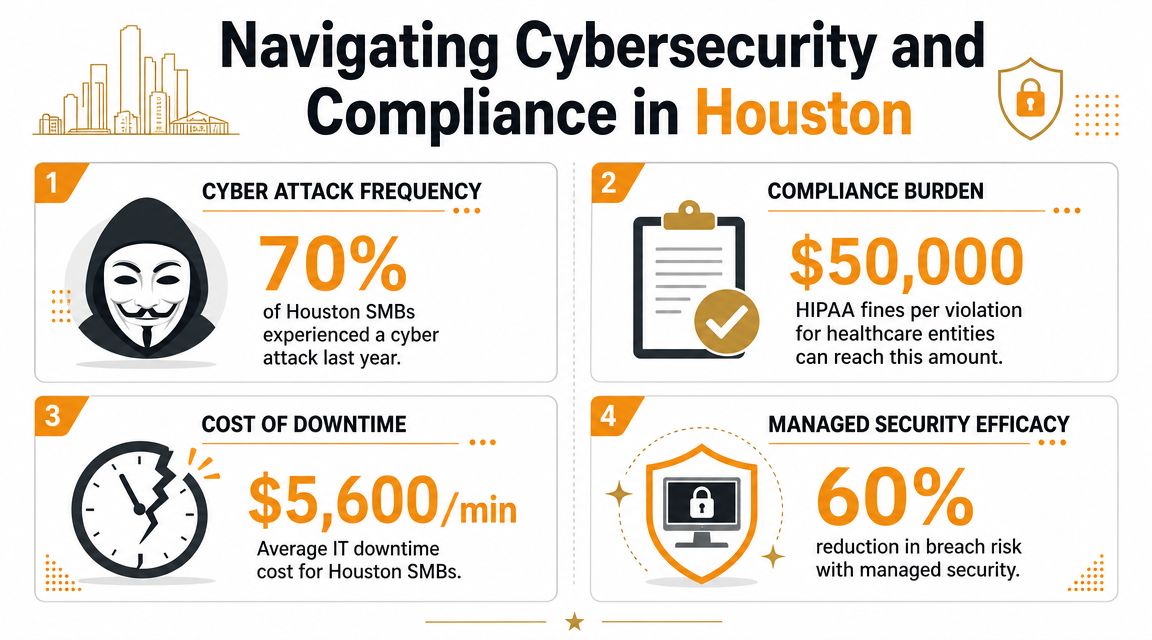
Why Houston businesses feel this pressure first
According to ECS Office's overview of managed IT services, managed service packages in this market often include 24/7 help desk, managed security, dark web monitoring, zero-trust policy support, and compliance guidance tied to frameworks such as HIPAA and SOC 2. That lines up with what many Houston SMBs now expect. Security is part of day-to-day IT operations, not a separate project you revisit once a year.
The local mix of industries matters here. Healthcare groups need tighter access control, audit trails, and documented processes around patient data. Energy, field services, and engineering firms often deal with remote connections, shared vendor access, and customer security reviews that expose weak admin practices fast. Even a 25-person office can face enterprise-style expectations if it serves larger clients.
I see one mistake over and over. Companies buy security tools but never tighten the underlying process. The antivirus is installed, but former employees still have active accounts. Backups exist, but no one has tested a restore. MFA is enabled for some users, not all users. That gap is where risk lives.
What security-first managed services should include
A provider supporting Houston SMBs should be able to put these controls in place and keep them working:
- Endpoint protection: Threat detection, device isolation, policy enforcement, and response support.
- Identity and access management: Multifactor authentication, role-based access, password policy enforcement, and user onboarding and offboarding.
- Monitoring and alerting: Visibility into suspicious sign-ins, unusual endpoint behavior, failed backups, and system health.
- Compliance support: Technical safeguards, documentation, policy guidance, and evidence collection for HIPAA, SOC 2, cyber insurance, or client questionnaires.
- Recovery readiness: Backups that are monitored, tested, and restorable within a timeframe the business can tolerate.
For healthcare, the conversation usually starts with HIPAA but quickly expands to device encryption, email security, access reviews, and documentation. For energy and industrial firms, the pressure often comes from client requirements, remote field access, and the need to separate critical systems from everyday office risk. Those are different problems. They should not be handled with the same checklist.
One area many SMBs miss is secrets management inside scripts, automations, internal apps, and integrations. Hardcoded credentials and poorly stored environment variables create quiet exposure that standard endpoint tools may not catch. This guide to EnvManager secrets security is a useful reference if your team runs custom workflows or in-house tools.
At IT Cloud Global, LLC, we treat compliance work the same way we treat support and security. As an operating issue. If controls are not documented, reviewed, and tied to real user behavior, they tend to fail when a client audit, insurance renewal, or incident puts them under pressure.
Security maturity comes from consistent control, clear documentation, and tested recovery. Not from buying more software.
How to Choose the Right Houston Managed IT Provider
Choosing a provider gets easier when you stop asking, “Who seems knowledgeable?” and start asking, “Who can reliably support the way our business works?”
A Houston MSP should fit your business model, your risk profile, and your operating rhythm. A clinic with compliance needs, a logistics company with dispatch and warehouse systems, and a professional office with remote staff all need different things from the same phrase, managed IT services.
Questions worth asking before you sign
Use this checklist when comparing providers.
- What's included in the base agreement: Ask for a written scope. You want to know whether helpdesk, endpoint security, Microsoft 365 administration, backup oversight, vendor coordination, and on-site support are included or separate.
- How do they handle remote and on-site support: Houston businesses often need both. A provider that can remote in quickly but can't show up when a firewall fails is only solving half the problem.
- Do they understand your industry: Healthcare, legal, energy, and professional services all carry different expectations around access control, documentation, and uptime.
- How do they document your environment: Good MSPs document assets, users, permissions, network layout, and recurring procedures. If you're curious what mature internal process looks like, Automated documentation solutions for MSPs give a useful example of how service organizations standardize knowledge and reduce support friction.
- Who owns strategy: Someone should be looking ahead at lifecycle issues, cloud cleanup, licensing, backup validation, and security gaps. If nobody owns that, your “managed” relationship is just outsourced ticket handling.
Here's a simple comparison framework:
| Evaluation point | Strong answer | Weak answer |
|---|---|---|
| Coverage | Clear scope with defined services | Vague promises and lots of exclusions |
| Local support | Remote and on-site capability in Houston | Remote only, or third-party dispatch |
| Security approach | Built into the service model | Optional add-ons with little guidance |
| Communication | Plain language and regular reviews | Heavy jargon and reactive updates |
| Industry fit | Familiar with your workflows and compliance pressure | Generic pitch for every business type |
Red flags to watch for
Some warning signs show up early if you know what to look for.
- Too much jargon, not enough clarity: If the provider can't explain support, security, and escalation in plain English, day-to-day communication probably won't improve after signing.
- Pricing that feels deliberately blurry: Confusing tiers, soft exclusions, or vague project language often lead to billing friction later.
- No mention of standards: Good providers care about patching, access control, documentation, backups, and device consistency. If every answer sounds improvised, operations probably are.
- No real process for onboarding or offboarding users: This is one of the fastest ways companies accumulate risk and account sprawl.
- Everything depends on one person: Businesses need a support model, not a single technician carrying the whole relationship in their head.
If a provider avoids specifics during sales, expect more ambiguity once they have the contract.
Frequently Asked Questions About Houston IT Services
Is my business too small for managed IT services
Usually not.
Small Houston businesses often feel IT pain first because they rely on the same core systems as larger companies without having internal coverage for support, security, backups, and vendor issues. If your team depends on Microsoft 365, line-of-business apps, shared files, VoIP, or remote access, managed IT can make sense even with a modest headcount.
The better question is whether technology problems interrupt billing, scheduling, patient communication, field work, or customer service. If they do, size is not the deciding factor.
What's the difference between managed services and just hiring an IT guy
Hiring one internal technician and hiring a managed service provider solve different problems.
An in-house IT person can be a good fit if your environment is large enough to keep them fully occupied and your budget supports salary, benefits, tools, training, and after-hours coverage. The trade-off is coverage depth. One person usually cannot handle user support, cybersecurity, Microsoft 365 administration, compliance documentation, backup testing, network issues, vendor coordination, and planning at a high level all at once.
Managed IT gives small and midsize businesses access to a team model instead of a single point of failure. That matters in Houston companies that need support across office staff, remote users, job sites, clinics, warehouses, or multiple locations. For healthcare and energy-adjacent firms, it also matters because access control, documentation, and response processes need more consistency than break-fix support typically provides.
At IT Cloud Global, LLC, the practical question we usually ask is simple: do you need one person, or do you need a support system?
How long does it take to switch IT providers
It depends on the condition of the environment you are inheriting.
A clean, well-documented setup can transition fairly quickly. A neglected environment takes longer because the new provider has to sort out admin access, licensing, device status, backup health, and basic documentation before support becomes predictable. That extra time is not wasted. It is often the first real cleanup the business has had in years.
A smoother handoff usually includes:
- user and admin account review
- device and asset inventory
- Microsoft 365 or cloud tenant review
- backup and recovery verification
- network documentation
- support contacts, ticket flow, and escalation rules
For regulated businesses in Houston, there is another layer. If you operate in healthcare or support energy clients, the transition should also include access review, policy gaps, and documentation checks so old compliance problems do not follow you into the new contract.
Get Proactive IT Support Your Houston Business Deserves
If you're dealing with recurring outages, weak support follow-through, rising security anxiety, or an IT setup that only gets attention during emergencies, the problem usually isn't one bad laptop or one noisy server. It's the operating model behind your technology.
Houston businesses need more than occasional troubleshooting. They need support that matches how they work. That means responsive helpdesk, stable networks, better device management, cloud administration, backup readiness, and security controls that are built into daily operations instead of bolted on after a scare.
A good managed service relationship should make your environment calmer. Your team should know where to go for help. Your leaders should know what's being maintained, what's at risk, and what needs attention next. Your budget should stop lurching from one surprise to another.
That's the practical value behind managed IT services in Houston, TX. Not more complexity. Less chaos.
If you're evaluating next steps, look for a provider that can support your users, secure your environment, explain issues clearly, and handle both remote and on-site needs across Houston without turning every improvement into a separate fire drill.
If you want a clearer picture of what proactive support should look like for your environment, IT Cloud Global, LLC is a Houston-based option for managed IT, helpdesk, cloud support, cybersecurity, backup and recovery, and on-site service. A practical next step is to ask for an IT assessment that reviews your current support gaps, security exposure, and priorities for the coming year.
- IT Security Services Houston TX: Essential for Your SMB In
- Top IT Services Houston TX: Your 2026 SMB Guide
- Managed IT Services Houston TX: 2026 Guide for SMBs
- Houston Managed IT Services: A 2026 Guide for SMBs
- How Long Does Data Recovery Take? Realistic Timelines
- What Is a Helpdesk Ticketing System? an SMB Guide
- Your 2026 Disaster Recovery Testing Checklist