


Integrated Communication Services for Houston SMBs in 2026
Your office probably has this problem right now. The front desk answers calls in one app. Sales lives in email. Your team messages each other in Slack or Microsoft Teams. Someone still has a separate desk phone system. Customer files sit in a shared drive that nobody can find quickly, and when an employee works from home, the whole setup feels one step away from breaking.
For a Houston SMB, that mess doesn't just create annoyance. It slows quotes, drops follow-ups, confuses customers, and makes security harder than it should be. Every time a staff member jumps between inboxes, chats, phones, and file folders, the business pays for it in wasted time and avoidable mistakes. If your company is growing, opening another location, or trying to support hybrid work, disconnected communication tools stop being a minor inconvenience and become an operating risk.
Table of Contents
- Why Your Disconnected Tools Are Costing You More Than You Think
- What Are Integrated Communication Services
- The Top Business Benefits of a Unified System
- Navigating Security and Compliance in a Connected World
- Your Deployment and Migration Checklist
- How to Calculate the Real Cost and ROI
- Choosing the Right Managed Provider in Houston
- Frequently Asked Questions
Why Your Disconnected Tools Are Costing You More Than You Think
A common Houston SMB setup looks efficient on paper. The business has email, a chat app, a phone system, Zoom, maybe a CRM, and some file-sharing tool. Each product works well enough on its own. The problem starts in the handoffs.
A customer calls with a service issue. The receptionist takes a note. The technician doesn't see it until later because the message lives in email, not in the team chat. Sales promises a callback, but the account manager is in a video meeting and misses the mobile app notification. Nobody can see the full conversation history in one place, so the customer repeats the issue to three different people.
That kind of fragmentation drags down uptime, service quality, and staff focus. The business pays multiple vendors, but significant loss often comes from confusion. Employees switch screens, search for context, and make decisions without complete information.
The reason this category keeps gaining attention is simple. Businesses are trying to run more of their operations through connected platforms, not loose collections of apps. The market for integrated enterprise IT and communication solutions was valued at USD 237.6 billion in 2023 and is projected to expand at an 11.4% CAGR from 2024 to 2032, according to Global Market Insights on integrated enterprise IT and communication solutions. That doesn't describe a niche toolset. It describes a business infrastructure shift.
Practical rule: If your team needs to ask, “Where did that message come in?” more than once a day, your communication stack is already costing more than the invoice total.
For Houston companies dealing with fast customer response expectations, field crews, compliance concerns, or multiple locations, integration isn't just about convenience. It's about running a business without communication bottlenecks built into the workflow.
What Are Integrated Communication Services
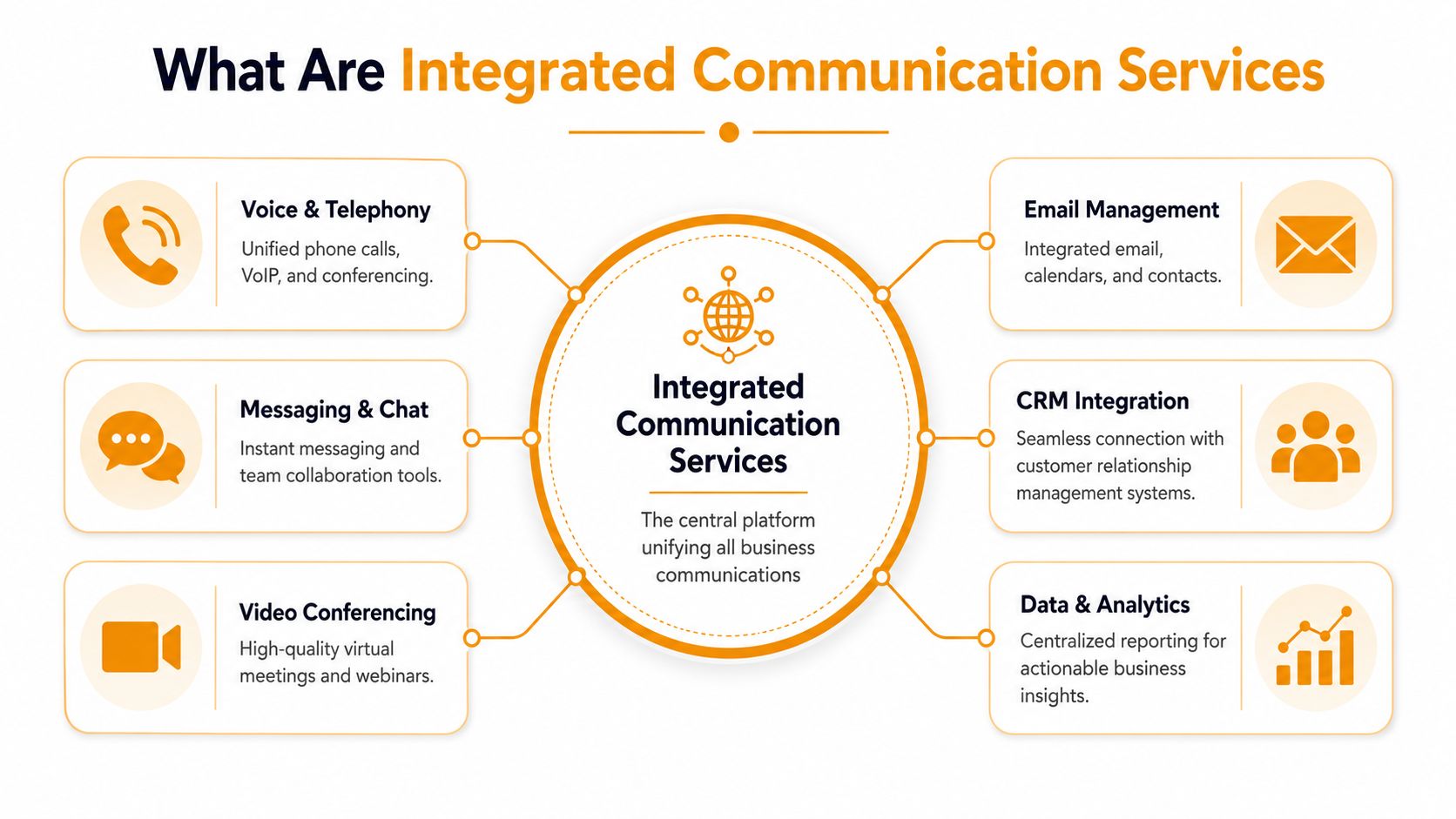
Integrated communication services are the business equivalent of a central nervous system. Instead of having separate tools for calls, meetings, messages, file access, and customer interactions, you connect those functions so information moves through one coordinated platform.
One system instead of five separate ones
The technical value is straightforward. An integrated system unifies multiple communication channels into one platform, which simplifies authentication, logging, and policy enforcement across user interactions, as described by Integrated Communication Services. For a business owner, that means fewer disconnected logins, less guesswork about where records live, and tighter control over who can access what.
Think of it this way. Separate tools act like individual contractors showing up to a jobsite without a foreman. Each one may be competent, but coordination breaks down. Integrated communication services put a foreman in place.
What usually sits inside the platform
Most SMB deployments pull together a mix like this:
- Voice and calling: Business phone numbers, call routing, voicemail, softphones, and VoIP.
- Video meetings: Internal meetings, client calls, screen sharing, and recorded sessions.
- Team messaging: Quick chat, department channels, status updates, and handoffs.
- File collaboration: Shared documents, approvals, and version control tied to conversations.
- Customer-facing workflows: Contact center queues, call records, and CRM-linked interactions.
- Admin and policy controls: User provisioning, permissions, retention settings, and audit visibility.
If you're evaluating the phone side of this stack, it helps to compare options built for smaller organizations. This guide to the best VoIP phone system for small business is useful because voice is often the first piece owners try to modernize.
A good integrated setup doesn't force every employee into the same workflow. Front desk staff, field technicians, sales reps, and managers will all use the platform differently. The win is that they're all working from the same communication spine instead of piecing together fragments from separate systems.
The Top Business Benefits of a Unified System
Features are easy to list. Business benefits are what matter. A unified communication system earns its place when it improves how the company runs day to day.
Less friction for staff
The first gain is operational. Staff don't waste time bouncing between a phone console, inbox, text thread, and file folder just to answer one question. They can see the conversation, act on it, and move on.
That reduces context switching. It also lowers the number of avoidable support requests inside the business. A manager isn't chasing three apps to approve a change. A dispatcher isn't copying customer notes from one screen to another. A remote employee can work from the same system as an in-office employee instead of improvising around gaps.
A few examples make this concrete:
- Field service teams: A technician can receive a call update, a job note, and an attachment in one workflow instead of three disconnected notifications.
- Sales staff: Call history and customer messages stay closer to the actual account record, so follow-up is faster and less dependent on memory.
- Front office teams: Reception, scheduling, and billing don't have to reconstruct the last conversation before answering a client.
A unified system doesn't make staff smarter. It removes the small obstacles that keep capable people from moving quickly.
Better service for customers
Customers rarely care which apps you use. They care whether your business responds, follows through, and sounds organized. Integration helps because the next employee in the chain has better context.
That translates into practical gains:
| Business area | With disconnected tools | With a unified system |
|---|---|---|
| Incoming calls | Staff hunt for history | Staff see more context faster |
| Team handoffs | Messages get buried | Conversations move with the work |
| Customer updates | Delays and duplication | More consistent follow-up |
| Growth | New users add complexity | New users fit into existing workflows |
There's also a cost angle. Bundling services can simplify vendor management and reduce administrative overhead, but that alone isn't enough. The full value comes when consolidation removes duplicate work, shortens response time, and makes the business easier to scale.
For Houston SMBs opening a second office, hiring remote staff, or serving customers across multiple channels, that flexibility matters. You want systems that grow with the business without forcing a rebuild every time operations change.
Navigating Security and Compliance in a Connected World
A lot of providers talk about integration as if combining systems automatically reduces risk. That's only half true. Integration can improve control, but it can also concentrate risk if the design is sloppy.
Integration can widen the blast radius
When communication systems converge with IT, businesses need to think about failure domains, cyber exposure, and regulatory continuity. That concern is highlighted in ICSSF's discussion of resilient and portable integrated architectures. In plain English, if one account, one admin panel, or one vendor problem affects everything, the outage or breach can hit harder.

That doesn't mean integrated communication services are unsafe. It means the design needs guardrails. Businesses in healthcare, legal, finance, and professional services should be especially careful about retention settings, user access, and how communication records are stored and reviewed.
The basics still matter:
- Access control: Don't give every manager global admin rights because it's convenient.
- Device policy: Phones, laptops, and tablets need consistent rules for sign-in and session security.
- Retention and auditability: If you may need records later, the platform has to preserve them in a controlled way.
- Outage planning: If your main system fails, staff need a fallback for critical communication.
Fraud and impersonation also ride on top of communication channels. If your staff handles invoices, approvals, or customer account changes, it's worth strengthening process discipline alongside technology. This practical guide on protecting your business from scams is useful because communication failures often start with a fake message that looked routine.
Questions owners should ask before signing
Some providers will demo a polished app and never discuss portability, audit trails, or offboarding. Ask anyway.
- How do we export our data if we leave? If the answer is vague, expect lock-in.
- What happens during an internet outage or vendor outage? A real answer includes fallback workflows, not just “our platform is reliable.”
- Can we separate admin roles? Security improves when one person doesn't control everything.
- How are records retained and retrieved? This matters for disputes, regulated communications, and internal investigations.
- What parts of the stack are single-vendor only? Deep integration is useful, but not if it traps you.
Buy convenience carefully. The fastest deployment isn't always the safest architecture.
Your Deployment and Migration Checklist
Most communication projects don't fail because the software is bad. They fail because the business skips planning, underestimates the network, or treats user adoption like an afterthought.
Start with the network you already have
Communications quality depends on end-to-end engineering. Poor cabling, weak Wi-Fi design, or unplanned network changes can create latency and packet loss that degrade voice and video performance, as noted in this overview of integrated communications infrastructure work. That's why do-it-yourself rollouts often disappoint. The software gets blamed, but the underlying cause is found in the wiring closet or the wireless layout.
Before you migrate anything, check the physical and access layers:
- Cabling health: Old runs, bad terminations, and improvised patching create unstable performance.
- Wi-Fi coverage: A conference room with weak signal will ruin meetings no matter how good the platform is.
- Switching and segmentation: Voice, video, and general traffic shouldn't be treated carelessly.
- Internet resilience: If the connection drops often, your cloud communications will drop with it.
If your business hasn't reviewed its network in a while, this walkthrough on how to set up a business network is a helpful planning reference.
A short explainer can help your team understand the rollout process before go-live:
A practical rollout sequence
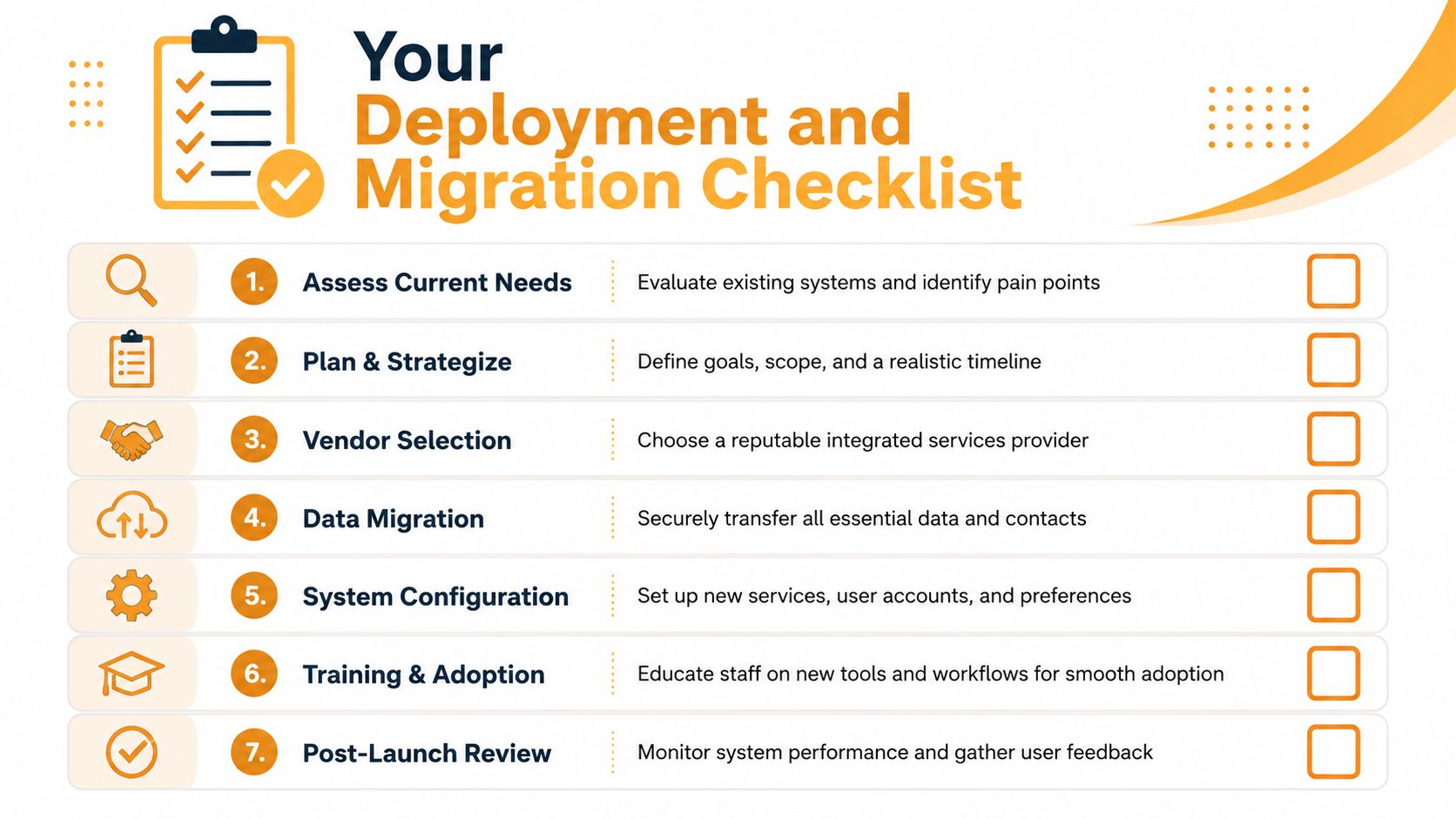
A smooth migration usually follows a simple sequence.
Audit current tools and workflows
List every phone line, user, queue, shared mailbox, conferencing tool, and communication dependency. You can't consolidate what you haven't mapped.Define what must not break
Emergency calling, front desk routing, customer support lines, executive numbers, and compliance-sensitive records go to the top of the list.Select the platform around workflows, not features
The product with the longest feature sheet may still be wrong for your office, retail site, clinic, or warehouse.Prepare users before cutover
Tell employees what changes, what stays the same, and where to get help. Most resistance comes from uncertainty, not stubbornness.Pilot with a small group
Use a real department with real work. Front desk, sales, or service dispatch often reveals issues quickly.Cut over in stages
Avoid “big bang” moves unless the environment is very simple. Stage numbers, users, and locations in a controlled order.Tune after launch
Call flows, permissions, mobile behavior, and notification rules almost always need adjustment after people start using the system.
The businesses that do this well don't chase a perfect launch. They aim for a stable launch, then improve.
How to Calculate the Real Cost and ROI
Owners often compare monthly subscription prices and stop there. That's too shallow. A true business case looks at what the current setup costs you now, not just what the replacement will cost.
The key point is simple. Most vendor content doesn't answer when integration saves money or reduces risk. A real business case requires looking at total cost of ownership and downtime avoidance, not just bundled pricing, as discussed by Integrated Comm Services on business-case clarity.
What belongs in your real cost baseline
Start with the system you already have. Write down every direct and indirect cost tied to communication.
| Cost area | What to include |
|---|---|
| Software spend | Phone system, conferencing, chat, storage, support add-ons |
| IT overhead | Admin time, troubleshooting, onboarding, vendor coordination |
| Operational drag | Missed calls, delayed approvals, duplicate data entry |
| Downtime impact | Lost availability during outages or bad migrations |
| Security exposure | Risk created by weak access control or poor visibility |
Then add the hidden cost categories owners often ignore:
- Employee time lost to tool switching
- Manual handoffs between departments
- Customer frustration from repeated explanations
- Training burden for multiple overlapping systems
- Support dependency on one internal “expert” who knows the mess
None of those line items may look dramatic alone. Together, they often decide whether consolidation is worth it.
If you only compare licenses, you're not evaluating ROI. You're price shopping.
How to build an ROI case that survives scrutiny
A better ROI model asks four questions.
- What work becomes faster? Think call handling, scheduling, internal approvals, sales follow-up, and remote collaboration.
- What becomes less error-prone? Focus on missed messages, duplicate data entry, and inconsistent customer records.
- What risk drops? Consider downtime, access sprawl, and the chance that key conversations vanish across apps.
- What future expense gets avoided? Growth matters. A system that scales cleanly can prevent another migration later.
For teams that want a structured starting point, the Cloud Vision Technologies ROI calculator can help frame assumptions in a more disciplined way. It's not a substitute for your own numbers, but it's a practical way to think beyond invoice totals.
The best ROI cases are use-case specific. A retail operation may care most about store-to-office coordination and call coverage. A medical practice may focus on compliance, records, and missed patient calls. A construction or field service company may value mobile access and dispatch clarity more than anything else.
That's why broad claims about integrated communication services can be misleading. Consolidation is not automatically cheaper. It's cheaper when it reduces enough friction, downtime, and risk to justify the move.
Choosing the Right Managed Provider in Houston
Technology choice matters, but provider choice usually matters more. A strong platform in weak hands still creates poor call quality, messy migrations, and support frustration.
What matters more than a polished sales demo
Houston SMBs should care about whether the provider can support both the software layer and the physical environment around it. That includes office moves, cabling issues, Wi-Fi dead zones, user onboarding, cloud administration, and security controls.
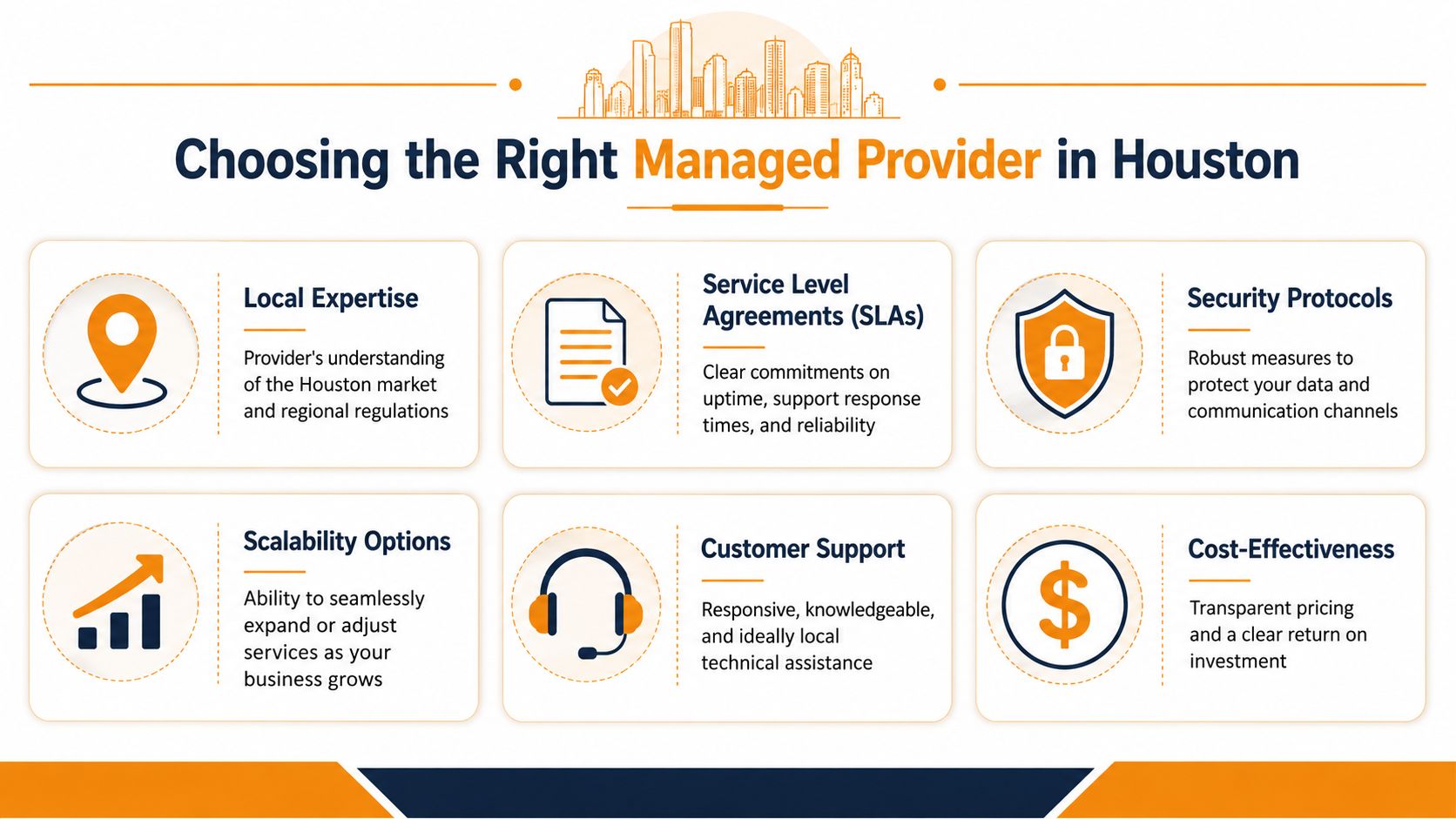
A few signs separate a serious managed provider from a reseller with a nice pitch deck:
- Local presence: If a location has an outage or a hardware issue, can they show up?
- Network knowledge: Can they deal with switching, wireless, structured cabling, and edge problems, or only the app?
- Microsoft 365 and cloud fluency: Integrated communication work often touches Teams, Exchange, identity, and mobile policy.
- Support maturity: Ask who answers after-hours issues and how escalation works.
- Security discipline: You want role-based access, documented procedures, and a clear offboarding process.
This guide on how to choose a managed service provider is a good reference because it pushes the discussion beyond price and into operational fit.
A simple provider scorecard
Use a plain scorecard during vendor conversations. If the provider can't answer clearly, treat that as an answer.
| Question | Why it matters |
|---|---|
| How do you handle onsite issues in Houston? | Remote-only support has limits |
| What network prerequisites do you check before deployment? | Voice and video depend on infrastructure |
| How do you design for outages and failover? | Resilience matters as much as features |
| How do we leave your platform if needed? | Portability protects you from lock-in |
| Who trains our users after go-live? | Adoption determines whether the project sticks |
The right provider should be able to explain trade-offs plainly. Not everything should be a single-vendor stack. Not every feature should be turned on. Not every location should be migrated the same way. Good advice sounds specific because the environment is specific.
Frequently Asked Questions
What's the difference between integrated communications and UCaaS
UCaaS usually refers to a cloud delivery model for unified communications. Integrated communication services are broader. They can include UCaaS, but they also cover network design, security, device policy, physical infrastructure, and cross-system workflow integration.
Can I mix vendors or do I need one provider for everything
You can mix vendors. In some environments, that's the better choice. The trade-off is more integration work and more accountability management.
How do I get employees to actually use the new tools
Keep the rollout practical. Train by role, not by feature list. Pilot with one group first, simplify defaults, and give staff quick support during the first days after cutover.
If your Houston business is dealing with scattered phone, chat, cloud, and network systems, IT Cloud Global, LLC can help you plan a more resilient setup without overcomplicating it. Their team supports managed IT, Microsoft 365, cloud migrations, Wi-Fi and cabling, cybersecurity, VoIP, and day-to-day helpdesk operations, so you can move toward integrated communication services with a clearer business case and less implementation risk.
- Houston IT Support: A 2026 Guide for SMBs
- What Is Network Access Control: Why Your Business Needs It
- Hybrid Cloud Management: A Practical Guide for SMBs
- Computer Service Near Me: A Houston Buyer’s Guide
- IT Security Services Houston TX: Essential for Your SMB In
- Top IT Services Houston TX: Your 2026 SMB Guide
- Managed IT Services Houston TX: 2026 Guide for SMBs