


Data Recovery Services Cost: 2026 Pricing Guide
Data recovery services usually cost $100 to over $3,000, and the price is driven by the type of failure, not how many files you need back. If your issue is simple, the bill may stay in the low hundreds. If the device has physical damage, failed heads, platter damage, or a complex RAID problem, the price climbs fast.
If you're reading this after a drive disappeared from File Explorer, a server volume stopped mounting, or a laptop started clicking right before an important deadline, you're not shopping. You're trying to stop a business problem from turning into a bigger one. That pressure is exactly why data recovery pricing feels so frustrating. Most business owners get a wide range, very little explanation, and a lot of technical terms they didn't ask for.
The good news is that the pricing isn't random. It's usually tied to how hard the job is for the engineer, what equipment the lab needs, and how much risk the device presents. If you understand that one principle, the quotes start to make sense.
For broader context, this 2026 data recovery cost guide is a useful outside reference because it helps frame the same pricing confusion many businesses run into. The better long-term fix, though, is to avoid turning one failed device into a full business interruption with a tested cloud backup strategy for small business.
Table of Contents
- What Actually Determines Data Recovery Cost?
- Why Price Depends on Failure Type Not Data Size
- Typical Cost Ranges for Different Devices
- Key Factors That Influence Your Final Quote
- DIY Data Recovery Software vs Professional Services
- How to Choose a Provider and Avoid Hidden Fees
What Actually Determines Data Recovery Cost?
Monday starts with a dead laptop, a finance share that will not mount, or a server RAID that suddenly drops offline. The first question many owners ask is the wrong one: how much data is on it? The question that controls the quote is what failed.
That is why data recovery prices surprise people. Labs charge for diagnosis, controlled lab work, donor parts, firmware repair, board work, cleanroom procedures, and the time needed to get a damaged device readable again. A tiny folder of contracts can cost more to recover than a full archive drive if the failure is harder to fix. For a plain-English benchmark, this 2026 data recovery cost guide shows how pricing rises with device condition and recovery method rather than simple storage size.
Use the right mental model. Data recovery works like engine repair. The bill comes from finding the fault and fixing access safely, not from counting files after the fact.
That is also why two drives with the same capacity can produce very different quotes. One may need straightforward logical recovery after accidental deletion. Another may need firmware work, component-level repair, or donor parts before a single file can be copied. The storage size barely changes that labor. The failure complexity does.
For a business, the cost decision should be tied to downtime and replacement value, not emotion. If the lost data would halt payroll, delay customer delivery, or wipe out records you cannot rebuild, pay for a proper evaluation. If the files already exist in tested backups or in cloud backup solutions for small business, recovery may be unnecessary.
Use this checklist before you approve any quote:
- Get a diagnostic first. You need a failure category, not a guess.
- Stop powering the device on and off. Repeated attempts can turn a recoverable case into a more expensive one.
- Ask what the quote includes. Parts, return media, expedited service, and evaluation fees should be clear in writing.
- Measure the business impact. Compare the quote to the cost of recreating the data, lost staff time, and downtime.
A good recovery quote should feel like a repair plan, not a mystery invoice.
Why Price Depends on Failure Type Not Data Size
A 4TB drive with a few client folders on it can cost more to recover than a full 512GB SSD. That surprises business owners for one reason. They are using the wrong pricing model.
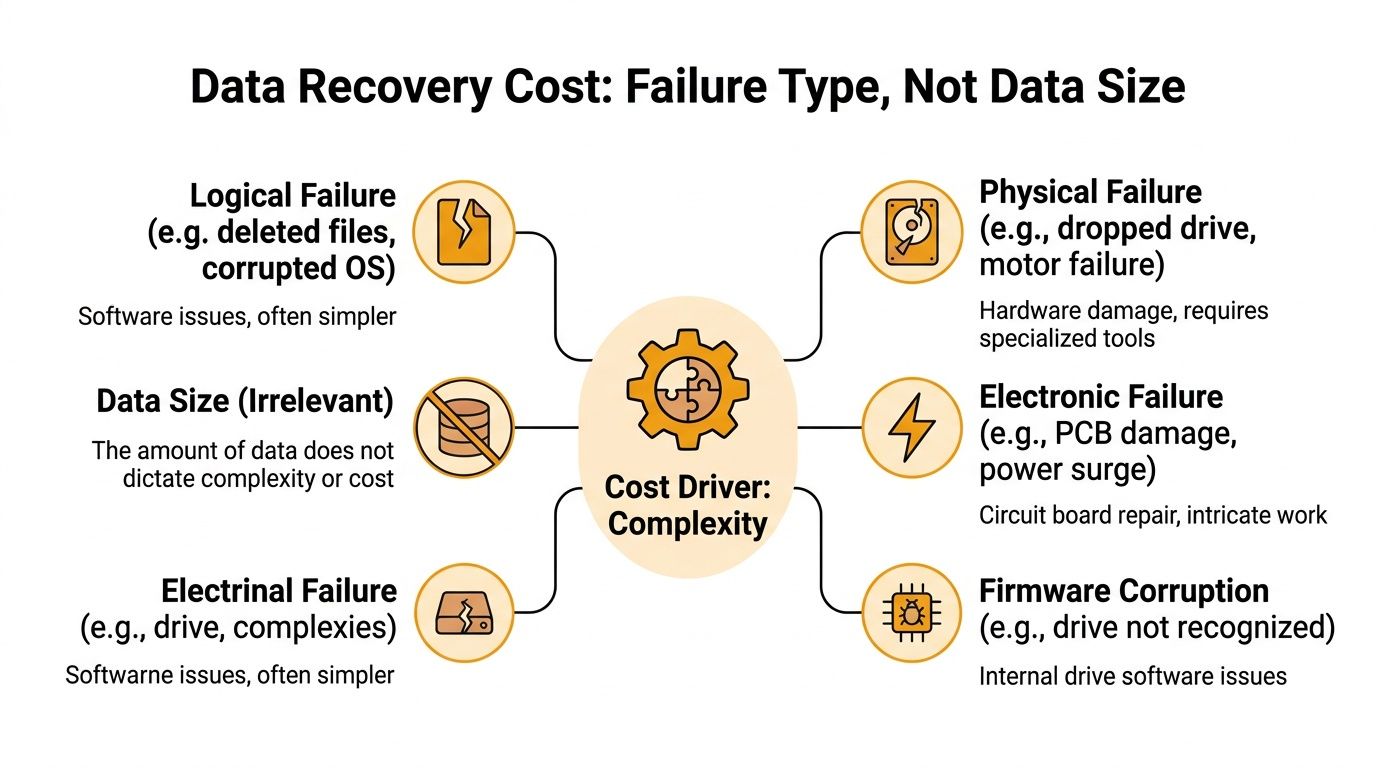
Recovery labs charge for the difficulty of getting the device readable again. They do not bill like cloud storage or file hosting. The expensive part is diagnosing the failure, stabilizing the device, repairing access, and imaging it safely before it gets worse. Once that hurdle is cleared, copying 10GB versus 500GB is often a secondary issue.
Gillware states this directly in its FAQ. In many cases, recovering a small amount of data costs the same as recovering a large amount because the underlying repair work is the same, as explained in its article on frequently asked questions about data recovery.
The right analogy is engine repair. A mechanic does not price the job by how many miles you planned to drive after the fix. The bill reflects whether the problem is a dead battery, a failed fuel pump, or internal engine damage. Data recovery works the same way.
Here is what usually drives the quote:
- Logical failure: deleted files, corrupted partitions, or damaged file systems where the device still responds.
- Physical failure: worn heads, platter damage, seizure, or other mechanical faults inside a hard drive.
- Electronic failure: board damage, power surge issues, or failed components that stop normal startup.
- Firmware failure: the device powers on but cannot identify itself correctly or serve data reliably.
This is why capacity is a poor budgeting shortcut. Two 2TB drives can produce completely different invoices. One may need a straightforward file system rebuild. The other may require donor parts, specialized hardware, cleanroom work, and repeated imaging attempts to pull readable sectors off an unstable device.
ACE Data Recovery makes the same point in its pricing guidance. Recovery cost is based on the type of failure and the work required, not just how much data was stored, as described in its data recovery pricing overview.
For a business owner, this changes how you evaluate the quote. Stop asking, "How many gigabytes are missing?" Ask, "What failed, how risky is the device state, and what work is needed to get stable access?" That is the part you are paying for.
If the lost data affects payroll, customer delivery, compliance records, or active projects, pay for a proper diagnosis fast. If the files already exist elsewhere, skip the recovery bill and restore from backup. That decision should come from business impact, not from a guess based on used storage.
Typical Cost Ranges for Different Devices
A 256GB laptop SSD can cost more to recover than a 4TB external hard drive. That surprises business owners all the time, and it is exactly why device type matters less than the kind of failure hiding underneath it.
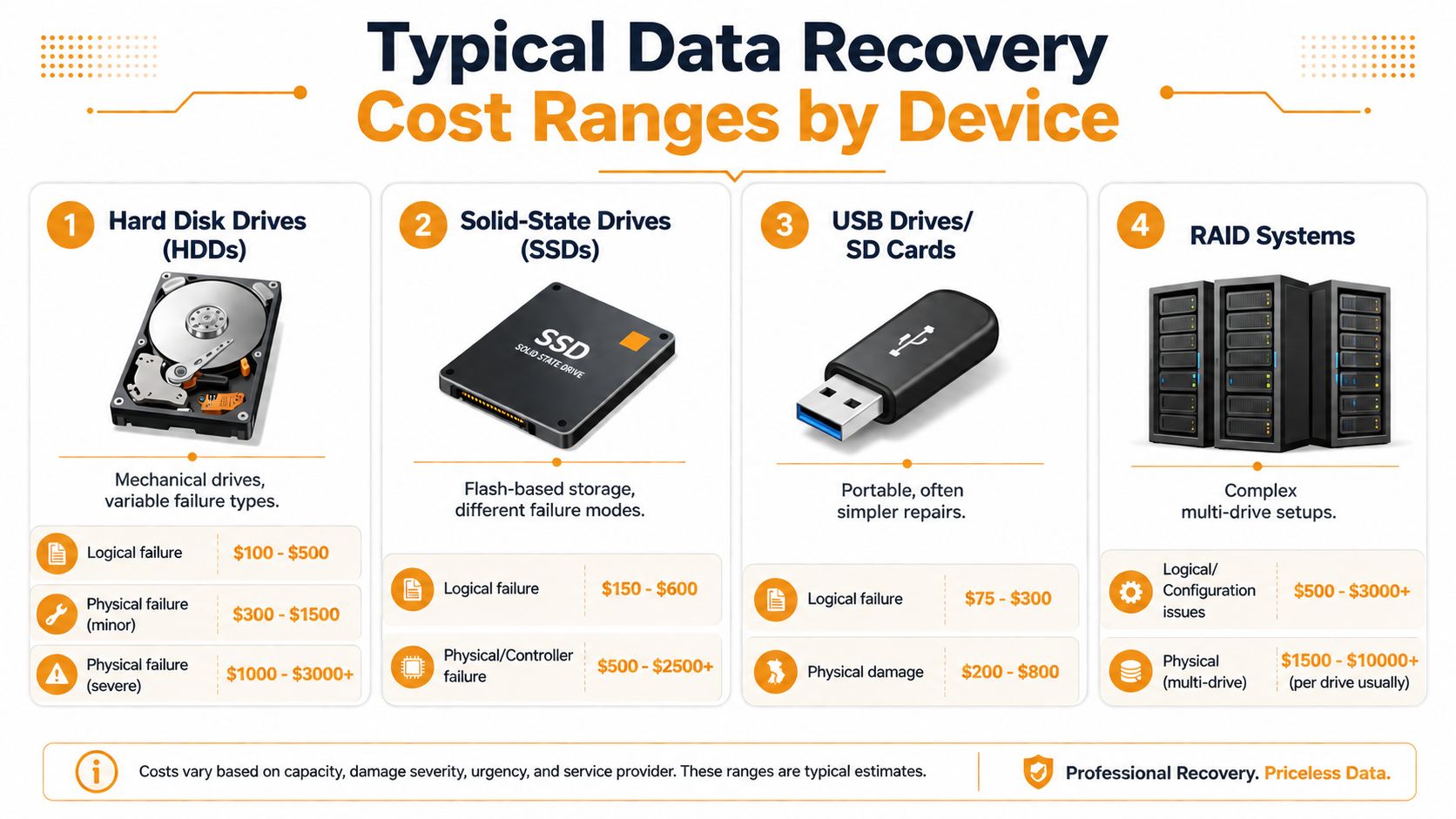
Use these ranges as budgeting guardrails, not fixed menu prices. Recovery labs price the labor, tooling, parts, and risk involved in getting stable access to the data.
Hard disk drives
Hard drives usually give you the widest pricing spread. A simple logical recovery or file system repair may stay in the lower hundreds. Mechanical failures push the bill up fast because the lab may need donor parts, controlled-environment work, and multiple imaging passes.
Secure Data Recovery's hard drive pricing guide shows how broad that range can be. Standard hard drive recovery often starts in the hundreds, while severe physical damage can climb well into four figures.
For budgeting, a practical expectation is this. Straightforward HDD cases tend to be the least painful. Clicking drives, seized motors, or damaged heads are where invoices start to feel like emergency repair bills instead of IT support.
Solid-state drives
SSDs fail in a different way, and that changes the economics. There are no heads or platters to replace, but recovery can become more specialized because of controller issues, encryption behavior, wear-leveling, and damaged flash memory.
DriveSavers' SSD recovery service page explains that SSD recovery often requires advanced controller-level and chip-level methods rather than the more familiar mechanical work used on hard drives.
That is why a small SSD can produce a bigger quote than a much larger HDD. You are not paying for the number of files. You are paying for how difficult the device makes access to those files.
RAID arrays and servers
RAID recovery is where budgets get hit hardest. The lab is not just recovering data from one failed device. It is rebuilding the map of the whole system, sorting out drive order, stripe size, parity, missing members, and any damage inside the individual disks.
Secure Data Recovery's RAID recovery page notes that RAID cases are among the most complex recoveries because they combine drive-level repair with array reconstruction.
A small RAID can already land in the low four figures. Larger arrays, failed rebuilds, or multiple damaged members can go much higher. If the RAID supports accounting, production, customer files, or virtual machines, that cost is still usually cheaper than prolonged downtime.
RAID recovery is expensive because the lab has to restore the drives and rebuild the logic that made the array usable.
Flash media and specialized devices
USB drives, SD cards, and other flash media often look cheap, but appearances mislead here too. Some cases are simple logical recoveries. Others require chip-off extraction, damaged connector repair, or work around failed controllers.
Gillware's flash drive recovery overview describes why removable flash devices can range from routine recoveries to highly technical lab work, especially when the controller fails or the device has physical damage.
Specialized hardware raises the ceiling further. Phones, tablets, embedded systems, and laptops with soldered storage can require board-level diagnosis before the lab can even start extraction. That is precision repair work, not a quick file copy.
A simple comparison helps:
| Device type | Typical range |
|---|---|
| HDD | Hundreds to low four figures |
| SSD | Hundreds to low or mid four figures |
| Flash media | Hundreds to low four figures |
| RAID arrays | Low four figures to several thousand dollars |
If you need one rule to remember, use this one. Devices get expensive to recover when access depends on repair skill, proprietary controller behavior, multiple disks, or chip-level work. Capacity alone tells you almost nothing.
Key Factors That Influence Your Final Quote
A business owner often asks the wrong first question: “How much per gigabyte?” Labs do not price recovery that way. They price the failure in front of them. A one-terabyte drive with a simple deletion problem can be cheaper than a tiny SSD that needs board work, firmware repair, and repeated imaging attempts.
Damage severity changes the quote fastest
Severity is the biggest cost driver because it determines the kind of work required.
A logical problem usually means the hardware still responds and the lab can focus on reconstruction, imaging, and file system repair. Physical damage is different. It can require controlled-environment disassembly, donor parts, head swaps, or electronics repair before any data can even be read. The Ontrack guide to hard drive data recovery explains the difference between logical and physical failures and why physical cases demand far more specialized handling.
Use a simple rule. If the device was dropped, clicks, grinds, overheats, or disappears intermittently, expect the quote to rise.
Device design affects labor more than capacity
Two drives with the same storage size can produce very different quotes because one is easy to access and the other is built like a sealed watch.
Modern SSDs, phones, and laptops with soldered storage often require board-level diagnosis before extraction starts. Some devices use proprietary controllers, encryption tied to the mainboard, or tightly integrated components that slow every step. The Secure Data Recovery overview of SSD recovery challenges outlines why controller behavior, wear leveling, and firmware issues make flash-based devices harder to recover than they look.
That is why “small device, small bill” is a bad assumption.
Turnaround time changes the workflow
Rush service costs more because the lab changes priorities, not because it prints a different invoice template.
An emergency case can bump other jobs, reserve equipment, and pull senior engineers into after-hours work. The DriveSavers emergency data recovery service page shows how expedited recovery is structured around immediate response and continuous lab effort. If your lost data affects payroll, client delivery, or a production server, paying for speed can be the cheaper business decision. If the files matter but operations are stable, standard turnaround usually makes more financial sense.
Engineer time is the real line item
Many quotes look high because business owners expect a copy job. Complex recovery is closer to failure analysis plus precision repair.
Labs often spend hours diagnosing the fault, stabilizing the device, imaging it in passes, and validating what was recovered. The Kroll overview of data recovery services makes that point clear. Recovery work is specialized engineering, not commodity labor. If you want a practical primer on when a failed drive has crossed the line from software problem to lab job, this guide on recovering data from a crashed hard drive is a useful reference. For contrast, Mac file recovery methods fit the much simpler end of the spectrum, where the device is healthy and the issue is limited to deletion or file loss.
A quick way to read a quote:
- Lower-end quotes: Usually simple logical recovery or straightforward imaging on stable hardware
- Mid-range quotes: Often firmware issues, degraded SSDs, unstable drives, or devices that require specialized access
- Higher quotes: Usually physical damage, donor-part work, chip-level repair, RAID logic problems, or emergency priority
If you remember one thing, remember this. Recovery cost follows complexity, not capacity. That single idea prevents a lot of bad budgeting and even worse DIY decisions.
DIY Data Recovery Software vs Professional Services
DIY tools have a place. They just don't belong in every situation.
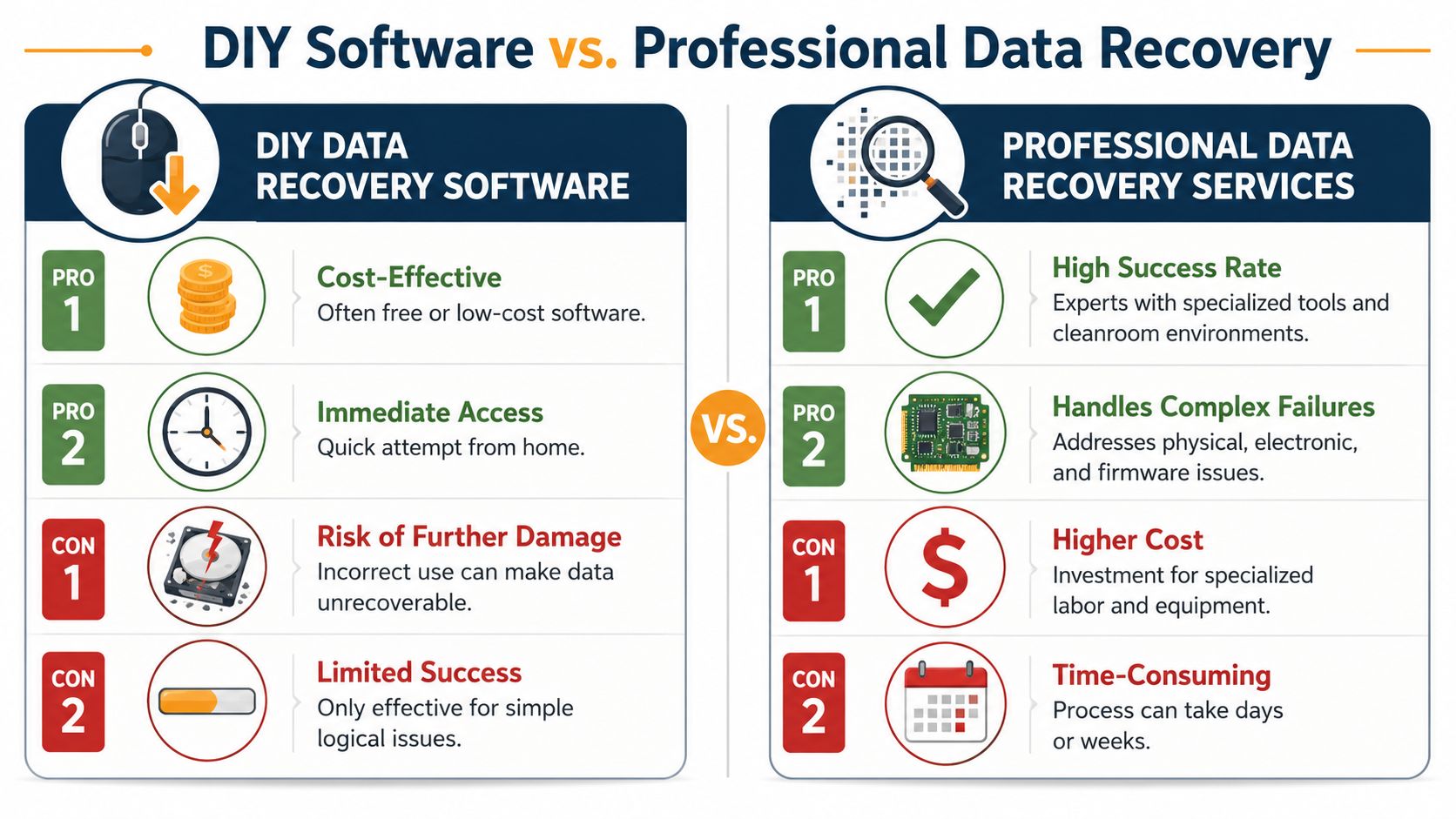
If you're dealing with a recently deleted file on a healthy device, software can be reasonable. If you're on a Mac and the problem is clearly a simple deletion event, this guide to Mac file recovery methods is a useful example of the kind of low-risk scenario where a software-first attempt may fit.
When DIY is reasonable
DIY software is best when all of these are true:
- The device is healthy: No clicking, grinding, overheating, or drop damage.
- The problem is recent: A file was deleted, a partition changed, or the recycle bin got emptied.
- The data isn't your only copy of the business: You're not betting the company on one scan.
If that's your situation, a controlled attempt can make sense. If you need a deeper business-oriented walkthrough, this guide on recovering data from a crashed hard drive helps frame when to stop and escalate.
Here's a visual comparison to keep the decision simple.
When DIY is a bad bet
If the drive clicks, vanished after a fall, powers on but won't identify properly, or belongs to a RAID or server, stop. Every extra power cycle can make the situation worse.
“If the data matters more than the device, stop experimenting with the device.”
Professional recovery costs more because it brings tools and procedures that home software doesn't. Clean environments, hardware imagers, donor parts, controller work, and firmware access are not things you improvise with a download and luck.
DIY is attractive because it feels cheap and immediate. That's the trap. If the issue is physical or electronic, a failed DIY attempt can convert a recoverable job into permanent loss. For business records, line-of-business data, and irreplaceable client files, that risk usually isn't worth the savings.
How to Choose a Provider and Avoid Hidden Fees
Your accounting server goes down at 4:30 p.m. A recovery shop quotes one price on the phone, another after inspection, and a third once they have your drive on the bench. That is how businesses get trapped. The underlying cost problem is rarely the first quote. It is the missing detail behind it.
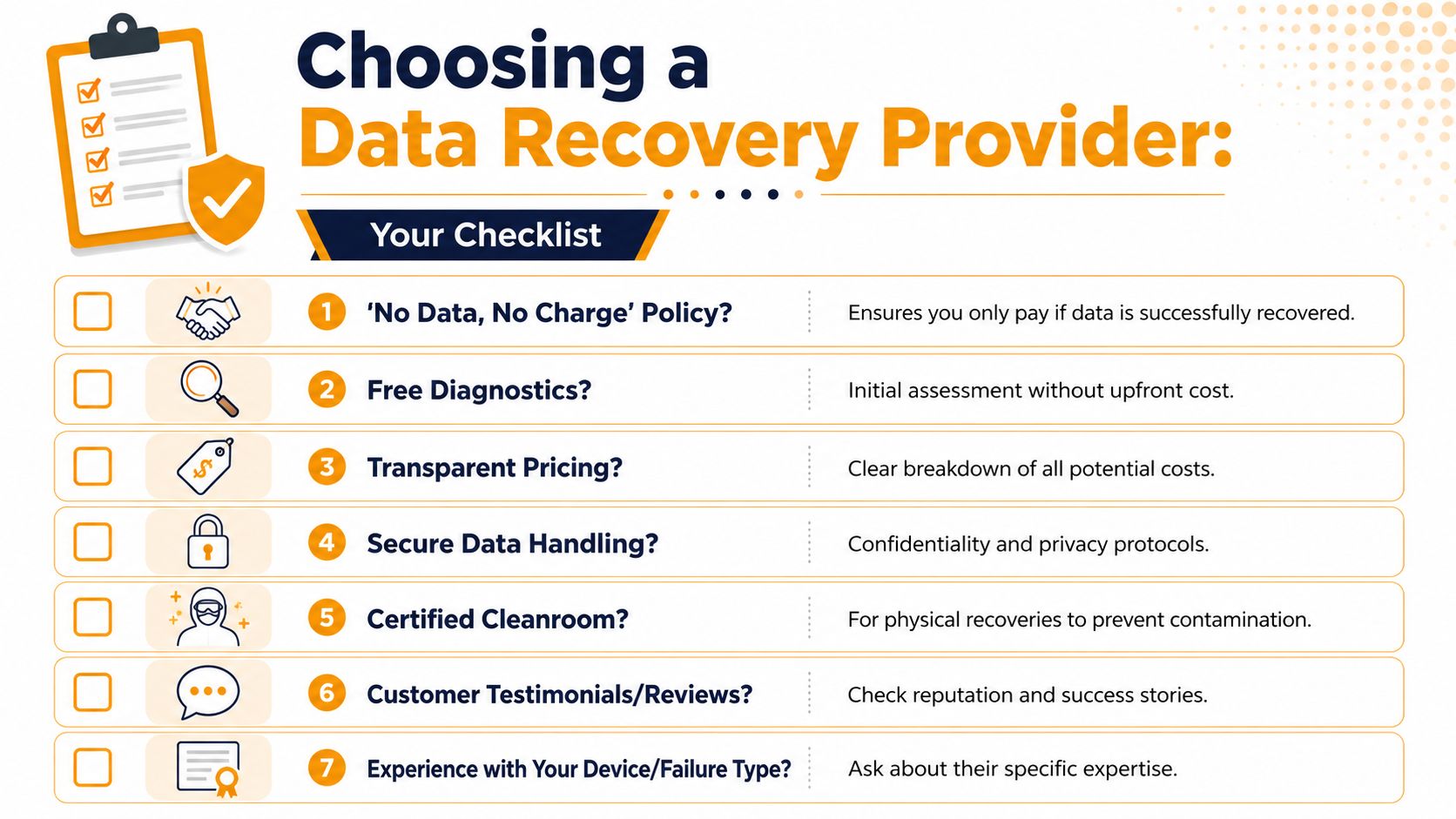
Choose the provider the same way you would choose a surgeon for a difficult case. You are not buying storage space. You are paying for diagnosis, tools, skill, and the ability to handle a specific kind of failure without making it worse. That is why the best questions are about process and billing terms, not just price.
Start with the failure policy. A provider should tell you, in writing, what you owe if they recover nothing useful. The Federal Trade Commission's guidance on shopping and service estimates is a good standard to apply here. Get the quote terms before you approve the work, and do not accept vague language like "bench fee may apply" or "partial success may be billable" unless those phrases are defined clearly.
Questions to ask before you approve anything
Use these questions to screen providers fast. If the answers are fuzzy, keep looking.
- What do I owe if recovery fails? Get the exact no-recovery policy in writing.
- Is the evaluation free? Ask whether shipping, handling, return media, parts, or cancellation charges can still appear.
- What failure type are you seeing? You want a plain-English answer such as logical corruption, controller failure, head damage, firmware trouble, or RAID rebuild work.
- Is the quote flat-rate or time-based? Flat-rate pricing is easier to budget. Hourly work can spiral if the scope changes.
- What counts as a successful recovery? Full data set, selected folders, or any readable files at all.
- How is my data handled and returned? Ask about chain of custody, encryption, and what media they use to send recovered files back.
- Who is doing the work? In-house lab work is different from a broker who forwards your drive elsewhere.
Ask one blunt question before you sign anything: "What exact events change this quote?"
What a clean quote looks like
A useful quote is specific. It should explain the likely failure, the recovery approach, the turnaround level, and every charge that can appear.
| Quote element | What you should see |
|---|---|
| Diagnosis | A clear statement of the likely failure type |
| Price model | Flat-rate or hourly, with all possible extra fees listed |
| Turnaround | Standard, priority, or emergency, with the cost difference stated |
| Outcome terms | What happens if recovery is partial, unusable, or fails |
Watch for pricing that ignores complexity. If a shop gives nearly the same quote for a simple deleted-file case and a mechanically damaged drive, they are either guessing or setting you up for a revised invoice later. Recovery cost follows failure difficulty, not how many gigabytes were on the device. A 256 GB SSD with controller damage can be far more expensive than a 4 TB drive with a minor logical issue.
Free diagnostics are common, but "free" needs a definition. The Better Business Bureau's advice on service estimates and written agreements lines up with what smart buyers already do. Ask whether approval is required before any billable work starts, and whether return shipping or donor parts are separate.
Downtime matters too. Recovery pricing should be weighed against operational loss, not viewed in isolation. The IBM page on the cost of a data breach and business impact is a reminder that data incidents create costs well beyond the repair invoice. A delayed recovery can mean missed billing, stalled projects, support failures, and staff sitting idle while critical files stay locked away.
If you want an in-person option instead of mailing sensitive hardware into a black box, review providers that offer data recovery services in Houston and publish clear estimate terms.
Cheap quotes attract stressed buyers. Clear quotes protect them.
The right provider explains what failed, why the price matches that failure, what can raise the bill, how success is defined, and what happens if the job does not work. That is the standard. Anything less is a risk premium hiding in plain sight.