


How to Choose a Texas Outsource IT Service
You're staring at a mess that looks ordinary on the surface. Payroll still has to run, the POS feels sluggish, a vendor portal is down again, and the one internal IT person is on vacation because they've earned it. That's the moment most Houston owners start looking for a Texas outsource IT service, not because they want a new vendor relationship, but because they need someone who can keep the business moving without turning every outage into a fire drill.
The wrong way to buy outsourced IT is to ask for “full support” and hope the quote makes sense later. The right way is to split the work into two buckets. Incident-response work is the unpredictable stuff, the urgent tickets, outages, failed updates, and security events that blow up the day. Recurring managed operations is the steady layer, the monitoring, patching, helpdesk, backups, cloud admin, and security routines that keep the lights on. Good outsourcing moves you from panic buying to an operating model with defined ownership, clearer risk, and fewer surprises.
Table of Contents
- Why Houston SMBs Are Outsourcing IT Right Now
- Audit Your IT Needs Before You Talk to a Single Provider
- Choosing Between MSP, MSSP, and Co-Managed IT
- Vetting Security, Compliance, and Real-World Reliability
- Reading SLAs, Pricing Models, and Contract Traps
- Running a Pilot and Planning the Migration
- Decision Checklist and Smart Next Steps
Why Houston SMBs Are Outsourcing IT Right Now
Houston owners don't shop for outsourced IT when things are calm. They shop when a sales rep is stuck, a back-office app is dragging, and the lone internal tech lead is unavailable. That pressure exposes the core question, whether you want to keep owning every interruption yourself or hand the recurring work to a provider that can absorb it.
The two-bucket model is the only one that holds up
The best operators separate IT into incident response and managed operations. Incident response is expensive because it's chaotic, time-sensitive, and usually tied to a business interruption. Managed operations are predictable, which makes them easier to budget, measure, and improve over time.
Practical rule: If a task is happening every week, it belongs in managed operations. If it only happens when something breaks, treat it as incident-response work and price it accordingly.
That distinction matters because outsourcing is not just a cost move. It's a shift in how uptime, risk, and security get owned. A provider that only fixes broken things is a break-fix shop with nicer branding. A provider that runs steady-state operations can keep systems patched, monitored, and documented before a problem becomes a client-facing outage.
Houston SMBs feel this especially hard because many of them run a mix of office staff, field teams, and cloud services. One missed update or unhandled alert can affect payroll, scheduling, customer service, and reporting at the same time. That's why the first decision isn't “Should we outsource?” It's “Which parts of IT should we stop handling reactively?”
What to expect from the rest of the buying process
A serious buyer starts with a needs audit, then chooses the service model, then vets security and compliance, then pressure-tests pricing, and only then signs a pilot. That sequence sounds simple, but most failed relationships skip straight to pricing and regret it later. The rest of this guide follows the sequence that prevents bad purchases.
For local context, Texas has the second largest IT services workforce nationally, with more than 203,700 professionals at over 17,600 IT services firms, and statewide IT employment exceeds 330,000 workers (Texas government report). That's a deep vendor ecosystem, but depth doesn't remove the need to buy carefully. It just means you've got enough choices to make a bad one if you're sloppy.
Audit Your IT Needs Before You Talk to a Single Provider
The fastest way to waste money is to call vendors before you know what problem you're buying relief from. I've watched SMBs ask for a “managed IT quote” when they really needed better backup testing, after-hours support, or Microsoft 365 administration. Those are different purchases, and they should be treated that way.
Start with inventory, not opinions
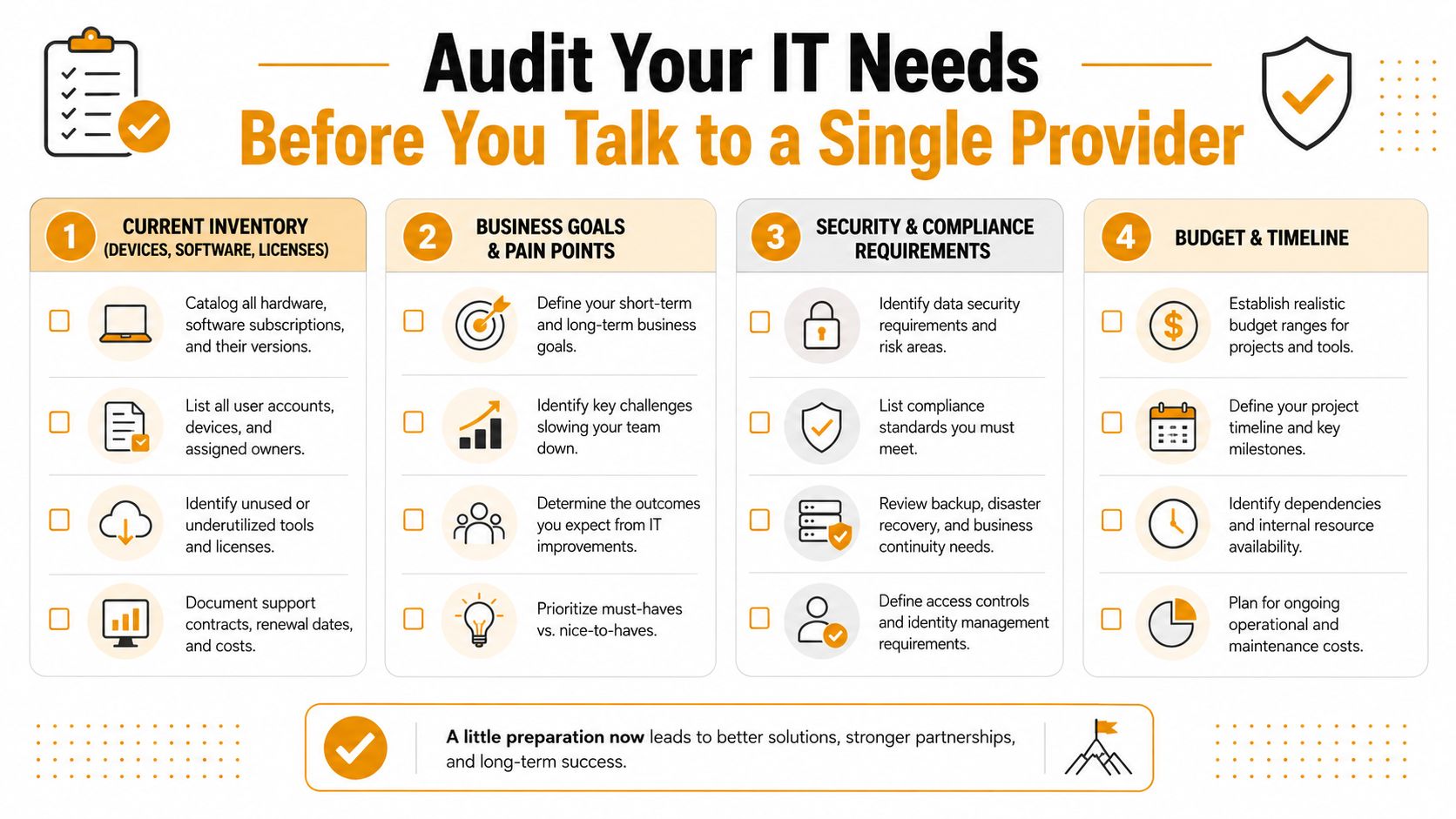
Build a real inventory of your environment. That means endpoints, servers, cloud tenants, Microsoft 365 users, security tools, printers, network gear, and anything else that a provider would need to support. If you need a reference point for how to organize it, Halo AI's inventory strategy guide is a practical starting point for separating hardware, software, and ownership data.
Use this internal worksheet before the first vendor call:
- Current inventory: List every device class, software subscription, and active cloud environment.
- Incident-response pain points: Write down outages, tickets, security scares, and anything that creates emergency work.
- Managed-operations gaps: Note patching, monitoring, backup, access control, and routine user support gaps.
- Compliance drivers: Mark anything that affects HIPAA, PCI-DSS, CMMC, or public-sector procurement.
- Support expectations: Record whether you need 24/7 coverage, onsite help, or remote-first support.
- Growth plan: Note expansions, new sites, or cloud moves already on the calendar.
If you want a deeper internal process, this IT systems auditing resource is useful when you're turning a messy environment into something a provider can quote.
Useful test: If you can't describe your environment in one page, you're not ready to buy outsourced IT. You're still discovering what you own.
Separate the wish list from the must-have list
Most SMBs overspend. They ask for every tool the vendor mentions, then pay for seats, licenses, and modules they never use. A better approach is to mark each item as must-have, nice-to-have, or not now. That forces a cleaner conversation and keeps the quote tied to actual business need.
Need also to think about growth. Texas added 231,000 professional-services jobs in five years and accounted for one in five such jobs added nationally, while computer system design grew 38% over that period, according to the Texas A&M Real Estate Center analysis (Texas A&M Real Estate Center). If your business is growing inside that environment, your provider should be able to support more users, more sites, or more cloud work without rebuilding the agreement from scratch.
Before you take vendor meetings, gather these documents: a current asset list, user counts, current contracts, recent outage examples, security or audit requirements, and any internal IT notes about recurring problems. That's the baseline. Without it, every quote is guesswork.
Choosing Between MSP, MSSP, and Co-Managed IT
Most buyers use the wrong label and then wonder why the relationship feels off. An MSP handles day-to-day IT operations. An MSSP focuses on security operations and monitoring. Co-managed IT supplements an existing internal team instead of replacing it. Those are not interchangeable, and the wrong fit gets expensive fast.
Pick the model that matches your internal maturity
A full-service MSP is the right move when you don't have a reliable internal IT function and need one provider to own the basics. That usually fits smaller teams that want helpdesk, endpoint management, patching, and routine admin under one roof. A 25-person law firm with no IT hire usually needs that level of simplicity.
An MSSP fits when the pain is security posture, not just ticket handling. If your environment needs stronger monitoring, threat detection, or more formal security reporting, bolting security on after the fact is weak architecture. The provider should be able to explain how their security work maps to your business risk, not just sell vague protection language.
A co-managed model is the one many Houston businesses should consider first. It's not a downgrade. It's a force multiplier. A 120-person healthcare clinic with a two-person internal team may need outside help for after-hours support, cloud migrations, cabling, or escalation coverage while keeping internal control over the systems that matter most.
Match the model to the work, not the sales pitch
A provider's packaging can mislead you. Some MSPs describe everything as “managed” even when half the heavy lifting still sits with your staff. Some MSSPs will gladly monitor security, but they won't touch the helpdesk. Co-managed providers often work best when your team already knows the environment and just needs depth, coverage, or specialized skills.
If you're still deciding how to structure the relationship, this managed service provider guide is worth reviewing before you sit through another discovery call.
Short version: If you have no IT lead, look hard at a full-service MSP. If security is the biggest gap, prioritize an MSSP. If you already have an internal lead and need leverage, co-managed usually wins.
Texas buyers should think in market terms too. The state's IT base is large enough to support serious enterprise work, with the largest subsector in computer systems design and sector growth of more than 29% from 2009 to 2013 in major IT services areas (Texas government report). That maturity means providers can specialize. Don't settle for one that pretends every SMB needs the same package.
Vetting Security, Compliance, and Real-World Reliability
Most vendor evaluations get too polite here. They ask if the provider is “secure” and accept a smile. That's useless. You need evidence, because security claims mean nothing without specific controls, documented process, and proof that somebody tests the things they sell.

Ask for controls, not comforting language
Start with the endpoint stack. Ask whether they use modern EDR, how patching is scheduled, how MFA is enforced, and what they do with privileged access. Then move to backup and disaster recovery. The provider should be able to explain restore testing, not just backup retention. If they can't describe an incident-response runbook, they're not ready to own your environment.
Compliance evidence matters just as much. Request SOC 2 Type II documentation if they have it, ask for HIPAA business associate agreements where relevant, and get PCI-DSS scoping notes if payment data touches their scope. For regulated Texas buyers, the issue isn't whether a vendor is friendly. It's whether the vendor can prove the controls that your auditors or counsel will ask about later.
Practical rule: Security questions should get operational answers. If the reply sounds like marketing, the control is probably weak or undocumented.
Test whether they can actually deliver
Reliability shows up in the details. Ask about technician certifications, escalation paths, onsite response expectations for Houston offices, and whether the helpdesk is staffed directly or farmed out. Then ask for references from businesses that look like yours, not just any client they've ever had.
Use these questions in every final call:
- Backup validation: How often do you test full restores, and can you show the last test?
- After-hours coverage: Who answers at 2 a.m., and is that person on your payroll?
- Subcontracting: Do you subcontract the helpdesk or field work?
- Escalation clarity: What happens when a first-line technician can't resolve the issue?
- Compliance support: What documentation do you provide for audits or vendor reviews?
There's a deeper reason this matters in Texas. Procurement rules and eligibility standards can narrow who's even usable in some buying channels, and healthcare buyers often underestimate how much governance work comes with outsourcing. If the relationship adds audit burden instead of reducing it, you need to know that before contract day, not after the first review cycle. For more detail on what to look for in support providers, this small-business provider checklist is a solid companion resource.
Good providers won't flinch at these questions. They'll answer them directly, because they already have the documents and the process.
Reading SLAs, Pricing Models, and Contract Traps
Outsourcing deals go sideways in the contract, not in the sales pitch. The quote looks tidy, the demo sounds confident, then the SLA shifts risk, after-hours support, and onsite work back onto you. Read it like a business document and a legal document, because that is exactly what it is.
Know which pricing model shifts risk onto you
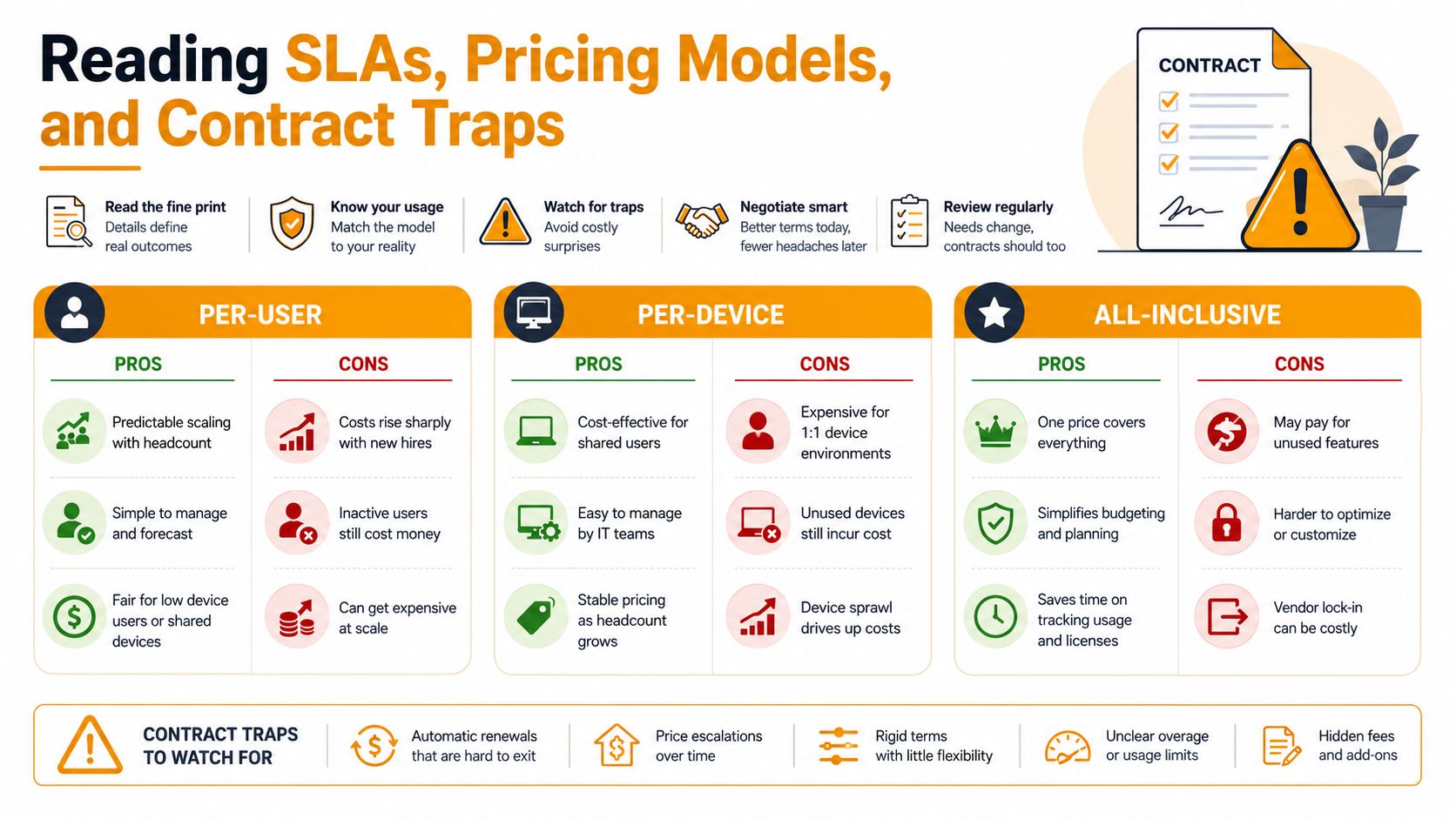
The three common structures are per-user, per-device, and all-inclusive with overage clauses. Per-user pricing is easy to forecast and usually tracks headcount, but it can punish you when staffing swings up or down. Per-device pricing fits shops where users carry different hardware loads, yet it gets messy fast in mixed environments with shared systems, kiosks, or field equipment. All-inclusive sounds clean until the overage language starts billing for items you assumed were included.
Judge the deal by scope, not the headline rate. Forte Group points out that outsourcing economics vary widely by labor mix and management overhead, and that planning bands are only useful if you compare them against the work you need done. For Houston SMBs, that matters most in the two-bucket model, incident response versus recurring managed ops. Emergency support can justify a different price structure than steady-state patching, monitoring, and user support, and good providers should separate those buckets instead of blending them into one fuzzy fee.
Read the SLA like it affects payroll, because it does
Response time and resolution time are different obligations. A provider can answer fast and still leave the ticket open for days, which is exactly how small teams get stuck babysitting a vendor. Uptime credits matter, but exclusions matter more. Third-party outages, unsupported software, and out-of-scope requests are standard carve-outs, and they can make a cheap agreement more expensive than it first appears.
Watch for auto-renewal clauses, early termination fees, travel charges for onsite work, and scope language that turns fixed fees into variable bills. If the contract says “reasonable support” without defining what that means, expect an argument later. If it says “best effort” for core services, you are buying convenience, not accountability.
The provider also needs to spell out escalation, change approval, and service-level remedies in plain English. If they cannot explain those terms directly, they wrote the agreement to protect themselves, not to run your operation.
Houston SMBs fixate on hourly rates and miss the cost drivers. For transaction-heavy work, cloud migration, and mixed-site support, coordination overhead is what pushes the bill up, not the sticker price alone. Read the SLA, then read the exceptions, then ask exactly what gets billed after hours and onsite. Rural Texas connectivity can also change the economics of support, because a remote-only plan breaks down fast when the site depends on weak last-mile service or a shaky backup link.
Running a Pilot and Planning the Migration
Never sign and hope. Run a pilot. A short pilot tells you more than a polished sales deck ever will, because you see the provider under actual pressure, not just in a discovery meeting.
Use the pilot to test behavior, not promises
A 30-to-90 day pilot is the right move even for a small engagement. Measure ticket response times, first-call resolution, after-hours coverage, and how they handle a deliberately injected issue. The point is to see whether the team follows process, communicates clearly, and escalates when needed.
Make the pilot narrow enough to control but real enough to expose weaknesses. Monitoring and patching are good first candidates. Helpdesk and endpoint management can follow. Servers, cloud workloads, and advanced security services should come later in waves, not all at once.
Migrate in waves, especially if you have multiple sites
A single cutover sounds efficient until it fails on a Friday afternoon. Wave-based migration is safer because it lets you learn from the first group before touching everything else. For Houston offices with field teams or sites outside the urban core, last-mile broadband, backup links, and onsite response times change the equation fast. Rural Texas connectivity can turn a nice remote-support plan into a fragile one if you don't account for it.
If your footprint includes remote offices, retail, or field locations, the SLA should reflect that reality. Don't accept metro-area assumptions for sites that won't get metro-area response. The value of outsourcing in those cases shifts from pure labor savings to resilience, hybrid connectivity, and remote-first operations.
One thing I tell buyers all the time: a provider's pilot performance is more honest than its proposal. Watch who communicates cleanly when the environment gets messy.
Week one should be boring. Give the provider your escalation contacts, approve the support queue, validate backup access, confirm MFA coverage, verify monitoring alerts, and document who owns what. If the first week feels improvised, the next quarter will too.
Decision Checklist and Smart Next Steps
The decision comes down to one question. Which provider can own the incident-response bucket you cannot absorb internally, and the managed-operations bucket you do not want to keep running by hand. If you are a smaller Houston business with no IT lead, a full-service MSP is usually the right call. If security and auditability drive the risk profile, an MSSP deserves a hard look. If you already have internal IT, co-managed IT usually fits best because it keeps control inside your team while offloading the recurring work.
Healthcare groups, public-sector-adjacent firms, and other regulated organizations face a different test. Outsourcing can add compliance burden if the vendor cannot produce the right documentation, controls, and audit trail. That is a reason to vet harder, not a reason to avoid outsourcing. The same governance question comes up if you decide to hire custom software developers in 2026 through a partner model instead of keeping development in-house. The delivery model matters, but the control model matters just as much.
For Texas buyers, the next filter is location and connectivity. A provider that looks fine on paper can stumble when a rural office depends on weak last-mile internet, backup links, or slow onsite response. Ask how they handle mixed-site environments, remote support, and outage escalation before you sign anything.
- Finish the needs audit. Inventory your devices, cloud tenants, recurring pain points, incident-response gaps, and compliance requirements.
- Shortlist three Texas providers. Use one MSP, one MSSP, and one co-managed option if you are still deciding which operating model fits.
- Request pilot proposals. Ask each provider to define success metrics, escalation paths, week-one onboarding steps, and how they will handle rural connectivity constraints if your footprint includes them.
- Book reference calls. Speak with comparable Texas businesses and ask how the provider handles outages, audits, after-hours support, and contract follow-through.
The best buyers stop thinking in ticket counts and hourly rates. Microsoft 365, AWS, Azure, and Google Cloud environments keep consolidating inside real businesses, so the right partner should help shape the operating model, not just wait for the next alert. If you are still deciding whether to use an MSP, an MSSP, or a co-managed setup, insist on a clear answer to one question, who owns the recurring work and who owns the failure path when something breaks.
IT Cloud Global, LLC provides managed IT, helpdesk, cloud, security, backup, networking, and onsite support for Houston businesses that need a cleaner operating model. If you are evaluating a Texas outsource IT service and want a provider that can cover support, Microsoft 365, cloud infrastructure, and disaster recovery under one roof, visit IT Cloud Global, LLC and compare their approach against your current setup.
- Houston IT Support: A 2026 Guide for SMBs
- Computer Service Near Me: A Houston Buyer’s Guide
- 7 Best Managed IT Services Houston TX Reviews (2026)
- Best IT Services Houston TX: Your 2026 Partner
- Managed IT Services Houston TX: 2026 Guide for SMBs
- IT Managed Services Houston TX: 2026 Guide
- What Is a Network Operations Center? an SMB Guide