


Outsource IT Service Houston: 2026 MSP Vetting Guide
You're running a business in Houston, your Microsoft 365 tenant is live, cloud apps are in production, and yet nobody can give you a straight answer on who owns retention, device policy, or backup recovery. The help desk is answering tickets, the invoice looks fine, and the risk sits in the gaps between identity, security, and governance. That's where outsourced IT either helps you or leaves you exposed.
Table of Contents
- What Outsourcing IT Services Actually Means for Houston Businesses
- Core Services Included in Outsourced IT Support
- Why Houston Businesses Are Choosing Outsourced IT
- Pricing Models and What Drives Your Monthly IT Bill
- The Hidden Governance Gap in Cloud and Microsoft 365
- How to Vet a Houston IT Service Provider
- How IT Cloud Global Supports Houston Businesses
What Outsourcing IT Services Actually Means for Houston Businesses
A Houston owner I'd worry about is the one whose day starts with a printer issue, turns into a mailbox outage, then ends with a security alert nobody has time to interpret. The business keeps moving, but every interruption chips away at momentum. That's usually the point where people search for outsource it service houston and realize they don't need more break-fix chaos, they need operational control.

From emergency fixes to managed responsibility
Outsourcing IT means handing over the daily running of endpoints, servers, networks, cloud platforms, and security to a provider that's paid to keep the environment stable, not just show up when something burns down. In practice, that's a shift from calling someone after an outage to having someone actively watching for the conditions that create outages in the first place. Houston lives inside one of the largest IT labor pools in the country, with more than 203,700 professionals directly employed at over 17,600 IT services firms and more than 330,000 workers in statewide IT employment across industries Texas IT report.
That matters because Houston buyers aren't choosing from a thin talent market. They're choosing whether to buy a true managed operating model or a cheaper-sounding patchwork of ad hoc support.
Practical rule: If the provider only reacts after users complain, you're not outsourcing IT. You're outsourcing the call center.
What it should feel like day to day
A real outsourced setup should reduce noise, not add another layer of confusion. Tickets should route through a help desk, routine monitoring should happen without your staff nagging anybody, and recurring maintenance should be handled on schedule, not when a server is already unstable. The point is to make IT boring in the best way possible.
You should also expect the provider to own the basics of continuity, patching, and escalation. If they can't explain how they monitor your endpoints, how they handle updates, or how they respond to repeat incidents, they're not running your IT. They're just renting you labor.
Core Services Included in Outsourced IT Support
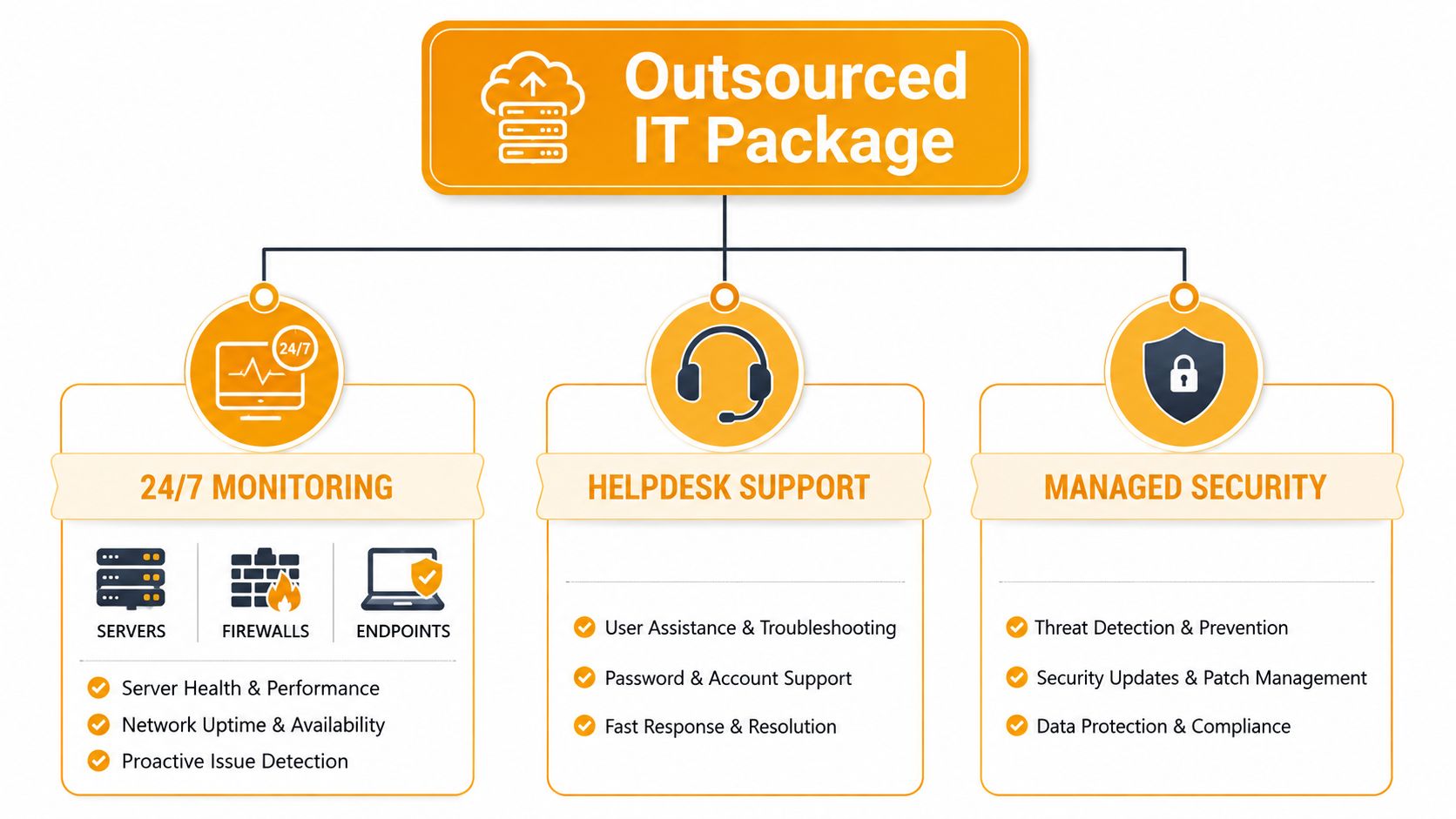
A lot of Houston MSP marketing throws around the same words, but the package is more structured than most owners think. The core model is 24/7 monitoring, help desk support, managed security, and backup oversight, all tied together so the provider can spot problems before staff feel them Houston MSP service model. That's the difference between a service contract and a support department.
Monitoring and help desk
Monitoring covers endpoints, servers, firewalls, and cloud services. If a server starts behaving badly at 2 a.m., the provider should see it before the next business day turns into a crisis. Help desk support sits on the other end of that model, answering user issues, device problems, and access requests without forcing your staff to chase three different contacts.
That combination is what keeps small problems from becoming visible downtime. Houston MSP descriptions consistently bundle network management, server and application monitoring, firewall management, patching, backup monitoring, and help desk under one operating model Houston MSP service model. That's the architecture you want if your goal is fewer surprises.
Security, patching, and backups
Patch and vulnerability management matters because unpatched systems are where avoidable incidents start. Managed security should cover firewall oversight, endpoint protection, alert review, and a clean escalation path when something looks wrong. Backup monitoring matters just as much, because a backup that isn't checked is just a hope with storage attached.
Direct advice: Ask whether the provider tests restores, not just whether they run backups. A backup you can't restore is expensive false comfort.
Network and cloud administration
Network management covers the stability of your wired and wireless environment, while cloud administration covers the tenant, permissions, and service configuration that sit behind Microsoft 365, Azure, Google Cloud, or other platforms. That's where many providers stop short. A provider like AI staff augmentation can help fill specialist roles for engineering-heavy projects, but day-to-day IT operations still need an owner who understands your environment end to end.
If you're buying outsourced IT, ask whether the contract includes the operational work, not just support tickets. You want someone managing the system, not just responding to it after users already feel the pain.
Why Houston Businesses Are Choosing Outsourced IT
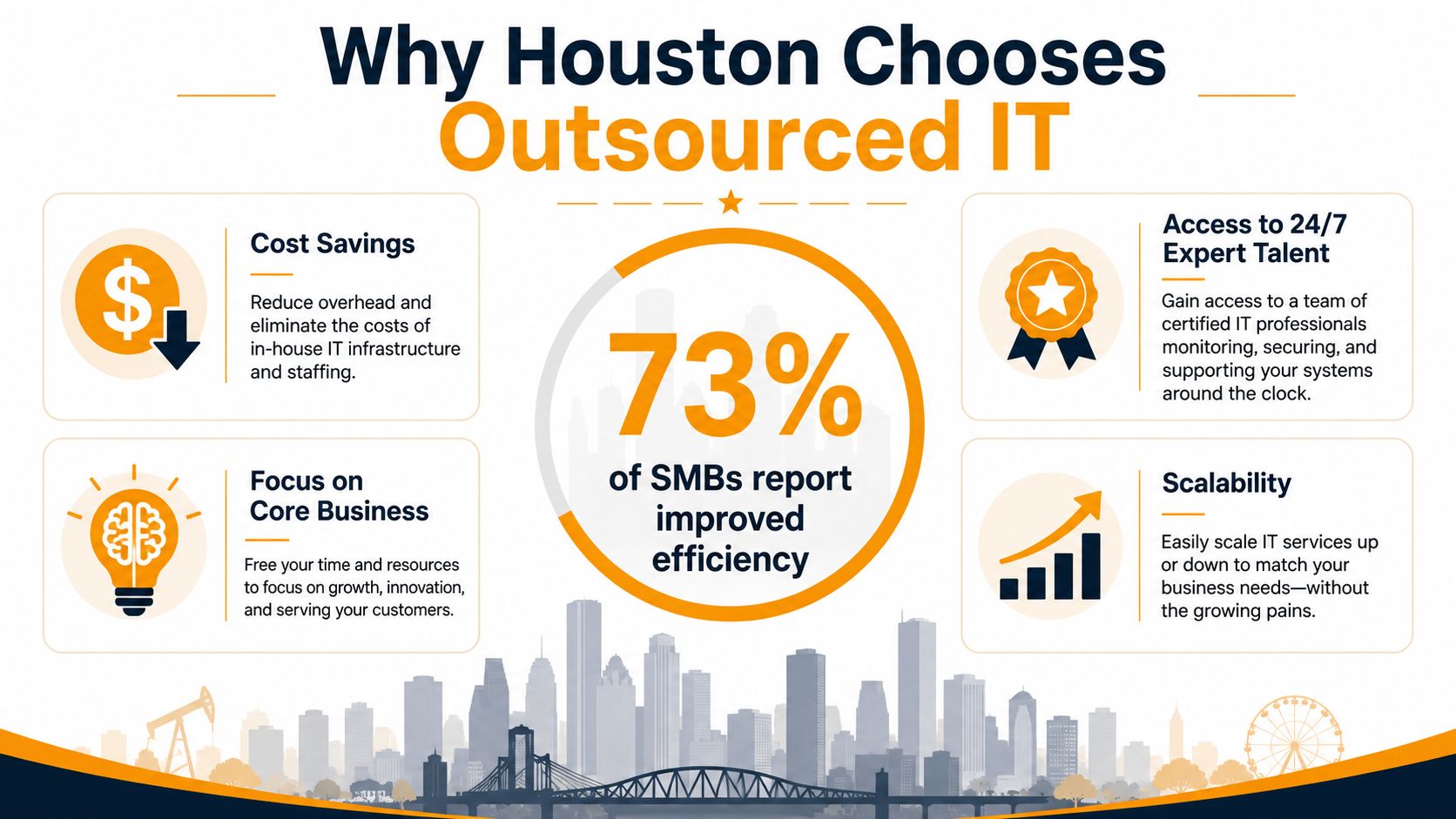
A Houston business does not outsource IT because it wants a trendy vendor relationship. It does it because internal IT breaks down fast when the company depends on Microsoft 365, hybrid cloud access, remote users, and a small team that is already stretched thin. The bigger problem is governance. Once mailboxes, files, identities, and devices live partly in the cloud, somebody has to own permissions, retention, audit trails, account reviews, and recovery rules. Too many local MSPs sell support and ignore that layer.
Houston also has enough IT talent on the market to make outsourced delivery workable, which is why the model keeps gaining ground. The state has more than 203,700 professionals directly employed at over 17,600 IT services firms, with statewide IT employment across industries exceeding 330,000 workers, and data processing, hosting, and related services employing 30,522 workers Texas IT report. That kind of depth makes it easier for Houston SMBs to buy outside expertise without building a full internal department.
Labor access beats staffing fragility
Internal IT looks tidy until one person leaves, gets overloaded, or cannot cover after hours. Then the whole operation slows down. Outsourcing fixes that single point of failure because the provider has a broader bench, defined process, and coverage that does not depend on one employee being available.
That matters even more after a Microsoft 365 or hybrid cloud move. User support is the easy part. The hard part is keeping permissions clean, reviewing admin roles, enforcing MFA, checking conditional access policies, and making sure backups and retention settings match how the business works. Those are governance tasks, and they often get ignored until an audit, incident, or account compromise forces the issue.
A recent industry roundup says 92% of G2000 companies use IT outsourcing, 64% of outsourced services globally are focused on IT functions, and 29% of U.S. businesses with fewer than 50 workers outsource at least some work outsourcing statistics. The point is not that every Houston company should hand over everything. The point is that outsourcing has become a normal operating choice for organizations that need stable coverage and fewer gaps.
Cloud and governance changed the equation
The old sales pitch was simple, outsource to cut labor costs. That pitch is too shallow now. Outsourcing is about keeping cloud environments controlled, documented, and recoverable while the business keeps growing. It also gives you a cleaner path for handling security operations, user lifecycle management, and service changes without waiting for an internal hire who may never arrive.
One practical example is the hidden gap after a Microsoft 365 rollout. Many businesses assume the migration solved the problem, but the work starts after cutover. Someone still has to manage tenant settings, external sharing, mailbox delegation, device compliance, and who can approve what. If nobody owns those controls, the environment becomes messy fast.
For a Houston owner, the better move is to use a provider that understands those operational details and can explain the cost drivers clearly. A useful breakdown of managed IT support pricing factors can help you see why endpoint count, security scope, cloud complexity, and support expectations change the monthly bill. That is the reason outsourcing keeps winning. It replaces ad hoc firefighting with defined ownership for uptime, access, and risk.
Outsourcing is an operating decision. It decides who owns response, control, and accountability when your cloud stack stops behaving.
Pricing Models and What Drives Your Monthly IT Bill
The cleanest way to compare providers is to separate flat-fee managed services from hourly break-fix billing. Flat-fee MSPs package ongoing monitoring, help desk, security, backups, and planning into a monthly rate. Hourly break-fix charges you when something goes wrong, which sounds cheaper until the bill shows up after a bad week.
| Factor | Flat-Fee MSP | Hourly Break-Fix |
|---|---|---|
| Billing style | Predictable monthly fee | Charges tied to incidents and labor time |
| Scope | Ongoing monitoring, help desk, security, backups, planning | Reactive repairs and ad hoc tasks |
| Budgeting | Easier to forecast | Harder to forecast |
| Incentive | Keep systems stable | Resolve tickets as they appear |
| Risk | Lower surprise labor costs | Higher emergency-cost volatility |
A Houston-focused source says full outsourcing commonly includes 24/7 monitoring, help desk, security, backups, and strategic planning on a flat monthly fee, and estimates a 25-person business at roughly $3,000 to $4,500 per month depending on environment complexity and included services Houston MSP pricing benchmark. That figure gives you a useful range, not a universal price tag.
What pushes the monthly price up or down
Your bill usually moves with endpoint count, security posture, cloud scope, and backup complexity. A clean environment with limited devices and simple support needs costs less than a mixed environment with multiple offices, hybrid cloud, and strict security requirements. The incident count shouldn't be the main driver if the provider is managing the environment well.
That's why comparing quotes by headline price alone is sloppy. A cheap quote that excludes after-hours monitoring, backup oversight, or Microsoft 365 administration can cost more later in outages and cleanup. For a useful breakdown of cost drivers, review this managed IT cost guide.
What fair looks like
Fair pricing should come with a clear list of included services, escalation rules, and what counts as out of scope. If the provider can't explain what's in the monthly fee, the invoice will explain it later. You don't want surprises in IT billing, because surprises in IT usually mean downtime or security drift.
The Hidden Governance Gap in Cloud and Microsoft 365
Most outsourced IT pages talk about monitoring, support, and security. They usually don't talk enough about who owns identity, device management, retention, and change control after migration. That's the actual trap for Houston SMBs running Microsoft 365, Azure, or Google Cloud. Once the move is done, the environment doesn't manage itself.
Microsoft 365 now combines identity, endpoint, collaboration, and security tooling in a tightly integrated stack. The business question isn't just whether the provider can “move you to the cloud.” It's whether they can run the tenant securely across Exchange, Teams, Intune, SharePoint, and hybrid environments after the migration settles down. For a practical cloud backup angle, see Microsoft 365 backup solutions.
Why governance gets missed
A lot of MSPs sell the migration and then drift back to help desk mode. That leaves the tenant in the hands of whoever happens to have admin access, which is not a governance model. If nobody is clearly accountable for who can create identities, approve device changes, alter retention settings, or manage collaboration sprawl, the business accumulates risk.
The gap shows up in the ugly places. Users get access they shouldn't have. Devices fall out of compliance. Retention settings don't match what the business needs. Then a cleanup project starts after an issue, not before it.
Questions that expose the gap
Ask these plainly before you sign:
- Who owns tenant governance? If the answer is “we all do,” nobody does.
- Who manages device policy and identity lifecycle? That should not be vague.
- Who changes retention and backup settings? If no one can answer quickly, that's a problem.
- Who documents changes in hybrid environments? If they can't show a process, they probably don't have one.
If your provider can't explain lifecycle management in Microsoft 365, you're buying support around the tenant, not stewardship of the tenant.
What a strong provider should cover
A serious provider should be able to describe how they handle admin permissions, email and collaboration governance, endpoint control, and cross-platform changes. They should also be able to show how they reduce confusion when users move between cloud tools and legacy systems. Many local firms get thin in this area, because the market often treats cloud work as a one-time project instead of a recurring operating responsibility.
That distinction matters more than most sales decks admit. The cheapest IT contract is useless if no one owns what happens after the migration is complete.
How to Vet a Houston IT Service Provider
Don't start with price. Start with proof. A Houston provider should be able to show you how they respond, how they report, and what they do when things break outside business hours. If they can't answer those questions cleanly, keep moving.
Check the service rules first
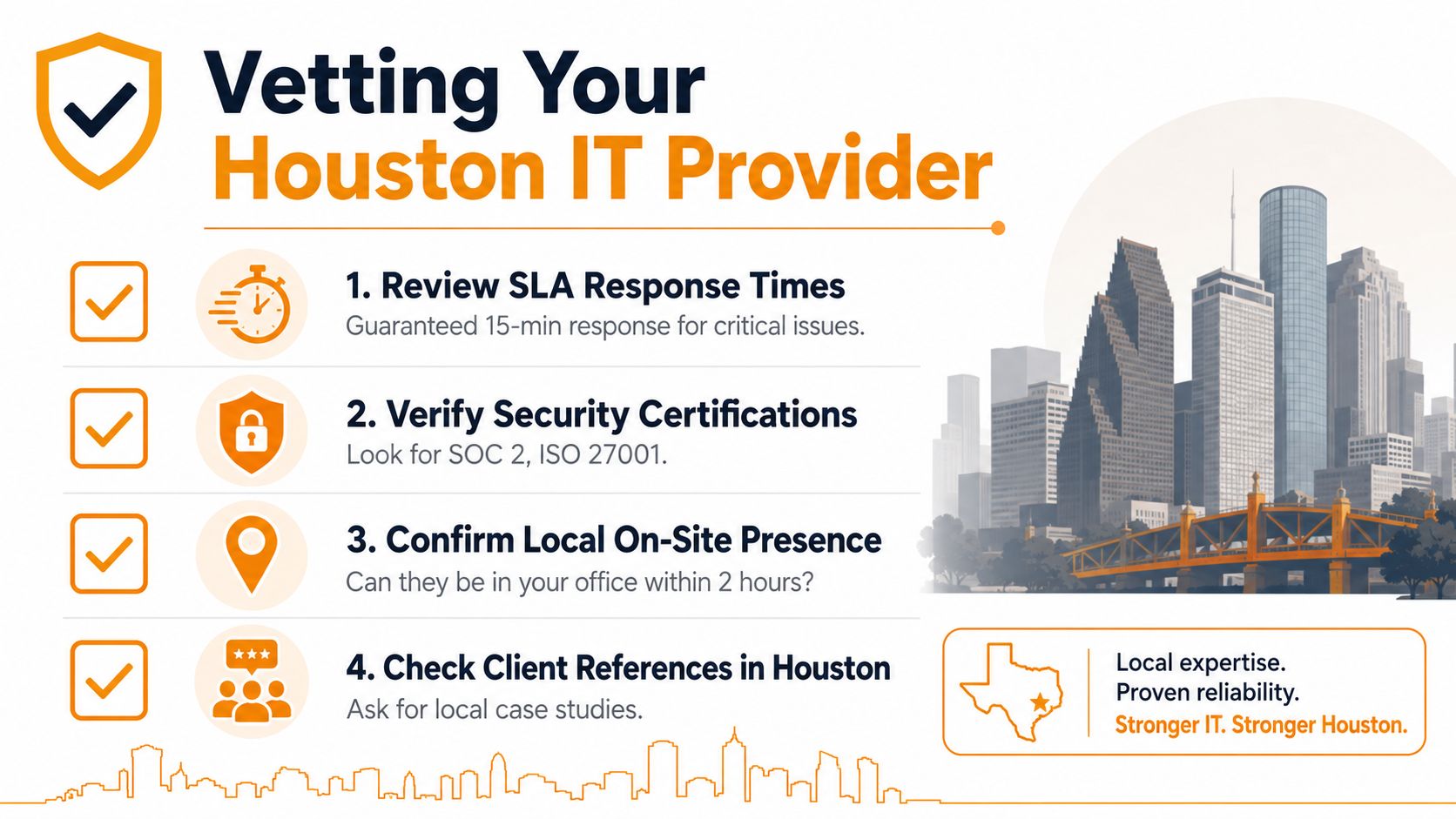
Look at the SLA language, not the sales talk. You want clear response targets for critical issues, a defined escalation path, and a written distinction between after-hours support and business-hours support. Vague promises are a red flag because they let the provider interpret urgency however they want.
Then ask how they report on tickets, patching, backup status, and security alerts. If reporting is weak, you'll spend your time chasing visibility instead of running the business. If they can't show you how they make the environment observable, they probably don't have much control over it.
Verify technical depth, not just friendliness
Security certifications matter, but so does whether the team understands Microsoft 365 governance, cloud administration, and disaster recovery. You want to know who handles cloud support after the migration and who owns change control when an app, identity policy, or email rule needs adjustment. That's the part of the job many providers gloss over.
Use a checklist, and don't apologize for being strict:
- Review SLA response times. Ask for written response commitments for critical incidents.
- Verify security certifications. Look for credible proof of process maturity.
- Confirm local on-site presence. Ask how quickly a technician can be on location when remote support isn't enough.
- Check Houston references. Talk to businesses that look like yours, not just any client they're willing to name.
Watch for obvious red flags
If the provider avoids answering who owns disaster recovery, that's a bad sign. If they have no local technicians, on-site support will be slow when hardware fails. If their cloud story is vague, they may know the basics but not the operational detail your tenant needs.
For a useful provider-selection framework, compare what they tell you against how to choose a managed service provider. If the answers are fuzzy, the contract probably will be too.
How IT Cloud Global Supports Houston Businesses
IT Cloud Global fits this discussion because it's built around the parts of IT Houston SMBs struggle to manage consistently, monitoring, help desk, on-site and remote support, server management, network security, and disaster recovery. It also handles cloud planning and administration across AWS, Google Cloud, and Microsoft Azure/O365, which matters when you're dealing with both infrastructure and tenant governance. That's the difference between a provider that reacts to incidents and one that manages the environment.
The company also brings in-house repair depot services for PCs, laptops, Macs, printers, data recovery, and virus removal, which helps when hardware problems can't be solved over a ticket. On the security and communications side, its partnerships with SentinelOne, Arista Networks, Atakama, and Ultatel support layered protection and cloud-based communications. For Houston businesses that need one team to coordinate support across endpoints, cloud, and network layers, that scope is relevant.
The practical value here is simple. If your business needs outsourced IT service in Houston, you want a provider that can cover day-to-day support while also handling the governance work that gets missed after Microsoft 365 or hybrid cloud migration. That's where the contract either holds up or falls apart.
If your Houston business is dealing with Microsoft 365 sprawl, hybrid-cloud confusion, or a support model that only reacts after users complain, talk to IT Cloud Global, LLC about a managed service plan built around monitoring, support, cloud administration, and disaster recovery. Visit IT Cloud Global, LLC to review their services and see whether their approach fits the way your team works.