


Cloud Security Managed Service: The Ultimate 2026 Guide
Your team moved email to Microsoft 365, put files in SharePoint, spun up a few workloads in AWS or Azure, and now everyone says you're “in the cloud.” At first, that feels like progress. Then the security questions start piling up.
Who has admin access? Who's watching logs at 2 a.m.? What happens if an employee clicks a bad link, a vendor account gets abused, or a backup fails when you need it most? For many Houston business owners, that's the moment cloud convenience turns into cloud anxiety.
A cloud environment doesn't behave like the old server closet down the hall. It's faster, more flexible, and easier to expand. It's also easier to misconfigure, harder to monitor without the right tooling, and unforgiving when access controls are sloppy. That's why more companies are treating a cloud security managed service as an operating requirement instead of an optional add-on.
Table of Contents
- Why Cloud Security Is Overwhelming for Businesses
- What Is a Cloud Security Managed Service
- Top 3 Business Benefits for SMBs
- The Core Components of a Complete Service
- Your Checklist for Choosing the Right Provider
- What to Expect During Deployment and Migration
- How IT Cloud Global Delivers Security for Houston Businesses
- Frequently Asked Questions
Why Cloud Security Is Overwhelming for Businesses
Most small and midsize businesses don't struggle because they ignore security. They struggle because cloud security spreads responsibility across too many moving parts at once. One platform handles email, another runs applications, another stores backups, and each one has its own permissions, policies, logs, alerts, and compliance concerns.
That creates a blind spot. A business owner may think, “We use Microsoft, AWS, and a good firewall, so we must be covered.” In reality, tools don't manage themselves. Someone still has to define who gets access, review risky changes, monitor suspicious behavior, and respond when something looks wrong.
The pace of growth shows why this has become such a serious business issue. The global cloud security market was valued at USD 51.11 billion in 2025 and is projected to reach USD 224.16 billion by 2034, with a CAGR of 17.80% according to market data summarized in this cloud security compliance overview. That kind of projected growth tells you something important. Businesses aren't buying more cloud security because it sounds advanced. They're buying it because unmanaged risk gets expensive fast.
Why internal teams get stretched thin
A typical SMB IT team already has a full plate:
- User support: Password resets, laptops, printers, WiFi issues, onboarding, offboarding.
- Operations: Microsoft 365 administration, patching, backups, vendor coordination.
- Projects: Migrations, new locations, Teams phone rollouts, network upgrades.
- Security spillover: Alerts, audit requests, phishing cleanup, access reviews.
Security becomes one more job on top of many others. That's where things start to slip. Not because the team is careless, but because cloud security requires constant attention and specialist knowledge.
Cloud security usually breaks down in the gaps between systems, teams, and assumptions.
Why managed service becomes practical, not optional
A strong cloud security managed service fills those gaps. It gives a business a dedicated operating layer for monitoring, access control, policy enforcement, threat response, and ongoing tuning. That matters because cloud risk isn't static. Employees change roles, vendors need temporary access, apps get connected, and new services appear before anyone updates the security model.
For a business owner, the issue isn't abstract. Poor cloud security means downtime, fraud exposure, compliance headaches, and damaged customer trust. Managed service makes sense when you need security handled with the same discipline you'd expect from payroll, accounting, or physical building access.
What Is a Cloud Security Managed Service
A cloud security managed service is not just software. It's an outsourced security operation focused on protecting your cloud systems, data, identities, and workloads on platforms like Microsoft 365, Azure, AWS, and Google Cloud.
The easiest way to understand it is to think about a high-rise office building. If you only hire one guard to stand in the lobby, you don't have a real security program. You have a visible person and a false sense of comfort. A proper security firm does much more than that. It manages access badges, monitors cameras, reviews incident reports, checks whether doors are propped open, tests emergency procedures, and keeps records when something goes wrong.
That's what a managed cloud security provider should do for your business in the cloud.
The office building analogy
In plain business terms, a provider should be responsible for things like:
- Access control: The cloud version of keycards and restricted floors. This means managing accounts, permissions, multi-factor authentication, and privileged roles.
- Monitoring: The equivalent of security cameras and alarm response. The provider watches for suspicious sign-ins, unusual system behavior, malware activity, and policy violations.
- Vulnerability management: Like checking side doors, stairwells, and loading docks for weaknesses before someone exploits them.
- Incident response: If something goes wrong, the provider doesn't just alert you. They investigate, contain, and help recover.
- Compliance support: Similar to making sure the building meets fire code, insurance requirements, and access rules for tenants.
What you're really buying
Many buyers often get confused. They think they're purchasing a bundle of tools. In practice, they're purchasing management, accountability, and operational discipline.
A good provider doesn't stop at installing Microsoft Defender, SentinelOne, or log monitoring and then disengage. They keep those systems tuned. They investigate noise versus real threats. They adapt policies when your business changes. They coordinate response instead of leaving your staff to interpret technical alerts.
Here's the business test: if your provider disappeared tomorrow, would your team clearly know what security controls are in place, who has access, what gets monitored, and how incidents are handled? If the answer is no, you may have tools, but you don't have a managed service.
A real managed service turns cloud security from scattered tasks into a repeatable business function.
For non-technical owners, that's the value. You're not hiring someone to “watch the cloud.” You're hiring a team to run security like a professional operation.
Top 3 Business Benefits for SMBs
The biggest advantage of a cloud security managed service isn't technical elegance. It's business stability. Small and midsize companies usually buy these services for three practical reasons: they need expertise they don't have, they need faster response when something goes wrong, and they need their internal team focused on work that moves the business forward.
Better protection without building a full security department
Hiring enough in-house talent to cover cloud monitoring, identity control, incident response, compliance, and after-hours escalation is hard. Keeping that talent is harder. Most SMBs don't need a huge security department, but they do need access to the skills that department would bring.
A managed service gives you that bench strength without forcing you to build it from scratch. It also reduces a common risk in growing companies: one overburdened “IT person” becoming the default security lead, cloud architect, compliance coordinator, and emergency responder all at once.
Faster response means less business disruption
Speed matters in security. Many incidents don't become major losses in the first few minutes, but delays make them worse. That's why the operational side of managed security matters so much.
Managed cloud security services reduce mean time to detect and mean time to respond by an average of 70%, and organizations using them see a 60% lower incidence of data breaches due to proactive remediation, according to Akamai's overview of managed cloud security services. For a business owner, that translates into fewer bad surprises turning into long outages, legal problems, or customer-facing chaos.
Internal teams get their time back
A good provider should take recurring security work off your team's shoulders, especially the work that's important but repetitive. That includes alert review, log monitoring, policy enforcement, routine hardening, and escalation handling.
When that's done well, your internal staff can spend time on:
| Business need | What your team should focus on |
|---|---|
| Growth projects | New locations, new apps, automation, customer experience |
| User productivity | Onboarding, workflow improvement, collaboration tools |
| Infrastructure planning | Upgrades, migrations, lifecycle management |
| Leadership support | Budgeting, vendor strategy, risk planning |
Practical rule: If your IT team is spending more time reacting to alerts than improving operations, your security model is backwards.
That shift matters more than many owners realize. Security should support the business, not trap your best technical people in constant cleanup mode.
The trust dividend
There's also a less visible payoff. Customers, partners, and leadership teams gain confidence when security is handled consistently. They may never ask how your identity policies are structured or how your response workflow runs. They will notice if service is unavailable, if accounts are compromised, or if sensitive information is exposed.
That's why the best managed security relationship doesn't feel flashy. It feels quiet, predictable, and under control. For most businesses, that's exactly what good security should look like.
The Core Components of a Complete Service
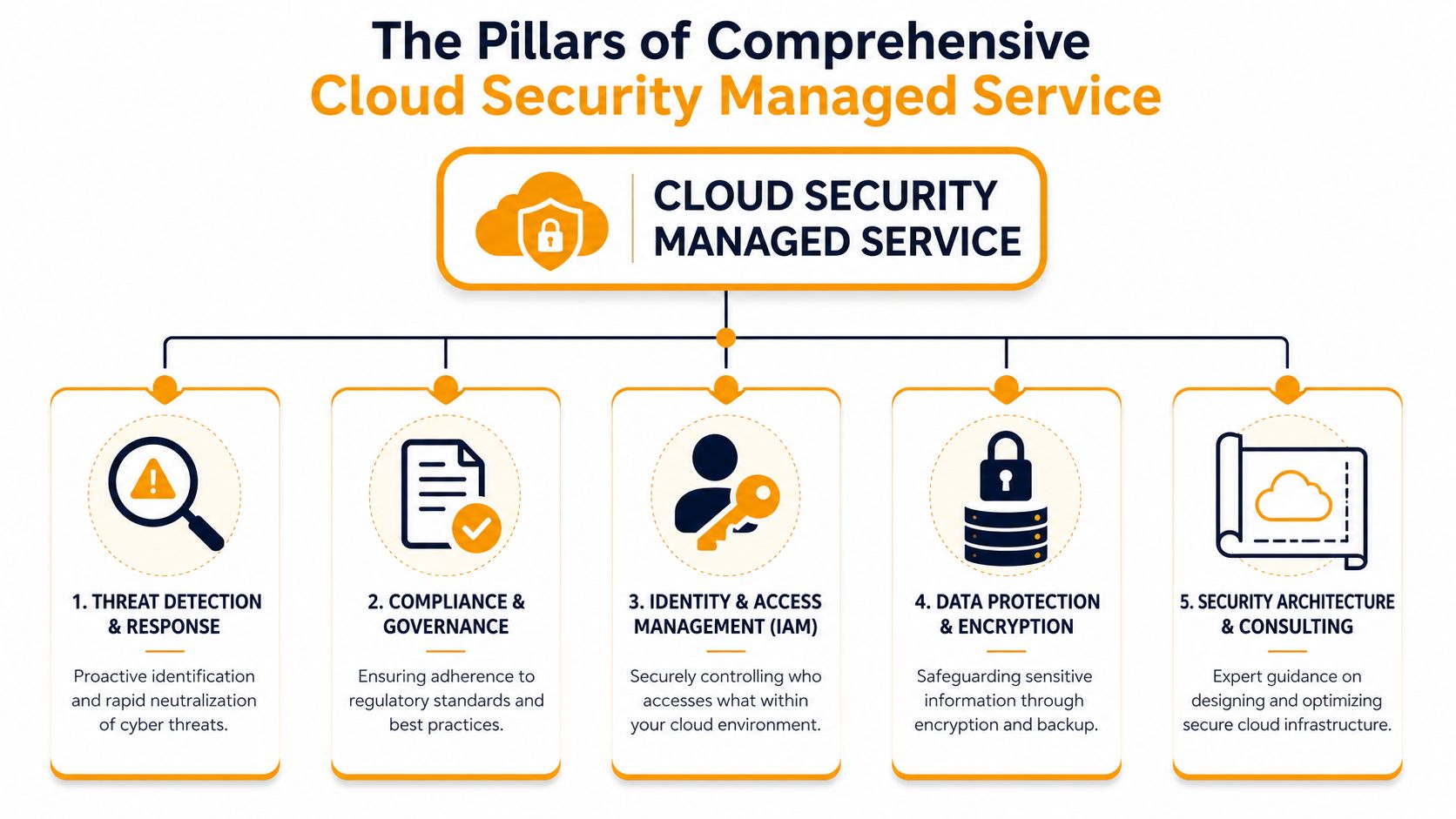
Many providers describe security in broad language. That's not enough. If you're paying for a cloud security managed service, you should understand the main parts of the machine and what each one does for the business.
This visual makes the structure easier to grasp.
What the service should actually include
Think back to the office building model. You need more than a lobby guard. You need layers.
- Threat detection and response: This is your surveillance room plus emergency dispatch. It includes log collection, alerting, investigation, and response actions when accounts or workloads behave abnormally.
- Compliance and governance: This is the building inspector and policy office. It checks whether systems are configured according to business rules, regulatory requirements, and documented standards.
- Identity and access management: This is the keycard and master key system. It decides who gets in, where they can go, and whether privileged access is tightly controlled.
- Data protection and encryption: This is the locked records room plus secure transport. It protects information at rest and in transit and makes recovery possible if something goes wrong.
- Security architecture and consulting: This is the blueprint review. It covers how your cloud environment is designed so you don't create risk through bad structure from the start.
Businesses often see these as separate purchases. They shouldn't be. The pieces have to work together.
A provider may use different tooling depending on your environment. For logging and centralized visibility, some teams look at platforms such as IT security solutions with Log360 when they need broader event monitoring and audit support across mixed environments. The product matters less than the operating model around it. A weak team with good tools still leaves gaps.
Why identity controls matter so much
Identity is where a lot of cloud risk lives. If an attacker gets the right account, they may not need to “hack” much at all. They can log in, move laterally, change settings, or exfiltrate data using valid credentials.
That's why strong IAM matters so much. Comprehensive IAM frameworks combined with encryption reduce identity-related breach risks by up to 85%, and managed services that enforce MFA and RBAC help organizations achieve a 90% compliance rate with standards like FedRAMP, according to HPE's explanation of cloud security managed services.
For a business owner, the takeaway is simple. Good IAM means:
- Fewer overpowered accounts
- Cleaner onboarding and offboarding
- Safer vendor access
- Less exposure when credentials are stolen
- Stronger evidence for audits and compliance reviews
If you want a useful framework for this, the idea of security in layers is the right mindset. Don't expect one product to carry the whole load.
The provider that talks only about antivirus or only about firewalls is telling you part of the story, not the whole one.
The pieces that buyers often overlook
Two components are commonly under-scoped.
First, backup and disaster recovery. Backup isn't glamorous, but it's what keeps a bad day from becoming a business crisis. A provider should be clear about what gets backed up, how recovery works, and what's excluded.
Second, configuration review and posture management. In cloud environments, many problems come from settings that drift over time. Permissions expand, storage gets exposed, exceptions pile up, and no one revisits old assumptions. A complete service catches that drift before it becomes an incident.
Your Checklist for Choosing the Right Provider
Most buyers ask the obvious questions first. Are you available around the clock? Do you support our cloud platforms? Can you help with compliance? Those are fair questions, but they don't get to the riskiest part of outsourcing security.
The hard question is this: how do you know the provider's own access to your environment won't become the problem?
That isn't paranoia. It's basic risk management.
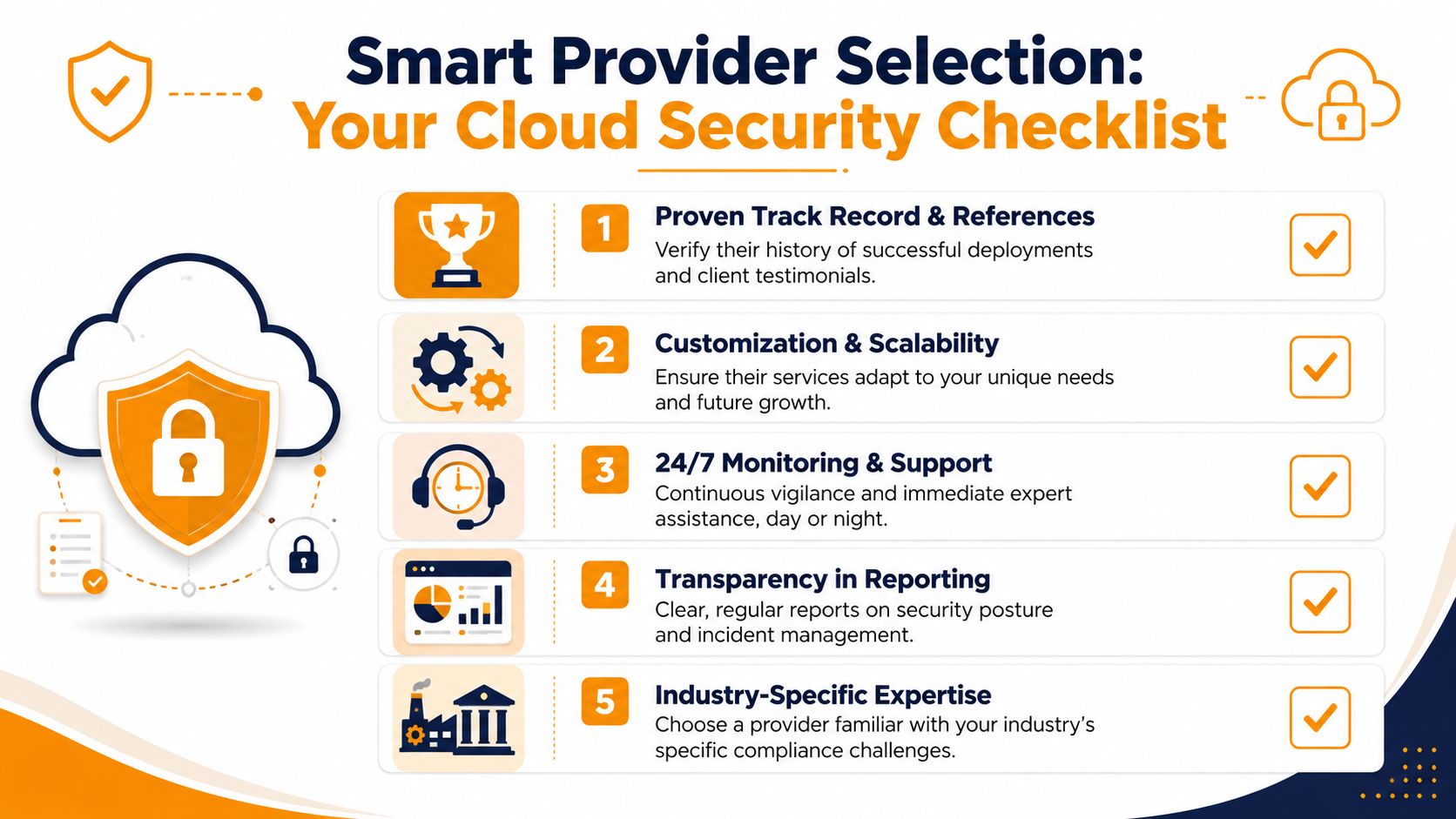
The standard checks most buyers already know
Start with the basics. They still matter.
- Proven experience: Ask what cloud platforms they actively manage and what kinds of environments they handle most often, such as Microsoft 365, Azure, AWS, or hybrid.
- Defined responsibility: Get clarity on what they monitor, what they remediate directly, and what still requires your approval.
- Reporting discipline: Ask for sample reports. You want reports that show account activity, incidents, changes, trends, and open risks in plain language.
- Escalation process: Find out who calls whom, under what conditions, and how after-hours incidents are handled.
- Fit for your business: A provider that works well for a regulated medical office may not be the right fit for a multi-site retailer or field-services company.
If you need a broader buying framework, this guide on how to choose a managed service provider is a useful starting point.
The uncomfortable questions you should still ask
Often, evaluations fall short in this regard. Buyers assume the security provider must already have its own controls locked down. Maybe they do. Maybe they don't. Ask anyway.
Data from the U.S. Department of Defense shows that 68% of cloud incidents involving Managed Service Providers stem from excessive privileges or misconfigured IAM roles, as outlined in the DoD guidance on managed service provider cloud risks. That should change how you interview providers.
Ask questions like these:
- How do you limit your engineers' privileged access to our environment?
- Do you use named accounts or shared admin accounts?
- Can we independently review logs of your administrative actions?
- Where are those logs stored, and can they be altered?
- How do you separate duties so one engineer can't do everything unchecked?
- How do you handle temporary privileged access for emergency work?
- What happens to your access if our contract ends?
If a provider gets defensive when you ask about their own access controls, keep looking.
A mature provider should welcome these questions. They should be able to explain how access is approved, time-limited, logged, and reviewed.
What a zero-trust provider relationship looks like
A healthy provider relationship doesn't depend on blind trust. It depends on verifiable controls.
Look for signs of a zero-trust mindset:
- Least privilege: The provider only has the access needed for the task.
- Independent logging: Their actions are captured in logs you can review.
- Approval workflows: Sensitive changes require defined authorization.
- Access expiration: Expanded rights don't stay active forever.
- Offboarding readiness: They can cleanly hand over documentation and remove access if you switch vendors.
For buyers who want another angle on how security partners should be tested, this guide for MSPs on pentesting partners is useful because it pushes beyond marketing claims and into verification.
The right provider doesn't just promise to protect you. They prove they can be trusted inside your environment.
What to Expect During Deployment and Migration
A good cloud security rollout shouldn't feel like open-heart surgery on your business. It should feel organized, phased, and boring in the best possible way. When deployment becomes chaotic, it usually means the planning was thin.
A good rollout feels controlled, not chaotic
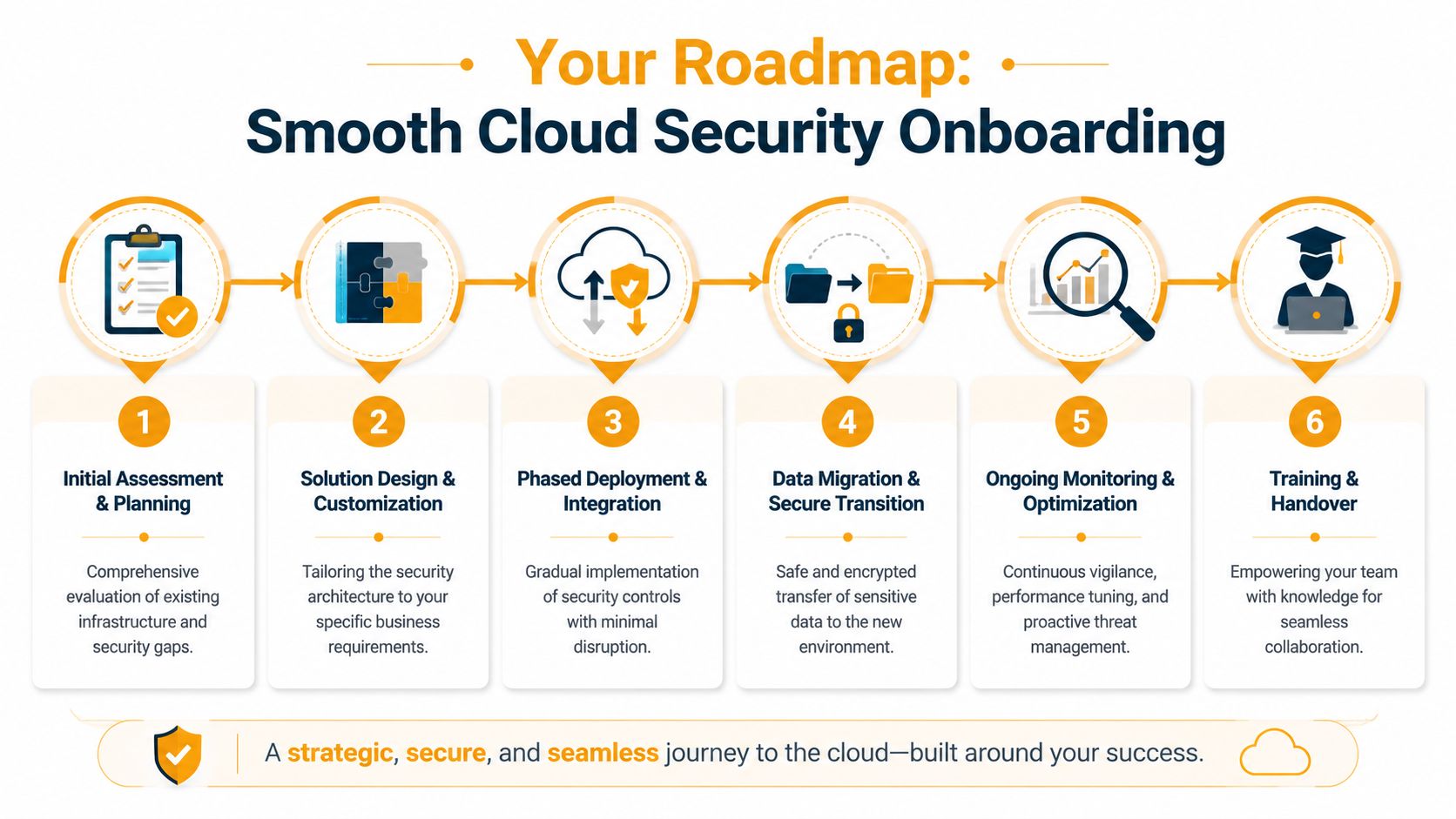
Professional onboarding usually starts with discovery. The provider reviews your cloud tenants, workloads, user roles, current policies, existing tools, and known pain points. They should also identify where your team depends on legacy habits that don't fit the cloud very well, such as broad admin access or undocumented exceptions.
Then comes design. The design phase involves translating security policies into business rules. Which users need privileged access? Which vendor accounts should be temporary? What must be logged? What gets escalated immediately versus reviewed in regular reporting?
This is the expected progression.
What business owners should watch during onboarding
Once the plan is set, implementation should happen in phases, not as one giant cutover. In practice, that often means identity controls first, logging and alerting next, workload protections after that, and then reporting refinement once the system is producing useful signal.
You should expect these milestones:
- Risk assessment completed: You receive a clear picture of current gaps and priorities.
- Policies approved: Access, escalation, backup, and response rules are documented.
- Tooling integrated: Logging, endpoint protection, cloud monitoring, and notification paths are connected.
- Runbooks established: Everyone knows what happens during common incidents.
- Monitoring handoff: The service moves into steady-state operations with regular review.
The first month shouldn't just produce dashboards. It should produce decisions, ownership, and cleaner controls.
Training matters too. Your staff doesn't need to become a security team, but they do need to understand new sign-in steps, approval workflows, and reporting paths. If employees don't understand the process, they'll create workarounds, and workarounds are where cloud security starts to weaken.
A strong deployment leaves you with fewer surprises, not more. You should know who owns what, how incidents flow, and what “normal” now looks like.
How IT Cloud Global Delivers Security for Houston Businesses
Houston businesses don't all face the same risks, but many of them share the same operational reality. They're growing, juggling hybrid work, running Microsoft 365, depending on stable networks, and trying to stay secure without slowing the business down.
That's where local execution matters. A provider serving Houston companies needs to understand more than cloud dashboards. They need to understand how office moves, warehouse networks, field staff, retail locations, VoIP systems, cabling, endpoint support, and Microsoft 365 administration all intersect with security.
IT Cloud Global approaches that challenge as a full-service IT partner, not just a monitoring vendor. That matters because cloud security is rarely isolated from the rest of the environment. Identity ties into Microsoft 365. Response planning ties into endpoint management. Recovery depends on backup discipline. Network performance and wireless design can affect how securely users connect and work day to day.
The company's Houston-based model also helps businesses that want dedicated engineers, on-site or remote support, and practical help across cloud migration, server management, network security, disaster recovery, and user support. Its partnerships with vendors such as SentinelOne, Arista Networks, Atakama, and Ultatel reflect a layered approach instead of a one-tool mindset.
For a local business owner, that combination is useful. You're not looking for abstract cybersecurity talk. You're looking for a team that can help keep operations stable, secure cloud systems, support users, and solve real infrastructure issues before they turn into downtime.
Frequently Asked Questions
Is cloud always the most cost-effective option for security?
No. That's one of the biggest oversimplifications in the market. Emerging 2024-2025 data shows a 35% increase in cloud waste due to over-provisioned instances that providers fail to optimize, and for systems that need 24/7/365 uptime, on-premises or hybrid models can sometimes be more cost-effective than a pure cloud server approach, according to this analysis of cloud security managed services and cloud waste.
If a provider insists every workload belongs in the cloud, treat that as a sales position, not a technical truth. Some businesses do best with cloud-first architecture. Others save money and reduce complexity with a hybrid design.
Will a managed service still work as my business grows?
Yes, if the provider built the service around policy and process, not just around your current headcount. Growth changes your environment. New users, new locations, more vendors, more software connections, and more compliance pressure all increase the need for structured access control and monitoring.
A good service should scale by adjusting permissions, coverage, and reporting without forcing a complete rebuild every time your business changes.
What if we want to switch providers later?
You should be able to leave cleanly. That means your logs, policies, documentation, runbooks, access records, and platform ownership need to stay visible and transferable. If a provider keeps everything opaque or tied to their internal systems, switching becomes painful.
Ask about offboarding before you sign. It's one of the clearest tests of whether the provider sees you as a partner or as a captive account.
How involved does my internal team need to be?
Less involved in daily alert handling, more involved in governance. Your team should help define who needs access, what systems matter most, what business events require escalation, and what acceptable risk looks like. They shouldn't have to spend their day chasing every security event or guessing what a suspicious login means.
The healthiest arrangement is shared accountability. The provider runs the security operation. Your business still owns the decisions that shape it.
If your business needs practical guidance on cloud security, compliance, Microsoft 365, AWS, Azure, or fully managed IT support, IT Cloud Global, LLC can help you evaluate the right approach without forcing a one-size-fits-all answer. Reach out to discuss your environment, your risk concerns, and what a secure, workable plan should look like for your Houston business.