


The Importance of BCP: Business Survival in 2026
Monday starts normally. Your staff logs in, the phones ring, invoices need to go out, and customers expect answers. Then a storm rolls through Houston, the power flickers, your internet drops, and someone realizes the files your team needs are only reachable from the office server. Payroll is due. Your bookkeeper can't access the system. Sales can't pull open quotes. Customers don't care that the outage wasn't your fault. They only see silence.
That's the moment most small business owners find out whether they have a business continuity plan or just good intentions.
For a lot of owners, the importance of BCP feels abstract until a real interruption hits. It sounds like enterprise language. Something for banks, hospitals, or large IT departments. In practice, it's much simpler than that. A BCP is the set of decisions you make before a bad day so your business can still function during one.
If you run a small or midsize business in Houston, you don't need a binder full of jargon to get started. You need a clear way to keep your essential work moving when weather, cyber incidents, vendor outages, or building access issues knock your normal routine off track.
Table of Contents
- Disaster Doesnt Wait Are You Prepared
- What Is a Business Continuity Plan Anyway
- The True Cost of Ignoring BCP for Your Business
- The Four Pillars of an Effective BCP
- Your First Five Steps to Building a BCP
- How IT Cloud Global Makes BCP Simple and Secure
- From Plan to Peace of Mind
Disaster Doesnt Wait Are You Prepared
A lot of continuity failures don't start with a dramatic disaster. They start with a normal day that goes sideways fast.
A warehouse office loses power after severe weather. A medical practice can't reach patient schedules because internet service is unstable. A retail business finds out its payment workflow depends on one device in one location. A small law office discovers the one person who knows where everything is stored is on a flight and unreachable.
That's how disruption usually feels on the ground. Not cinematic. Just expensive and confusing.
In Houston, owners already think about property damage, flooding, fire risk, and facility access. That's smart. Physical preparedness still matters, and resources like these comprehensive property safety tips can help reduce avoidable building-related risk. But business survival takes more than protecting the space. You also need a plan for how work continues if the space, systems, or vendors become unavailable.
If your team can't answer customers, process orders, access files, or communicate internally, the business is interrupted even if the building is still standing.
That's why continuity planning has to go beyond backups. A backup may restore data later. A BCP answers what your staff does today. Who calls employees. How customers are informed. Which systems matter first. What happens if your main office is inaccessible. Where the current vendor contacts live if email is down.
If you've already started thinking about recovery, this guide on a disaster recovery plan for small business is a useful companion. Disaster recovery handles the technical restore. Business continuity covers the larger question: how your company keeps operating while that restore is happening.
What Is a Business Continuity Plan Anyway
A business continuity plan, or BCP, is the fire escape plan for your whole business.
Not just the building. The business.
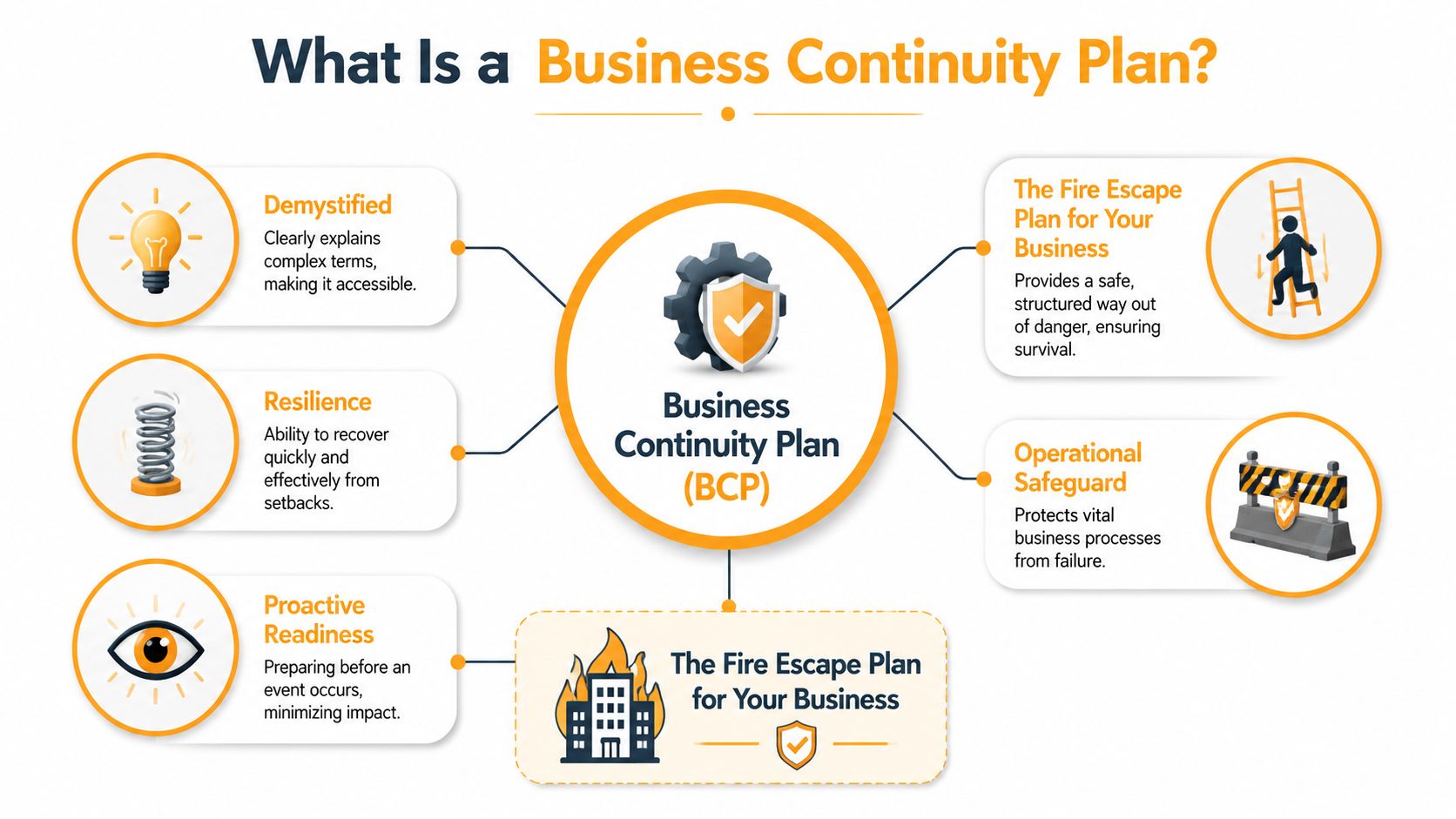
When there's a fire escape plan, people know where to go, who leads, and how to get out safely. A BCP works the same way for operations. It tells your company what to do when something interrupts normal work, whether that interruption comes from severe weather, ransomware, internet failure, a cloud outage, or a building issue.
What a BCP actually covers
A practical BCP usually answers questions like these:
- Critical work first: Which activities must continue even if everything else pauses?
- People and roles: Who makes decisions, who contacts staff, and who steps in if a key person is unavailable?
- System access: How do employees reach files, apps, phones, and email if the office or network is unavailable?
- Communication: How do you update customers, vendors, and employees if your main channels fail?
- Workarounds: What manual process keeps money moving, service going, and commitments from slipping?
For a small business, this doesn't need to be huge. It needs to be usable.
BCP is bigger than disaster recovery
Owners often hear business continuity and disaster recovery used like they mean the same thing. They don't.
The most straightforward way to grasp this is:
| Term | What it focuses on | Example |
|---|---|---|
| Business Continuity Plan | Keeping the business functioning during disruption | Staff work remotely, calls reroute, customers receive updates, payroll still runs |
| Disaster Recovery | Restoring IT systems and data | Servers are rebuilt, backups are restored, Microsoft 365 access is recovered |
Disaster recovery is part of continuity. It's the IT recovery lane. BCP includes that lane, but it also covers people, process, communication, vendors, and decision-making.
Practical rule: If your plan only talks about backups, you don't have a full BCP. You have one important piece of one.
That distinction matters because many failures aren't pure IT failures. Sometimes systems are available, but the team doesn't know who approves remote work. Sometimes data is safe, but no one has an offline employee contact list. Sometimes your cloud environment is fine, but a third-party provider outage stops the workflow you depend on.
The importance of BCP comes from closing those gaps before they turn into downtime.
The True Cost of Ignoring BCP for Your Business
It is 9:10 on a Tuesday. Your office internet is down, your phones are tied to the same connection, staff cannot get into the files they need, and customers are already calling for updates. In the first hour, the problem is not technical. The problem is that work stops, cash flow slows, and nobody is sure what happens next.
That is why business continuity planning matters to a small business owner. It protects revenue, customer relationships, and day-to-day operations when something breaks. For most SMBs, the goal is not an enterprise program with binders and committees. The goal is a practical plan that keeps the business running through a bad day.
A FEMA preparedness article for businesses has long cited a widely repeated finding that many small businesses never recover after a major disaster. IBM has also published continuity research showing how downtime and poor recovery planning drive financial and reputational harm. Even without arguing over the exact percentage, the pattern is clear. A serious disruption can put a small company out of business.
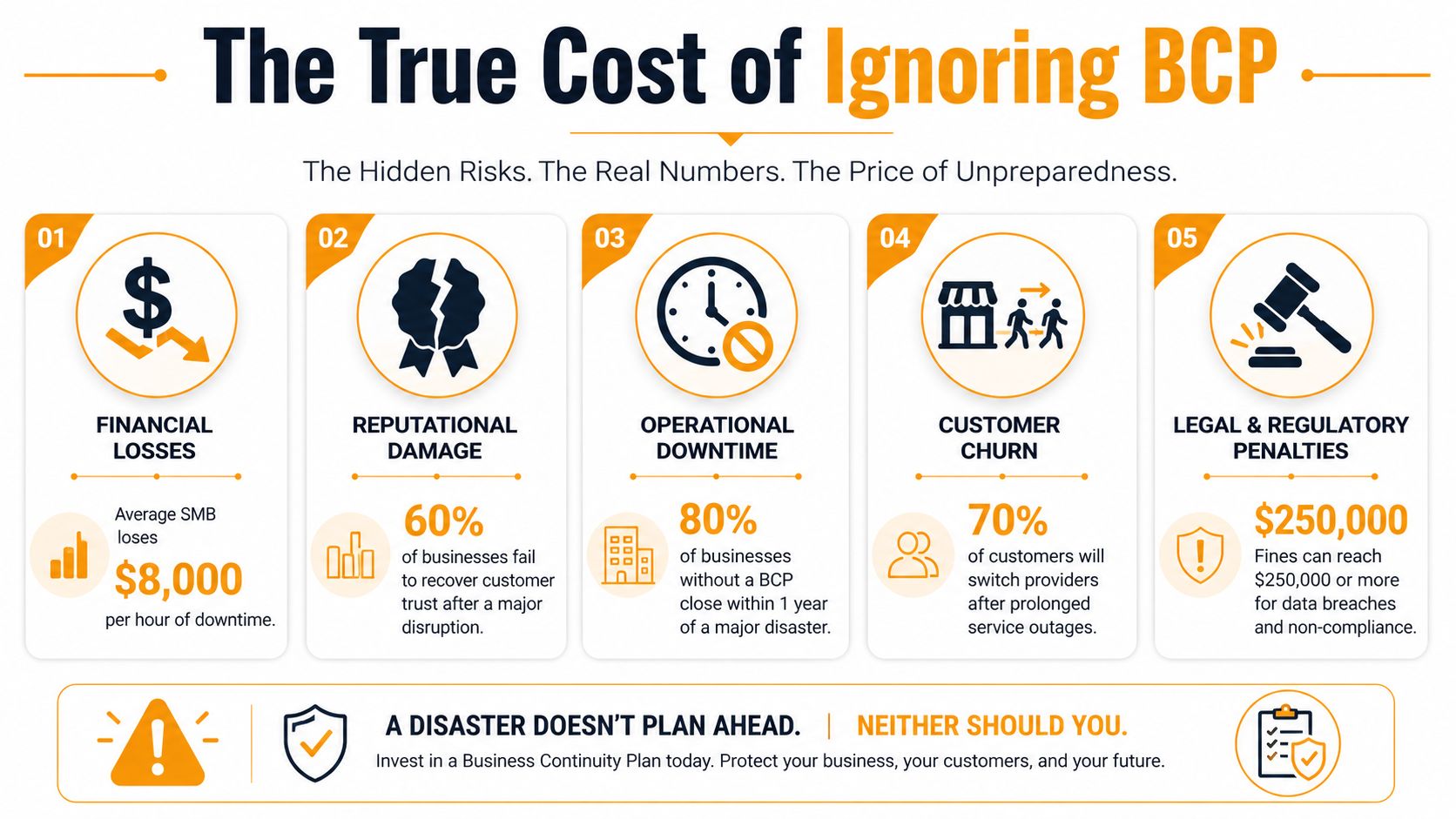
Financial losses hit first
Most owners feel the cost of an outage in layers.
Sales stop. Payroll still runs. Projects slip. Someone spends half the day texting employees, calling vendors, and rebuilding information from memory. If your team cannot access accounting, scheduling, inventory, quoting, or customer records, the issue spreads beyond IT fast.
The expensive part is often the cleanup. Missed invoices, rushed work, overtime, duplicate data entry, refund requests, and orders that never come back add up quickly. Good cloud backup solutions for small business reduce part of that risk, but backup alone does not tell your team who does what during an outage.
Reputational damage lasts longer
Customers usually do not care whether the root cause was a server failure, a storm, ransomware, or a vendor outage. They care whether you respond, keep them informed, and deliver what you promised.
Small businesses endure significant damage during disruptions. A client who cannot reach your team during a disruption may give you one chance. After that, they start looking for a provider that appears more stable. Insurance can help cover some direct losses. It does not repair the trust lost after missed calls, vague updates, or silence.
The better approach is simple. Have a communication plan your staff can use under pressure.
Operational chaos creates avoidable mistakes
Many continuity failures start with confusion, not technology.
Who can approve emergency purchases? Who has admin access to Microsoft 365, your line-of-business apps, and your internet account? If the office is inaccessible, can payroll still run? If one key employee is out, does anyone else know the vendor contacts, login recovery steps, or manual workaround?
When those answers live in one person's inbox or memory, a short outage turns into a messy one. Staff improvise. Different people make different calls. Time gets wasted on basic decisions that should already be documented.
Client and compliance pressure is rising
Larger customers increasingly ask smaller vendors to prove they can stay operational during a disruption. That pressure is real in healthcare, legal, finance, logistics, and any business handling sensitive data or time-sensitive service.
IDC tracks continuity and resilience practices across larger organizations, including how formal planning ties into security and compliance expectations. If you want to review that research, use the IDC research portal for business continuity and resilience topics. The takeaway for an SMB owner is straightforward. You do not need Fortune 500 paperwork, but you do need a clear, usable process when a client asks how your business handles downtime.
Saying "we back up our files" is a start. It is not an answer.
The Four Pillars of an Effective BCP
A good continuity plan holds up on a bad day. If your internet drops, your office is closed, or a key employee is out, the plan should tell your team what to do in plain language. For a small business, that usually comes down to four parts that work together.
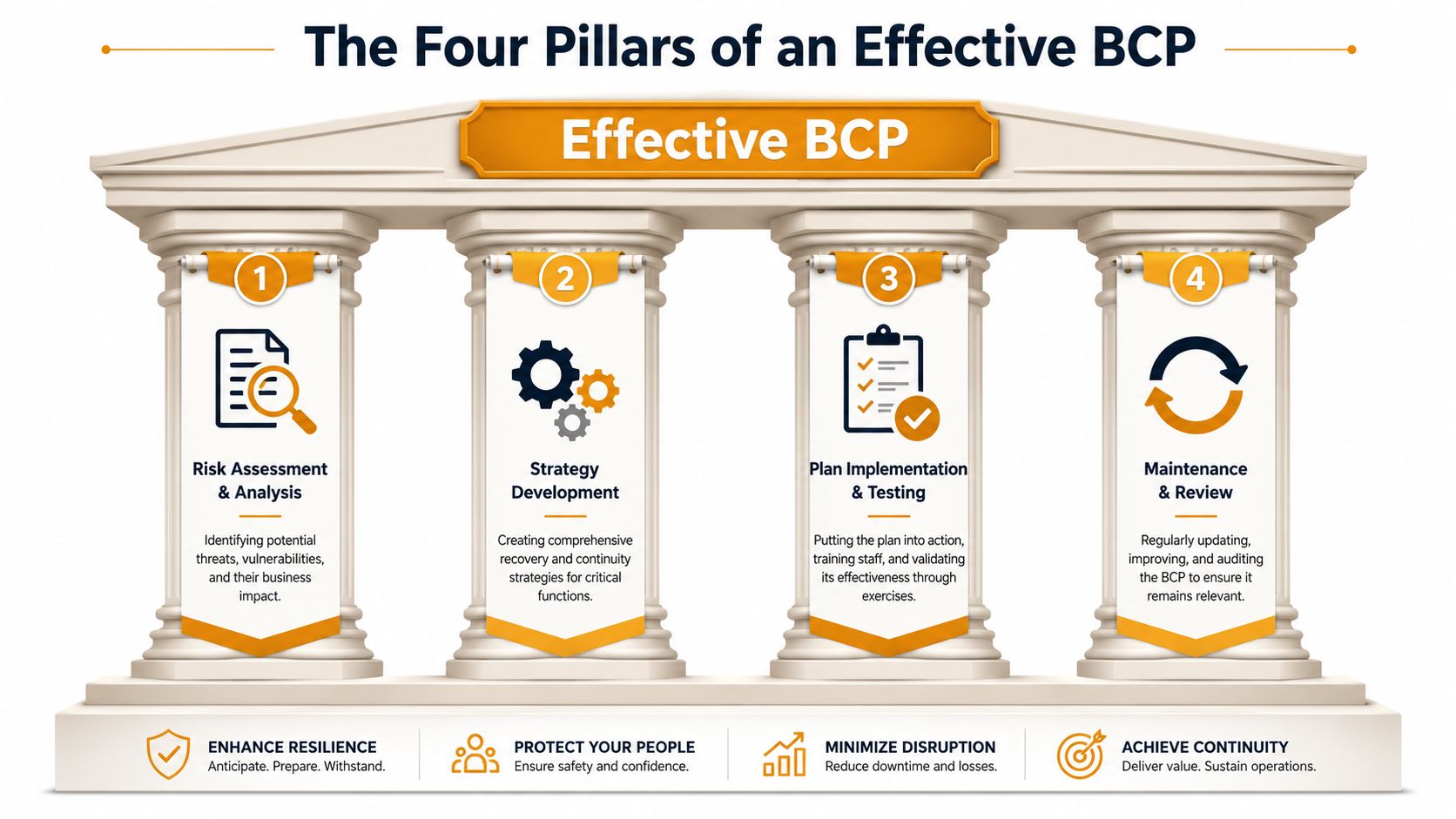
Pillar One Know What Cannot Stop
Start with the work that keeps money coming in and customers informed.
For many small businesses, a massive business impact analysis is unnecessary to begin. A shorter, usable list is better. Identify the few functions that would hurt the business fastest if they stopped for a day. In my experience, owners usually get traction once they narrow it to cash flow, customer communication, access to records, and one or two delivery or service tasks.
A simple table keeps this practical:
| Critical function | What breaks it | Basic fallback |
|---|---|---|
| Payroll | Office system unavailable | Secure cloud access or approved manual process |
| Customer communication | Phone or email outage | Alternate calling method and prewritten status message |
| Billing and invoicing | Accounting access failure | Backup device access and exported key records |
| Scheduling or dispatch | Internet or platform outage | Offline contact list and manual scheduling sheet |
Look hard for single points of failure. One person with all the passwords. One internet provider. One software admin account nobody else can access. Those are continuity risks, even if nothing has gone wrong yet.
Pillar Two Build Real Recovery Paths
This pillar answers the question owners ask in the middle of an outage. How do we keep operating by noon?
Backups matter, but recovery is bigger than backups. You also need alternate devices, remote access that works outside the office, recovery instructions that are not trapped inside the affected system, and vendor contacts your team can reach from a phone.
For many SMBs, the best starting point is reliable offsite backup with a clear restore process. If you are comparing options, review cloud backup solutions for small business based on one standard. Your team should be able to get data back and return to work without guessing.
Pillar Three Control the Message
Downtime becomes a customer trust problem fast.
Your plan should name who contacts employees, who updates customers, which channel comes first, and what to say if email or phones are down. The first message does not need to be polished. It needs to be clear. Confirm the issue, explain what is still working, and tell people when the next update is coming.
Useful communication lists include:
- Employee contacts: Mobile numbers and personal email addresses stored offline
- Customer priorities: Key accounts that need immediate outreach
- Vendor details: Internet, VoIP, cloud, payroll, banking, and building contacts
- Template messages: Short disruption notices for staff and clients
A short script saves time under pressure. It also prevents three employees from giving three different answers to the same customer.
Pillar Four Test What You Wrote
A plan that has never been tested usually breaks at the worst moment.
You do not need a formal exercise program to start. Run a tabletop session for 30 minutes. Pick one scenario and walk it through. The office is inaccessible tomorrow morning. Microsoft 365 access is interrupted. Your dispatcher is out sick during a service outage. Ask who does what, what tool they use, and where the instructions live.
The places where the conversation stalls are the weak spots. Fix those first.
I usually tell owners to test for clarity, not perfection. If your team can find the contacts, reach the backup system, and keep the top three functions running, you have the beginnings of a plan that can help on a hard day.
Your First Five Steps to Building a BCP
A Houston business does not need a 60-page continuity binder to survive a bad week. It needs a short plan that answers one hard question fast. If the office is down tomorrow morning, how do you keep money coming in and customers informed?
That is where many owners get stuck. The process sounds technical, time-consuming, and expensive before they even start. The Sensiba 2025 SMB Resilience Report found that 89% of SMBs abandon BCP efforts because they see the process as too technical or resource-intensive. The same report notes that a minimum viable BCP focused on 3 to 5 critical functions is an effective starting point.
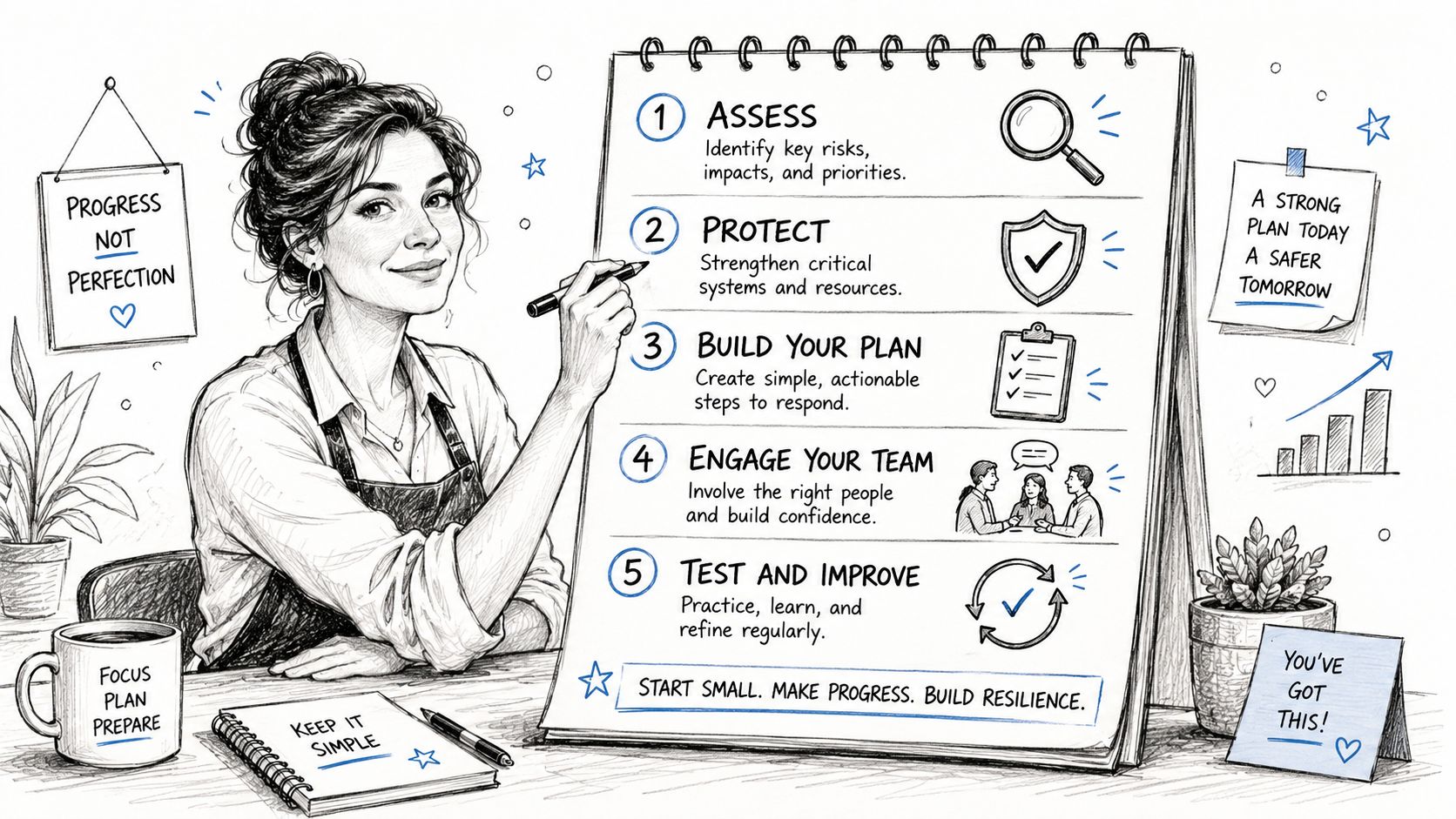
That is the right starting point for a small team. Build the first version around the work that keeps revenue moving, then improve it over time.
A Minimum Viable BCP for a Small Team
Pick three critical functions
Start with the work that hurts fastest when it stops. For one company that may be dispatch, billing, and customer support. For another, it may be scheduling, payroll, and access to project files. If losing a function would stop cash flow, delay service, or damage customer trust, it belongs on the list.Assign one backup method for each function
Keep this simple and specific. If your billing platform is unavailable, do invoices get tracked in a spreadsheet for one day or two? If phones are down, do calls roll to mobile numbers or a backup VoIP app? If one key employee is out, who takes over the task? One fallback per function is enough for version one.Create an offline contact list
Store it somewhere your team can reach without relying on the same system that may be down. Include employee mobile numbers, personal email addresses if appropriate, key vendors, internet and phone carriers, landlord or building contacts, bank contacts, and outside IT support. If all your contact data lives inside one email tenant, you have a real weakness. A quick IT risk assessment helps identify those system and vendor dependencies before they become an outage.Write one page of response notes
Keep this page practical. Who can declare an incident? Where do employees check for updates? Which customers get contacted first? What work continues first, and where are the recovery steps stored? Under stress, plain language beats polished language every time.
The best small-business BCP usually fits on a few pages because people can use it under pressure.
What a Simple Test Looks Like
Run a short tabletop exercise with the people who will make decisions during a disruption. Use one scenario that would be painful but believable. A storm knocks out the office. A ransomware event locks staff out of shared files. Your internet circuit fails on payroll day. A cloud app your team depends on becomes unavailable, and if Azure is part of that conversation, CloudConsultingFirms helps with Azure.
Ask the group to walk through the first hour, the first morning, and the first full day. Where do they get instructions? Which tool do they use first? Who contacts customers? Where the conversation slows down, the plan needs work.
After you do that once, use this short walk-through as a team prompt:
- Make one person the continuity owner
Someone needs clear responsibility for keeping the document current, updating contacts, and scheduling the next test. That person does not do every task during an incident. They make sure the plan stays usable instead of turning into a file nobody opens until it is too late.
Small businesses do not need perfect continuity planning first. They need a plan simple enough to use on a chaotic day, and strong enough to protect revenue, service, and trust.
How IT Cloud Global Makes BCP Simple and Secure
For a Houston business, continuity gets easier when one provider can connect the moving parts instead of leaving you to coordinate five separate vendors during a disruption.
IT Cloud Global supports the technical side of continuity in the places where SMBs usually struggle most. Managed backup and disaster recovery help with system restoration. Proactive monitoring and helpdesk support catch issues earlier and give staff a clear place to call when things break. Cybersecurity tools and endpoint protection reduce the odds that malware, account compromise, or device failure turns into a business-wide outage.
The company's cloud work also matters for continuity. If your business runs on Microsoft 365, Azure, AWS, or Google Cloud, continuity isn't just about where data lives. It's about how people keep working when access changes, devices fail, or a local office becomes unusable. Remote access, identity management, SharePoint, Teams, Exchange, Intune, and cloud-based file access all play a role in keeping operations moving.
Where provider choices matter
One continuity blind spot for small businesses is vendor dependency. Owners often assume the platform they use has already solved continuity for them. In reality, your provider protects its service. You still need a plan for your operation.
That's true whether you use Microsoft 365, a line-of-business SaaS tool, or a public cloud stack. If you're evaluating Azure options and want a broader view of service models and support types, CloudConsultingFirms helps with Azure as a reference point for comparing providers and capabilities.
Why this matters in day-to-day operations
Continuity isn't only about major disasters. It also shows up in smaller failures that create the same business pain. WiFi instability in the office. A broken laptop holding key local files. A printer workflow that stops document processing. A phone outage that leaves customers hearing silence. A server issue discovered too late because no one was monitoring it.
That's where integrated support helps. Network design, cloud administration, VoIP, endpoint security, repair services, virtualization, and recovery planning all touch the same outcome. Keeping your business available when normal conditions disappear.
From Plan to Peace of Mind
A business continuity plan doesn't eliminate risk. It reduces panic, shortens downtime, and gives your team a way to function when the day doesn't go as planned.
For a small business owner, that underscores the importance of BCP. It protects revenue, customer trust, internal coordination, and your ability to make clear decisions under pressure. It also gives you something more personal than that. Confidence that one bad event doesn't have to become a business-ending one.
You don't need an enterprise program to start. You need a short list of critical functions, one backup path for each, a communication plan, and a habit of testing what you wrote. That's enough to move from guessing to preparedness.
If your current “plan” lives in one employee's memory, one office computer, or one vendor relationship, now is the right time to fix it.
IT Cloud Global, LLC helps Houston businesses turn continuity planning into something practical. From managed backups and disaster recovery to cloud migrations, cybersecurity, Microsoft 365 administration, VoIP, network support, and ongoing IT guidance, the team builds resilience around how your business operates. If you want help creating a BCP that's simple, usable, and secure, contact IT Cloud Global, LLC.
- 7 Best Managed IT Services Houston TX Reviews (2026)
- MDR vs EDR: Choosing Cybersecurity for Your Houston Business
- Cloud Backup Solutions for Small Business: A 2026 Guide
- Disaster Recovery Companies: An SMB Survival Guide
- How to Choose a Managed Service Provider: A 2026 Guide
- Best Endpoint Protection for Small Business: 2026 Guide
- Modernization of Technology for Houston SMBs