


Hardware as a Service: A Guide for Smart Businesses
Your office probably has a few machines that tell the whole story. One laptop takes forever to boot. One front-desk printer works only if a specific employee talks to it nicely. A few desktops are “good enough” until they freeze during payroll, invoicing, or a client meeting. Then the budget gets hit by surprise repairs, rush replacements, and lost staff time.
That cycle wears down small and midsize businesses. You buy hardware, stretch it longer than you wanted, patch problems as they pop up, then replace everything in a stressful burst when too many devices age out at once. For Houston companies trying to grow, that's not just an IT problem. It's a cash flow problem, a productivity problem, and often a security problem too.
Hardware as a service gives businesses a cleaner way to run. Instead of treating laptops, network gear, servers, and support like separate purchases, you treat them like a managed utility. You pay for use, service, maintenance, and refreshes in one model designed to keep work moving.
Table of Contents
- Tired of the Hardware Treadmill?
- What Is Hardware as a Service Exactly
- Key Business Benefits of the HaaS Model
- HaaS vs Buying vs Leasing A Clear Comparison
- Strengthening Security and Compliance with HaaS
- How to Choose the Right HaaS Partner
- Get HaaS in Houston with IT Cloud Global
Tired of the Hardware Treadmill?
Most SMB owners don't wake up wanting to think about firmware, replacement cycles, or whether the office switch is near failure. They just want employees to log in quickly, files to open, printers to print, WiFi to stay stable, and support to show up before small issues become expensive ones.
The hardware treadmill starts innocently. A business buys a batch of laptops. A year later, one needs a battery. Another gets sluggish. Someone spills coffee on a machine that was already overdue for replacement. Then the office adds two new hires, and now IT has to scramble for compatible devices, setup time, software installs, security settings, and docking stations.
That's when many owners realize they're not managing hardware. The hardware is managing them.
The real business drag
Aging equipment rarely fails at a convenient time. It fails on invoice day, before a presentation, or during a busy season when nobody has time to babysit a computer problem. Even when the device still “works,” employees lose time waiting on updates, rebooting frozen apps, or moving to another desk because the original workstation isn't reliable.
Old hardware usually doesn't break all at once. It steals time in small chunks until the losses become obvious.
For a growing company, that drag matters. If your team spends its day working around technology instead of using it, growth gets harder than it should be.
Why more businesses are changing models
This isn't a fringe idea anymore. A market analysis valued the global Hardware as a Service market at about USD 3.65 billion in 2025 and projects it could reach about USD 18.07 billion by 2034, with a projected 19.46% compound annual growth rate over 2026 to 2034, according to Fortune Business Insights on the hardware as a service market.
That matters for one reason. Businesses aren't just looking for new ways to pay for devices. They're looking for a better operating model. One that keeps hardware current, support predictable, and replacement planning off the owner's plate.
For Houston SMBs, especially those adding staff, opening locations, or tightening security requirements, hardware as a service is often the off-ramp from reactive IT.
What Is Hardware as a Service Exactly
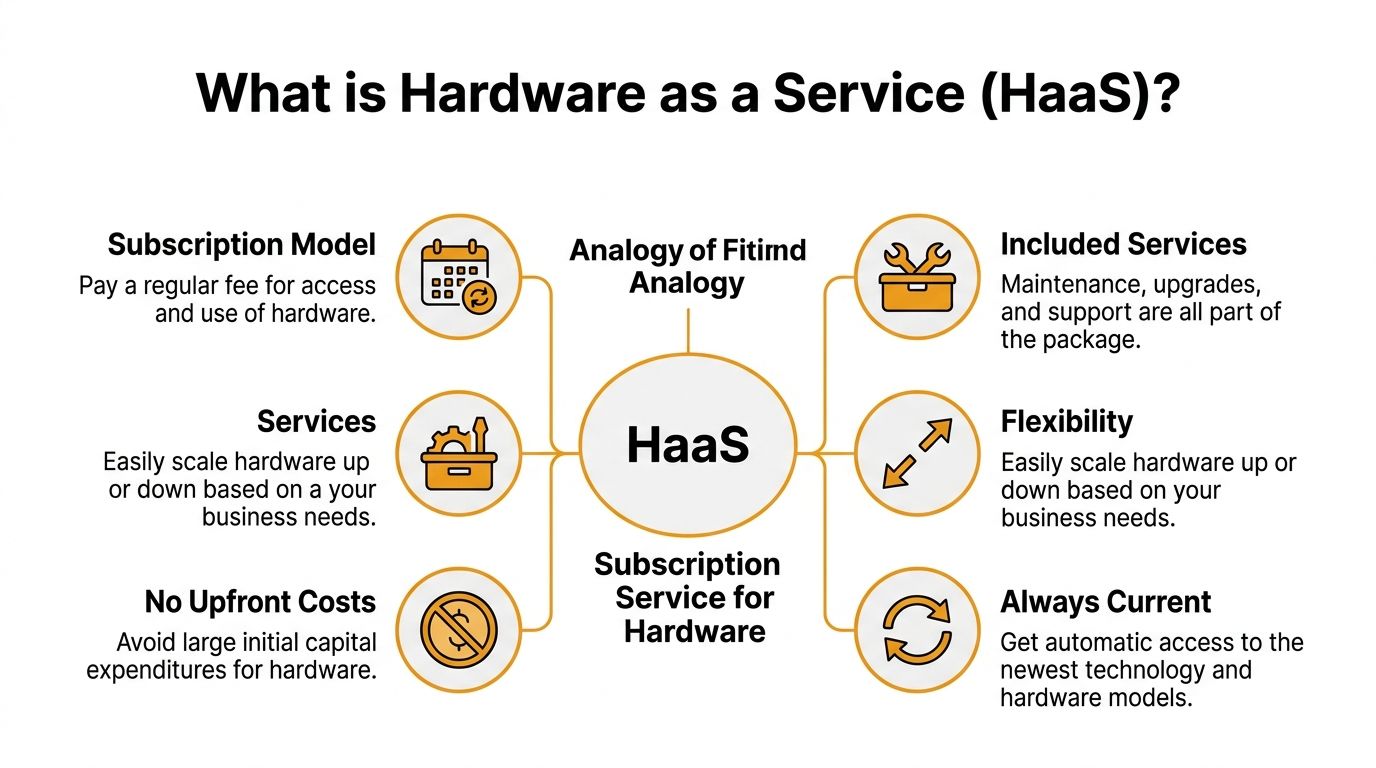
Hardware as a service is a subscription model for business equipment. Your company gets the devices it needs for a monthly fee, and the provider handles the work that usually creates IT headaches over time.
For a Houston SMB, that usually means more than dropping off a few laptops. A solid HaaS arrangement includes setup, support, repair or replacement, refresh planning, and end-of-life handling. The provider often retains ownership of the hardware, while your business gets equipment that is kept current and supported under a defined service agreement.
A useful comparison is a fully serviced vehicle plan. You are paying for dependable use, upkeep, and a replacement cycle, not just for a physical asset sitting on your books. The same idea applies to laptops, desktops, firewalls, switches, servers, printers, and other equipment your team depends on to do its job every day.
What is usually included
A good hardware as a service agreement combines several parts of the hardware lifecycle into one package:
- Physical devices such as business laptops, desktops, servers, access points, switches, printers, tablets, or conference room gear.
- Deployment work including setup, imaging, user configuration, application installs, and shipping or on-site rollout.
- Ongoing support so employees have someone to call when devices fail, run poorly, or need replacement.
- Maintenance tasks like firmware updates, driver updates, health checks, and standardized configurations.
- Lifecycle refreshes so you are not stuck keeping outdated equipment in service longer than you should.
- End-of-life handling including secure retirement, wipe procedures, return logistics, and disposal or refurbishment.
That last item matters more than many owners expect.
In practice, the purchase is often the easy part. The harder part is keeping every device standardized, secure, documented, replaced on time, and disposed of properly. For Houston companies in regulated fields, the disposal side alone can create risk if drives are not wiped correctly or old equipment ends up in the wrong hands. E-waste, chain of custody, and compliance are part of the job, even if vendors rarely lead with that in the sales pitch.
Practical rule: If a provider only changes how you pay for hardware, you are looking at financing with light support, not a strong HaaS model. The value is in lifecycle management, accountability, and clear service terms.
The simplest definition is this. Hardware as a service gives your business the equipment it needs, plus the support and replacement process needed to keep work moving, without turning every upgrade into a separate project or surprise decision.
Key Business Benefits of the HaaS Model
The obvious appeal of hardware as a service is predictable billing. That matters, but it's only part of the story. The bigger upside is operational. Good HaaS reduces the number of times your team gets derailed by basic IT equipment issues.
It protects cash and attention
Buying hardware in batches can hit an SMB at the worst time. One quarter you spend heavily on laptops and networking gear. The next quarter you're trying to preserve cash for hiring, inventory, or a move. HaaS smooths that pattern out and makes planning easier.
It also removes a lot of owner attention from device decisions that don't deserve it. You shouldn't be comparing replacement models, managing warranty claims, or figuring out which old PCs can survive another year. That time belongs in sales, operations, staffing, or customer work.
A 2022 Gartner analysis summarized by Meter's overview of HaaS indicated that businesses using HaaS saw an average 30 to 40 percent reduction in total cost of ownership over five years compared with traditional buy-and-maintain approaches.
That result makes sense in practice because the costs of ownership aren't limited to the purchase price. They also include setup labor, patching, troubleshooting, replacement planning, and the business impact of aging equipment.
It reduces the hidden cost of old equipment
Old machines create soft costs that rarely appear on a purchasing spreadsheet. Staff wait longer. Helpdesk tickets rise. Remote workers lose time on unstable laptops. A front office employee resets a printer instead of helping customers. A manager delays onboarding because there isn't a clean, ready-to-go machine available.
Those costs are real even if they're hard to measure line by line.
Here's where HaaS often works best for growth-minded businesses:
- New hire readiness gets easier because you can provision devices under a standard process instead of hunting for whatever is available.
- Multi-location consistency improves when every site uses the same laptop standards, WiFi gear, and support process.
- Refresh planning stops being emotional. Devices get replaced on schedule instead of only after they become painful.
- Internal IT strain drops because routine hardware work is handled as part of the service.
A team with current, stable devices usually works faster and complains less. That sounds simple because it is. Better tools reduce friction.
When employees stop fighting their hardware, managers get fewer interruptions and customers get faster answers.
HaaS isn't perfect for every company. Some businesses prefer ownership for tax, accounting, or specialized equipment reasons. But for general office computing, networking, and endpoint management, the strongest benefit is often not the monthly payment. It's the reduction in daily friction that drags on growing companies.
HaaS vs Buying vs Leasing A Clear Comparison
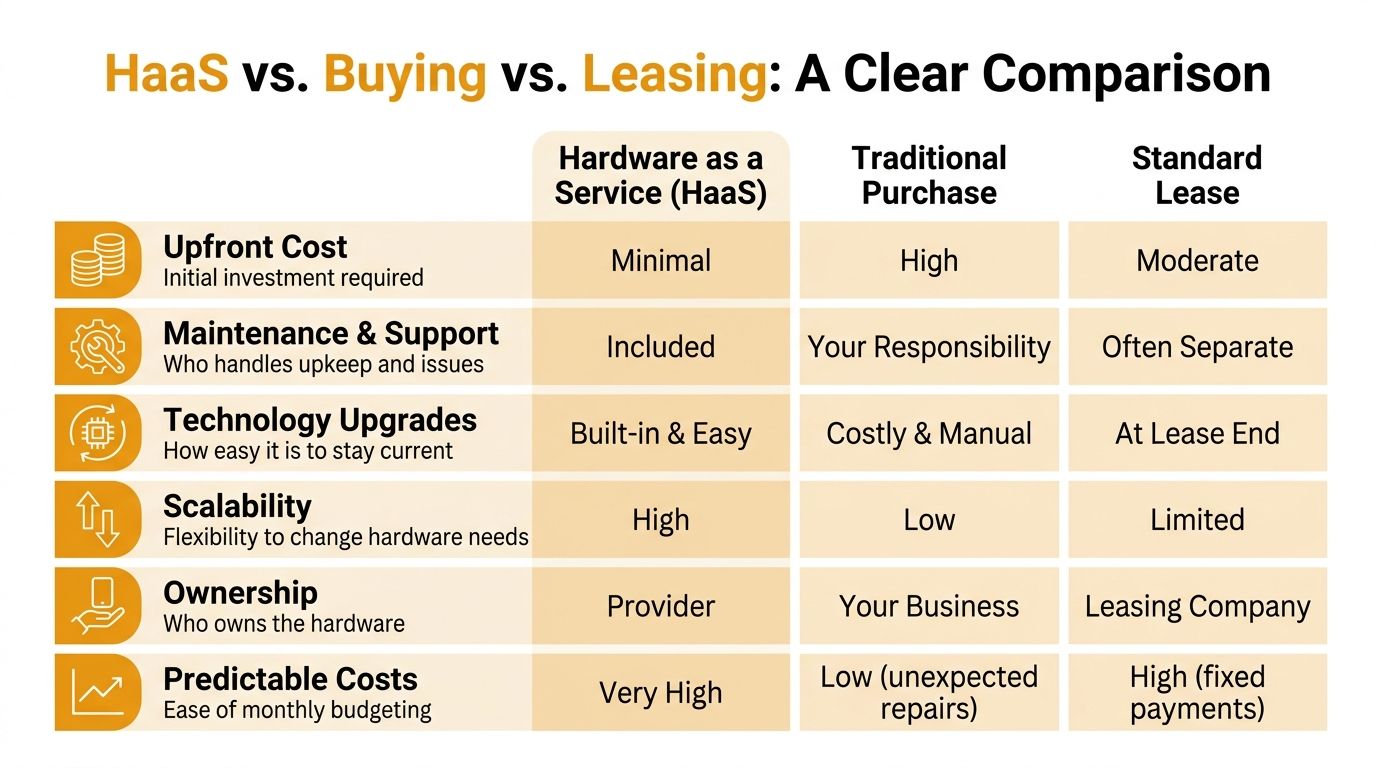
Many SMB owners lump these three models together because all of them can spread out cost in some way. They're not the same. The difference comes down to who owns the problem after the equipment lands in your office.
Where each model fits
Traditional buying gives you control. That can be useful if you have internal IT staff, stable hardware needs, and a reason to own assets outright. The trade-off is that every repair, refresh decision, and end-of-life task is yours.
Standard leasing lowers the initial cash hit compared with buying, but it often behaves more like financing than managed service. You may still need separate support, separate configuration work, separate security management, and a separate plan for what happens when users outgrow the equipment.
Hardware as a service puts lifecycle responsibility closer to the provider. That's usually the better fit when the business wants predictable operations, easier scaling, and less internal effort spent on device upkeep.
If you're still evaluating funding options more broadly, this guide to the benefits of equipment financing is useful because it frames when financing helps preserve cash even outside a managed model.
A practical side by side view
| Decision area | Hardware as a Service | Buying | Standard Leasing |
|---|---|---|---|
| Upfront cost | Usually low | Usually high | Usually moderate |
| Maintenance | Commonly bundled | Your responsibility | Often separate |
| Refresh cycle | Planned as part of service | Manual and easy to delay | Usually tied to lease term |
| Scaling up or down | Flexible if contract allows | Slow and purchase-driven | Limited by agreement terms |
| Ownership | Provider typically owns | Your business owns | Leasing company owns during term |
| End-of-life work | Often handled by provider | Your team handles wipe, resale, recycle, disposal | Shared or contract-specific |
| Support experience | Integrated if provider is strong | Varies by internal capability | Often fragmented |
The table doesn't mean HaaS wins every time. It means HaaS solves a different problem.
Buying is best when your company wants full control and is prepared to manage the hardware lifecycle. Leasing can be fine when cash preservation matters but you already have support covered elsewhere. HaaS works best when you want the hardware plus the operating model that keeps it usable.
One more issue matters here. Many companies underestimate the labor side of device ownership. The cost of setting up, maintaining, replacing, and supporting equipment adds up fast, which is why this breakdown of in-house IT teams vs outsourced IT support is worth reviewing alongside any HaaS decision.
For a Houston SMB with limited internal IT capacity, the cleanest question is this: do you want to own equipment, or do you want employees to have working equipment without the usual chaos around it?
Strengthening Security and Compliance with HaaS
Security problems often start in boring places. An outdated BIOS. A laptop missing encryption. A machine that never received a firmware update because nobody owned the task. A former employee's device sitting on a shelf, still holding business data.
Hardware as a service can tighten those weak points because it pushes device management into a standardized process instead of leaving it to chance.
Standardization closes common gaps
When a provider manages a fleet under a HaaS model, devices are usually deployed from a known standard. The same settings, the same update process, the same endpoint tools, and the same replacement logic get applied across users. That consistency matters because attackers often exploit the gaps between “mostly managed” and “fully managed.”
A CloudBlue summary of HaaS and managed hardware models cites a 2021 MITRE-aligned study showing that organizations using HaaS-style refresh cycles with managed firmware updates reduced known-vulnerability exposure by about 60 percent compared with ad hoc procurement and manual patching.
In practical terms, that means a better HaaS setup can support:
- Device encryption across laptops and desktops
- Centralized patching for firmware, drivers, and operating systems
- Standard endpoint protection on every business machine
- Faster replacement of devices that fall out of policy or fail health checks
- Cleaner offboarding when employees leave
Security improves when every device follows the same rules. The problem with most SMB environments is that too many exceptions pile up over time.
Why this matters for regulated Houston businesses
Houston has plenty of businesses that deal with regulated data without thinking of themselves as “high compliance” organizations. Medical practices, clinics, law firms, professional services companies, retailers processing card payments, and contractors working with larger enterprise clients all face scrutiny over how they handle systems and data.
HaaS doesn't solve compliance on its own. A subscription won't magically make a company HIPAA-ready or satisfy PCI requirements. But it can create a cleaner technical foundation for audits and policy enforcement because the hardware layer becomes easier to inventory, secure, and refresh.
If compliance is part of your decision, review how managed controls fit into your broader program. This overview of cloud security and compliance services is a useful companion because most SMB environments now blend on-site devices with Microsoft 365, cloud apps, and remote access.
The main takeaway is simple. Security gets harder when every device is an exception. HaaS helps by reducing exceptions.
How to Choose the Right HaaS Partner
The monthly price gets attention first. It shouldn't decide the deal by itself. A weak provider can make hardware as a service feel like a fancy billing arrangement with slower support and murky contract terms.
The provider matters more than the label.
Questions that expose weak providers fast
Start with the service layer, not the device catalog. Any vendor can list laptops and switches. The better question is what happens after deployment.
Ask direct questions like these:
- What exactly is covered by the SLA? You want response times, replacement expectations, and support boundaries in writing.
- Who performs support? Some providers rely heavily on third parties. That's not always bad, but you should know who owns escalation.
- How are refreshes triggered? By age, performance standards, warranty status, or contract anniversary?
- What happens to failed devices? Ask about loaners, swaps, and whether users wait days or keep working.
- How is data removed from retired equipment? Secure decommissioning should be a defined process, not a vague promise.
- What are the e-waste and refurbishment policies? Returned equipment shouldn't disappear into a black box.
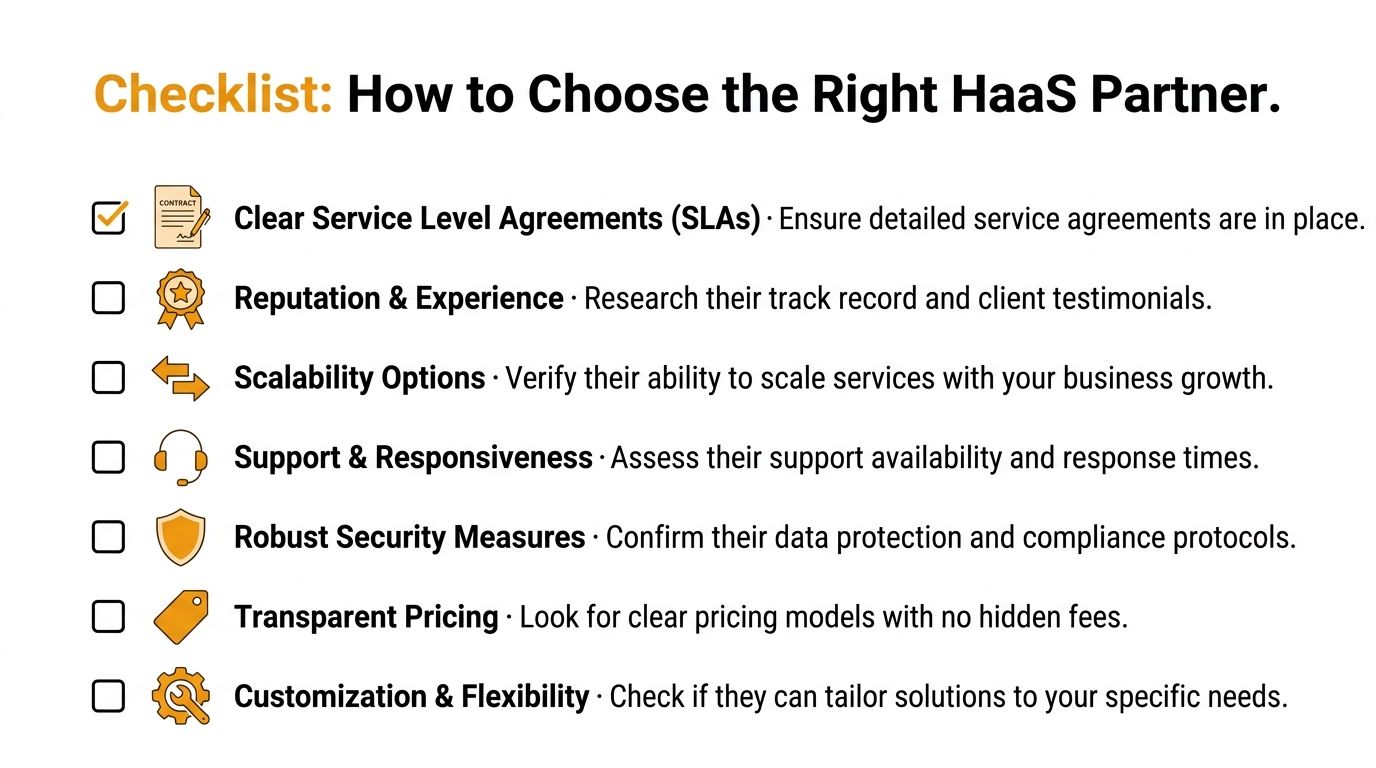
A solid provider should answer those questions clearly and without marketing fog.
Look past the monthly payment
There's another issue many owners miss. Contract structure affects accounting, reporting, and audit readiness. A 2023 PwC survey discussed in the referenced material on lease-classification awareness found that only 38 percent of SMEs using leasing or subscription hardware arrangements fully understood the related lease-classification and disclosure requirements.
That should prompt a practical conversation with your finance team or accountant. You don't need to become an expert in lease accounting standards, but you do need transparency. Ask the provider how the agreement is typically structured, what obligations sit with your business, and what documentation they provide for audits or reviews.
Also pay attention to flexibility:
- Can you add users cleanly? Growth should not require renegotiating every device.
- Can you reduce hardware if needs change? Some contracts scale up easily and resist scaling down.
- Can the provider support mixed environments? Many SMBs run Windows laptops, Macs, printers, WiFi gear, Microsoft 365, and line-of-business software at the same time.
Good HaaS contracts answer uncomfortable questions before you sign them.
If you need a broader framework for vetting service providers, this checklist on how to choose a managed service provider is useful because many of the same red flags apply.
Choose the partner that gives straight answers about support, security, hardware refreshes, accounting transparency, and equipment retirement. If those answers are fuzzy at the sales stage, they won't get clearer later.
Get HaaS in Houston with IT Cloud Global
For Houston SMBs, hardware as a service works best when it's tied to real support on the ground. That means deployment that doesn't disrupt operations, helpdesk coverage that responds quickly, security controls that stay consistent, and a provider that can handle both office users and the infrastructure behind them.
Why local execution matters
A local MSP has an advantage when your environment includes more than laptops. Many Houston businesses need a mix of endpoint support, WiFi troubleshooting, printer and depot repair, low-voltage cabling, Microsoft 365 administration, server support, and on-site help when something physical fails. That's where a managed HaaS model becomes more useful than a generic subscription from a distant vendor.

A practical provider should be able to standardize devices, align them with your security tools, support users remotely, and still show up when a network closet, printer fleet, or office move needs hands-on work.
A better way off the treadmill
The best HaaS relationships don't feel like financing. They feel like operational relief. Your team gets dependable devices. Management gets predictable planning. Security gets stronger because standards hold. Growth gets easier because adding staff or locations doesn't trigger a fresh hardware scramble.
That only happens when the provider is transparent about scope, refreshes, support, and contract terms. It also helps to negotiate from a position of clarity. If you want a practical framework before signing any vendor agreement, these supplier negotiation tactics for B2B offer useful ways to push for cleaner terms and better accountability.
For businesses in Houston, the opportunity is straightforward. Stop treating hardware as a series of purchases and start treating it as an operating system for growth. When done well, hardware as a service reduces friction in the background so your staff can stay focused on customers, revenue, and daily execution.
If your business is ready to get off the hardware treadmill, IT Cloud Global, LLC can help you build a practical hardware as a service plan for your Houston office. The team handles managed IT, helpdesk, security, cloud, networking, and in-house repair with a client-first approach and free estimates. Reach out to discuss your current hardware headaches, your growth plans, and the kind of support model that fits how your business operates.
- Remote IT Support Services: Boost Uptime & Cut Costs
- IT Security Houston: Protect Your Business
- Auditing IT Systems: A Practical SMB Guide
- Integrated Communication Services for Houston SMBs in 2026
- Maximize Security: It Services Law Firms Guide 2026
- Cloud Security Compliance for SMBs: Your 2026 Guide
- Managed IT Services Houston TX: Your 2026 Business Guide