


Maximize Security: It Services Law Firms Guide 2026
A law firm usually starts thinking seriously about IT after something goes wrong. A partner can't open a matter folder before a filing deadline. A departing employee still has access to Microsoft 365. A client asks where their data is stored, and nobody can answer with confidence. Or opposing counsel requests preserved communications, and the firm realizes its retention rules live partly in email, partly in a document system, and partly in individual laptops.
That's the moment generic support stops looking inexpensive.
For most businesses, weak IT creates delay and frustration. For law firms, it can also create confidentiality problems, supervision failures, and questions about whether the firm can defend its own processes. Good legal IT isn't just about keeping systems online. It's about proving that access, storage, retention, backup, and response procedures hold up under scrutiny.
Table of Contents
- Why Generic IT Support Puts Your Firm at Risk
- Core IT Services Tailored for Modern Law Firms
- The Digital Fortress Security and Compliance Imperatives
- Your Practice in the Cloud On-Premise vs Cloud Infrastructure
- Unlocking Efficiency with Integrated Legal Software
- How to Choose the Right Legal IT Services Provider
- Your Action Plan for Securing a Legal IT Partner
Why Generic IT Support Puts Your Firm at Risk
The failure pattern is predictable. A firm hires a general IT company that knows workstations, printers, and password resets. Then a legal problem lands on the IT desk. A litigation hold has to be enforced across email and document storage. A lawyer needs remote access from court without downloading client files onto an unmanaged device. A partner asks who accessed a sensitive matter folder last month. Generic support can often keep devices running. It usually can't answer those questions cleanly.
Law firms face a different standard because the consequences are different. When a manufacturer loses a file share for an afternoon, production slows. When a law firm loses access to pleadings, deal documents, or client communications, lawyers can miss deadlines, expose privileged material, or fail to supervise confidential information properly.
Practical rule: If your IT provider talks mainly about fixing computers, they're solving the wrong problem for a law firm.
The warning signs usually show up before a major incident:
- Access is too broad: Staff members can open files they don't need.
- Offboarding is inconsistent: Former employees keep app access longer than they should.
- Backups exist, but recovery isn't mapped to legal priorities: Restoring a server isn't the same as restoring matter continuity.
- Remote work grew faster than controls: Home devices, personal email forwarding, and unmanaged file copies become normal.
This is why generic support is a liability. It treats legal work like ordinary office work.
A legal environment needs tighter controls around user provisioning, document systems, Microsoft 365, remote access, and auditability. It also needs someone who understands that a security event isn't just a technical outage. It can become a client notice issue, an ethics issue, and a reputational issue at the same time.
Small and midsize firms are often more exposed because they have the same confidentiality obligations as large firms but fewer internal resources. That makes focused oversight important, especially for firms that have grown quickly or rely on hybrid work. The operational patterns discussed in this guide to why small businesses are common hacking targets and how IT support helps are especially relevant in legal environments where a single compromised account can touch many matters at once.
Core IT Services Tailored for Modern Law Firms
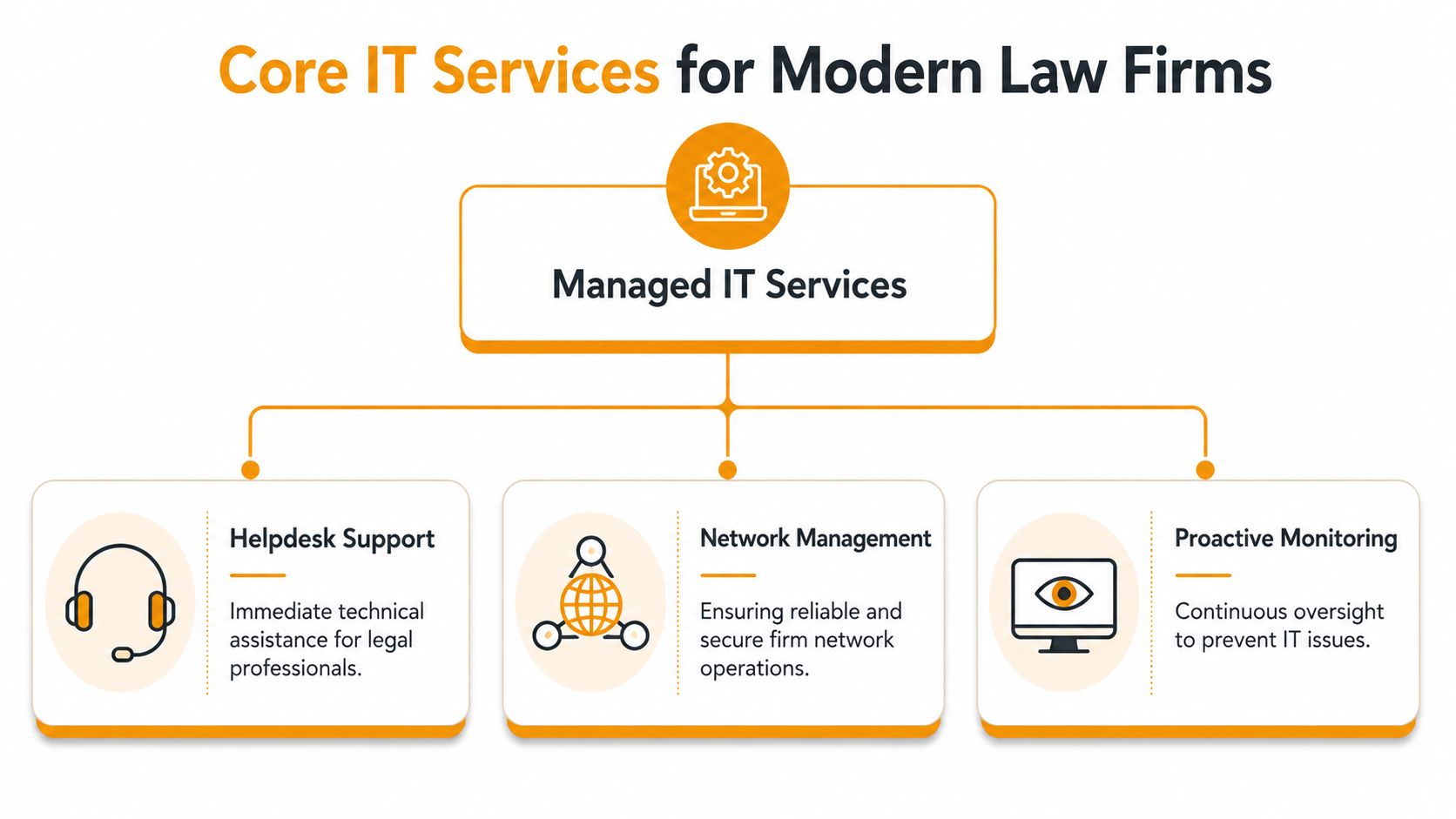
Legal IT support isn't a helpdesk with a nicer service level agreement. It's an operating model built around how attorneys, paralegals, billing teams, and administrators work.
What a legal IT stack actually includes
A legal-specific managed IT stack usually goes beyond basic ticket handling. It includes Microsoft 365 administration, backup monitoring, onboarding and offboarding controls, remote-access support, legal-software support, vendor coordination, and ongoing environment management. In provider-reported benchmarks, that broader service model can reduce downtime by up to 40% by tightening access control and improving network optimization across practice groups, as noted by Uptime Legal's overview of IT support for law firms.
That list matters because each item connects to a legal workflow:
- Microsoft 365 administration: Controls mailbox permissions, Teams access, retention behavior, and account security.
- Backup monitoring: Confirms backups are running and recoverable, not just scheduled.
- Onboarding and offboarding: Gives the right people access on day one and removes it decisively on day last.
- Legal-software support: Keeps practice management, billing, and document systems working together.
- Vendor coordination: Stops the blame-shifting that happens when your copier vendor, software vendor, and IT vendor all point at each other.
Where legal operations and IT overlap
What works in practice is tightly defined responsibility. Someone owns user access. Someone owns backup verification. Someone owns escalation when a litigation team loses access to a matter workspace. Firms get into trouble when every vendor handles a slice and nobody governs the whole environment.
A strong provider should also understand adjacent systems that affect client experience. Intake is a good example. If a firm relies on phone-based lead capture, missed or poorly routed calls can create operational drag before a matter even opens. In that context, tools like Voicedial.ai for law firm intake are useful to review because intake isn't separate from IT once call handling, routing, and records touch your broader workflow.
The best legal IT providers don't just close tickets. They reduce the number of preventable tickets your firm creates in the first place.
What doesn't work is reactive support without process discipline. If your provider waits for users to report backup failures, remote access issues, or permission mistakes, your firm is paying for interruption instead of prevention.
The Digital Fortress Security and Compliance Imperatives
Security for a law firm isn't just a matter of stopping malware. It has to preserve confidentiality, support supervision, and produce records that stand up when a client, regulator, court, or insurer asks hard questions.
Security has to support legal duties
A lot of firms ask, "Is it secure?" That's not the right first question. The better question is, "Can we prove the environment supports privilege, retention, access control, and incident response across every office, device, and vendor relationship?"
That shift matters. A secure file platform can still create legal exposure if the firm can't show where data is stored, who can export it, how access is reviewed, or how preserved content is handled during discovery. Generic IT guidance often falls short in addressing such specific legal needs. It focuses on uptime and perimeter security instead of regulatory defensibility.
For firms using cloud services, Microsoft 365, hosted practice platforms, or remote support tools, those issues become more pointed. Data residency, confidentiality, and cross-border cloud use need explicit answers. The compliance side of cloud architecture is discussed well in this cloud security and compliance resource, but for law firms the standard should be stricter. You need more than a secure platform. You need evidence that the configuration matches your obligations.
A practical review should cover:
- Privilege protection: Which users, groups, and vendors can access matter data?
- Retention and hold support: Can the firm preserve what it must without freezing everything?
- Auditability: Can you reconstruct who accessed, changed, or exported sensitive content?
- Incident response: If an account is compromised, who investigates, who contains it, and what records are available?
Security controls only matter if the firm can demonstrate them under pressure.
Privacy posture also matters when vendors process data on the firm's behalf. If a tool uses client information to power automation, summarization, or workflow assistance, the provider's handling standards should be reviewed carefully. For a concise example of how a vendor frames those commitments, Donely's data protection policy is worth reading as a model for the type of transparency firms should expect.
AI adds speed and new governance problems
AI is moving into legal operations quickly, but adoption is still uneven. By 2024, 65% of firms believed AI would significantly accelerate task completion, 64% of lawyers reported improved efficiency, only 26% of firms had deployed AI tools, and 53% planned to invest soon, with potential cost reductions of up to 50% based on the verified data provided.
Those numbers explain the pressure. Lawyers see the efficiency upside, but many firms haven't built the governance layer needed to use AI safely. The issue isn't whether AI can help draft, summarize, classify, or search. It can. The issue is whether the firm knows what data enters the tool, where that data goes, what gets retained, and how outputs are supervised before they affect client work.
This short video is a useful companion to that conversation:
A legal IT partner should treat AI like any other high-impact system. Classify the data, control access, define approved use cases, and document the rules.
Your Practice in the Cloud On-Premise vs Cloud Infrastructure
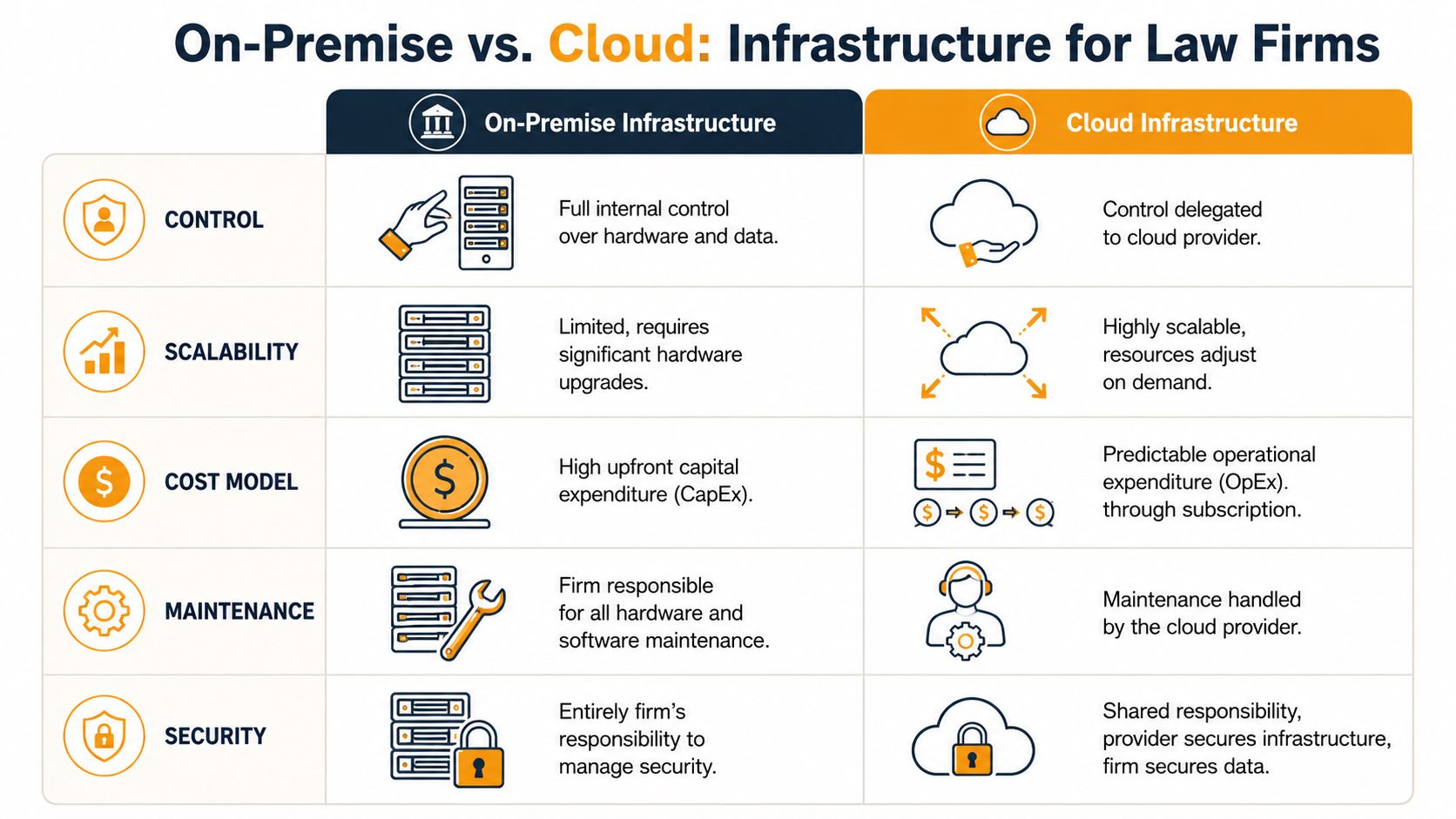
The infrastructure decision isn't really about fashion. It's about control, access, support burden, and how much operational risk the firm wants to carry itself.
What on-premise still does well
Some firms still prefer on-premise servers because they want direct control over hardware and local systems. That can make sense where legacy applications, internal policy, or client requirements make change difficult.
There are trade-offs. On-premise environments demand local maintenance, patching, backup oversight, hardware lifecycle planning, remote access engineering, and internal security discipline. If the firm doesn't have a capable internal IT function, the burden can become heavier than expected. Lawyers often discover this only after a server issue, an after-hours outage, or a rushed expansion to remote work.
A common blind spot is assuming on-premise means simpler compliance. It doesn't. The firm still has to govern access, retention, exports, and incident response. Owning the server doesn't remove those duties.
Why managed cloud fits many firms better
Law-firm IT environments are commonly built around centralized application hosting in a private-cloud or managed-cloud model so legal practice systems, billing, document management, and Microsoft 365 can be accessed remotely while the provider handles backups, maintenance, updates, and cybersecurity, according to Cloudvara's overview of IT solutions for law firms.
That model usually fits firms that need dependable remote access and don't want to run server infrastructure internally. It also makes it easier to standardize support because users connect to a controlled environment instead of a patchwork of office desktops, local file shares, and personal workarounds.
A balanced comparison looks like this:
| Environment | Better fit when | Main caution |
|---|---|---|
| On-premise | The firm needs direct hardware control or must keep a legacy application local | Internal team has to carry maintenance and security workload |
| Managed cloud | The firm wants centralized access, provider-managed upkeep, and simpler remote work | The contract and configuration must address residency, access, and audit needs |
There are also edge systems to think about. Fax is the classic example. Many firms still need it for courts, healthcare-adjacent matters, or client preferences. If that traffic is moving into cloud workflows, reviewing secure business fax services can help firms think through how an old channel fits inside a modern, governed environment.
Unlocking Efficiency with Integrated Legal Software
The firms that get the most value from IT usually stop thinking about it as infrastructure alone. They use it to tighten the path from work performed to work billed and collected.
Integration fixes billing leakage
A 2023 survey found that 65% of law firms had adopted online time-tracking software as a core IT service component, and 47% of firms using those tools captured an additional 1 to 5 billable hours per week. The same verified data shows that 15% of legal professionals identified getting paid as their most challenging function in 2023, while firms using IT-enabled online payment systems saw client collections increase by 33%.
Those are not abstract IT metrics. They are workflow outcomes.
In practical terms, integrated legal software reduces the small failures that bleed revenue:
- time entries left in drafts
- duplicated client and matter records
- billing data that doesn't sync cleanly
- payment links that live outside the client workflow
- document systems disconnected from matter management
When the stack is aligned, lawyers can move from email to matter record to document to time entry without friction. Billing staff spend less time reconciling errors. Partners get cleaner visibility into work in progress.
A law firm doesn't lose revenue only through bad pricing. It also loses revenue when technology makes billable work harder to capture.
What works and what usually fails
What works is integration around the tools lawyers already use. That often includes Microsoft 365, a practice management platform, a document management system, billing software, and secure remote access. The IT provider's role is to make the handoffs reliable, especially around permissions, sync behavior, authentication, and support ownership.
What fails is layering software without workflow design. A firm buys a time tracker, a payment portal, and a document platform, but each system has separate user management and inconsistent matter naming. Staff then create manual side processes to compensate. That's where errors start.
The right IT services for law firms should close those gaps. If a provider only manages devices and leaves application workflow to chance, the firm won't see the operational return it's expecting.
How to Choose the Right Legal IT Services Provider
Most firms ask providers about response time, ticket volume, and monthly cost. Those questions matter, but they don't tell you whether the provider can protect the firm in a legal context.
Questions that expose generic providers
A critical and often missed issue is how the provider handles data residency, confidentiality, and cross-border cloud use so the environment supports privilege, retention, and incident response across offices. That gap is highlighted in Uptime Legal's discussion of IT service types for law firms. If a provider can't answer clearly, the problem isn't just technical. It's evidentiary.
Ask questions that force specifics:
- Where is client data stored, and how is that location controlled?
- How do you support litigation holds or preservation across Microsoft 365, document systems, and hosted apps?
- How is vendor access approved, limited, and audited?
- What happens when an attorney travels or works across jurisdictions?
- How do you offboard a lawyer or staff member who handled sensitive matters?
- Who coordinates with legal software vendors when an issue affects billing, documents, or case access?
A generic provider often answers in general security language. A capable legal IT partner talks about systems, permissions, logs, retention behavior, and documented procedures.
If your firm is comparing options broadly, this guide on how to choose a managed service provider is a useful starting point. For law firms, add another filter. You need a provider who can defend the environment, not just maintain it.
Law Firm IT Provider Evaluation Checklist
| Evaluation Area | Key Questions to Ask | Why It Matters for Law Firms |
|---|---|---|
| Legal application support | Which practice management, billing, and document platforms do you support directly? | The provider must understand the software that drives matters, billing, and records. |
| Access governance | How do you handle onboarding, role changes, and offboarding for attorneys and staff? | Access errors can expose privileged material and create supervision problems. |
| Data residency | Can you explain where data is stored and how you handle cross-border concerns? | Client instructions, jurisdictional obligations, and defensibility often turn on this issue. |
| Retention and e-discovery | How do you support preservation, export, and audit needs across systems? | The firm needs more than backup. It needs controlled retention and retrieval. |
| Vendor management | Who owns escalation when a legal software vendor and your team disagree? | Split accountability causes long outages and unresolved risk. |
| Remote work controls | How do you secure access for hybrid staff, traveling attorneys, and contractors? | Legal work now happens outside the office. The controls must follow the user. |
| Incident response | What records, timelines, and communication steps do you provide during a security event? | A firm may need evidence for clients, insurers, and counsel very quickly. |
Ask for examples of process, not just promises of service.
Your Action Plan for Securing a Legal IT Partner
If your firm is still relying on generic support, don't start by shopping on price. Start by finding where the risk sits today.
First, audit the environment you already have. Review user access, departing-employee offboarding, backup verification, remote work methods, document storage, and who can answer a client question about data location or preservation. If those answers depend on one staff member's memory, the process isn't mature enough.
Second, interview at least two providers using a legal-specific checklist. Push past uptime language. Ask about privilege, retention, audit logs, vendor access, and cross-border handling. A serious provider won't dodge those questions or reduce them to generic security claims.
Third, choose the partner who understands that legal IT has to be both operationally reliable and defensible. Your firm needs systems that let lawyers work quickly, but it also needs records, controls, and governance that hold up when tested.
The strongest IT services for law firms do both. They protect confidentiality, support remote practice, improve software performance, and help the firm capture more of the work it already does. That's not overhead. That's part of running a modern legal practice properly.
If your firm needs a legal IT environment that's secure, efficient, and defensible, IT Cloud Global, LLC is worth a serious look. The team supports managed IT, Microsoft 365, cloud infrastructure, cybersecurity, networking, and disaster recovery with the practical discipline law firms need when client confidentiality and operational continuity are on the line.
- Houston IT Support: A 2026 Guide for SMBs
- What Is Network Access Control: Why Your Business Needs It
- Hybrid Cloud Management: A Practical Guide for SMBs
- Computer Service Near Me: A Houston Buyer’s Guide
- Your 2026 Disaster Recovery Testing Checklist
- What Is a Network Operations Center? an SMB Guide
- Microsoft 365 Backup Solutions Your Business Needs in 2026