


Cloud Security Compliance for SMBs: Your 2026 Guide
Your company moved email, files, line-of-business apps, and maybe even phone systems into the cloud because it made sense. You got flexibility, remote access, and less hardware to babysit. Then a customer questionnaire lands in your inbox asking about encryption, audit logs, retention policies, user access reviews, and incident response. Suddenly “we use Microsoft 365” or “it's in AWS” doesn't sound like an answer.
That's where many SMBs get stuck. They aren't avoiding security. They're trying to run the business, and cloud compliance feels like enterprise paperwork written for companies with full-time security teams. In practice, though, cloud security compliance is less about bureaucracy and more about proving that sensitive data is protected, access is controlled, and problems can be detected before they turn into downtime, legal exposure, or a hard customer conversation.
Table of Contents
- Why Cloud Security Compliance Matters More Than Ever
- What Is Cloud Security Compliance
- The Shared Responsibility Model Explained
- Navigating Major Compliance Frameworks
- Your SMB Roadmap to Cloud Compliance
- Partnering for Compliance Success with IT Cloud Global
Why Cloud Security Compliance Matters More Than Ever
A common SMB scenario looks like this. The business adopts cloud tools in stages, one practical decision at a time. Microsoft 365 replaces the old mail server. A file share moves into SharePoint or Google Drive. Accounting adds a SaaS platform. Sales stores customer records in another cloud app. Then a larger customer asks for proof that data is handled securely, or an insurer asks pointed questions during renewal.
At that moment, compliance stops feeling theoretical.
According to Exabeam's cloud security statistics roundup, about 45% of all data breaches occur in cloud environments, and public cloud security incidents average $5.17 million per breach in recent years. For an SMB owner, the exact lesson isn't that every company faces the same scale of loss. It's that weak governance in the cloud has real business consequences. Misconfigured storage, loose admin rights, and incomplete logging don't stay “technical issues” for long.
Compliance is risk management in plain clothes
A lot of owners hear “compliance” and think audit binders, legal language, and checkbox exercises. The better way to see it is this: compliance turns good security habits into a repeatable operating model.
That model answers basic but important business questions:
- Who can access sensitive data and why
- How data is protected when staff share, store, or transmit it
- What evidence exists if a customer, auditor, or insurer asks
- How quickly your team can detect issues before they spread
If those answers are unclear, the business is exposed whether a regulation is involved or not.
Practical rule: If your team can't quickly show who has access to key systems, what data is sensitive, and where security logs are retained, you probably have a compliance gap even if no one has named it yet.
The cloud changed the speed of both growth and mistakes
Cloud platforms make it easy to launch fast. They also make it easy to create silent risk. One extra permission, one stale user account, one unreviewed integration, and you may be out of alignment with customer expectations or industry requirements.
That's why smart SMBs treat cloud security compliance as part of core operations, not as a project they'll “clean up later.” It supports vendor due diligence, cyber insurance conversations, contract renewals, and incident readiness. It also fits naturally beside broader small business cybersecurity best practices, because compliance and day-to-day security reinforce each other.
A business doesn't need a giant internal team to do this well. It does need a clear structure, disciplined controls, and ongoing follow-through.
What Is Cloud Security Compliance
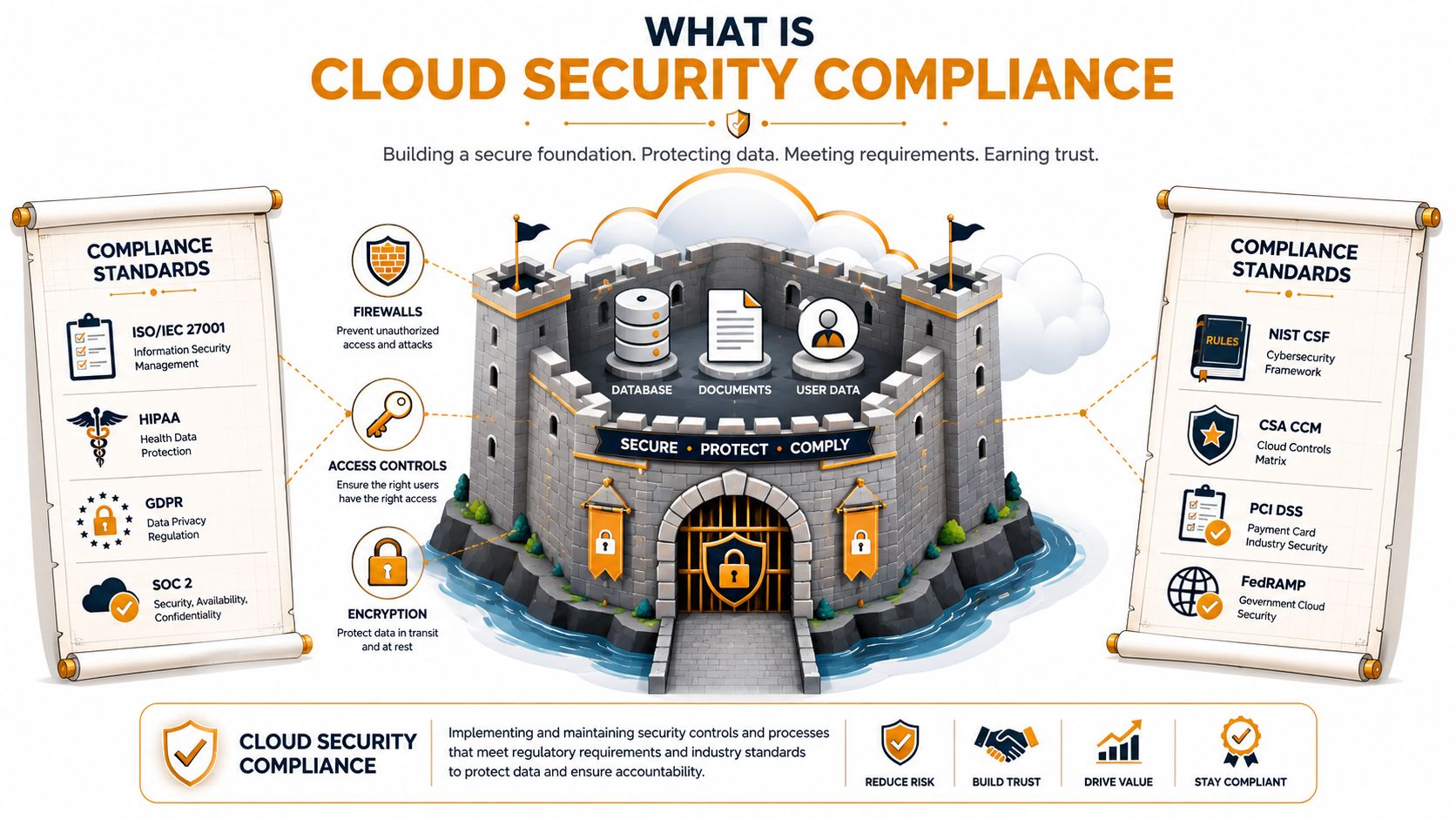
Cloud security compliance is easiest to understand as your business's digital building code.
If you were opening a physical office, you wouldn't just rent space and assume everything was safe. You'd need working locks, fire protection, proper wiring, controlled access, and inspection records. Cloud compliance works the same way. Your systems can be online and functional while still falling short on the controls needed to protect data and satisfy customers, regulators, or contractual obligations.
The rules come from more than one place
Cloud compliance isn't a single law or certificate. It's shaped by the shared-responsibility model and by major frameworks such as CIS, NIST, ISO, GDPR, FedRAMP, and HIPAA, which define how cloud data, access controls, auditing, and monitoring must be managed across different environments and markets, as described in Qualys' overview of cloud compliance practices.
For an SMB, those rules usually come from three directions:
Legal or regulatory obligations
If you handle medical, financial, or personal data, specific requirements may apply to storage, privacy, access, and breach handling.Industry and customer expectations
Even when a law doesn't directly apply, larger clients often require evidence that your controls are mature enough to protect their information.Your own internal policies
Password rules, device standards, retention schedules, and approval workflows matter because they turn intent into repeatable behavior.
Compliance is a management system, not a tool
Many businesses look for a product that will “make them compliant.” That usually leads to disappointment. Microsoft 365, Azure, AWS, Google Cloud, SentinelOne, and log platforms are all useful. None of them replace governance.
A workable cloud compliance program combines several moving parts:
| Area | What it looks like in practice |
|---|---|
| Data protection | Encryption, retention rules, and classification of sensitive information |
| Access control | Least-privilege permissions, role-based access, and review of dormant accounts |
| Monitoring | Logging, alerting, and evidence that activity can be traced |
| Documentation | Policies, procedures, exceptions, and records of changes |
| Review | Regular checks that controls still match how the business actually operates |
Why many SMBs underestimate it
The confusing part is that cloud services feel turnkey. You can buy licenses, create users, and start working the same day. Compliance, however, asks a different question: can you prove the environment is configured, governed, and monitored in a defensible way?
Compliance isn't the same as buying secure technology. It's running that technology with enough discipline that another party can verify your controls.
That's why cloud security compliance always includes ongoing oversight, documentation, and continuous monitoring. The cloud changes constantly. Users join and leave, apps get connected, permissions drift, and business data moves. If your controls don't keep pace, the environment may still work fine while your compliance posture erodes.
The Shared Responsibility Model Explained
One of the most expensive misunderstandings in cloud security is the belief that moving to the cloud transfers security responsibility to the provider. It doesn't. It changes the boundary.
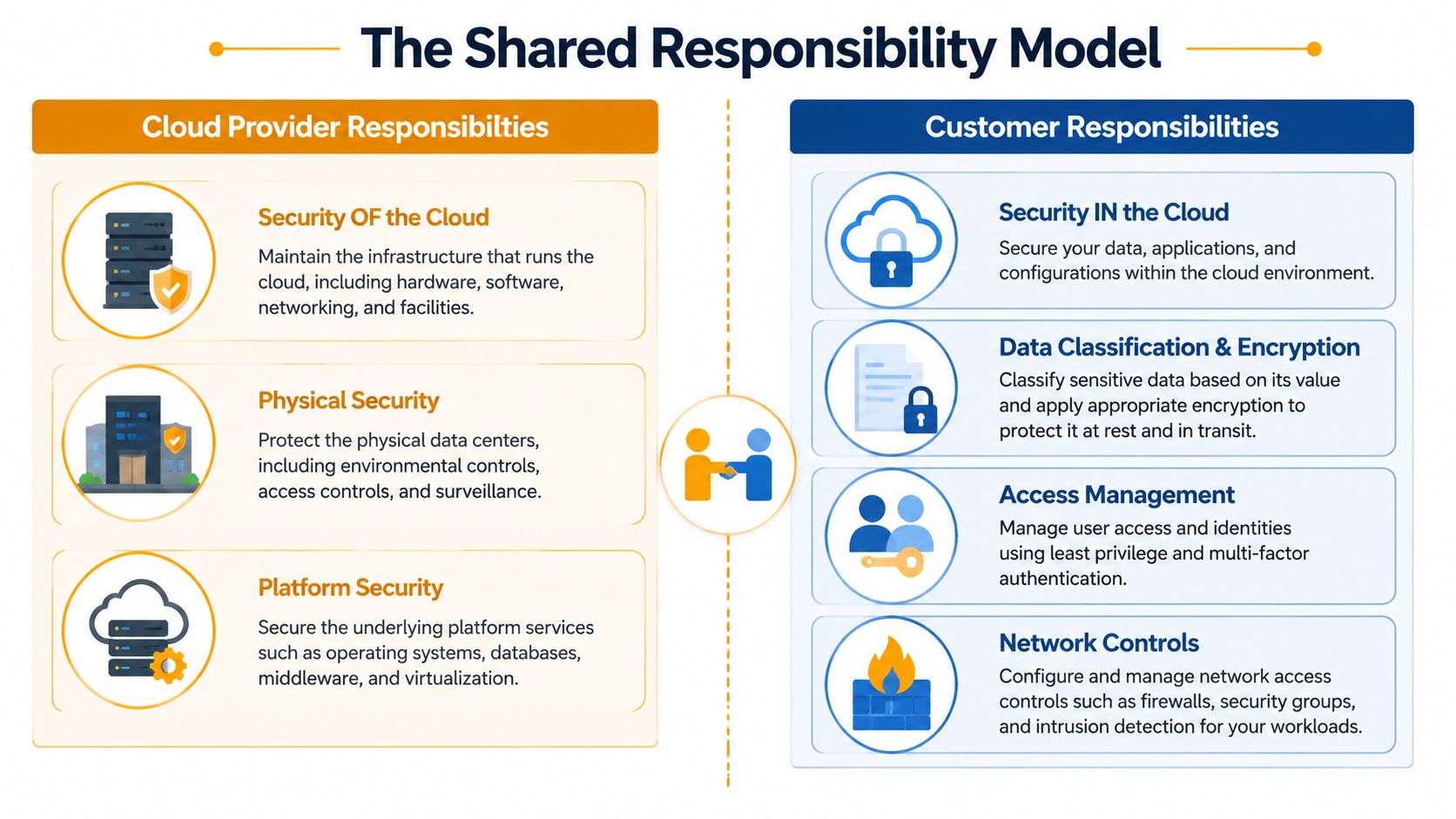
AWS, Microsoft Azure, and Google Cloud all operate under a version of the same idea. The provider handles security of the cloud. The customer handles security in the cloud. If that sounds abstract, think of a landlord and tenant. The landlord secures the building structure, utilities, and exterior doors. The tenant still has to lock the suite, control keys, and protect what's inside.
What the provider owns
The cloud provider is generally responsible for the underlying foundation:
- Physical facilities where systems run
- Core hardware and networking
- Platform availability and resilience at the infrastructure layer
- Base services that power storage, compute, and identity platforms
That matters because SMBs don't need to build or secure a data center from scratch. They inherit a strong foundation.
What your business still owns
Your company remains responsible for the decisions most auditors and attackers care about:
- User accounts and admin rights
- Data classification and protection
- Application settings and tenant configuration
- Endpoint security on the devices employees use
- Logging, retention, and review of suspicious activity
- Third-party integrations and vendor access
A simple example makes this clear. Microsoft secures the Microsoft 365 platform. Your business still decides whether former employees keep access, whether multi-factor authentication is enforced, whether external sharing is restricted, and whether mailboxes holding sensitive information are monitored properly.
Later in the same conversation, many owners realize the issue. The cloud provider can give you secure options. It can't decide your acceptable risk.
To make the split more concrete, this quick visual helps:
| Cloud provider responsibility | Customer responsibility |
|---|---|
| Data centers and physical infrastructure | Data stored in cloud apps and platforms |
| Core platform and service availability | User permissions and identity governance |
| Underlying host and service layers | Security settings, policies, and configurations |
| Some built-in security features | Turning those features on and managing them correctly |
A short explainer is useful here:
Where SMBs usually stumble
SMBs rarely fail because they chose the “wrong cloud.” They usually struggle with ownership gaps.
Common examples include:
- Admin sprawl where too many users hold privileged rights
- Unreviewed sharing in collaboration platforms
- Shadow integrations connected by staff without oversight
- Weak offboarding that leaves dormant accounts active
- Missing evidence when someone asks for logs or access history
The provider gives you the locks, alarms, and cameras. Your team still has to decide which doors stay open, who gets keys, and whether anyone checks the footage.
Once a business understands this model, compliance becomes more practical. The goal isn't to secure “the cloud” in some vague sense. It's to control the parts your organization owns.
Navigating Major Compliance Frameworks
Most SMB owners don't need a lecture on every framework in the market. They need to know which ones are relevant to their business model and what those frameworks expect them to do differently.
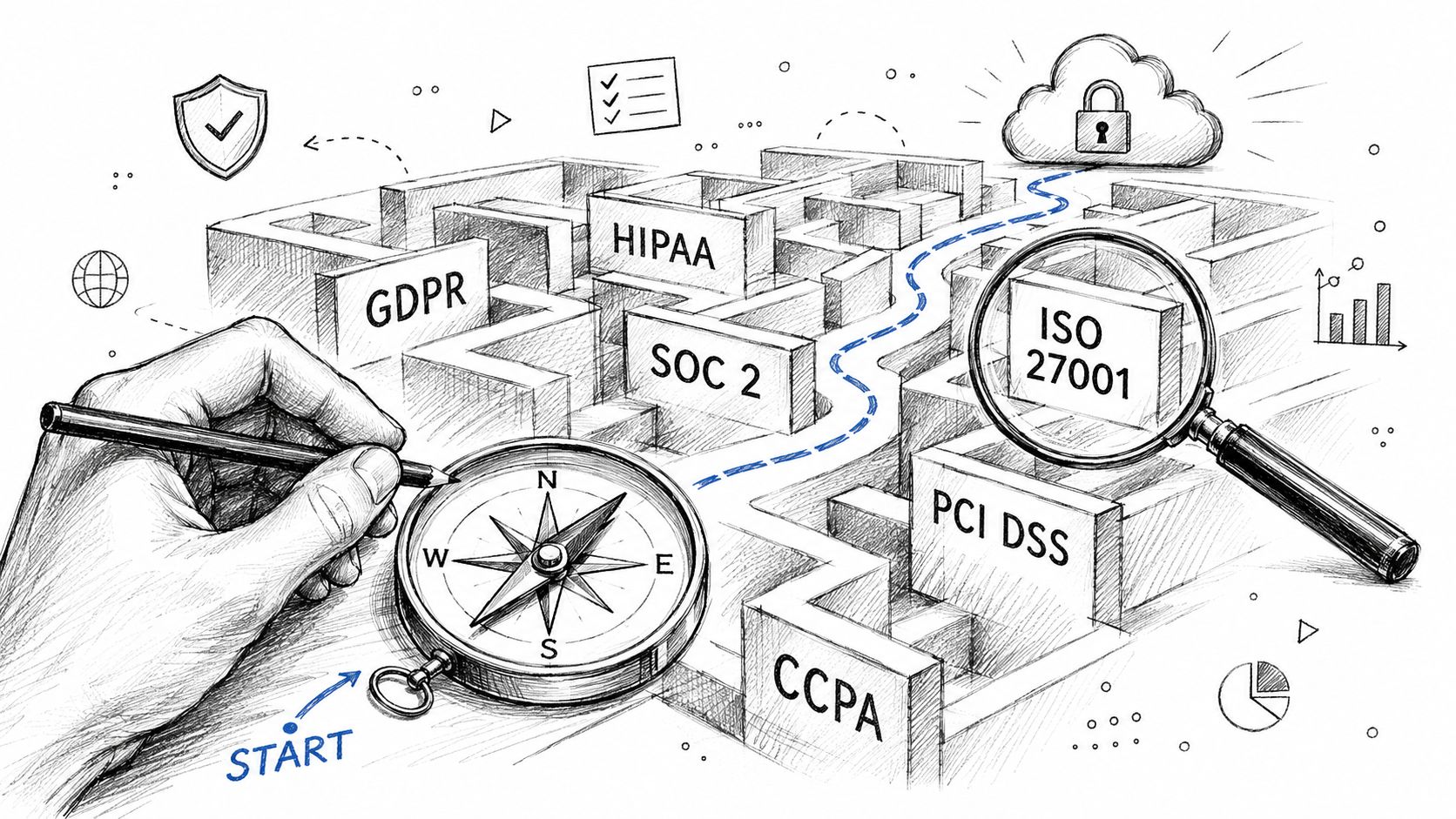
The easiest way to cut through the alphabet soup is to sort frameworks by business situation, not by acronym.
If you handle customer and business data for clients
For service firms, SaaS vendors, and outsourced providers, SOC 2 often becomes relevant because customers want assurance that your controls are dependable. As noted by Forcepoint's compliance overview, SOC 2 evaluates five Trust Services Criteria: security, availability, processing integrity, confidentiality, and privacy.
That language may sound formal, but the operational meaning is straightforward. Can you protect systems, keep services available, process information correctly, limit exposure, and respect how data is used?
In practical terms, that pushes SMBs toward a familiar control set:
- Least-privilege IAM so users get only the access they need
- Cryptographic protection for sensitive data
- Audit logging that shows who did what and when
If you're working through the identity side of that problem, this primer on securing cloud access is a useful companion read because access design is often where compliance programs either mature or fall apart.
If you support government or defense-related work
Compliance gets more specific when federal data or defense supply chain requirements enter the picture.
Here's the short version:
- CMMC matters when an organization must protect Controlled Unclassified Information.
- FedRAMP matters in federal cloud contexts where standardized security assessment and ongoing monitoring are central.
- NIST-based controls often sit underneath those requirements and shape the technical expectations.
For SMBs, this usually means the customer contract drives the framework choice. You don't “pick” one because it sounds best. You identify what the work requires.
If privacy or sector regulation applies
Some frameworks are tied to geography or industry:
- GDPR comes into play when personal data tied to EU individuals is involved.
- HIPAA matters for protected health information in healthcare-related settings.
- DORA affects financial entities and ICT providers that need to manage IT risk, resilience testing, and third-party oversight.
Those frameworks don't just ask for technical controls. They force operational discipline. You need clear ownership, vendor oversight, documented procedures, and evidence that the controls are active, not aspirational.
Don't start with the acronym. Start with the business process
A better SMB question is not “Which framework should we adopt first?” It's this:
Which data do we store, whose data is it, what promises have we made about protecting it, and what customers or regulators can ask us to prove?
That question usually narrows the field quickly.
A medical practice, an e-commerce company, a manufacturer bidding on defense contracts, and a managed service firm may all run on Microsoft 365 and Azure. Their compliance obligations still look very different because the business context is different. Framework names matter. Business reality matters more.
Your SMB Roadmap to Cloud Compliance
Most SMBs don't fail at cloud security compliance because they ignore it. They fail because they tackle it in the wrong order. They buy tools before defining scope, write policies that don't match daily operations, or prepare for an audit without building a system that can produce evidence on demand.
A better approach is staged and operational.
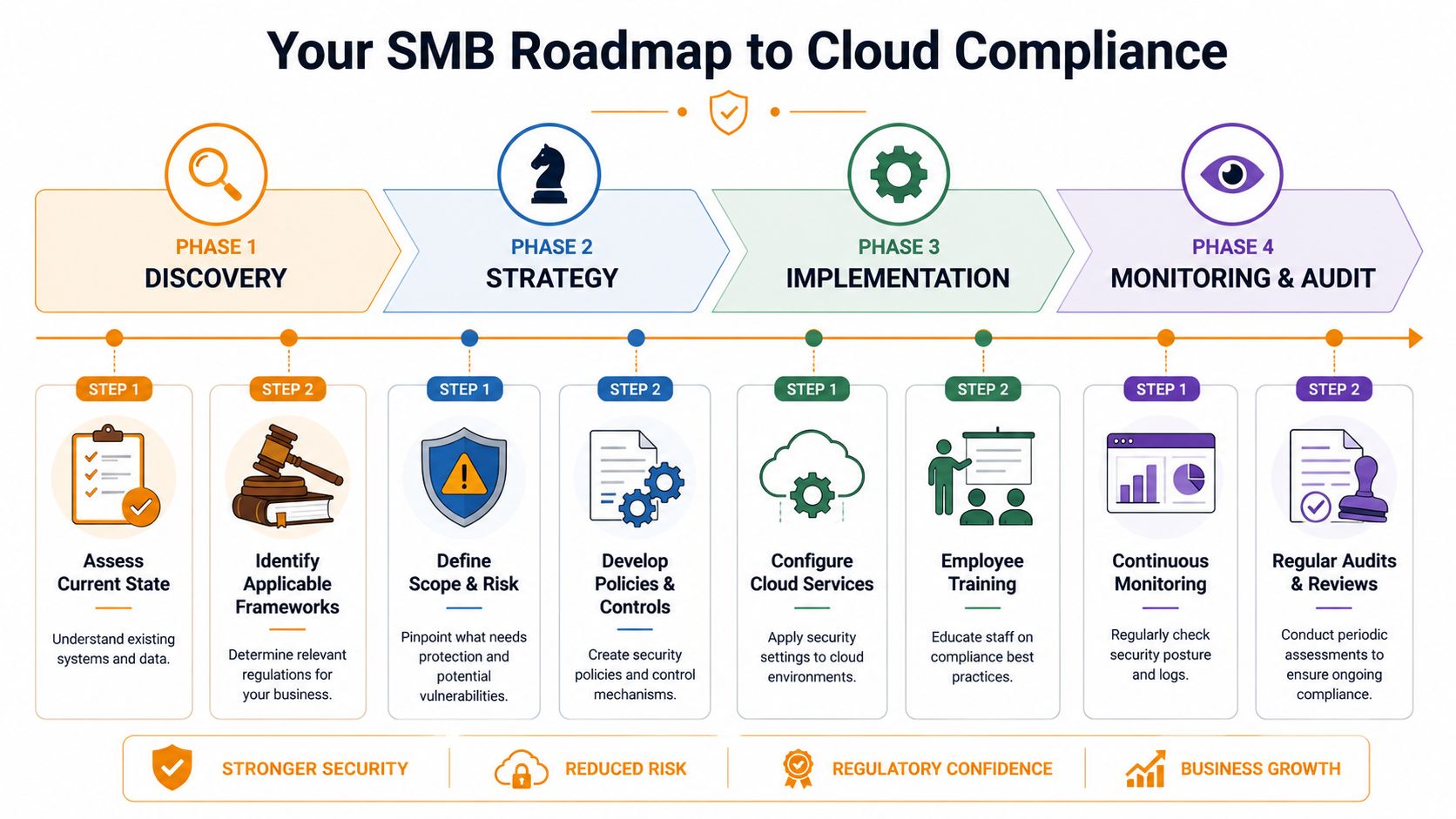
Phase one starts with discovery, not software
Before changing settings, map the environment you have. That means cloud platforms, Microsoft 365 tenants, file repositories, SaaS apps, endpoints, user roles, and outside vendors with access to business data.
At this point, leadership should be able to answer four plain-language questions:
- What sensitive data do we hold?
- Where does it live?
- Who can access it?
- Which customer, legal, or contractual requirements apply?
This phase often exposes uncomfortable surprises. Former staff may still appear in groups. Shared mailboxes may hold sensitive records with broad access. Department heads may use unsanctioned apps. None of that is unusual. It does need to be surfaced early.
A pre-build and review mindset helps here, especially when cloud environments are expanding or being redesigned. This guide to the importance of cloud audit and optimization before cloud build, deploy, and integration aligns with that reality. It's much cheaper to correct architecture and control gaps before they become baked into operations.
Phase two defines controls that fit the business
Once scope is clear, the next job is choosing controls that are appropriate and supportable. SMBs often copy enterprise policy templates and end up with rules nobody can follow. That creates paper compliance and operational friction at the same time.
A better control set is specific, realistic, and owned.
Examples include:
- Identity controls such as least-privilege roles, MFA, offboarding procedures, and admin account separation
- Data controls like retention rules, encryption choices, and restrictions on sharing
- Operational controls such as change approval, vulnerability remediation, and incident escalation
- Vendor controls for SaaS apps, contractors, and communication tools
That last point matters more than many teams expect. Cloud compliance doesn't stop at file storage and email. It also touches communication systems, especially when calls, transcripts, recordings, or AI features may involve regulated data. For teams evaluating that area, ConnectCX advice on compliant phone systems is a helpful example of how compliance questions extend into everyday business tooling.
Phase three is where implementation either gets disciplined or messy
Now the technical work begins. In a healthy program, implementation follows documented decisions. It doesn't invent them on the fly.
This phase usually includes:
- reworking permission models in Microsoft 365, Azure, AWS, or Google Cloud
- tightening endpoint and email protection
- enabling or improving audit logs
- formalizing backup and recovery behavior
- setting standards for new app approvals and integrations
- training staff on how the rules affect daily work
The trap here is overengineering. SMBs don't need a museum-quality compliance environment. They need one that is secure, documented, and maintainable by their existing team.
Field note: The best control is the one your business can operate consistently six months from now, during staff turnover, vendor changes, and a busy quarter.
Phase four never really ends
For regulated cloud environments, the GSA's FedRAMP basics page notes that the dominant operating model is continuous monitoring and evidence collection, and that post-authorization activity includes continuous monitoring, re-authorizations, and audits. That principle applies far beyond federal use cases. In practical SMB terms, it means controls like logging and vulnerability remediation have to support ongoing attestability, which is why automation becomes so important as environments grow.
That changes how you should think about compliance. It's not a project with a finish line. It's a managed program.
A sustainable monitoring rhythm often includes:
| Ongoing activity | Why it matters |
|---|---|
| Access reviews | Catch privilege creep and stale accounts |
| Log monitoring | Spot suspicious behavior and preserve evidence |
| Vulnerability remediation | Reduce exposure and show that issues are actively managed |
| Policy review | Keep rules aligned with actual business workflows |
| Audit readiness checks | Prevent last-minute evidence scrambles |
What works and what usually doesn't
What works:
- Starting with data and access, not branding and buzzwords
- Limiting scope before expanding it
- Using automation for logs, alerts, evidence collection, and repeatable checks
- Assigning named owners for policy, systems, and vendor oversight
What usually doesn't:
- Treating compliance as an annual event
- Assuming the cloud provider covers customer-side configuration
- Writing policies no manager can realistically enforce
- Running critical systems without a documented review cadence
SMBs can absolutely build strong cloud security compliance. The winning pattern is simple. Keep it scoped, tie controls to business reality, and design for proof, not just intent.
Partnering for Compliance Success with IT Cloud Global
For most SMBs, the hard part isn't understanding that compliance matters. It's sustaining all the moving pieces without pulling internal staff away from revenue-producing work.
Cloud security compliance requires technical depth, but it also requires consistency. Someone has to review configurations, harden Microsoft 365, watch for risky changes, manage endpoint security, document control decisions, respond to alerts, and keep the environment ready for customer or audit questions. That's a lot to ask from a small internal team that's already handling support tickets, vendor issues, onboarding, and everyday IT fires.
Where outside support changes the outcome
A capable managed services partner reduces the operational burden in very concrete ways:
- Assessment support helps identify which cloud systems, users, and data flows matter
- Security tooling management improves the odds that protections are configured correctly and kept current
- 24/7 monitoring shortens the window between a suspicious event and a response
- Microsoft 365 and cloud administration turns licensing, access, and configuration into governed processes instead of ad hoc changes
- Documentation and operational discipline make audits, questionnaires, and renewals less chaotic
That matters because most compliance failures don't come from one dramatic mistake. They come from drift. Settings change. Exceptions accumulate. Old accounts linger. Logs exist, but nobody reviews them. A strong partner helps stop that drift before it becomes exposure.
Why fit matters as much as technical skill
The right provider doesn't flood an SMB with enterprise jargon or sell an oversized stack. The right one translates requirements into controls the business can run.
That's why vendor selection deserves care. This guide on how to choose a managed service provider is worth reviewing because compliance support only works when the provider is responsive, transparent, and strong in the exact areas your business depends on.
Good compliance support should make your environment easier to understand, not harder to explain.
IT Cloud Global fits that model well for Houston-area SMBs that need practical cloud, security, and managed IT support under one roof. The company's mix of cloud expertise across AWS, Azure, Google Cloud, and Microsoft 365, plus endpoint protection, network security, helpdesk coverage, and ongoing operational support, aligns closely with what compliance programs require. Not a one-time cleanup. Ongoing control, visibility, and accountability.
If you need help turning cloud compliance from a vague concern into an operating plan, talk with IT Cloud Global, LLC. Their team can help assess your current environment, tighten cloud and Microsoft 365 security, support monitoring and documentation, and build a practical path that fits your business without requiring an in-house compliance department.
- Houston IT Support: A 2026 Guide for SMBs
- What Is Network Access Control: Why Your Business Needs It
- Hybrid Cloud Management: A Practical Guide for SMBs
- Computer Service Near Me: A Houston Buyer’s Guide
- Your 2026 Disaster Recovery Testing Checklist
- What Is a Network Operations Center? an SMB Guide
- Business Continuity Strategies: SMB Guide 2026