


Disaster Recovery Companies: An SMB Survival Guide
The alert hits your phone at 4:47 p.m. A tropical system in the Gulf strengthens. School districts start posting early closure notices. Your office manager asks whether staff should take laptops home. Your bookkeeper asks a better question: if the building loses power for two days, can payroll still run?
That's the moment most Houston business owners realize backup and recovery aren't the same thing.
A copied file sitting somewhere offsite is helpful. It is not a business survival plan. If your Microsoft 365 access locks up, your server won't boot, your line-of-business app gets encrypted, or your office is inaccessible after flooding, you need more than saved data. You need a way to keep operating.
Table of Contents
- Why Your Business Needs a Disaster Recovery Plan Now
- Decoding Disaster Recovery Services and Offerings
- RTO vs RPO The Two Numbers That Define Your Downtime
- Your Checklist for Vetting Disaster Recovery Companies
- Beyond Servers The Unique Risks for Houston Businesses
- DR Pricing Models and Common Pitfalls to Avoid
- Getting Started A Sample Disaster Recovery Roadmap
Why Your Business Needs a Disaster Recovery Plan Now
Houston companies don't get the luxury of treating disruption like a rare event. Hurricanes, flash flooding, extended power issues, hardware failures, ransomware, and plain old human mistakes all hit the same weak spot: your ability to stay open.
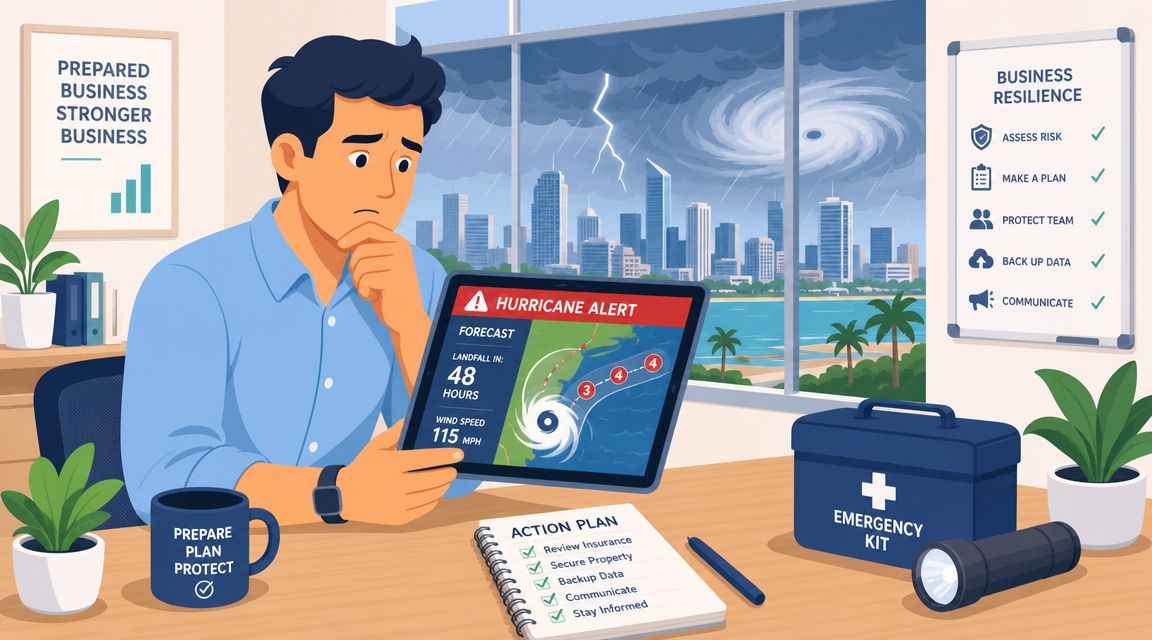
The hard truth is that outages already hurt businesses constantly. A 2025 Cockroach Labs survey found that 100% of technology companies lost revenue from outages in the prior year, and the average outage lasted 196 minutes. The same set of statistics also notes that only 54% of organizations have an established, company-wide disaster recovery plan (PhoenixNAP disaster recovery statistics). If you're in the other half, you're not saving money. You're borrowing risk.
That risk isn't just digital. In Houston, your recovery plan has to account for the building, equipment, records, and physical operating environment too. If you're tightening your broader readiness posture, this practical guide to protecting your property assets is worth reviewing alongside your IT planning.
Waiting is the expensive option
Most owners delay disaster recovery because they think it sounds like enterprise-grade complexity. That's backwards. The smaller your business is, the less downtime you can absorb.
A midsize manufacturer might survive while a system is rebuilt. A smaller law office, clinic, distributor, or retail operation often can't. If invoices stop, scheduling stops, or card processing stops, revenue stops.
Practical rule: If one bad week of downtime would create a cash-flow problem, you need a disaster recovery plan now.
What disaster recovery companies are really selling
Good disaster recovery companies aren't selling storage. They're selling continuity.
That means they help you answer questions like:
- What must come back first: Payroll, email, ERP, scheduling, point-of-sale, file shares, phones, and remote access rarely have equal priority.
- Who can work from where: If your office is dark or inaccessible, your staff still needs secure access.
- What happens in the first day: Someone has to own restoration, communication, vendor coordination, and verification.
Too many Houston SMBs still treat DR like an add-on. It isn't. It's business insurance with technical teeth. You hope you won't need it. You budget like you will.
Decoding Disaster Recovery Services and Offerings
A backup file sitting in the cloud will not keep your business operating after a Houston flood, ransomware hit, or extended power outage. It may save some data. It will not restore your phones, line-of-business apps, user access, internet connectivity, and recovery sequence by itself.
Backup is the floor, not the plan
Analysts at IBM note in their overview of disaster recovery planning and services that disaster recovery is broader than backup. It covers the policies, tools, and procedures used to restore IT systems and data after an outage. That distinction matters because many SMBs buy backup software and assume they bought resilience.
They did not.
Backup gives you copies. Disaster recovery gives you a method to restore operations in the right order, under pressure, with limited time and limited staff. For a Houston medical practice, that could mean bringing the EHR back before shared drives. For an oilfield services company, it may mean dispatch, email, and mobile access before anything else. For a law firm, document systems and secure remote access usually come first.
If you are reviewing backup strategy, this guide on how often you should back up your business data is a useful companion. Frequency matters, but recovery design matters more.
What disaster recovery companies provide
Good providers build layers, not a single safety net. Industry guidance from Scale Computing points to the same building blocks: off-site replication, redundant infrastructure, automated failover, network redundancy, alternate recovery environments, and regular testing (Scale Computing disaster recovery planning guidance).
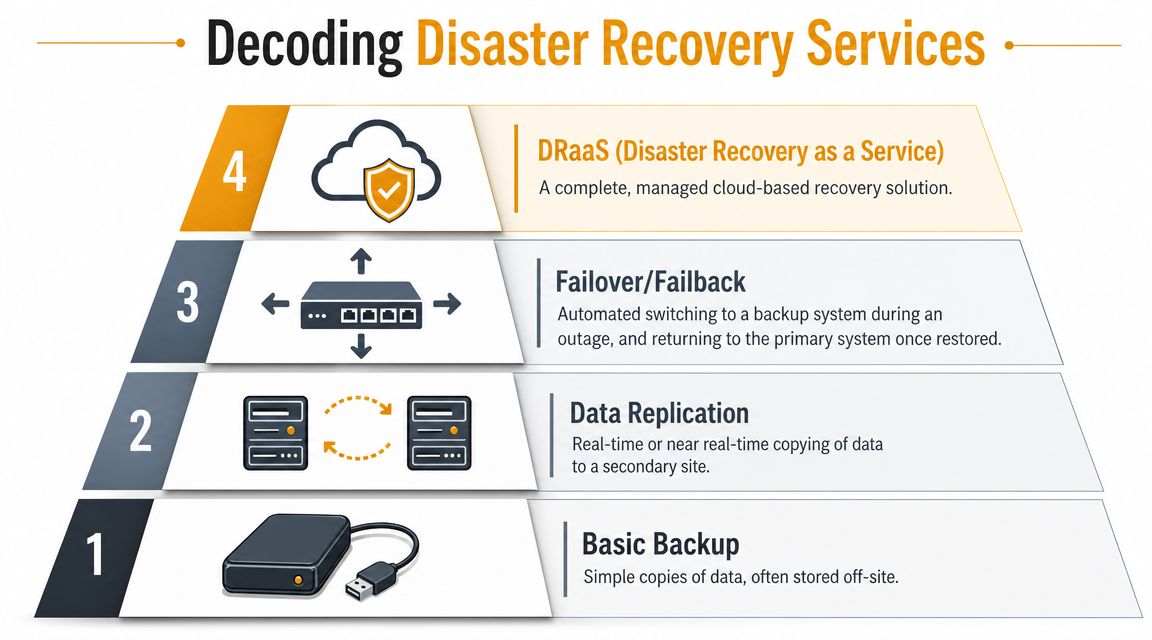
In plain terms, you will usually see four service categories:
- Backup: Copies of files, systems, or workloads stored locally, offsite, or in the cloud.
- Replication: Ongoing or scheduled copying of critical systems to a second environment so recovery starts from a recent state.
- Failover and failback: Temporary operation from a standby environment during an outage, then controlled return to the primary site.
- DRaaS: A managed service where the provider handles orchestration, recovery infrastructure, testing, and much of the response process.
That last category is where many Houston SMBs should focus. Hurricanes, building access issues, and long utility disruptions create problems that last longer than a simple restore window. If your office is dry but your ISP is down, or your servers survived but your staff cannot reach the building, you need a provider that can recover workloads somewhere else and let people work securely.
A separate problem shows up after hardware failure, water damage, or a dropped device. Sometimes you need forensic file extraction from damaged media, not a standard system restore. In that case, a specialized data recovery company can support the wider response.
Backup answers, “Do we still have the data?” Disaster recovery answers, “How fast can we serve customers, get paid, stay compliant, and keep working?”
Choose providers that map dependencies. They should ask which systems rely on your firewall, identity platform, internet circuit, phones, Microsoft 365 tenant, and vendor connections. They should also account for compliance obligations common in Houston industries, including healthcare, legal, finance, and energy. The test is whether they can restore business operations in a controlled order, not whether they can point to a successful backup job.
RTO vs RPO The Two Numbers That Define Your Downtime
If you remember only two technical terms from any conversation with disaster recovery companies, remember these: RTO and RPO.
Think like a store owner, not an engineer
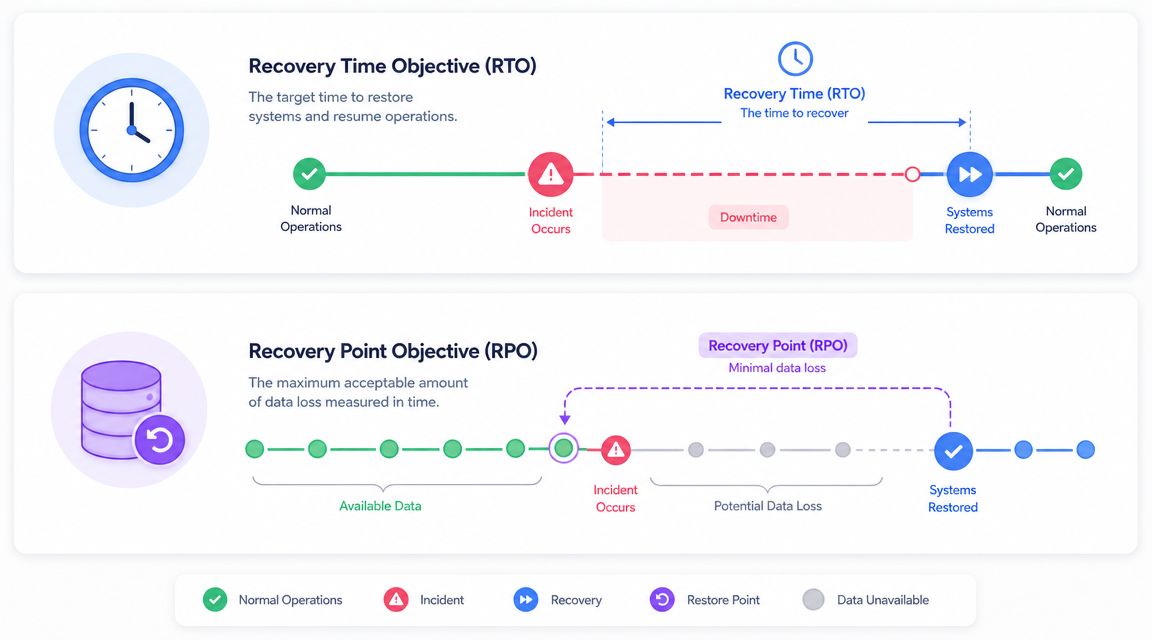
Recovery Time Objective (RTO) is the maximum time your business can tolerate a system being down.
Recovery Point Objective (RPO) is the maximum data loss your business can tolerate, measured backward from the disruption.
CompTIA's guidance states: lower targets require more advanced automation, replication, pre-staged infrastructure, and more expense (CompTIA disaster recovery measurements). That's why these numbers matter. They determine what you buy.
Use a store analogy. If your point-of-sale system is down, RTO is how long the store can stay unable to check out customers before the damage becomes unacceptable. RPO is how many sales records you're willing to lose and re-enter manually once systems come back.
Here's a simple way to consider it:
| Business system | RTO question | RPO question |
|---|---|---|
| Payroll | How long can payroll be delayed before it creates legal and employee problems? | How much payroll data can you afford to recreate manually? |
| How long can your team go without client communication? | How many recent messages can you lose? | |
| Accounting | How long can invoicing and payment posting stop? | How much transaction data can you re-enter? |
If you want a deeper look at backup timing, this guide on how often you should back up your business data helps connect backup frequency to real business impact.
Put the targets in writing
Owners often find themselves bewildered by jargon. Don't let that happen.
Ask every provider to define RTO and RPO by workload, not as one blanket promise for the whole company. Your ERP system, Microsoft 365 environment, file server, phones, and surveillance systems do not deserve the same recovery target.
If a provider can't tell you what comes back first, how long it takes, and how much data you might lose, you don't have a recovery strategy. You have a sales brochure.
This short explainer is useful before you sit down with a provider:
Put the final targets in the service agreement. That turns abstract tech talk into something you can hold a vendor accountable for.
Your Checklist for Vetting Disaster Recovery Companies
Most providers sound competent in the first meeting. That's easy. The actual test is whether they can recover your business under ugly conditions, not whether they can explain backups with a polished slide deck.
Questions that separate real providers from backup resellers
Start with operational questions, not product names.
- Ask about SaaS recovery: Many SMBs assume Microsoft 365, Salesforce, or other cloud tools are automatically covered in a standard DR plan. Often they aren't. That gap matters because cloud app access can fail even when your office systems are fine. The problem is especially important for identity, email, and collaboration recovery (EDA disaster recovery overview).
- Ask how they test: Not “Do you test?” Ask for the cadence, the documentation, and who signs off on the result.
- Ask about Houston scenarios: Can they support your team if roads flood, the office is inaccessible, or only part of your staff can work remotely?
If you're comparing vendors broadly, this article on how to choose a managed service provider is a useful filter before you narrow the list.
What to verify before you sign anything
Don't make this harder than it needs to be. Use a punch list.
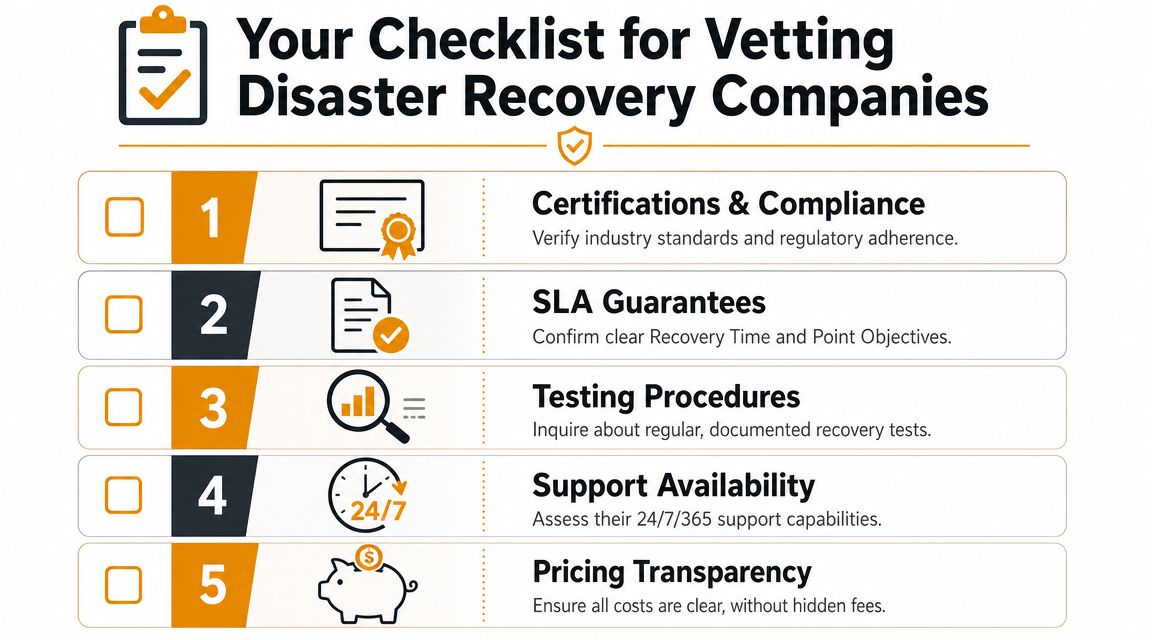
- SLA clarity: Make them spell out recovery commitments by system. “Rapid recovery” means nothing.
- Cloud coverage: Confirm whether Microsoft 365, Azure, AWS workloads, endpoints, and identity services are included.
- Runbook ownership: Someone has to maintain the order of operations, contacts, credentials, and escalation path.
- Support model: Ask who answers after hours and whether they coordinate with your internet provider, software vendors, and hosting providers during an incident.
- Testing evidence: You want reports, findings, and remediation steps, not verbal reassurance.
Buyer's check: If the proposal focuses heavily on storage size and barely mentions testing, failover, identity recovery, or SaaS restoration, keep shopping.
A serious provider should be comfortable walking through a live scenario. For example: “It's Monday morning. Microsoft 365 login fails, your accounting VM is unavailable, and your office has no power. What happens in the first two hours?” If they answer that cleanly, you're talking to the right kind of firm.
Beyond Servers The Unique Risks for Houston Businesses
Houston recovery planning gets distorted when people think only about the server room. That's too narrow.
A real local disruption doesn't just knock out hardware. It affects transportation, staffing, building access, vendors, phones, internet circuits, and your ability to document losses while the business is still trying to function.
Regional disruption changes everything
A provider who only plans for single-system failure will disappoint you during a storm event. Houston businesses need a plan for the day nobody can get into the office, not just the day a file server dies.
That includes practical continuity issues such as remote access, alternate communication methods, preserved business records, and documented recovery steps for finance and operations. For SMBs in storm-prone markets, the value of a DR provider extends beyond restoring servers. The real test is whether they help preserve evidence for insurance, meet payroll and regulatory deadlines, and restart operations when physical access is impossible (disaster legal services and recovery support context).
Power resilience belongs in that conversation too. If your operation can't tolerate facility-level outages, backup power and storage planning should sit beside your IT recovery design. For some businesses, especially warehouses, clinics, and multi-tenant commercial sites, reviewing Solar Energy Management LLC solar solutions can help frame the building-side continuity piece.
Houston compliance and continuity realities
Houston has a heavy mix of healthcare, legal, logistics, energy, professional services, and field operations. Those sectors don't just need uptime. They need records, audit trails, communications, and controlled access during a disruption.
That means your disaster recovery company should understand questions like:
- Can staff securely access systems from home or a temporary site?
- Can you preserve documents for claims, audits, and disputes?
- Can regulated data stay protected while systems are being restored?
The local angle matters because a regional event creates a pileup of problems at once. Your people are dealing with family needs, roads, school closures, and property concerns while the business still has obligations. A good DR partner plans for that mess. A mediocre one just promises to restore a machine.
DR Pricing Models and Common Pitfalls to Avoid
A lot of SMBs shop for disaster recovery the wrong way. They ask for the cheapest monthly number and assume they're comparing equivalent protection.
They aren't.
How providers usually price the work
Most disaster recovery companies package services in one of a few common ways:
- Per device or per server: Straightforward on paper, but it can hide differences in recovery speed and scope.
- By protected data volume: Fine for storage planning, weak as a standalone pricing model because business impact has little to do with terabytes alone.
- By service tier: This usually maps better to business needs because it reflects different recovery priorities for different workloads.
- Managed DR bundles: These often include monitoring, replication, testing, documentation, and incident response coordination.
The right model is the one that matches your recovery priorities. Cheap storage is not a substitute for recoverability.
The mistakes that cost more than the contract
The biggest mistake is confusing backup with disaster recovery. If your “solution” gives you files but no rapid restoration path, no failover, no documented sequence, and no testing, you bought a partial tool and called it a plan.
Other expensive mistakes are more subtle:
- Buying one blanket service level: Your accounting system and archive files don't need identical treatment.
- Ignoring cloud application recovery: If Microsoft 365 or another SaaS platform is central to operations, that has to be addressed explicitly.
- Skipping tests because operations are busy: A plan nobody has rehearsed is a guess.
- Choosing based only on sticker price: Lower RTO and RPO targets cost more for a reason. They require more infrastructure, automation, and management.
A cheap backup service feels affordable right up to the day you need to restore the business instead of just the data.
Ask what the contract excludes. Ask what recovery labor is included. Ask who handles coordination when the incident touches cloud platforms, endpoints, networking, and third-party vendors at the same time. That's where weak deals fall apart.
Getting Started A Sample Disaster Recovery Roadmap
A Houston business can lose a full workday faster than owners expect. A hurricane knocks out power. The office building closes. Staff cannot reach the server. Orders stall, phones reroute poorly, and nobody is sure who owns the recovery call. That is the moment when a vague backup strategy gets exposed.
Start with a roadmap. Keep it practical. Build around the systems that keep revenue, operations, and compliance intact.
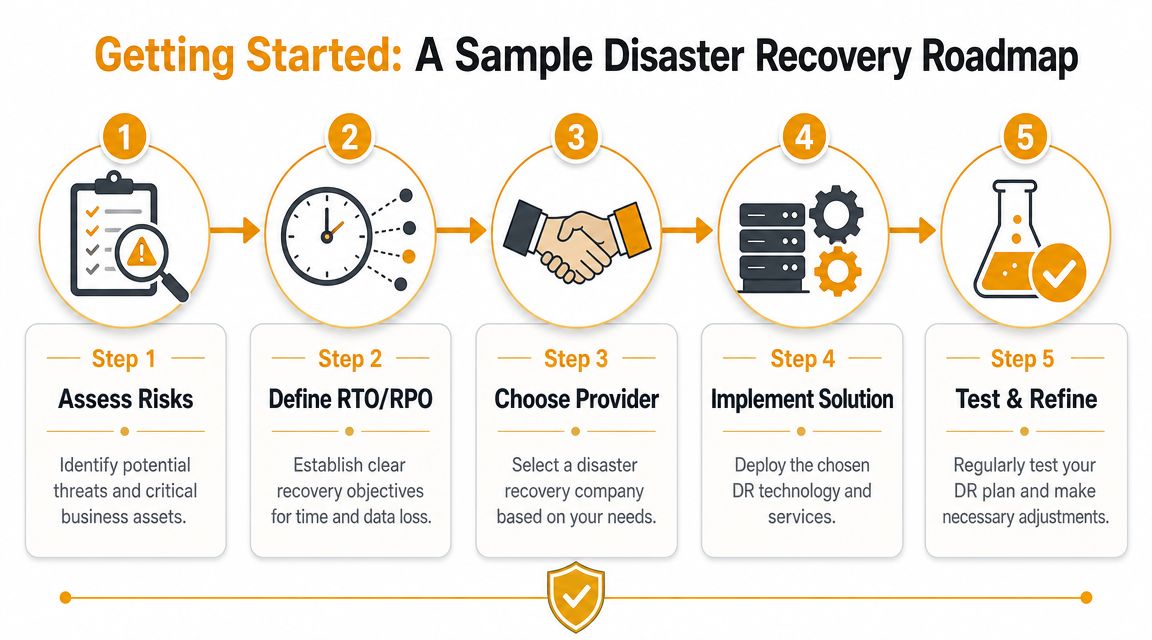
A practical five-step path
Use this sequence.
Assess risks
Write down the events that would stop your business in Houston, not generic threats from a template. Start with hurricane-related outages, flooding, office inaccessibility, ransomware, failed storage, internet circuit loss, and cloud account lockout. If you serve regulated industries such as healthcare, legal, energy, or financial services, include the compliance impact of downtime and data loss.Define RTO and RPO
Set recovery targets by business function. Your line-of-business app, file server, Microsoft 365 data, phones, and remote access do not all need the same treatment. Pick what has to come back first, how fast it must return, and how much data loss the business can absorb before the cost gets ugly.Choose a provider
Pick a firm that can recover your environment the way it is built today. Some providers are better with cloud-first recovery. Others are stronger in hybrid infrastructure with on-prem servers, firewalls, and line-of-business systems. If you want a local reference point, this small business disaster recovery planning page for Houston companies shows the kind of support many SMBs need.Implement the solution
Put the controls in place. That usually means backups, replication, identity protection, alternate infrastructure, recovery documentation, and clear admin access rules. If your office is inaccessible, staff still need a secure way to work, communicate, and reach core systems.Test and refine
Run a drill. Time the recovery. Document what failed, what took too long, and who got stuck waiting on credentials, vendor support, or leadership approval. Then update the runbook before the next storm season or major system change.
Start smaller than you think, but start now
Your first version does not need to cover every workload in perfect detail. It needs to protect the systems that would hurt the business first.
That usually starts with five blunt questions:
- What system would interrupt revenue or operations first if it went down?
- How long can we afford to be without it?
- How much data can we lose before it becomes a financial or compliance problem?
- Where will staff work if the office is closed for days?
- Who makes the first three recovery decisions?
Put those answers in writing. Assign an owner. Then have your disaster recovery provider turn that into a tested plan with real recovery steps, not a stack of screenshots and vendor logins.
Houston businesses do not need more advice about “being prepared.” They need a plan built for Gulf Coast weather, remote work during outages, and the compliance pressure that follows missed data protections. IT Cloud Global, LLC provides Houston-based managed IT, cloud, backup, and disaster recovery support for businesses that need a practical recovery strategy, not just another backup subscription.
- Recovery Point Objective: A Practical Guide for SMBs
- 7 Best Managed IT Services Houston TX Reviews (2026)
- Your 2026 Disaster Recovery Testing Checklist
- Business Continuity Strategies: SMB Guide 2026
- Your 2026 Disaster Recovery Plan Checklist
- The Importance of BCP: Business Survival in 2026
- Data Breach Response Plan: Essential SMB Guide 2026