


Endpoint Protection vs Antivirus: A Houston Guide
You're probably sitting on a stack of laptops, a few home offices, a couple of staff who still use personal devices, and one antivirus license that felt “good enough” when you bought it. Then a phishing email lands, somebody clicks, the payload slips past signature detection, and now you're asking the real question, not “Which product is newer?” but which setup keeps a 25-person Houston business covered when people work everywhere and attackers don't care about your office boundary.
That's the right frame for endpoint protection vs antivirus. Antivirus still has a job. It catches known malware well enough for simple environments. But once your team is hybrid, your data is sensitive, or your insurance and compliance expectations get real, the comparison changes fast. The practical difference is coverage, response, and who is watching the alerts when something goes wrong. If you want a broader context for how attackers behave in other markets, the top threats for Georgia businesses piece is a useful read, because the same playbook of phishing, device sprawl, and weak controls shows up across regions.
| Property | Traditional Antivirus | Endpoint Protection Platform |
|---|---|---|
| Detection method | Signature-based scanning | Behavioral detection, analytics, and response |
| Coverage | Known malware | Known and unknown threats |
| Response | Alert, quarantine, remove | Investigate, isolate, remediate, and centralize |
| Scope | One device at a time | Multi-device, policy-driven management |
| Operational model | Standalone and lightweight | Central console with broader control |
Table of Contents
- Why This Decision Matters More in 2026
- What Antivirus and Endpoint Protection Actually Mean
- Feature-by-Feature Comparison That Actually Helps You Decide
- Real-World Use Cases for Houston SMBs
- Cost, Licensing, and the Real 5-Year TCO
- Deployment, Management, and Integration With Your Stack
- How Houston Businesses Should Choose and Implement
- Frequently Asked Questions About Endpoint Protection vs Antivirus
Why This Decision Matters More in 2026
A 30-person Houston professional services firm can run consumer-grade antivirus for years without a visible problem, until the day it can't. One employee opens a malicious attachment, the file looks harmless to a signature engine, and the infection lands on the laptop, then spreads into email, file shares, or identity systems. Palo Alto Networks, citing Unit 42 data, says endpoints are the primary target in 72% of incidents, and over 70% of incidents span three or more fronts such as endpoint, cloud, and identity, which is exactly why the old “install antivirus and move on” mindset keeps failing Palo Alto Networks.
The old perimeter mindset doesn't match hybrid work
That Houston firm doesn't live behind a neat office perimeter anymore. Staff check email on home Wi-Fi, contractors bring their own laptops, and executives carry mobile devices that touch company data outside the office. Endpoint security matters because the device itself is often the entry point, not just a victim after a network breach.
This is also why endpoint protection vs antivirus isn't an academic debate. It's a coverage question. If the device is where the attack starts, the device needs continuous monitoring, centralized policy, and real response, not just a scan that compares files against known hashes.
Why this guide is written for non-specialists
You don't need to be a security engineer to make a defensible buying decision. You do need a clear definition of both options, a plain-English comparison, a realistic look at cost, and a recommendation based on how your business works.
A lot of buyers in SMBs get trapped by marketing that treats “newer” as “better.” That's lazy. The right choice depends on whether you have static desktops or hybrid endpoints, whether someone is watching alerts, and whether a missed event would be a nuisance or a business problem. If you only remember one thing from this guide, make it this. Antivirus is a control. Endpoint protection is a control plane.
What Antivirus and Endpoint Protection Actually Mean
Traditional antivirus in plain English
Traditional antivirus checks files against a library of known malicious signatures. On a Windows laptop, it usually runs on-access checks when files open, periodic scans in the background, and quarantine actions if it recognizes malware. That works fine for known threats and low-complexity environments.
The limitation is simple. If the threat is new, fileless, or behaving like legitimate software, signature scanning can miss it. Palo Alto Networks describes this shift clearly, traditional antivirus compares files against known malware hashes, while modern endpoint security adds behavioral detection, analytics, and response Palo Alto Networks.
Endpoint protection, EPP, EDR, and XDR
Endpoint protection is the broader category. It usually means an endpoint protection platform, or EPP, that combines antivirus engines with behavioral analytics, continuous monitoring, automated isolation, and centralized response. That's the practical upgrade buyers care about.
EDR, endpoint detection and response, goes deeper into telemetry, investigation, and guided remediation. XDR expands that idea across endpoints, identity, email, cloud, and other layers. The acronym matters less than the outcome. If your tools can see suspicious behavior, contain it, and give you a clean audit trail, you're in modern territory.
Bottom line: antivirus catches known malware, endpoint protection handles the unknown too.
For a product-level view of how vendors package these capabilities, this small-business roundup on the best endpoint protection for small business is a good companion read.
Feature-by-Feature Comparison That Actually Helps You Decide
The cleanest way to compare endpoint protection vs antivirus is by what happens when something suspicious touches the device. AV-Comparatives' 2024 Endpoint Prevention & Response testing showed some products reaching 99.3% prevention/response scores, which tells you modern endpoint stacks can perform at a very high level when they're built and tuned well AV-Comparatives. But that's not the whole story, because performance and management overhead matter too.
| Property | Traditional Antivirus | Endpoint Protection Platform |
|---|---|---|
| Detection | Signature-driven, best for known malware | Behavior, ML, heuristics, and signature support |
| Coverage | Narrow, mostly file-based threats | Broader, includes unknown and fileless threats |
| Response | Quarantine and alert | Isolate, block, investigate, remediate |
| Management | Per-device or basic admin console | Centralized visibility and policy control |
| Telemetry | Limited logs and alerts | Richer logs, reporting, and investigation trails |
Detection and response
Endpoint protection wins here. Antivirus still catches known malware, but endpoint tools are built to see suspicious behavior, not just bad files. That matters when a payload arrives through a trusted user account or when malware tries to hide behind legitimate processes.
Scope and management
Endpoint protection wins again for any business with more than a handful of devices. A central console gives you policy control, consistent settings, and faster containment. Antivirus is fine when every device is basically the same and nobody needs to coordinate response across locations.
Telemetry and reporting
Endpoint protection wins for audits, incident review, and cyber insurance conversations. If you need to show what happened, when it happened, and how the device was handled, richer telemetry is the difference between a clean story and a guessing game.
Where antivirus still makes sense
Antivirus still earns its keep in a very narrow lane. If you have static desktops, limited data sensitivity, and nobody available to manage a security console, it's low-cost and low-overhead. That's why some buyers still start there.
A practical reminder for risk transfer matters too. If you're reviewing policy language alongside security tools, the Schneider and Associates cyber insurance page is worth a look, because insurers care about what you can prove, not just what you installed.
Real-World Use Cases for Houston SMBs
The right answer changes with the business model. A small, stable office is not the same thing as a hybrid team or a retail operation with terminals and thin IT coverage. The mistake is buying the same tool for all three and pretending the fit is identical.
A 12-person accounting firm
A Houston accounting firm with a locked-down office network and strong document controls should lean toward endpoint protection with audit-ready logging. Tax records, client financials, and email all deserve central visibility, especially when regulators or clients ask hard questions. Antivirus alone is too shallow when a single compromised machine can affect shared files and correspondence.
The trade-off is management effort. Someone has to own the console, review alerts, and tune policies so the tool doesn't become noise.
A 40-person hybrid professional services company
This is the biggest antivirus-only trap. Staff work from home, use personal laptops, and connect through home Wi-Fi, which means coverage gaps appear fast if you only protect office-issued machines. Endpoint protection with centralized management solves the blind spot by enforcing policy across endpoints instead of hoping everyone behaves the same way.
The trade-off is broader rollout discipline. If devices aren't enrolled and monitored, the “better” product won't save you.
A 20-person retail operation
A retail business with point-of-sale terminals and limited IT staff needs pragmatism. A managed antivirus-plus-EDR bundle may be the best fit if it reduces admin time and keeps response practical. The goal is not the fanciest stack. The goal is a stack that stays on, stays updated, and gets watched.
If you're dealing with online exposure, reputation cleanup, or brand risk alongside endpoint risk, the Houston content removal services page is relevant in a different way. Security incidents often create a cleanup problem long after the malware is gone.
Practical rule: if you can't confidently say every endpoint is enrolled, monitored, and recoverable, the stack is incomplete.
Cost, Licensing, and the Real 5-Year TCO
Sticker price is where most buyers get fooled. Endpoint protection usually costs more upfront than basic antivirus, but that's not the budget question. The question is what you pay over time for licensing, console management, training, incident handling, and the hours lost when nobody catches a problem quickly.
What the product brochure leaves out
AV-Comparatives' 2025 Endpoint Prevention & Response evaluation showed a wide spread in both effectiveness and cost. Bitdefender posted 99.7% combined prevention/response with a 5-year per-agent cost of $100 and $210 5-year TCO, while CrowdStrike reached 97.7% combined prevention/response at $475 per agent and $1,245 TCO AV-Comparatives. That spread matters because endpoint protection is not one uniform purchase. You're paying for both capability and operating model.
How to estimate your own spend
Start with per-seat licensing, then add the costs most quotes skip. Console licensing, training time, incident response hours, and management overhead all belong in the calculation. For a small company, a managed stack often reduces the hidden labor even when the software itself is more expensive.
A simple budgeting framework works well:
- Multiply per-agent cost by headcount.
- Add a 15% to 20% buffer for management overhead.
- Compare the total against your expected downtime cost and response burden.
If your business can absorb a short outage and you have almost no security operations overhead, antivirus stays attractive. If a missed endpoint event could interrupt billing, client service, or retail operations, the premium for endpoint protection is easier to justify.
The hardest truth is this. Low price is only cheap if it doesn't create a longer incident, more manual labor, or a failed insurance or compliance review later.
Deployment, Management, and Integration With Your Stack
What deployment really looks like
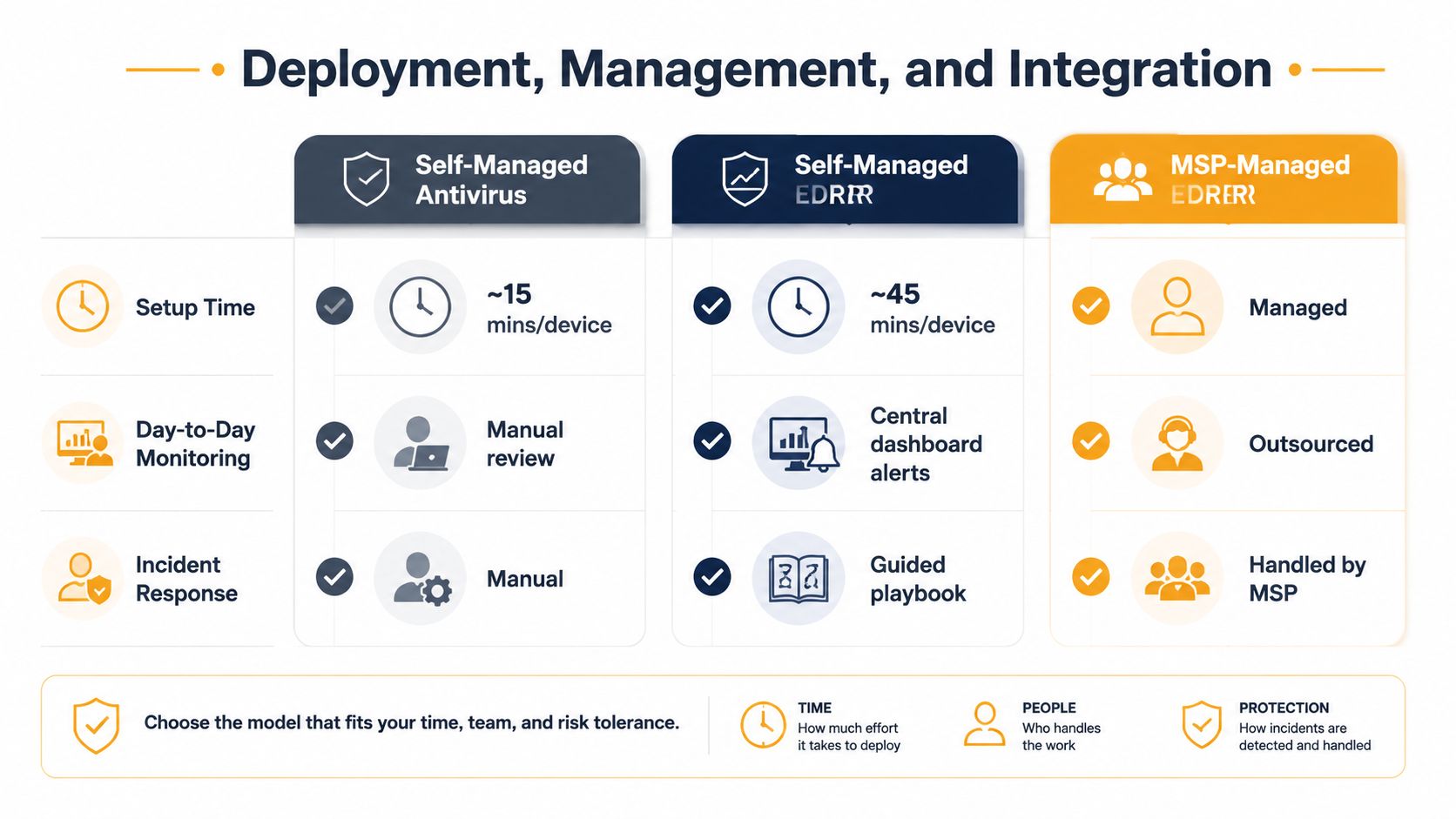
Self-managed antivirus is easy to install and forget. That's also the problem. You get a light agent, but you don't get much visibility when something misbehaves.
Self-managed EDR is stronger, but it asks more from your team. Someone has to enroll devices, watch the dashboard, interpret alerts, and act on them. If that person already wears three hats, alert fatigue shows up fast.
MSP-managed EDR changes the operating model. The vendor stack is still there, but a managed team handles monitoring and response. For small businesses, that often matters more than which badge is on the box.
How it fits with Microsoft 365 and the rest of the stack
Most Houston SMBs already live in Microsoft 365, Intune, and Azure AD. Endpoint protection should plug into that environment, not sit beside it like a separate island. When your endpoint stack integrates with identity and device management, policy enforcement becomes much cleaner.
That's why bundled partner models are popular. A setup built around SentinelOne, Microsoft 365, and Intune can collapse what used to be three vendor conversations into one managed relationship. It reduces friction, simplifies support, and makes response faster when a device goes sideways.
For a deeper comparison of operating models, this guide on MDR vs EDR is a useful companion.
Check these before you sign:
- Agent footprint on laptops and desktops.
- OS coverage for every device type you care about.
- Cloud or on-prem console based on your management style.
- 24/7 support if you don't have internal coverage.
How Houston Businesses Should Choose and Implement
The decision is straightforward if you stop shopping by buzzword and start shopping by operating reality.
Use antivirus only when the environment is truly simple
Keep antivirus if you have a static, low-risk setup, a tight budget, and very little appetite for ongoing monitoring. That means mostly office-bound devices, minimal sensitive data, and no expectation that someone will actively hunt through alerts. In that world, antivirus is a workable control, not a fancy one.
Upgrade to endpoint protection when risk or complexity rises
Move to endpoint protection if you handle client data, operate in a regulated field, support hybrid work, or have BYOD or contractor devices in the mix. The 10 cybersecurity best practices for small businesses page is relevant here because endpoint tooling is strongest when it sits inside a broader policy and identity approach, not when it's treated as a magic fix.
Choose MSP-managed EDR when you need coverage, not another project
If you don't have a dedicated security team, MSP-managed EDR is usually the smartest route. For a 25-person Houston company, rollout is often measured in weeks, not months, because the work is about inventory, policy, pilot, and controlled rollout, not a giant infrastructure project. That's the right play when you want security without hiring an in-house analyst.
Implementation sequence:
- Inventory every endpoint that touches company data.
- Define policies for isolation, updates, and access.
- Pilot on a small group before broad deployment.
- Roll out in phases to avoid disruption.
- Tune alerts and response so the system stays usable.
The best endpoint protection is the one that's actually deployed across every device and actively monitored.
Frequently Asked Questions About Endpoint Protection vs Antivirus
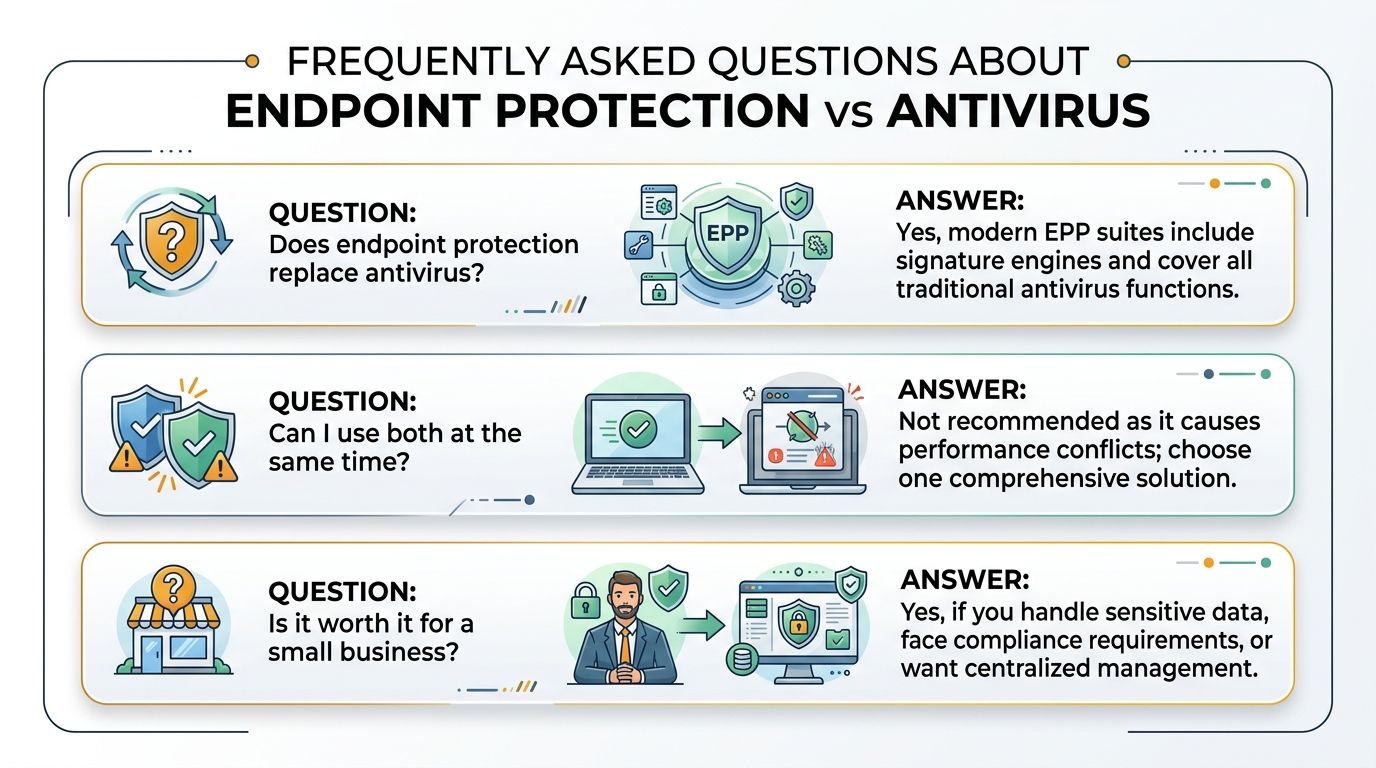
Does endpoint protection replace antivirus?
Yes, in modern EPP suites it does. Endpoint protection typically includes signature-based engines, so you're not losing classic malware scanning when you upgrade.
Can I run both at the same time?
Usually, no. Two security agents can create performance conflicts and messy alerting, which helps nobody. Pick one solution and manage it well.
Does it cover home laptops and BYOD devices?
Only if you deploy it there and manage those devices centrally. That's the coverage gap most casual comparisons skip, and it's the part hybrid work exposes fastest.
Does cyber insurance care?
Yes, and it's getting harder to ignore. Insurers increasingly want stronger telemetry and response capability, not just a basic antivirus badge on a policy.
If you want a practical read on your current endpoint coverage, reach out to IT Cloud Global, LLC for a free endpoint assessment. Their team helps Houston businesses map device coverage, tighten endpoint policy, and choose the right mix of protection and management without overspending. Visit IT Cloud Global, LLC and ask for a review of your current stack.
- Small Business Development Center: Houston Growth Guide 2026
- Houston IT Support: A 2026 Guide for SMBs
- What Is Network Access Control: Why Your Business Needs It
- Hybrid Cloud Management: A Practical Guide for SMBs
- Computer Service Near Me: A Houston Buyer’s Guide
- Your 2026 Disaster Recovery Testing Checklist
- What Is a Network Operations Center? an SMB Guide