


Low Voltage Wiring Guide for Houston Businesses
A Houston business can have brand-new Wi-Fi access points, cameras, phones, and digital displays, yet still struggle because the cabling behind the ceiling was treated as an afterthought. One crushed cable, an overloaded PoE switch, or a shared pathway can turn a clean buildout into dropped calls, blind security zones, and a repair bill after the walls are finished.
Low voltage wiring is the infrastructure your staff rarely sees but depends on all day. The global low voltage wire and cable market was estimated at USD 156.2 billion in 2025 and is projected to reach USD 313.0 billion by 2035, while another estimate places the market at USD 158.9 billion in 2022 and projects USD 278.7 billion by 2032 (Future Market Insights market overview). Those projections reflect how low-voltage systems now support data, power distribution, security, automation, and communications.
For a Houston office or retail site, the decision isn't just which cable costs less. You need the right pathway, separation, cable rating, PoE capacity, testing plan, and documentation. Get those decisions right before installation, and your network has room to serve the business. Get them wrong, and every future change becomes harder.
Table of Contents
- The Houston Office Wiring Story
- What Low Voltage Wiring Actually Is
- Common Cable Types and Where Each One Wins
- Code and Safety Basics Every Owner Should Know
- Planning an Office or Retail Cabling Project
- Hiring Low Voltage Cabling Services in Houston
- Common Low Voltage Problems and How to Fix Them
- Your Next Steps for a Clean Cabling Project
The Houston Office Wiring Story
A Midtown co-working tenant learned the expensive way that “the Wi-Fi works” isn't a cabling plan. The space covered 6,000 square feet, with one telecom room serving the entire floor. The installer mixed Cat5e and Cat6 runs, the wireless rollout added Wi-Fi 6 access points, and a security crew placed camera cabling in the same conduit as network cables.
Opening day exposed the shortcuts. Access points near the corner offices struggled to provide usable coverage. PoE phones dropped calls when several devices were active. A camera mounted above the loading dock never delivered a dependable view, leaving a security blind spot exactly where deliveries and after-hours access needed monitoring.
The owner initially blamed the wireless equipment. That diagnosis missed the actual problem. The cabling plan hadn't matched the floor layout, device density, pathway requirements, or power demand. The telecom room had become a bottleneck, and nobody had required a complete drop schedule or certification report before the ceiling closed.
What the failure revealed
A structured cabling project needs decisions in writing, not assumptions buried in a contractor's price. The quote should identify:
- Cable category: State whether each run uses Cat6, Cat6A, fiber, coax, or control cable.
- Pathway separation: Show how data, security, audiovisual, and electrical routes remain separated where required.
- Device locations: Mark access points, cameras, phones, point-of-sale equipment, displays, and spare outlets.
- PoE requirements: Identify which switch ports power devices and whether the switch can support the planned load.
- Testing deliverables: Require permanent-link or channel test results, labels, floor plans, and a final drop list.
- Future capacity: Reserve pathway space and switch capacity for additions instead of filling every route on day one.
The Midtown tenant could've avoided most of this by treating cabling as part of the technology design rather than a late-stage cable pull. Houston projects add another layer of practical concern, including crowded ceilings, long runs, remodel constraints, and multiple trades working in the same pathway.
You'll recognize at least one of these mistakes in your own office, storefront, warehouse, or medical suite. The rest of this guide shows where owners should push back before signing a cabling quote.
What Low Voltage Wiring Actually Is
Low voltage wiring generally carries 50 volts or less for technology and control applications. It supports data, voice, security, audiovisual systems, and building automation rather than standard outlets, lighting circuits, or large equipment. A simple comparison helps: line-voltage wiring moves power like a fire hose, while low-voltage wiring moves information and limited power like a garden hose, through smaller, more precise pathways distributed throughout a building.
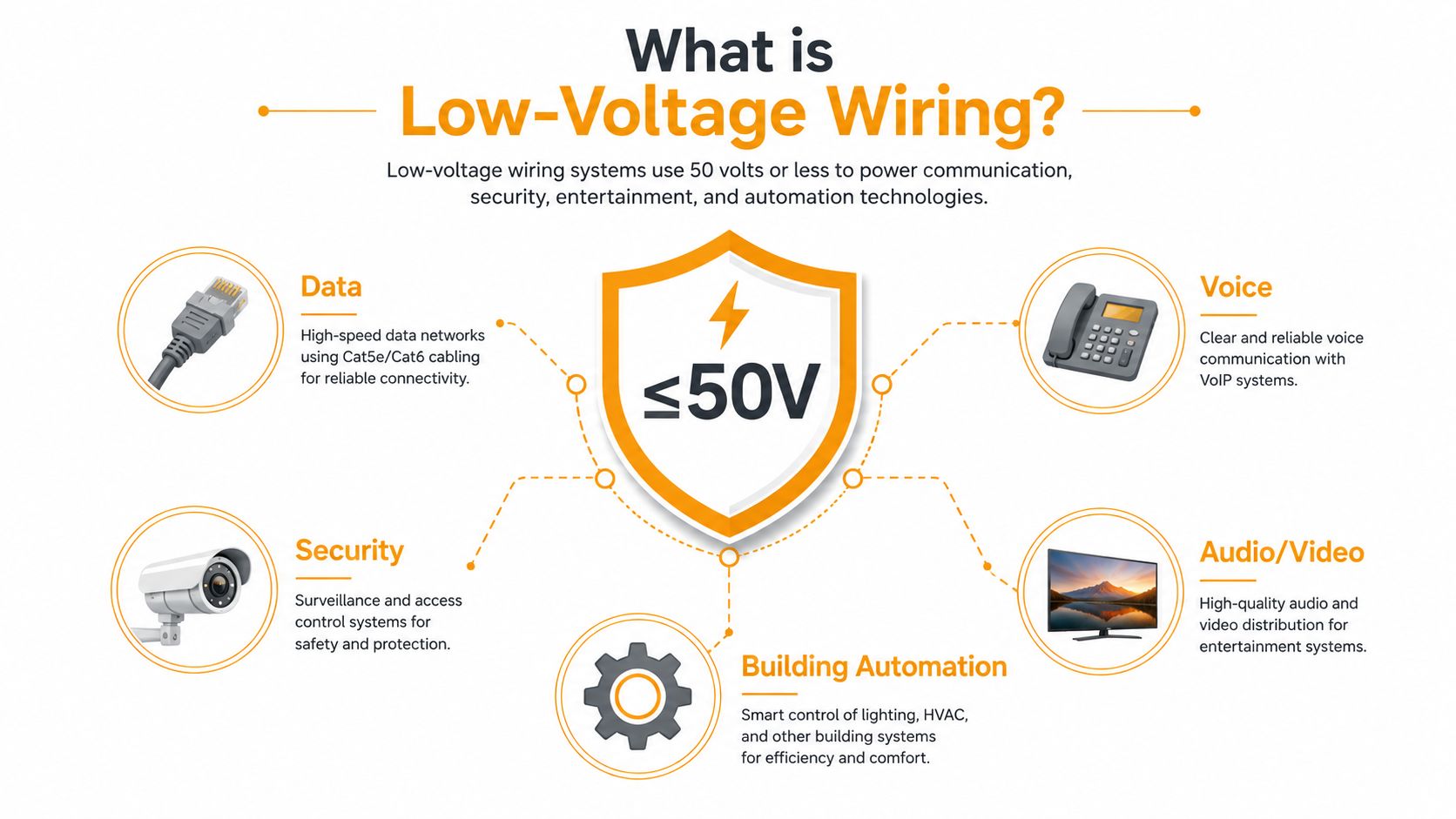
The familiar phrase “low voltage” is still useful in conversations with owners and installers, but code language is shifting toward limited energy. NEC 2026 reorganized communications and related systems into Chapter 7 and emphasizes energy-based terminology, a change discussed in this NEC 2026 limited-energy cabling overview. Houston specifiers, inspectors, and authorities having jurisdiction may therefore ask questions based on circuit energy, classification, separation, and pathway conditions rather than relying only on a voltage label.
What appears on a Houston cabling quote
The voltage definition becomes practical when you translate it into materials:
- Cat5e: Twisted-pair Ethernet cable used in older data and voice installations.
- Cat6: The common copper choice for business networks, phones, access points, and many PoE devices.
- Cat6A: A larger, better-isolated twisted-pair option for demanding links and dense PoE environments.
- Single-mode fiber: A backbone medium suited to long-distance links and high-capacity connectivity.
- RG-6 coax: Used for cable television, some video systems, and legacy audiovisual equipment.
- 18/2 control cable: Common for access control, alarms, and building automation connections.
- Class 2 speaker wire: Used for audio systems where the cable carries limited power to speakers.
These systems aren't interchangeable. Ethernet carries both data and, in many deployments, power. Fiber carries data but doesn't directly power a typical access point. Control cable may connect a door device or sensor but can't replace a network drop. The contractor who designs the system should identify what each cable does, how it terminates, and which code requirements apply.
Common Cable Types and Where Each One Wins
A Houston office can save money by matching cable to the job, not by installing the same product everywhere. Choose for the device, route, PoE load, and expected life of the space.
Cat5e is the legacy floor, not my recommendation for a new Houston buildout. It can keep an inherited phone or basic data system running, but open-ceiling construction is the right time to replace mixed infrastructure. Cat6 remains the workhorse for gigabit desktops, Wi-Fi 6 access points, VoIP phones, cameras, and ordinary PoE devices.
Cat6A earns its place in dense offices, longer-life projects, and higher-demand wireless areas. Category 6 introduced a 250 MHz channel target with tighter crosstalk, attenuation, and return-loss requirements. Current ANSI/TIA-568.2-D also requires alien-crosstalk testing for Category 6A because adjacent cables can affect 10G performance in dense bundles (TIA category comparison). For a new office, Wi-Fi 7 access points, 10G links between floors, or heavy PoE deployment, I would choose Cat6A instead of cutting the cable budget with Cat6.
The practical cable comparison
| Cable Type | Typical Use | Distance Limit | Best Fit For |
|---|---|---|---|
| Cat5e | Legacy Ethernet and voice | Design-dependent | Existing systems and limited rework |
| Cat6 | Data, phones, Wi-Fi, cameras, PoE | Design-dependent | Most current SMB access-layer drops |
| Cat6A | 10G, dense PoE, newer wireless | Design-dependent | New construction and higher-demand sites |
| Fiber | Building backbones and high-capacity links | Design-dependent | Telecom-room interconnects and noisy environments |
| RG-6 coax | CATV, older AV, some video systems | Design-dependent | Television and legacy equipment |
| 18/2 or 22/2 control cable | Access control, alarms, automation | Load and run-dependent | Dedicated control circuits |
| Speaker cable | Distributed audio | Load and run-dependent | Commercial AV and paging |
Copper Ethernet is commonly planned around a 328-foot channel limit, but that figure is not permission to stretch every run. Patch cords, pathway routing, service loops, temperature, cable category, and PoE load affect the result. Between telecom rooms, install fiber instead of forcing copper across the building.
My recommendation: Use solid copper Cat6 for ordinary drops, Cat6A in new high-density or PoE-heavy areas, and fiber for backbones. A single cable type everywhere usually hides poor planning behind a simpler quote.
Fiber performs well in noisy industrial spaces, between floors, and on backbones that need substantial capacity without electrical interference. It costs more to terminate and demands installers who can clean, test, label, and protect it correctly. RG-6 still belongs in retail spaces that inherit television or legacy AV infrastructure. It does not replace a modern Ethernet backbone.
Avoid copper-clad aluminum, or CCA, Cat6. It is a common false economy in retail fit-outs. The jacket can resemble compliant network cable, while the conductor creates higher resistance and unreliable PoE performance. Require solid copper cabling with the manufacturer and category clearly identified. For data-point planning, review contact DLG Electrical for data points, then compare the scope against the Ethernet installation cost guide before approving a bid.
Code and Safety Basics Every Owner Should Know
Owners don't need to become electricians, but they do need to recognize the code questions that affect schedule, materials, and inspection. The older “low voltage” label often hides several separate requirements involving energy, cable rating, pathway separation, grounding, and the building's construction.
Article 725 covers Class 1, Class 2, and Class 3 remote-control, signaling, and power-limited circuits. The newer limited-energy framing, including the terminology shift associated with NEC Chapter 7, asks the project team to focus on how much energy the circuit can deliver and how that circuit is installed. Most SMB technology systems operate below 48 volts, but a lower voltage doesn't eliminate code obligations.
The rules that change your project
| Code Concept | Threshold or Rule | What It Means for Your Project |
|---|---|---|
| Low-voltage definition | 50 volts or less | Covers many data, security, control, and AV systems |
| Article 725 | Class 1, 2, and 3 circuits | Determines power limitation and installation conditions |
| Class 2 capacity | Up to 100W or 324VA in the cited guidance | Shapes power supplies and PoE planning |
| Plenum rating | Required where cable occupies qualifying air-handling spaces | Use CMP cable when the ceiling space serves that function |
| Riser rating | Used for qualifying vertical pathways | Use CMR where the route connects floors through riser spaces |
| Separation | Keep circuits separated according to applicable code and design rules | Don't casually share pathways with line voltage or incompatible systems |
Houston commercial ceilings frequently contain return-air spaces. If a cable runs through a qualifying plenum, the installer may need CMP-rated cable rather than ordinary riser cable. A riser-rated jacket belongs in appropriate vertical pathways, not automatically everywhere. Ask the contractor to identify the rating on the plans and explain why it matches the route.
PoE creates another design constraint. Voltage drop increases with current and run length. Industry guidance commonly targets less than 5% total drop for power lines, while many low-voltage DC applications use a 10% maximum; one published table shows a 12-volt camera at 300 mA reaching about 88 meters on 18 AWG at a 10% limit but only about 22 meters on 24 AWG (Ariston Cavi technical data). The practical lesson is straightforward: long camera and access-point runs need the correct conductor, switch budget, and pathway plan.
Inspection details owners often miss
Require floor plans, drop lists, labels, test results, and a record of pathway routing. Ask how emergency-power circuits are separated, whether elevator shafts are being used appropriately, and how fire-rated penetrations will be sealed. Data and AV cables shouldn't be thrown into a shared pathway without the required divider or separation. For broader electrical-safety context outside the United States, this AS/NZS rules Australia guide is useful, but Houston projects must follow the applicable local code, adopted NEC provisions, and AHJ direction.
Planning an Office or Retail Cabling Project
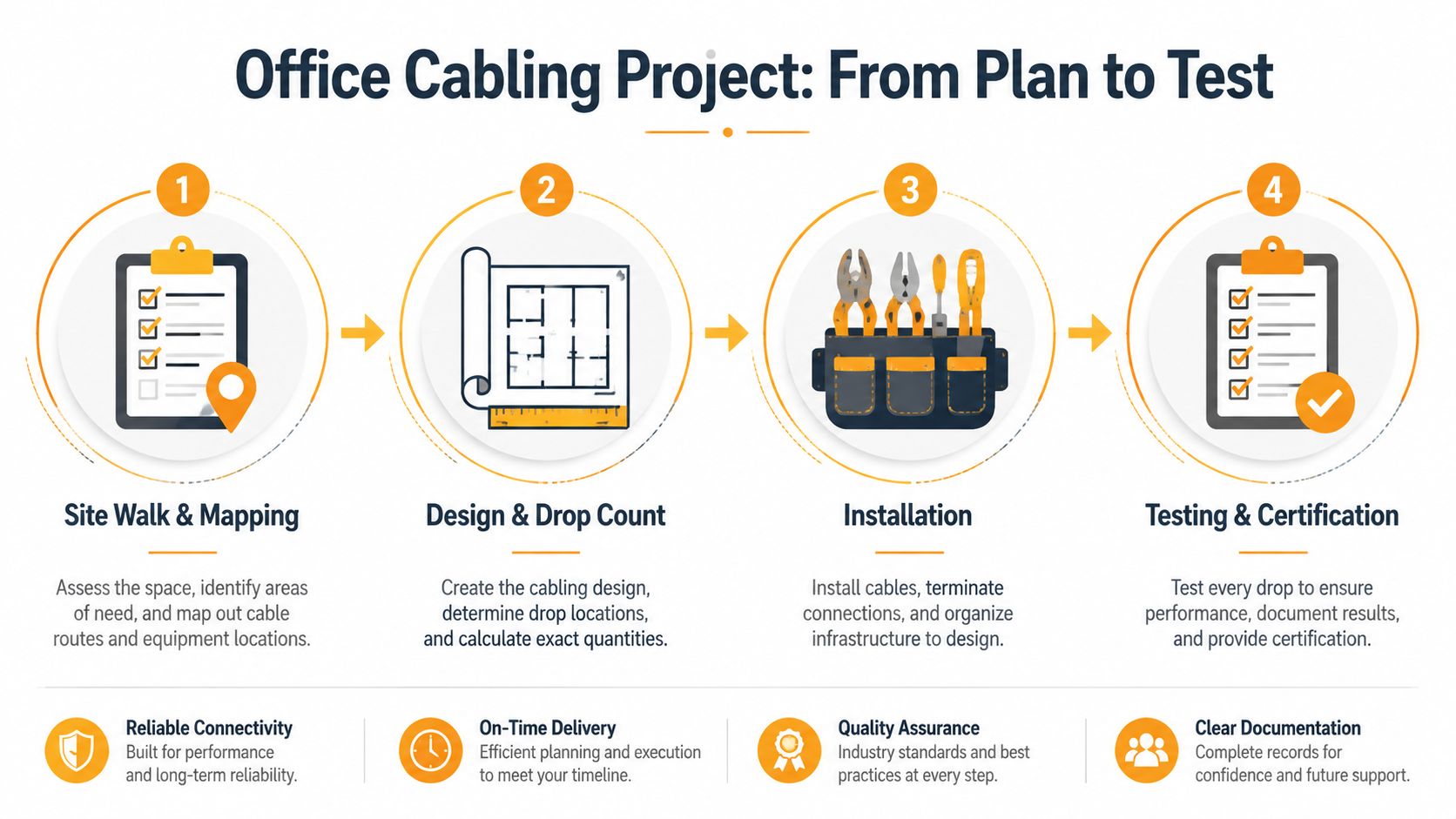
Start with the users, not the cable box. Walk the site and mark desks, conference rooms, printers, phones, wireless access points, cameras, point-of-sale stations, displays, door controllers, and equipment in the back room. A ten-person professional office may need a focused set of workstation and conference-room drops, while a 5,000-square-foot retail floor adds checkout stations, surveillance, digital signage, inventory systems, music, and back-of-house wireless.
The owner should approve a drop schedule before installation begins. One outlet at every obvious device location isn't enough if the pathway is difficult to reach later. Put spare capacity near reception, conference rooms, POS counters, wireless locations, security panels, and ceiling areas where the tenant may add devices.
Design the pathway before pulling cable
Open ceilings give installers choices, but they still need a disciplined route. J-hooks can work for organized, accessible runs. Cable tray makes more sense where the project has many cables, frequent additions, or a long route serving several zones. Sleeves through fire-rated walls must be coordinated before other trades close the opening, and every bend must respect the cable manufacturer's radius.
Don't let the installer bury a telecom room behind an inaccessible finish or consume the entire pathway on day one. Leave room for growth, maintain separation from power, and protect cables from sharp edges, heat, crushing, and unsupported spans.
PoE planning must happen alongside wireless planning. A 24-port switch serving 802.3bt Class 8 devices may face a very different power demand from the same switch serving ordinary phones and cameras. Build the port schedule by device type, expected power draw, cable route, and future additions. Cat6A is increasingly favored for new LAN and PoE++ deployments, while fiber is increasingly used for backbones and higher-capacity links, as outlined in this Cat6A and fiber cabling comparison.
Use the right construction sequence
- Rough-in during the buildout: Install pathways, sleeves, back boxes, and cable before walls and ceilings become inaccessible.
- Trim-out after drywall: Terminate jacks, patch panels, faceplates, cameras, access points, and equipment connections after finishes are ready.
- Test before move-in: Certify the permanent links, correct failures, update labels, and deliver the final documentation before staff depend on the network.
Coordinate cabling with ceiling work, electrical installation, security, and any office lighting upgrade. If each trade creates its own route, the ceiling fills quickly and the last crew gets forced into bad compromises. For Houston businesses that need design, installation, and network coordination under one scope, review network cabling services in Houston and require the same testing and documentation standards in the proposal.
Hiring Low Voltage Cabling Services in Houston
You have three realistic options. Your internal IT team can handle a small move or add if they have the tools and experience. A general electrician can be a good choice when the project combines line-voltage electrical work with straightforward technology pathways. A dedicated low-voltage contractor is the right choice for structured cabling, fiber, dense PoE, security integration, and any job where certification matters.
Internal IT understands the business, users, and devices. That familiarity helps with port placement and sequencing, but internal staff may not have a cable certifier, pathway design experience, or time to manage a construction crew. A general electrician may already be on site, yet electrical expertise doesn't automatically include Cat6A termination, fiber testing, alien-crosstalk requirements, or manufacturer warranty procedures.
What to demand from a specialist
For anything beyond a single-room reconfiguration, hire a structured cabling specialist. Look for:
- Relevant licensing: Ask for a Texas C-7 or equivalent low-voltage credential where applicable to the scope.
- Manufacturer training: Confirm experience with systems from manufacturers such as CommScope, Panduit, or Leviton.
- Certified testing tools: Require a Fluke or equivalent cable certifier, not only a basic continuity tester.
- Written design ownership: Identify who creates the drop layout, pathway plan, rack elevation, and PoE schedule.
- Clear warranty terms: Separate workmanship coverage from manufacturer defects and equipment warranties.
- Permit responsibility: Ask whether the contractor handles permits with the City of Houston or Harris County when the scope requires them.
A low bid that excludes testing, labels, patch-panel organization, or permit coordination isn't a low bid. It's an incomplete scope. Compare deliverables line by line, not just labor and material totals.
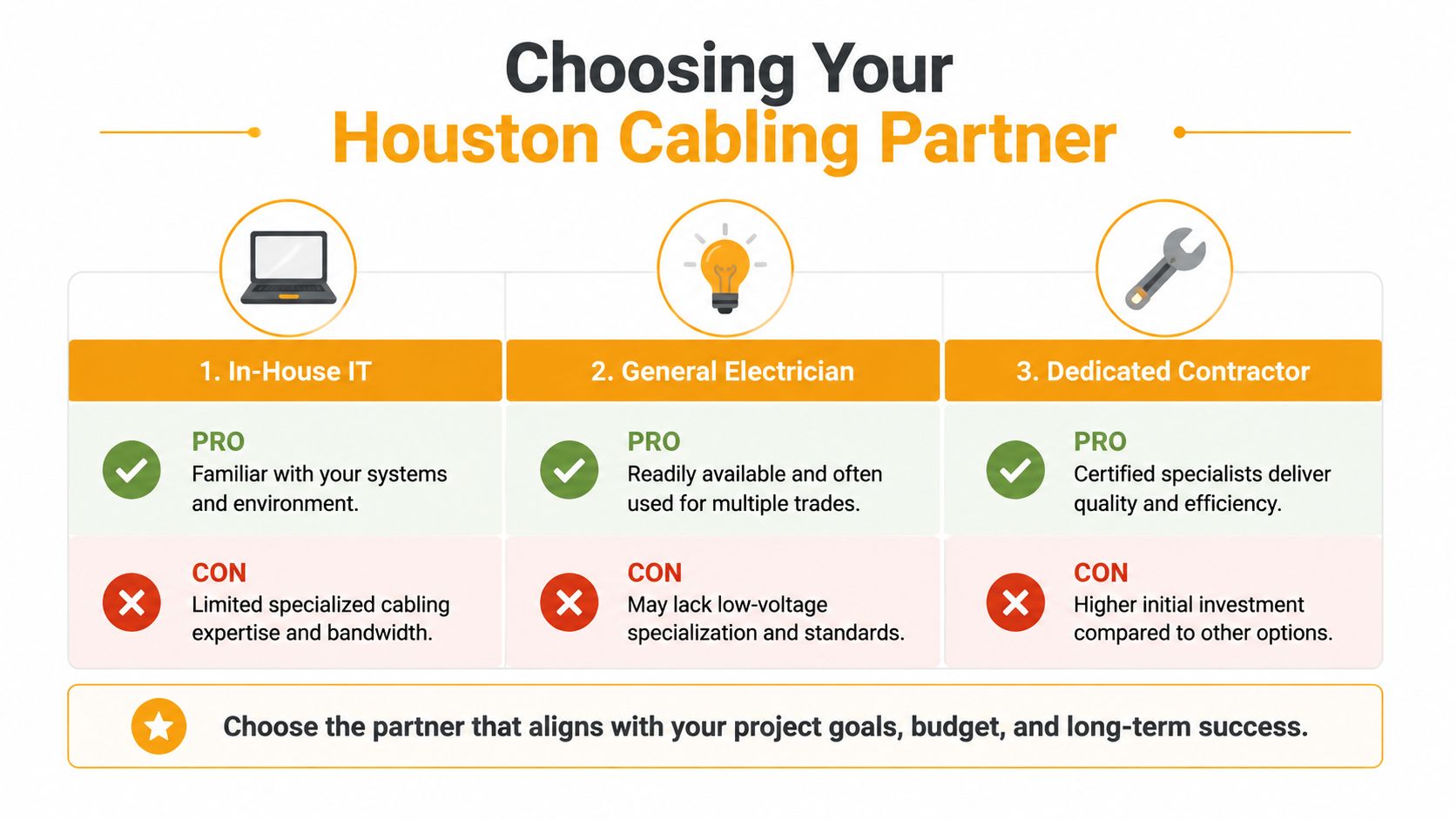
My recommendation is direct: let a cabling lead own the design and certification, then let internal IT manage moves, adds, and changes afterward. Use this structured cabling contractors resource to frame the questions before vendors walk the site.
Common Low Voltage Problems and How to Fix Them
The most dangerous assumption is that a link is good because a device powers on. A basic tester may confirm continuity while missing performance failures that appear under load, in a dense bundle, or at the far end of a long PoE run.
Houston retrofit work repeatedly exposes the same problems: inherited Cat5e hidden in walls, data and power bundled together, unsupported cable resting on ceiling tiles, inconsistent terminations, and patch panels with no usable labels. Each failure starts during design or installation, then becomes an IT problem after occupancy.
Prevent the failures before closeout
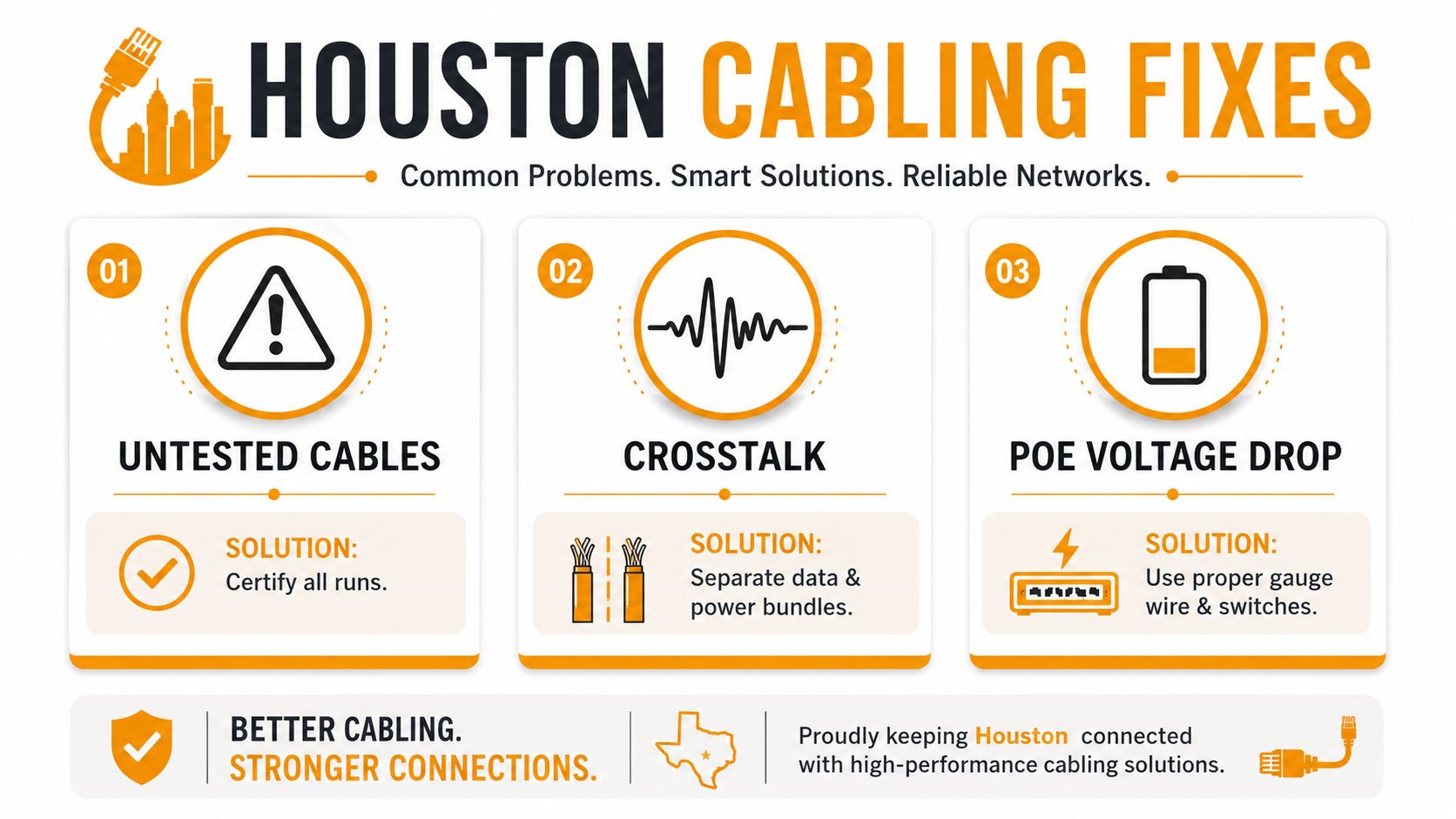
- Untested cables: Require certification of every installed run with a real cable certifier. Save the test files with the final floor plan and drop list.
- Crosstalk: Separate data and power pathways, control bundle size, use the correct category cable, and require alien-crosstalk testing where the standard calls for it.
- PoE voltage drop: Match switch power, cable category, conductor quality, route length, and device demand before installation. A camera that works on a bench may fail at the end of a marginal run.
- Mixed terminations: Keep the termination method and component family consistent. Mixed manufacturers can complicate performance validation and warranty claims.
- Poor labeling: Label both ends, the patch panel, rack position, room, and outlet identifier. Use a scheme that an office manager can understand later, not an installer's private shorthand.
- Damaged cable: Reject crushed, kinked, tightly bent, or over-pulled cable before it disappears above the ceiling.
The closeout rule: If the contractor can't hand over labels, certification results, updated drawings, and warranty details, the project isn't finished.
Owners who inherit bad cabling should start with an audit rather than replacing random outlets. Tone and trace suspicious runs, inspect the pathway, identify cable types, and certify priority links. Then replace the weakest section first, especially routes serving wireless access points, cameras, POS equipment, and critical phones.
Your Next Steps for a Clean Cabling Project
A Houston owner can make meaningful progress this week without choosing a contractor on the spot.
- Audit the existing drops: Use a toner for identification and a certifier for performance. Record cable category, location, termination, and result.
- Define the port schedule: Count current devices, identify PoE loads, and reserve growth capacity in the rack, patch panels, switches, and pathways.
- Choose the backbone: Use copper for appropriate access-layer drops and evaluate fiber between telecom rooms, floors, or electrically noisy areas.
- Issue one complete RFP: Include pathways, cable types, separation, PoE planning, labels, testing, drawings, permits, cleanup, and warranty.
- Make certification a deliverable: Don't accept “tested” as a verbal assurance. Require the actual test report files and a final labeled map.
Treat the project as a build-versus-buy decision based on complexity, not budget alone. Internal IT can own the device list and business priorities. Facilities can coordinate access, ceiling work, and landlord requirements. A qualified cabling lead should design the routes, manage installation quality, and certify the finished links.
The next action is simple. Schedule a site walkthrough, bring the current floor plan, and ask the contractor to mark every device, pathway, telecom-room connection, and future expansion point before pricing the work.
IT Cloud Global, LLC helps Houston businesses design and install structured low voltage wiring for Cat5e, Cat6, Cat6A, fiber, surveillance, audiovisual, Wi-Fi, and VoIP systems. Visit IT Cloud Global, LLC to request a walkthrough, coordinate a cabling upgrade, and receive a scope that includes installation, testing, and network support.
- Structured Cabling: A Practical Guide for Modern Businesses
- Disaster Recovery vs Business Continuity for SMBs
- Ethernet Installation Cost: Smart Budget Tips
- How Long Does Data Recovery Take? Realistic Timelines
- What Is a Helpdesk Ticketing System? an SMB Guide
- What Is Virtualization in Computing? Save & Boost Uptime
- Cloud Computing Solutions for Small Business: Houston 2026