


Multi-Factor Authentication: A Practical Guide for SMBs
A Houston business owner usually discovers an MFA gap during an ordinary workday. An employee signs in from home, a controller opens Microsoft 365, or a technician connects to a VPN, and everyone assumes the password is doing its job. The problem is that passwords can be reused, stolen, sold, and tested automatically without malware ever touching the network.
Multi-factor authentication changes that equation, but only when it's deployed as an operating program rather than a checkbox. The right approach covers administrators, finance users, cloud consoles, VPNs, RDP, service accounts, recovery paths, and the sessions that remain active after login. This guide explains what MFA proves, which factors hold up against modern attacks, and how a small IT team can roll out stronger protection without creating an avoidable support crisis.
Table of Contents
- Why a Stolen Password No Longer Has to End Your Business
- What Multi-Factor Authentication Actually Does
- Comparing MFA Factor Types by Real-World Risk
- Deploying MFA Across Your Cloud and Remote Access Stack
- A Practical SMB Rollout Plan and Recovery Strategy
- Compliance, Insurance, and the ROI of Strong MFA
- Common MFA Pitfalls and How to Mitigate Them
- Your 30-Day MFA Action Checklist
Why a Stolen Password No Longer Has to End Your Business
Consider a 22-person logistics company in Houston. The controller reused a password across business services, and those credentials appeared in a credential-stuffing dump. An attacker used the valid username and password to access the account and initiated a $118,000 fraudulent wire. There was no malware, zero-day exploit, or complicated intrusion. The attacker tried a leaked credential where it worked.
MFA could have interrupted that login by requiring proof beyond the stolen password. The control wouldn't solve every security problem, but it would have changed a valid credential into an incomplete authentication attempt. That distinction matters for businesses that rely on Microsoft 365, cloud applications, remote desktops, and VPN access.
Practical rule: A password proves that someone knows a secret. MFA should prove that the person also controls a separate device, key, or biometric factor.
Password-only access is obsolete for administrative and remote-access paths. Microsoft's telemetry found that MFA reduced compromise risk by 99.22% across the full population, including a 98.56% reduction when credentials had already leaked (Microsoft's MFA research paper). That doesn't mean every MFA prompt is equally strong. SMS, push approvals, authenticator codes, passkeys, and hardware keys face different attack methods.
A defensible program starts with an inventory. List every identity provider, administrator account, finance mailbox, VPN concentrator, RDP gateway, cloud console, third-party SaaS platform, and recovery account. Then document which system enforces MFA, which factor it accepts, and what happens when an employee loses a phone.
Businesses looking to strengthen their broader breach defenses can also review this guide to preventing data breaches. The important point is practical: MFA is one layer in an identity and access program, and it works best when the business knows exactly where access begins and where enforcement can be bypassed.
What Multi-Factor Authentication Actually Does
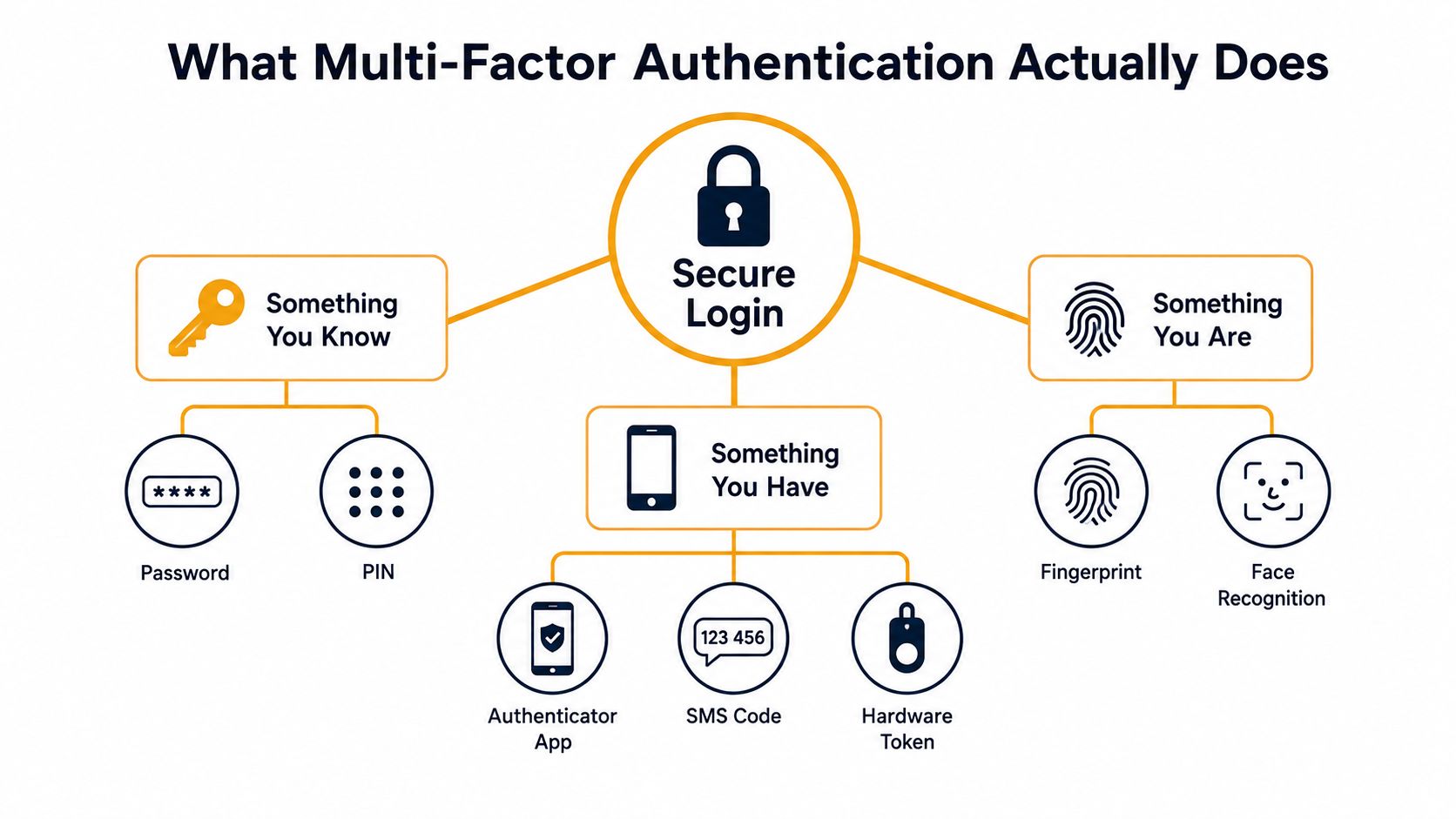
MFA requires a user to prove identity with two or more independent factors from different categories. A password is like the doorknob on an office door. MFA adds a deadbolt, a security key, or another independent check, so a stolen password alone doesn't open the account.
The classic factor families are straightforward:
- Something you know: A password, PIN, or memorized answer.
- Something you have: A phone running an authenticator app, a hardware security key, or a smart card.
- Something you are: A fingerprint, face scan, or another biometric characteristic.
- Where you are: A trusted office network, expected country, or approved access location.
- How you behave: Familiar typing cadence, normal device use, or an impossible-travel signal.
The first three are the canonical authentication factors. Location and behavioral information usually act as risk signals layered on top, helping an identity provider decide whether to permit, challenge, or block a sign-in.
Independence is the part many deployments miss. Two prompts delivered to the same compromised phone don't provide the same separation as a password combined with a hardware key. Likewise, email codes offer limited protection if the attacker is already targeting the email account that receives them.
A useful way to assess the business need is to look beyond headlines and examine coverage. Resources such as this discussion of 43% of UK businesses breached help frame why identity controls deserve attention, but the implementation decision still belongs to your environment. Start with the accounts that can move money, reset passwords, alter security policies, or reach sensitive systems.
The next question is factor quality. MFA isn't a single product or a single level of assurance. The method you choose determines which attacks remain practical.
Comparing MFA Factor Types by Real-World Risk
Factor selection should follow the threat, not convenience alone. Microsoft reported that MFA-enabled accounts remained secure in more than 99.99% of accounts during its investigation period, while MFA reduced compromise risk by 99.22% across the full population (Microsoft's published research). Google's cited findings found MFA prevented 100% of automated attacks, 96% of bulk phishing attacks, and 76% of targeted attacks (the Microsoft research paper containing the cited findings). Those results describe MFA broadly, not every individual factor.
| Factor Type | Phishing Resistance | Typical Use Case | Recommended For |
|---|---|---|---|
| SMS codes | Low | Temporary fallback or difficult legacy enrollment | Fallback only |
| Voice calls | Low | Users unable to receive app prompts | Limited transitional use |
| Email codes | Low to moderate | Account recovery or low-risk services | Noncritical access only |
| TOTP authenticator apps | Moderate | Workforce applications and SaaS | General users where stronger options aren't practical |
| Push with number matching | Better against approval fatigue | Microsoft 365 and other cloud sign-ins | Workforce access and transitional admin coverage |
| FIDO2, WebAuthn, or platform passkeys | High, phishing-resistant | Privileged access and sensitive workflows | Administrators, finance, remote access |
| PKI smart cards | High, phishing-resistant | Certificate-based enterprise environments | High-assurance regulated access |
SMS is the weakest common option because attackers can target the phone number through SIM swapping, and proxy-based phishing can relay codes. Voice calls add vishing exposure. Email codes are also a poor choice when the mailbox itself is under attack.
TOTP apps are a meaningful improvement, but a real-time adversary-in-the-middle phishing site can capture the password and one-time code as the user enters them. Push notifications become safer when the user must enter a displayed number and verify the application and location context. Number matching addresses the approval habit that makes push fatigue effective.
FIDO2 and WebAuthn use asymmetric cryptography. The authenticator signs a challenge bound to the legitimate site's origin, so a look-alike page can't collect a reusable secret. Windows Hello, Touch ID, platform passkeys, and hardware keys such as YubiKey fit this model. CISA and NIST identify FIDO/WebAuthn and PKI-based methods as phishing-resistant options (NIST guidance on phishing-resistant MFA).
Use a simple priority order: admins and finance users first on FIDO2 or platform passkeys, the wider workforce on TOTP or number-matched push, and SMS only as a controlled fallback.
Deploying MFA Across Your Cloud and Remote Access Stack
MFA enforcement fails when teams secure the main email platform but leave another entrance open. Treat the identity provider as the control plane wherever possible. Entra ID, Okta, or Google can centralize sign-in policy, while application-specific controls handle systems that can't federate.
Microsoft 365 and Google Workspace
For Microsoft 365, use Microsoft Entra ID Conditional Access to require MFA for global administrators, privileged roles, remote access, finance users, and accounts that can reset passwords or change security policies. Confirm the licensing needed for Conditional Access before building the policy, because Entra ID P1 is commonly required for these controls. Test exclusions carefully, especially service accounts and emergency access accounts.
Google Workspace administrators should configure MFA requirements in the Admin console and use context-aware access where the organization's edition supports it. Enforce the policy through Google as the primary sign-in provider rather than relying on separate settings across every SaaS application.
AWS, VPN, and RDP
AWS environments need MFA for the root account, IAM administrators, and users with permissions to alter identity, networking, storage, or logging. AWS IAM Identity Center can provide a more consistent access path than individually managed credentials, particularly when it integrates with an existing identity provider.
VPN and RDP deserve equal attention. Configure MFA at the gateway, not just inside the application a remote user reaches afterward. Cisco AnyConnect, FortiGate, Cloudflare Tunnel, Duo, and Okta can provide different enforcement models depending on the existing network and identity architecture. Legacy stacks may require a Duo or Okta add-on, while some gateways support standards-based integration directly.
The cloud security managed service model can help businesses map these controls across Microsoft 365, AWS, Azure, endpoints, and remote access without treating each platform as an isolated project.
| Platform | MFA Feature to Enable | Minimum License | Enforcement Layer |
|---|---|---|---|
| Microsoft 365 | Entra Conditional Access and authentication methods | Entra ID P1 for Conditional Access | Identity provider |
| Google Workspace | Admin MFA enforcement and context-aware policies where available | Workspace edition dependent | Google identity layer |
| AWS | IAM and IAM Identity Center MFA | AWS configuration dependent | AWS identity layer or federated IdP |
| VPN | Gateway MFA through native integration, Duo, or Okta | Product and add-on dependent | VPN concentrator |
| RDP | MFA at RD Gateway or access proxy | Gateway and identity integration dependent | Remote access gateway |
| SaaS applications | SSO with Entra, Okta, or Google | Application and IdP dependent | Central identity provider |
Don't exempt shared mailboxes by sharing a password. Convert the workflow to delegated access, and document how noninteractive service accounts authenticate. Break-glass accounts need strong protection, monitoring, and a tested emergency procedure, not casual exclusions.
A Practical SMB Rollout Plan and Recovery Strategy
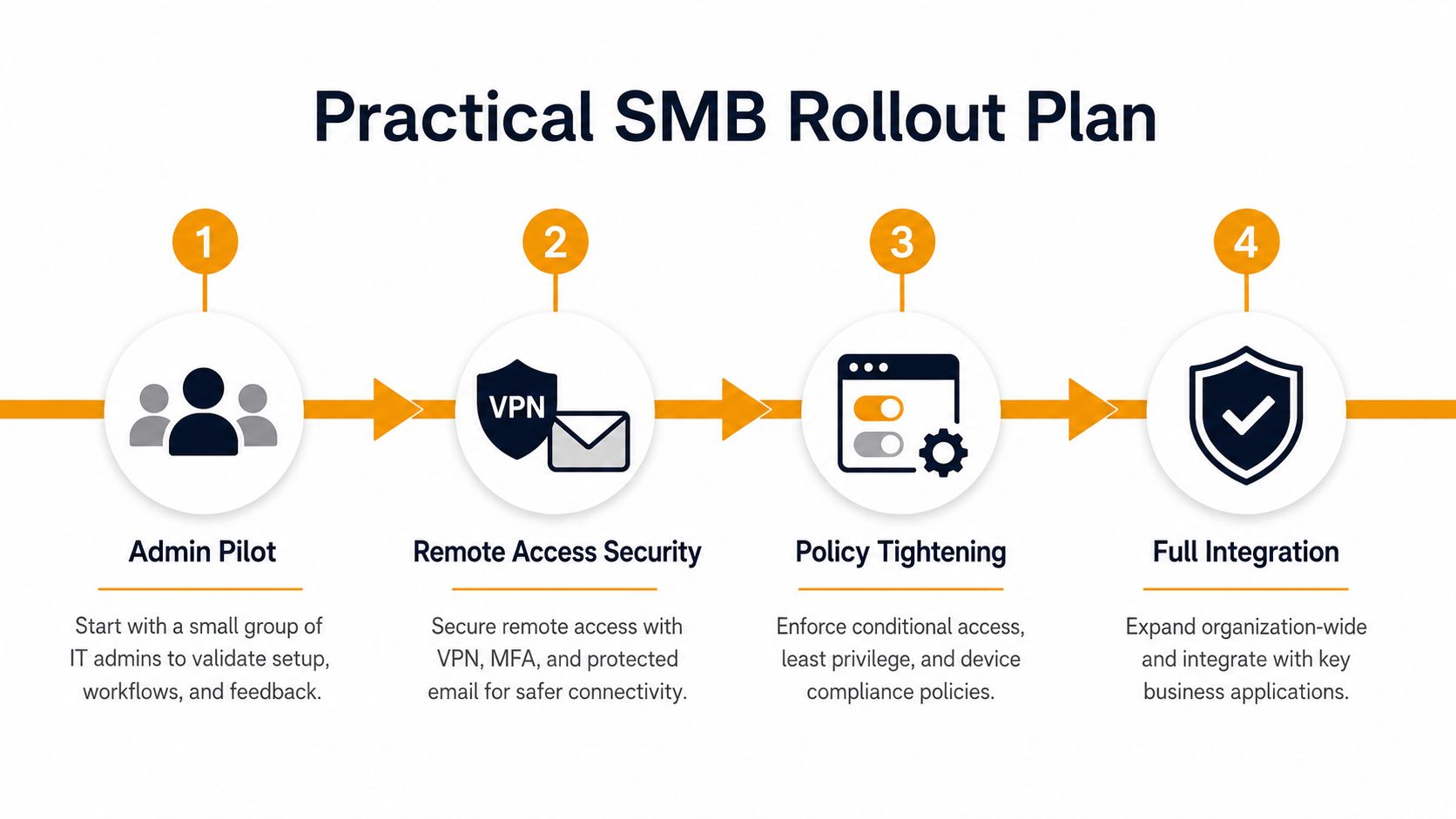
A small business doesn't need to change every login at once. It needs to secure the highest-consequence paths first, prove the support process, and expand without creating hidden bypasses.
Start with controlled access
Begin with a small administrator pilot. Enroll each participant on a phishing-resistant factor, register a second approved method, and test access from a normal office connection and a remote connection. Record the enrollment, recovery, and lockout steps in language the help desk can follow.
Then secure remote access. VPN, RDP, email, cloud consoles, and third-party SSO should move ahead of low-risk applications because they provide broad reach into the environment. Review sign-in logs during the pilot and look for accounts that authenticate outside the expected path.
Build recovery before enforcement
Recovery design should preserve security rather than undermine it. Maintain documented break-glass accounts with access held by a trusted second party. Store one-time recovery codes in a controlled password manager or sealed envelope, and test the process before a real lockout occurs.
A lost phone needs a defined re-enrollment procedure. Require out-of-band identity verification, revoke the old device, issue a replacement factor, and record the event. Staff without smartphones can use hardware tokens such as YubiKey or approved printed recovery codes, depending on the system and risk level.
Contractor access belongs in the same program. Give contractors named accounts, restrict their applications and hours where practical, and disable access promptly when the engagement ends. Never allow a shared account to become the permanent workaround for enrollment or recovery.
One week before broad enforcement, complete this checklist:
- Communications: Explain the reason for the change, enrollment deadline, and support route.
- Help desk readiness: Give technicians a verification script and recovery runbook.
- Pilot evidence: Confirm administrators and remote-access paths work as expected.
- Fallback control: Define an approved rollback window if support demand spikes.
- Coverage review: Identify every account and system that remains outside the policy.
Compliance, Insurance, and the ROI of Strong MFA
A business can pass an audit on paper while leaving email, administrator accounts, or remote access outside MFA. Compliance and insurance reviews increasingly examine coverage, enforcement, logging, and recovery, not merely whether a second prompt exists. The applicable scope depends on the organization and its data, so map each control to the relevant framework rather than treating MFA as a complete compliance answer.
| Driver | Scope MFA Must Cover | Audit or Underwriter Signal |
|---|---|---|
| PCI DSS Requirement 8.4 | In-scope access and administrative paths | Evidence that required authentication controls are enabled |
| HIPAA Security Rule | Workforce access to ePHI systems | Documented access control and review process |
| CJIS | Access to systems handling criminal justice information | Strong identity controls and auditable enforcement |
| FTC Safeguards Rule | Covered financial institutions and protected customer information | Written security program and access safeguards |
| SOC 2 CC6.1 | Logical access to systems and data | Consistent authorization and authentication evidence |
| Cyber insurance | Email, VPN, administrator, and remote access | Application answers, MFA evidence, and exclusions or sublimits |
Use this overview of IT compliance requirements as an initial reference, then confirm the details with your auditor, counsel, or insurer. Insurance applications commonly ask whether MFA covers email, VPN, remote access, and privileged accounts. Gaps can affect eligibility, exclusions, or policy terms.
The return on investment comes from reducing the chance that one stolen password becomes an operational outage. Microsoft reported a 99.22% reduction in compromise risk associated with MFA, while the residual risk reinforces the need for phishing-resistant factors, complete coverage, and protected sessions (Microsoft MFA research).
Give the owner or CFO a cost comparison they can evaluate. Include licenses, hardware keys, implementation time, user support, and recovery work. Compare those costs with the disruption, investigation, legal response, and customer impact that can follow an account takeover.
Keep evidence in an audit folder: policy exports, enrollment reports, approved exceptions, recovery-test results, and sign-in reviews. An IT cloud security and compliance program can organize these records across identity, endpoint, network, and cloud controls, making coverage gaps easier to find before an audit or insurance renewal.
Common MFA Pitfalls and How to Mitigate Them
MFA can be enabled and still provide weak protection. The common failure is not the absence of a second prompt. It's choosing a factor that attackers can manipulate, protecting only one application, or ignoring the session after authentication.
MFA fatigue occurs when an attacker repeatedly sends push requests until a distracted user approves one. Number matching makes that approval harder to perform accidentally. Require the user to enter the number displayed on the sign-in screen and confirm the application, location, and device context. If a prompt arrives unexpectedly, the user should deny it and report the event.
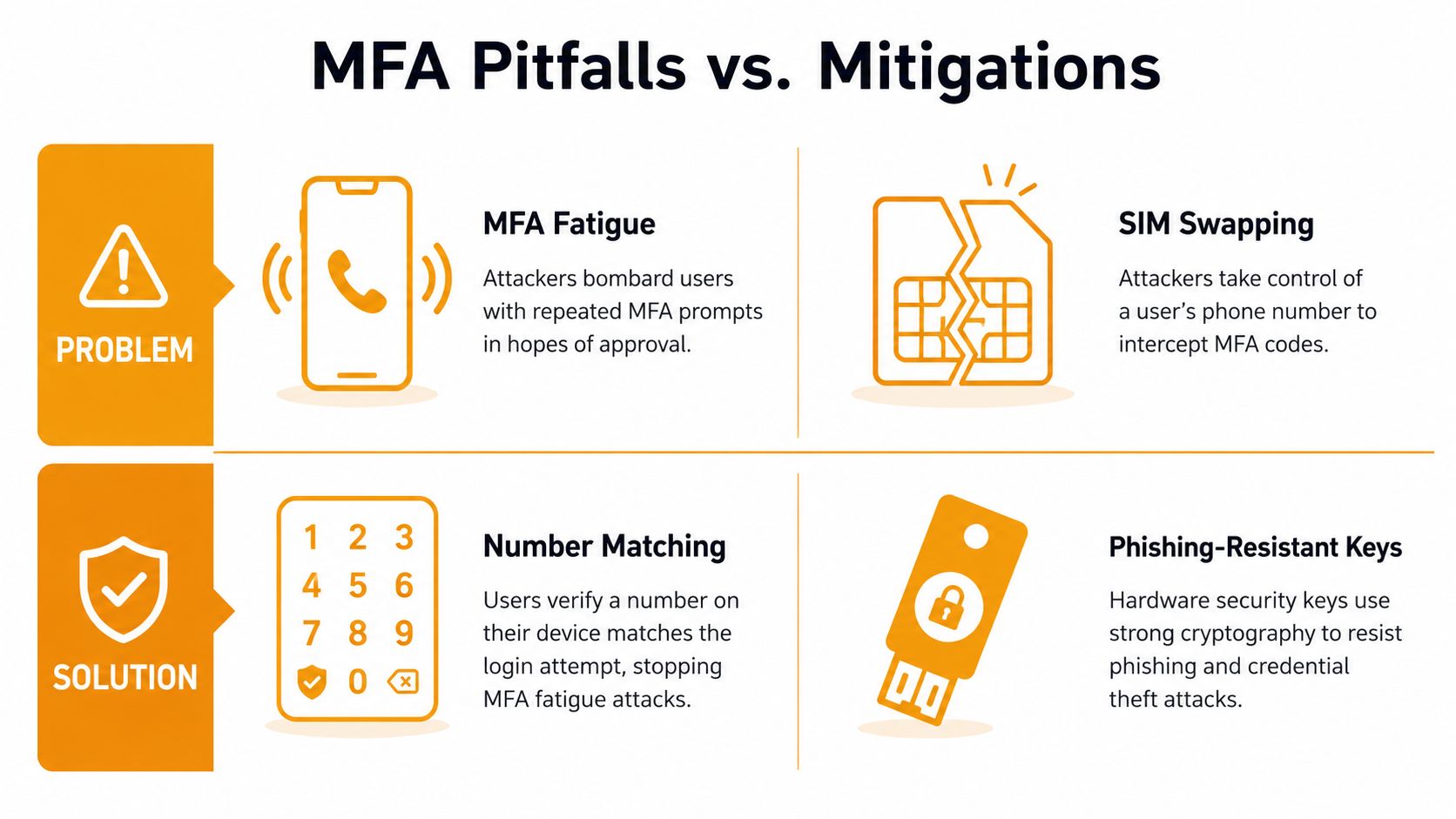
Adversary-in-the-middle phishing uses a proxy site to relay a login in real time. The attacker can capture credentials and session material even though the user completed MFA. Retire SMS and ordinary push for privileged accounts, and use FIDO2, Windows Hello, or platform passkeys that bind the authentication to the legitimate origin.
The second factor isn't the end of the sign-in story. The authenticated session needs protection too.
Token theft is a separate problem. An attacker who steals a browser cookie may continue using the account without repeating the original MFA challenge. Reduce exposure with shorter session lifetimes, continuous access evaluation where Entra supports it, device controls, and token-binding capabilities where available.
Partial deployment creates another blind spot. A company may protect Microsoft 365 while leaving VPN, RDP, a legacy administration portal, or a service account outside the policy. Build a coverage map from identity-provider sign-in logs and gateway records. Mark each ingress path as enforced, transitional, exempt with approval, or unknown.
Recovery paths deserve the same scrutiny. Help desk resets, backup codes, and alternate email addresses can become the easiest route around MFA. Require out-of-band verification, limit reset attempts, document approvals, and review recovery events. For broader technical context, this video on MFA security pitfalls can support an internal awareness discussion, but staff still need a written procedure for suspicious prompts and lost devices.
Your 30-Day MFA Action Checklist
A focused 30-day program can produce meaningful coverage without asking a small IT team to redesign every application at once. Assign one owner, keep an exception register, and measure coverage by account and access path.
Week 1
- Enable number matching: Turn it on for Microsoft 365 or Google Workspace push prompts.
- Protect privileged identities: Require MFA for global administrators, cloud administrators, password-reset operators, and emergency accounts.
- Document recovery: Test backup codes, device replacement, and help desk verification.
Week 2
- Audit remote access: Enroll VPN concentrators, RDP gateways, SSH bastions, and third-party SSO.
- Remove shared access: Replace shared administrator credentials with named accounts and delegated permissions.
- Review logs: Identify sign-in paths that bypass the primary identity provider.
Week 3
- Upgrade privileged factors: Move administrators and finance users from SMS and ordinary push to Windows Hello, Touch ID, platform passkeys, or FIDO2 keys.
- Restrict fallback: Disable SMS fallback for high-risk accounts where the platform permits it.
- Check contractors: Confirm named access, ownership, expiration, and offboarding.
Week 4
- Tighten sessions: Set an idle and absolute session policy appropriate to the business risk, then test user impact.
- Validate coverage: Pull reports from Entra ID or Google Workspace and confirm that protected applications, VPN, RDP, and administrative paths appear in the results.
- Record evidence: Save policy settings, enrollment reports, exceptions, recovery tests, and approval records.
This sequence turns MFA into a maintained operating control. It strengthens compliance evidence, reduces account-takeover exposure, and shows the owner exactly which systems remain transitional rather than hiding behind a single “MFA enabled” setting.
IT Cloud Global, LLC helps Houston businesses design and manage MFA across Microsoft 365, cloud platforms, VPNs, remote desktops, endpoints, and recovery workflows. If your team needs help finding uncovered access paths or rolling out phishing-resistant authentication without disrupting operations, visit IT Cloud Global, LLC to discuss a practical managed IT and security plan.