


Ethernet Installation Cost: Smart Budget Tips
A typical commercial Ethernet installation runs $125 to $400 per Cat6 drop, and a small 10-drop office usually lands around $2,750 to $14,000. Labor, not cable, drives most of the final price, so the number on the first quote is only useful if you know what work is included.
That's the reality in Houston offices right now. A warehouse conversion, a strip-center suite, or a clean office buildout can all use the same cable class and still produce wildly different bids because access, testing, patching, and restoration change the labor hours fast.
Table of Contents
- What Ethernet Installation Really Costs in 2026
- What's Included in a Per-Drop Price
- Cable Categories and How Each One Moves the Price
- Site Conditions That Significantly Increase Labor Costs
- DIY Versus Hiring a Professional Installer
- Sample Ethernet Installation Scenarios for Houston Businesses
- How to Compare Quotes Without Getting Burned
- Planning Your Ethernet Installation the Smart Way
What Ethernet Installation Really Costs in 2026
A 12-person Houston marketing agency moving into a converted warehouse does not need mystery pricing, it needs a hard range. For a setup like 14 network drops, the commercial benchmark is $125 to $400 per Cat6 drop, and the project math scales quickly as the count rises. The broader market picture lines up with HomeAdvisor's computer network installation guide, which puts a standard computer network around $415, with a typical range of $186 to $676, low-end projects near $85, and complex installs reaching $1,580.
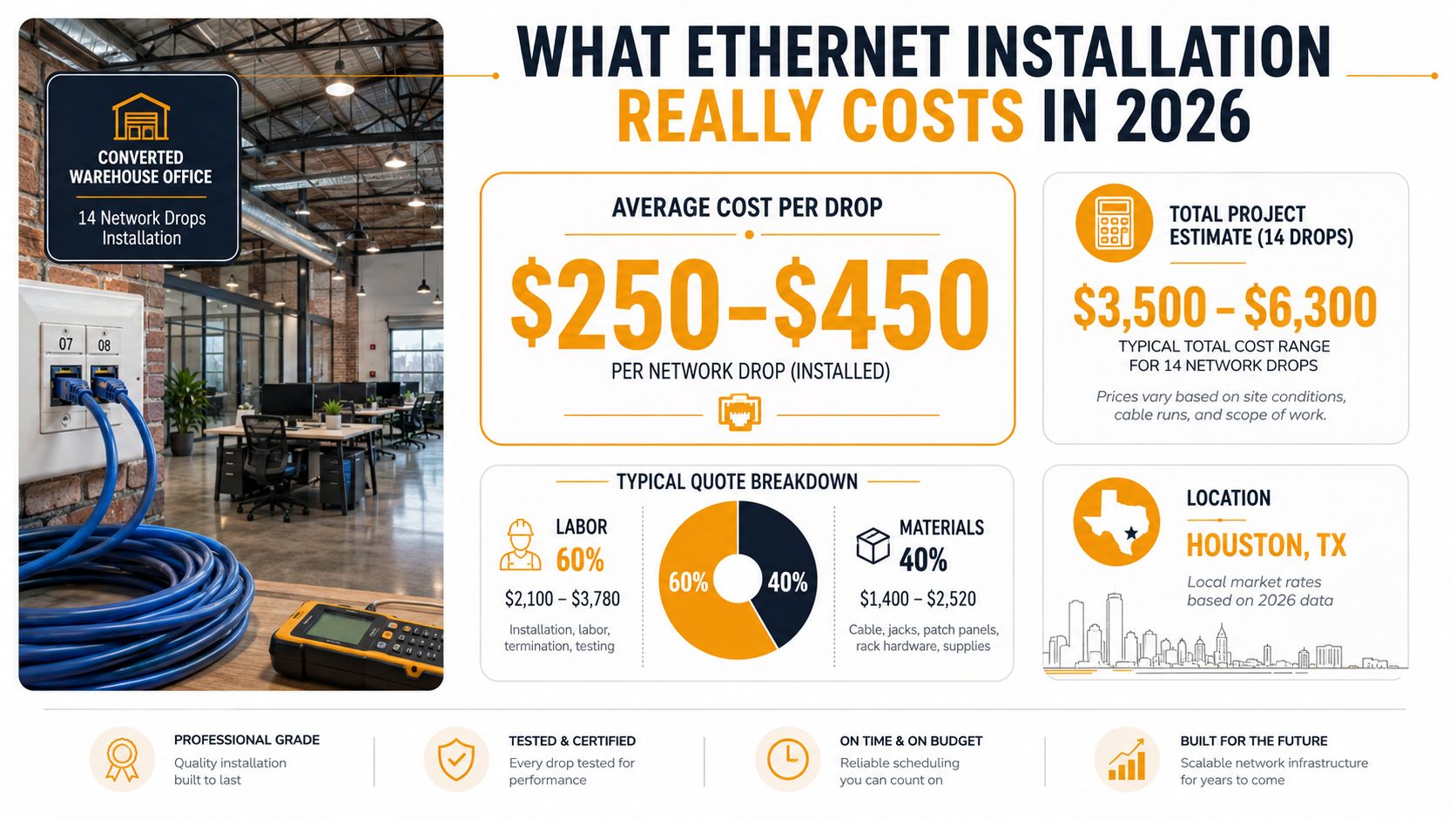
For business owners, the useful takeaway is simple. Ethernet installation cost is a project cost, not a cable cost, and the per-drop number only means something when you know the building conditions around it. A small office retrofit can stay near the lower end when runs are short and ceilings are open, but the total climbs fast when the crew has to fight through finished walls, long routes, or extra testing.
Practical rule: If a quote only gives you a per-drop number, you do not know the final price. You need the labor scope, the testing scope, and the restoration scope before you can compare bids fairly.
A good way to sanity-check the budget is to compare the bid against a calculator that forces you to think about scope instead of just port count. The calcs for home services calculator is useful here because it keeps the conversation grounded in project assumptions, not wishful thinking.
Residential installs are often cited at $200 to $800 per project, while commercial Ethernet work can begin around $1,000 and rise to $5,000 or more according to the same HomeAdvisor benchmark. That gap exists because business installs usually involve more drops, more labor, more documentation, and more coordination around active spaces.
What's Included in a Per-Drop Price
A bid for a single drop should read like a scope sheet, not a mystery number. The quote has to cover the cable run, termination at the wall and in the rack, labeling, and test results. For commercial work, $100 to $250 per drop is a practical benchmark because it usually includes cable, termination, labeling, wall hardware, and certification testing, while labor generally takes 60 to 70 percent of the total cost according to The Network Installers' Ethernet installation cost guide.
The parts you should expect to see
A fair bid usually rolls several line items into that per-drop number:
- Cable material, the actual Cat5e, Cat6, Cat6A, or fiber run.
- Keystone jack and wall plate, the endpoint hardware in the room.
- Patch panel port, the termination point in the closet or rack.
- Labeling and documentation, which keeps future troubleshooting sane.
- Certification testing, which proves the run works to spec, not just that it links.
Those items are not optional extras. A clean quote separates them clearly, for example, cable at one rate, termination at another, and testing as its own charge or included deliverable. That format lets you see whether you are paying for material, labor, or a padded markup. If the contractor hides all of it inside one vague line called “installation,” expect the final invoice to wander.
Why labor overwhelms material cost
The cable itself is rarely the reason a quote balloons. The money goes into the time spent getting from point A to point B, especially when the installer has to lift ceiling tiles, route around existing systems, or terminate and test every run cleanly. That is why the same drop count can look cheap on paper and turn into a much higher final invoice.
Practical rule: Ask for the drop count, the number of terminations, the test method, and the documentation deliverable on every bid. If those four items are not spelled out, the quote is incomplete.
The strongest bids separate materials, labor, and testing so you can compare apples to apples. A clear line item list looks like cable at one price, termination at another, and certification testing called out by name. If a vendor will not break it out that way, assume the hidden work is where the margin lives.
Cable Categories and How Each One Moves the Price
Cable choice matters, but not in the simplistic way many quotes imply. Cat5e is still acceptable for some basic business uses, Cat6 is the default for most Houston SMB work, Cat6A is the better call when you want more headroom, and fiber changes the job entirely because you're buying a different skill set, different termination gear, and different testing discipline. Commercial guides commonly price Cat5e at $125 to $300, Cat6A at $175 to $500, multi-mode fiber at $300 to $700, and single-mode fiber at $350 to $900 per drop, while a 2026 structured cabling guide reports $125 to $400 per Cat6 drop installed and tested in business environments structured cabling pricing guide.
Cable Class vs Per Drop Cost
| Cable Class | Typical Use | Per-Drop Range |
|---|---|---|
| Cat5e | Basic office connectivity, legacy refreshes | $125 to $300 |
| Cat6 | Mainstream SMB office and retail runs | $125 to $400 |
| Cat6A | Higher headroom, denser networks, more futureproof builds | $175 to $500 |
| Multi-mode Fiber | Backbone and riser work inside buildings | $300 to $700 |
| Single-mode Fiber | Longer backbone links and more demanding links | $350 to $900 |
The smart move for most SMBs is boring for a reason. Cat6 usually makes sense when you want a good balance of cost and capability. Cat6A earns its keep when you expect denser wireless, PoE-heavy endpoints, or you don't want to revisit the cabling soon.
Fiber belongs in backbone and riser work, not as a reflex for every desk. It costs more because the terminations are less forgiving and the test gear is more specialized. That higher price is justified when distance, interference, or building layout makes copper the wrong tool.
Best fit, not best spec: Buy the cable class that matches your actual use, not the one that sounds futureproof in a sales deck. Overbuilding every drop wastes budget, underbuilding creates a second project.
Use Cat5e only if the use case is modest and you're comfortable with less headroom. Use Cat6 for the bulk of ordinary office builds. Step up to Cat6A or fiber only when the network design calls for it.
Site Conditions That Significantly Increase Labor Costs
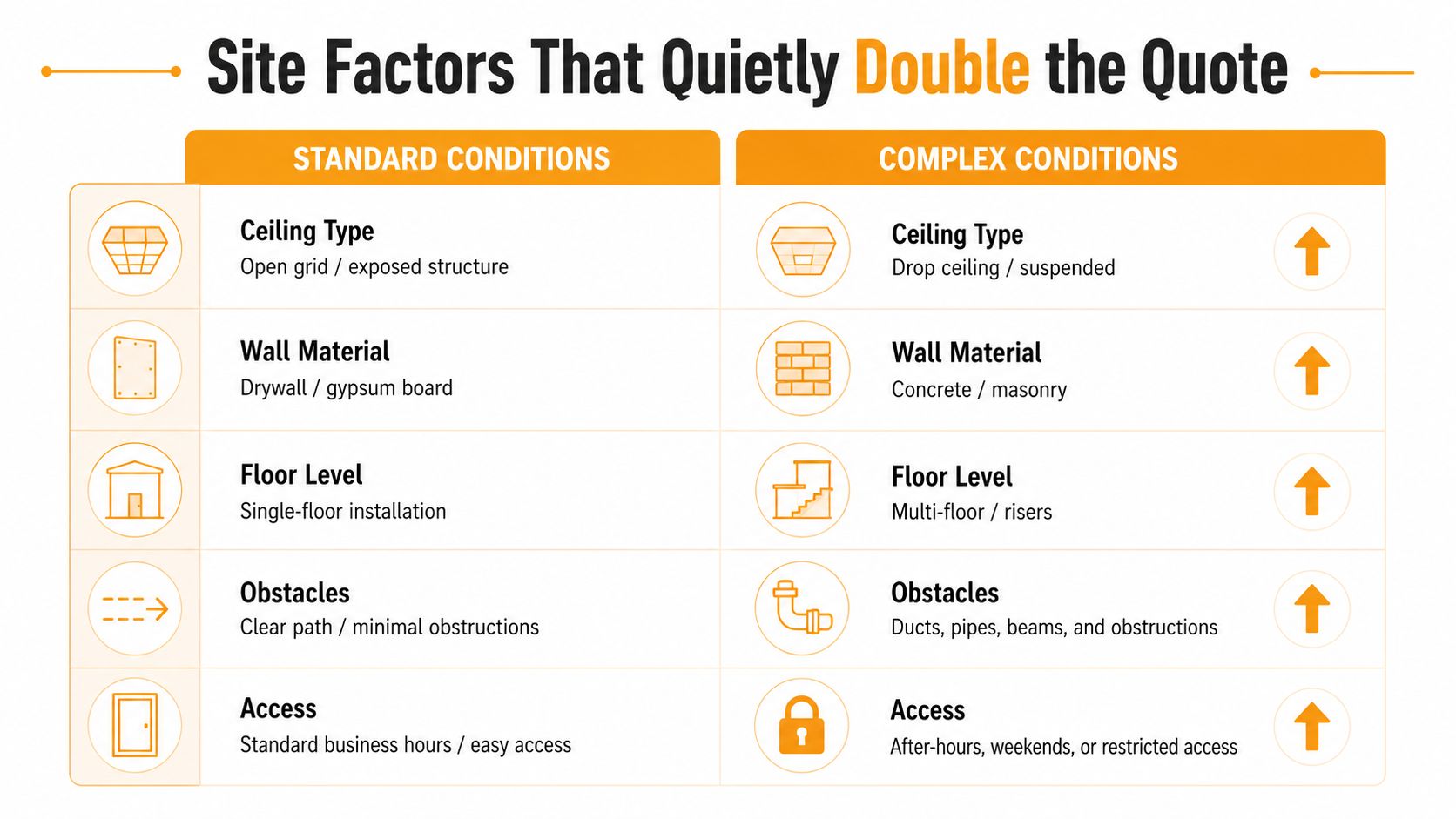
Two offices can have the same drop count and very different labor bills. The building sets the difficulty level, and installers price that reality whether they spell it out or roll it into a lump sum. The biggest swings come from ceiling access, wall construction, vertical routing, and the restoration work needed after the cable is in.
What makes a quote jump
Open ceilings give the contractor room to work. Pulls go faster, terminations are easier to reach, and testing happens without fighting hidden pathways. Finished tenant space changes the whole job. Concrete, masonry, tight plenum spaces, and walls with no clean access all slow the crew down because every run takes longer and every opening has to be handled carefully.
Multi-floor builds add more friction. Vertical risers, fire-stopping, conduit, and after-hours access all take real time, and that time shows up in the invoice. A clean daytime office pull is one kind of job. A project that needs evening work, tenant coordination, and permit handling is a different price class.
The same pattern shows up in camera and other low-voltage work. Practical home security camera wiring tips are useful because they force you to think about access, routing, and finish work before anyone starts cutting into walls. That is where quotes start to drift if the site was never walked properly.
Read the site before you price it
Walk the space with the installer and check these items:
- Ceiling type, open grid is easier than a finished or suspended ceiling.
- Wall material, drywall is usually friendlier than concrete or masonry.
- Floor count, single-floor work is far simpler than riser-heavy builds.
- Obstacles, ducts, pipes, and beams add labor every time they block a path.
- Access window, standard business hours are easier than after-hours or restricted access.
Use those details to judge the quote, not the sales pitch. If the contractor has to fight the building, you pay for the fight. If the space is open and easy to work in, the bid should come down. That is why two bids for the same drop count can both be honest and still look far apart.
DIY Versus Hiring a Professional Installer
A capable internal IT team can absolutely handle some cabling work. If the ceiling is open, the run count is modest, and the goal is a lab, a temporary workspace, or a few simple drops, DIY can make sense. But once the job involves fire-stopping, plenum-rated cable, patch-panel documentation, or certified test results, you're in professional territory.
What DIY actually saves
DIY saves labor, but it does not erase the need for tools. A real job still needs a punch-down tool, cable tester, labels, wall plates, and enough time to do clean terminations. If you skip certification testing, you've only proved the link lights up, not that the run is worth keeping.
The hidden risk is not just sloppiness. It's rework. A bad pull, a poor termination, or a failed test can wipe out the savings because the space has to be reopened and repaired again.
When to stop and hire out
Professionals earn their money when the job gets messy. That means code-sensitive work, finished spaces, backbone links, or any install where the owner wants warranty-backed results and clean documentation. A contractor who certifies the runs and hands over the test reports is selling predictability, not just manpower.
If the cabling is going to stay in the walls for years, pay for the person who can prove it was installed right.
DIY is fine for temporary or low-risk work. Professional installation is the better bet when downtime, compliance, or future troubleshooting matters more than saving a little on labor.
Sample Ethernet Installation Scenarios for Houston Businesses
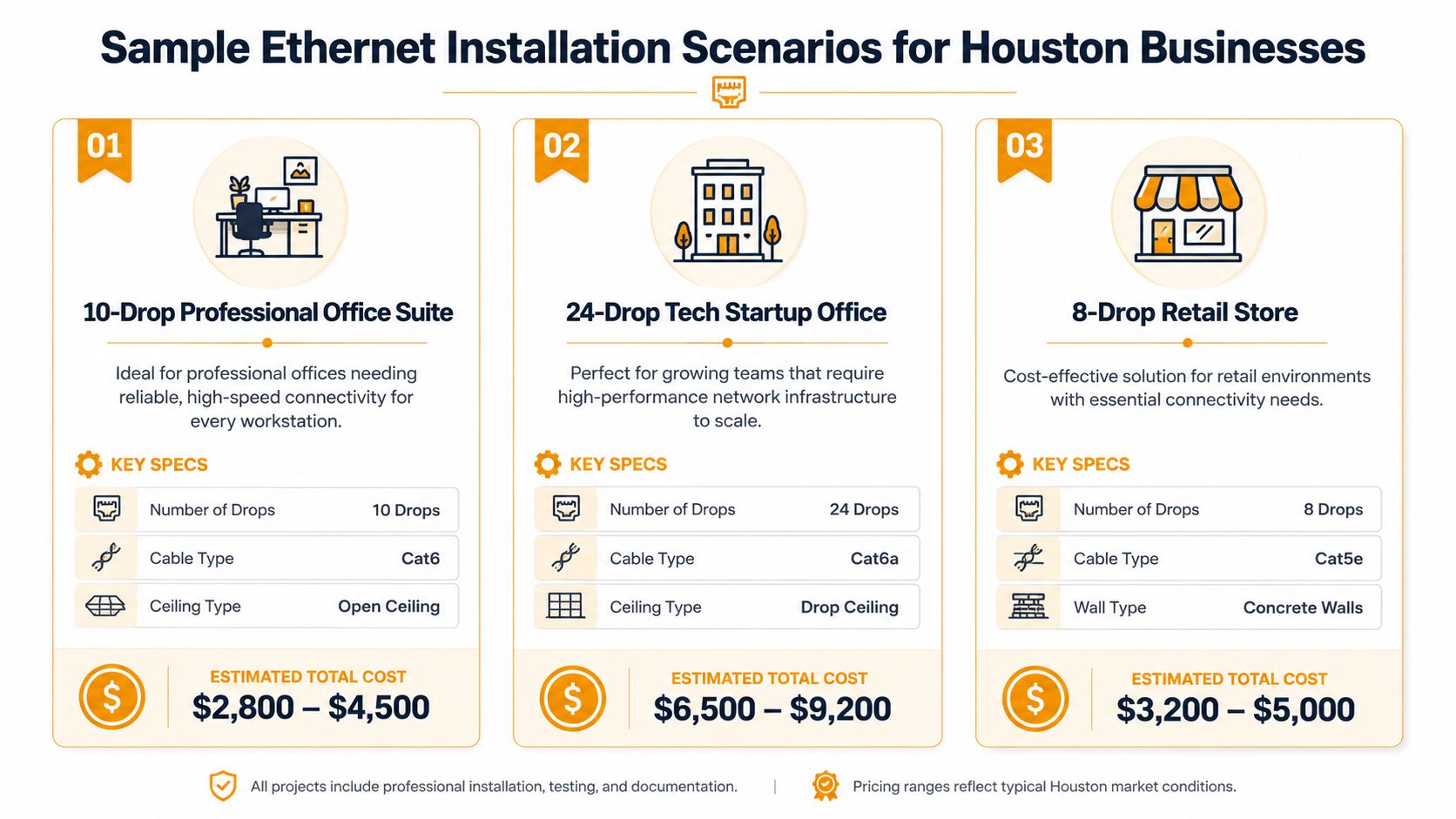
A real quote makes sense when you can see your own building in it. The three most common Houston SMB patterns are a small office suite, a mid-size single-floor company, and a larger multi-floor or industrial build where fiber starts to matter. The numbers below are reference projects, not hard rules, but they map closely to how contractors price in the field.
Small office suite
A 10-drop professional office suite in a strip-center or similar buildout is the cleanest reference point. A quote in the $2,800 to $4,500 range is believable when the ceiling is open and the cable is Cat6. The contractor is usually pricing straightforward labor, a modest material list, and standard testing. For many small professional offices, that is the “normal” job, not the exception.
Mid-size office floor
A 24-drop tech startup office with Cat6A and a drop ceiling is already more involved. A total around $6,500 to $9,200 is a realistic band when the build has more terminations, more labeling, and more time in the air. This is the point where planning matters, because the count of endpoints starts to drive rack organization and testing time as much as pulling cable does. For contractors that focus on structured cabling, a vendor page like this structured cabling contractor resource is a useful reminder of how scope and deployment type affect the final bill.
Retail space with tougher access
An 8-drop retail store with Cat5e and concrete walls can still get expensive fast. A total around $3,200 to $5,000 makes sense when the installer has to work around hard wall material and tighter pathways. That is the kind of project that punishes anyone who quoted it like an easy office pull.
If you want the same logic in a broader services context, IT Cloud Global's network cabling services in Houston reflects the kind of scope owners should expect from a serious low-voltage provider. The lesson from all three scenarios is simple. Drop count matters, but the building and the access pattern decide whether the number stays civilized or gets ugly.
How to Compare Quotes Without Getting Burned
A clean quote should read like a scope document, not a guess. If the installer can't itemize the work, you don't really have a bid, you have a number. Demand line items for drops by category, patch panel ports, testing and certification, firestopping, conduit, permit fees, and restoration.
Questions to ask before you sign
- What's included in each drop? Make the installer spell out cable, termination, faceplate, and patch-panel work.
- Is testing included? Ask whether the certification report is part of the price or a separate add-on.
- Who owns the documentation? You want as-builts, labels, and test results handed over with the job.
- What costs extra? Conduit, fire-stopping, drilling, and restoration should not show up as surprises later.
- What is excluded? If the quote leaves out cleanup or wall repair, get that in writing now.
This is also the time to see whether the vendor understands the building. A contractor who talks clearly about access, ceiling type, and routing usually knows the job well. A contractor who only repeats a per-drop price is often setting you up for change orders.
A better bid is the one that tells you where the cost lives. If the line items are transparent, you can compare vendors directly. If they aren't, the cheapest quote is usually the one that costs you most later.
Planning Your Ethernet Installation the Smart Way
Budget around three numbers, not one. Anchor on per-drop price, remember that labor is the dominant share of the bill, and compare the total project range against your building conditions before you approve anything. If a bid feels low, check what it left out.
For a simple Houston business install, use the how to guides from Trupeer Inc. as a reminder that the best projects come from a clear process, not improvisation. The same mindset applies here, and the IT Cloud Global business network setup guide is a practical starting point if you're mapping cabling into a broader office network plan.
Print this before your first vendor walkthrough. Count the drops, note the ceiling type, mark concrete walls, list any fire-rated penetrations, and ask who handles testing and cleanup. That's the fastest way to keep an Ethernet bid honest.
IT Cloud Global, LLC designs and installs structured cabling for Houston businesses that need clean runs, clear documentation, and a network built to last. If you're planning an Ethernet install and want a team that understands low-voltage cabling, on-site deployment, and practical budget control, visit IT Cloud Global, LLC and ask for a quote that spells out the work line by line.