


On Premises to Cloud Migration: A Practical Guide 2026
You're probably staring at a half-finished Microsoft 365 rollout, a couple of aging servers nobody wants to touch, and a monthly bill that keeps climbing because the licensing stack got messy years ago. That's the usual SMB cloud conversation in Houston, and the mistake is thinking the problem is which cloud to buy. The primary problem is the lack of a written migration sequence, a dependency map, and a rollback plan that somebody has tested.
On premises to cloud migration is no longer an experiment. By 2024 to 2025, it had already become the mainstream operating model in major markets, with LogicMonitor reporting that pre-COVID, 35% of workloads resided on-premises, and IT decision makers expected that share to fall to 22% by 2025. In parallel, a 2024 CDW survey found that about 45% of organizations had already shifted at least half of their applications to public clouds, with 35% expecting to move at least half of the remaining applications within three years, which points to a deeper shift in how SMBs should think about infrastructure, identity, and operations. LogicMonitor's cloud migration study
A lot of migration guidance reads like it was written for a Fortune 500 IT department. SMBs don't live that life. They need a playbook that assumes a small team, mixed workloads, a short cutover window, and a blunt choice between doing it themselves or handing it to a managed partner.
Table of Contents
- Why SMBs Need a Written Migration Playbook
- Running a Real Readiness Assessment and Discovery
- Choosing Your Target Platform and Migration Strategy
- Building the Migration Plan Across Networking, Identity, Data, and Apps
- Testing, Cutover, Rollback, and Disaster Recovery
- Cost, Licensing, and Compliance Considerations
- Post-Migration Optimization and When to Bring in a Managed Partner
Why SMBs Need a Written Migration Playbook
If your environment looks anything like the SMBs I've cut over, the pattern is familiar. One server is past its comfortable life, the Microsoft 365 project is half done, file shares are cluttered with old reports, and everyone wants a cloud answer without paying for a six-month consulting engagement. That's exactly when people start making platform decisions before they've done discovery.
A written playbook matters because the usual failure isn't bad technology. It's bad sequence. Teams skip inventory, skip dependency mapping, skip rollback planning, and then act surprised when a simple file move breaks a line-of-business app or an identity change locks out users.
The business case is also bigger than a one-time IT project. Gartner forecast worldwide end-user spending on public cloud services at $723.4 billion in 2025, up from $595.7 billion in 2024, a 21.5% year-over-year increase. That tells you cloud is now part of operating expense planning, not just a modernization initiative. Gartner cloud spending forecast context
Practical rule: Don't start by picking a migration tool. Start by writing down why the business is moving, what must stay up, and what breaks if you get the sequence wrong.
A good SMB playbook should answer four things before anybody touches production. First, what's in the environment. Second, what depends on what. Third, what the target platform is. Fourth, whether the team can realistically run the project in-house.
That's the line this guide draws. No enterprise theater. No generic architecture diagrams. Just the decisions that matter when you've got a small team, a live business, and a narrow window to get the move done.
Running a Real Readiness Assessment and Discovery
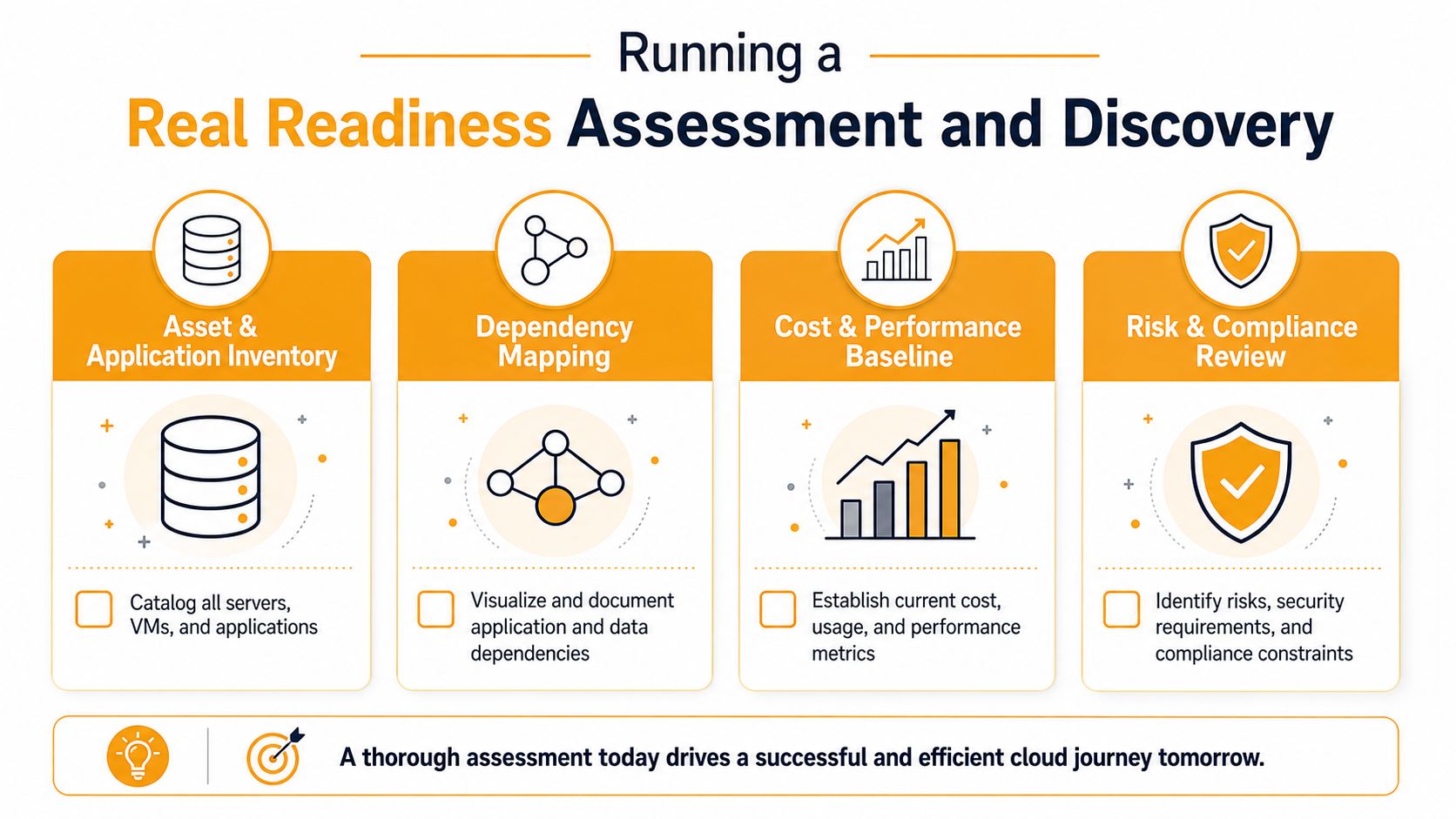
Discovery is where most migrations are won or lost. If you don't know every server, every app, every file share, and every identity dependency, you're not migrating. You're guessing with a budget attached. A formal readiness assessment matters because organizations that perform one before migration have 2.4 times higher success rates, and industry data also shows only 36% of data migration projects stay within budget and 46% finish on deadline. Cloud migration readiness and project performance
Build the inventory before you touch anything
Start with a full asset and application inventory. That means physical servers, virtual machines, databases, SaaS dependencies, file shares, scheduled jobs, printers if they're tied to workflows, and every app somebody says is “critical” without being able to prove it. Tools like RVTools, Azure Migrate, AWS Application Discovery Service, and reports from the Microsoft 365 admin center help, but interviews matter just as much as scanners.
You need to talk to the people who use the systems. Owners, power users, and the one person in accounting who knows which report breaks every Friday. Shadow IT usually shows up here, and it's often uglier than procurement records suggest.
Map dependencies and baseline risk
Inventory is not enough. You need a dependency map that shows which apps talk to which databases, what uses Active Directory or Entra ID, and which file shares are hardcoded into workflows. If you skip this, the first cutover will expose it for you.
Also baseline security before you migrate. Document IAM, encryption standards, network restrictions, and any compliance constraints that already exist. A cloud move should not be the moment you discover that a service account has been shared for ten years or that nobody knows who owns a database. For a sustainability-minded perspective on why inventory and efficiency matter together, browse Faberwork data center sustainability in parallel with your assessment work.
If discovery turns up duplicate reports, stale data, or systems nobody uses, retire them before the move. Migrating junk is still junk, just more expensive junk.
That checklist is the one I'd hand to an internal owner before approving any migration work: inventory, dependency map, data-quality profile, security baseline, and a list of candidates for retirement. If those aren't done, the project isn't ready.
Choosing Your Target Platform and Migration Strategy
Pick the target platform based on what the business already lives in, not on whatever sales pitch arrived last week. Microsoft-heavy SMBs usually land in Azure and Microsoft 365 because the identity model, desktop stack, and collaboration tools already align. AWS makes sense when the workload mix is broader, the partner ecosystem matters, or you need depth across many service categories. Google Cloud is strongest when data and analytics are the center of gravity. Microsoft 365 alone is enough for some SMBs that are really escaping on-premises Exchange, file servers, and collaboration sprawl rather than rebuilding infrastructure.
Match the strategy to the workload
Don't default to refactoring. That's where SMB projects go sideways. A stable internal app that just needs to move should usually be lift-and-shift. A workload that will benefit from managed services but doesn't need a redesign is a replatform candidate. A customer-facing app with strategic value might justify refactoring, but only if the business can absorb the added cost and risk. Hybrid is the right call when compliance, hardware, or timing says some systems should stay put for now.
| Strategy | Best Fit | Main Trade-off |
|---|---|---|
| Lift-and-shift | Legacy apps, tight timelines, low-change systems | Fastest move, least modernization |
| Replatform | Workloads that benefit from managed databases or PaaS | Some change, some extra complexity |
| Refactor | Strategic apps needing cloud-native design | Highest effort and risk |
| Hybrid | Staged transitions or compliance-limited systems | More complexity during transition |
That's the decision rule I use in real life. If the workload is stable and the goal is relocation, keep it simple. If the app is strategic and the budget can support it, modernize carefully. If someone wants to refactor everything because it sounds cleaner, push back.
For a practical service-side reference point, these AWS cloud migration best practices are useful when AWS is on the shortlist. They're not the whole answer, but they're a good reminder that the platform choice and the migration approach have to fit together.
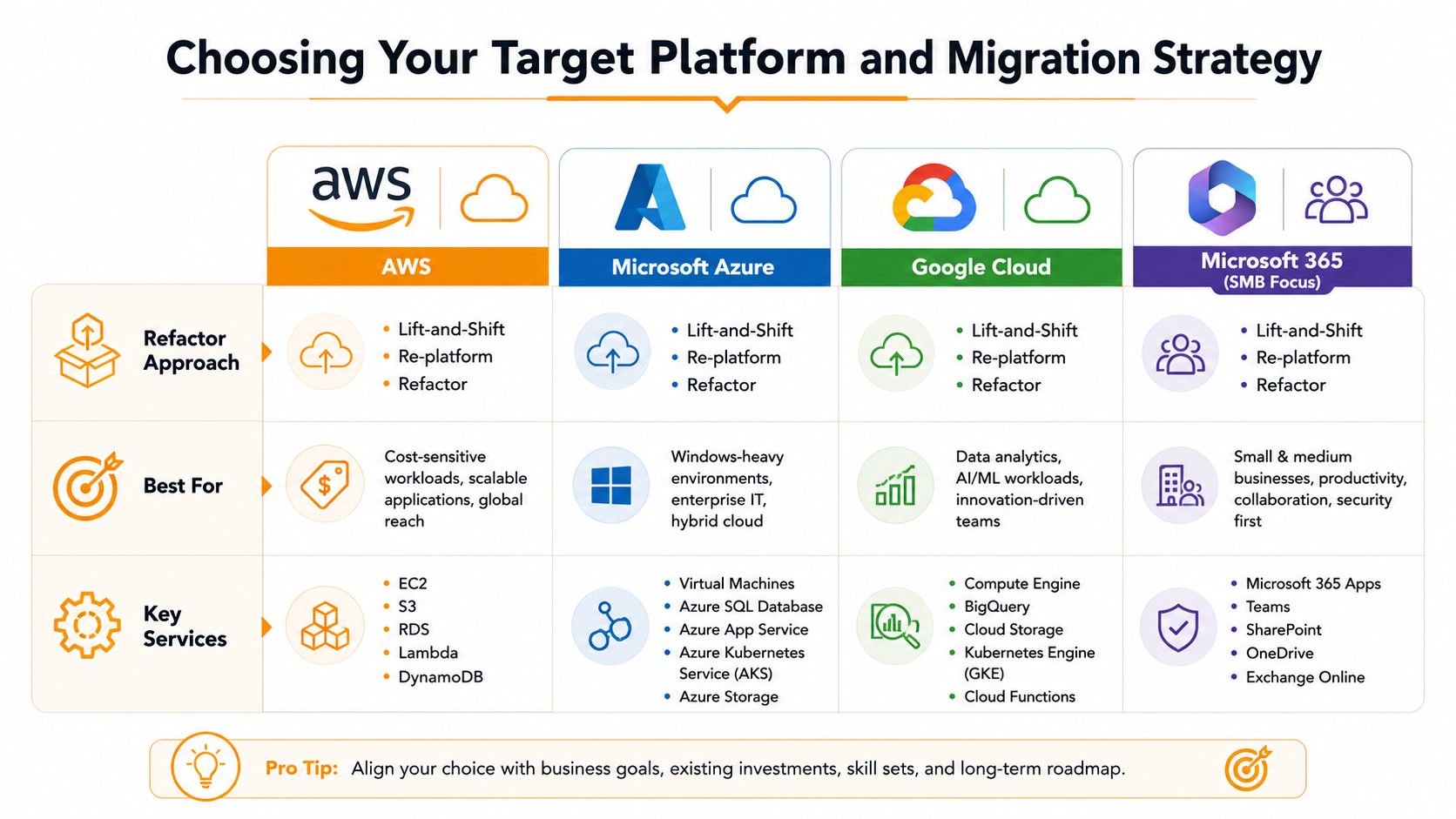
The right choice is the one your team can operate after cutover. That's the part most comparisons ignore.
Building the Migration Plan Across Networking, Identity, Data, and Apps
The migration plan needs four tracks, and they have to be sequenced in the right order. Networking comes first, because nothing else matters if users can't reach the new environment. Identity comes next, because access control is the spine of the whole project. Then data, then applications.
Start with networking and identity
Set up the connection path before the move. That may mean a site-to-site VPN, an ExpressRoute-style private connection, or a Direct Connect-style link, depending on the platform and budget. Build the cloud network with a hub-and-spoke pattern, and put firewall-as-a-service or equivalent controls in place so traffic inspection is not an afterthought.
Identity follows immediately. Get Entra ID, AWS IAM, or GCP IAM aligned with the migration target, then make sure hybrid join, conditional access, and role design are sorted before users ever hit production. If identity is messy, every later task becomes harder.
Move data before customer-facing apps
Data is where migrations get expensive when nobody planned for cleanup. Use the discovery phase to fix data-quality issues, classify what belongs in a database versus a file share, and decide what should be replaced with SharePoint or a cloud file service. For broader backup and protection planning, the cloud data protection guide is a worthwhile reference while you design the storage layer and retention rules.
Cutover rule: The first workload should be non-mission-critical. If the pilot fails, you want a learning event, not an outage.
That first wave should prove your cutover procedure, not impress anybody. Move something low risk, something the business can live without for a day, then document exactly what happened. Once that works, expand in waves.
A simple deliverable order helps keep the team honest:
- Network live: connectivity tested, routing validated, firewall rules in place.
- Identity ready: users can authenticate, conditional access is working, service accounts are documented.
- Data moved: pilot dataset verified, file or database cutover path confirmed.
- Apps in waves: lowest-risk workload first, customer-facing systems later.
The mistake I see most often is trying to do everything at once. A wave plan keeps the team focused and stops the migration from becoming a permanent side project.
Testing, Cutover, Rollback, and Disaster Recovery
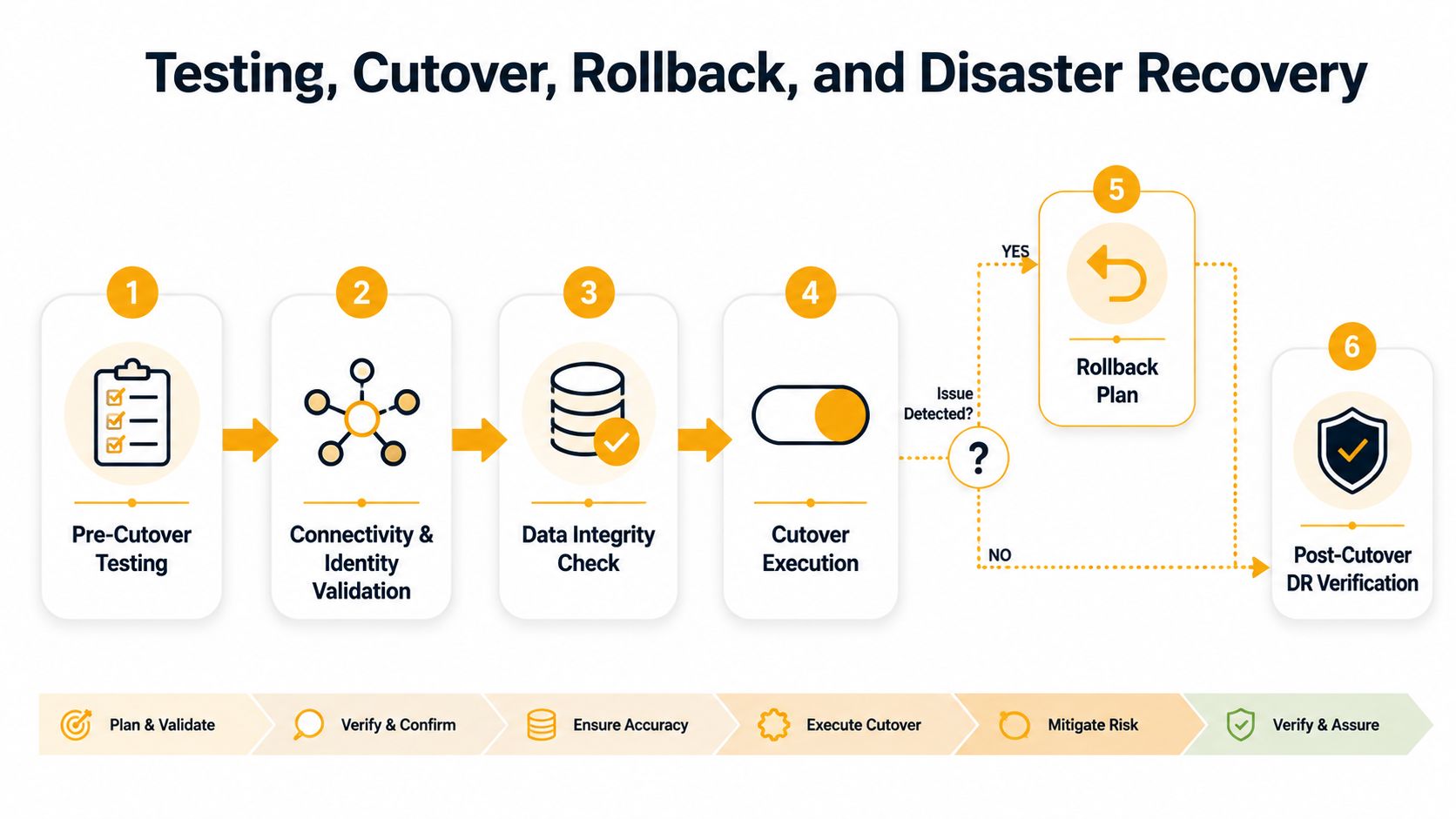
Testing is what separates a controlled cutover from a weekend of panic. You need to validate connectivity, identity, data integrity, application function, and performance before you touch live traffic. If any of those fail, the cutover window doesn't open.
Run the tests in the right order
Start with connectivity. Then verify identity and sign-in paths. Then validate data integrity by comparing source and target records. After that, run functional testing on the migrated app, followed by performance checks that mirror real usage patterns.
A clean cutover sequence is straightforward. Freeze changes. Snapshot on-premises systems. Sync the delta. Switch DNS or endpoint connections. Validate user access and app behavior. Monitor closely until the team is satisfied nothing's bleeding.
Keep rollback open longer than you think you need
Most SMBs talk about rollback and then close the door too early. Don't do that. Keep the rollback path available through the full cutover window, and make sure someone has the authority to trigger it if validation fails. A rollback plan that no one is willing to use is theater.
For a field checklist that's easy to adapt, this disaster recovery testing checklist is a solid companion to your cutover runbook.
SMB translation: RPO is how much data you can afford to lose. RTO is how long the business can tolerate being down.
Your cloud landing zone should already include backups, replication, and a runbook before cutover begins. If the post-migration incident is the first time anyone reads the recovery plan, the plan wasn't ready.
Backup internet matters more than people admit. If the primary connection gets unstable during cutover, you'll want a secondary path already tested. Prevent downtime with backup internet before the weekend arrives.
Cost, Licensing, and Compliance Considerations
Cloud cost control starts with discipline, not discounts. You have to account for compute, storage, egress, managed service premiums, and the common mistake of leaving idle resources running after cutover. If you don't plan for that cleanup, the migration bill keeps running long after the project is over.
Licensing changes the math more than most SMB owners expect. If you already live in the Microsoft ecosystem, M365 and Azure-aligned licensing can tilt the total cost picture toward Microsoft because the stack is already in place. AWS or GCP can still be the better fit for some workloads, but existing licenses and admin familiarity matter in real TCO discussions.
Compliance is not abstract for Houston SMBs. HIPAA, PCI-DSS, CMMC for defense suppliers, and Texas data handling expectations all affect how you build the landing zone, which region you choose, and which controls remain your responsibility under the shared-responsibility model. The wrong region or a sloppy network boundary can create problems you won't notice until audit time.
Use the platform that matches the control burden
If the team needs strong Windows integration and wants to reuse Microsoft licensing, Azure usually deserves a hard look. If the workload is broad, the architecture is more platform-agnostic, or partner support matters more than ecosystem alignment, AWS often stays in the mix. If analytics drives the project, GCP should be evaluated on its own merits.
The point is simple. Don't buy cloud the way people buy office software. Match the control model, the licensing model, and the compliance burden to the workload. Otherwise, you'll end up paying for flexibility you don't use and controls you can't operate.
Post-Migration Optimization and When to Bring in a Managed Partner
The 90 days after cutover are where the ongoing work begins. Right-size compute, clean up storage, tag resources properly, turn off what nobody uses, and tighten IAM before the environment turns into a second mess. Turn on native monitoring and SIEM feeds early, not after an incident forces the issue.
Houston SMBs also need to be honest about capacity. If someone inside the company owns cloud operations, has time to learn the platform, and can keep up with tickets, in-house management can work. If the same two people are handling helpdesk, servers, users, security, and vendor calls, that model breaks fast.
A managed partner makes sense when the business needs steady-state services the internal team cannot cover around the clock. That includes ongoing cloud operations, M365 administration, monitoring, optimization, and hybrid cloud management. IT Cloud Global, LLC sits in that category, with cloud services, Microsoft 365 administration, and managed support that can sit alongside internal ownership when the team wants a hands-on operator instead of a one-time project vendor.
Don't judge success by the cutover alone
Tie optimization back to the reason the migration started. If the original goal was lower friction, faster recovery, or cleaner collaboration, measure those outcomes after the move. If the project only changed where the servers live, the business paid for motion, not progress.
A clean milestone checklist keeps the next step obvious:
- Discovery complete with inventory and dependencies documented.
- Target platform and strategy chosen with workload fit agreed.
- Pilot cutover scheduled with a tested rollback path.
- Post-migration owner assigned for cost, security, and stability.
The two decisions that matter most are the ones people delay. Do the readiness assessment before vendor sales conversations get too far, and decide early whether migration plus operations stay in-house or go to a managed provider. That is how you avoid a rushed cutover that misses its RPO or runs far over budget.
IT Cloud Global, LLC helps Houston SMBs plan, migrate, and steady-state cloud environments across AWS, Azure, and Microsoft 365, with managed support that fits small teams that cannot absorb another full-time cloud role. If you are ready to stop guessing and get a real migration plan, visit IT Cloud Global, LLC and ask for help with discovery, cutover planning, and ongoing cloud operations.