


Vulnerability Scanning Services Explained for SMBs
Most SMB owners don't wake up worried about a scanner. They worry about the laptop that won't boot, the email that stopped syncing, or the firewall rule nobody remembers changing after a late-night fix. Then a patch goes in, the office runs fine, and a week later someone notices a forgotten cloud service, an exposed app, or an old server that never made it into the last cleanup.
That's where vulnerability scanning services earn their keep. They're not just a checkbox for audits. They're a regular way to check what's exposed, what's outdated, and what needs attention before a small issue turns into a messy outage or an avoidable incident. The UK National Cyber Security Centre advises regular scans, at least monthly, and immediate rescans after critical changes, which is a good sign that this has become an operational habit, not a once-a-year review NCSC vulnerability scanning guidance. For busy teams, that shift matters because security stops being a separate project and starts acting more like a routine health check.
A good scanner doesn't just list problems. It helps you see whether your business has the right coverage, whether fixes are getting closed on time, and whether the assets you care about are being checked. That's the difference between “we ran a scan” and “we know where we're exposed, and we can prove we're closing gaps.”
For a simple layering view of how that fits into broader protection, this security in layers overview is a useful companion.
Table of Contents
- Introduction to Vulnerability Scanning Services for Busy Teams
- How Vulnerability Scanning Really Works Under the Hood
- Types of Vulnerability Scanning Services Explained Simply
- From Findings to Fixes and How Often to Scan
- Benefits Limits and Blind Spots You Must Understand
- How to Choose Vulnerability Scanning Services and What They Cost
- Next Steps to Put Vulnerability Scanning Into Action
Introduction to Vulnerability Scanning Services for Busy Teams
A lot of SMBs are in the same place: they've patched laptops, updated a few servers, and maybe even paid attention to the firewall, but there's still one thing they can't fully see. An old test app is live, a cloud storage setting changed during a rushed project, or a vendor left a service exposed after a deployment. That's the kind of blind spot vulnerability scanning is meant to catch.
At its simplest, vulnerability scanning services are tools and managed processes that check your systems for known weaknesses. They compare what's running in your environment with known security issues, then flag what needs attention. In practice, that means looking across servers, endpoints, apps, and cloud services, not just one corner of the network.
Why this matters beyond compliance
Compliance is part of the story, but it's not the whole story. The bigger value is continuous visibility. New exposure appears when you add hardware, move workloads, apply patches, or reconfigure cloud services, so the risk picture changes faster than an annual checklist can keep up.
The UK NCSC's advice to scan regularly, at least monthly, reflects that reality NCSC vulnerability scanning guidance. Wiz's guidance goes further by treating scanning as a KPI-driven discipline, where teams track the percentage of assets scanned, the share of authenticated scans, and the percentage of critical or high-severity vulnerabilities closed within SLA, with a target above 95% for critical or high issues Wiz vulnerability scanning guidance. That's the fundamental change, scanning is no longer just about finding things, it's about whether the business is fixing them.
For an SMB owner, that's a lot like a property inspection. You don't just want to know that someone walked through the building. You want proof they checked the doors, the alarms, the wiring, and the rooms people rarely visit.
Practical rule: if a scan report doesn't help you answer “what's exposed, what's most urgent, and what got fixed,” it's not doing enough work for your business.
How Vulnerability Scanning Really Works Under the Hood
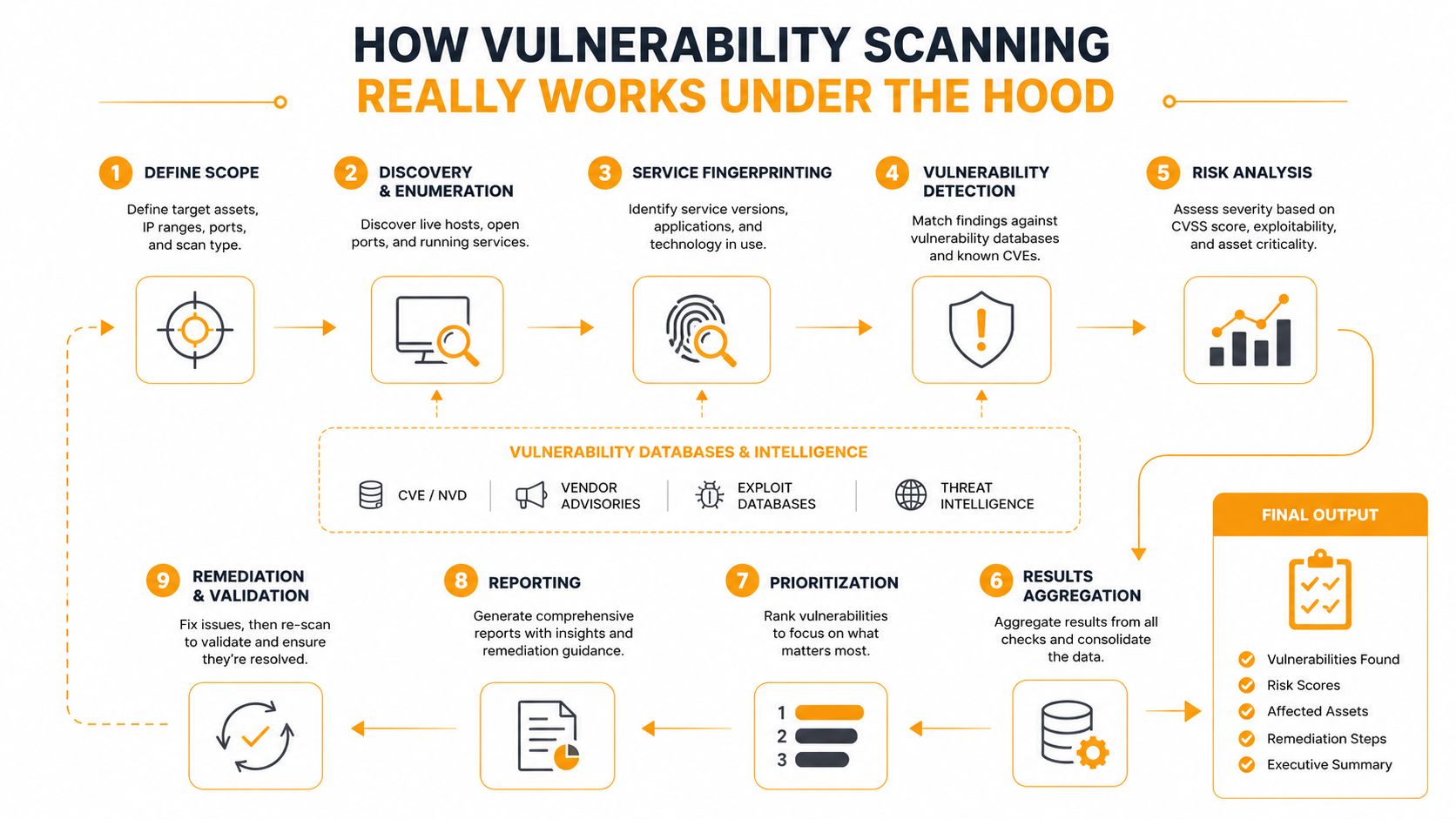
A scan is often thought of as a single pass, but the engine underneath is more like a building inspection with different levels of access. First comes discovery, where the scanner probes for live systems using ICMP, TCP, and UDP checks. Then it moves into enumeration and fingerprinting, which is where it identifies services, versions, and behavior patterns through banner grabbing and protocol analysis technical breakdown of vulnerability scanning services.
After that, the scanner matches those observations against a continuously updated CVE database. If a version, configuration, or service pattern lines up with a known issue, it gets flagged. That's how raw network visibility turns into actionable findings.
Why credentials change the quality of the result
The biggest difference between a shallow scan and a useful one is often authentication. An unauthenticated scan sees the outside of the building, what's exposed to the street. An authenticated internal scan goes inside with the keys, so it can see patch state, local misconfigurations, and installed software that surface checks can't detect technical breakdown of vulnerability scanning services.
That distinction matters because the same system can look fine from the outside and still be behind on patches inside the network. For a busy business, that's not a technical nuance, it's the difference between assuming you're covered and knowing.
Key concept: scan accuracy depends on inventory completeness and credentials. If the scanner can't see the asset, or can't log in where needed, the report will always be narrower than the real risk.
A useful way to think about it is this. External scans show what an attacker can see first. Internal authenticated scans show what your team needs to fix next.
A short video walkthrough can also help non-technical teams visualize the workflow.
Types of Vulnerability Scanning Services Explained Simply
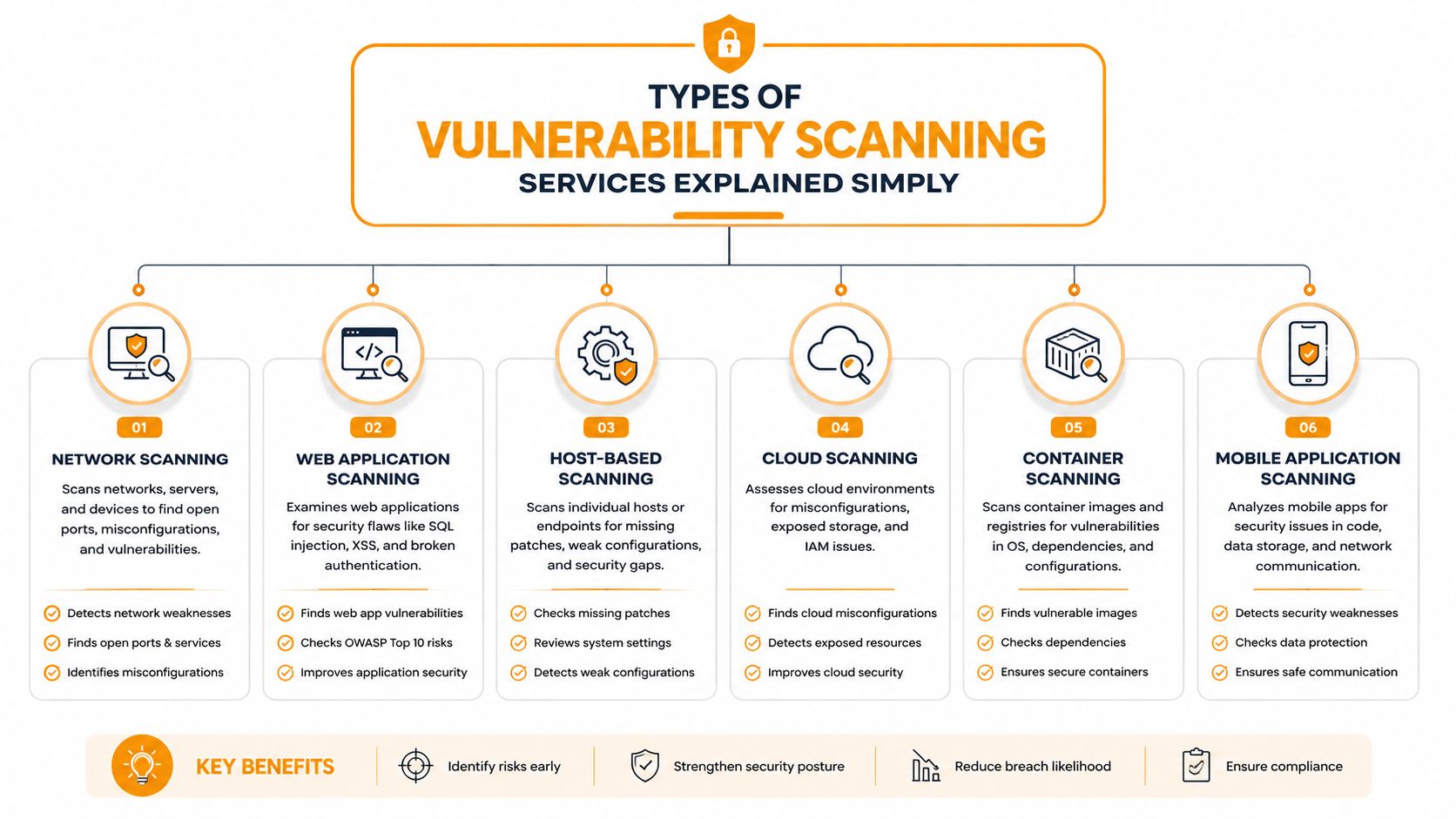
Not every scanner answers the same question. That's why proposals can sound similar while covering very different ground. If you're comparing vendors, it helps to think in terms of where they look and how they look.
External and internal network scanning
External scanning looks at systems the public internet can reach. It's useful for exposed services, firewall mistakes, and anything an outsider could probe first. Internal scanning looks inside the business network, which is where you often find patch gaps, stale systems, and local settings that never show up from the outside technical breakdown of vulnerability scanning services.
Web and application scanning
Web application scanning focuses on apps and their behavior, especially issues like injection flaws and scripting problems. If your business runs customer portals, internal dashboards, or cloud-hosted line-of-business apps, scanners help narrow the gap between infrastructure risk and application risk. For a deeper look at that category, this application security testing resource is a helpful companion.
Authenticated versus unauthenticated scans
This is the storefront versus back-office difference. An unauthenticated scan sees what's visible at the door. An authenticated scan goes inside, checks the shelves, and notices what's out of date behind the counter. If you only buy external scans, you may miss the misconfigurations that matter most inside the environment.
If you're mapping where risk lives, this understanding your attack surface guide is a useful way to frame the conversation. It helps connect scanner type to the broader question of what your business exposes.
Cloud and container scanning
Cloud workloads, containers, and fast-moving infrastructure need scans that keep up with change. These environments shift quickly, so a scan that only checks a static server list can miss the full picture. The more dynamic your stack, the more you want coverage that includes cloud settings, workload exposure, and configuration drift.
A simple vendor question cuts through the noise: Which parts of my environment are you scanning, and which parts are you not? If the answer is vague, the coverage probably is too.
From Findings to Fixes and How Often to Scan
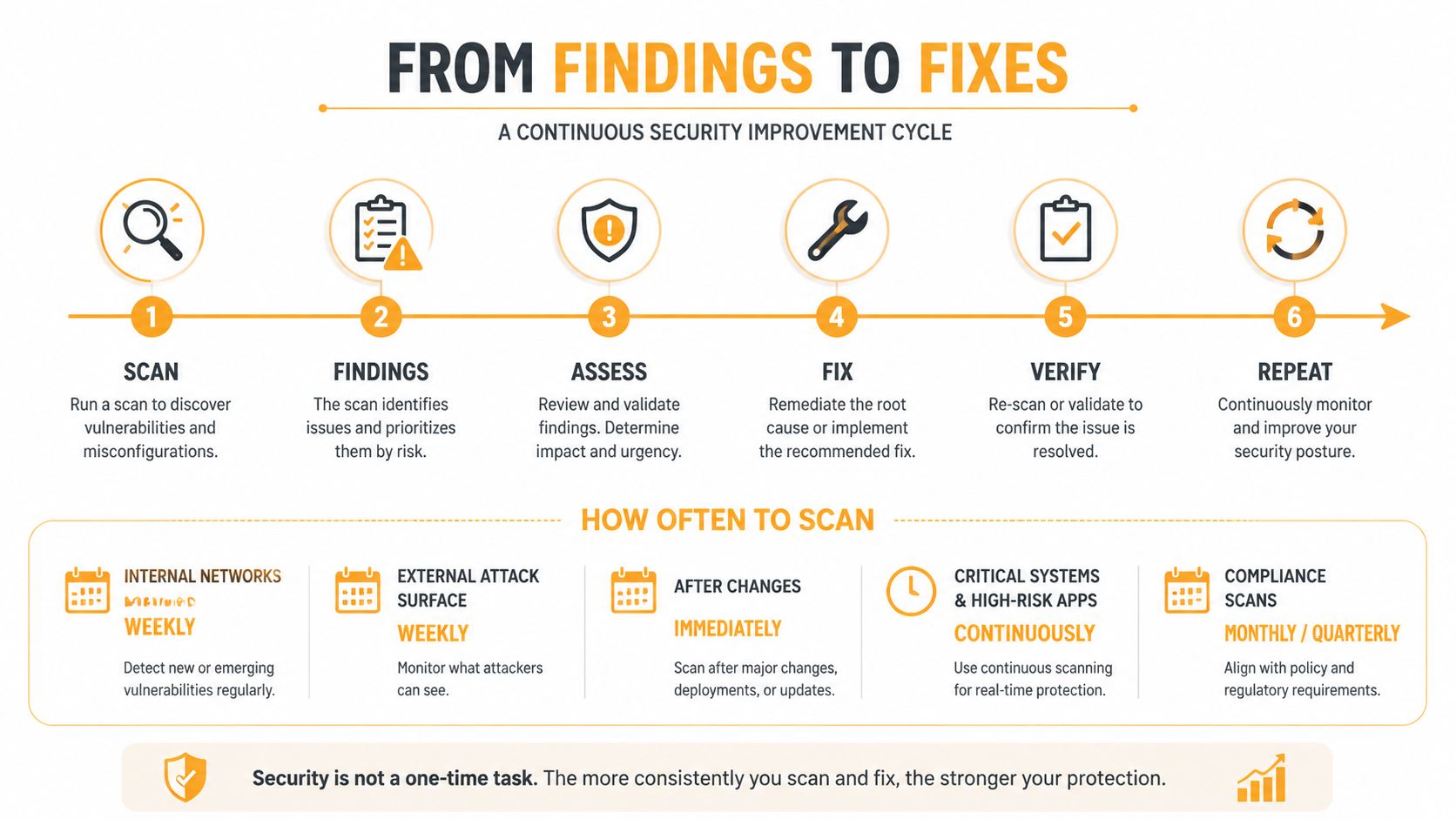
The useful part of scanning starts after the report lands. A long list of findings doesn't reduce risk by itself. Someone still has to decide what matters first, route the fix, and confirm it closed the gap.
Frequency is part of the control
The NCSC guidance is straightforward, scan regularly, at least once every month, and rescan immediately after applying changes to remediate a critical issue NCSC vulnerability scanning guidance. That's the operational mindset SMBs need. Scanning isn't a calendar event, it's a control that responds to change.
That matters because the environment changes whenever people patch, deploy, reconfigure, or add services. A scan from last week can already be stale if the network changed on Monday morning. Regular cadence helps, but rescans after major fixes are what prove the fix worked.
Prioritization beats raw volume
Good platforms don't stop at severity labels. Gartner's review guidance says modern assessment platforms correlate severity with asset context and threat context, then push remediation into patch management, SIEM, or ticketing workflows Gartner vulnerability assessment review. That's important because CVSS alone is not enough to tell you what to do first in a real business environment.
A vulnerability on a finance system deserves more urgency than the same issue on an isolated test box. That's not a scoring problem, it's a business context problem.
What good metrics look like
Wiz's KPI framing is helpful here because it focuses on coverage and closure, not just discovery Wiz vulnerability scanning guidance. Useful metrics include how much of the environment is being scanned, whether scans are authenticated, and how quickly critical issues are closed within SLA. Those numbers tell you whether the program is moving risk down, not just generating more tickets.
If a scanning program can't show that findings are turning into closed fixes, it's only proving that problems exist. It's not proving that the business is safer.
For SMBs, that means the schedule and the workflow matter more than the raw count of vulnerabilities. A smaller report with faster closure is usually better than a giant report that never leaves the queue.
Benefits Limits and Blind Spots You Must Understand
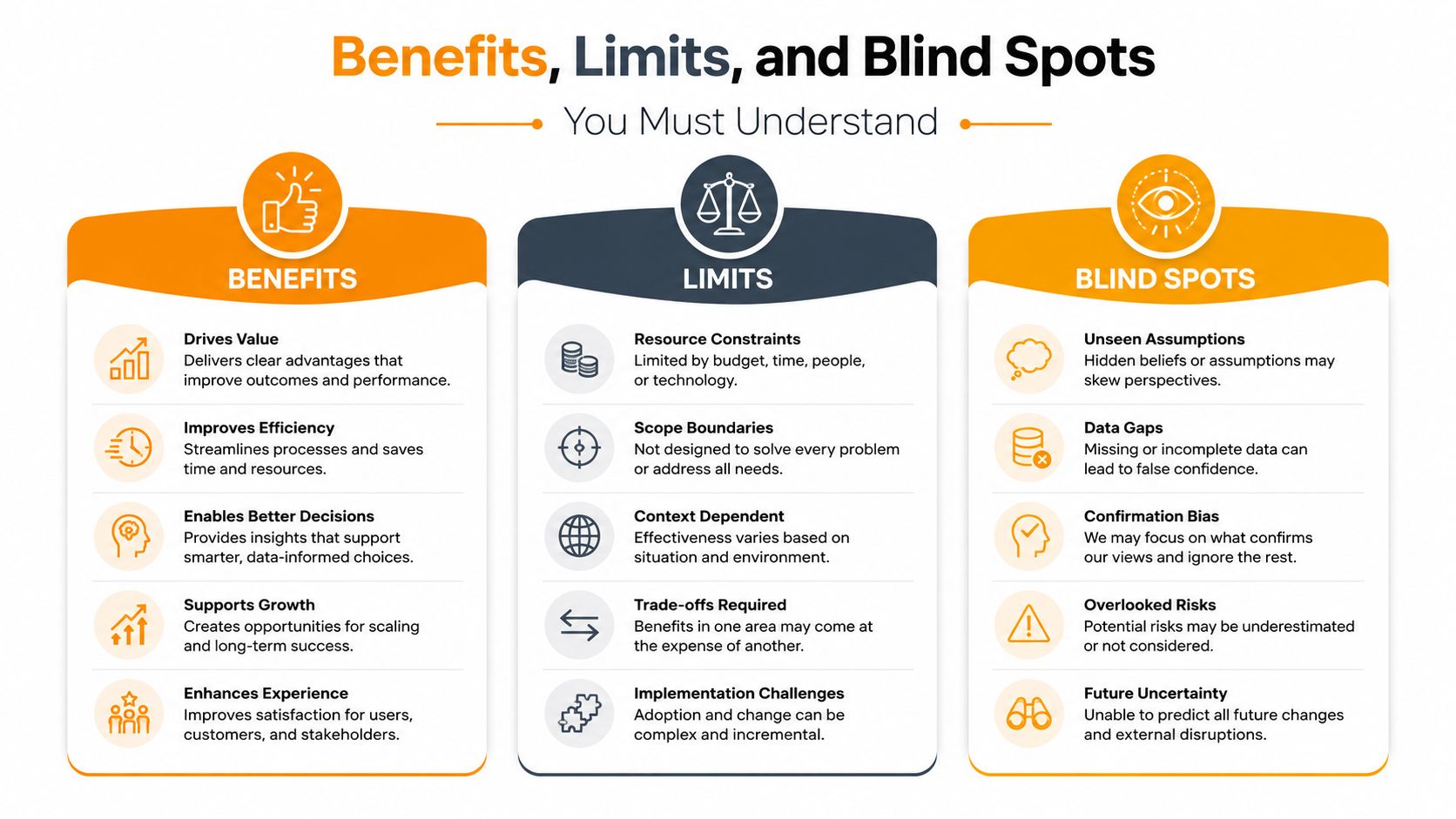
A scanner is useful because it cuts through guesswork. It helps shrink the attack surface, speeds up remediation, and gives your team a cleaner way to support audits and customer questions. That said, it's not a magic box that proves the environment is safe.
What scanners do well
Scanners are strong at finding known issues, especially when they can inspect systems regularly and compare them against updated vulnerability intelligence technical breakdown of vulnerability scanning services. They also help teams stop arguing from memory. Instead of relying on “we fixed that last quarter,” you get a repeatable check that shows whether the issue is still there.
That makes them a practical control for ongoing operations. They're especially helpful when you need steady visibility across mixed infrastructure, remote users, and cloud services.
What they miss
Independent guidance is clear that automated scanners have limits around application behavior, user context, and environment-specific configuration vulnerability scanner limitations. OWASP treats web vulnerability scanners as DAST tools that focus on common issues like SQL injection and cross-site scripting, while Invicti notes that some flaw categories sit outside automated coverage. In plain English, a scan can't see everything a person can see.
That's why scanning works best alongside testing, code review, and human validation when the app is complex or business-critical. A cloud workload can also change so quickly that a scan from last week may no longer reflect the current state. Fast change creates fast drift.
The blind-spot problem
The other big risk is coverage. A 2025 industry article argues that teams shouldn't trust the scanner alone, because tools can't report devices they've never seen. It recommends cross-checking EDR, endpoint management, network discovery, and DHCP inventories to find missed IPs, misconfigurations, and agentless devices coverage blind spots article.
That point lines up with practical security work. If you don't know an asset exists, a scanner can't tell you it's vulnerable. That's why proof of coverage matters more than scan count.
For a broader business-security view, this smart cyber security for businesses resource is a helpful reminder that scanning is one part of a layered program, not the whole plan.
How to Choose Vulnerability Scanning Services and What They Cost
The market is growing fast. One industry estimate puts the global vulnerability scanning services market at $5.8 billion in 2025 and projects it to reach $12.8 billion by 2034, a 9.8% CAGR market estimate. For SMBs, that growth usually means more vendors, more packaging, and more room to overbuy the wrong thing.
What to check before you sign
Start with coverage. Ask whether the service can handle hybrid environments, remote workers, authenticated internal scanning, cloud assets, and container workloads. Then ask how the provider proves inventory coverage, because a neat dashboard doesn't help if it missed part of the estate.
Also ask for reporting clarity. A good service should give you an executive summary, a technical findings view, a prioritized remediation plan, and trend KPIs that show whether risk is improving. If the deliverable is just a pile of raw alerts, your team will do the work manually.
When managed service makes sense
Managed services are worth a hard look when your team is small, your environment changes often, or your staff doesn't have time to tune scanners every week. DIY tools can work, but they usually demand more internal upkeep than most SMBs expect. Managed options are usually better when you want coverage, prioritization, and remediation support without making one person the scanner babysitter.
| Vulnerability Scanning Service Tiers for SMBs | Coverage Included | Best For |
|---|---|---|
| Basic external-only | Public-facing assets and simple exposure checks | Very small teams that need a first pass |
| Internal plus external | Network assets, authenticated checks, and perimeter visibility | Most SMBs with mixed office and remote systems |
| Managed continuous service | Ongoing scanning, prioritization, workflow integration, and reporting | Teams that want less manual work and stronger coverage proof |
A few vendor questions usually separate the good fits from the weak ones:
- What assets are included by default? Make sure remote endpoints, cloud services, and internal systems are part of the discussion.
- Do you support authenticated scans? If not, expect less visibility into patch state and local settings.
- How do findings reach our ticketing or patch process? If the answer is “download a report,” expect delay.
- How do you prove coverage? Ask how they compare scan results against endpoint, network, or asset inventories.
- What does success look like month to month? Look for closure, not just discovery.
Next Steps to Put Vulnerability Scanning Into Action
The simplest next move is to treat scanning like a routine control, not a one-off project. Start with a clean asset inventory, schedule monthly scans, run at least one credentialed internal scan, and compare the results against your endpoint and network records so you can spot blind spots early. If you're not sure where your exposure starts, this IT risk assessments resource is a practical place to begin thinking about the full picture.
Then focus on how findings move. Build a path from scan result to ticket, patch, and verification, because the value comes from closing issues, not storing reports. If your team doesn't have time to manage that loop well, a managed provider can take on the heavy lifting and keep the process consistent.
For Houston SMBs, the goal is simple, safer systems without adding another burden to the day. Use scanning to prove coverage, prioritize what matters, and keep fixes moving. That's how it becomes an operational advantage instead of another compliance task.
IT Cloud Global, LLC helps Houston businesses build a more reliable security and IT baseline with managed support, cloud expertise, and practical remediation planning. If you want help turning vulnerability scanning into a working control instead of another report, visit IT Cloud Global, LLC to ask for a free estimate and discuss the next step for your environment.
- How to Implement Zero Trust Security: A Phased Plan
- Business Continuity Strategies: SMB Guide 2026
- IT Security Houston: Protect Your Business
- Managed IT Solutions: Grow Your Houston Business
- Auditing IT Systems: A Practical SMB Guide
- Cloud Security Compliance for SMBs: Your 2026 Guide
- Professional IT Support Services: An SMB Guide