


Managed IT Services Houston TX: 2026 Guide for SMBs
Your office opens at 8. By 8:12, the printer is down, Microsoft 365 won't sync for two users, Wi Fi is dragging, and the line-of-business app on the front desk PC keeps freezing. You call the usual repair person and hear the same thing: they can look at the machine, but they don't handle cloud access, email security, or the firewall.
That's the problem with how many Houston SMBs buy IT. They collect vendors instead of building coverage. One company handles cabling. Another touches laptops. A freelancer logs into Microsoft 365. Nobody owns the whole environment, so when work stops, fingers start pointing.
For managed IT services in Houston TX, you probably don't need another vague promise about “digital transformation.” You need one accountable partner that can keep your cloud systems stable, protect your data, support your staff, and still show up when a desktop, Mac, printer, or network closet causes real-world trouble.
Table of Contents
- Is Your Houston Business Running on Hopeful IT
- What Are Managed IT Services Really
- The Full Spectrum of IT Support in Houston
- Proactive support that prevents ugly surprises
- Help desk that users will actually use
- Security that belongs inside the service, not bolted on later
- Cloud management that controls cost and chaos
- On site infrastructure and repair depot support under one roof
- Voice connectivity and physical network work
- The Business Case ROI Beyond the Monthly Fee
- How to Choose the Right Houston IT Partner
- Real World Success Stories from Houston Businesses
- Take Control of Your IT and Future Proof Your Business
Is Your Houston Business Running on Hopeful IT
A lot of businesses don't realize they're running on hopeful IT until something snaps. The server limps along, backups exist somewhere, user accounts pile up without cleanup, and everyone assumes the internet, phones, and shared files will just keep working. Then a Monday morning outage turns that assumption into a bill.

I've seen this pattern in law offices, retail shops, clinics, and small industrial firms. They don't ignore IT because they don't care. They ignore it because the business comes first, and the technology seems “good enough” until a dead workstation, ransomware scare, or failed sync blocks payroll, sales, or customer service.
Houston gives you plenty of options, but options alone don't solve the issue. Texas holds the second-largest IT services workforce in the United States, with more than 203,700 professionals across over 17,600 IT services firms, according to the Texas governor's IT industry report. That means the local market is deep, competitive, and crowded. It also means picking the wrong provider is easy.
Hopeful IT is what happens when nobody is watching your systems until after users complain.
Managed services fix the root problem. Instead of paying someone only when something breaks, you put a team in charge of keeping things from breaking in the first place. They monitor systems, patch devices, manage user issues, tighten security, and handle the ugly maintenance work that most owners never want to think about.
If your current setup feels reactive, inconsistent, or stitched together, start by reading this practical look at proactive IT support for Houston businesses. Then ask yourself one hard question: are you buying support, or are you buying stability?
What Are Managed IT Services Really
The phrase “managed IT services” is often understood to mean outsourced tech support. That's too narrow. Good managed service is ongoing operational ownership of your business technology environment.
The easiest way to think about it
Treat your office like a commercial building. You can wait until the plumbing bursts, the locks fail, and the AC dies, then call separate specialists one by one. That's break-fix IT. It works right up until it doesn't.
Or you can hire a property manager who handles maintenance schedules, access control, inspections, vendors, and emergency coordination. That's managed IT. The point isn't just repairing problems. The point is reducing the number of problems your staff ever sees.
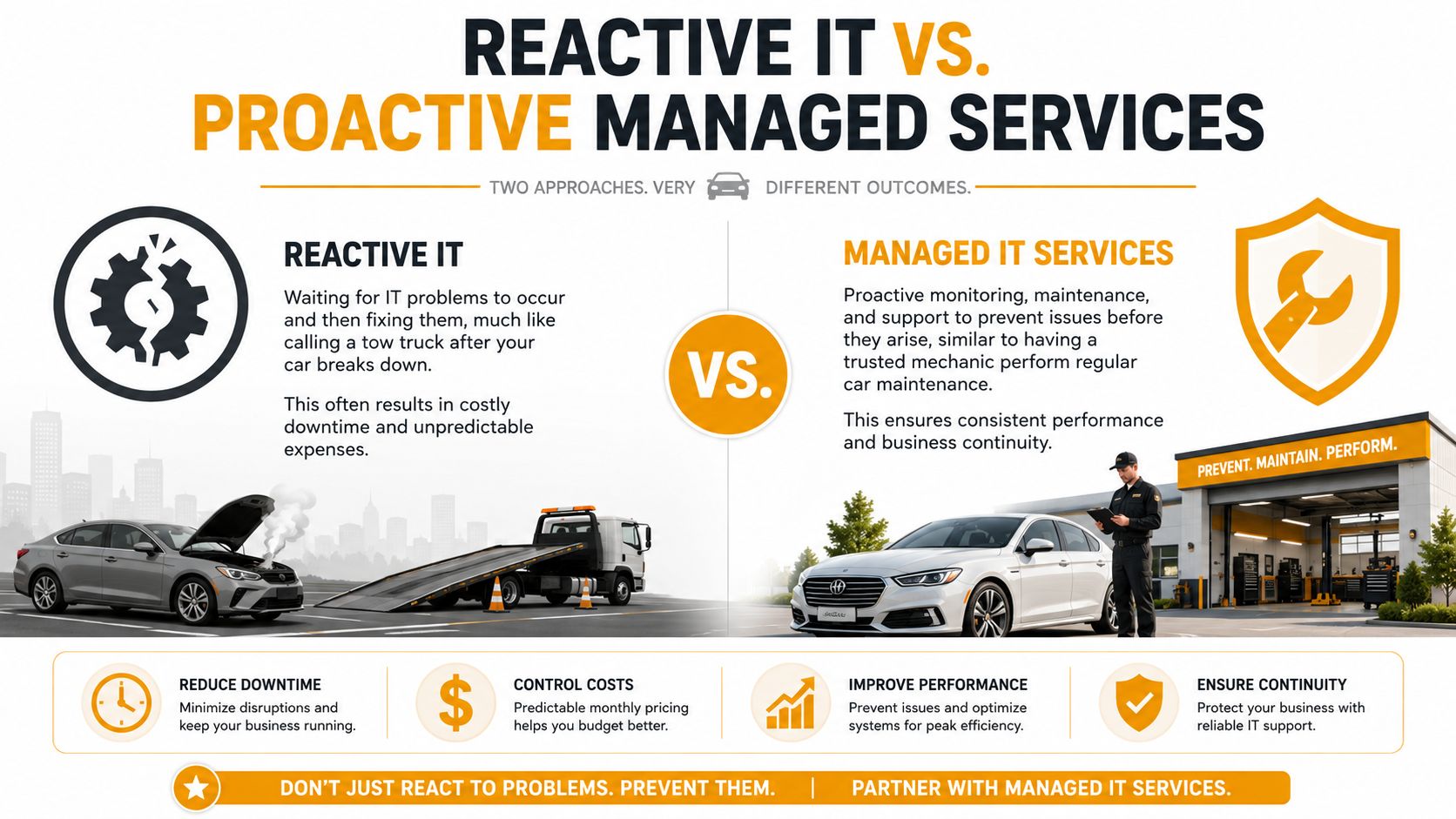
Reactive support waits for pain. Managed service looks for weak points before they hit operations.
What the service should actually include
A real MSP doesn't just answer tickets. It should cover the basics that keep a business functioning day to day:
- Device and user support: Laptops, desktops, Macs, user logins, email, printing, and common workflow issues.
- System monitoring: Watching servers, networks, endpoints, and cloud services for trouble signs.
- Routine maintenance: Patching, updates, cleanup, asset oversight, and lifecycle planning.
- Security controls: Endpoint protection, email filtering, MFA, user policy enforcement, and incident response steps.
- Backup and recovery readiness: Not just storing copies, but making sure recovery is possible when it matters.
- Advisory support: Guidance on when to replace equipment, move services to the cloud, or tighten risk controls.
Later in the process, you should also expect planning around Microsoft 365, Azure, AWS, Google Cloud, virtualization, wireless coverage, and physical office infrastructure if your environment needs it.
A quick explainer helps if you want the short version in video form:
Practical rule: If a provider only talks about fixing tickets, you're not hearing a managed services strategy. You're hearing outsourced help desk.
The model matters because incentives change. Under break-fix, vendors get paid when things go wrong. Under a managed agreement, the provider is expected to keep systems healthy, users productive, and interruptions under control. That's a much better alignment for an SMB owner.
The Full Spectrum of IT Support in Houston
Most guides split IT into neat boxes. Cloud over here. Cybersecurity over there. Hardware repair somewhere else. Real businesses don't operate in boxes. Your employees use physical devices to access cloud apps over wired and wireless networks while depending on printers, scanners, VoIP, shared storage, and line-of-business software.
That's why the smartest approach in Houston is a single partner that can cover the entire stack.
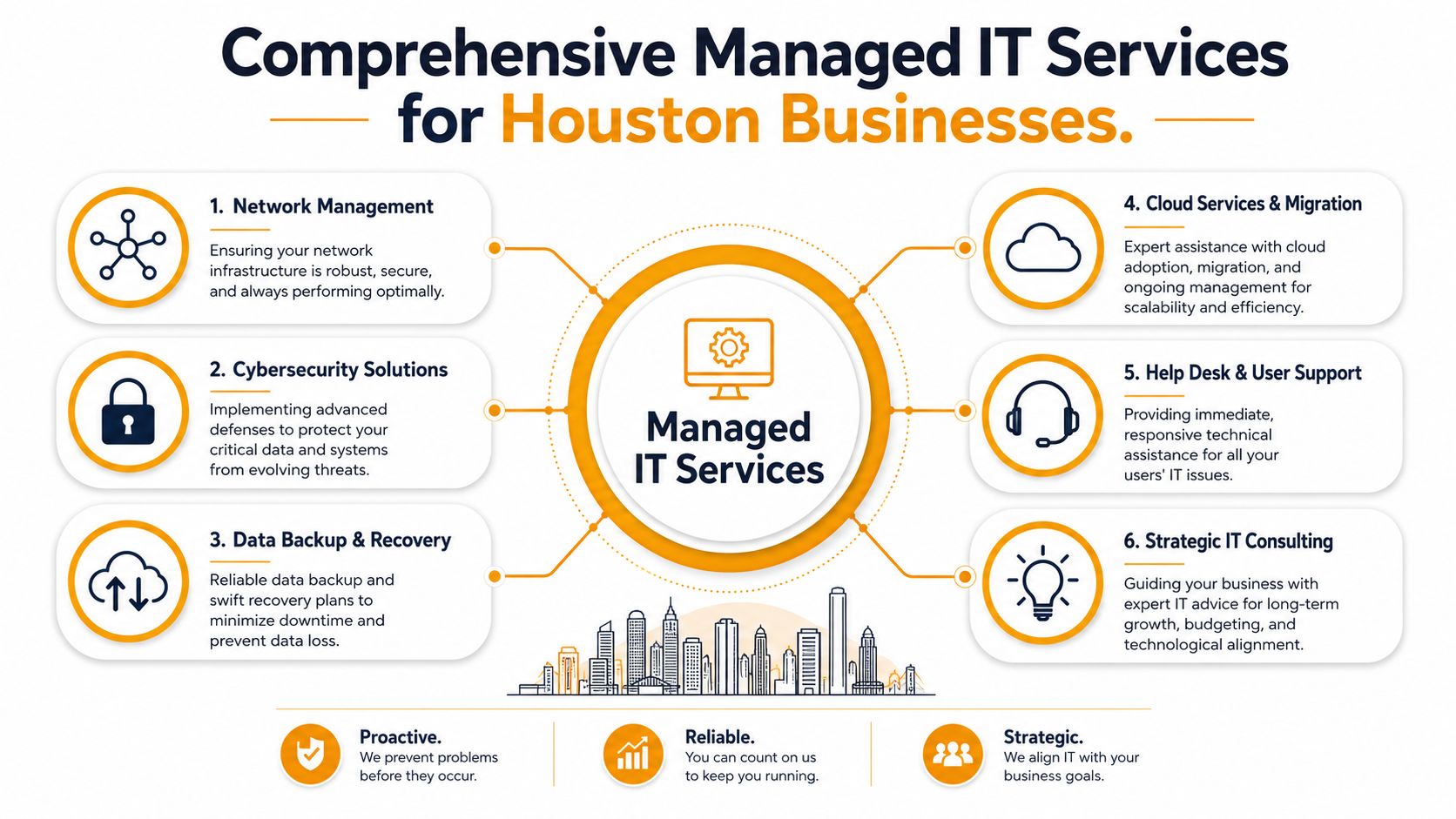
Proactive support that prevents ugly surprises
At the core, managed support should mean someone is always watching the health of your environment. That includes endpoint monitoring, server oversight, patch status, account hygiene, storage warnings, and performance trends.
For SMBs, proactive work matters because users rarely report the first sign of a problem. They report the moment the issue blocks work. By then, you've already lost time.
Look for a provider that includes:
- Monitoring and alerting: So performance, service failures, and suspicious activity don't sit unnoticed.
- Patch management: Because unpatched systems create avoidable risk and instability.
- Regular review: Someone should interpret the data and tell you what needs attention, replacement, or cleanup.
Help desk that users will actually use
A help desk isn't valuable because it exists. It's valuable if your staff trusts it enough to contact it early.
That means quick responses, clear ticket ownership, real troubleshooting, and support across common business platforms like Microsoft 365, Teams, Outlook, shared drives, VPN tools, and endpoint devices. The goal is simple: stop small annoyances from turning into half-day outages.
In Houston's mid-market MSP space, a credible provider typically includes six core components in a standard engagement: proactive monitoring, 24/7 tiered SLA help desk, built-in cybersecurity, Azure and Microsoft 365 cloud management, backup and disaster recovery with defined recovery targets, and strategic advisory, as outlined in Meriplex's Houston managed IT guide.
Security that belongs inside the service, not bolted on later
If cybersecurity is listed as an optional add-on for basic protection, keep looking. For most SMBs, that model is outdated.
A practical stack often includes endpoint detection and response, email security, multifactor authentication, account policy controls, and security awareness steps for users. Tools vary. Some firms standardize on platforms such as SentinelOne for endpoint protection, while others use different EDR products. The exact brand matters less than disciplined implementation, alert review, and response ownership.
Security should be embedded in daily operations, not sold as a separate panic purchase after an incident.
Cloud management that controls cost and chaos
Cloud migration isn't the finish line. It's the start of a new management problem. Once your environment spans Microsoft 365, Azure, AWS, or Google Cloud, sprawl becomes the enemy. Permissions multiply. Old accounts linger. Storage grows. Licensing drifts. Backups become confusing.
Good cloud support includes planning, migration, administration, and cleanup. For many Houston SMBs, that means Microsoft 365 administration, Exchange, SharePoint, Teams, Intune, hybrid identity, and Azure resource oversight. For others, it includes AWS or Google Cloud optimization tied to application hosting, remote access, or recovery design.
If you're mapping upgrades beyond basic support, Technioz's 2026 IT infrastructure guide is a useful outside reference because it frames infrastructure decisions in business terms instead of vendor jargon.
On site infrastructure and repair depot support under one roof
This is the part most articles miss. Houston SMBs still run on physical gear. Desktops fail. Macs need service. Printers jam at the worst possible time. A damaged laptop can interrupt accounting, dispatch, intake, or operations just as fast as a cloud outage.
A gap remains in the local market around hybrid on-site and remote repair depot models that combine cloud migration with in-house hardware repair, including PCs, Macs, printers, and data recovery under one contract, as noted by Cobait's Houston managed IT article. That gap is exactly why many owners get frustrated. One vendor manages Azure. Another shop fixes the laptop. A third cabling crew handles the office. Nobody owns the full problem.
One example of a provider built around this broader model is IT Cloud Global, LLC, which offers managed support, cloud administration across AWS, Google Cloud, and Microsoft Azure, plus an in-house repair depot for PCs, laptops, Macs, printers, data recovery, and virus removal.
Voice connectivity and physical network work
A complete IT partner should also be able to handle the parts of technology that live in ceilings, walls, racks, and back offices. That includes Wi Fi troubleshooting, switch and firewall work, low-voltage cabling, fiber runs, surveillance support, and business VoIP coordination.
Here's the simple test. If your internet slows down, your phones cut out, and your front-desk printer won't connect, can one company diagnose the whole chain? If the answer is no, you don't have total IT management. You have a vendor list.
The Business Case ROI Beyond the Monthly Fee
Owners often ask the wrong first question: “What does managed IT cost?” The sharper question is, “What does weak IT cost us every month we tolerate it?”
The visible fee is easy to spot. The hidden losses are what hurt.
Where the real return shows up
Managed services create value in places that don't always show up on a simple invoice comparison.
- Less disruption to staff: Employees stop wasting time bouncing between login issues, unreliable devices, email quirks, and recurring network problems.
- Fewer operational surprises: Proactive maintenance and monitoring reduce the number of emergency decisions you have to make under pressure.
- Stronger security posture: Better account control, endpoint protection, and backup discipline lower your exposure when users click the wrong thing or a device fails.
- Better planning: You replace systems on purpose instead of in a panic.
For small and midsize businesses, that shift matters more than shaving a little off support spend. Stable systems let managers manage, sales teams sell, and front-office staff serve customers without turning every tech issue into a leadership problem.
What owners get wrong about ROI
Many buyers compare a managed agreement to the cost of an occasional technician visit. That's a bad comparison because it ignores risk, downtime, inconsistency, and the fact that break-fix support doesn't carry ongoing responsibility for your environment.
A proper ROI view includes questions like these:
| Business question | What to look at |
|---|---|
| Are staff losing time weekly? | Repeated login issues, unstable devices, printing failures, slow file access |
| Are you exposed to avoidable risk? | Weak MFA enforcement, unmanaged endpoints, unclear backup ownership |
| Are upgrades delayed? | Old hardware, messy Microsoft 365 setup, no cloud roadmap |
| Is leadership dragged into tickets? | Owners approving emergency fixes instead of strategic improvements |
A managed relationship also gives you access to broader expertise than a single internal generalist usually can cover. Cloud architecture, endpoint security, Microsoft 365 administration, network troubleshooting, and hardware lifecycle decisions don't always live in one person's skill set.
For a deeper look at how those savings and operational gains stack up, read this piece on the hidden ROI of managed IT services in Houston.
Good managed service doesn't just reduce downtime. It reduces management drag.
That's the part many SMBs underestimate. When technology stops demanding constant attention, leadership gets time back. That time is worth more than most monthly support line items.
How to Choose the Right Houston IT Partner
The Houston market has no shortage of MSPs. The problem isn't finding one. The problem is filtering out the firms that sell a bundle but don't take real ownership.
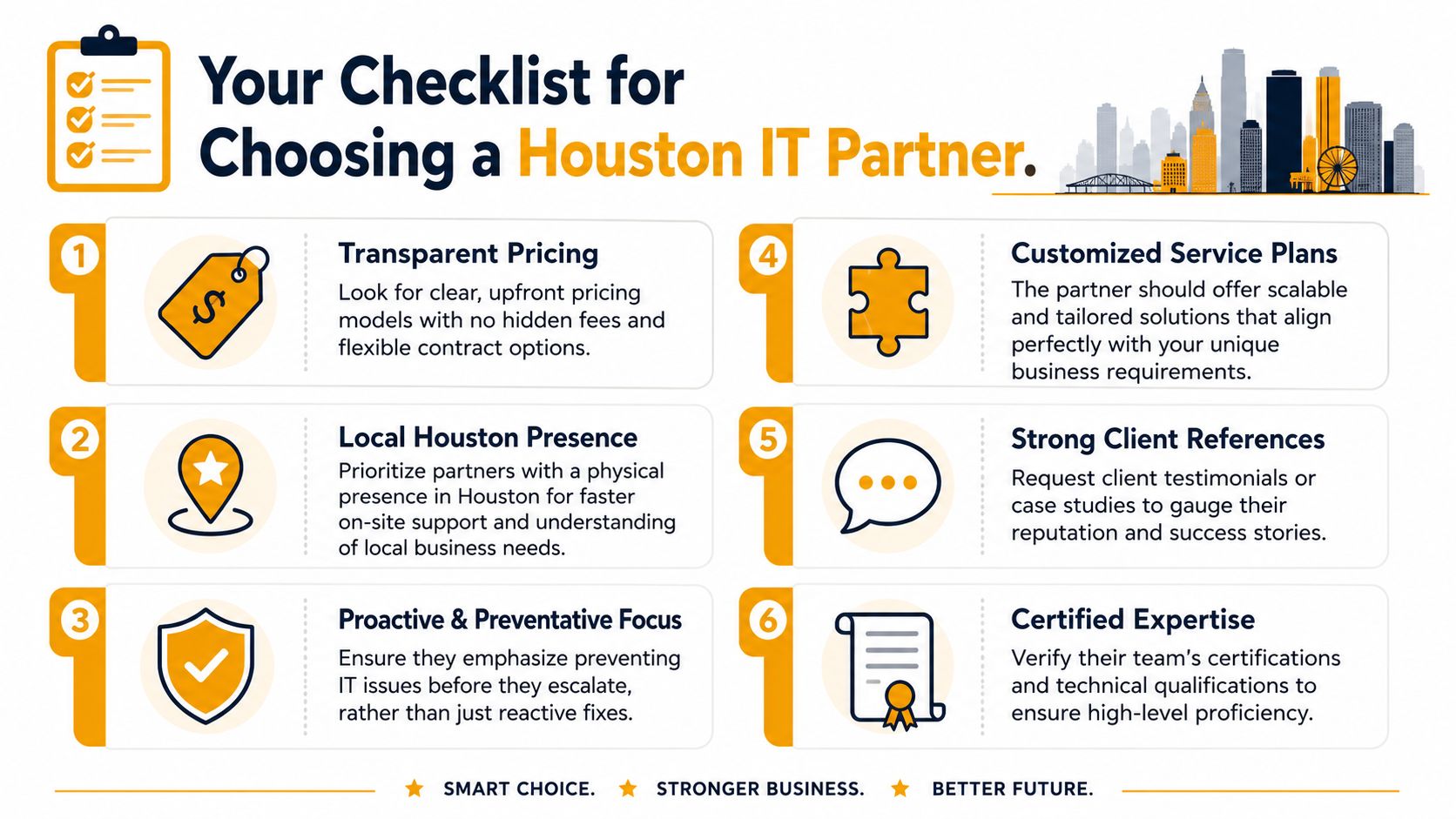
Start with the service model, not the sales pitch
Ask what is included by default. If monitoring, help desk, cybersecurity basics, cloud administration, backup oversight, and strategic guidance all appear as separate upsells, you're probably looking at a fragmented offer.
Houston buyers should expect a coherent package, not a menu designed to make the base price look low.
Use pricing the right way
In Houston, standard managed IT services typically range from $125 to $225 per user per month, while compliance-heavy industries such as energy, healthcare, and financial services often run $150 to $300 per user per month, according to IT GOAT's Houston MSP pricing guide.
That range is useful, but don't shop by the lowest number. Price moves for real reasons:
- Compliance pressure: HIPAA, NERC CIP, and similar requirements add work and controls.
- Infrastructure complexity: Hybrid systems, multiple sites, older servers, and specialized apps raise support demands.
- SLA expectations: Faster response and deeper coverage cost more.
- Security tooling: EDR, MFA, privileged access controls, and email security all affect scope.
Houston co-managed models can also lower cost when an internal IT lead keeps strategic control and the vendor handles selected monitoring and security tasks. As outlined in Uprite's Houston MSP overview, those arrangements typically fall below the price of full management.
Ask hard questions about support and security
Don't ask whether the provider offers “great service.” Ask questions that force clarity.
- Who answers after hours? If support is “24/7,” find out whether that's a real staffed help desk or just an emergency voicemail path.
- What security tools are standard? Ask specifically about EDR, email security, MFA, and account administration.
- How do they report performance? You want regular visibility into ticket trends, recurring issues, and remediation work.
- How do they handle regulated environments? If you operate in healthcare, finance, or energy, test whether they can speak plainly about operational controls and documentation.
Some Houston MSPs publish response metrics as a transparency benchmark. Uprite notes that certain providers report average inbound support call answer times of 80 to 94 seconds and average issue resolution times around 6 minutes in their service positioning, which gives buyers a more concrete way to evaluate responsiveness than generic promises. Use that standard of transparency when comparing options, as referenced earlier.
A broader buyer perspective also helps. If you want an outside view on how businesses assess providers beyond technical features alone, this roundup on managed IT service evaluations is worth reviewing.
Watch for the cloud and hardware gap
Many selections go wrong. A provider may be strong on Microsoft 365 and weak on physical support. Another may be good with desktops and useless on Azure, AWS, or Google Cloud.
You need to ask direct questions:
- Do you support both cloud platforms and end-user hardware?
- Can you handle on-site troubleshooting when the issue involves cabling, Wi Fi, printers, or a failing workstation?
- If a user can't work, do you own the whole problem, or do you hand us another phone number?
If you want a shortlist of practical evaluation criteria before you sign anything, use this guide on how to choose a managed service provider.
The right MSP doesn't just support technology. They reduce vendor sprawl.
That's the filter I recommend most. Pick the partner that can close gaps across cloud, security, support, and physical infrastructure, not the one with the slickest proposal template.
Real World Success Stories from Houston Businesses
Law firm with security pressure and no room for mistakes
A small Houston law office had a familiar setup. Aging workstations, inconsistent user permissions, and a Microsoft 365 environment nobody had cleaned up in years. Attorneys were storing sensitive files correctly some days and improvising on others because the system was clumsy.
They moved to a managed model with tighter account controls, structured support, endpoint security, and better Microsoft 365 administration. The biggest result wasn't flashy. Staff stopped working around the system. Intake, document access, and day-to-day communication became predictable.
Retail business that needed uptime at the counter
A multi-location retail operation didn't suffer from one huge IT problem. It suffered from lots of small ones. POS-adjacent devices failed, store printers went down, Wi Fi issues lingered, and calling separate vendors for phones, workstations, and cloud apps wasted management time.
The fix was consolidating support under one accountable team that could handle user support, network troubleshooting, VoIP coordination, and physical device repair. The business gained something owners care about more than technical elegance: fewer operational interruptions during open hours.
When one partner owns both the cloud side and the broken-device side, frontline teams stop becoming unpaid project managers.
Manufacturer stuck between legacy servers and modern operations
A small manufacturer had production and administrative workflows spread across older on-prem systems, shared folders, and a patchwork remote access setup. They didn't need hype about the cloud. They needed a sensible hybrid path.
The provider stabilized the existing environment first, then mapped a staged move to a more manageable mix of cloud services and retained local infrastructure. Backup discipline improved. Remote access became easier to support. Hardware issues no longer triggered a scramble because repair and infrastructure support sat under the same relationship.
These aren't miracle stories. That's the point. Good managed IT doesn't feel dramatic. It makes daily work less fragile.
Take Control of Your IT and Future Proof Your Business
If your business is still relying on whoever picks up the phone first, you're not managing IT. You're reacting to it. That model creates avoidable downtime, confused accountability, and a steady stream of small disruptions that drain your staff.
The right approach is straightforward. Put one qualified partner in charge of the environment your business uses. That means cloud systems, cybersecurity, user support, backups, network performance, and the physical devices your team touches every day.
For Houston SMBs, the biggest missed opportunity isn't failing to adopt the newest tool. It's failing to unify support. When cloud management sits with one vendor and hardware repair sits with another, problems take longer to resolve and nobody owns the full business outcome.
Choose managed IT services in Houston TX that match how your company really operates. If you depend on Microsoft 365, printers, Wi Fi, laptops, line-of-business apps, and occasional on-site troubleshooting, your provider should cover all of it without excuses.
The payoff is simple. Less chaos. Better security. Cleaner planning. More time spent running the business instead of babysitting technology.
If you're ready to replace reactive IT with a single accountable support model, contact IT Cloud Global, LLC for a free, no-obligation estimate and consultation. Talk through your current environment, where the support gaps are, and whether a combined cloud, cybersecurity, help desk, and hardware-repair approach makes sense for your Houston business.
- 7 Best Managed IT Services Houston TX Reviews (2026)
- IT Security Services Houston TX: Essential for Your SMB In
- Best IT Services Houston TX: Your 2026 Partner
- Top IT Services Houston TX: Your 2026 SMB Guide
- IT Managed Services Houston TX: 2026 Guide
- Houston Managed IT Services: A 2026 Guide for SMBs
- What Is a Network Operations Center? an SMB Guide