


Houston Managed IT Services: A 2026 Guide for SMBs
Your office is busy, your team is trying to close work, and then the tickets start. One laptop won't connect to WiFi. A shared folder is missing. Microsoft 365 is acting up. Your line-of-business app slows down right when everyone needs it. Nobody planned for the interruption, but everyone pays for it.
That's the daily reality for a lot of Houston small businesses. A logistics company near the Ship Channel can't afford network outages when shipments are moving. A clinic near the Medical Center can't shrug off security gaps and hope nothing happens. A professional services firm in Uptown loses real money when employees spend half the morning waiting on basic IT fixes instead of doing billable work.
The point isn't that technology breaks. It's that most businesses are still handling IT in a reactive way. They wait for something to fail, then they scramble. That model is expensive, stressful, and hard to scale.
Table of Contents
- The Houston SMB's Constant IT Challenge
- What Managed IT Services Really Mean for Your Business
- A Blueprint of Core Houston Managed IT Services
- The Real ROI Gaining a Competitive Edge in Houston
- Navigating Security and Compliance in Houston Industries
- Choosing Your Houston MSP A Practical Vetting Guide
- Your Next Step Towards Strategic IT with IT Cloud Global
The Houston SMB's Constant IT Challenge
A lot of owners call for IT help only after a bad week. The internet dropped twice. Someone clicked something they shouldn't have. The backup status is unclear. Nobody knows whether the firewall rules were updated, and nobody wants to find out during an outage.
That break-fix cycle feels normal until you step back and look at the cost. Your staff loses time. Your customers wait longer. Your managers become accidental IT coordinators. You keep paying for disruption instead of paying for stability.
That's why Houston managed IT services have become a practical business decision, not a luxury. Businesses want proactive monitoring, real helpdesk coverage, and disaster recovery planning before something goes wrong. Demand for that model isn't slowing down. The global managed services market is projected at USD 460.59 billion in 2026 and USD 705.22 billion by 2031, driven by proactive monitoring, 24/7 helpdesk support, and disaster recovery solutions, according to managed services market projections from MarketsandMarkets.
You don't need more heroic last-minute fixes. You need fewer emergencies.
For Houston owners, the shift is simple. Stop treating IT as a repair problem. Start treating it as an operations function. When you move from reactive support to managed support, you're buying consistency, response discipline, and fewer ugly surprises.
If that sounds like the situation you're in now, this breakdown of Houston's top IT support challenges and how managed IT support services can help will probably feel familiar.
What Managed IT Services Really Mean for Your Business
Think of an MSP like a property manager for your technology. A good property manager doesn't wait for the roof to cave in. They inspect, maintain, schedule repairs, control risk, and keep the building usable. That's what managed IT should do for your business.

The bad version of IT support is simple. Something breaks, you call somebody, and then you wait. Maybe they fix it fast, maybe they don't. Either way, the problem already cost you time and money.
The managed model flips that. The provider watches systems, applies patches, tracks device health, reviews backups, supports users, and tightens security as part of ongoing service. Their job is to reduce the number of disruptions that reach your staff in the first place.
The shift from break-fix to operational control
With break-fix support, your costs are unpredictable and your problems stack up between service calls. With managed services, you should know what's covered, what gets monitored, and what response path exists when something fails after hours.
That matters more than most owners realize. If your team depends on Microsoft 365, shared drives, printers, WiFi, cloud apps, and remote access, then your business is already running on an interconnected IT environment. You can't manage that reliably with occasional support calls.
A lot of technical leaders also struggle with the staffing question. Should they hire internally, augment the team, or outsource specific functions? If you're weighing those options, this piece on strategic advice for engineering leaders gives useful context on when managed services make more sense than adding headcount.
What you should expect from a real MSP
A real MSP isn't just a helpdesk. You should expect:
- Preventive maintenance: Patching, device oversight, update management, and routine review work.
- User support: Fast help when employees can't work because of access, email, device, or software issues.
- Security operations: Endpoint protection, monitoring, policy enforcement, and incident handling.
- Business continuity: Backups, recovery planning, and someone accountable for testing and readiness.
- Strategic guidance: Advice on upgrades, cloud decisions, vendor sprawl, and lifecycle planning.
If a provider only talks about tickets and tools, keep looking. You're not hiring them to answer phones. You're hiring them to keep your business running.
A Blueprint of Core Houston Managed IT Services
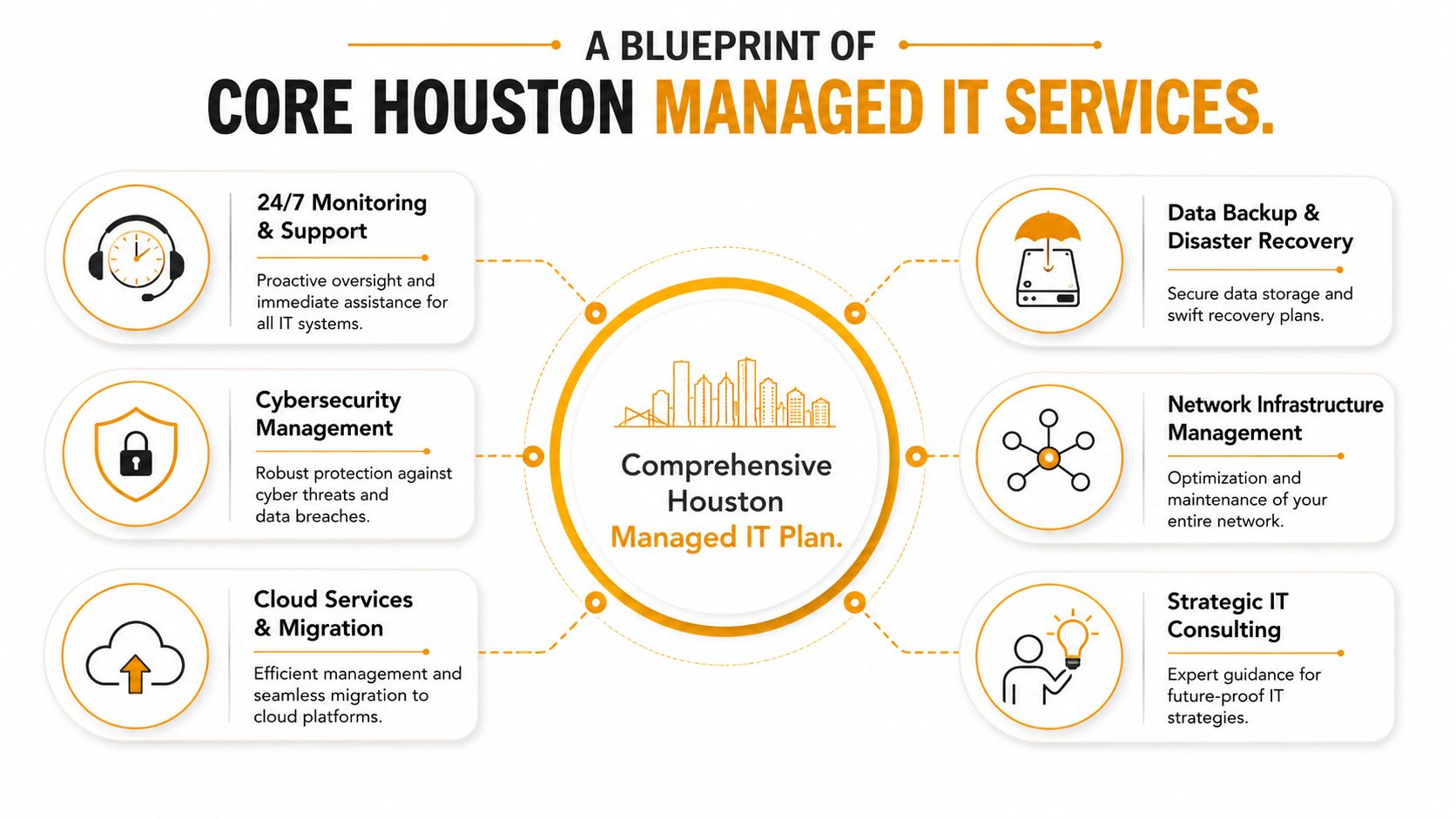
The strongest Houston managed IT services aren't built around one tool or one support desk. They're built as a stack. If one layer is weak, the whole environment becomes harder to support, harder to secure, and more expensive to maintain.
Early in the process, it helps to see the full picture.
The services that actually matter day to day
Start with the basics that affect your staff every day.
- 24/7 monitoring and helpdesk support: This is the heartbeat of managed service. Your provider should watch devices, servers, and core systems continuously and give users a clear path to support when something breaks.
- Network management: Routers, switches, firewalls, wireless access points, VPN access, and internet failover all sit here. If your network is unstable, every other app looks broken.
- Endpoint management: Laptops, desktops, and mobile devices need patching, policy control, antivirus or EDR coverage, encryption oversight, and lifecycle planning.
- Backup and disaster recovery: Backups aren't useful just because they exist. They matter when someone can restore data fast and cleanly when a server fails, a file is deleted, or ransomware hits.
Houston businesses should also pay attention to support responsiveness. High-performing local MSPs show average inbound support call answer times of 80 to 94 seconds and average issue resolution time of approximately 6 minutes, according to Houston MSP performance benchmarks from IT GOAT. Those numbers matter because slow response turns small problems into lost work hours.
Practical rule: Ask what happens when a user can't work right now. If the answer is vague, the support model is weak.
Later in your evaluation, watch this short overview for a visual sense of how managed support fits together in practice.
What a complete support model looks like
A complete MSP should also handle the infrastructure and planning work that many owners forget until a move, expansion, or failure forces the issue.
| Service area | Why it matters to an SMB |
|---|---|
| Cybersecurity management | Protects endpoints, identities, email, and access paths that attackers usually target first |
| Cloud migration and optimization | Keeps Microsoft 365, Azure, AWS, or Google Cloud environments usable, secure, and organized |
| Structured cabling and WiFi design | Solves dead zones, poor office coverage, and unreliable physical connectivity |
| VoIP and communications | Keeps calling, routing, and collaboration stable for front-office and hybrid teams |
| Device repair and recovery | Reduces downtime when laptops, Macs, desktops, or printers fail unexpectedly |
| Strategic IT consulting | Helps owners budget, standardize, and avoid random tool purchases that create future support problems |
That last layer matters more than people think. If your provider can support cloud, endpoints, networking, and physical office infrastructure together, you avoid finger-pointing between vendors. One team owns the issue.
For example, some Houston firms need more than remote support. They need on-site troubleshooting, low-voltage cabling, WiFi remediation, Microsoft 365 administration, and hardware repair under one roof. IT Cloud Global, LLC is one local option that covers those areas, including in-house repair depot work, cloud support across AWS, Google Cloud, and Azure/O365, and network cabling for office environments. That kind of full-stack scope is useful when your business doesn't have time to coordinate four separate vendors.
The Real ROI Gaining a Competitive Edge in Houston
Most owners ask the wrong first question. They ask, “How much will managed IT cost?” The better question is, “What is unreliable IT already costing us?”
If employees lose access to files, email, line-of-business apps, printers, phones, or cloud systems, work slows down immediately. Sales gets delayed. Customer service gets sloppy. Managers stop focusing on growth and start chasing technical noise.
The return shows up in operations first
Managed services create ROI in places you feel every week:
- Less downtime: Your team spends more time working and less time waiting.
- Cleaner budgeting: Monthly service is easier to forecast than random emergency invoices.
- Better leadership focus: Owners and department heads stop acting like part-time IT coordinators.
- Lower operational drag: Standardized systems are easier to support, secure, and replace.
That's the core business case. You're not buying IT for IT's sake. You're buying smoother operations.
Most companies don't need more software. They need better oversight of the software and systems they already depend on.
Why this has become a business decision
This isn't a fringe approach anymore. The U.S. managed services market was valued at USD 69.9 billion in 2024 and is estimated to reach USD 171.7 billion by 2033, with a projected CAGR of 10.5% from 2025 to 2033. That points to a broader shift toward managed services as a core operating model, as noted earlier from the same market analysis.
Houston SMBs should take that seriously. Your competitors are not gaining an edge because they have shinier hardware. They're gaining an edge because their people can work without constant interruption, their systems are maintained before failure, and their leadership isn't stuck in a cycle of avoidable IT fire drills.
If you need help making that case internally, this breakdown of the hidden ROI of managed IT services in Houston is a useful next read.
Navigating Security and Compliance in Houston Industries
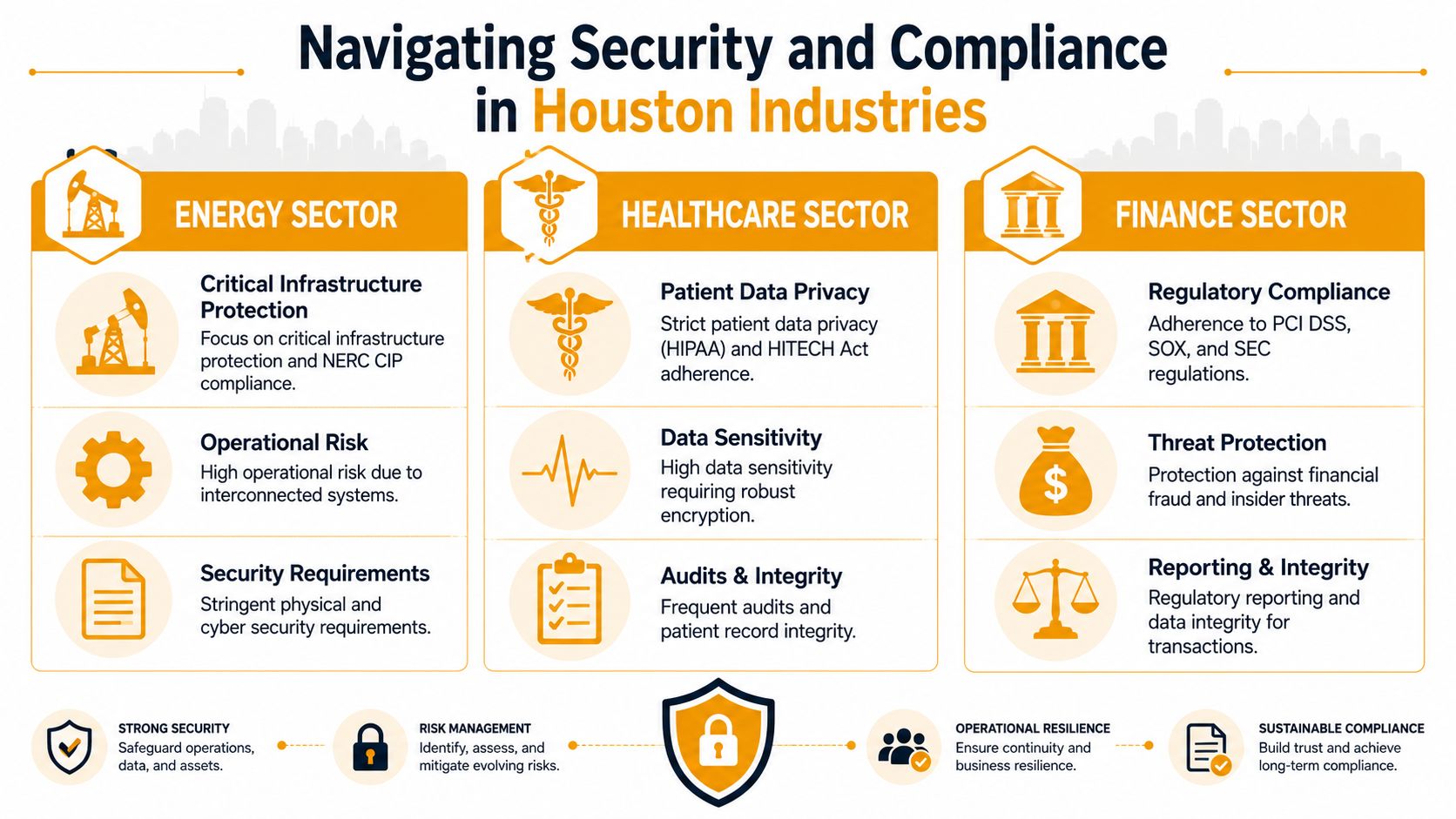
A generic IT plan might be fine for a small office with low data sensitivity and simple workflows. It is not fine for healthcare, energy, finance, or any company that has to prove controls, retain logs, secure sensitive data, and respond cleanly during audits.
That's where many Houston buyers get bad advice. They get a flat per-user quote with no serious discussion of compliance burden, audit readiness, or industry-specific security controls. Then the actual costs show up later.
Why regulated businesses pay more
Houston managed IT services for a standard business typically run $125 to $225 per user per month, but compliance-heavy environments such as healthcare or energy often move into the $150 to $300+ per user per month range because they require stronger security controls, audit logging, and more operational oversight, according to Houston managed IT pricing guidance from Meriplex.
That gap isn't arbitrary. It comes from extra work, including:
- Audit logging and retention: Someone has to configure it, review it, and keep it available.
- Encrypted storage and access control: Sensitive data can't just sit anywhere with loose permissions.
- Patch discipline: Regulated environments need tighter control over how and when systems are updated.
- Documented policies and reporting: You often need evidence, not just technical settings.
- Incident response readiness: Breaches and outages require a cleaner process when compliance is involved.
A clinic dealing with HIPAA issues doesn't need the same stack as a small retail office. An energy company dealing with NERC CIP concerns won't accept the same risk profile as a general services firm. If a provider pretends those are basically the same, they either don't understand your environment or they're trying to get the contract signed before the scope grows.
Where Houston companies get this wrong
The biggest mistake is buying based on the lowest sticker price.
A low quote often leaves out the difficult parts. It may not include advanced monitoring. It may not include serious logging. It may assume your internal staff handles policy work, vendor coordination, or security exceptions. Then six months later, you're paying change orders for everything you thought was included.
Use this quick comparison when reviewing proposals:
| Business type | Likely support profile |
|---|---|
| Compliance-light office | Standard endpoint support, backups, patching, basic security, routine helpdesk |
| Compliance-heavy operation | Added security layers, stronger access control, logging, reporting, tighter change management |
Ask providers to explain the difference in plain language. If they can't map your industry requirements to actual support tasks, they aren't ready for your business.
Choosing Your Houston MSP A Practical Vetting Guide
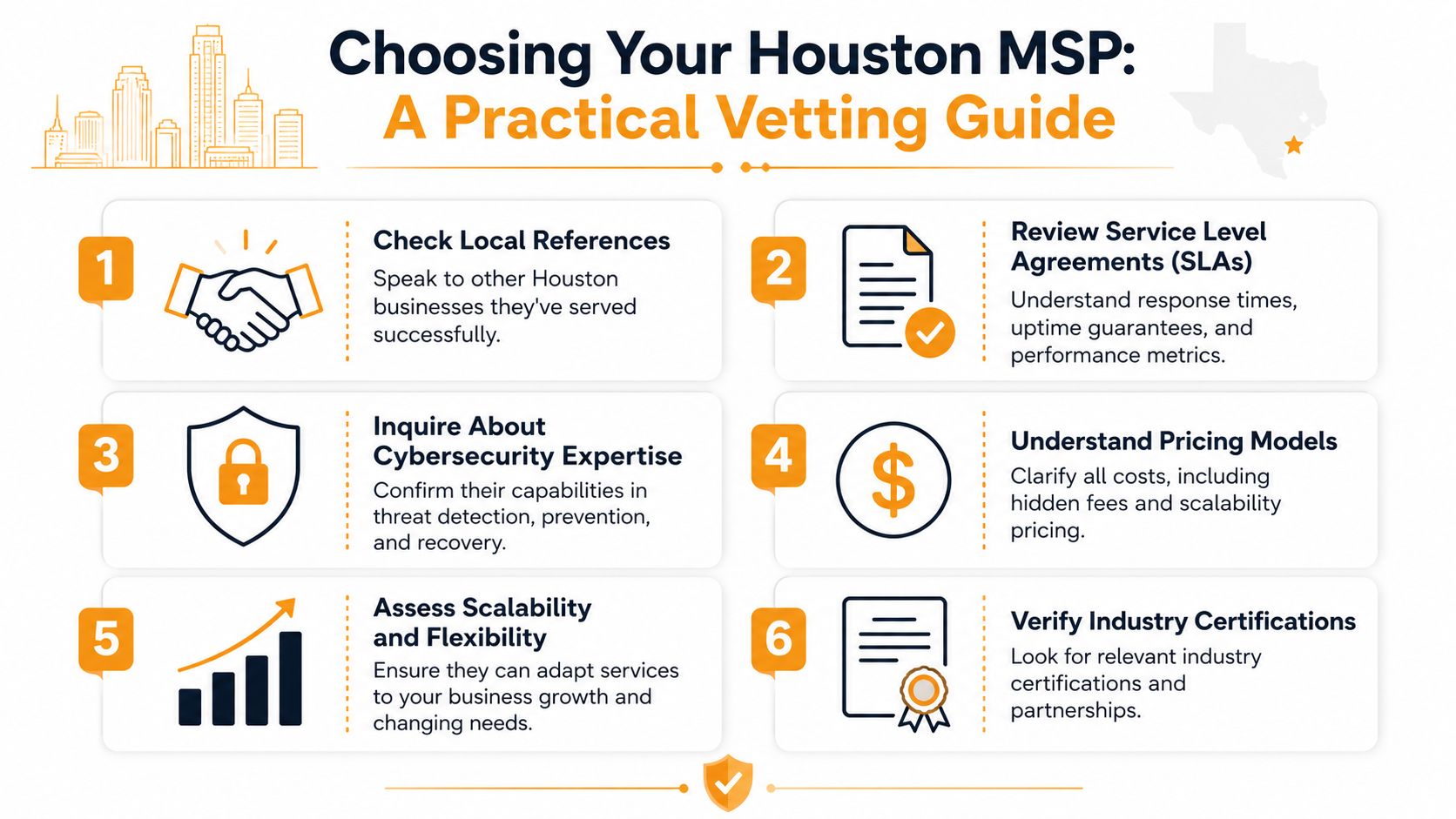
Most MSPs sound good in the sales meeting. They talk about uptime, security, responsiveness, and partnership. That's easy. What matters is whether they can prove how they operate when users are locked out, systems fail after hours, or you decide to leave the contract.
Start with price but don't stop there
For Houston SMBs, managed IT services often fall between $100 and $250 per user per month for full support, or around $1,000 to $5,000 per month for small businesses with roughly 10 to 50 employees. Compliance-heavy industries often rise to $150 to $300 per user per month, and a 20-person professional services firm may budget about $3,000 to $5,000 per month for full-service management with security, based on Houston managed IT pricing benchmarks from IT Companies.
That gives you a baseline. It does not tell you whether the quote is complete.
Ask every provider these questions:
- What is included in the monthly fee? Get specifics on monitoring, patching, backups, endpoint security, Microsoft 365 support, after-hours help, and on-site support.
- What triggers extra charges? Projects, after-hours labor, onboarding, hardware setup, vendor calls, and security incidents often live outside the base plan.
- How does pricing change as we grow? You need to know what happens when you add users, devices, locations, or compliance requirements.
Ask for proof not promises
A polished SLA is not enough. You need evidence of actual service behavior.
Ask for sample monthly reports, actual ticket metrics, and examples of how the provider handled urgent incidents after business hours.
If the provider claims they respond fast, ask for real response history. If they say they patch aggressively, ask what their after-hours patching cadence looks like. If they say security is covered, ask what that means operationally. Who reviews alerts? Who owns escalation? What does the client see each month?
You should also ask for local references. Not generic testimonials. Actual Houston clients with similar size, complexity, and industry exposure.
A strong review process should include:
- Reference checks: Talk to businesses that use them now, not just former success stories.
- Monthly reporting samples: You want to see ticket volume, recurring issues, and what got resolved.
- Escalation clarity: Ask who answers first, who handles complex issues, and what happens after hours.
- Technical scope: Confirm whether they support cloud, networking, endpoints, vendor coordination, and security operations directly.
Read the contract like you expect a breakup
Many SMBs commonly get burned. The hard questions aren't about the shiny service bundle. They're about what happens when things go wrong, or when the relationship ends.
Critical questions include after-hours patching cadence and data-ownership clauses when terminating contracts, because many buyers overlook hidden fees and vague cybersecurity language until after signing, according to questions Houston businesses should ask an IT provider before signing.
Here's the checklist I'd use in every final-round MSP meeting:
- Data ownership: Confirm that your data, documentation, backups, and administrative records remain yours.
- Offboarding process: Ask how credentials, documentation, backups, and configs are returned at termination.
- Hidden fees: Watch for add-ons tied to onboarding, licensing coordination, emergency support, or vendor management.
- Patch timing: Ask exactly when critical patches happen and how user disruption is handled.
- Security language: If they use broad phrases like “advanced protection,” make them define the tools and workflow.
- Termination clauses: Look for notice periods, data extraction costs, and obligations that survive cancellation.
If you want a practical checklist to use during provider interviews, review this guide on how to choose a managed service provider.
The right MSP should welcome these questions. If they get defensive, move on.
Your Next Step Towards Strategic IT with IT Cloud Global
The core decision isn't whether to outsource a few tickets. It's whether you want your business to keep operating in a reactive loop. Houston managed IT services work when they bring structure to support, discipline to security, and predictability to cost.
That means choosing a provider that can handle more than surface-level helpdesk work. You need a team that understands user support, cloud systems, backups, security controls, office infrastructure, and the contract details that matter when stakes are high. If you're in a regulated industry, that bar is even higher.
For Houston SMBs, the practical move is simple. Audit what's failing today, identify what's unsupported or undocumented, and compare providers based on proof, not polished sales language. Then choose a partner that can support your business as an operating environment, not just as a list of tickets.
If you want a clear next step, talk with IT Cloud Global, LLC about your current setup, your support gaps, and what a managed plan would look like for your business. A direct conversation about users, systems, security needs, and office infrastructure will tell you more than another generic proposal ever will.
- Top IT Services Houston TX: Your 2026 SMB Guide
- Managed IT Services Houston TX: 2026 Guide for SMBs
- IT Managed Services Houston TX: 2026 Guide
- What Is a Helpdesk Ticketing System? an SMB Guide
- Your 2026 Disaster Recovery Testing Checklist
- Houston IT Support Services: Expert Solutions 2026
- Top Managed Services Provider Houston: Your 2026 Guide