


How Long Does Data Recovery Take? Realistic Timelines
Data recovery can take minutes, hours, days, or even months. The biggest factor is what kind of data loss you're dealing with, because a deleted file, a corrupted server, and a physically failed hard drive all follow very different timelines.
If you're reading this after a laptop stopped booting, a file share vanished, or a drive started clicking, you probably want one answer: how long does data recovery take? The honest answer is that there isn't one number that fits every situation. What matters most is whether the problem is logical, physical, or part of a wider disaster recovery event.
For small businesses, the painful part isn't only the missing data. It's the waiting. Staff stop working. Customers wait for answers. Owners have to decide whether to push ahead with a risky DIY attempt or preserve the device and call in help. That's why vague promises like “fast turnaround” aren't useful when you're trying to plan around downtime.
The concern is justified. According to the 2025 State of Backup and Recovery Report, only 54% of organizations can recover lost data within hours or minutes, while 40% require days and 10% need weeks. Slow recovery isn't rare. It's common enough that every business should plan for it.
If the problem is on a laptop and you need immediate first-step guidance before you make things worse, this guide for laptop file emergencies is a practical place to start.
Table of Contents
- The Moment of Panic When Data Disappears
- Data Recovery Timelines by Failure Type
- The Four Stages of Professional Data Recovery
- Key Factors That Influence Recovery Speed
- DIY Data Recovery vs Calling a Professional
- How to Prevent Future Data Loss Emergencies
- Your Houston Data Recovery Experts
The Moment of Panic When Data Disappears
It usually starts with something small. A folder won't open. QuickBooks files look empty. A staff member says the shared drive is “acting weird.” Then someone hears a clicking noise from a desktop, or the office server refuses to come back after a restart.
At that point, people want certainty. They ask if the files are gone, whether backups worked, and how long the business will be disrupted. The hard part is that the first symptom rarely tells the full story. A missing folder might be a simple accidental deletion, or it might be corruption underneath. A machine that won't boot might still have intact data, or the storage device may already be failing physically.
For business owners, the stress isn't abstract. Payroll might be on that machine. Customer artwork might be on that NAS. The accounting archive might sit on one external drive nobody thought to duplicate.
A fast answer that's wrong is worse than a slower answer that protects the remaining data.
That's why realistic timelines matter. Recovery professionals don't start by guessing a finish line. They start by asking what disappeared, where it was stored, what happened just before failure, and whether anyone has already tried software tools, reboots, or repairs.
Why panic often leads to bad decisions
The biggest mistakes usually happen in the first hour:
- Repeated reboots: A failing drive can degrade further every time it spins up.
- Installing recovery software on the same device: That can overwrite the very data you're trying to get back.
- Running repair utilities too early: Tools meant to “fix” file systems can make later recovery harder.
- Opening a hard drive outside a lab: Physical contamination turns a difficult case into a far worse one.
A calm response saves time later. If the data matters to operations, the first goal isn't speed at any cost. It's preserving the best possible recovery path.
Data Recovery Timelines by Failure Type
A business owner usually asks this question when the pressure is already on. Staff cannot reach files, customers are waiting, and every hour without data starts to cost money. The timeline depends less on the device name and more on the kind of failure underneath.
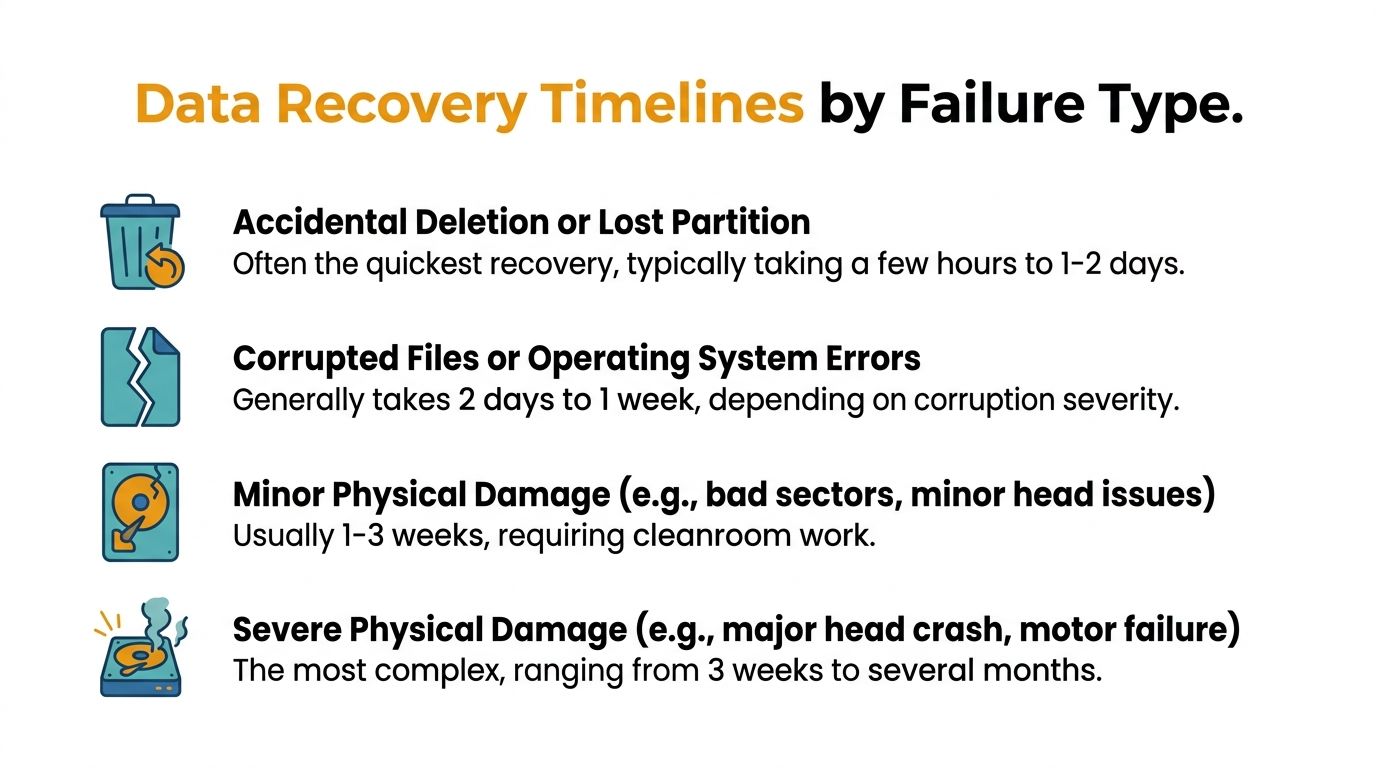
The ranges below reflect what recovery teams plan around in real cases, including evaluation, imaging, repair work when needed, and file checks before data goes back to the client.
What quick recoveries look like
If the storage hardware is stable and the damage is logical, recovery is often measured in hours or days.
| Failure type | Typical real-world expectation | Why |
|---|---|---|
| Accidental deletion or lost partition | A few hours to 1 to 2 days | The device usually reads normally, so the work is focused on finding intact data and exporting it safely |
| Corrupted files or operating system errors | Around 2 days to 1 week | Technicians may need to rebuild file structures, sort through partial corruption, and verify what opens cleanly |
| RAID or multi-disk storage issue | Varies widely | The timeline depends on whether the problem is configuration damage, failed members, or file system corruption across the array |
SSDs need a little more caution. A logical SSD case can move quickly if the drive still responds and deleted blocks have not been cleared. A failed controller or firmware problem is different. At that point, the job becomes specialized, and the early estimate usually widens fast.
One practical rule helps. If the device powers on, stays stable, and can be read without worsening, the recovery window is usually shorter.
If you are weighing urgency against budget, this guide to data recovery service costs gives useful context for why a straightforward logical case is priced very differently from a lab job with parts and repeated imaging attempts.
When hardware damage changes the schedule
Physical failure adds delays that many business owners do not hear about in marketing estimates. The first delay is diagnosis. The second is stabilization. If parts are needed, there can be a third delay just to locate a matching donor drive.
That donor-drive step matters more than people expect. Older hard drives, uncommon revisions, and some NAS disks are not always sitting on a shelf. A lab may need to source multiple compatible donors because one match on paper does not always mean one successful repair in practice.
That is why these broader planning ranges are usually closer to reality:
- Minor physical damage: Often 1 to 3 weeks after evaluation, parts sourcing, cleanroom work, imaging, and validation
- Severe physical damage: Commonly 3 weeks to several months if donor parts are hard to find or the drive only yields data in short, unstable sessions
- Complex multi-drive environments: Often longer when hardware repair and logical reconstruction are both required
RAID cases deserve special caution. A RAID failure is often a stack of problems, not a single event. One disk may have failed, another may be degraded, the controller may have dropped metadata, or an automatic rebuild may have changed the situation before anyone noticed. Even when the disks are readable, the array still has to be reconstructed in the correct order and parameters before the files mean anything.
Business planning typically improves with a more strategic approach. Instead of asking, "How fast can you get it back," ask, "What kind of failure is this, what hidden delays are possible, and when will we know whether parts or reconstruction are required?" That line of questioning gets you closer to the timelines professionals use internally. For another business-focused perspective, see 2026 data recovery insights for businesses.
The Four Stages of Professional Data Recovery
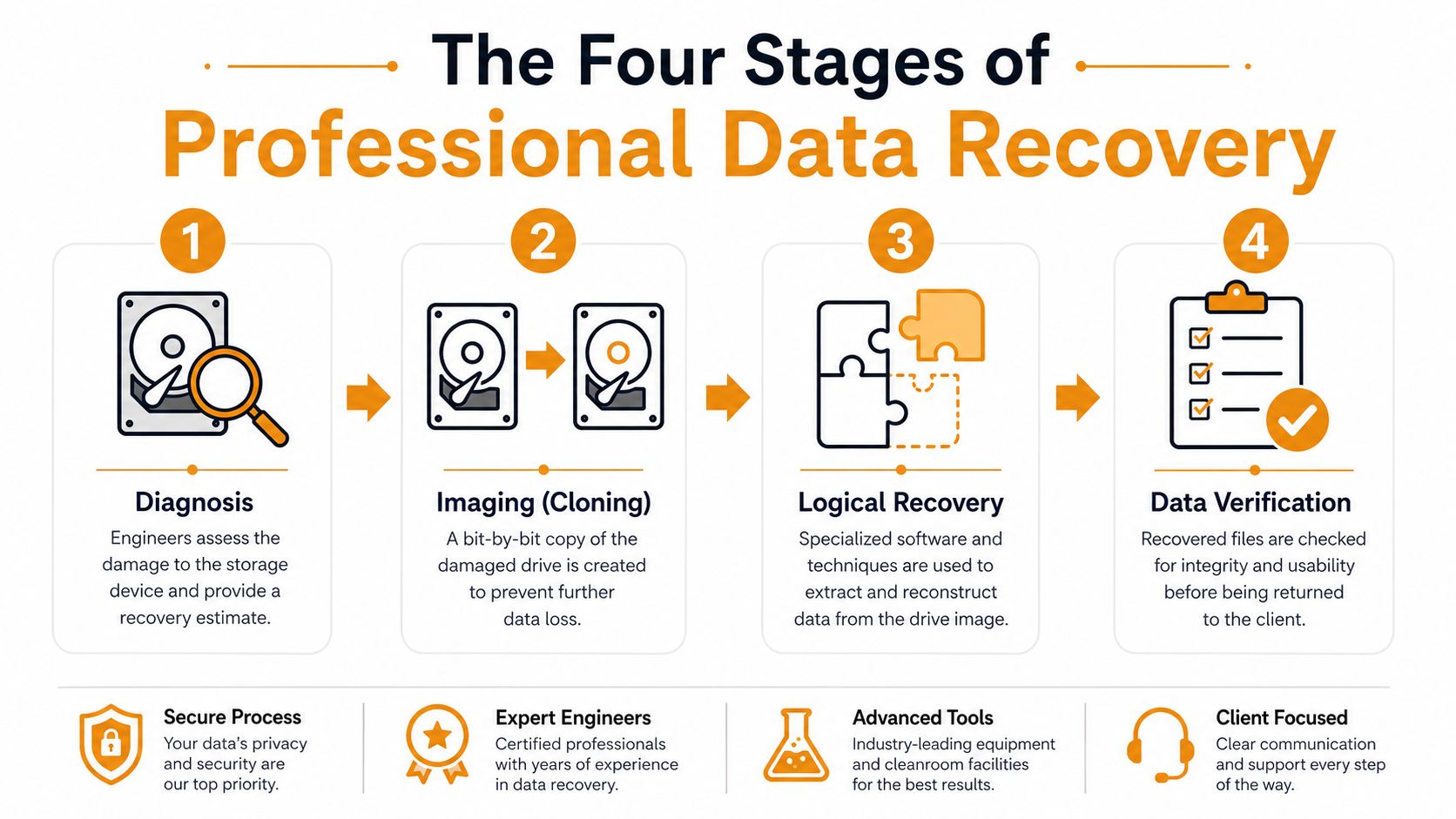
Professional recovery takes time because good labs don't work directly on the damaged source unless they have to. They reduce risk first, then extract data methodically.
A visual overview helps make that process easier to understand.
Why the process takes time
The first stage is diagnosis. Engineers identify whether the issue is logical corruption, firmware trouble, electronics failure, mechanical damage, or a mix of problems. During this stage, the estimate becomes grounded in reality rather than guesswork.
Next comes imaging, sometimes called cloning. The aim is to create a bit-by-bit copy of the source so recovery work happens on the image, not on the original. That protects the remaining data and gives the team a safer working copy for repeated analysis.
The third stage is logical recovery. During this stage, technicians rebuild file systems, extract files, reconstruct damaged structures, or piece together data from an unstable image. It's often the most misunderstood step because from the outside it can look like “the files should already be there,” when in fact they may still need heavy reconstruction.
What happens after the first diagnosis
The last stage is verification. Recovered data has to be checked for integrity and usability. A folder tree that looks complete isn't enough if key files are corrupted, databases won't open, or application files fail validation.
This is also why full system recovery usually takes longer than people expect. According to Framework IT's disaster recovery discussion, full system recovery typically requires 10 to 24 hours because teams must identify lost data, locate backup versions, transfer large volumes, reinstall applications, rebuild directory services, and verify integrity before returning systems to production.
That benchmark lines up with what many businesses experience. Restoring data isn't the same as restoring operations.
If you want another business-focused perspective on where these timelines go in practice, these 2026 data recovery insights for businesses are worth reading alongside your own continuity planning.
A short walkthrough can help if you want to see how pros think through the process in real terms.
The restore isn't finished when files exist again. It's finished when staff can open what they need and keep working.
Key Factors That Influence Recovery Speed
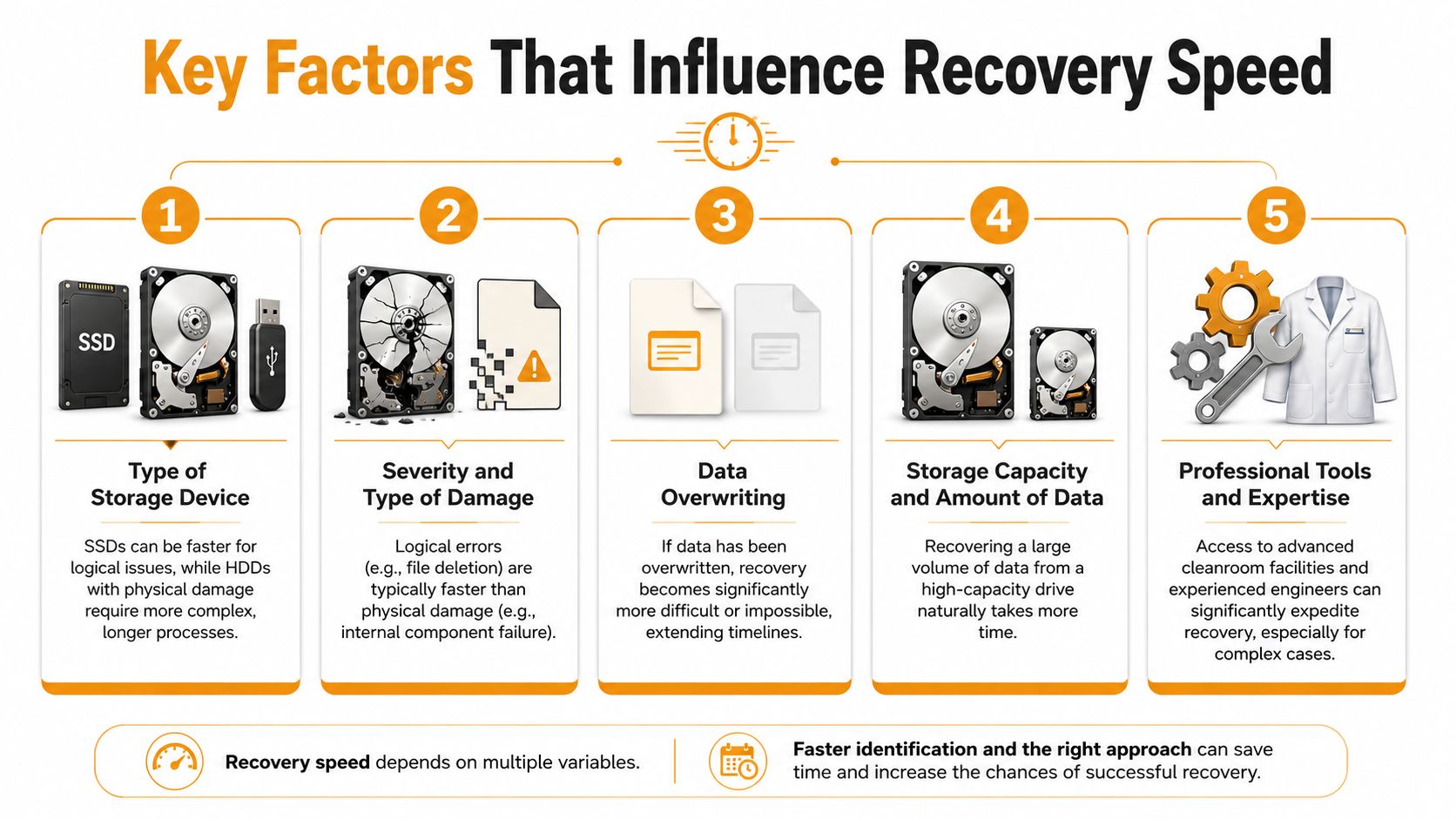
Two businesses can lose access to “the same” folder and still face very different recovery timelines. The reason is that recovery speed depends on a stack of technical details, not just the visible symptom.
What speeds a recovery up
Some factors work in your favor:
- Healthy underlying hardware: If the storage reads consistently, engineers can focus on extraction instead of rescue work.
- Smaller data sets: Less data usually means faster scanning, imaging, and validation.
- Clear problem history: Knowing whether someone deleted files, reformatted a partition, or heard drive noises changes the first moves.
- Granular backup tools: Recovering a specific folder is far faster than rebuilding an entire server volume.
- Experienced tooling: Labs and IT teams with proper imaging hardware, cleanroom access, and file system expertise don't waste time on blind guesses.
Storage type matters too. SSDs often move quickly in logical cases, while physically damaged HDDs tend to slow everything down because read stability becomes the core problem. Capacity also matters. Even without citing a fixed number, it's easy to see why a large business archive takes longer to process than a small office laptop.
Another hidden variable is overwriting. If deleted data has been partially overwritten by normal device use, the recovery path becomes more limited. The issue then isn't only time. Some files may no longer be recoverable at all.
The delay most businesses never hear about
The most overlooked delay in physical recovery is evaluation and donor-drive procurement. That part is often missing from sales-page timeline estimates, but it matters when the damaged drive needs a head swap or motor-related work.
According to Hi-Tech Data Group's discussion of donor-drive delays, most sources list 3–7 days for physical recovery, but complex cases involving head swaps or motor failures can stall for 2–3 months waiting for donor drives.
That's the kind of detail business owners need for realistic disaster planning. The technician may be ready. The lab may be ready. But if the exact donor match for a legacy or uncommon drive isn't available, the job pauses.
If a physically failed hard drive needs donor parts, the bottleneck may be supply, not labor.
This is one reason I tell owners not to anchor on the fastest estimate they hear. If the device has physical damage, the timeline may have almost nothing to do with how urgently you ask for it. It depends on recoverability, compatible parts, and how stable the drive remains once work starts.
DIY Data Recovery vs Calling a Professional
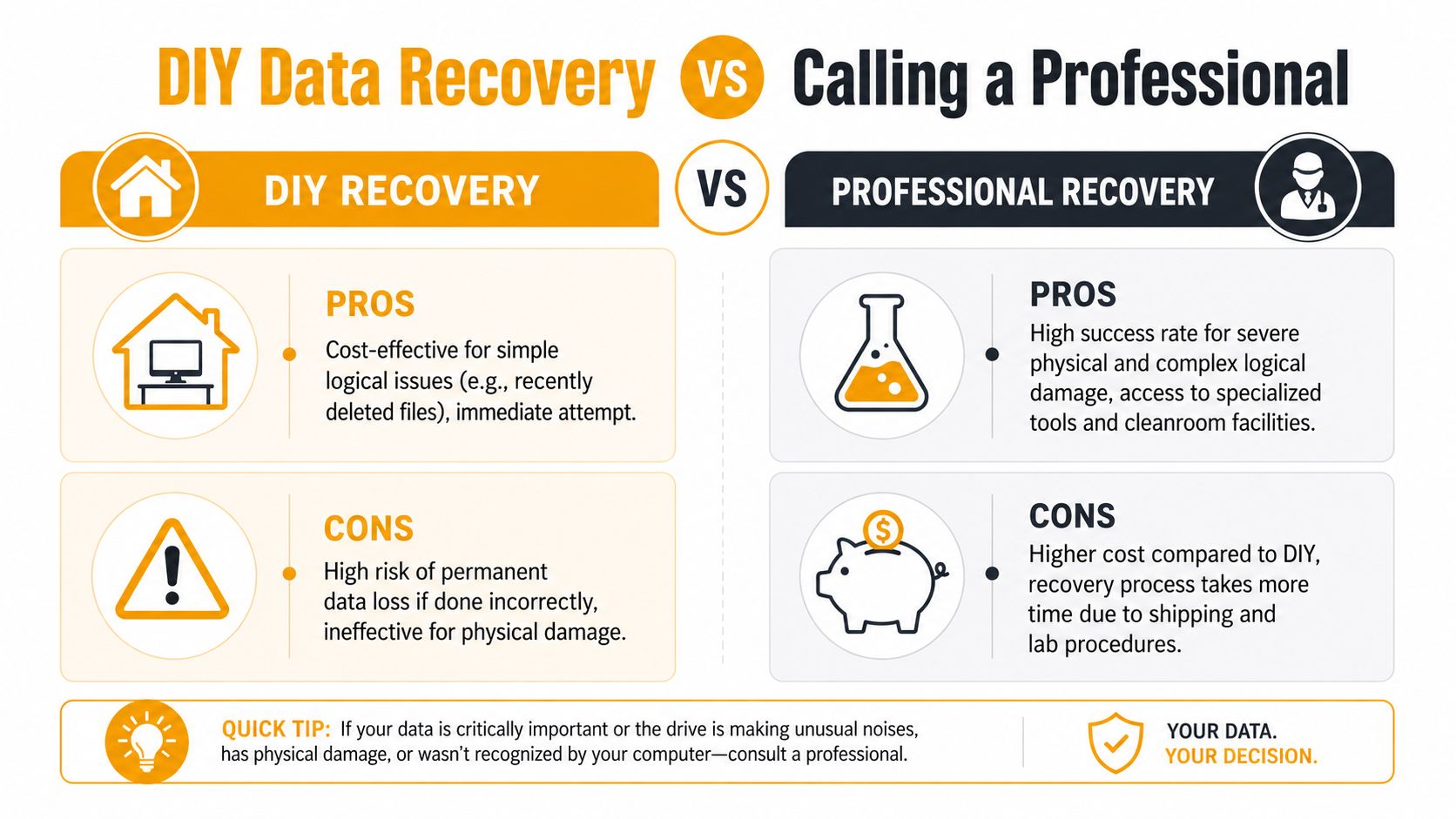
Some data loss problems are reasonable to handle yourself. Others get worse the moment you touch them. Knowing the difference can save both time and data.
When DIY is reasonable
DIY recovery makes sense when the device is otherwise healthy and the loss is simple. Good examples include a recently deleted file, a removed partition on a stable drive, or an external disk that still mounts normally but has missing data.
In those situations, a careful software-based attempt may be appropriate if you stop using the device immediately and recover to a different destination. The key is restraint. One clean attempt is very different from cycling through multiple utilities while continuing to use the source drive.
A practical decision checklist:
- The device is quiet: No clicking, grinding, or repeated spin-up sounds
- The computer still detects it normally: Capacity and identity appear correctly
- The files were lost recently: There's been minimal chance of overwriting
- You can recover elsewhere: You're not writing recovered files back to the same device
When to stop immediately
If the drive clicks, disappears intermittently, smells burnt, was dropped, or causes the system to freeze, don't run recovery software on it. Don't chkdsk it. Don't keep powering it up to “see if it works this time.”
That's where DIY often turns a recoverable case into a much more expensive one, or a permanent loss.
Professional help is also the safer route for business systems, encrypted devices, RAID arrays, servers, and any device holding irreplaceable company records. If the data has operational, legal, or financial importance, protecting the recovery path matters more than saving the first service fee.
For a practical look at the kinds of hard drive failures that should push you away from DIY fast, this guide on recovering data from a crashed hard drive is useful.
If the data matters more than the device, stop experimenting and preserve the media.
How to Prevent Future Data Loss Emergencies
The best way to shorten recovery time is to avoid needing full recovery in the first place. Businesses don't need perfect systems. They need recoverable systems.
Build backups for restoration, not just storage
A lot of companies think they have a backup plan when they really have backup copies. That isn't the same thing. A useful recovery setup is built around how quickly you can restore the exact files, systems, and applications people need.
The classic 3-2-1 approach still holds up well in practice: keep three copies of important data, store them on two different media types, and keep one copy off-site or outside the main environment. For many small businesses, that means a mix of local backup storage plus cloud backup.
The recovery side matters too. According to CloudAlly's data recovery time FAQ for IT administrators, best practices that reduce recovery time include cloud-to-cloud backups, data deduplication, and granular recovery tools that restore specific files rather than full volumes.
Simple habits that reduce panic later
A few habits make a real difference:
- Automate backups: Don't rely on staff remembering to copy files.
- Test restores: A backup you haven't restored from is still unproven.
- Watch drive health: S.M.A.R.T. alerts, unusual slowness, and recurring I/O errors deserve attention early.
- Separate critical data: Finance, contracts, and line-of-business data should have clear backup priority.
- Use the right media: For portable recording devices and surveillance use, reliable storage matters. If your business uses vehicle cameras or field recording gear, choosing a high-speed SD card for dash cams is one small example of reducing avoidable media-related problems.
The main goal is simple. Don't build a backup system that only looks good in a dashboard. Build one that can restore the right data without forcing your team into a long outage.
Your Houston Data Recovery Experts
When businesses ask how long data recovery takes, the answer usually comes down to diagnosis, not hope. A deleted folder may come back quickly. A corrupted system may take careful restoration work. A mechanically failed drive may involve lab work, imaging, reconstruction, verification, and a wait for compatible parts.
That's why local support matters. You need a team that can assess the situation quickly, tell the difference between a recoverable logical issue and a dangerous hardware failure, and help you decide whether the right next move is backup restoration, in-house repair, or specialist recovery handling.
For Houston organizations that need help with laptops, desktops, Macs, business workstations, and office systems, professional local support can reduce delay and confusion. If you need a nearby team for diagnostics, business continuity guidance, and repair coordination, review these Houston data recovery services.
Good recovery support doesn't just chase files. It protects uptime, sets realistic expectations, and helps your business avoid making the problem worse during the most stressful part of the incident.
If your business in Houston needs fast, practical help with lost files, failed drives, backup recovery, or in-house repair support, IT Cloud Global, LLC can help. Their team supports businesses with managed IT, disaster recovery planning, repair depot services, and day-to-day technical support that keeps operations moving when hardware or data problems hit.
- Low Voltage Wiring Guide for Houston Businesses
- Disaster Recovery vs Business Continuity for SMBs
- What Is a Helpdesk Ticketing System? an SMB Guide
- What Is Virtualization in Computing? Save & Boost Uptime
- Data Recovery Services Cost: 2026 Pricing Guide
- Cloud Computing Solutions for Small Business: Houston 2026
- Network Maintenance Service: A Guide for Houston SMBs