


Managed IT Services Houston TX: Expert Solutions 2026
You're probably dealing with one of these problems right now. Staff can't log in. Microsoft 365 is acting up. A line-of-business app slows to a crawl right before a deadline. Or a storm rolls through Houston and suddenly everyone realizes “backup” was just a box someone thought had been checked.
That's when most small businesses learn the hard truth. Reactive IT is expensive, stressful, and slow. It waits for failure, then charges you to clean up the mess.
If you're searching for managed IT services in Houston TX, the main issue isn't convenience. It's control. You need fewer outages, tighter security, predictable costs, and a plan that still works when weather, infrastructure, or compliance pressure hits your business at the same time.
Table of Contents
- Why Houston Businesses Need Proactive IT Support
- What Are Managed IT Services Really
- Core Managed Services Your Houston Business Needs
- Helpdesk support that solves problems fast
- Network management that prevents silent failures
- Cybersecurity that covers endpoints and users
- Cloud management that treats Microsoft 365 and Azure as connected systems
- Backup and disaster recovery built for business continuity
- Onsite support cabling and repair still matter
- The Real ROI Of Managed IT For Houston SMBs
- Navigating Pricing And Service Level Agreements
- Your Vetting Checklist For Houston IT Providers
- Conclusion Take Control Of Your Houston Business Technology
Why Houston Businesses Need Proactive IT Support
A Houston business owner usually calls an IT provider after the damage is already done. The office internet is unstable. Files won't open. The firewall hasn't been updated in who knows how long. Remote staff are using a patchwork of personal devices and old passwords. The team is standing around waiting, and every minute feels longer than it is.
That break-fix cycle gets old fast. It also puts you in a weak position because every urgent ticket becomes a negotiation over time, scope, and cost. You're not managing technology. You're surviving it.
Houston isn't a small, simple market where downtime slips by unnoticed. The Houston metro reached about 7.3 million residents in the 2020 Census, making it one of the country's biggest metro regions, and its mix of energy, healthcare, logistics, and other industries drives demand for around-the-clock coverage, cybersecurity, and disaster recovery planning, according to Cortavo's Houston managed IT overview. In plain terms, if your systems go down, a competitor is ready to take the call you missed.
What reactive IT looks like on the ground
Here's the pattern I see most often:
- A recurring issue gets ignored: Wi-Fi drops, printer failures, VPN instability, and aging PCs become “normal.”
- Nobody owns prevention: Patching, monitoring, backup checks, and access reviews happen inconsistently.
- One outage exposes everything: Once a server fails or a cloud account gets locked, you discover the documentation is outdated and nobody has a tested recovery process.
- Leadership loses visibility: IT spending jumps from quiet neglect to emergency expense.
Practical rule: If your IT provider mostly shows up after users complain, you don't have managed services. You have outsourced chaos.
A proactive support model flips that. Systems get watched before users notice trouble. Security updates aren't optional chores. Backups are part of operations, not a comforting assumption. If you want a good primer on that shift, this guide on proactive IT support is worth reading.
The businesses that handle Houston well aren't the ones with the most gadgets. They're the ones with fewer surprises.
What Are Managed IT Services Really
Managed IT services are simple once you strip away the sales language. Think of them like a building superintendent, not a plumber. A plumber gets called after the pipe bursts. A superintendent checks the building constantly, handles maintenance, spots weak points early, and keeps small issues from turning into expensive emergencies.
That's the key difference.

Managed IT services are built around continuous monitoring and a flat-fee support model, replacing old break-fix support with proactive maintenance, endpoint management, and disaster recovery inside a predictable monthly agreement, as explained in XVAND's managed IT services definition. For a small or midsize business, that means IT becomes an operating function instead of a string of emergencies.
What that includes in practice
A real managed service relationship usually covers several things at once:
- Monitoring so servers, endpoints, and network gear are checked continuously.
- Maintenance so patching, updates, and routine fixes happen before users get blocked.
- Support so employees have somewhere to go when devices, apps, or accounts fail.
- Security so endpoint controls, access management, and threat response don't get treated as add-ons.
- Recovery planning so a device failure, outage, or security event doesn't stop the business cold.
That combination matters more in Houston because a lot of businesses are running mixed environments. Some systems are still on-premises. Others live in Microsoft 365, Azure, or another cloud platform. Many employees now work from the office, home, job sites, or all three.
What managed services are not
They're not a person who waits for a call and logs billable hours.
They're not “we can help with IT if something happens.”
They're not a cheap remote helpdesk with no visibility into your firewall, backups, cloud admin, or recovery process.
Managed IT should reduce uncertainty. If your contract still leaves you guessing who handles patching, security, cloud admin, or outage recovery, it's not managed enough.
If you want the shorter version, this breakdown of what managed IT services are and their benefits lays out the model clearly. The key idea is straightforward. You're paying for prevention, response, and operational consistency, not just repairs.
Core Managed Services Your Houston Business Needs
Most providers list the same broad menu. Helpdesk. Security. Cloud. Backup. That's fine, but it doesn't help you judge whether the service stack is complete. A Houston SMB needs a tighter baseline.
Start here.
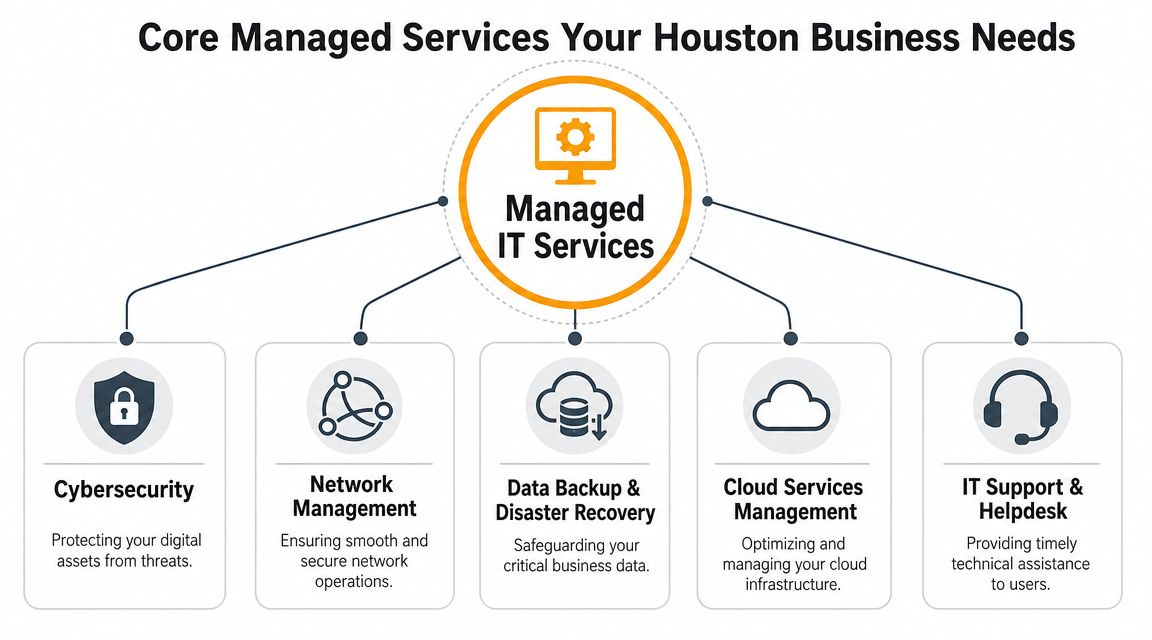
A strong technical baseline for Houston small and midsize businesses includes 24/7 network monitoring plus automated patch management across servers, switches, firewalls, and endpoints. Those two controls are the core levers for reducing downtime and preventing recurring security incidents, based on Ultimate Technical Support's managed IT services guidance.
Helpdesk support that solves problems fast
Helpdesk is the front line. If your staff can't access email, print shipping labels, connect to Wi-Fi, or use line-of-business software, they need help immediately.
Good helpdesk support does more than close tickets. It tracks repeat issues, identifies patterns, and feeds those problems back into system improvements. If the same laptop model keeps failing updates or the same team keeps getting locked out, someone should fix the root cause.
Network management that prevents silent failures
Your network is where many slow-motion failures start. Unstable switches, firewall misconfigurations, poor Wi-Fi coverage, and old cabling rarely crash all at once. They degrade performance, frustrate staff, and create security gaps.
For a practical outside perspective on performance bottlenecks, this Appjet.ai performance guide is useful because latency issues often get mistaken for “internet problems” when the cause is deeper in the network path.
A healthy network should be visible, documented, and monitored. If your provider only notices network issues after users complain, they're already late.
Cybersecurity that covers endpoints and users
Most SMB attacks don't begin with movie-style hacking. They begin with ordinary failures. A bad click. A reused password. An unpatched endpoint. A stale admin account. Security has to cover the desktop, laptop, mobile device, email, firewall, and user access layer together.
You want endpoint protection, patching discipline, access control, and user support tied into one operating model. Security can't sit in a separate bucket from support because users trigger security events every day.
Cloud management that treats Microsoft 365 and Azure as connected systems
A lot of Houston businesses now depend on Microsoft 365 for email, Teams, SharePoint, and file access while also using Azure or other cloud infrastructure. That environment breaks down fast when identity, endpoint posture, storage, and recovery planning are handled by different people with different assumptions.
Cloud management should cover tenant administration, permissions, device policies, collaboration tools, and recovery readiness as one connected system. That's where many providers overpromise and under-deliver.
Backup and disaster recovery built for business continuity
Backup isn't enough by itself. You also need restoration procedures, role clarity, and a realistic failover plan for office outages, ransomware events, and hardware loss.
In Houston, this gets very practical. Can people work remotely if the office is inaccessible? Can key files be restored quickly? Can the business keep taking calls, processing requests, or serving customers while systems are being recovered? Those are operational questions, not just IT questions.
Onsite support cabling and repair still matter
A lot of MSPs act like everything can be solved remotely. That's nonsense. Houston businesses still need on-site support for office moves, Wi-Fi dead zones, firewall installs, low-voltage cabling, device deployment, and physical troubleshooting.
Some firms also need repair capability for PCs, Macs, printers, and data recovery instead of replacing every failed device. A provider like IT Cloud Global, LLC handles managed services, cloud administration, on-prem systems, cabling, VoIP, and in-house repair, which is a practical fit for businesses that don't want five vendors touching the same environment. For a broader service checklist, review these essential managed IT support services for Houston small businesses.
The Real ROI Of Managed IT For Houston SMBs
Most owners ask the wrong question first. They ask, “What does managed IT cost?” The better question is, “What does unmanaged IT keep costing me every month?”
If employees lose access to systems, work slows down immediately. If the network drags, your team wastes time all day in small increments nobody tracks. If backups aren't usable during an outage, the bill gets much larger because now you're paying in lost operations, missed customer response, and leadership distraction.
Predictable cost is part of the return
Managed services clean up one of the worst budgeting problems in small business. Surprise IT spending.
With a proactive model, you stop treating technology like emergency plumbing. The monthly agreement covers the ongoing work required to keep things stable. That changes how you plan, because you're no longer guessing whether next month's IT invoice will be routine or ugly.
The return also shows up in less visible ways:
- Fewer recurring disruptions: Staff stop losing time to the same unresolved issues.
- Cleaner escalation paths: Problems go to the right engineer faster.
- Less leadership drag: Owners and operations managers spend less time playing part-time IT coordinator.
- Better security posture: Security work becomes operational, not occasional.
A medical office feels this when staff can keep scheduling, charting, and communicating without interruption. A logistics firm feels it when dispatch, file access, and communications stay available during a network or office issue. The point isn't abstract efficiency. It's continuity.
Houston resilience is where managed IT proves its value
This city has a specific risk profile, and too many providers talk around it. Houston businesses deal with weather disruption, flood concerns, power instability, and office access problems that can knock normal operations sideways. Backup and disaster recovery can't be generic line items here.
A key gap in many provider conversations is industry-specific resilience planning for Houston's operating environment. Local weather events and infrastructure risks make robust backup, remote work failover, and fast recovery times critical continuity needs, not optional extras, as noted by ECS Office's managed IT services overview.
If your provider can't explain how your team would work through a storm-related office outage, they haven't planned for Houston. They've sold you a generic package.
That's the true ROI. Not just lower ticket volume. Not just calmer budgeting. It's the ability to keep operating when conditions get messy, which they do here.
Navigating Pricing And Service Level Agreements
Pricing for managed IT can get confusing fast because providers use the same words for very different service scopes. “Managed support” from one company may mean remote helpdesk and patching. From another, it may include security tooling, cloud administration, backup oversight, and strategic planning.
You need to separate the pricing model from the actual coverage.
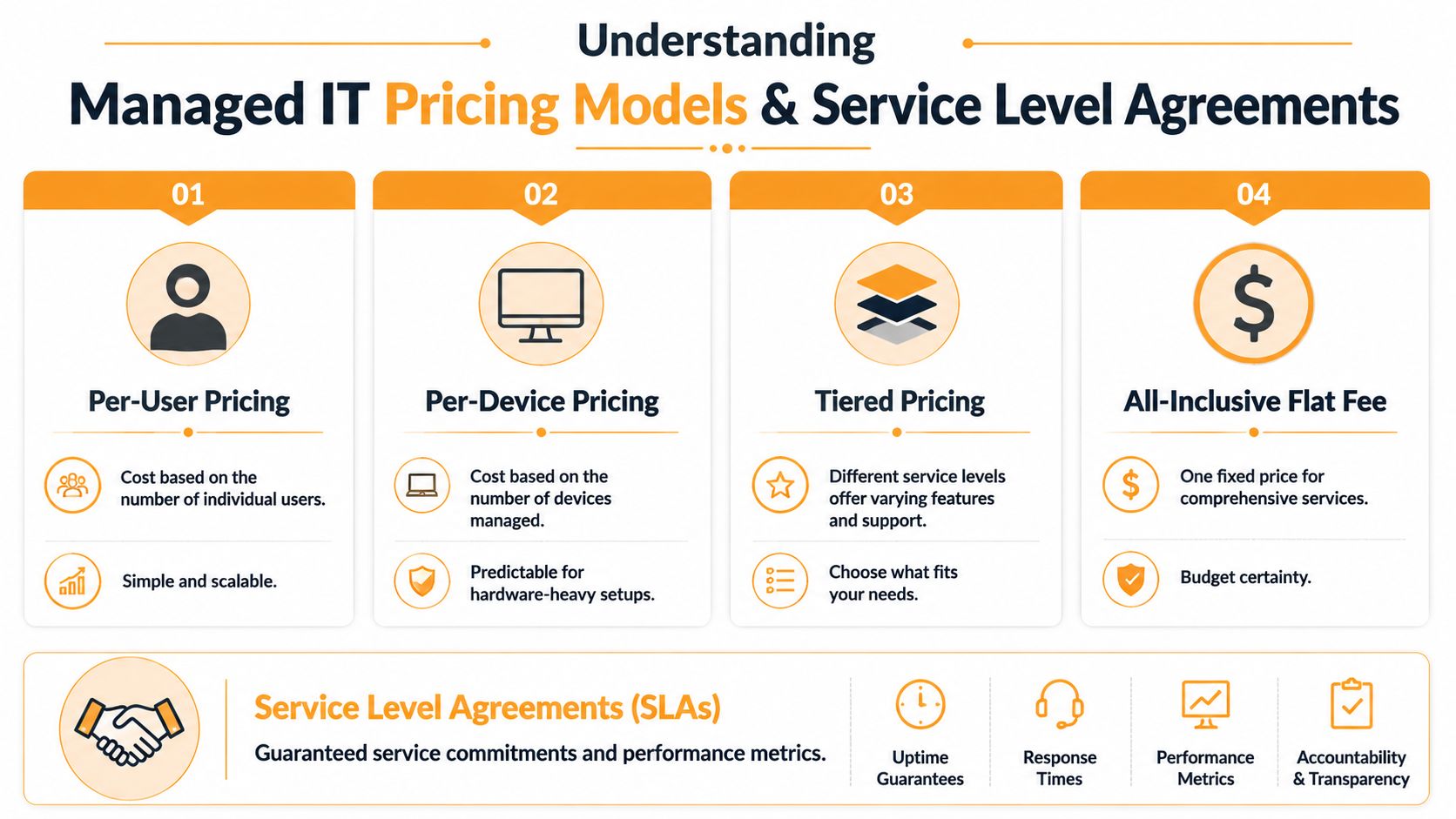
Common pricing models and where they fit
Here's the plain-English version:
| Model | Best fit | Watch out for |
|---|---|---|
| Per-user pricing | Offices where employees use multiple devices and shared apps | Make sure security, backup oversight, and admin work are included |
| Per-device pricing | Environments with a stable device count or lots of shared hardware | User support can end up fragmented |
| Tiered pricing | Companies that want a clear entry level and upgrade path | Tier names often hide major differences in scope |
| Flat-fee all-inclusive | Businesses that want budget certainty and broad coverage | Read exclusions carefully |
None of these models is automatically right. The right one depends on how your team works. A law office with heavy user support needs may prefer per-user pricing. A warehouse or shop floor with shared stations may lean toward device-based logic. A company with internal IT staff might want a co-managed structure tied to a limited set of responsibilities.
A contract is only as good as its written commitments. If you want a legal-side reference for what service commitments should look like, this legal advice on startup SLAs is useful because it forces you to think beyond marketing language and into actual obligations.
Here's a quick explainer before you compare proposals:
What your SLA needs to say in plain English
An SLA matters more than the sales deck. It tells you what happens when something breaks and how long you'll wait.
Look for these items:
- Response expectations: How fast does the provider acknowledge a critical issue versus a standard ticket?
- Resolution process: What gets escalated, when, and to whom?
- Coverage hours: Is after-hours support included, limited, or extra?
- Onsite terms: When do they come on location, and what areas do they cover?
- Out-of-scope work: What triggers separate billing?
- Vendor coordination: Will they deal with Microsoft, your ISP, firewall vendors, or line-of-business software support?
Contract check: If the proposal highlights “unlimited support” but the SLA is vague on response, escalation, and exclusions, don't sign it yet.
A clean proposal should let you answer one basic question without guessing. When something serious goes wrong, who owns it and what happens next?
Your Vetting Checklist For Houston IT Providers
Most MSP sales conversations sound polished because they've all learned the same script. They talk about proactive support, security, and cloud expertise. Fine. That doesn't tell you whether they can support your business when a real issue lands on a Monday morning or during a citywide disruption.
Use a checklist and ask direct questions.
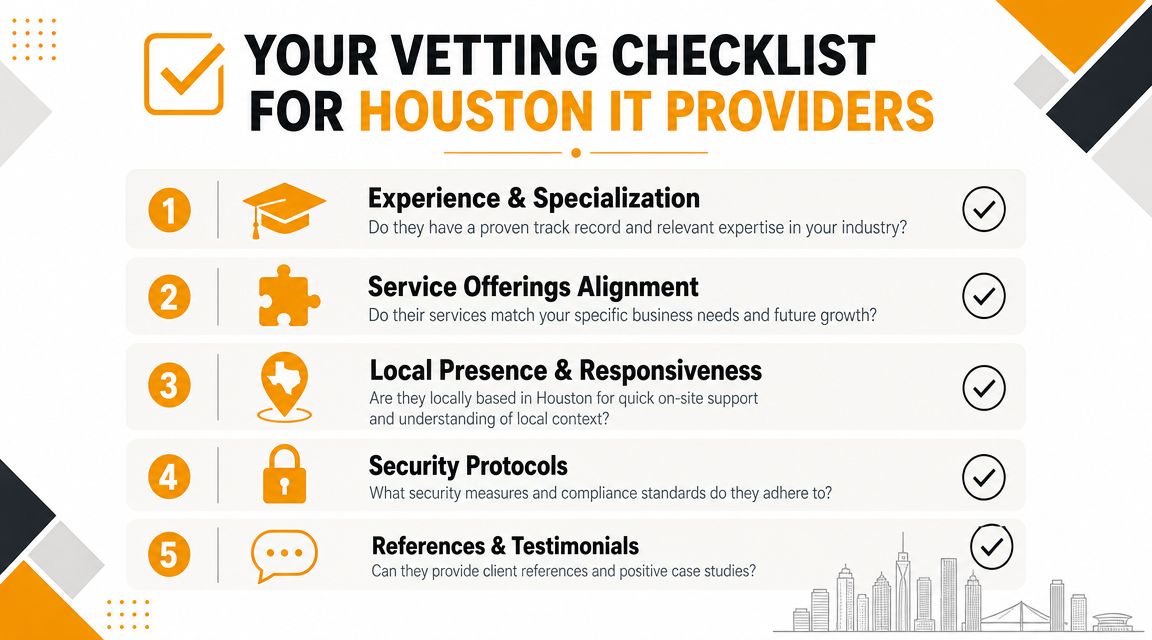
Questions that expose weak providers quickly
Ask these without softening them:
- Who handles on-site support in Greater Houston? If they rely heavily on remote-only service, that's a limitation, not a feature.
- What do you manage directly versus coordinate through another vendor? You need to know where accountability stops.
- How do you handle regulated environments? If you're in healthcare, finance, legal, or another compliance-sensitive space, “we take security seriously” isn't an answer.
- What does onboarding include? Documentation, asset review, access cleanup, backup validation, and network visibility should be part of the transition.
- How do you report on recurring issues? A provider should show trends, not just closed tickets.
One cloud question matters more than most. When evaluating cloud services, confirm the provider can manage Microsoft 365, Azure, cloud storage, and disaster recovery as one unified control plane, because misalignment between those elements is a major cause of slow incident recovery, especially in regulated industries, according to HoustonTech's cloud and disaster recovery guidance.
When co-managed IT makes more sense than full outsourcing
A lot of local content skips this entirely, which is a mistake. Not every Houston company needs to hand over everything.
If you already have an internal IT person or small team, co-managed IT can be the better move. Your internal staff keeps ownership of user relationships, business context, or day-to-day tasks. The outside partner handles specialized security, backup, cloud administration, escalation support, and after-hours coverage.
That model often works well when:
- Your internal team is stretched thin: They can manage the basics but not deep infrastructure or security work.
- You're growing into new locations or systems: Temporary capacity matters.
- You need specialized skills without full-time hiring: Cloud migrations, security tooling, and compliance support aren't always full-time jobs.
For companies weighing internal hiring against outside support, this piece on scalable growth with staff augmentation is a useful comparison because it highlights when adding outside technical capacity makes more sense than forcing a small internal team to cover everything.
Don't choose a provider based on the broadest service list. Choose the one that can clearly define ownership, response, and recovery in your environment.
If a provider can't answer your checklist directly, keep looking.
Conclusion Take Control Of Your Houston Business Technology
If your business still treats IT as a series of repairs, you're operating with unnecessary risk. That risk shows up as downtime, security exposure, frustrated staff, and bills that arrive only after the damage is done.
Managed IT fixes that when it's done properly. You get proactive monitoring, better support discipline, tighter security, cleaner cloud management, and recovery planning built for the way Houston businesses operate. That last part matters. Weather disruption, office outages, and compliance pressure aren't side issues here. They're part of the job.
The right provider should give you clarity, not jargon. You should know what they monitor, how they respond, what they secure, what they back up, and how they keep your business running if the office goes dark.
That's the standard to hold.
If you want managed IT services in Houston TX, don't settle for a generic package with vague promises. Get a real assessment of your current risks, your support gaps, and your continuity plan before the next outage makes those decisions for you.
If you want a practical next step, contact IT Cloud Global, LLC for a no-obligation review of your current environment. As a Houston-based firm, they provide managed IT support, cloud administration, cybersecurity, network services, backup and disaster recovery, on-site support, cabling, VoIP, and repair services across the Greater Houston area. If your goal is fewer surprises, clearer accountability, and technology that supports the business instead of interrupting it, that conversation is worth having.
- Houston IT Support: A 2026 Guide for SMBs
- Computer Service Near Me: A Houston Buyer’s Guide
- Top 7 Managed IT Services Houston TX Reviews 2026
- 7 Best Managed IT Services Houston TX Reviews (2026)
- IT Security Services Houston TX: Essential for Your SMB In
- Best IT Services Houston TX: Your 2026 Partner
- Top IT Services Houston TX: Your 2026 SMB Guide